How to Create a Sales Territory Plan That Actually Holds Up
Most territory plans are a spreadsheet of zip codes nobody opens again. Here's a seven-step process for building a sales territory plan with real capacity math, balanced account loads, and data your reps trust.
TL;DR
- How to create a sales territory plan, in one line: split accounts, geographies, or segments across reps using capacity math — not a gut feel about who "deserves" the enterprise logos.
- The seven steps: audit your TAM, pick a segmentation axis, score accounts, calculate rep capacity, balance the load, assign with a coverage model, and set a quarterly review cadence.
- Balance matters more than size. A territory 30% larger than its neighbor breeds resentment, attrition, and quota sandbagging — not more revenue.
- Your plan is only as good as the contact data under it. If 30% of the accounts in a territory have no reachable decision-maker, you assigned a rep to an empty room.
- Rebalance quarterly at the account level and annually at the structural level. Anything faster destroys relationship continuity.
What is a sales territory plan, and why do most of them fail?#
Learning how to create a sales territory plan starts with one definition. The plan is the documented decision about which reps own which accounts, and why. Think of it like dividing a city into delivery routes. You are not just splitting the map into equal-looking shapes. You are balancing how many stops each driver can make in a day, how far apart those stops sit, and which routes carry the packages worth delivering.
Most territory plans fail for one of three reasons.
They optimize for fairness of appearance, not fairness of opportunity. Four reps, four equal-sized regions on a map. Except one region contains three Fortune 500 headquarters and another contains a lot of farmland. The map looks fair. The commission statements do not.
They're built once and frozen. Companies spend three weeks on territory design in January and never touch it again. Accounts get acquired, ICPs shift, two reps quit in April, and by Q3 the plan describes a company that no longer exists.
They ignore data quality entirely. This is the quiet killer. A territory with 400 named accounts sounds generous. Then you find that 140 of them have no verified contact for the buying role you sell to. The rep isn't underperforming — they were handed a list, not a territory.
Research from Harvard Business Review on sales force structure makes the case plainly. Territory design is one of the highest-leverage, lowest-cost levers a sales leader has. You're not hiring anyone. You're not building product. You're just reallocating who talks to whom — and it moves the number.

How to create a sales territory plan, step 1: audit your TAM#
Before you draw a single line, you need to know what you are dividing. Skip this step and every later calculation is guesswork.
Pull a complete list of accounts that match your ICP. Not your CRM — your CRM only records accounts you happened to touch, which is a biased sample. Build the market list from the outside in:
- Define the firmographic filter. Industry codes, employee count band, revenue band, geography, and any technographic signal that predicts fit (they run Shopify, they use Salesforce, they posted a RevOps job).
- Pull the account universe. Use a B2B database or a market-sizing vendor to get the full count, not just the accounts you already know. If your ICP is "US SaaS companies, 50–500 employees," that is roughly 20,000–30,000 accounts. Know the number.
- Overlay your existing CRM. Tag each account: customer, open opportunity, closed-lost, never-touched. The never-touched pool is where territory design creates new revenue.
Then check what you can actually work with:
- Check contactability. For each account, do you have a verified email for at least one person in the buying committee? Run the list through an email verifier and record the pass rate per account. That rate becomes a weighting factor later.
- Flag the excluded. Named accounts owned by strategic AEs, partner-sourced accounts, accounts under active legal dispute. Pull them out of the pool before you divide.
The output is a single spreadsheet. Every row is an account, and every column is a signal you can sort on. That file is the raw material for everything else.
Which segmentation axis should you actually use?#
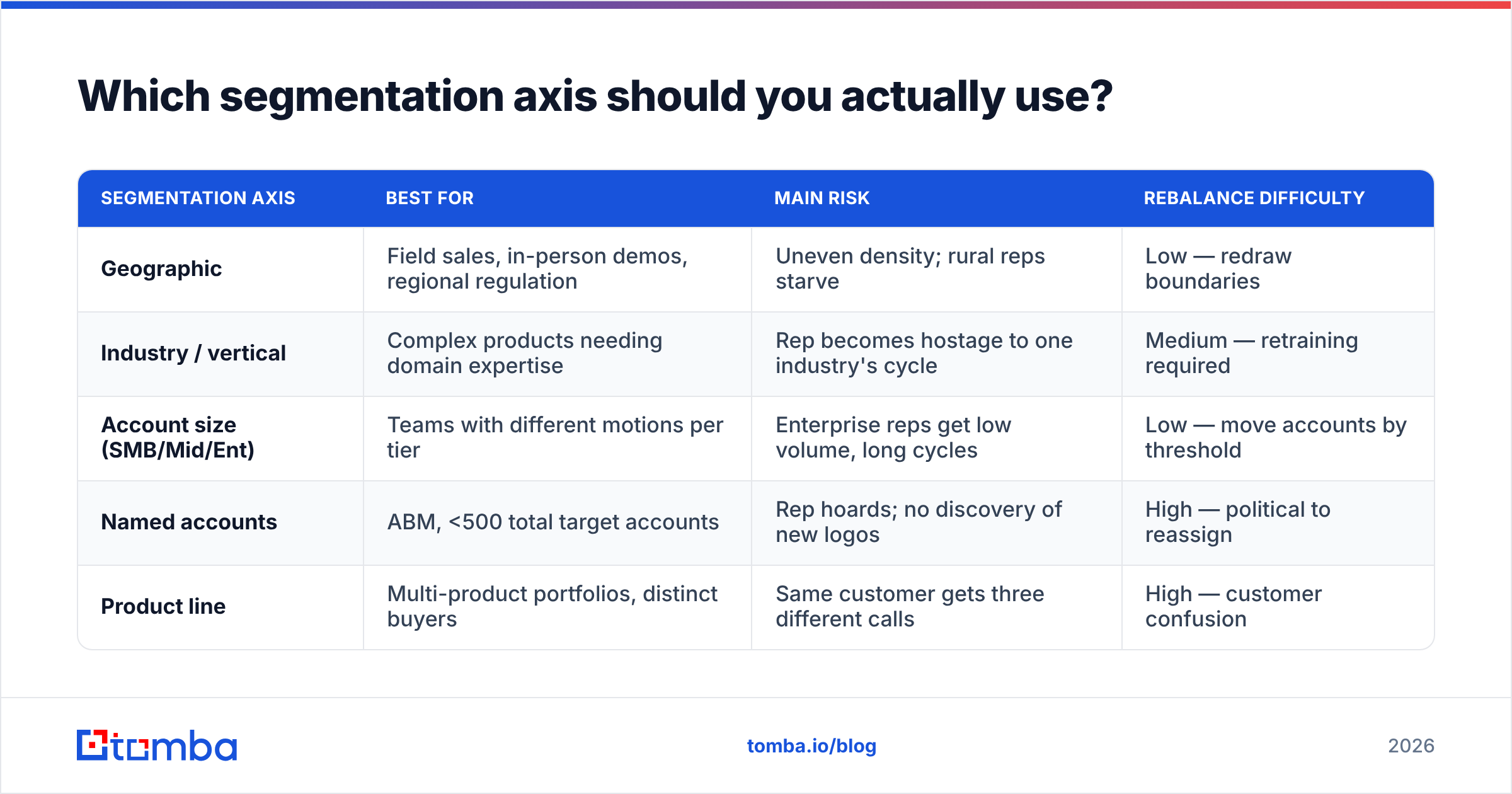
There are five common ways to slice a market. The right choice depends on how your buyers behave, not on what is easiest to draw.
| Segmentation axis | Best for | Main risk | Rebalance difficulty |
|---|---|---|---|
| Geographic | Field sales, in-person demos, regional regulation | Uneven density; rural reps starve | Low — redraw boundaries |
| Industry / vertical | Complex products needing domain expertise | Rep becomes hostage to one industry's cycle | Medium — retraining required |
| Account size (SMB/Mid/Ent) | Teams with different motions per tier | Enterprise reps get low volume, long cycles | Low — move accounts by threshold |
| Named accounts | ABM, <500 total target accounts | Rep hoards; no discovery of new logos | High — political to reassign |
| Product line | Multi-product portfolios, distinct buyers | Same customer gets three different calls | High — customer confusion |
For most B2B SaaS teams under 50 reps, a hybrid works best: segment by account size first, then by geography or vertical inside each tier. Enterprise gets named accounts, mid-market gets vertical pods, SMB gets geographic or round-robin.
The wrong move is stacking too many axes. "West Coast, healthcare, mid-market, security product" produces territories so narrow that a single lost deal wrecks the quarter.
How do you score and rank accounts inside each territory?#
Not all accounts deserve equal effort. A territory plan that treats them equally is just a list. Build a simple weighted score — four to six factors, nothing more, or nobody will maintain it.
- Fit score (0–40 points). How closely does the account match your best customers on firmographics and technographics?
- Intent or trigger signals (0–25 points). Recent funding, leadership change, relevant job postings, competitor churn signals.
- Contactability (0–15 points). Do you have a verified, deliverable email and ideally a direct phone for the economic buyer? An account you cannot reach scores zero here regardless of fit.
- Existing relationship (0–10 points). Past customer, current customer in another product line, warm referral path.
- Deal-size potential (0–10 points). Modeled ACV based on employee count or comparable closed-won deals.
Sum to a 0–100 score, then bucket into A/B/C tiers. Most teams land on the same rule of thumb. A accounts get 60% of rep time and a multi-threaded plan. B accounts get 30% and a sequenced cadence. C accounts get 10% and live in automated nurture until they raise a hand.
Contactability deserves more weight than it usually gets. Gartner's research on B2B buying puts the typical buying group at six to ten stakeholders. If your territory data has one contact per account, your rep cannot run the motion you are asking for. Multi-threading starts with having the contacts. That is why a domain search pass across the account list before assignment is worth the afternoon it takes.
How do you calculate real rep capacity?#
This is where most plans quietly break. Managers assign account counts based on what feels right. Then coverage collapses and nobody knows why.
Work backwards from selling hours.
Step 1 — available selling hours. A rep works roughly 1,800 hours a year after PTO and holidays. Subtract internal meetings, training, CRM admin, forecast calls, and travel. Realistic net selling time is 45–55% of that — call it 900 hours.
Step 2 — touches per account. How many meaningful touches does an A account need per quarter? Research, sequence build, calls, emails, LinkedIn, follow-up. For mid-market, budget 4–6 hours per A account per quarter, 1.5 hours per B, and 15 minutes per C.
Step 3 — do the arithmetic. 225 selling hours per quarter. If a rep carries 25 A accounts (5 hrs each = 125 hrs), 40 B accounts (1.5 hrs each = 60 hrs), that's 185 hours, leaving 40 hours for C accounts and inbound. That rep can hold roughly 25 A / 40 B / 150 C — about 215 accounts total.
Step 4 — sanity-check against benchmarks. Enterprise AEs typically hold 25–50 named accounts. Mid-market: 100–250. SMB/velocity: 400–1,000 with heavy automation. If your math produces 600 accounts for an enterprise rep, your touch model is wrong or your segmentation is.
Publish this math. When a rep argues their territory is too big, you're debating a spreadsheet instead of a feeling — and sometimes the spreadsheet says they're right.
What does a balanced territory actually look like?#
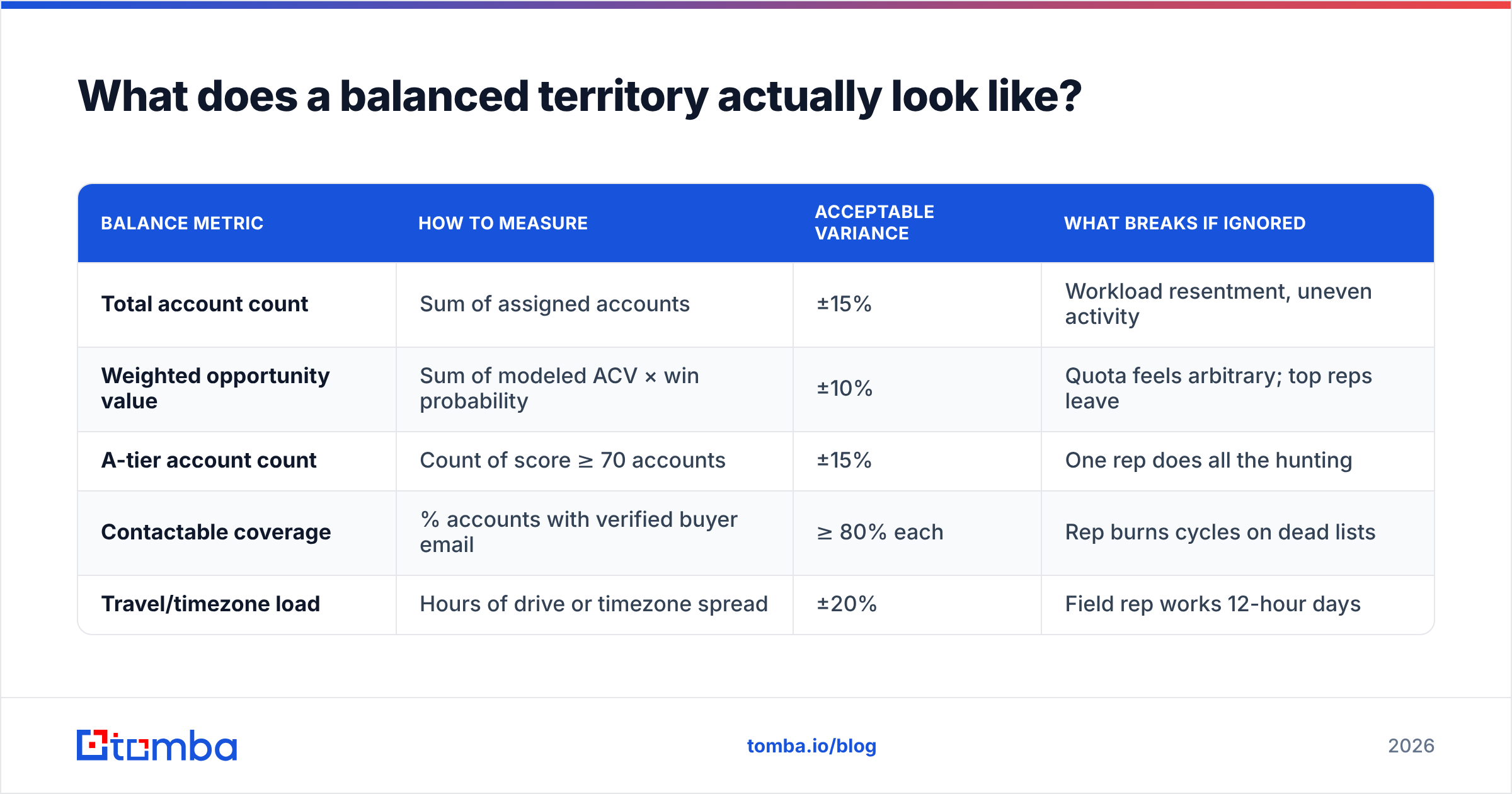
Balance is measured across four dimensions at once, and the target is that no territory deviates more than 15% from the mean on any of them.
| Balance metric | How to measure | Acceptable variance | What breaks if ignored |
|---|---|---|---|
| Total account count | Sum of assigned accounts | ±15% | Workload resentment, uneven activity |
| Weighted opportunity value | Sum of modeled ACV × win probability | ±10% | Quota feels arbitrary; top reps leave |
| A-tier account count | Count of score ≥ 70 accounts | ±15% | One rep does all the hunting |
| Contactable coverage | % accounts with verified buyer email | ≥ 80% each | Rep burns cycles on dead lists |
| Travel/timezone load | Hours of drive or timezone spread | ±20% | Field rep works 12-hour days |
The contactable-coverage row is the one teams forget. Two territories can look identical on account count and modeled value. One still has 92% verified-contact coverage while the other has 54%. The second rep will miss quota, and it will look like a performance problem. It isn't.
Run coverage as a hard gate before you finalize assignments. Pull the contact list per territory, verify deliverability, and enrich the gaps. Bulk workflows exist for exactly this. A bulk email finder pass across a few thousand accounts takes minutes and turns a hypothetical territory into a workable one.
How do you assign territories without a mutiny?#
Assignment is a change-management problem wearing a spreadsheet costume. The math can be perfect and the rollout can still fail.
Grandfather active opportunities. Any deal past the discovery stage stays with the current rep through close, regardless of new boundaries. Nothing poisons a territory rollout faster than a rep losing a deal they sourced.
Weight for relationship continuity. When two territories are roughly equal, assign the account to the rep who already has a live relationship there. Continuity is worth more than a 3% balance improvement.
Match rep strengths to territory shape. A rep whose closed-won history is concentrated in healthcare should get the healthcare-heavy territory, not the geographically convenient one.
Publish the methodology, not just the outcome. Share the scoring model, the capacity math, and the balance table. Reps will accept a territory they think is unfair to them personally. They will not accept one they think was assigned at random.
Set a protest window. Give reps five business days to challenge assignments with evidence — a relationship you didn't know about, a competitor lock-in, a parent-company conflict. Resolve, then freeze for the quarter.
Define the ramp period. New territories take 30–60 days to produce pipeline. Adjust quota or comp accordingly in the transition quarter, or you're punishing reps for your reorg.
How often should you rebalance, and what triggers an off-cycle change?#
Two different cadences, and conflating them causes chaos.
Account-level rebalancing — quarterly. Move individual accounts between reps. New accounts entering the market get assigned, dead accounts get retired, accounts that outgrew a tier move up. This is routine maintenance, handled by the RevOps team in a two-hour session.
Structural rebalancing — annually. Redrawing the boundaries themselves: new segments, new regions, headcount changes. Do this once a year, aligned to your fiscal planning cycle, with 30 days of notice.
Off-cycle changes are justified by exactly four triggers: a rep leaves, headcount is added, you launch into a new segment or geography, or an acquisition dumps a new account base on you. "This rep is behind quota" is not a trigger — it's a coaching conversation.
Track these metrics per territory every month so you have evidence when the annual redesign comes around:
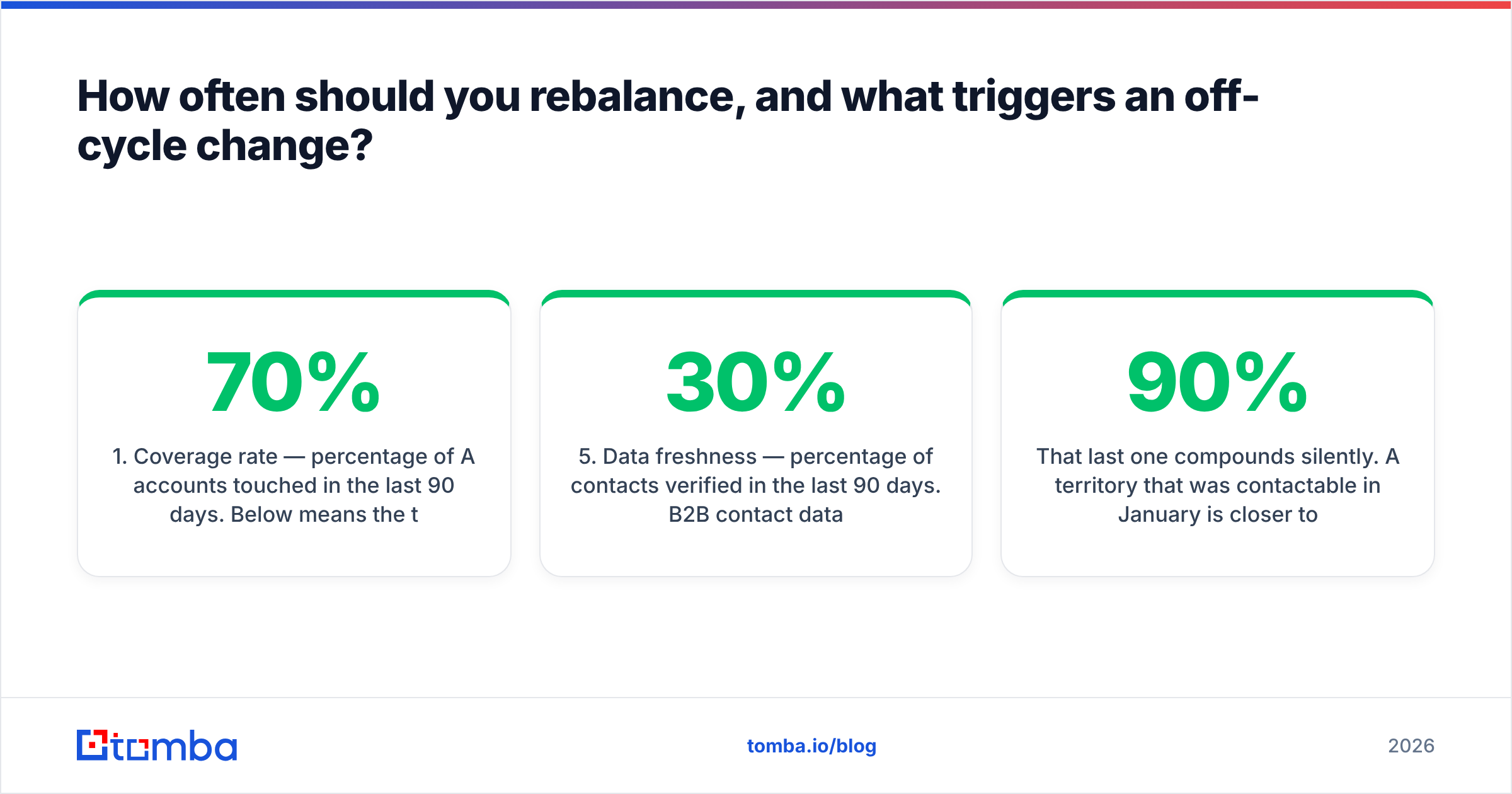
- Coverage rate — percentage of A accounts touched in the last 90 days. Below 70% means the territory is too big.
- Pipeline coverage ratio — open pipeline divided by remaining quota. Below 3x means the territory can't produce.
- Win rate by territory — a territory 10 points below the mean has either a data problem or a competitive-density problem. Find out which.
- Account penetration — percentage of assigned accounts with at least one meaningful engagement. Low penetration plus high account count equals oversized territory.
- Data freshness — percentage of contacts verified in the last 90 days. B2B contact data decays roughly 25–30% per year as people change jobs, so this needs a standing refresh.
That last one compounds silently. A territory that was 90% contactable in January is closer to 70% by December if nobody refreshes it. Schedule a quarterly data enrichment pass the same way you'd schedule a pipeline review — it's the same job, done earlier in the funnel.
What tools do you actually need for this?#
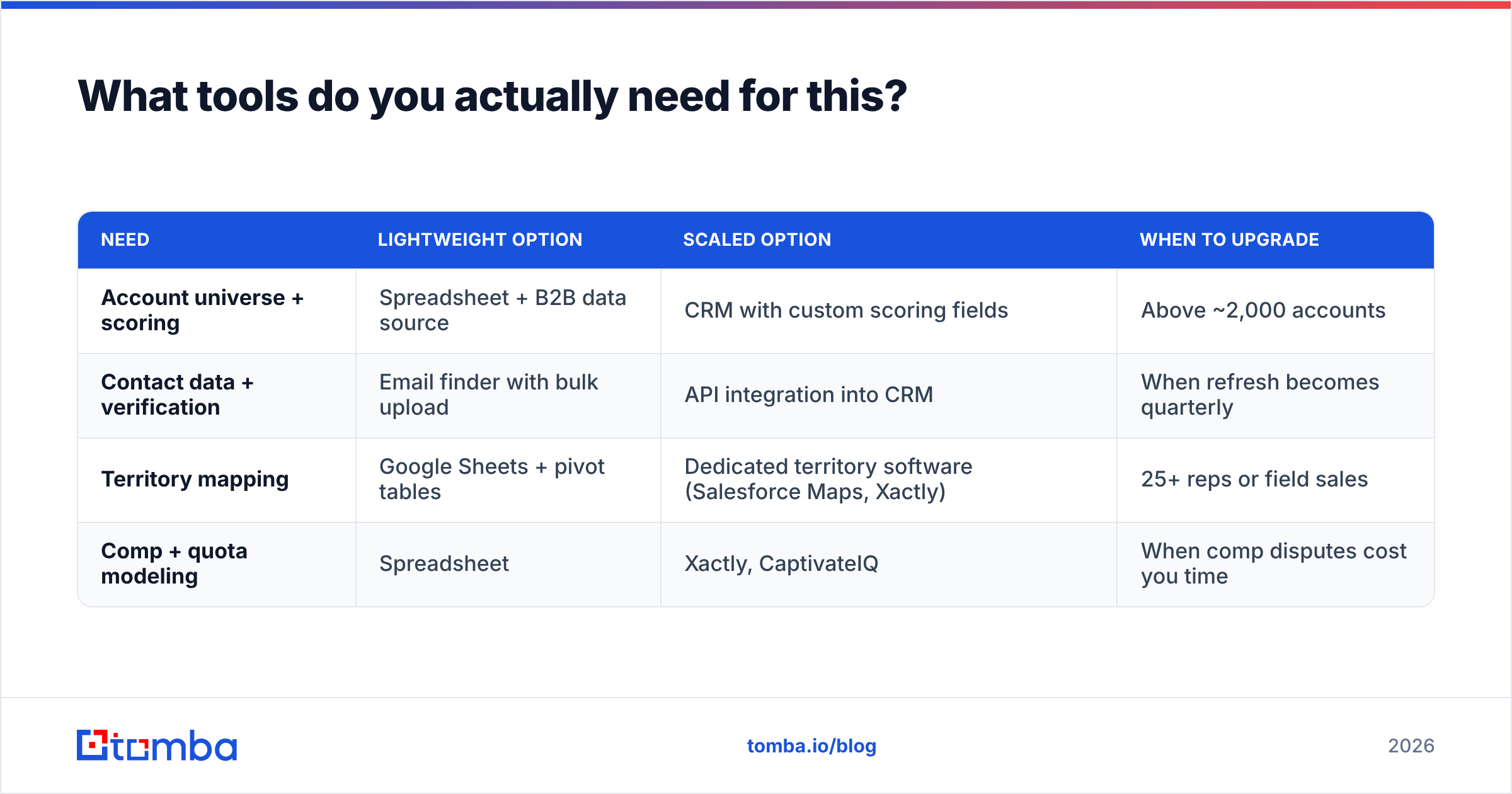
You need three things, and only one of them is a purpose-built territory tool.
| Need | Lightweight option | Scaled option | When to upgrade |
|---|---|---|---|
| Account universe + scoring | Spreadsheet + B2B data source | CRM with custom scoring fields | Above ~2,000 accounts |
| Contact data + verification | Email finder with bulk upload | API integration into CRM | When refresh becomes quarterly |
| Territory mapping | Google Sheets + pivot tables | Dedicated territory software (Salesforce Maps, Xactly) | 25+ reps or field sales |
| Comp + quota modeling | Spreadsheet | Xactly, CaptivateIQ | When comp disputes cost you time |
Most teams under 25 reps do not need dedicated territory software. A well-built spreadsheet with real capacity math beats an expensive tool fed with bad account data every time. G2's sales territory mapping category is worth browsing once you cross that threshold. Just don't buy the mapping layer before you fix the data layer underneath it.
Peer platforms in the data space — BookYourData, for example — take a prepaid-list approach. That suits teams building a one-time territory snapshot. API-first tools fit better when you need continuous refresh inside the CRM. Both are reasonable; pick based on whether your territory data is a project or a process.
Your next step#
That is how to create a sales territory plan: a capacity model plus a contact list. The capacity model is a spreadsheet you can build this week. The contact list decides whether the plan survives the quarter.
Before you assign a single account, run your territory lists through the Tomba Email Finder and see what your real contactable coverage is per territory. The free tier gives you 25 searches to spot-check a sample. The Starter plan at $49/mo handles a full mid-market account base, and Growth at $99/mo covers a team-wide quarterly refresh. Full Tomba pricing is on the site.
Find out which of your territories is actually empty before you hand it to a rep and call it opportunity.
Related guides#
// get started
Find, verify and enrich your first contacts today
Start on the free plan with 25 searches a month, then scale when your team is ready.
Free plan · No credit card required · GDPR & CCPA
// about the author