How to Create a Sales Workflow That Reps Actually Follow
Most sales workflows die in a Notion doc nobody opens. Here's a 7-step build that maps real buying behavior, defines exit criteria per stage, and automates the busywork reps hate.
TL;DR
- A sales workflow is not your CRM pipeline. The pipeline shows where a deal is; the workflow defines what happens at each stage, who does it, and what proves the deal can move.
- Build it in seven steps: map the real buying journey, define stages, write exit criteria, assign owners, script the touches, automate the busywork, then instrument the whole thing.
- Exit criteria are the single highest-leverage piece. "Discovery → Demo" should require a named economic buyer, a quantified pain, and a confirmed timeline — not a rep's optimism.
- Automate data entry, enrichment, and follow-up reminders. Never automate qualification judgment.
- Review the workflow quarterly against conversion rate by stage and time-in-stage. If a stage has under 20% conversion or double the average dwell time, the workflow is broken there, not the reps.
What is a sales workflow, and how is it different from a pipeline?#
A sales workflow is the documented sequence of actions, owners, and decision gates that moves a lead from first touch to closed revenue. Your pipeline is the scoreboard. The workflow is the playbook.
Think of it like a restaurant kitchen. The ticket rail shows which orders are in progress — that's your pipeline. The workflow is the station assignments, the prep order, the temperature check before a plate leaves the pass. Two restaurants with identical ticket rails produce wildly different food because one has a workflow and the other has vibes.
Most teams have a pipeline and call it a process. The tell: ask three reps what has to be true before a deal moves from "Qualified" to "Proposal." If you get three different answers, you have a pipeline with stage names, not a workflow.
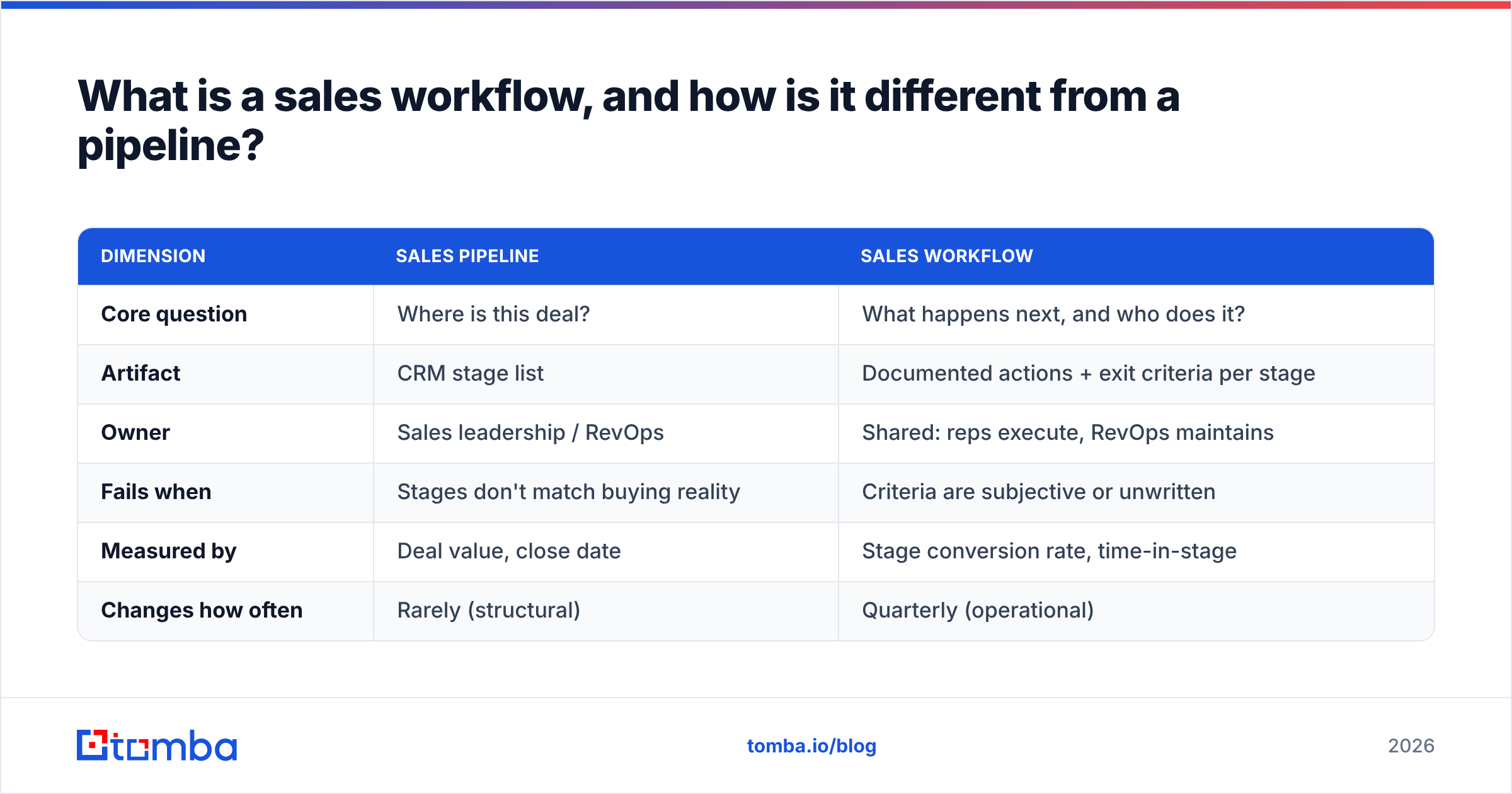
Here's what separates the two in practice:
| Dimension | Sales pipeline | Sales workflow |
|---|---|---|
| Core question | Where is this deal? | What happens next, and who does it? |
| Artifact | CRM stage list | Documented actions + exit criteria per stage |
| Owner | Sales leadership / RevOps | Shared: reps execute, RevOps maintains |
| Fails when | Stages don't match buying reality | Criteria are subjective or unwritten |
| Measured by | Deal value, close date | Stage conversion rate, time-in-stage |
| Changes how often | Rarely (structural) | Quarterly (operational) |
The distinction matters because you cannot fix a conversion problem by renaming stages. You fix it by changing what happens inside them.
Why do most sales workflows fail within a quarter?#
Four failure modes account for nearly everything I've seen go wrong:
- The workflow was designed around the seller, not the buyer. Stages named after internal milestones ("Sent Deck," "Legal Review") describe your activity, not the buyer's decision progress. A buyer doesn't care that you sent a deck. Rebuild around what the buyer has committed to.
- Exit criteria are adjectives. "Prospect is interested" is not a criterion. "Prospect confirmed budget exists and named the approver" is. Adjectives let reps advance deals to look busy, which is how you end up with a pipeline that's 4x coverage and 11% win rate.
- The workflow requires manual data entry nobody does. If advancing a stage means filling seven custom fields by hand, reps will skip it, and your data — and every forecast built on it — is fiction.
- Nobody owns maintenance. A workflow written once and never revisited drifts from reality within two quarters. Assign an owner, put a quarterly review on the calendar, and treat the doc as living.
The fourth one is quietly the worst. According to Gartner's sales research, B2B buying groups now average six to ten stakeholders, each arriving with their own independently gathered information. A workflow built for a single-threaded 2019 buying cycle simply doesn't describe what's happening on the other side of the table anymore.
How do you create a sales workflow in 7 steps?#
Step 1: Map the actual buying journey, not your ideal one#
Pull your last 20 closed-won deals and your last 20 closed-lost. For each, write down the real sequence: who reached out first, what triggered the conversation, how many people got involved, what objection nearly killed it, what unblocked it.
You're looking for patterns you didn't design. Maybe every won deal had a security review you never planned a stage for. Maybe every lost deal stalled at the same point. That's your workflow's real shape.
Do this with actual call recordings and email threads, not from memory. Memory is a highlight reel.
Step 2: Define stages around buyer commitments#
Each stage should represent a commitment the buyer made, not an action you took. A workable default for mid-market B2B:
- Identified — Account matches ICP; contact data verified and reachable.
- Engaged — Buyer replied and agreed to a discovery conversation.
- Qualified — Pain quantified, budget confirmed to exist, timeline stated.
- Evaluating — Buyer has looped in at least one additional stakeholder and agreed to an evaluation step (demo, pilot, technical review).
- Committed — Verbal yes from the economic buyer; procurement or legal is the only remaining path.
- Closed — Signed.
Six stages is usually right. Under four and you can't diagnose anything; over eight and reps stop distinguishing between them.
Step 3: Write exit criteria as binary checks#
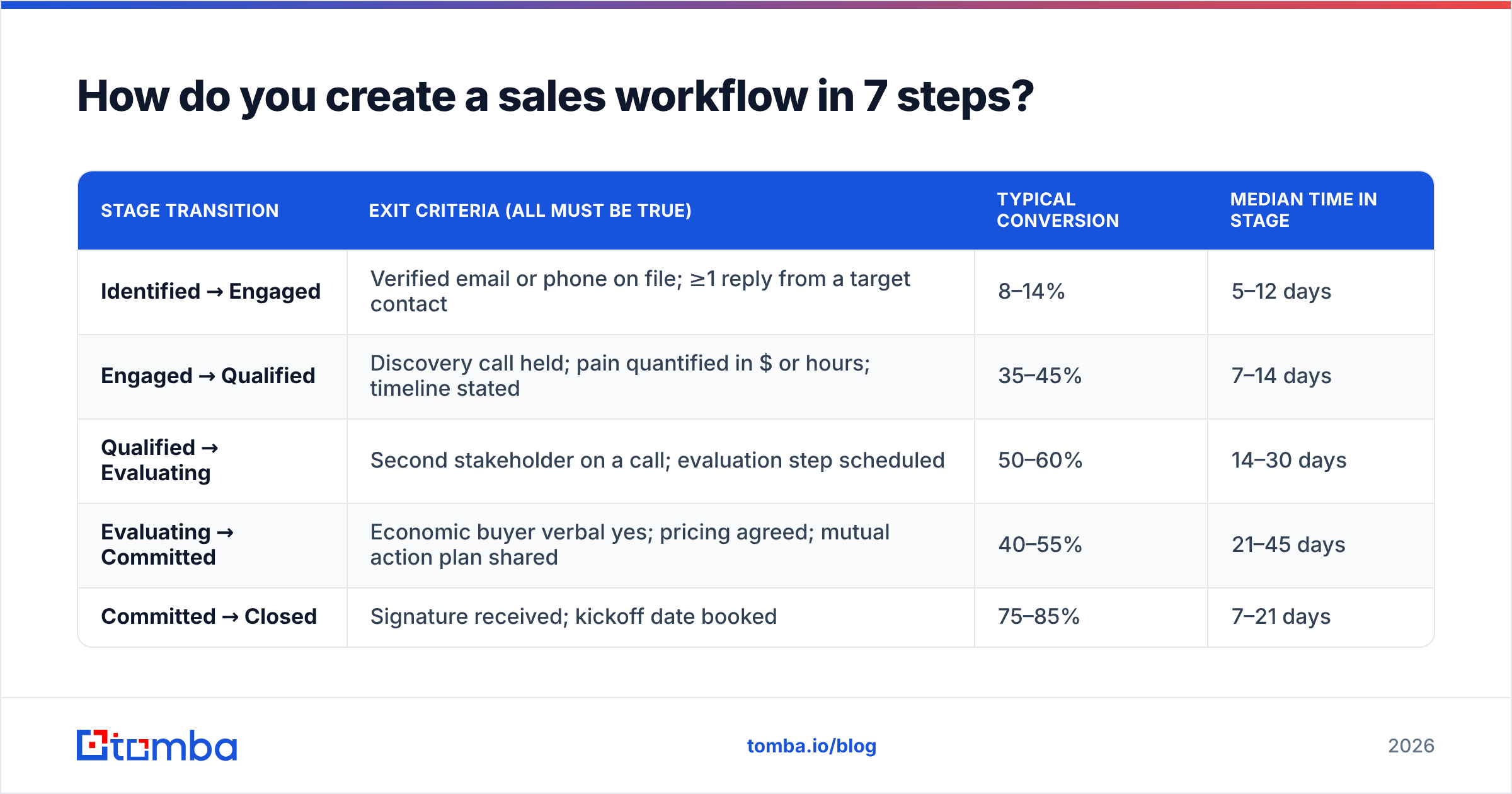
This is where the workflow gets teeth. Every stage transition needs criteria a stranger could verify by reading the CRM record.
| Stage transition | Exit criteria (all must be true) | Typical conversion | Median time in stage |
|---|---|---|---|
| Identified → Engaged | Verified email or phone on file; ≥1 reply from a target contact | 8–14% | 5–12 days |
| Engaged → Qualified | Discovery call held; pain quantified in $ or hours; timeline stated | 35–45% | 7–14 days |
| Qualified → Evaluating | Second stakeholder on a call; evaluation step scheduled | 50–60% | 14–30 days |
| Evaluating → Committed | Economic buyer verbal yes; pricing agreed; mutual action plan shared | 40–55% | 21–45 days |
| Committed → Closed | Signature received; kickoff date booked | 75–85% | 7–21 days |
Treat the conversion and dwell-time columns as starting benchmarks to replace with your own numbers after one full cycle. The point is that every stage has a number attached, so when something degrades you know exactly which gate broke.
Step 4: Assign a single owner per action#
Ambiguous ownership is where workflows leak. For each action in each stage, name one role: AE, SDR, SE, or RevOps. Not two. If an SE and an AE are both "responsible" for the technical validation summary, it gets written by neither.
A simple ownership grid works:
- SDR owns — sourcing, verification, first touch, meeting handoff with a written brief.
- AE owns — discovery, qualification judgment, multi-threading, commercial negotiation.
- SE owns — technical validation, security questionnaire, pilot design.
- RevOps owns — data hygiene rules, stage definitions, reporting, and the quarterly workflow review.
Step 5: Script the touches (but leave room to think)#
For each stage, define the touch cadence and the intent of each touch — not the exact words. A rep reading a script sounds like a rep reading a script.
For the Identified → Engaged transition, a workable sequence is: day 1 email referencing a specific trigger, day 3 LinkedIn view plus connection, day 5 short value email with one proof point, day 9 phone attempt, day 14 breakup email. Five touches over two weeks, then recycle to nurture. If you want the mechanics of that sequence in depth, HubSpot's sales prospecting guidance is a solid, vendor-neutral reference.
The rule: script the structure, not the sentences.
Step 6: Automate the busywork, never the judgment#
Here's the split that holds up:
Automate freely: contact enrichment, email verification, activity logging, stage-based task creation, follow-up reminders, meeting reminders, data deduplication, handoff notifications.
Never automate: whether a deal is qualified, whether to discount, whether to disqualify, what the next best question is.
The automation layer is where most of the time savings live. If a rep spends 20 minutes per account manually hunting contact details, that's the first thing to kill. A bulk email finder run against your target account list, piped into the CRM through a HubSpot integration or Salesforce integration, turns that 20 minutes into a batch job. Run the output through an email verifier before it hits the sequence and your bounce rate stays where it should be.
Set the automation rules explicitly in the workflow doc, because undocumented automation is how a workflow becomes haunted. Write down: trigger, action, owner of the rule, and what happens on failure.
Step 7: Instrument it and set a review cadence#
A workflow you can't measure is a suggestion. Track four things per stage:
- Conversion rate — deals exiting / deals entering. Under 20% at any stage that isn't the top of funnel means the gate is misplaced or the criteria are wrong.
- Time in stage — median, not mean. Means get destroyed by one zombie deal.
- Activity-to-outcome ratio — touches per stage advancement. Rising ratios mean the message is degrading.
- Criteria compliance — what percentage of advanced deals actually met the written exit criteria. Audit 10 records a month by hand. This number is always worse than you expect the first time.
Review quarterly with reps in the room. They know which criteria are unrealistic; leadership usually doesn't.
What tools do you need to run a sales workflow?#
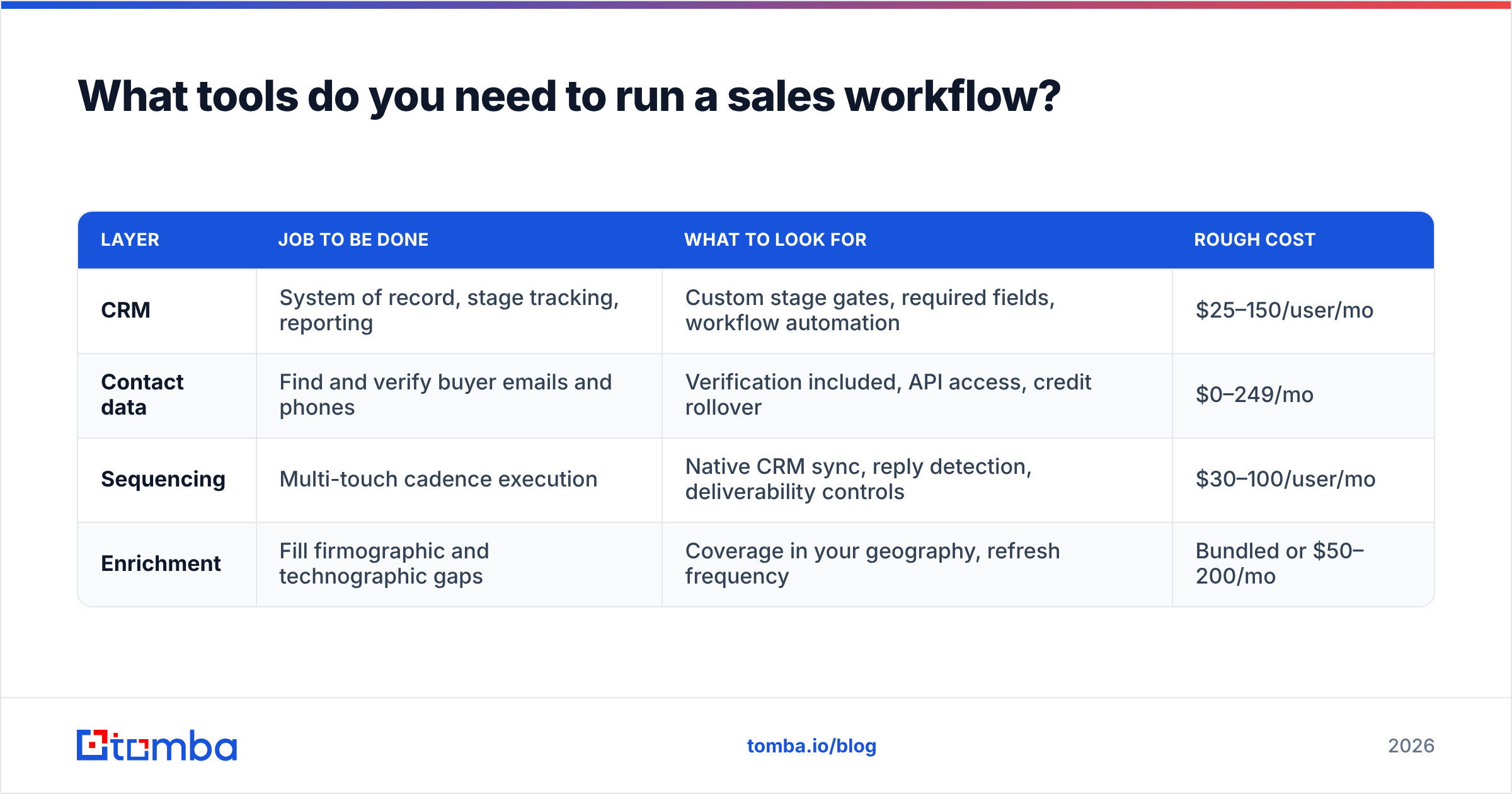
Fewer than the market wants to sell you. A functioning workflow needs four layers, and one tool can often cover two.
| Layer | Job to be done | What to look for | Rough cost |
|---|---|---|---|
| CRM | System of record, stage tracking, reporting | Custom stage gates, required fields, workflow automation | $25–150/user/mo |
| Contact data | Find and verify buyer emails and phones | Verification included, API access, credit rollover | $0–249/mo |
| Sequencing | Multi-touch cadence execution | Native CRM sync, reply detection, deliverability controls | $30–100/user/mo |
| Enrichment | Fill firmographic and technographic gaps | Coverage in your geography, refresh frequency | Bundled or $50–200/mo |
On the contact-data layer specifically, the trap is paying for a full sales-engagement suite when you only need reliable email discovery and verification. Tools priced per seat punish you for adding SDRs; credit-based tools scale with usage instead. Tomba's pricing runs a free tier at 25 searches per month, Starter at $49/mo, Growth at $99/mo, and Pro at $249/mo, which puts a small team's data layer under the cost of two extra CRM seats. BookYourData is a strong option if you'd rather buy pre-built verified lists than run discovery yourself — different model, same goal, and worth evaluating side by side. For peer reviews across all of these, G2's sales intelligence category is the least biased starting point.
Whatever you pick, the integration matters more than the feature list. A data tool that doesn't write back to your CRM automatically just moved the manual work, it didn't remove it.
How do you know your sales workflow is working?#
Give it one full sales cycle plus 30 days before judging. Then look for these signals:
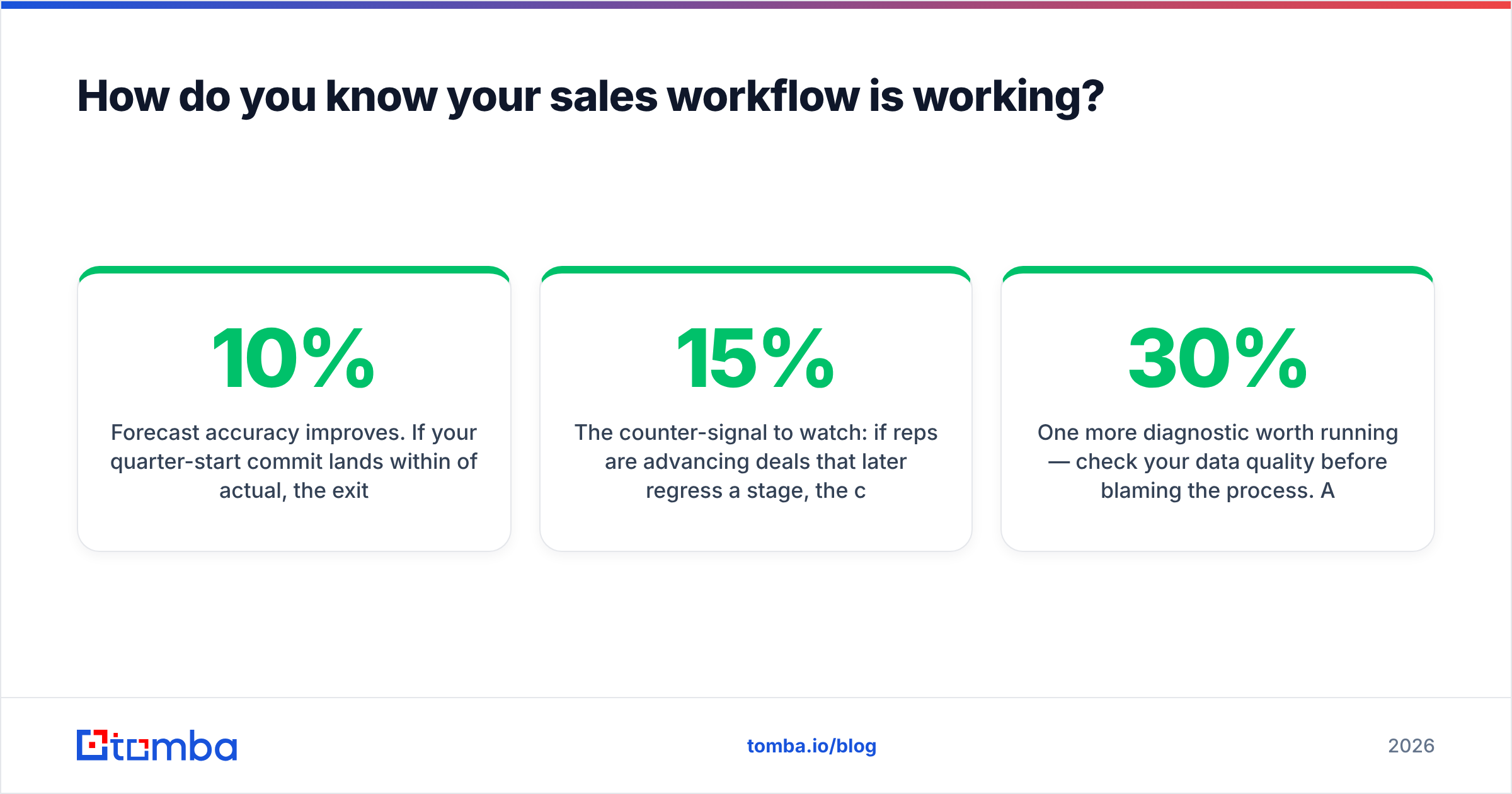
- Forecast accuracy improves. If your quarter-start commit lands within 10% of actual, the exit criteria are doing their job. Loose criteria produce inflated commits.
- Stage conversion tightens between reps. In a working workflow, your top rep and your median rep should have similar stage conversion rates even if volume differs. Wide variance means reps are running personal processes.
- Time-in-stage variance drops. Deals should cluster around a median, not scatter.
- Ramp time shortens. A documented workflow is the fastest onboarding asset you have. If new reps hit quota a month sooner, the workflow is real.
- Fewer "what do I do next" questions. Measure this informally. Managers who stop fielding process questions have a workflow that works.
The counter-signal to watch: if reps are advancing deals that later regress a stage, the criteria are being gamed or misunderstood. Regression rate above 15% means go back to step 3.
One more diagnostic worth running — check your data quality before blaming the process. A workflow that requires reaching a named contact fails silently when 30% of your contact records bounce. Run a sample of 200 records through a free email checker and see what comes back. If the invalid rate is above 10%, fix the data layer first. Everything downstream inherits that error rate, and no amount of workflow design compensates for contacts who never receive the email.
What should you do in your first week?#
Don't try to build all seven steps at once. A sequence that actually finishes:
- Day 1–2: Pull 40 recent deals (20 won, 20 lost) and map the real journey. Two hours with call recordings beats two days of whiteboarding.
- Day 3: Draft six stages with binary exit criteria. Write them in a shared doc, not a slide.
- Day 4: Sit with two reps and pressure-test the criteria. They will tell you which ones are impossible. Listen.
- Day 5: Configure the CRM — required fields at each gate, automated task creation, and one dashboard showing stage conversion and time-in-stage.
- Week 2: Wire the data automation. Verification and enrichment on entry, so no deal enters the workflow with unusable contact data.
- Week 3+: Run it. Audit 10 records. Adjust once, then leave it alone for a quarter.
Resist the urge to redesign after two bad weeks. Workflows need a full cycle of data before the signal separates from the noise.
Start with the data layer#
Every step above assumes you can actually reach the people in your pipeline. That assumption breaks more workflows than bad stage design does — a perfect process running on stale contact records produces a perfect-looking pipeline full of deals that were never real.
Fix that layer first. The Tomba Email Finder gives you verified professional email addresses by domain, name, or company, with verification built in so your Identified stage starts with contacts who exist. Free tier covers 25 searches a month if you want to test the workflow on a single account list before committing, and the Tomba API handles it at volume once the process proves out. Build the workflow, then feed it data that holds up.
Related guides#
// get started
Find, verify and enrich your first contacts today
Start on the free plan with 25 searches a month, then scale when your team is ready.
Free plan · No credit card required · GDPR & CCPA
// about the author