How to Create a Sell Sheet That Actually Books Meetings
A sell sheet is one page that has to do the work of a 20-minute pitch. Here is the exact structure, the tools worth paying for, and the distribution step most teams skip.
TL;DR
- A sell sheet is a single page that answers four questions fast: what it is, who it is for, why it beats the alternative, and what to do next.
- The winning structure is seven blocks — headline, problem, solution, proof, specs table, pricing anchor, CTA. Anything else is padding.
- Design tools are cheap and interchangeable. Canva, Figma, and Adobe Express all get you to a printable PDF; the copy is what decides response rates.
- Version the sheet by segment. One retail sell sheet, one distributor sell sheet, one enterprise sell sheet — same product, three different proof points.
- A sell sheet only performs if it reaches a real inbox. Build the list with verified contact data before you spend a week on layout.
What is a sell sheet, and why does one page beat a deck?#
A sell sheet is a one-page sales document that presents a single product or offer to a single audience. Think of it as the restaurant menu photo, not the cookbook. The cookbook explains every technique; the photo makes someone order.
Buyers scan sell sheets in under 30 seconds. That constraint is the point. A 14-slide deck lets you postpone hard decisions about what matters — a one-pager forces you to name the one benefit that justifies a reply.
You will see the format under other names: product one-pager, line sheet, spec sheet, leave-behind. The differences are mostly industry vocabulary. A CPG brand pitching a grocery buyer calls it a sell sheet. A SaaS company calls it a product one-pager. The structure is identical.
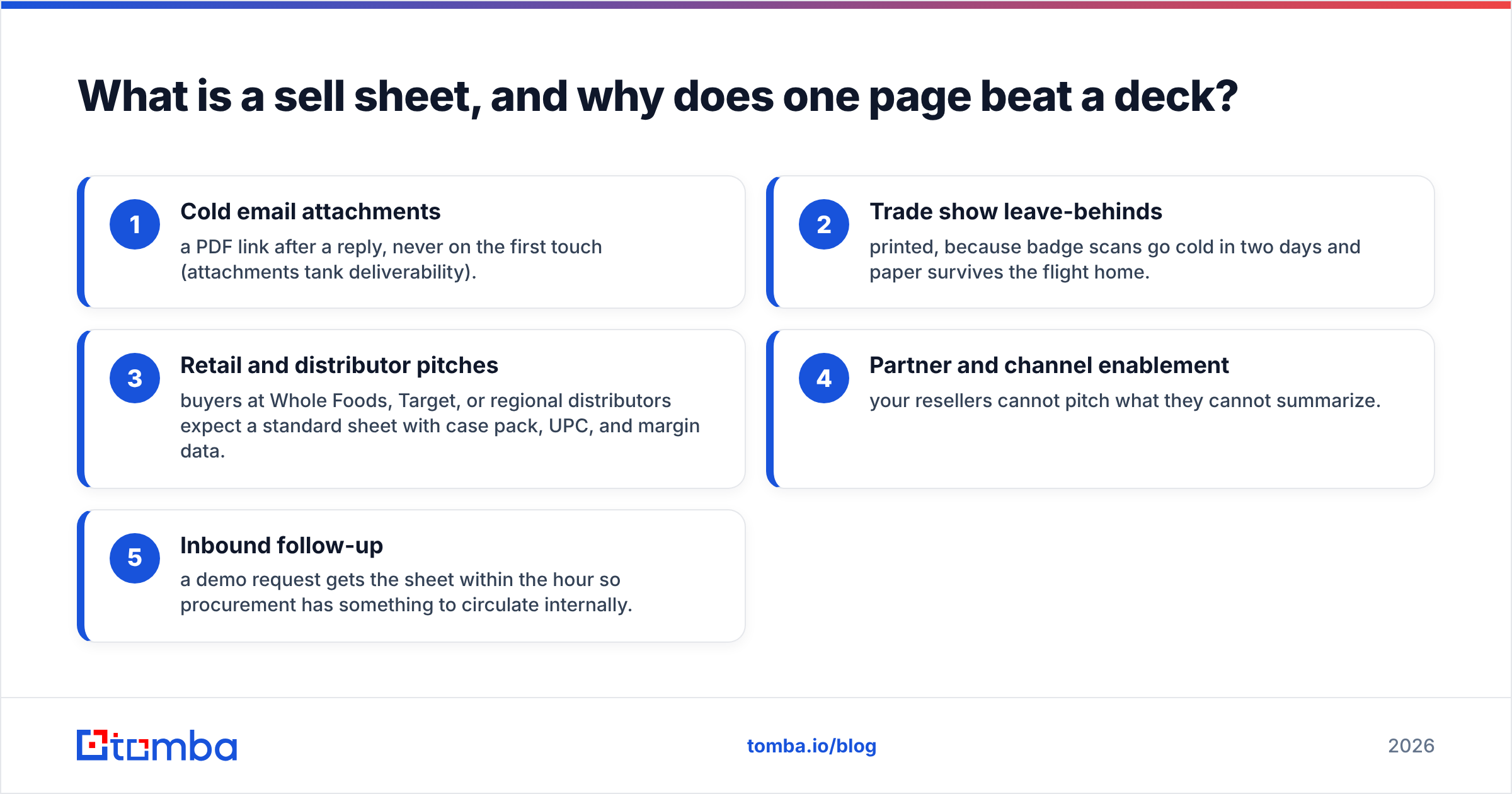
Where it gets used:
- Cold email attachments — a PDF link after a reply, never on the first touch (attachments tank deliverability).
- Trade show leave-behinds — printed, because badge scans go cold in two days and paper survives the flight home.
- Retail and distributor pitches — buyers at Whole Foods, Target, or regional distributors expect a standard sheet with case pack, UPC, and margin data.
- Partner and channel enablement — your resellers cannot pitch what they cannot summarize.
- Inbound follow-up — a demo request gets the sheet within the hour so procurement has something to circulate internally.

How do you create a sell sheet in 7 steps?#
Work in this order. Copy first, design last — reversing that order is why most sell sheets end up as pretty pages that say nothing.
Step 1: Pick one audience and one offer#
Not "our platform." One product, one buyer persona. If you sell to both procurement and end users, you need two sheets. A sheet that tries to serve both says "flexible" and "scalable" and converts nobody.
Write the audience line at the top of your draft file and delete anything that does not speak to that person. This single constraint does more for the finished sheet than any design decision.
Step 2: Write the headline as a claim, not a name#
Bad: "Introducing Meridian Pro." Good: "Cut warehouse pick time by 31% without replacing your WMS."
Your headline gets 100% of readership; everything below gets maybe 30%. Spend disproportionate time here. Include a number if you have one, and name the thing the buyer keeps rather than the thing they must change — that is what kills deals in evaluation.
Step 3: State the problem in the buyer's language#
Two to three sentences maximum. Use the phrasing you have heard on discovery calls, not the phrasing from your positioning doc. If a buyer says "our reps waste half of Monday building lists," write that, not "operational inefficiency in prospecting workflows."
Step 4: Present the solution as three benefits, not fifteen features#
Three bullets. Each one leads with the outcome and closes with the mechanism:
- Faster onboarding — templated workflows ship in 48 hours, not six weeks.
- Lower error rate — automated validation catches format mismatches before export.
- No migration — connects to your existing stack through a REST API.
That bolded-lead pattern is not decoration. It survives skimming, which is the only reading mode your sheet will get.
Step 5: Add proof that a skeptic would accept#
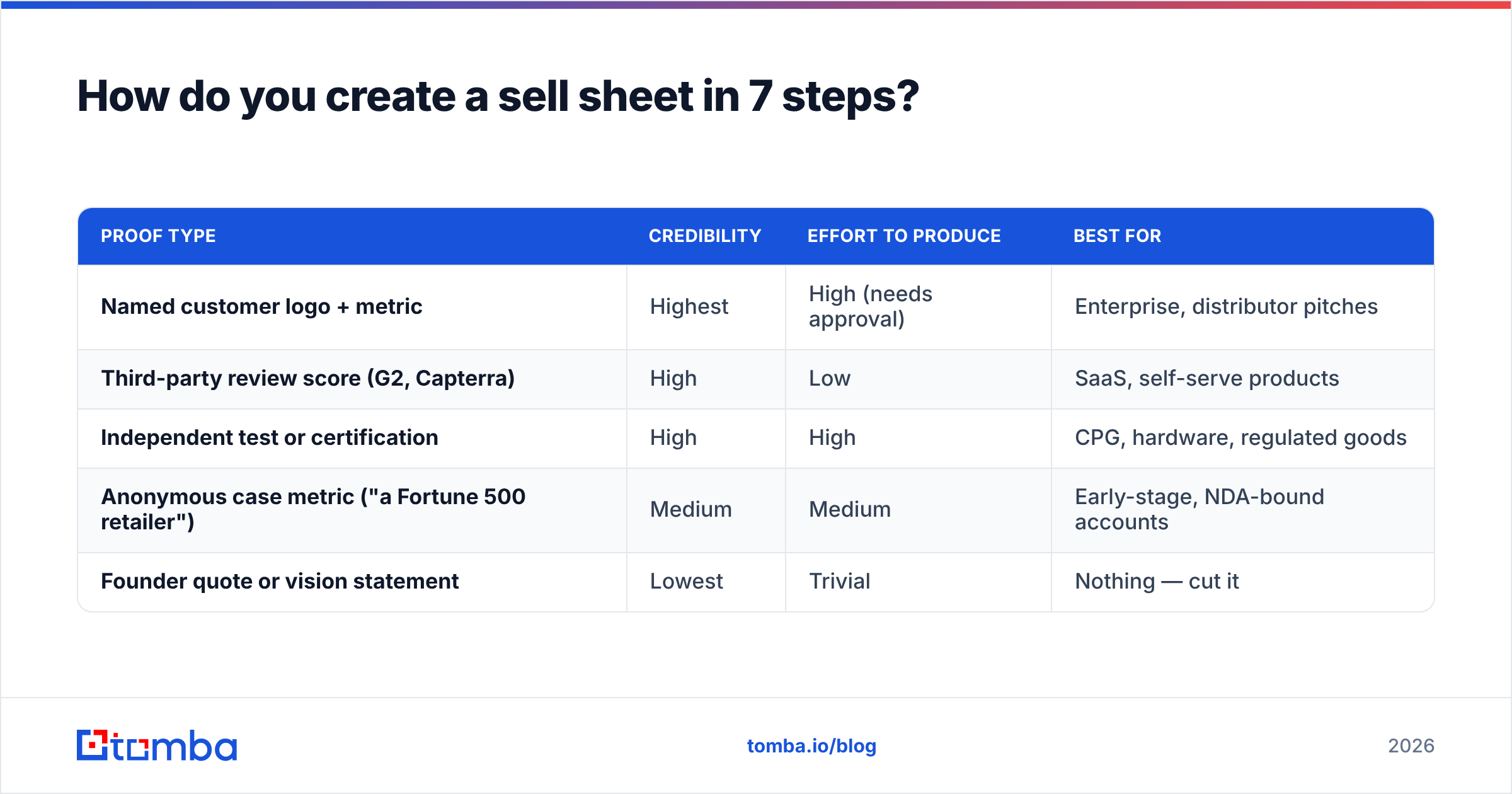
Rank your proof by how hard it is to fake:
| Proof type | Credibility | Effort to produce | Best for |
|---|---|---|---|
| Named customer logo + metric | Highest | High (needs approval) | Enterprise, distributor pitches |
| Third-party review score (G2, Capterra) | High | Low | SaaS, self-serve products |
| Independent test or certification | High | High | CPG, hardware, regulated goods |
| Anonymous case metric ("a Fortune 500 retailer") | Medium | Medium | Early-stage, NDA-bound accounts |
| Founder quote or vision statement | Lowest | Trivial | Nothing — cut it |
One strong proof point beats four weak ones. A verified G2 score with a review count outperforms three unattributed testimonials every time.
Step 6: Build the specs table#
This is the block buyers actually screenshot and forward. For physical goods, include SKU, case pack, dimensions, MSRP, wholesale price, margin, and lead time. For software, include plan tiers, seat limits, integrations, security posture, and support SLA.
Keep it to four columns maximum so it stays readable on a phone. Anything wider gets scrolled past.
Step 7: End with one call to action#
One. Not a phone number, an email, a QR code, a calendar link, and a website. Pick the action you actually want and make it the only clickable thing on the page. "Book a 15-minute fit call" with a single link beats a footer full of options.
What tools should you use to build it?#
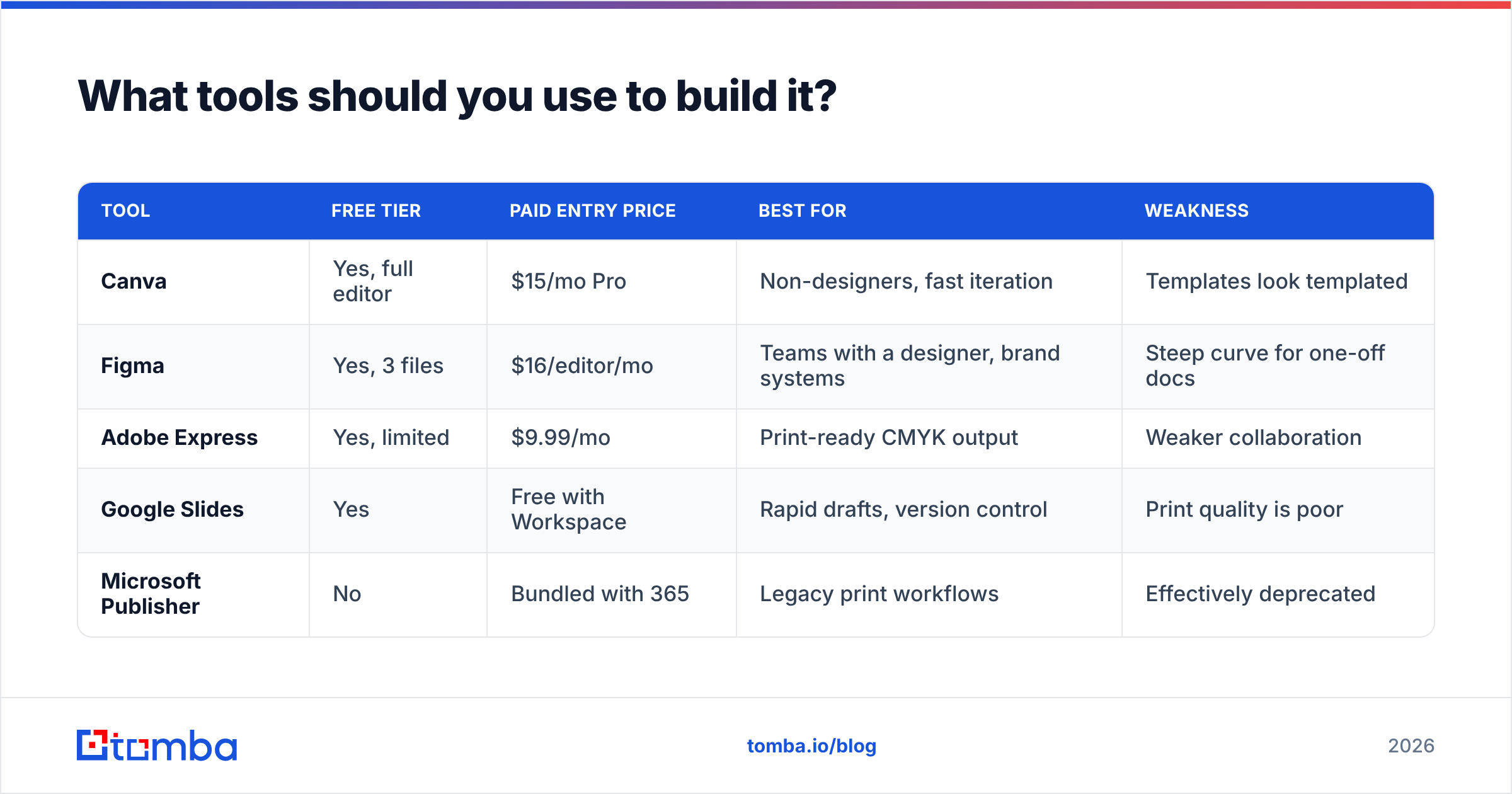
The design tool matters less than teams assume. Here is the honest comparison as of 2026:
| Tool | Free tier | Paid entry price | Best for | Weakness |
|---|---|---|---|---|
| Canva | Yes, full editor | $15/mo Pro | Non-designers, fast iteration | Templates look templated |
| Figma | Yes, 3 files | $16/editor/mo | Teams with a designer, brand systems | Steep curve for one-off docs |
| Adobe Express | Yes, limited | $9.99/mo | Print-ready CMYK output | Weaker collaboration |
| Google Slides | Yes | Free with Workspace | Rapid drafts, version control | Print quality is poor |
| Microsoft Publisher | No | Bundled with 365 | Legacy print workflows | Effectively deprecated |
Pick based on who maintains the file six months from now. If that person is a sales ops generalist, Canva. If it is a brand designer, Figma. Do not build your sheet in a tool nobody else on the team can open.
Set the page at US Letter (8.5 × 11 in) or A4 depending on your market, export at 300 DPI for print and a compressed PDF under 2 MB for email. Oversized PDFs get stripped by corporate mail gateways.
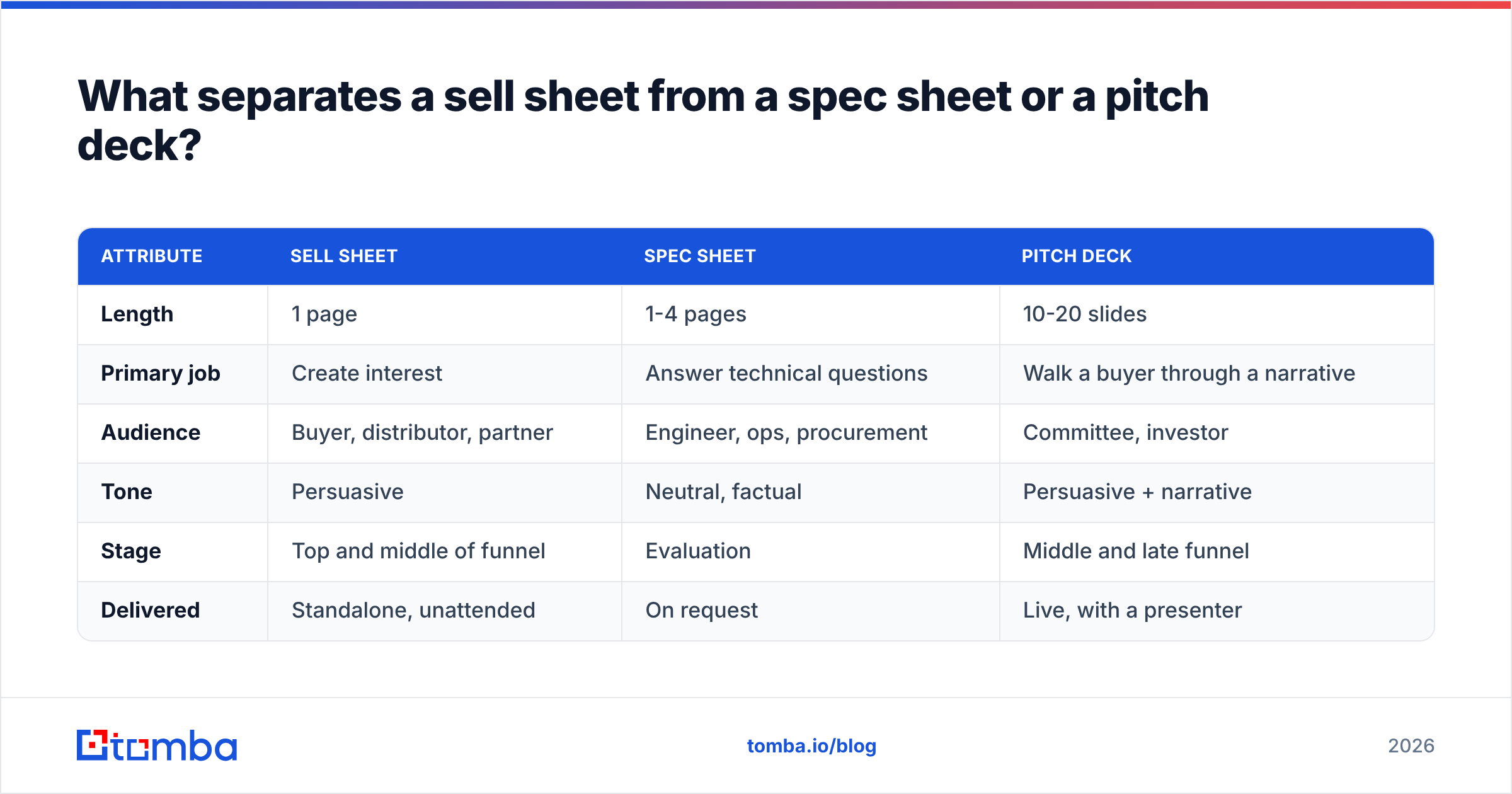
What separates a sell sheet from a spec sheet or a pitch deck?#
These three documents get confused constantly, and using the wrong one at the wrong stage stalls deals.
| Attribute | Sell sheet | Spec sheet | Pitch deck |
|---|---|---|---|
| Length | 1 page | 1-4 pages | 10-20 slides |
| Primary job | Create interest | Answer technical questions | Walk a buyer through a narrative |
| Audience | Buyer, distributor, partner | Engineer, ops, procurement | Committee, investor |
| Tone | Persuasive | Neutral, factual | Persuasive + narrative |
| Stage | Top and middle of funnel | Evaluation | Middle and late funnel |
| Delivered | Standalone, unattended | On request | Live, with a presenter |
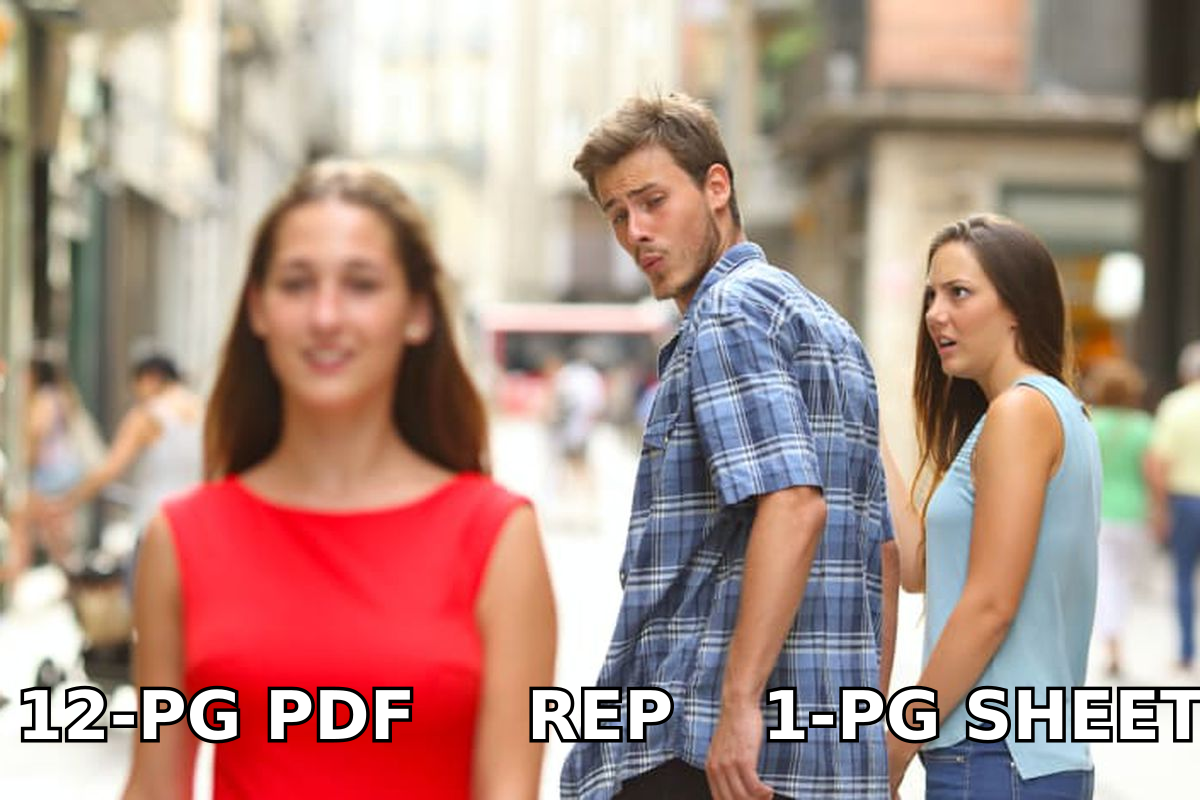
The rule: if the document has to work with nobody in the room explaining it, it is a sell sheet. If someone is presenting it, it is a deck. A sell sheet that requires narration has failed at its only job.
How do you get the sell sheet in front of the right buyer?#
This is the step where most sell sheet projects quietly die. A team spends two weeks on layout, exports a beautiful PDF, and then emails it to the generic info@ address on a company's contact page.
The distribution work has three parts:
- Define the account list. Firmographics first — industry, headcount, region, tech stack. A 200-account list you understand beats a 5,000-account list you bought.
- Find the right individual. Category buyers, not receptionists. For each target company, identify the person who owns the budget line your product touches. A domain search returns the named contacts at a company along with their roles, which is faster than guessing at name patterns.
- Verify before you send. Bounce rates above 3% start damaging your sender reputation, and a damaged domain means even your good sends land in spam. Run the list through an email verifier before the first campaign.
On sequencing: do not attach the PDF to a cold first email. Attachments trigger spam filters and add weight before trust exists. Lead with a two-sentence email that names the outcome from your headline, and send the sheet as a link once someone replies or clicks. HubSpot's research on email engagement consistently shows short plain-text first touches outperform designed attachments in reply rate.
For enrichment beyond email — title, company size, LinkedIn profile, direct dial — contact enrichment fills in the fields your CRM needs so the follow-up call has context. If your outreach mixes email and phone, a phone finder closes the gap for accounts where email alone stalls.
How do you know if your sell sheet is working?#
Track four numbers, not vanity metrics:
- Reply rate on emails that include the sheet link — compare against your baseline sequence. A good sheet lifts reply rate by a measurable margin; a bad one does nothing.
- Link open rate — if under 15% of recipients open the sheet, your email copy is the problem, not the sheet.
- Time on page (if hosted as a web page rather than a PDF) — under 20 seconds means the headline lost them.
- Meetings sourced — the only metric that pays salaries. Attribute meetings back to the sheet version that preceded them.
Version your sheets with a small code in the footer — SS-RETAIL-2026-Q1 — so you can tell which variant produced which meeting. Without versioning you are guessing.
Refresh the sheet quarterly. Pricing changes, proof points age, and a 2024 stat on a 2026 sheet signals a company that stopped paying attention.
What mistakes should you avoid?#
- Writing for your CEO instead of your buyer. If the sheet has to survive internal review by six people, it will end up saying nothing. Assign one owner.
- Leading with company history. Nobody bought anything because a company was founded in 2011.
- Using stock photos of handshakes. Product photography, a screenshot, or a clean diagram — anything that shows the actual thing.
- Cramming in a second CTA. Every additional option reduces the odds of any action.
- Skipping the price. If you are pitching distributors or retailers, omitting margin data gets your sheet filed under "follow up never."
- Sending it to unverified addresses. A beautiful sheet delivered to a dead mailbox has a conversion rate of exactly zero.
What does a finished sell sheet look like in practice?#
Take a mid-market logistics software company selling to regional 3PLs. Their sheet, top to bottom:
Headline: "Cut driver check-in time from 22 minutes to 4." Subhead: "For 3PLs running 50-500 dock doors."
Problem block: three sentences on yard congestion, quoted from a customer interview.
Solution block: three bolded benefit bullets — throughput, labor cost, no hardware install.
Proof block: one named customer with a metric, plus a G2 rating with review count.
Specs table: four columns — plan, dock doors included, integrations, monthly price.
CTA: "See your yard modeled in 15 minutes" with one calendar link.
That is the entire page. White space carries about a third of it, which is correct. The version they emailed to a verified list of operations directors booked meetings; the version they emailed to scraped generic inboxes did not. Same PDF.
Ready to put your sell sheet in front of real buyers?#
The document is half the job. The other half is a clean list of the people who should read it — named, role-matched, and deliverable.
Start with the Tomba Email Finder to pull verified contacts for the accounts on your target list, then verify the batch before your first send. The free tier gives you 25 searches a month to test the workflow; Starter is $49/mo and Growth is $99/mo when you scale the list. Build the sheet, build the list, and stop guessing at info@ addresses.
Related guides#
// get started
Find, verify and enrich your first contacts today
Start on the free plan with 25 searches a month, then scale when your team is ready.
Free plan · No credit card required · GDPR & CCPA
// about the author