How to Create an Email Nurture Campaign in 7 Steps (2026)
A nurture campaign is not a drip of newsletters. Here is the exact sequence map, timing, segmentation logic, and data hygiene that turns cold-ish leads into booked calls — plus what to measure each week.
TL;DR
- An email nurture campaign is a timed, triggered sequence that moves a known lead from "interested" to "ready to talk" — it is not a newsletter and not cold outreach.
- Five to eight emails over 21–45 days covers most B2B cycles. More emails do not help if the segmentation is lazy.
- Every email needs one job and one ask. If you can't name the job in four words, cut the email.
- Bad data kills nurture faster than bad copy: bounces above 3% wreck your sender reputation and the whole sequence stops landing.
- Measure reply rate and meetings booked per 100 enrolled, not open rate — Apple Mail Privacy Protection has made opens close to useless since 2021.
What is an email nurture campaign?#
An email nurture campaign is an automated sequence of emails sent to someone who has already given you permission — a demo request, a content download, a webinar registration, a trial signup that went cold. The sequence runs on a schedule or on behavior triggers, and each email is designed to move the person one step closer to a buying conversation.
Think of it like a restaurant host. A cold email is someone shouting at strangers on the sidewalk. A nurture campaign is the host who noticed you looked at the menu, remembered you three weeks later, and said "the tasting menu you were asking about starts Thursday." Same restaurant, completely different reception.
Technically, nurture sits between marketing automation and sales engagement. Marketing owns the top of it, sales owns the bottom, and the handoff is where most programs fall apart.
How is a nurture campaign different from cold email?#
They look identical in the inbox and behave nothing alike behind it. The distinction drives everything: volume, tone, compliance posture, and the metric you're allowed to celebrate.
| Dimension | Cold outbound | Nurture campaign |
|---|---|---|
| Recipient status | No prior relationship | Opted in or engaged with you |
| Typical volume | 500–5,000/month per rep | 100–800/month per segment |
| Send infrastructure | Separate warmed domains | Your marketing domain or CRM |
| Sequence length | 4–6 touches over 14 days | 5–8 touches over 21–45 days |
| Primary metric | Positive reply rate | Meetings booked per 100 enrolled |
| Realistic reply rate | 1–5% | 8–20% |
| Unsubscribe pressure | High | Low if segmented properly |
| Content mix | 100% pitch/problem | 70% useful, 30% ask |
The practical takeaway: you can be slower, more generous, and more specific in nurture, because the recipient already knows who you are. Wasting that advantage by sending the same three-line pitch you use cold is the single most common mistake.
What do you need before you send the first email?#
Do not open your sequence builder yet. Five prerequisites, in order:
- A defined entry trigger. "Downloaded the pricing guide," "attended the webinar but didn't book," "trial expired without activation." One trigger per campaign. If you can't state it in one sentence, you have two campaigns.
- A clean, verified contact list. Every enrolled address gets checked before the first send. Run the list through an email verifier and drop anything that comes back invalid or risky. Form-fill data rots at roughly 2–3% per month as people change jobs.
- Enrichment on every record. Company size, industry, role seniority, and tech stack decide which branch of the sequence someone enters. Pull those fields with contact enrichment rather than asking for them on the form — every extra form field costs you conversions.
- One measurable exit action. Booked a call, replied, started a trial, hit a pricing page twice. Define it before you write copy, because the copy exists to produce that action.
- A suppression list that actually works. Current customers, open opportunities, competitors, and anyone who unsubscribed from anything. Test it with a real record before launch — sending a "still interested?" email to an active customer is an avoidable embarrassment.
Only when all five exist should you write email one.
How do you map the sequence?#
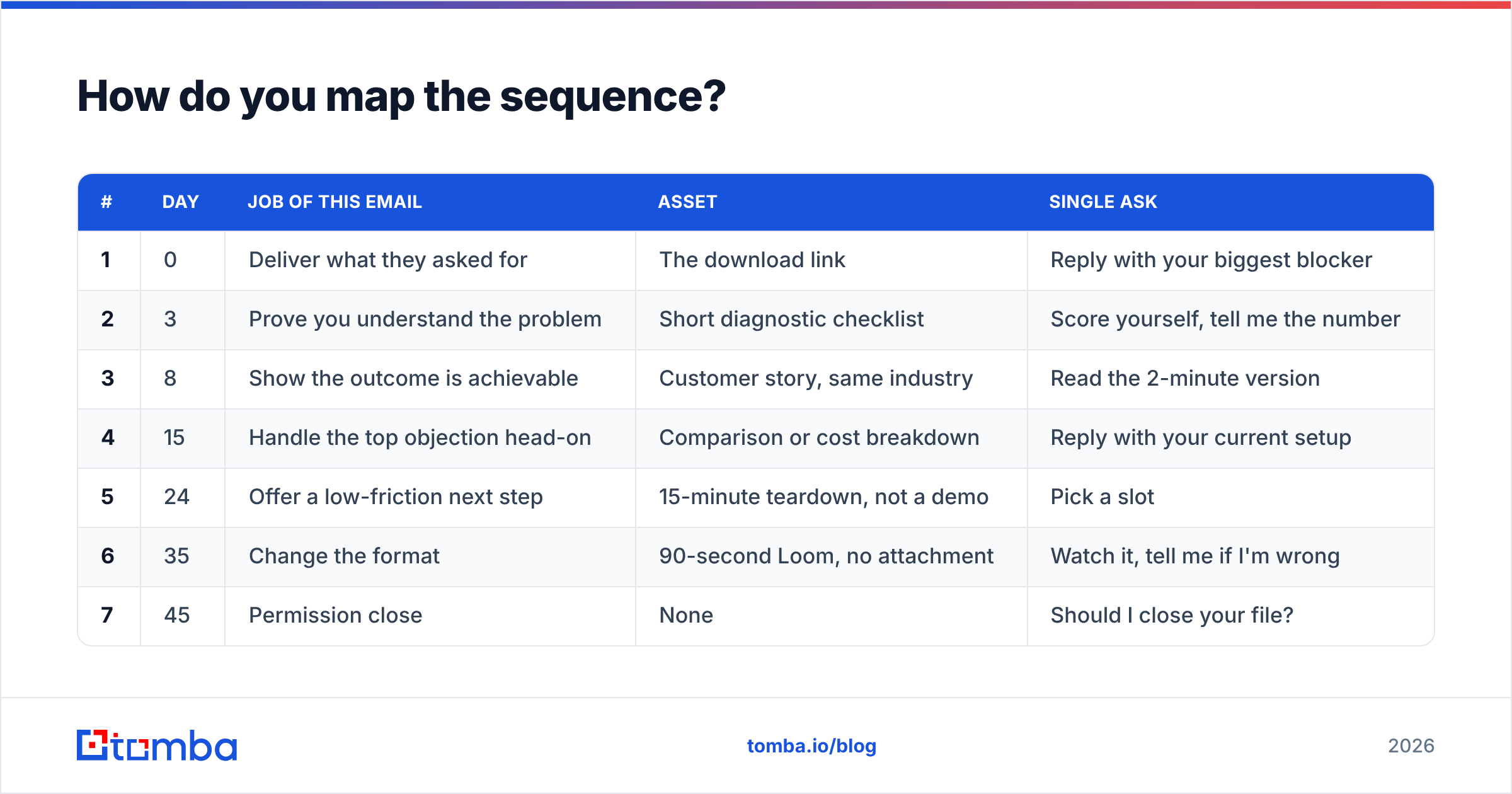
Build the map as a table before you write a word of copy. Each row gets one job, one asset, and one ask. Here's a proven skeleton for a mid-market B2B SaaS nurture triggered by a content download:
| # | Day | Job of this email | Asset | Single ask |
|---|---|---|---|---|
| 1 | 0 | Deliver what they asked for | The download link | Reply with your biggest blocker |
| 2 | 3 | Prove you understand the problem | Short diagnostic checklist | Score yourself, tell me the number |
| 3 | 8 | Show the outcome is achievable | Customer story, same industry | Read the 2-minute version |
| 4 | 15 | Handle the top objection head-on | Comparison or cost breakdown | Reply with your current setup |
| 5 | 24 | Offer a low-friction next step | 15-minute teardown, not a demo | Pick a slot |
| 6 | 35 | Change the format | 90-second Loom, no attachment | Watch it, tell me if I'm wrong |
| 7 | 45 | Permission close | None | Should I close your file? |
Two rules make this map work. First, the ask escalates slowly — you do not request a 45-minute demo on day three. Second, email six changes format deliberately. Repeating the same structure seven times trains people to skip you.
The day-45 permission close consistently produces the highest reply rate in the whole sequence. People who ignored six emails will answer "no, keep me on the list" or "actually yes, next quarter." Both are useful. Silence is not.
How many emails should a nurture campaign have?#
Between five and eight for most B2B cycles. The right number is a function of deal size and evaluation length, not of ambition.
- Deals under $5K ACV: 4–5 emails over 21 days. The buyer decides fast or not at all.
- $5K–$50K ACV: 6–7 emails over 30–45 days. Multiple stakeholders, one budget cycle.
- $50K+ ACV: 8–10 emails over 60–90 days, with human touches interleaved. Nurture here is a holding pattern until a trigger event, not a closing mechanism.
Spacing matters more than count. Days 0, 3, 8, 15, 24, 35, 45 works because the gaps widen. Tight early spacing capitalises on the moment they raised their hand; widening gaps respect the fact that they have a job.
Never send two nurture emails in the same 48 hours unless behaviour triggered the second one. If someone visits your pricing page twice in a day, that's a different play entirely — that's a sales alert, not a scheduled send.
What should each nurture email actually say?#
Four constraints, applied to every email:
- Under 120 words. Nurture emails get read on phones between meetings. If it needs scrolling, it needs cutting.
- One idea. Not "here's the guide, also our new feature, also a webinar." One.
- A specific, low-cost ask. "Reply with the number" beats "let me know your thoughts." "Pick a 15-minute slot" beats "let's set up some time."
- Plain formatting. No hero images, no four-column templates, no tracking-pixel bloat. Text-and-one-link emails land in the primary tab far more reliably. HubSpot's email marketing research has repeatedly found plain, personal-looking sends outperform designed templates for B2B conversion.
On subject lines: match the register of the body. A three-word lowercase subject on a 90-word plain-text email reads like a human. The same subject on a designed newsletter template reads like a trick. If you're stuck, run candidates through a subject line tester before you commit the sequence.
One more thing that costs nothing: reference the specific asset they engaged with by name in emails one through three. "The pricing teardown you grabbed on Tuesday" is worth more than any personalisation token.
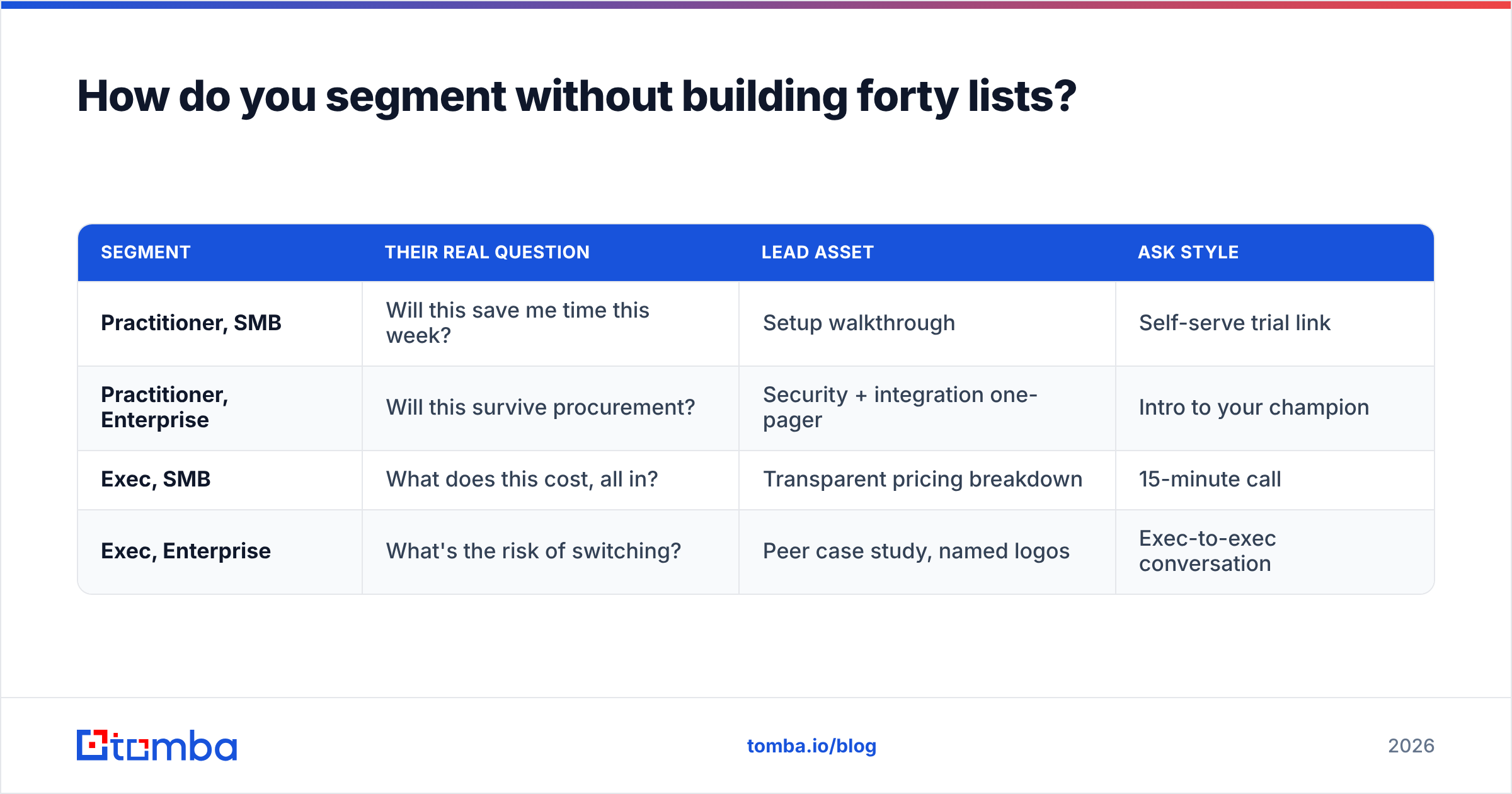
How do you segment without building forty lists?#
Segment on the two variables that change your message, and ignore the rest. For most B2B teams those are role (who feels the pain vs. who signs) and company size (which changes the objection, not the pain).
That yields four branches, not forty:
| Segment | Their real question | Lead asset | Ask style |
|---|---|---|---|
| Practitioner, SMB | Will this save me time this week? | Setup walkthrough | Self-serve trial link |
| Practitioner, Enterprise | Will this survive procurement? | Security + integration one-pager | Intro to your champion |
| Exec, SMB | What does this cost, all in? | Transparent pricing breakdown | 15-minute call |
| Exec, Enterprise | What's the risk of switching? | Peer case study, named logos | Exec-to-exec conversation |
Same seven-email skeleton, four different asset sets. That's manageable. Twelve persona micro-segments each with bespoke copy is a project that never ships and never gets maintained.
Behavioural segmentation layers on top of this, not beside it. If someone clicks the pricing link in email four, they should jump straight to the day-24 ask. Salesforce's lead nurturing guidance makes the same point: behaviour beats demographics for timing, demographics beat behaviour for content.
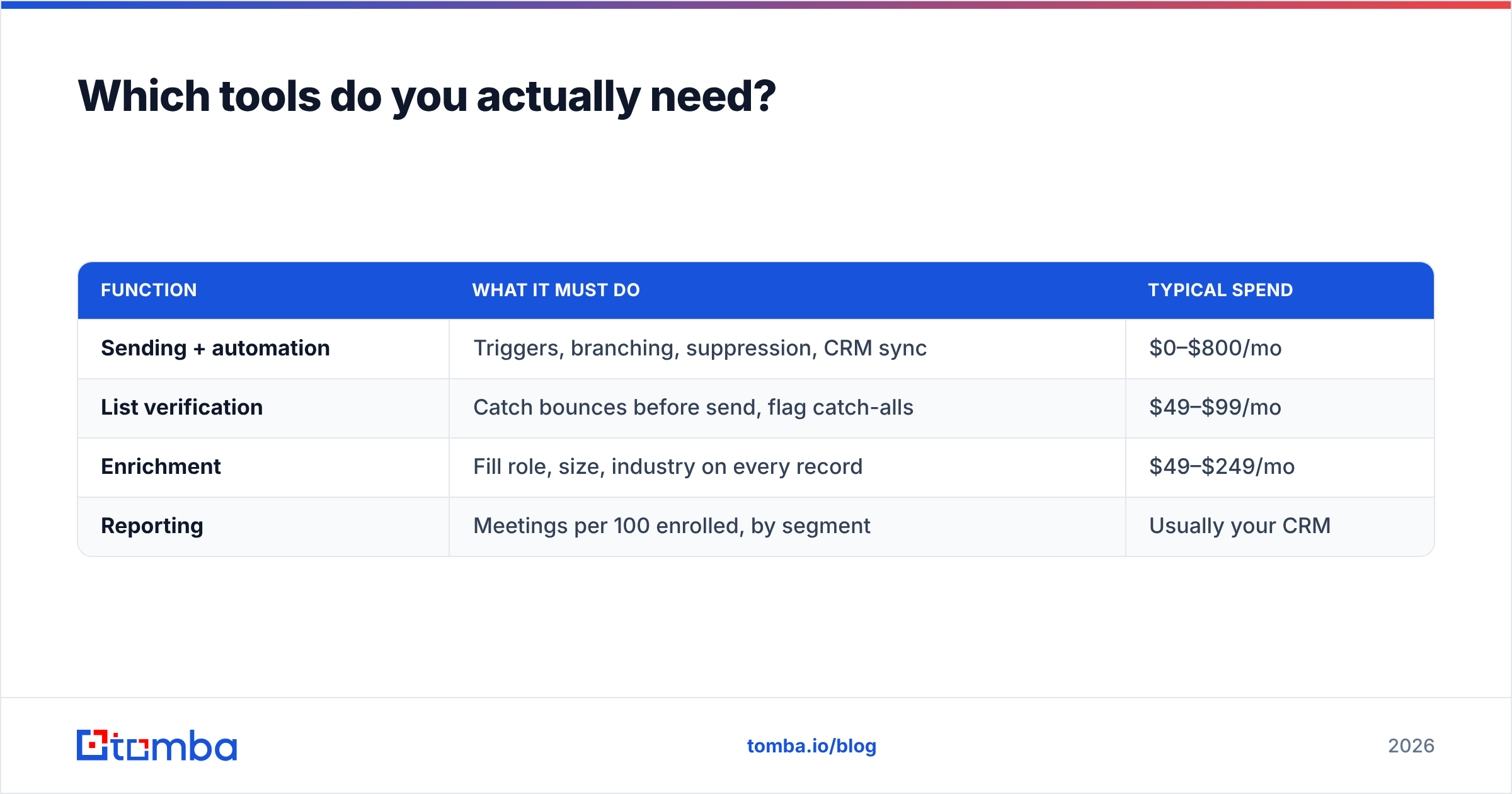
Which tools do you actually need?#
Fewer than vendors will tell you. Four functions, and one tool can often cover two.
| Function | What it must do | Typical spend |
|---|---|---|
| Sending + automation | Triggers, branching, suppression, CRM sync | $0–$800/mo |
| List verification | Catch bounces before send, flag catch-alls | $49–$99/mo |
| Enrichment | Fill role, size, industry on every record | $49–$249/mo |
| Reporting | Meetings per 100 enrolled, by segment | Usually your CRM |
For sending, your existing marketing automation platform or CRM sequencer is almost always the right answer — check the G2 marketing automation category if you genuinely need a new one, but adding a fifth tool to a working stack rarely pays.
For data, the economics are simple. Verification and enrichment cost a fraction of the sending platform and protect everything downstream. Tomba's plans start free at 25 searches/month, then $49/mo Starter, $99/mo Growth, and $249/mo Pro — full Tomba pricing is public, and the Growth tier covers most teams running two or three nurture programs. If you re-verify quarterly, run the whole list through a bulk verify job rather than checking records one at a time.
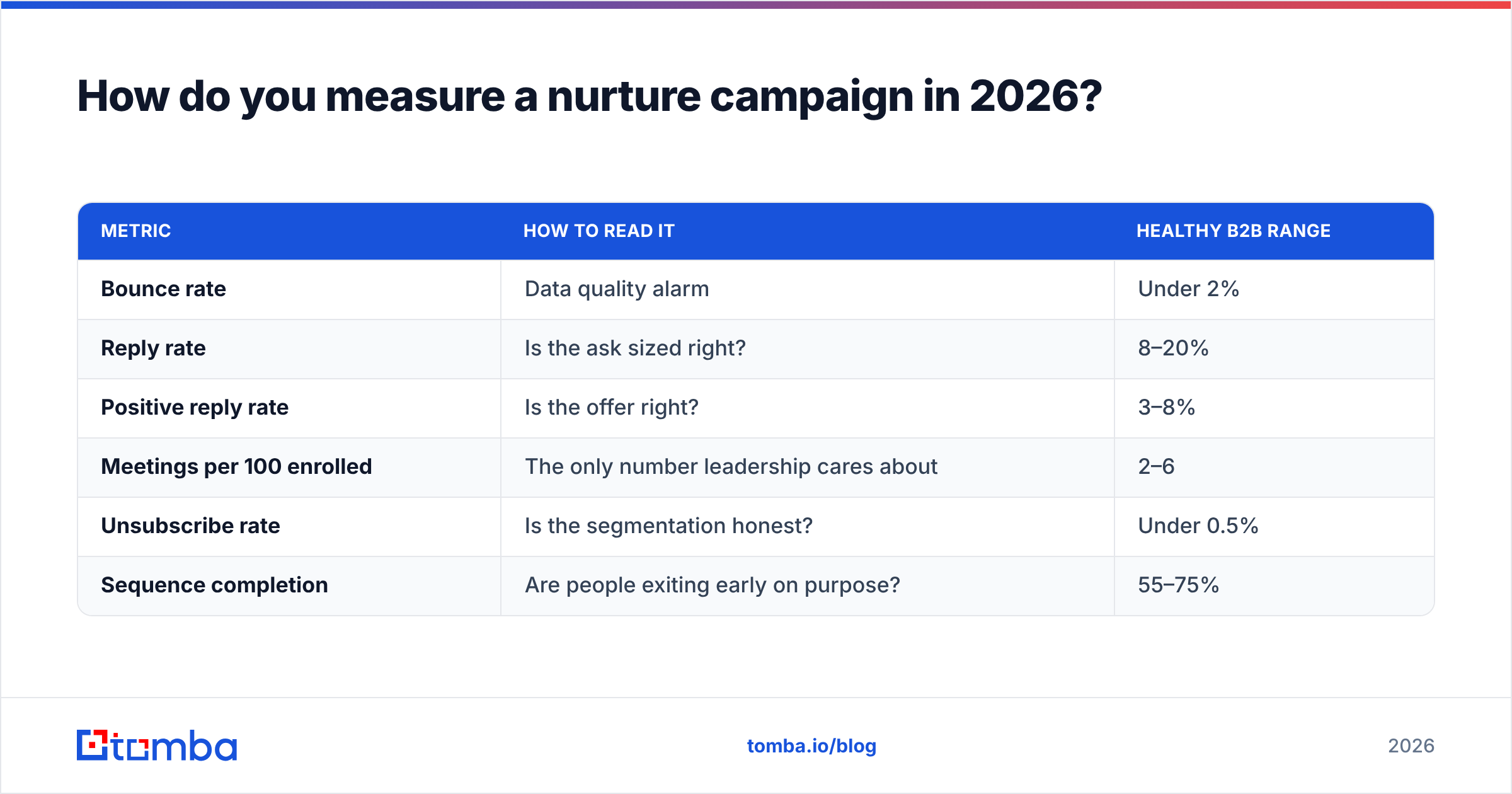
How do you measure a nurture campaign in 2026?#
Open rate is dead as a decision metric. Apple's Mail Privacy Protection pre-fetches images, which inflates opens for a large share of your list. Use it as a directional signal at best.
Track these instead, per segment, weekly:
| Metric | How to read it | Healthy B2B range |
|---|---|---|
| Bounce rate | Data quality alarm | Under 2% |
| Reply rate | Is the ask sized right? | 8–20% |
| Positive reply rate | Is the offer right? | 3–8% |
| Meetings per 100 enrolled | The only number leadership cares about | 2–6 |
| Unsubscribe rate | Is the segmentation honest? | Under 0.5% |
| Sequence completion | Are people exiting early on purpose? | 55–75% |
Read them as a diagnostic chain. High bounces mean a data problem — fix the list, not the copy. Good replies but few meetings means your ask is too big or your offer is vague. Rising unsubscribes mean you're sending relevant-to-you content to people it isn't relevant for. Low completion with high meetings is a success, not a failure — people exited because they converted.
Benchmark against your own previous quarter, not against a blog post's averages. Your list source, industry, and offer move these numbers more than any copy tweak. If you want the underlying definitions, the response rate entry in Tomba's glossary spells out how each is calculated.
What breaks nurture campaigns most often?#
In rough order of damage:
- Dirty lists. Bounces above 3% put your domain in filtering purgatory. Every subsequent email in the sequence performs worse, and you'll blame the copy. Verify at enrollment, then re-verify every 90 days.
- No exit logic. Someone books a call on day 8 and keeps getting "still interested?" emails until day 45. Wire the exit before you launch, and test it with your own address.
- Marketing-to-sales handoff gaps. The lead replies, and nobody's watching the inbox. Route replies to a named human with an SLA measured in hours, not days.
- Set-and-forget. A nurture sequence written 18 months ago references a product that has changed twice. Review copy quarterly; kill emails that underperform their neighbours by more than half.
- Treating nurture as a pitch drip. If every email asks for a meeting, you've built a slow cold sequence. The first three emails should be worth reading even if the recipient never buys.
Start with the data layer#
The sequence map is the easy part — you can build it in an afternoon with the tables above. What determines whether it works is whether the records entering it are real, current, and enriched enough to route correctly.
Start there. Use the Tomba Email Finder to fill in the addresses your forms didn't capture, verify what you already have, and enrich every record with the role and company data your segmentation depends on. The free tier gives you 25 searches a month to test the workflow before committing, and Starter at $49/mo covers a first full nurture program. Clean data first, then copy — that order is not negotiable.
Related guides#
// get started
Find, verify and enrich your first contacts today
Start on the free plan with 25 searches a month, then scale when your team is ready.
Free plan · No credit card required · GDPR & CCPA
// about the author