How to Create an Outreach Strategy That Books Meetings in 2026
Most outreach fails before the first email sends. Here is a seven-step framework for building an outreach strategy — ICP, data, channels, cadence, and the metrics that tell you when to kill a sequence.
TL;DR
- An outreach strategy is not a sequence. It is four decisions — who you target, what data you trust, which channels you use, and what you measure — and the sequence is just the output.
- Segment before you scale. A 400-contact list scored against a real ICP beats a 40,000-contact scrape on reply rate almost every time.
- Verify every address before it enters a sequence. Bounce rate above 3% starts dragging your domain reputation down, and no amount of copy fixes that.
- Multichannel beats email-only, but only when the channels reference each other. Random LinkedIn touches stapled onto an email cadence do nothing.
- Track reply rate and meetings-per-100-contacts, not open rate. Apple Mail Privacy Protection has made opens close to meaningless since 2021.
What is an outreach strategy, and how is it different from a sequence?#
A sequence is a list of messages on a timer. An outreach strategy is the set of decisions that determine whether those messages should exist at all.
Think of it like opening a restaurant. The sequence is the menu — what you serve on Tuesday. The strategy is deciding who eats here, where you source ingredients, which nights you open, and how you know whether the place is working. Plenty of teams obsess over the menu while sourcing rotten ingredients from a list broker and wondering why nobody comes back.
A complete outreach strategy answers five questions before a single email is written:
- Who — the segment, the trigger that makes them relevant now, and the persona inside the account.
- What data — where contact records come from, how fresh they are, and what verification gate they pass through.
- Which channels — email, phone, LinkedIn, or some combination, and in what order.
- What message — the specific problem you claim to solve for this segment, in their language.
- What success looks like — the threshold at which you double down or kill the play.
Skip any one and the whole thing degrades into volume. Volume is what people do when they have not decided who they are talking to.
How do you define the ICP your outreach strategy targets?#
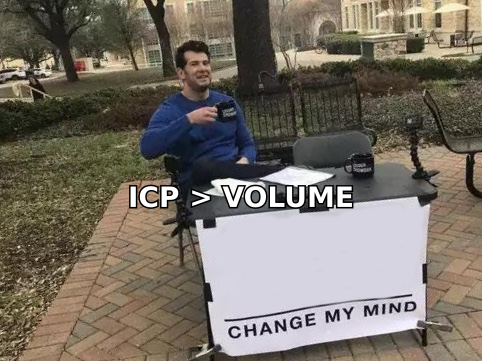
Start narrower than feels comfortable. Your first segment should be small enough that you could name twenty companies in it from memory.
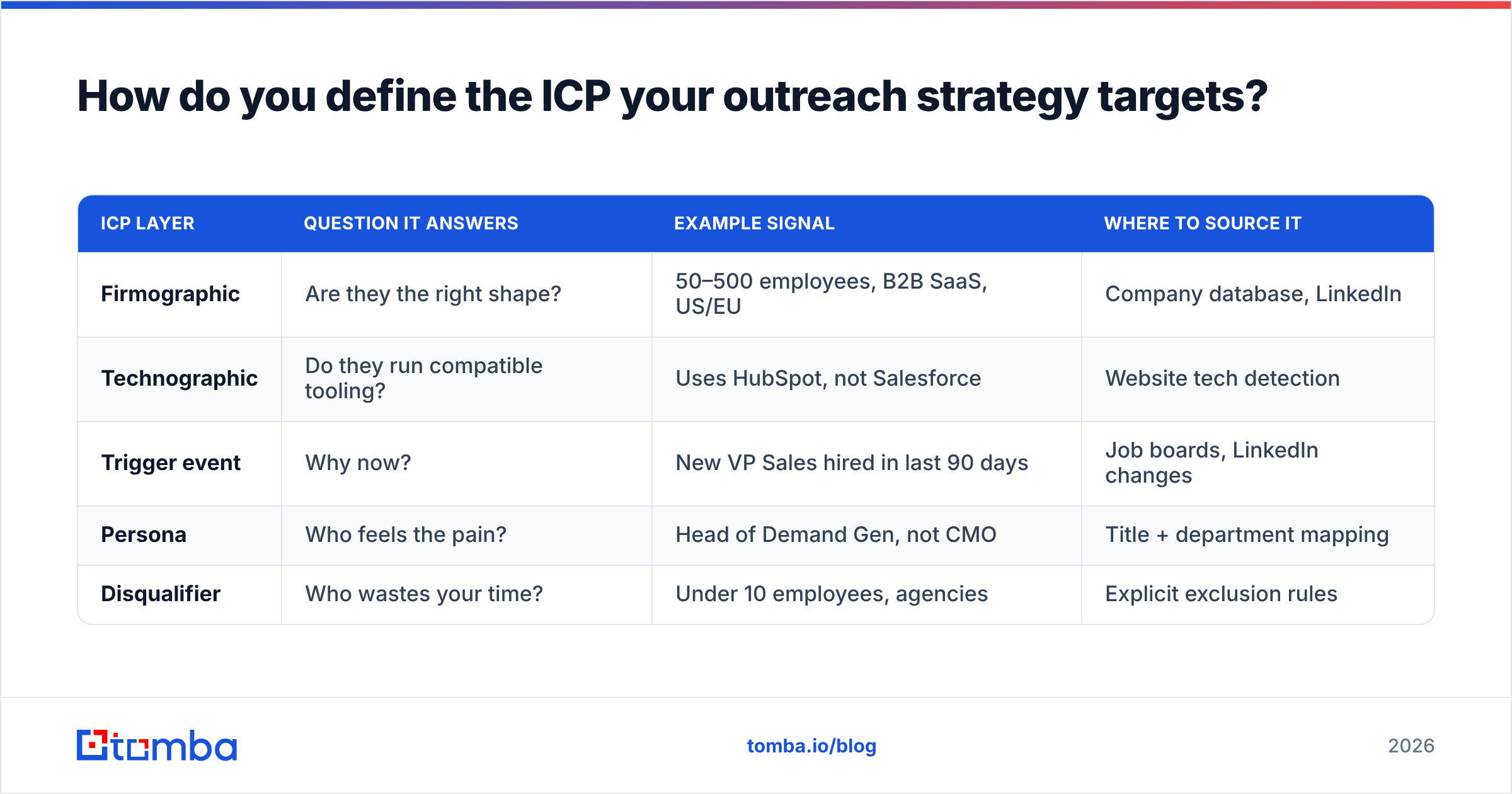
The mechanical version: pull your last 12 months of closed-won deals, then look for what they share beyond firmographics. Firmographics (headcount, industry, revenue, geography) get you a filter. What actually predicts conversion is usually a situation — they just hired a VP of Sales, they migrated off a competitor, they opened a second office, they posted three job reqs for the role your product supports.
| ICP layer | Question it answers | Example signal | Where to source it |
|---|---|---|---|
| Firmographic | Are they the right shape? | 50–500 employees, B2B SaaS, US/EU | Company database, LinkedIn |
| Technographic | Do they run compatible tooling? | Uses HubSpot, not Salesforce | Website tech detection |
| Trigger event | Why now? | New VP Sales hired in last 90 days | Job boards, LinkedIn changes |
| Persona | Who feels the pain? | Head of Demand Gen, not CMO | Title + department mapping |
| Disqualifier | Who wastes your time? | Under 10 employees, agencies | Explicit exclusion rules |
The disqualifier row is the one most teams skip and the one that saves the most money. Write down who you will not contact. Enforce it in the list build, not in the rep's judgment at 4pm on a Friday.
Score each account 0–3 on the first four layers. Anything scoring 8+ goes into a high-touch, researched cadence. 5–7 goes into a lighter templated cadence. Below 5 does not get contacted at all. That triage is the single highest-leverage thing in this whole article.
Where should your contact data come from?#
Your outreach strategy is capped by your data quality. A perfect message to a stale address is a bounce.
There are three realistic sourcing routes, and most teams end up blending them:
- Database providers — you buy access to a large pre-built contact set and filter it. Fast, broad, and the freshness varies wildly by region and seniority. Providers like BookYourData sit here and do well on verified B2B coverage; so do the large aggregate platforms.
- On-demand finding — you identify the account first, then resolve the contact at query time. Slower per record, dramatically fresher, and far cheaper per usable record. A domain search that returns the live email pattern for a company, or an email finder that resolves a specific first name + last name + domain, both work this way.
- First-party signals — inbound form fills, webinar lists, and website visitor reveal on anonymous traffic. Smallest volume, highest intent by a wide margin.
Whatever the source, everything passes through the same gate before it enters a sequence. Run the list through an email verifier, drop hard bounces, and route catch-all domains to a separate track — catch-all servers accept everything at SMTP time, so a "valid" result there means "unknown", not "safe". A dedicated catch-all verifier narrows that gap, but treat those contacts as a lower-confidence bucket regardless.
Keep bounce rate under 3%. Google and Yahoo's 2024 bulk sender requirements formalised what mailbox providers were already enforcing informally — sustained spam complaints above 0.3% and sloppy authentication get you filtered, and once sender reputation drops, every downstream metric in your strategy becomes noise.
Which channels belong in your outreach strategy?#
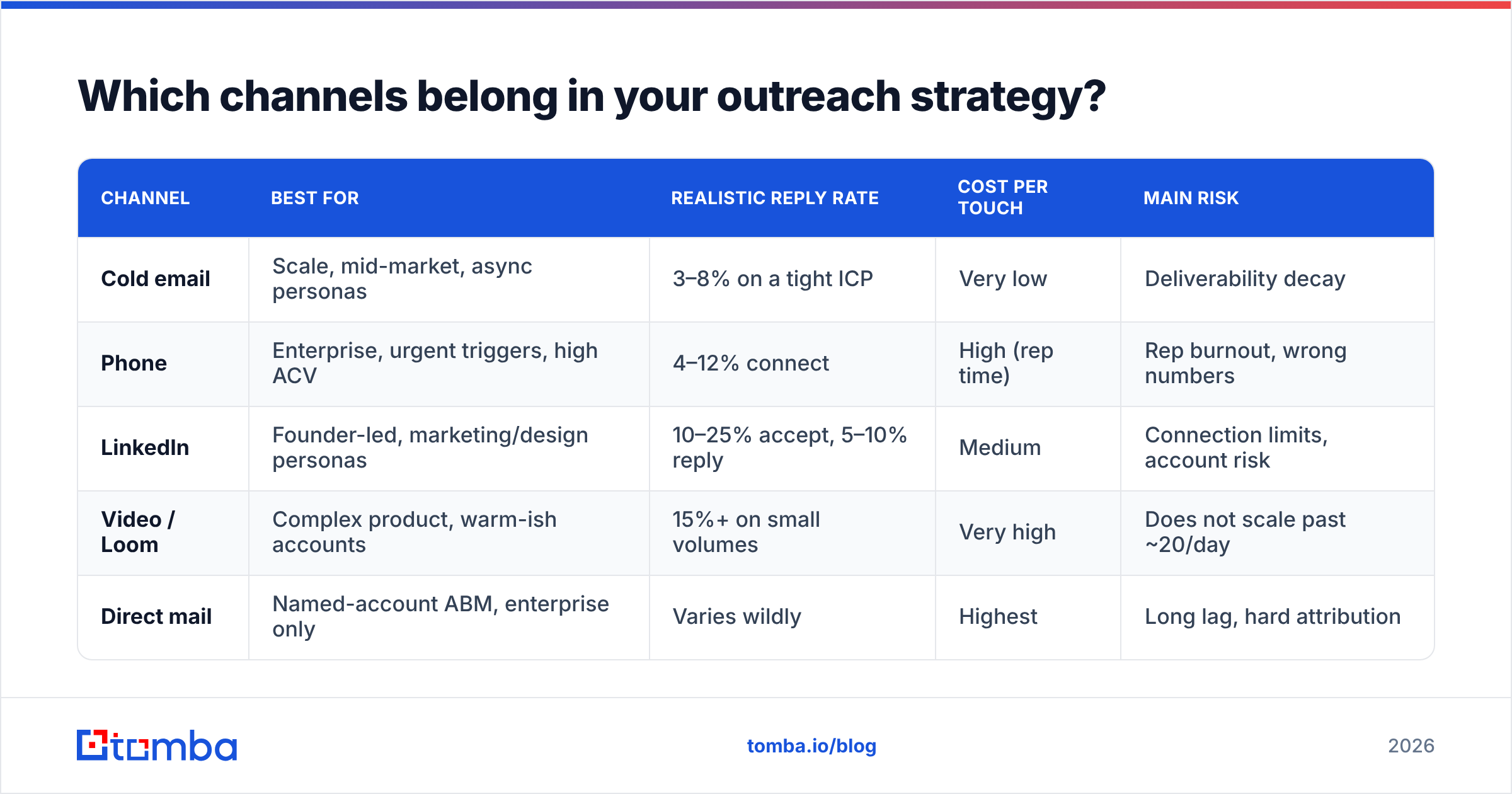
Email is the backbone for most B2B motions because it scales and it is asynchronous. But single-channel outreach leaves meetings on the table, and multi-channel is not the same as multi-tool-spam.
The rule: each touch should reference or build on the previous one across channels. A LinkedIn connection request that lands two days after an email with a related hook is coherent. The same request fired at random is noise.
| Channel | Best for | Realistic reply rate | Cost per touch | Main risk |
|---|---|---|---|---|
| Cold email | Scale, mid-market, async personas | 3–8% on a tight ICP | Very low | Deliverability decay |
| Phone | Enterprise, urgent triggers, high ACV | 4–12% connect | High (rep time) | Rep burnout, wrong numbers |
| Founder-led, marketing/design personas | 10–25% accept, 5–10% reply | Medium | Connection limits, account risk | |
| Video / Loom | Complex product, warm-ish accounts | 15%+ on small volumes | Very high | Does not scale past ~20/day |
| Direct mail | Named-account ABM, enterprise only | Varies wildly | Highest | Long lag, hard attribution |
Pick two channels for your first version. Three is usually the practical ceiling before the cadence gets unmanageable. If phone is one of them, source numbers deliberately — a phone finder paired with number validation avoids the classic problem of reps burning an hour dialing disconnected switchboards.
For LinkedIn-heavy motions, the resolution problem runs the other way: you have a profile and need a work address. A LinkedIn finder closes that loop so the same contact can be worked on both channels without a manual copy-paste step.
What does a good cadence actually look like?#
Here is a 14-day, two-channel structure that works for most mid-market B2B motions. Adjust the timing, not the shape.
- Day 1 — Email 1 (trigger + one specific claim). Reference the reason you are contacting them now. Under 90 words. One question, one ask.
- Day 3 — LinkedIn connect (no pitch). Blank or one line referencing the same trigger. No product mention.
- Day 5 — Email 2 (different angle, not a bump). New value proposition or a customer proof point in their segment. Never "just bumping this."
- Day 8 — Phone or LinkedIn message. If connected, a short message tied to email 2. If phoning, leave a 15-second voicemail naming the trigger.
- Day 12 — Email 3 (short, specific, easy no). Two sentences. Offer a genuine out — "if this is not a priority this quarter, tell me and I'll close the loop."
- Day 14 — Close the loop and set a re-entry date. Move to a 90-day nurture. Do not delete. Timing is the most common reason for a no.
Two things kill cadences more than copy quality. First, sending all touches from one domain and one inbox at volume — split sending across secondary domains and warm each one before it carries production traffic. Second, writing every step as a variation of the same message. If steps two and three could be swapped without anyone noticing, you have one message, not a cadence.

How do you personalise at scale without wasting hours?#
Personalisation is a spectrum, and the mistake is applying the same level to every tier.
- Tier A (score 8+, ~50 accounts/rep): genuine research. Read a recent post, a funding announcement, or a product release. Two custom sentences minimum. 8–12 minutes per contact.
- Tier B (score 5–7, ~500 accounts): segment-level personalisation. The first line is shared across everyone in the segment and references a problem specific to that segment. 30 seconds per contact.
- Tier C (below threshold): do not contact. Add to a nurture or content list instead.
Segment-level personalisation is underrated because it looks lazy on paper and performs like real research in practice. "Most Series-B marketplaces we talk to are stuck routing supply-side signups manually" reads as specific to the recipient even though 300 people receive it, because it is true of their situation.
Enrich once, reuse everywhere. Pushing job title, company size, and tech stack into your CRM via data enrichment means your merge fields have something real to merge. Empty merge fields are the fastest way to produce "Hi {{first_name}}," in a live send.
Where you have a name and a company but no address, resolve it in bulk rather than one at a time — a bulk email finder run against your target list before the sequence starts is far less painful than discovering gaps mid-cadence.
What metrics tell you the strategy is working?#
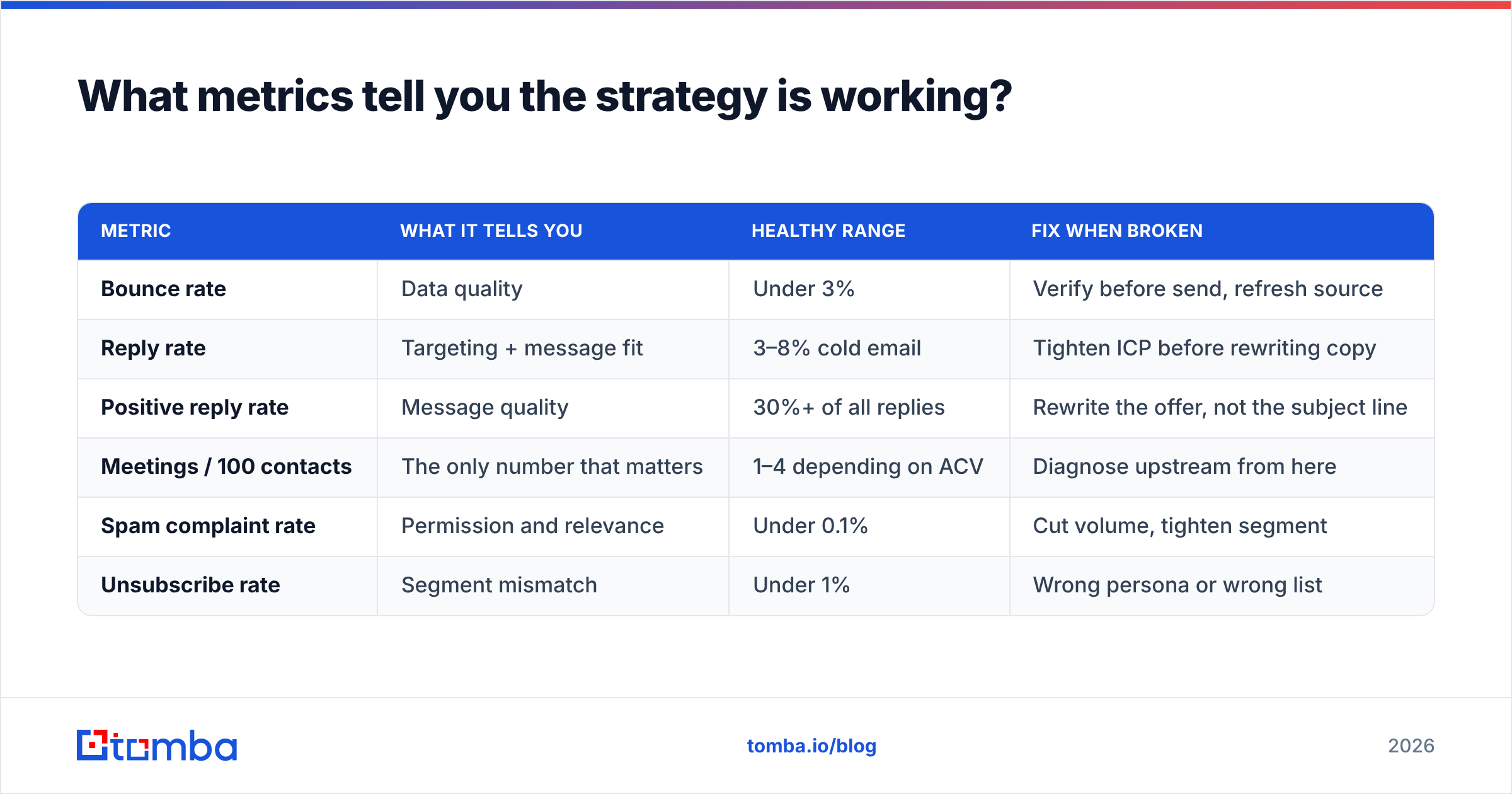
Open rate is dead. Apple's Mail Privacy Protection pre-loads tracking pixels for a large share of consumer and mixed-mode mailboxes, which means your 62% open rate is partly a robot. Stop reporting it as a primary metric.
Use these instead:
| Metric | What it tells you | Healthy range | Fix when broken |
|---|---|---|---|
| Bounce rate | Data quality | Under 3% | Verify before send, refresh source |
| Reply rate | Targeting + message fit | 3–8% cold email | Tighten ICP before rewriting copy |
| Positive reply rate | Message quality | 30%+ of all replies | Rewrite the offer, not the subject line |
| Meetings / 100 contacts | The only number that matters | 1–4 depending on ACV | Diagnose upstream from here |
| Spam complaint rate | Permission and relevance | Under 0.1% | Cut volume, tighten segment |
| Unsubscribe rate | Segment mismatch | Under 1% | Wrong persona or wrong list |
Diagnose in order. Low reply rate with a clean bounce rate is almost always a targeting problem, not a copy problem — and teams reliably get this backwards, rewriting subject lines for a week when they should have cut the segment in half. Track response rate at the segment level, not the campaign level, or averages will hide the one segment that is actually working.
Give any single play at least 200 contacts before you judge it. Below that, the sample size is not telling you anything; you are reading noise. For deeper benchmark context on B2B outbound performance, G2's sales software category data and HubSpot's sales research are both reasonable external reference points.
How do you build the first version in one week?#
You do not need a quarter to launch. You need five days of disciplined scoping.
- Day 1 — Define one segment and one disqualifier list. Write both down. Get someone else to sanity-check the disqualifiers.
- Day 2 — Build a 200-contact list. Use domain search per target account rather than buying 20,000 records you will never work.
- Day 3 — Verify and split. Run verification, drop invalids, isolate catch-alls into a separate track, and confirm your sending domain has SPF, DKIM, and DMARC configured correctly.
- Day 4 — Write the cadence. Three emails, two LinkedIn touches. Each email attacks a different angle. Nothing over 100 words.
- Day 5 — Launch at 30 sends/day/inbox. Ramp weekly. Review after 200 contacts have completed the full cadence.
Then iterate on one variable at a time. Changing segment, copy, and channel mix simultaneously guarantees you learn nothing from the result.
Where should outreach data actually come from?#
Whatever tooling you settle on, the sequence is the cheap part — the expensive part is being confident that the address you are sending to belongs to a real person who still works there.
Tomba's Email Finder resolves work emails by name and domain, backed by verification and domain-level pattern detection so you are not guessing at formats. The free tier gives you 25 searches a month to test coverage on your own target accounts, and paid plans start at $49/mo on Starter, $99/mo on Growth, and $249/mo on Pro — full Tomba pricing is on the site. Run 50 of your own ICP accounts through it before you commit to any list purchase; coverage on your segment is the only benchmark that matters.
Related guides#
// get started
Find, verify and enrich your first contacts today
Start on the free plan with 25 searches a month, then scale when your team is ready.
Free plan · No credit card required · GDPR & CCPA
// about the author