How to Demo a Product in 2026: A Sales Rep's Playbook
Most product demos lose the deal in the first four minutes. Here's the discovery-first structure, the timing, and the follow-up sequence that turns a demo into a signed contract.
TL;DR
- The demo is not a product tour. It's a proof session for three specific pains you already uncovered in discovery — everything else is noise that lengthens the cycle.
- Structure beats charisma: 5 min recap, 20 min tailored proof, 10 min pricing and objections, 5 min next-step commitment. Anything longer than 45 minutes drops decision-maker attention hard.
- Show the end state first (the report, the closed ticket, the enriched list), then the workflow that produces it. Buyers care about the outcome, not the settings screen.
- Multithread before the call. A demo with one attendee has a fraction of the close rate of one with three-plus stakeholders in the room.
- The follow-up recap sent within two hours — with a mutual action plan and a booked next date — is what converts. No recap, no deal.
What Is a Product Demo, and What Is It Not?#
A product demo is a structured proof session where you show a specific buyer that your product removes a specific pain they already told you about. That's the whole definition. It is not a tour, not a training session, and not a features webinar.
Think of it like a test drive. A good salesperson doesn't start by opening the hood and explaining the alternator. They ask where you commute, then hand you the keys for that exact route. The demo works the same way: you're not proving the product exists, you're proving it fits the buyer's route.
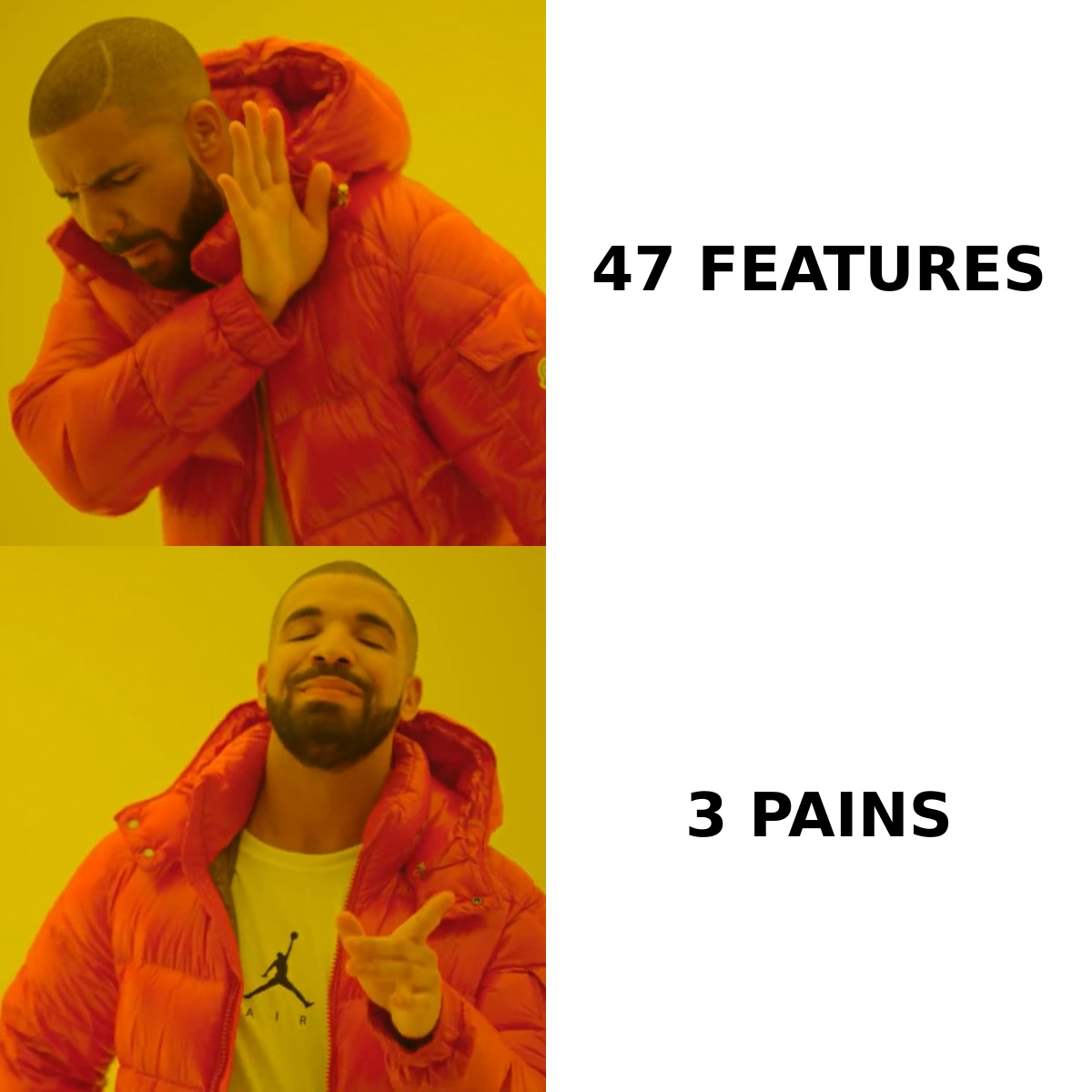
Most reps get this backwards. They open the app, start at the dashboard, and walk left to right through the nav bar. Twenty-five minutes later, the buyer has seen 40 features, remembered two, and formed no opinion about whether their Tuesday gets easier. Then the rep asks "any questions?" and gets silence.
Here's the distinction that matters most:
- A demo answers "can this solve my problem?" — not "what does this product do?" Scope every screen to a pain the prospect named out loud.
- A demo is earned, not given. If you haven't run discovery, you're guessing. A guessed demo is a feature dump wearing a costume.
- A demo has a defined exit. You should know before the call what "yes" looks like — a security review, a pilot, a pricing conversation with the CFO.
- A demo is a two-way call. If you talk more than 60% of the time, it's a webinar. The best demos are interrupted constantly.
- A demo ends with a calendar entry. Not "I'll send over some materials." A date, a name, and an agenda.
How Do You Prepare Before the Demo Call?#
Preparation is where demos are won. The call itself is mostly execution.
Run real discovery first. You need three things on paper before you build anything: the current process (what they do today, step by step), the cost of that process (hours, dollars, missed revenue), and the trigger (why they're looking now, in this quarter). If you can't write those three sentences, reschedule the demo and run a 20-minute discovery call instead. Reps hate doing this. It is also the single highest-leverage move available.
Map the buying committee. Gartner research has consistently found that a typical B2B purchase involves six to ten decision makers, each arriving with their own independently gathered research. If your demo has one attendee, you're demoing to a messenger, not a buyer. Ask directly: "Who else needs to see this before you'd move forward? Can we get them on this call rather than making you re-explain it?"
When you need to reach those extra stakeholders, don't rely on the champion to forward things. Pull their contact details yourself — a domain search across the company gives you the security lead, the finance approver, and the ops manager who'll actually use the tool, so you can invite them directly.
Build the account-specific environment. Generic sandbox data kills credibility. Load their company name, their logo, their industry's terminology, a workflow that resembles theirs. If your product enriches contact data, run the demo against their actual target account list. The moment a buyer sees their own data in your product, the conversation shifts from "interesting" to "how fast can we start?"
Write the agenda and send it in advance. Three bullets, no more. "1. Confirm what we heard about your renewals process. 2. Show how [feature area] handles it. 3. Agree next steps." Sending it filters out no-shows and signals you're not going to waste 45 minutes.
Do a technical dry run 15 minutes before. Close Slack. Close your inbox. Clear notifications. Have a recorded backup of the core flow in case the environment breaks. Nothing erodes trust like watching a rep debug a login screen for four minutes.
What Is the Ideal Demo Structure and Timeline?#
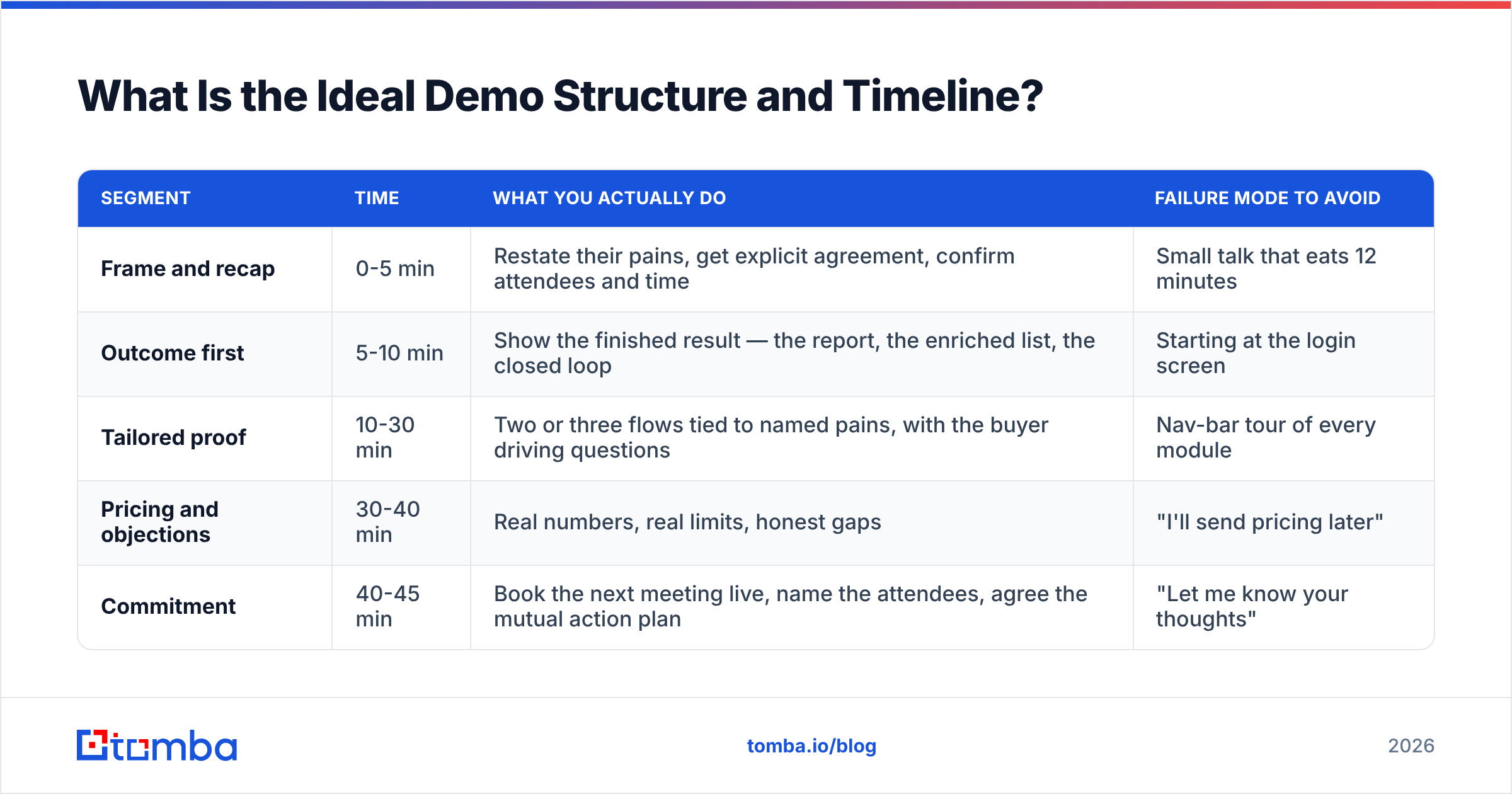
Use a fixed skeleton and vary only the middle. Predictable structure frees your attention for reading the room.
| Segment | Time | What you actually do | Failure mode to avoid |
|---|---|---|---|
| Frame and recap | 0-5 min | Restate their pains, get explicit agreement, confirm attendees and time | Small talk that eats 12 minutes |
| Outcome first | 5-10 min | Show the finished result — the report, the enriched list, the closed loop | Starting at the login screen |
| Tailored proof | 10-30 min | Two or three flows tied to named pains, with the buyer driving questions | Nav-bar tour of every module |
| Pricing and objections | 30-40 min | Real numbers, real limits, honest gaps | "I'll send pricing later" |
| Commitment | 40-45 min | Book the next meeting live, name the attendees, agree the mutual action plan | "Let me know your thoughts" |
Three notes on this table.
Outcome first is non-negotiable. Start with the thing the buyer wants to hold at the end — the exported list, the dashboard with their numbers, the alert that fires at the right moment. Then rewind: "Here's the four clicks that produced that." This is the reverse of how product teams demo internally, and it's why product-led demos so often flop in sales calls.
Cap tailored proof at three flows. Every additional flow reduces recall of the first two. If a buyer asks about a fourth, write it down and park it: "Great question, that's a whole workflow on its own — can I show you that on Thursday with your ops lead in the room?" Parking questions creates the reason for the next meeting.
Give pricing on the call. Withholding price to "preserve the follow-up" is a tactic that reads as evasive to buyers who have already read your G2 reviews and your pricing page. Say the number, explain what drives it, and handle the reaction while you're on camera together.
How Do You Tailor a Demo to the Buyer's Role?#
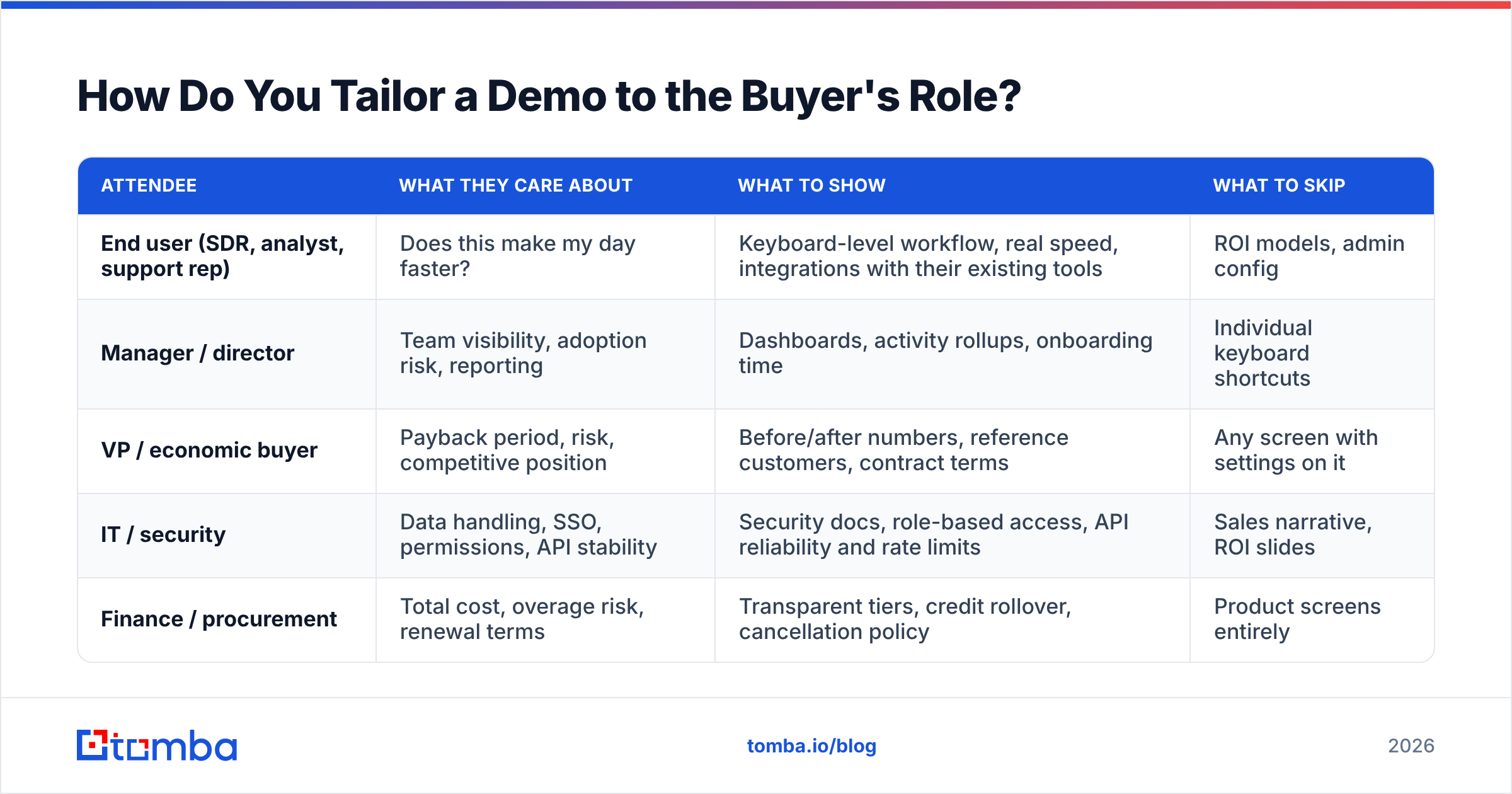
Same product, radically different demo. The mistake is running one script for all attendees.
| Attendee | What they care about | What to show | What to skip |
|---|---|---|---|
| End user (SDR, analyst, support rep) | Does this make my day faster? | Keyboard-level workflow, real speed, integrations with their existing tools | ROI models, admin config |
| Manager / director | Team visibility, adoption risk, reporting | Dashboards, activity rollups, onboarding time | Individual keyboard shortcuts |
| VP / economic buyer | Payback period, risk, competitive position | Before/after numbers, reference customers, contract terms | Any screen with settings on it |
| IT / security | Data handling, SSO, permissions, API stability | Security docs, role-based access, API reliability and rate limits | Sales narrative, ROI slides |
| Finance / procurement | Total cost, overage risk, renewal terms | Transparent tiers, credit rollover, cancellation policy | Product screens entirely |
If you have all five on one call, sequence them: outcome and numbers first (VP is most likely to drop early), workflow in the middle, security and pricing detail at the end. Tell the room you're doing this: "I'll cover the business case in the first ten minutes so anyone on a tight schedule can drop, then we'll get into the hands-on part."
How Do You Handle Questions and Objections Live?#
Objections during a demo are a buying signal. Silence is the problem.
"Can it do X?" when the answer is no. Say no. Then say what you do instead and whether it's on the roadmap without inventing a date. "No, we don't do X natively. Teams usually handle it by Y, or through the API. It's not on the roadmap this half." Buyers have talked to four vendors. The one who admits a gap becomes the trustworthy source for everything else.
"How does this compare to [competitor]?" Answer honestly and specifically. Name where the competitor is genuinely strong. If a buyer needs a huge pre-built contact database with firmographic filters, tools like BookYourData are built exactly for that list-buying motion and are a reasonable fit. If they need real-time verified email discovery inside their own workflow, that's a different tool class. Categorizing rather than trashing makes you sound like an advisor.
"This looks expensive." Reframe against the cost of the current process you documented in discovery. If they told you two SDRs spend six hours a week building lists manually, put that number next to the subscription cost. Cost objections are almost always value-framing failures earlier in the call.
"Send me a recording and I'll share it internally." Accept, but attach a condition: "Absolutely, I'll send it today. Can we also get 20 minutes with your ops lead next week? Recordings answer 'what is it,' but they're bad at answering 'will it work for us.'"
Handling the interruption itself. When someone jumps in mid-flow, stop screen-sharing motion, look at the camera, and answer. Reps who keep clicking while answering signal that the script matters more than the person.
What Should You Do Immediately After the Demo?#
The two hours after the call decide more than the call did.
Send the recap within two hours. Structure it as: (1) the three pains you heard, in their words; (2) what you showed for each; (3) open questions you owe them; (4) the agreed next step with date and attendees. Keep it under 200 words. This document becomes the internal artifact your champion forwards — write it for the person who wasn't on the call.
Attach a mutual action plan. A simple table with columns for step, owner, and target date, covering everything from security review to contract signature. HubSpot's sales research and most modern methodology point to the same thing: deals with a written, shared close plan slip far less often than deals held together by optimism.
Log everything in the CRM the same day. Attendees, objections raised verbatim, features that got reactions, features that got nothing. Verbatim objections are gold for the next call and for your product team.
Enrich anyone new who appeared on the call. Someone always joins unannounced. Get their details into your sequence properly rather than guessing at an email format — a quick pass through an email verifier before you add them to a follow-up sequence protects your sender reputation and stops bounce-driven damage to the thread you just built.
How Do You Measure Whether Your Demos Are Working?#
Track four numbers. If you track more, you'll track none.
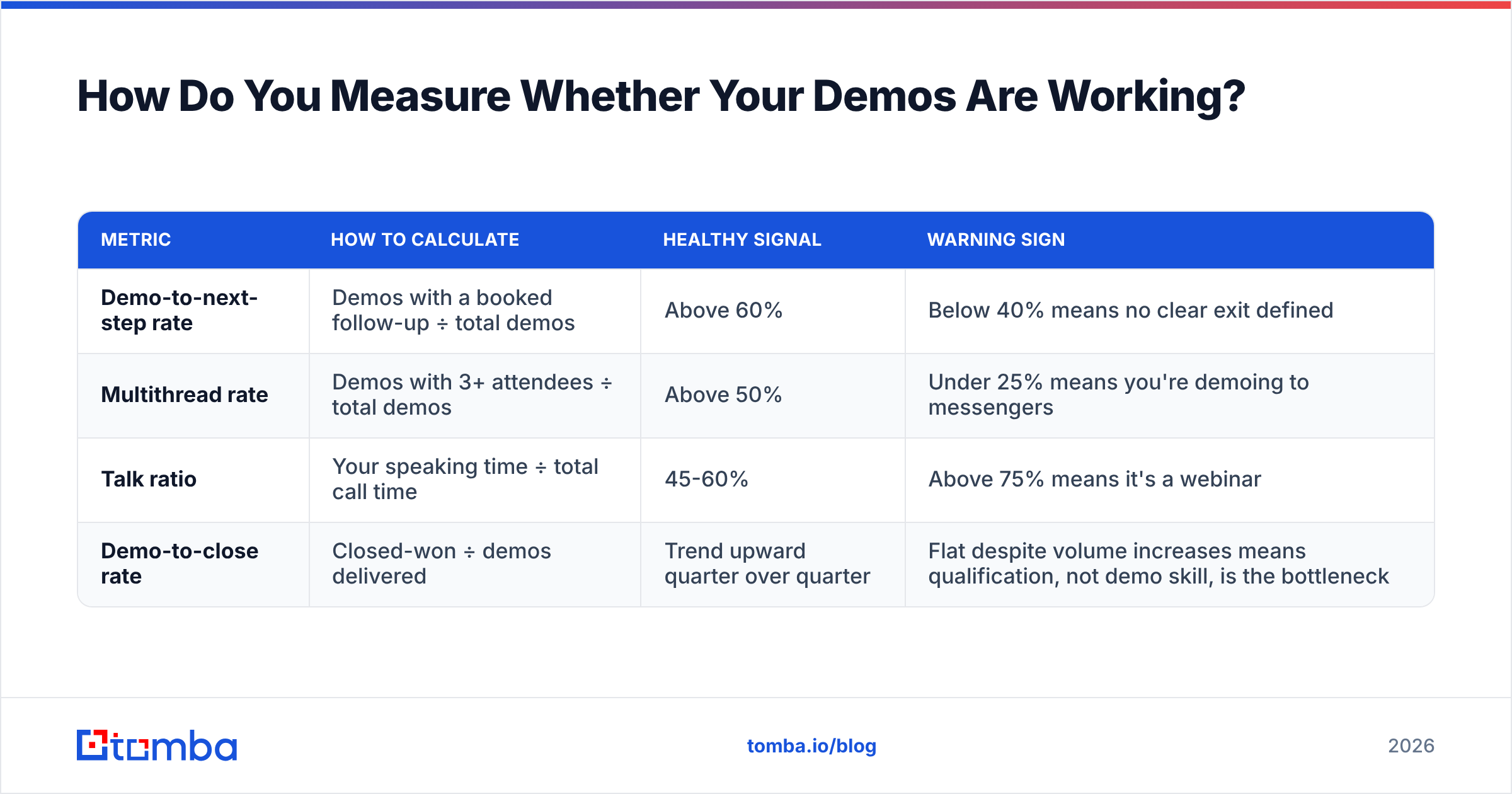
| Metric | How to calculate | Healthy signal | Warning sign |
|---|---|---|---|
| Demo-to-next-step rate | Demos with a booked follow-up ÷ total demos | Above 60% | Below 40% means no clear exit defined |
| Multithread rate | Demos with 3+ attendees ÷ total demos | Above 50% | Under 25% means you're demoing to messengers |
| Talk ratio | Your speaking time ÷ total call time | 45-60% | Above 75% means it's a webinar |
| Demo-to-close rate | Closed-won ÷ demos delivered | Trend upward quarter over quarter | Flat despite volume increases means qualification, not demo skill, is the bottleneck |
Record calls and actually review them. Pick one demo a week and watch it at 1.5x with a notepad. Count how many seconds pass before you say something specific to the buyer's business. If it's over 90, your framing needs work.
Also watch the correlation between demo length and close rate in your own data. Most teams find a ceiling somewhere between 35 and 50 minutes, after which longer calls correlate with worse outcomes — attention degrades and the "we'll get back to you" reflex kicks in.
What Are the Most Common Demo Mistakes?#
- Demoing before discovery. The root cause of nearly every other item on this list. If a prospect demands a demo on the first call, run a 10-minute discovery block at the start of it and say so explicitly.
- Narrating the interface. "Here in the top right you'll see a settings gear..." Nobody buys a settings gear. Narrate outcomes: "This is where you'd cut the list from 4,000 to the 300 that actually match."
- Apologizing for the product. "This part is a bit clunky, we're rebuilding it." You just handed the buyer an objection they didn't have.
- Demoing every feature you're proud of. Your favorite feature is often the one that took the most engineering effort, not the one that closes deals. Check which features actually appear in closed-won deal notes.
- Letting the champion demo internally without support. Give them a two-slide summary and an offer to join the internal readout. Champions lose deals in meetings you weren't invited to.
- No pricing, no next step. A demo that ends with "let me know" has a conversion rate close to zero. Book the next call before you leave the Zoom.
What Tools Support a Strong Demo Motion?#
The demo itself needs almost nothing — a stable environment, a recorder, and a calendar link. The infrastructure around it is where teams under-invest.
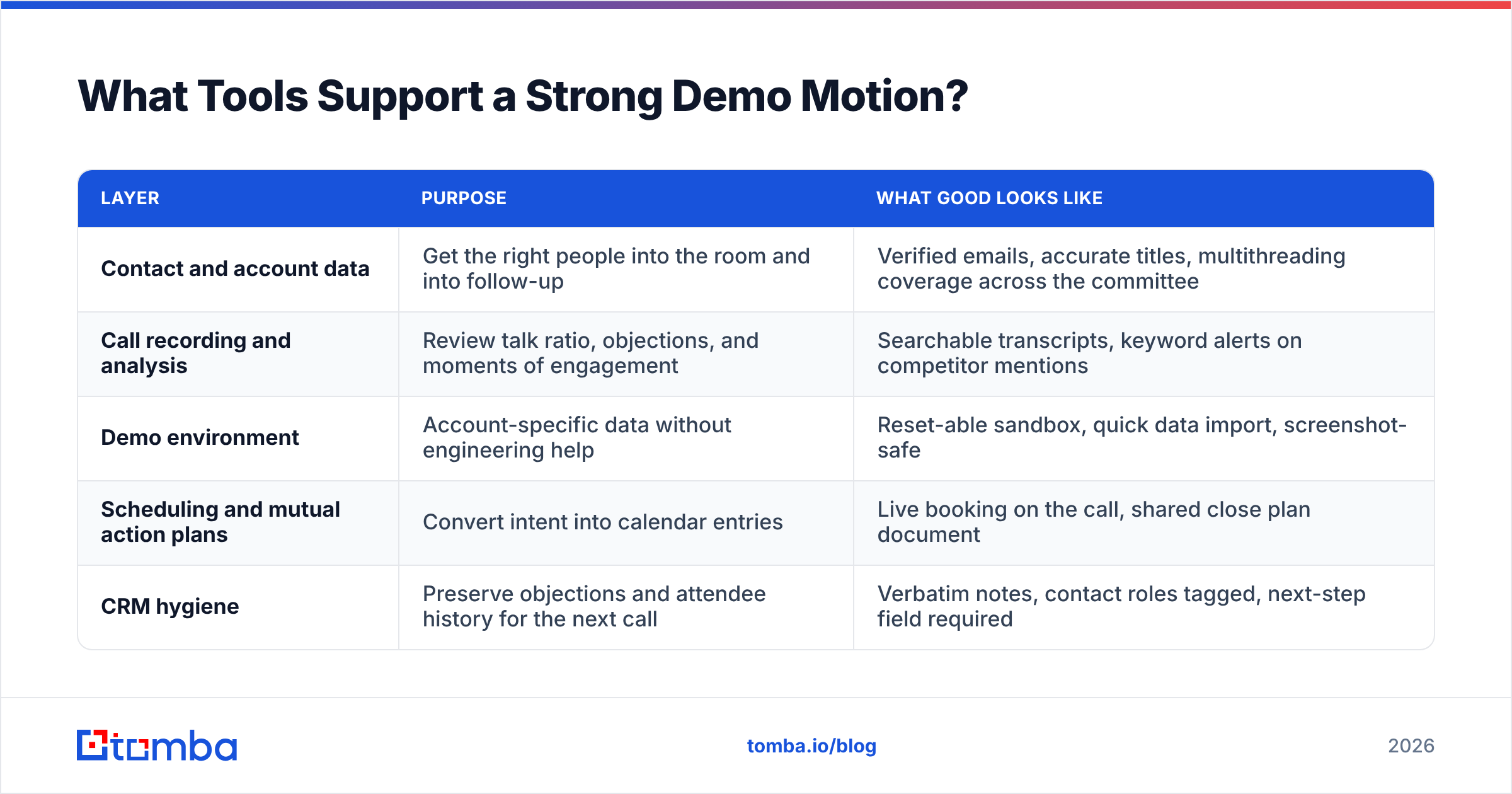
| Layer | Purpose | What good looks like |
|---|---|---|
| Contact and account data | Get the right people into the room and into follow-up | Verified emails, accurate titles, multithreading coverage across the committee |
| Call recording and analysis | Review talk ratio, objections, and moments of engagement | Searchable transcripts, keyword alerts on competitor mentions |
| Demo environment | Account-specific data without engineering help | Reset-able sandbox, quick data import, screenshot-safe |
| Scheduling and mutual action plans | Convert intent into calendar entries | Live booking on the call, shared close plan document |
| CRM hygiene | Preserve objections and attendee history for the next call | Verbatim notes, contact roles tagged, next-step field required |
Contact data is the layer that silently caps everything else. You can run a flawless demo and still lose the deal because you never got the VP of Ops into the room — or because your follow-up to the CFO bounced. Before every demo, spend ten minutes finding and verifying the two or three stakeholders your champion mentioned in passing. Reliable data enrichment on the account turns a single-threaded demo into a committee conversation, and committee conversations are the ones that close.
Ready to get the whole buying committee into your next demo? Use the Tomba Email Finder to pull verified contact details for every stakeholder on the account — the security lead, the finance approver, and the ops manager your champion forgot to invite. Start free with 25 searches a month, or move to the Starter plan at $49/mo once multithreading becomes part of every deal you run. Full Tomba pricing is public, with Growth at $99/mo and Pro at $249/mo for teams running demos at volume.
Related guides#
// get started
Find, verify and enrich your first contacts today
Start on the free plan with 25 searches a month, then scale when your team is ready.
Free plan · No credit card required · GDPR & CCPA
// about the author