How to Determine if an Email Address Is Valid in 2026
Syntax checks catch typos. MX lookups catch dead domains. SMTP catches the rest — until a catch-all server lies to you. Here is the full validation stack, in order, with what each layer can and cannot prove.
TL;DR
- "Valid" means four different things: correctly formatted, resolvable domain, accepted by the mailbox server, and actually monitored by a human. Most people only test the first one.
- Syntax and MX checks are free, instant, and catch roughly 20-30% of bad addresses in a typical scraped list. They cannot confirm the mailbox exists.
- SMTP handshake checks are the only non-sending method that queries the receiving server directly — and they are the layer that gets blocked, rate-limited, or lied to.
- Catch-all domains accept every address at the SMTP layer, so they need pattern confidence scoring, not a simple yes/no.
- Never test validity by sending a real campaign. One bad list can cost you a domain reputation that takes months to rebuild.
What does it actually mean for an email address to be valid?#
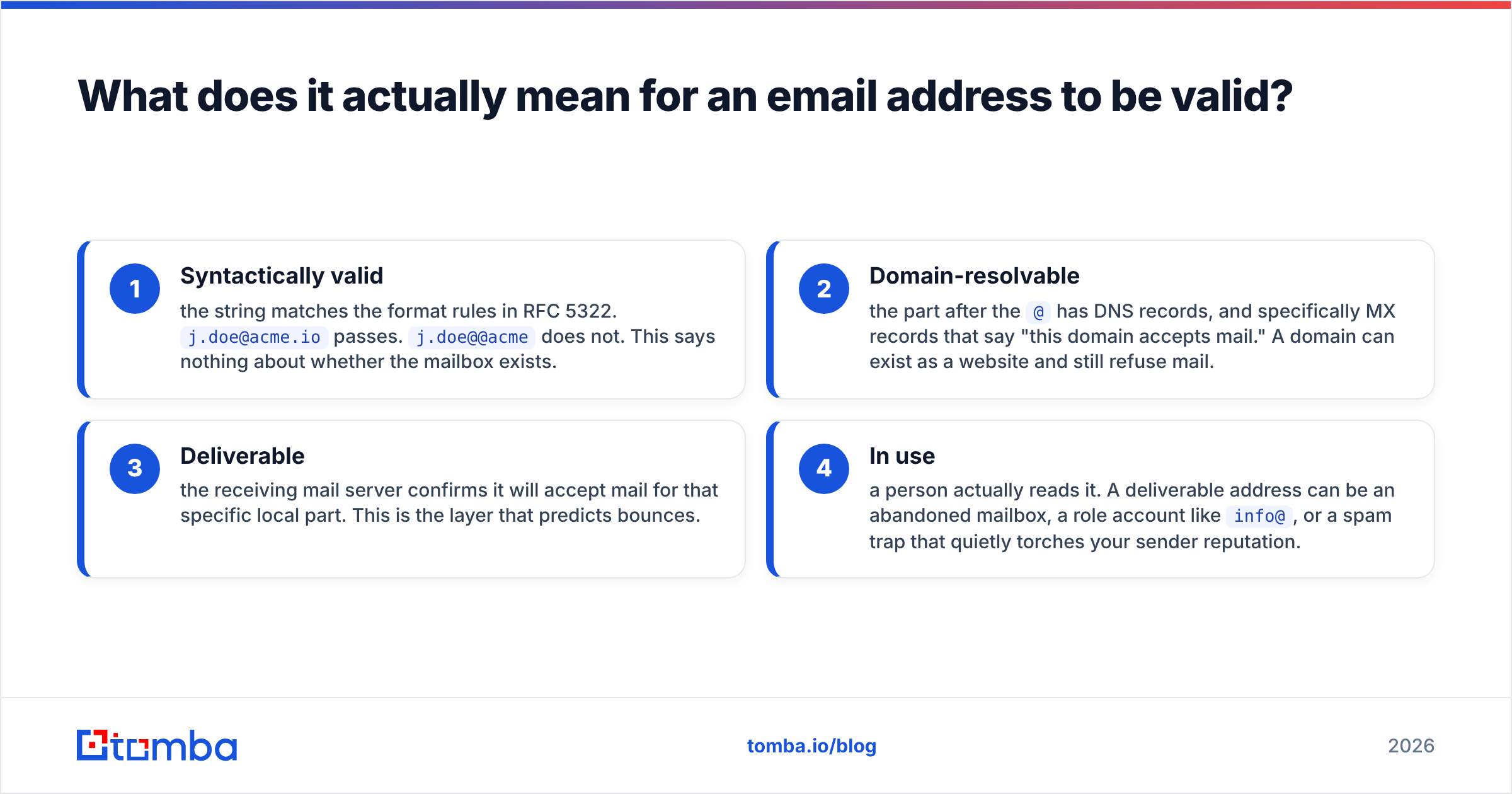
The word "valid" hides four separate questions, and confusing them is why so many people think their list is clean right up until 12% of it bounces.
- Syntactically valid — the string matches the format rules in RFC 5322.
j.doe@acme.iopasses.j.doe@@acmedoes not. This says nothing about whether the mailbox exists. - Domain-resolvable — the part after the
@has DNS records, and specifically MX records that say "this domain accepts mail." A domain can exist as a website and still refuse mail. - Deliverable — the receiving mail server confirms it will accept mail for that specific local part. This is the layer that predicts bounces.
- In use — a person actually reads it. A deliverable address can be an abandoned mailbox, a role account like
info@, or a spam trap that quietly torches your sender reputation.
A tool that reports "valid" without telling you which of those four it tested is not giving you information you can act on. The Wikipedia entry on email address syntax is a useful reminder of how permissive the spec really is — quoted strings, plus-addressing, and IP-literal domains are all technically legal even though almost no B2B contact uses them.

How do you check email syntax without breaking real addresses?#
Start here because it is free and instant, but keep your regex conservative. The classic mistake is writing a strict pattern that rejects legitimate addresses — apostrophes in Irish surnames, plus signs, long TLDs like .technology, and internationalised domains all get caught by naive rules.
Run these five checks in order:
- Single
@separator — exactly one, not zero, not two. Split on the last@to handle quoted local parts. - Local part length and characters — 1 to 64 characters. Letters, digits, and
. _ % + -cover essentially every real business address. Reject leading, trailing, or consecutive dots. - Domain shape — at least one dot, no leading or trailing hyphen in any label, each label under 64 characters, total address under 254 characters.
- TLD sanity — two characters minimum, alphabetic. Do not maintain a hardcoded TLD allowlist; it will be stale within a year.
- Typo detection on the domain —
gmial.com,yahooo.com, andhotmial.comare syntactically perfect and completely undeliverable. Levenshtein distance against the top 200 mail domains catches most of them.
If you just want to sanity-check one address before adding it to a CRM, a browser tool is faster than writing code — Tomba's free email checker runs syntax plus the DNS layer in one pass.
What does an MX record lookup prove?#
An MX (Mail Exchanger) lookup asks DNS which servers handle mail for a domain. It is the cheapest high-value check you can run, because a domain with no MX records cannot receive mail at all — every address on it is dead, no matter how well-formed.
Three outcomes matter:
- MX records present — the domain accepts mail. Move to the next layer.
- No MX, but an A record present — some legacy servers still accept mail on the A record. Treat this as "risky," not "invalid."
- No DNS at all (NXDOMAIN) — the domain does not exist. Hard invalid. This is common in lists built from OCR'd conference badges or web scrapes with truncated strings.
MX lookups also tell you who handles the mail, which is strategically useful. If the MX points to google.com or outlook.com, you know the mailbox behaves like Gmail or Microsoft 365 and you can predict how aggressive its filtering will be. If it points to a security gateway like Proofpoint or Mimecast, expect SMTP probing to be blocked entirely.
How does an SMTP check work, and when does it lie?#
An SMTP verification opens a connection to the receiving mail server and walks through the beginning of a delivery conversation — HELO, MAIL FROM, RCPT TO — then disconnects before sending any data. The server's response to RCPT TO is the answer: a 250 means it will accept mail for that address, a 550 means it will not.
No email is ever delivered. Nothing appears in the recipient's inbox. That is the whole appeal of the method.
But four things break it, and any verification vendor claiming 99%+ certainty across all domains is glossing over them:
- Greylisting — the server returns a temporary 4xx to unknown senders and expects a retry. A single-pass check reads this as "unknown."
- Rate limiting and IP blocking — hammering a server with
RCPT TOprobes from one IP gets that IP blocked fast. This is why serious verification services run large rotating IP pools rather than one box. - Catch-all configuration — the server returns 250 for literally every address. More on this below.
- Deliberate obfuscation — some providers, notably Yahoo and several security gateways, return uninformative responses on purpose to defeat exactly this kind of probing.
The practical consequence: SMTP checking is necessary but not sufficient. It resolves the majority of addresses cleanly and hands you a residue of "unknown" and "accept-all" results that need a different technique.
What do you do about catch-all domains?#
A catch-all (or accept-all) domain is configured to accept mail addressed to any local part and sort it out internally. ceo@company.com, qwerty@company.com, and notarealperson@company.com all get a 250. Roughly 15-20% of B2B domains are configured this way, and the rate is higher among smaller companies on hosted platforms.
SMTP verification cannot resolve these. What can:
- Email pattern inference — if you have confirmed addresses at the same domain, you know the format. If 40 known contacts at
acme.ioall usefirst.last@, thensarah.chen@acme.iois very likely real even though the server will not confirm it. - Source corroboration — an address that appears in a public signature, a press release, a GitHub commit, or a conference speaker page has independent evidence behind it.
- Historical engagement data — a provider that has seen that exact address bounce or deliver in the past has the only truly reliable signal.
This is the layer where verification tools genuinely differ. A pure SMTP checker marks the whole catch-all bucket "unknown" and leaves you to guess. A tool with a real dataset behind it scores them. Tomba's catch-all verifier uses pattern confidence plus source data rather than returning a shrug.
Which validation method should you use when?#
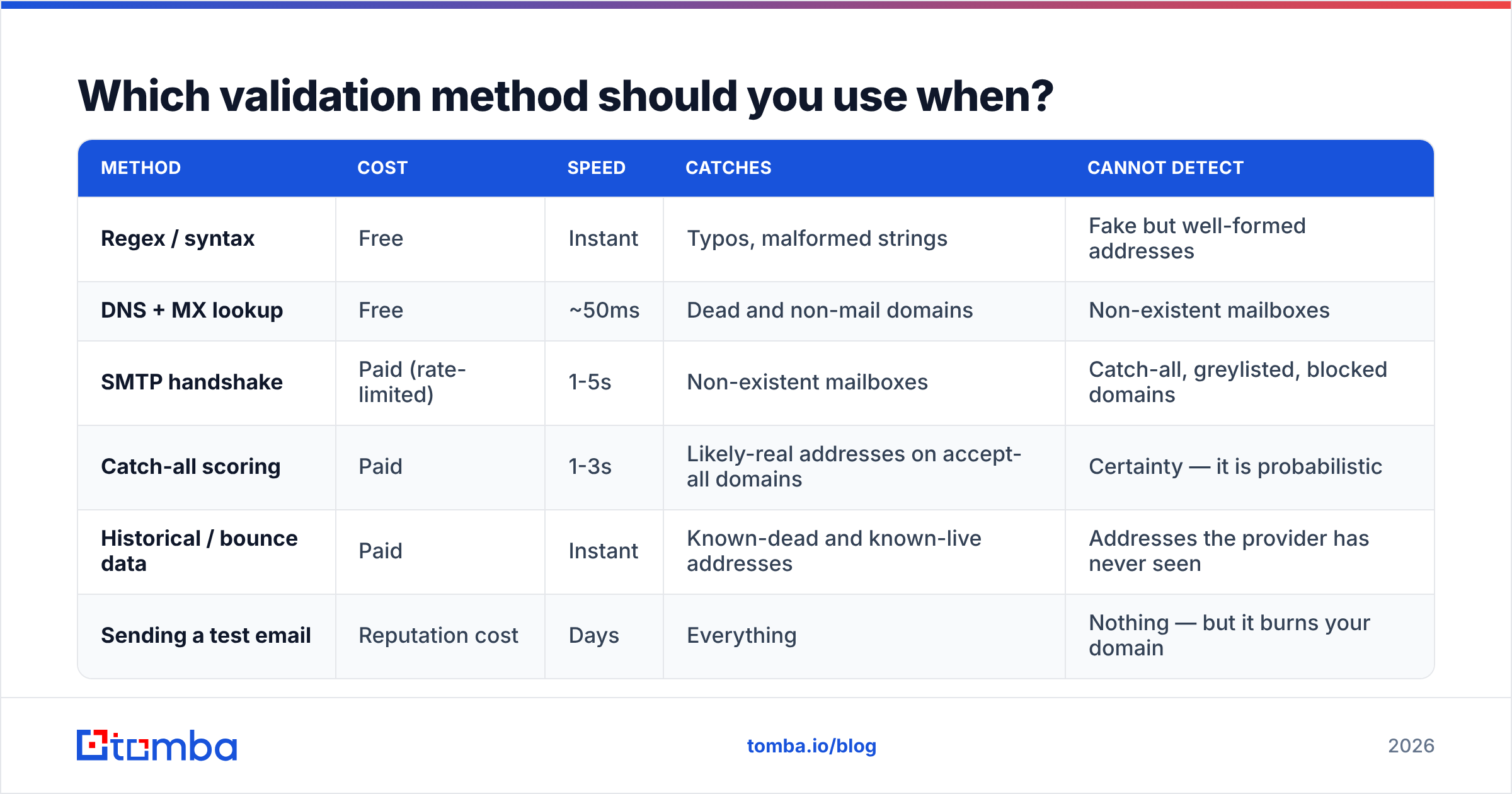
| Method | Cost | Speed | Catches | Cannot detect |
|---|---|---|---|---|
| Regex / syntax | Free | Instant | Typos, malformed strings | Fake but well-formed addresses |
| DNS + MX lookup | Free | ~50ms | Dead and non-mail domains | Non-existent mailboxes |
| SMTP handshake | Paid (rate-limited) | 1-5s | Non-existent mailboxes | Catch-all, greylisted, blocked domains |
| Catch-all scoring | Paid | 1-3s | Likely-real addresses on accept-all domains | Certainty — it is probabilistic |
| Historical / bounce data | Paid | Instant | Known-dead and known-live addresses | Addresses the provider has never seen |
| Sending a test email | Reputation cost | Days | Everything | Nothing — but it burns your domain |
The right stack for most B2B teams runs all of the first five in sequence and never uses the sixth. Run the free layers first so you are not paying credits to SMTP-check bob@gmial.con.
How do the main verification approaches compare in practice?#
There are three broad categories of tooling, and they trade off differently.
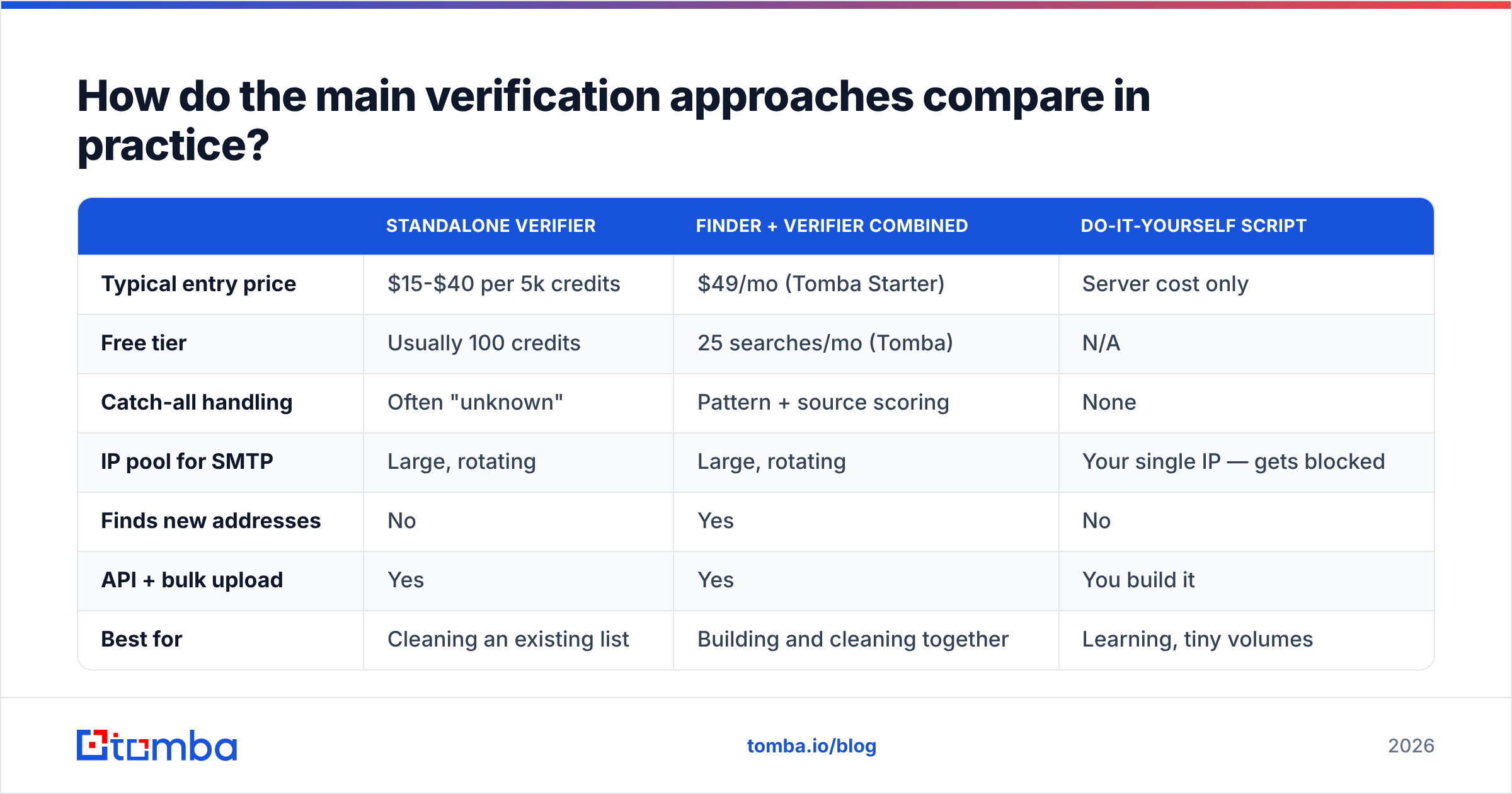
| Standalone verifier | Finder + verifier combined | Do-it-yourself script | |
|---|---|---|---|
| Typical entry price | $15-$40 per 5k credits | $49/mo (Tomba Starter) | Server cost only |
| Free tier | Usually 100 credits | 25 searches/mo (Tomba) | N/A |
| Catch-all handling | Often "unknown" | Pattern + source scoring | None |
| IP pool for SMTP | Large, rotating | Large, rotating | Your single IP — gets blocked |
| Finds new addresses | No | Yes | No |
| API + bulk upload | Yes | Yes | You build it |
| Best for | Cleaning an existing list | Building and cleaning together | Learning, tiny volumes |
If you already have a list and only need it scrubbed, a standalone verifier is the cheapest path. If you are sourcing contacts as well as cleaning them, paying twice makes little sense — Tomba's email verifier shares a credit pool with the finder, and the full Tomba pricing ladder runs Free (25 searches/mo), Starter $49/mo, Growth $99/mo, Pro $249/mo, and custom Enterprise.
The DIY route deserves a warning. Writing an SMTP checker is a fun weekend project and a terrible production system. Your outbound IP will be blocklisted within days of any real volume, and once it is, your actual mail from that infrastructure suffers too.

How do you validate an entire list at once?#
Single-address checks are for CRM entry and form validation. For a list, the workflow looks different:
- Deduplicate first. Duplicates inflate your credit spend and skew your bounce math. Normalise case and strip Gmail dots and plus-tags before comparing.
- Strip role accounts.
info@,sales@,support@,admin@,noreply@are deliverable and useless for one-to-one outreach. Many providers flag them separately — keep the flag, decide per campaign. - Run the free layers locally. Syntax and MX on your own machine costs nothing and typically removes a fifth of a scraped list before you spend a credit.
- Bulk upload the remainder. A bulk verify job handles the SMTP and catch-all layers across thousands of rows without you managing concurrency or IP rotation.
- Segment by result, do not just delete. Valid goes to the main sequence. Catch-all with high pattern confidence goes to a smaller, well-warmed sending domain. Unknown gets parked. Invalid gets deleted.
- Re-verify on a schedule. B2B email data decays at roughly 22-30% per year as people change jobs — a figure consistently cited in HubSpot's database decay research. A list verified nine months ago is not a verified list.
What bounce rate should you actually expect?#
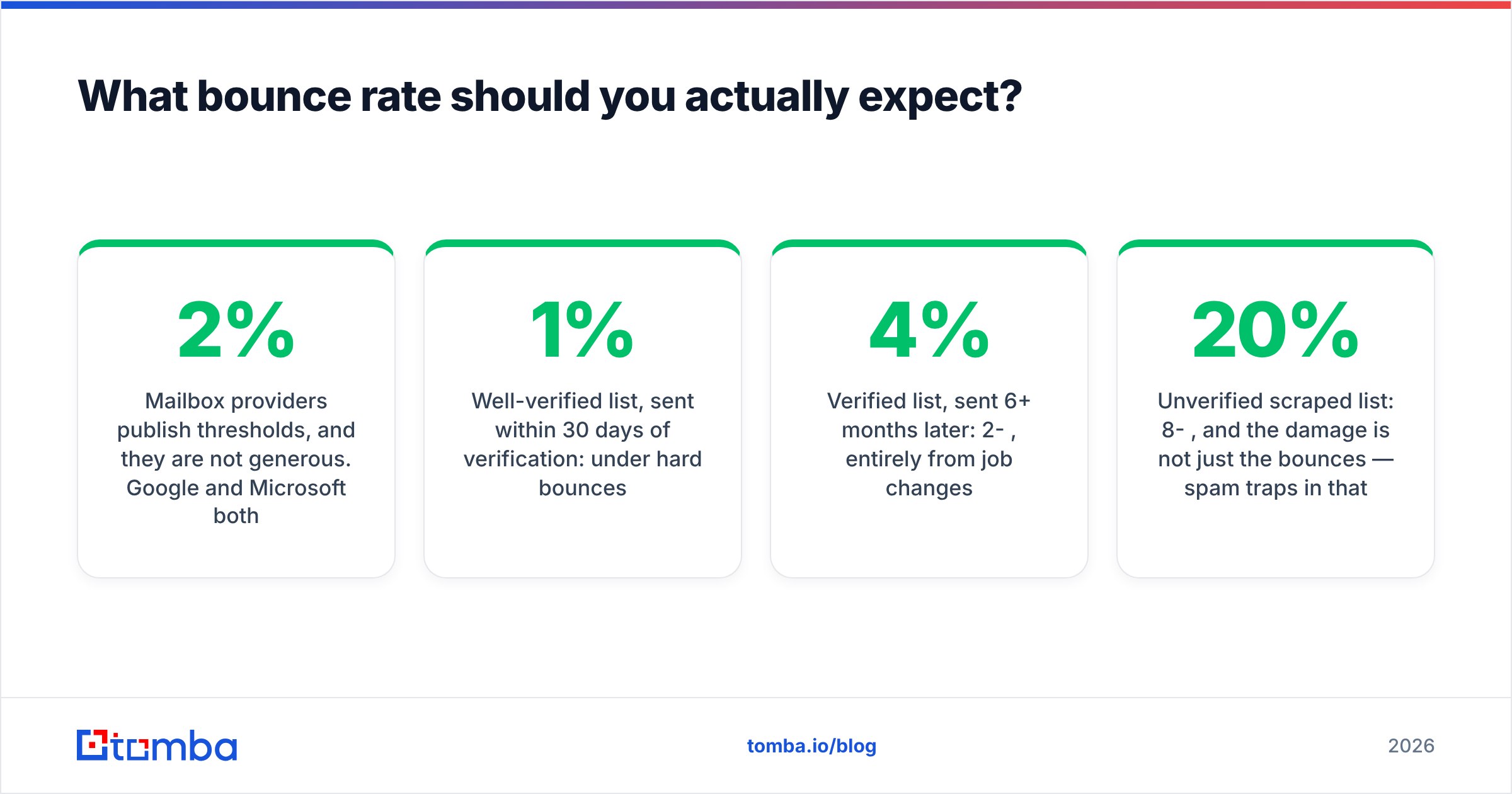
Mailbox providers publish thresholds, and they are not generous. Google and Microsoft both treat sustained hard-bounce rates above 2% as a reputation signal, and most email service providers will suspend an account well before 5%.
Realistic numbers after a proper verification pass:
- Well-verified list, sent within 30 days of verification: under 1% hard bounces.
- Verified list, sent 6+ months later: 2-4%, entirely from job changes.
- Unverified scraped list: 8-20%, and the damage is not just the bounces — spam traps in that bucket can put your domain on a blocklist.
No verifier gets to 100%. Anyone advertising it is either counting only the addresses they could resolve or ignoring catch-all entirely. Judge vendors on how they report the hard cases, not on the headline accuracy number, and cross-check claims against real user reviews on G2 rather than vendor landing pages.
What are the most common validation mistakes?#
- Trusting regex alone. It proves formatting, nothing more. A perfectly formatted address for a person who left the company in 2023 passes every syntax test ever written.
- Verifying once and never again. Decay is continuous. Build re-verification into your sequence launch checklist.
- Deleting every catch-all. On some verticals that is a third of your addressable market. Score them, segment them, send carefully.
- Testing with a live campaign. The feedback loop is real bounces on real infrastructure. There is no version of this that is cheaper than verification credits.
- Ignoring the role-account flag.
info@addresses inflate your "valid" count and depress your reply rate simultaneously. - Sending from a cold domain regardless. Perfect data on an unwarmed domain still lands in spam. Verification solves deliverability's data problem, not its reputation problem.
Where should you start?#
Run the free layers today: syntax, then MX. That alone will tell you whether your list has a data-quality problem or a targeting problem. If a meaningful share of your addresses fail those checks, the source is the issue, not the verification step.
Then decide what you are actually buying. If your list already exists and just needs scrubbing, any competent standalone verifier will do the job. If you are still building the list — and most teams are — pay once for both. Tomba's Email Finder returns addresses that have already been through the syntax, MX, SMTP, and catch-all layers with a confidence score attached, so the thing you export is a list you can send to rather than a list you then have to clean. Start on the free tier at 25 searches a month, and only move to Starter at $49/mo once you know the hit rate on your own target accounts.
Related guides#
// get started
Find, verify and enrich your first contacts today
Start on the free plan with 25 searches a month, then scale when your team is ready.
Free plan · No credit card required · GDPR & CCPA
// about the author