How to Email the Hiring Manager: A 2026 Playbook
Applying through the portal puts you in a queue. Emailing the hiring manager directly puts you in a conversation. Here's how to find the right address, verify it, and write a note that gets answered.
TL;DR
- Applying through the job portal puts your resume in a queue of 200+. A direct email to the hiring manager puts you in a one-on-one conversation.
- The hiring manager is usually the person who will manage the role — the engineering director for a senior dev job, the VP of Sales for an AE job. Not the recruiter, not HR.
- Find them with LinkedIn plus a company domain search, confirm the email pattern, then verify the address before you send. Unverified guesses bounce and damage nothing but your one shot.
- The email itself should be under 150 words: who you are, one specific proof point tied to their problem, one low-friction ask.
- Send Tuesday–Thursday morning in their timezone, follow up once after 4–5 business days, then stop.
Why does emailing the hiring manager work better than applying?#
Because the applicant tracking system is a filter, and the hiring manager is a human with a hole in their team.
Think of the job portal as the front desk of a large office building. You hand your resume to a receptionist who logs it, files it, and promises someone will look. Emailing the hiring manager is walking up to the person whose project is behind schedule and saying, "I've done this exact thing three times." One of those is a queue. The other is a conversation.
The mechanics back this up. A typical corporate job posting draws hundreds of applications, and recruiters screen the pile with keyword filters before a human ever reads a line. Your carefully written resume competes on token overlap. Meanwhile the hiring manager — the person actually feeling the pain of an open headcount — often has an empty inbox on that topic, because almost nobody emails them.
That asymmetry is the entire opportunity. It is the same asymmetry that makes cold outbound work in B2B sales: the channel everyone uses is saturated, and the channel almost nobody uses is wide open.
There's a caveat worth stating up front. This tactic works when the email is specific, short, and respectful. It backfires when it's a mass-blasted template with the company name swapped in. The difference between "impressive initiative" and "spam" is about twenty minutes of research per email.
Wait — that image reference is malformed. Here it is correctly:

Who is the actual hiring manager?#
The hiring manager is the person the role reports to. That's the working definition, and it filters out most of the confusion.
Here's how the cast of characters usually breaks down:
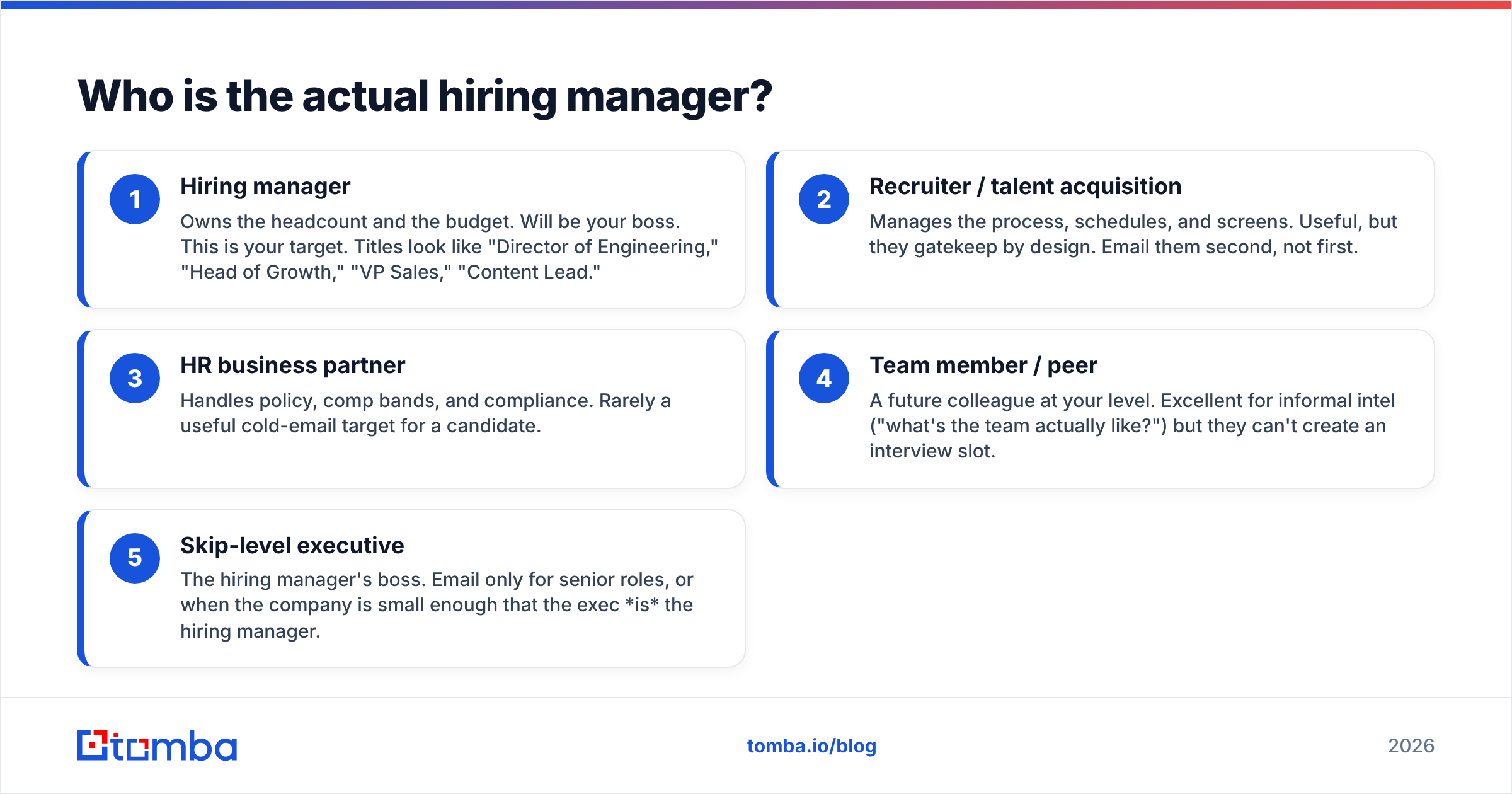
- Hiring manager — Owns the headcount and the budget. Will be your boss. This is your target. Titles look like "Director of Engineering," "Head of Growth," "VP Sales," "Content Lead."
- Recruiter / talent acquisition — Manages the process, schedules, and screens. Useful, but they gatekeep by design. Email them second, not first.
- HR business partner — Handles policy, comp bands, and compliance. Rarely a useful cold-email target for a candidate.
- Team member / peer — A future colleague at your level. Excellent for informal intel ("what's the team actually like?") but they can't create an interview slot.
- Skip-level executive — The hiring manager's boss. Email only for senior roles, or when the company is small enough that the exec is the hiring manager.
To identify the right one, read the job description like a document with fingerprints on it. Phrases like "reports to the Director of Data" or "you'll partner closely with the Growth team" name the org. Cross-reference on LinkedIn: search the company, filter by the department, and look for the most senior person whose scope covers the role but who isn't three levels above it. At a 40-person startup, that might be the CEO. At a 4,000-person enterprise, it's a director.
One more signal: check who posted the job on LinkedIn. Postings often carry a "posted by" avatar, and roughly half the time that's the hiring manager rather than a recruiter.
How do you find the hiring manager's email address?#
You have four reliable routes, and you should use them in this order.
Route 1 — Find the company's email pattern. Almost every company uses one format across the org: first.last@, first@, flast@, or firstl@. Determine the pattern once and you can construct any address at that company. A company email pattern check does this in seconds, and a domain search returns known addresses at the domain along with the dominant format.
Route 2 — Search the person directly. If you have the name and the company domain, an email finder returns the specific address plus a confidence score and the public sources it was seen in. This is faster than pattern-guessing and produces a verifiable result rather than a hypothesis.
Route 3 — Start from their LinkedIn profile. When you found the hiring manager on LinkedIn but don't know their exact name spelling or middle initial, a LinkedIn finder resolves the profile URL to a work email.
Route 4 — Manual sleuthing. Press releases, conference speaker pages, GitHub commit histories, and the company's own blog bylines all leak addresses. Slow, but free, and occasionally the only thing that works at a company with aggressive email obfuscation.
Whatever route you take, verify before you send. A bounced email at a company you're applying to is a small but real negative signal, and at scale it hurts your sending domain. Run the address through an email verifier first. If the domain is catch-all — meaning it accepts everything and tells you nothing — a catch-all verifier gives you a probability rather than a shrug.
Which method should you use?#
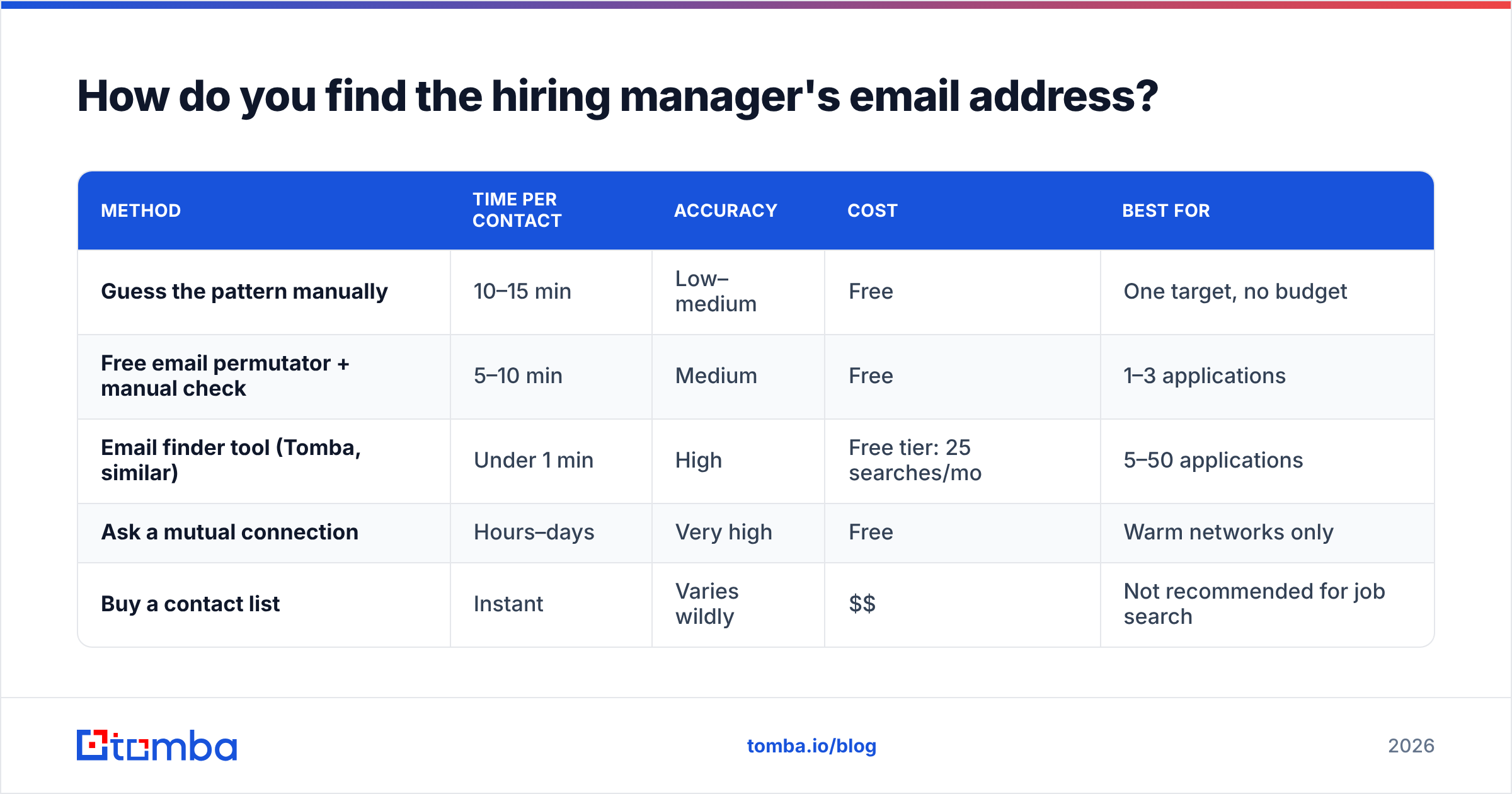
| Method | Time per contact | Accuracy | Cost | Best for |
|---|---|---|---|---|
| Guess the pattern manually | 10–15 min | Low–medium | Free | One target, no budget |
| Free email permutator + manual check | 5–10 min | Medium | Free | 1–3 applications |
| Email finder tool (Tomba, similar) | Under 1 min | High | Free tier: 25 searches/mo | 5–50 applications |
| Ask a mutual connection | Hours–days | Very high | Free | Warm networks only |
| Buy a contact list | Instant | Varies wildly | $$ | Not recommended for job search |
For a job search, the middle row is the sweet spot. You're not running a 10,000-contact campaign — you're sending fifteen very good emails. A free tier that covers 25 lookups a month is usually enough; if you're recruiting for a team rather than applying to one, Tomba pricing starts at $49/mo on Starter and $99/mo on Growth for higher volume.
What should the email actually say?#
Under 150 words, four moves, no attachments in the first touch.
Move 1 — A subject line that describes, not sells. "Senior Backend Engineer role — 6 yrs on payments infra" beats "Passionate developer seeking opportunity." The hiring manager scans subject lines the same way you scan a busy inbox: for relevance, not enthusiasm. If you want to pressure-test options, a subject line tester will flag spam triggers and length issues.
Move 2 — One sentence on who you are and why them specifically. Not "I admire your company's mission." Something only someone who did the research could write: "I saw the posting for the Payments Platform lead — I ran the Stripe-to-Adyen migration at [Company] last year, which I'd guess is roughly the problem you're hiring for."
Move 3 — One concrete proof point. A number, a shipped thing, a named outcome. Not a paragraph of adjectives. "Cut chargeback processing from 9 days to under 24 hours" is a proof point. "Results-driven professional with a track record of excellence" is noise.
Move 4 — A low-friction ask. Not "please review my attached resume and consider me for the role." Try: "Worth a 15-minute call, or should I go through the portal?" That second half matters — it gives them a graceful out, which paradoxically makes a yes more likely.
Here's the shape:
Subject: Senior Backend Engineer — 6 yrs payments infra
Hi Priya,
I saw the Payments Platform posting. I led the Stripe-to-Adyen migration at Northwind last year — 40M transactions moved with no customer-facing downtime, and chargeback handling dropped from 9 days to under 24 hours.
Your posting mentions consolidating three processors, which is the same shape of problem.
Worth 15 minutes this week, or should I go through the portal instead?
Best,
Marcus
[LinkedIn] · [Portfolio]
That's 82 words. It respects their time, proves something, and asks for one small thing.

When should you send it, and how often should you follow up?#
Tuesday through Thursday, 7:30–9:00 AM in their timezone. Monday mornings are triage. Friday afternoons are already the weekend. Early morning lands you near the top of the inbox before the day's meetings bury it.
Follow up once, four to five business days later, and make the follow-up add something rather than repeat the ask. A relevant link, a short note on something the company shipped that week, or a one-line "still interested, happy to go through the portal if that's easier." Then stop. Two emails is persistent. Four is a problem, and hiring managers talk to each other.
A few timing details that matter more than people expect:
- Send before the posting is 5 days old. After the first week, the pile is deep and the manager has mentally shortlisted.
- Don't send during a company's known crunch. Emailing a retail company's ops director in late November is a choice.
- Match the medium. If they're active on LinkedIn and dormant on email, a connection request with a note may outperform. Some research suggests multi-channel sequences lift response rate meaningfully over single-channel.
If you're applying at volume — say a career transition where you're targeting 30 companies — keep a simple tracker: company, hiring manager, email, verification status, sent date, follow-up date, outcome. A spreadsheet is fine. A Google Sheets add-on that finds and verifies addresses in-sheet saves the copy-paste tax.
What are the most common mistakes?#
Ranked by how much damage they do.
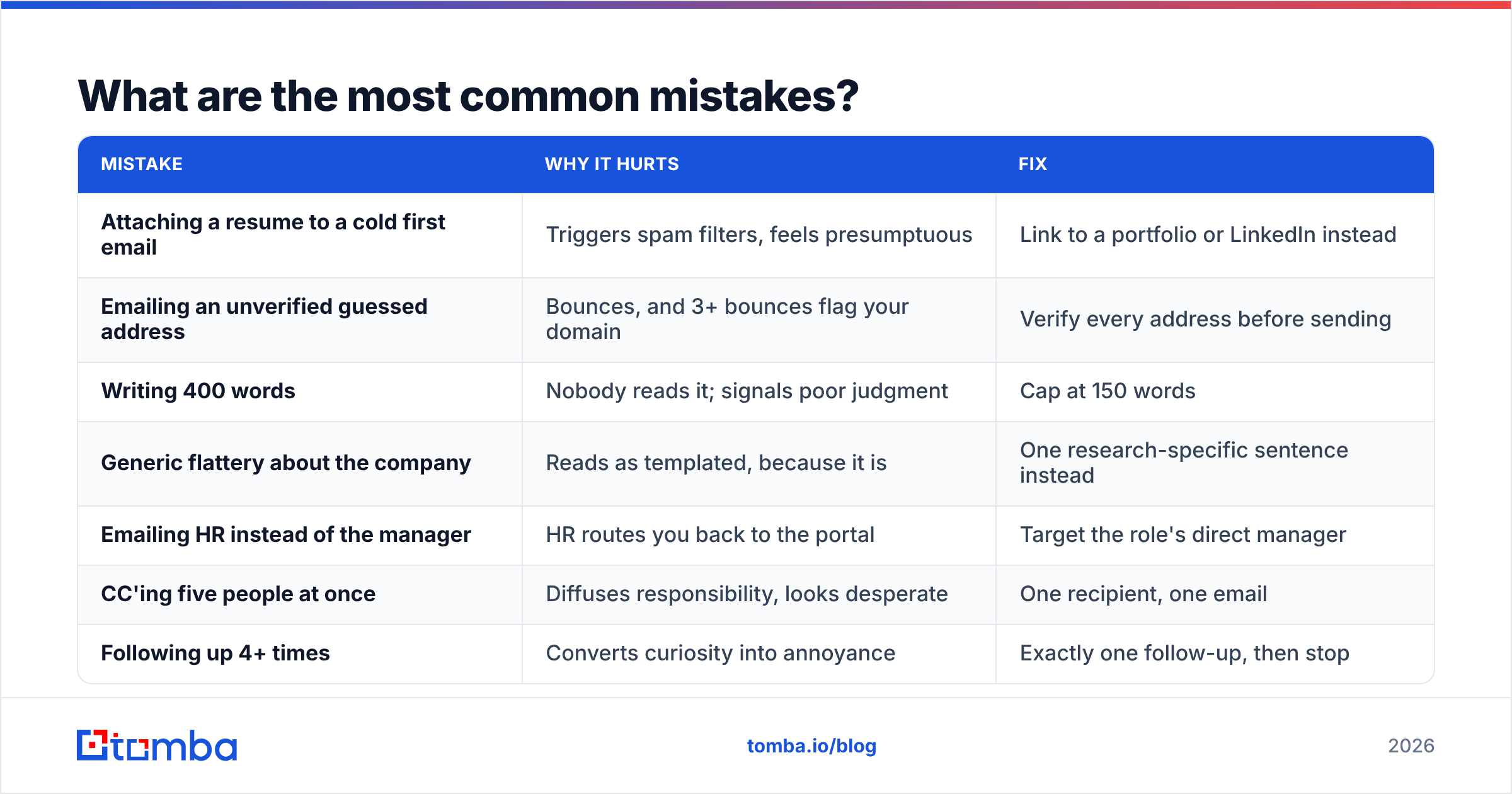
| Mistake | Why it hurts | Fix |
|---|---|---|
| Attaching a resume to a cold first email | Triggers spam filters, feels presumptuous | Link to a portfolio or LinkedIn instead |
| Emailing an unverified guessed address | Bounces, and 3+ bounces flag your domain | Verify every address before sending |
| Writing 400 words | Nobody reads it; signals poor judgment | Cap at 150 words |
| Generic flattery about the company | Reads as templated, because it is | One research-specific sentence instead |
| Emailing HR instead of the manager | HR routes you back to the portal | Target the role's direct manager |
| CC'ing five people at once | Diffuses responsibility, looks desperate | One recipient, one email |
| Following up 4+ times | Converts curiosity into annoyance | Exactly one follow-up, then stop |
The verification point deserves emphasis. Guessed addresses fail more often than people assume, and the failure is silent when a domain is configured as catch-all — the server accepts your message and quietly drops it. You'll never know whether you were ignored or never delivered. Checking the address first removes that ambiguity for the cost of one API call.
It's also worth understanding basic email deliverability if you're sending from a personal Gmail account with no history of business email. A brand-new address firing off fifteen messages to corporate domains in one afternoon can look like a burst pattern. Space them out over a week.
Is it ever a bad idea to email the hiring manager directly?#
Yes, in three situations.
When the posting explicitly says not to. Some companies — usually large ones with strict compliance requirements, government contractors, or firms in regulated industries — state that all candidate contact must route through the ATS. Ignoring that is a fast disqualification.
When you're a poor fit and know it. Direct email spends social capital. If you're missing the core requirement, a cold email doesn't fix that; it just makes the rejection personal and memorable.
When you can get a warm intro instead. A referral from a current employee outperforms any cold email. Check LinkedIn for second-degree connections before you write anything. Referral hires convert at dramatically higher rates than cold applicants across nearly every dataset — LinkedIn's own talent research and vendor benchmarks on sites like G2 consistently show the gap. Cold email is what you do when the warm path doesn't exist.
Outside those three cases, the downside is close to zero. The worst realistic outcome is no reply — which is also the outcome of applying through the portal, except you learned nothing.
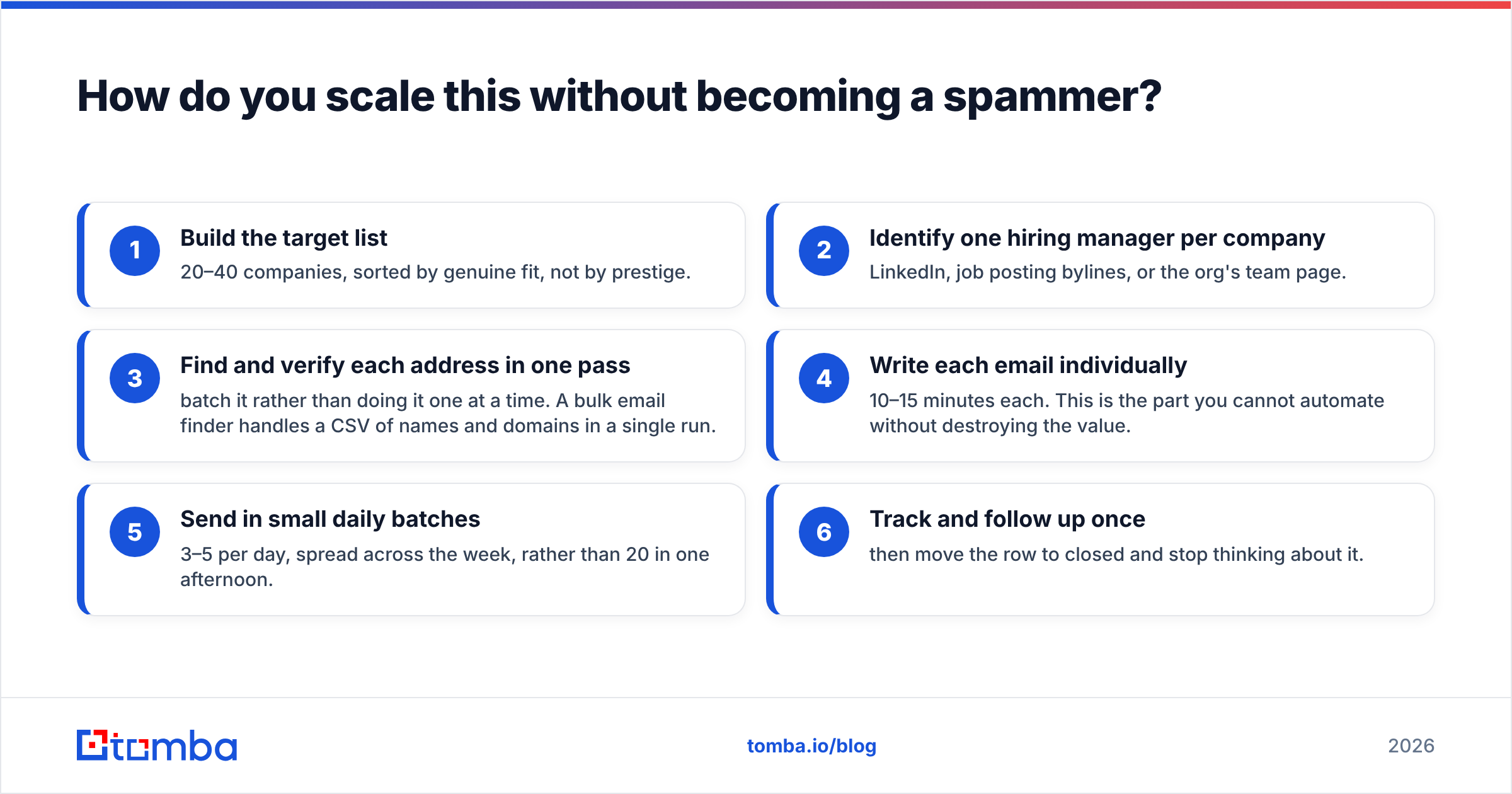
How do you scale this without becoming a spammer?#
The line is research depth per email, not volume.
Fifteen emails, each with one specific researched sentence, is not spam. Fifteen emails with {{company}} merged into the same template is. The tell is whether a human reading it would believe you looked at their company for more than eight seconds.
A workable process for a full job search:
- Build the target list — 20–40 companies, sorted by genuine fit, not by prestige.
- Identify one hiring manager per company — LinkedIn, job posting bylines, or the org's team page.
- Find and verify each address in one pass — batch it rather than doing it one at a time. A bulk email finder handles a CSV of names and domains in a single run.
- Write each email individually — 10–15 minutes each. This is the part you cannot automate without destroying the value.
- Send in small daily batches — 3–5 per day, spread across the week, rather than 20 in one afternoon.
- Track and follow up once — then move the row to closed and stop thinking about it.
If you're on the other side of this — a recruiter or founder trying to reach candidates rather than employers — the same infrastructure applies in reverse, and adding a phone finder to the stack usually lifts connect rates when email goes quiet. Vendors in the contact-data space including Tomba, BookYourData, and others all approach coverage differently; test two on the same 50-contact sample before committing to either.
The short version#
Emailing the hiring manager isn't a growth hack. It's the ordinary behavior of a candidate who took the job seriously enough to find out who they'd be working for.
Find the right person. Confirm the address rather than guessing. Write eighty words that only you could have written. Send it on a Tuesday morning. Follow up once. That's the whole method, and it takes about twenty-five minutes per company — which is less time than most people spend rewriting a cover letter nobody will read.
Ready to stop guessing addresses? Tomba Email Finder resolves a name and company domain into a verified work email in under a second, with a confidence score and the public sources behind it. The free tier includes 25 searches a month — enough to cover an entire focused job search — and paid plans start at $49/mo if you're doing this at recruiting volume. Find the hiring manager, verify the address, and send the email that actually lands.
Related guides#
// get started
Find, verify and enrich your first contacts today
Start on the free plan with 25 searches a month, then scale when your team is ready.
Free plan · No credit card required · GDPR & CCPA
// about the author