How to Find a Hiring Managers Email: 6 Methods That Work
Applying through a job board puts you in a queue. Emailing the hiring manager starts a conversation. Here is how to find a hiring managers email, verify it, and use it without getting flagged as spam.
You found the job. Now you want the person behind it. This guide shows how to find a hiring managers email in about three minutes, verify it, and send a note that gets read.
TL;DR
- The hiring manager is usually the person the role reports to — not the recruiter, and almost never
careers@. Identify the title first, the human second, the email third. - The fastest reliable sequence is: LinkedIn job post → company domain → email pattern → finder tool → verification. Most searches take under three minutes.
- Free methods (Google operators, permutators, company blog bylines) work, but they hand you guesses. Paid finders hand you a confidence score.
- Never send to an unverified address. A single hard bounce on a corporate domain can get your personal Gmail throttled, and it guarantees the message never gets read.
- Budget matters less than you think: a free tier of 25 searches per month covers an entire job hunt for most people.
Why should you email the hiring manager at all?#
Because the applicant tracking system is a filter, and the hiring manager is a person.
Think of a job board application like a letter posted into a mail sorting plant. It gets somewhere eventually, sorted by machine, ranked against a few hundred near-identical envelopes. A direct email is different. It is walking into the office and handing the letter to the person who has to solve the problem this week.
The numbers back this up. Job postings on large boards routinely collect 200–1,000 applications. Recruiters spend a median of a few seconds on the first pass. A short, direct email to the person who owns the headcount lands in an inbox that gets maybe 60 messages a day, not 600 applications a week. Your odds change before you write a single word.
The tactic comes straight from B2B sales. Cold outbound teams stopped emailing info@ a decade ago for the same reason. Generic aliases are watched by nobody in particular and actioned by nobody at all. The habit that makes an outbound sequence work makes a job application work too.

Who is actually the hiring manager?#
Before you hunt for an address, get the target right. Sending a great email to the wrong person is worse than sending nothing. You burn a referral you never got.
- The hiring manager is the person the role reports to. For a "Senior Backend Engineer, Payments" role, that is usually the Engineering Manager or Director of Payments. They own the headcount and the final yes.
- The recruiter or talent partner runs the process. They are a fair second target and often easier to find, but they work for pipeline volume, not for you.
- The skip-level (VP, Head of Department) is the fallback at companies under ~200 people, where the VP often is the hiring manager.
- The future peer is the underrated option. Someone already doing the job you want can forward your note inside the company, and internal forwards beat cold emails every time.
- Founders and C-level are fair game at startups under 50 people. At large firms they are usually a mistake, because your note gets passed to HR with no context.
How do you spot them? Open the job posting on LinkedIn and look at "Meet the hiring team" if it is shown. If it is not, search the company's people page for the department plus a seniority word ("Engineering Manager", "Head of Growth"). Then read the job description itself. A line like "reporting to the Director of Demand Generation" is a free answer.
How to find a hiring managers email: the 6 fastest methods#
Here are the six methods that actually produce a deliverable address, ordered by speed-to-result.
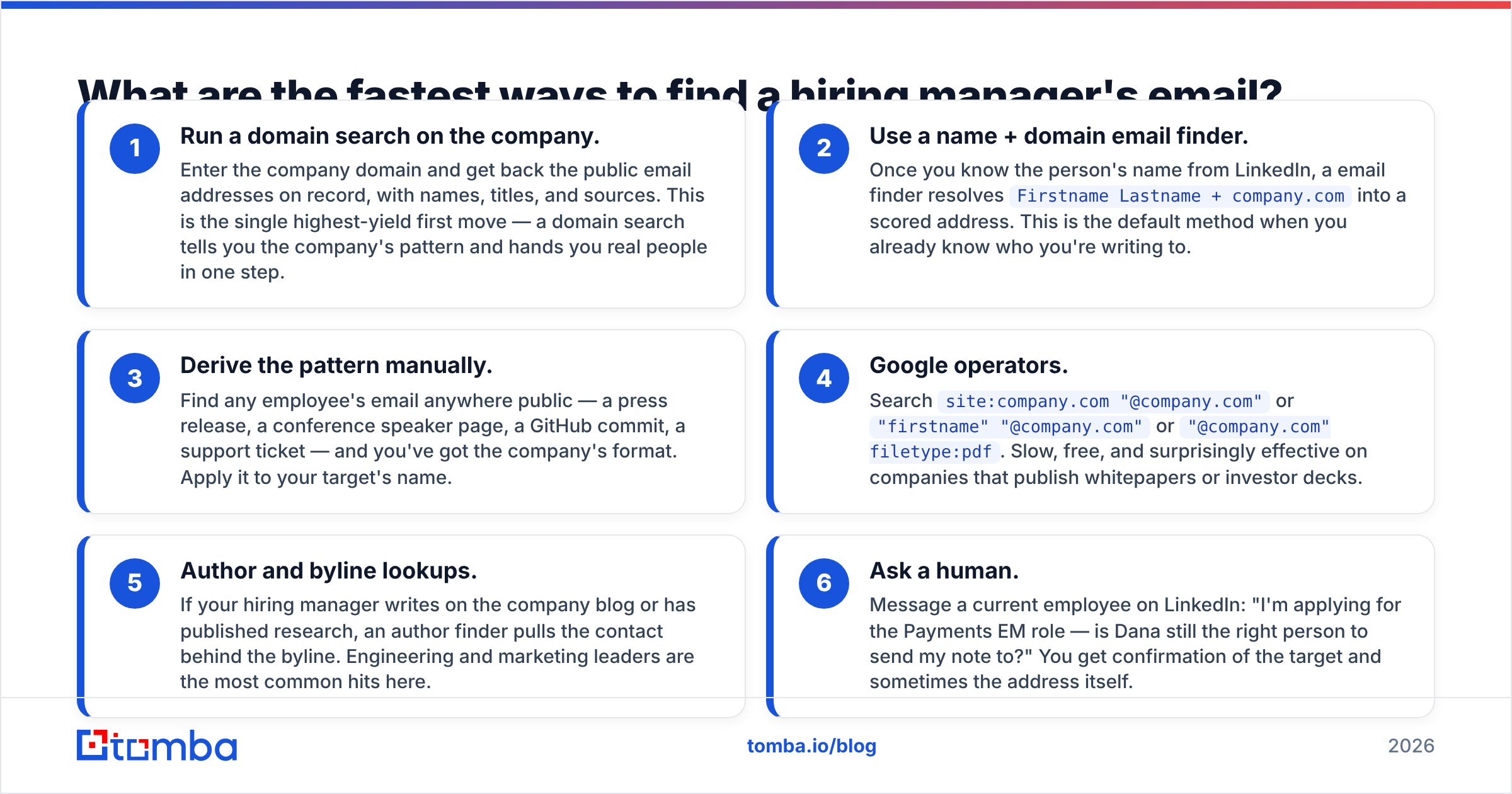
- Run a domain search on the company. Enter the company domain and get back the public email addresses on record, with names, titles, and sources. This is the highest-yield first move — a domain search tells you the company's pattern and hands you real people in one step.
- Use a name + domain email finder. Once you know the person's name from LinkedIn, a email finder turns
Firstname Lastname + company.cominto a scored address. This is the default when you already know who you are writing to. - Derive the pattern manually. Find any employee's email anywhere public — a press release, a conference speaker page, a GitHub commit, a support ticket — and you have the company's format. Apply it to your target's name.
Those three cover most searches. Use the next three when the first pass comes up empty.
- Google operators. Search
site:company.com "@company.com"or"firstname" "@company.com"or"@company.com" filetype:pdf. Slow, free, and surprisingly good on companies that publish whitepapers or investor decks. - Author and byline lookups. If your hiring manager writes on the company blog or has published research, an author finder pulls the contact behind the byline. Engineering and marketing leaders are the most common hits here.
- Ask a human. Message a current employee on LinkedIn: "I'm applying for the Payments EM role — is Dana still the right person to send my note to?" You get confirmation of the target, and sometimes the address itself.
Which method should you use — free, manual, or a finder tool?#
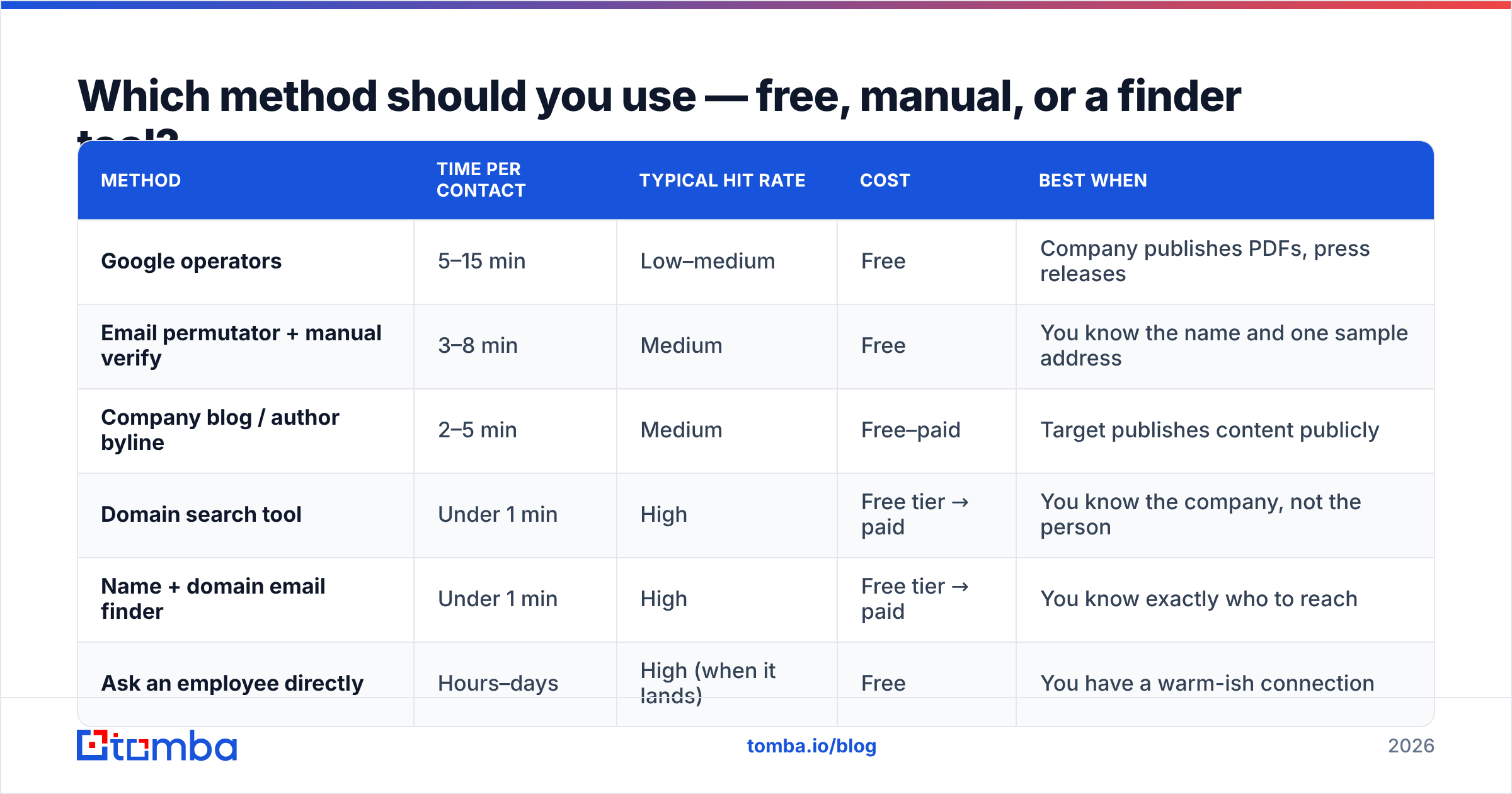
| Method | Time per contact | Typical hit rate | Cost | Best when |
|---|---|---|---|---|
| Google operators | 5–15 min | Low–medium | Free | Company publishes PDFs, press releases |
| Email permutator + manual verify | 3–8 min | Medium | Free | You know the name and one sample address |
| Company blog / author byline | 2–5 min | Medium | Free–paid | Target publishes content publicly |
| Domain search tool | Under 1 min | High | Free tier → paid | You know the company, not the person |
| Name + domain email finder | Under 1 min | High | Free tier → paid | You know exactly who to reach |
| Ask an employee directly | Hours–days | High (when it lands) | Free | You have a warm-ish connection |
The honest read: free methods are fine for one or two applications. But a real job search means 20 to 40 targeted applications over six weeks. At that size, the manual route costs you several full working days. That is the actual price of "free".
How do you guess an email pattern correctly?#
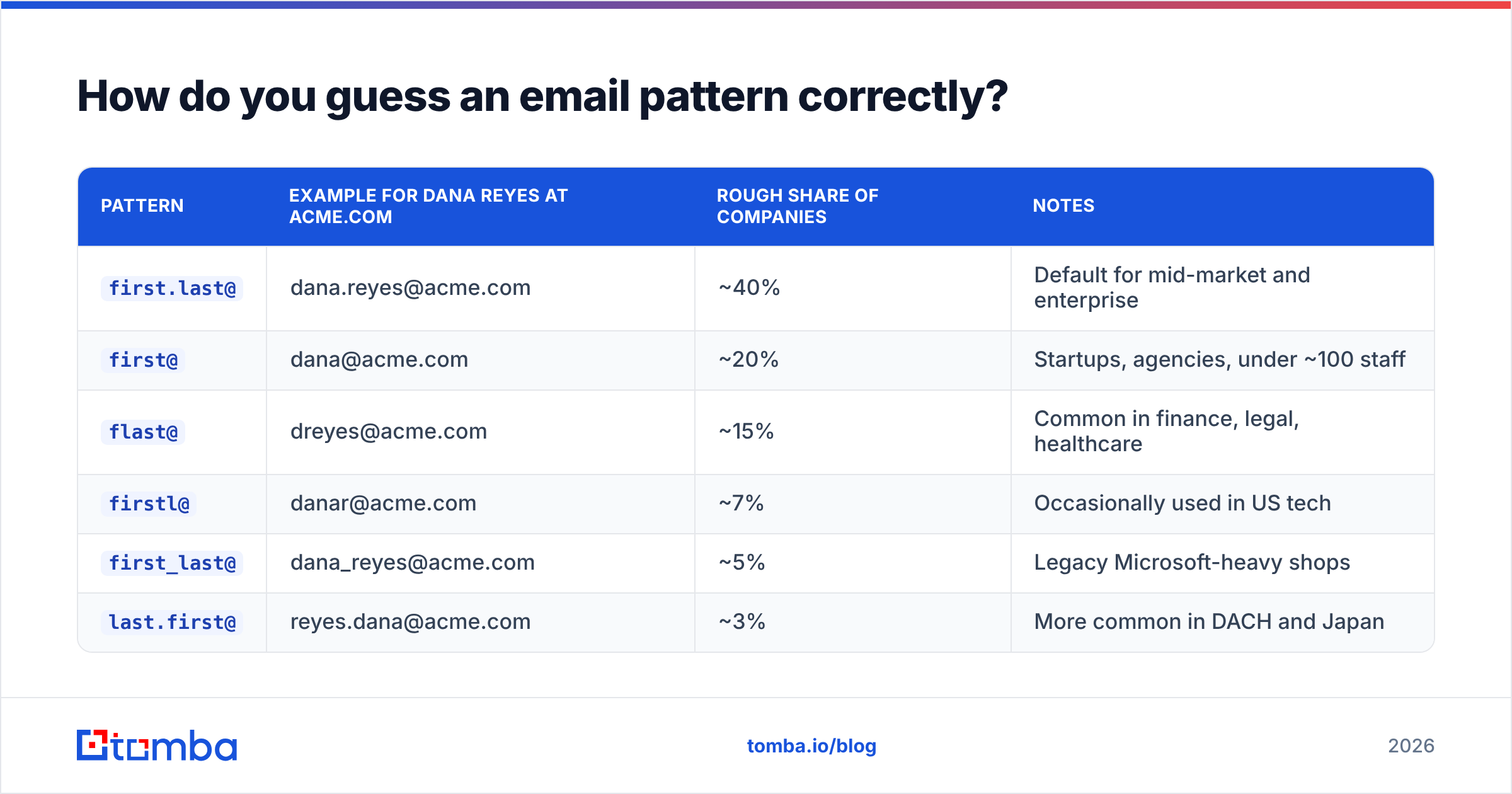
Corporate email formats are boringly predictable. Roughly 70–75% of B2B domains use one of the first three formats below.
| Pattern | Example for Dana Reyes at acme.com | Rough share of companies | Notes |
|---|---|---|---|
first.last@ |
dana.reyes@acme.com | ~40% | Default for mid-market and enterprise |
first@ |
dana@acme.com | ~20% | Startups, agencies, under ~100 staff |
flast@ |
dreyes@acme.com | ~15% | Common in finance, legal, healthcare |
firstl@ |
danar@acme.com | ~7% | Occasionally used in US tech |
first_last@ |
dana_reyes@acme.com | ~5% | Legacy Microsoft-heavy shops |
last.first@ |
reyes.dana@acme.com | ~3% | More common in DACH and Japan |
Two catches nobody warns you about.
Duplicate names. At a 5,000-person company there may be three Dana Reyeses. The pattern then breaks into dana.reyes2@ or dreyes3@. Pattern logic alone cannot solve this. You need a source-backed record.
Catch-all domains. Some companies accept mail at every address on the domain. So asdfgh@acme.com comes back "valid" to a naive checker. That is why a permutator's output is a guess, not an answer. Run suspicious domains through a catch-all verifier before you trust a green tick. If you want to build candidates by hand first, a email permutator produces the full list in one click, and a company email pattern lookup tells you which format the domain really uses.

Why does verification matter more than finding?#
Because a bounce is not neutral. It is a negative signal that follows you.
When you send to a dead address, the receiving server returns a hard bounce. Mailbox providers track your bounce ratio at the sending-address level. Personal Gmail accounts are more forgiving than cold-email domains. But a cluster of bounces in a short window still hurts your sender reputation. Mail that would have landed in Primary starts landing in Promotions or Spam. During a job search, that is the difference between an interview and silence you can never explain.
Verification is the cheap insurance. A proper email verifier runs an MX lookup, an SMTP handshake, a disposable-domain check, and a role-account check. It returns a status you can act on:
- Valid — the mailbox exists and accepts mail. Send.
- Accept-all / catch-all — the domain accepts everything. Send only if the pattern is backed by a second source.
- Unknown — the server did not answer clearly. Treat as risky; try the LinkedIn route instead.
- Invalid / disposable / role — do not send.
careers@,jobs@, andhr@are role accounts and belong in this bucket for your purposes.
If you want the mechanics underneath, the email address and MX record specs explain why some servers answer honestly and some do not.
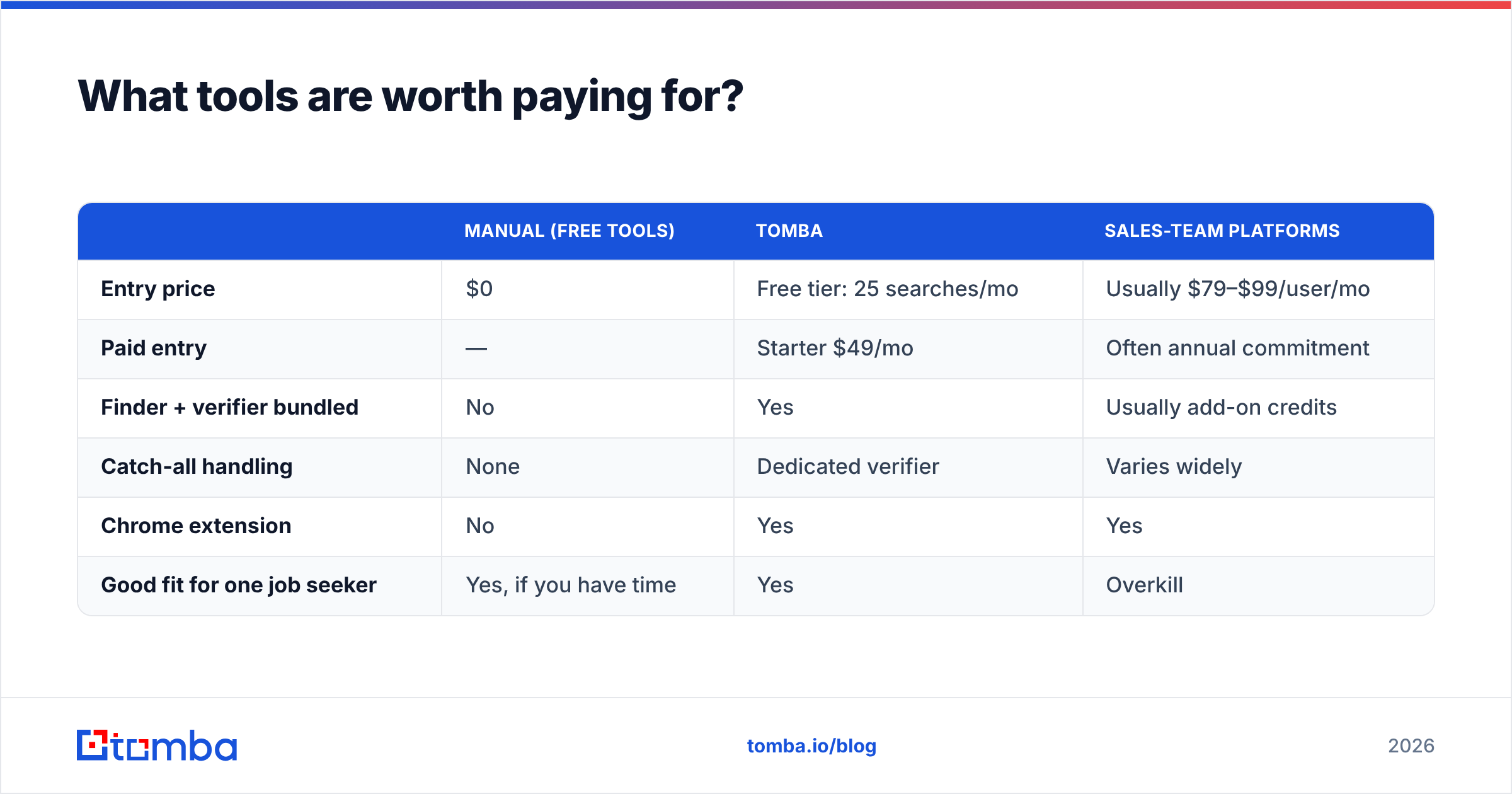
What tools are worth paying for?#
The market here is crowded. G2's lead intelligence category lists well over a hundred vendors. Most are built for sales teams buying seats, not for one person running a job search. That gap matters when you compare prices.
| Manual (free tools) | Tomba | Sales-team platforms | |
|---|---|---|---|
| Entry price | $0 | Free tier: 25 searches/mo | Usually $79–$99/user/mo |
| Paid entry | — | Starter $49/mo | Often annual commitment |
| Finder + verifier bundled | No | Yes | Usually add-on credits |
| Catch-all handling | None | Dedicated verifier | Varies widely |
| Chrome extension | No | Yes | Yes |
| Good fit for one job seeker | Yes, if you have time | Yes | Overkill |
For a job seeker, the free tier is genuinely enough. Twenty-five searches covers 25 companies, which is more targeted applications than most people send in a month.
If you are a recruiter or an agency, or you run outreach at volume, the Tomba pricing ladder goes Starter $49/mo, Growth $99/mo, Pro $249/mo, with Enterprise on request. Bulk workflows and API access start to matter around the Growth tier. Peers like BookYourData sell prepaid verified-contact credits instead. That suits teams who want a one-off list rather than a monthly search allowance. Both models are fine; they just fit different buyers.
What do you send once you have the address?#
Finding the email is the easy half. Here is the format that gets replies, kept short on purpose.
Subject: Payments EM role — 3 things I'd fix in month one
Body, four sentences:
- Who you are and which role, in one line. No throat-clearing.
- One specific, checkable proof point tied to their problem — a number, a shipped thing, a named system.
- One observation about their situation that shows you read past the job description.
- A low-friction ask: "Worth a 15-minute call, or should I go through the portal?"
Attach nothing on the first email. Link your CV or portfolio instead. Attachments from unknown senders trip spam filters and corporate attachment scanners.
Two rules people break all the time. Do not send to more than two people at the same company in the same week; internal forwarding will expose it, and it reads as spray-and-pray. And do not apologise for emailing directly. Hiring managers are relieved when someone competent shows initiative. HubSpot's sales and outreach research makes the same point about cold email: specificity beats politeness.
Is emailing a hiring manager legal and appropriate?#
Yes, with the normal caveats. In the US, CAN-SPAM covers commercial email. A job application is not a commercial pitch, but the good-practice rules still apply: accurate subject line, real identity, honour any request to stop. Under GDPR in the EU and UK, business contact data can be used under legitimate interest. A job application to someone who is actively hiring is about as clean a case as exists. Keep it to one follow-up, delete the data when the process ends, and stop at once if asked.
Appropriateness is the easier test. If you would be happy for the hiring manager to forward your email to the recruiter word for word, send it. If not, rewrite it.
What's the fastest end-to-end workflow?#
This is how to find a hiring managers email end to end, under three minutes per company:
- Open the job posting. Identify the department and the reporting line.
- Find the manager's name on LinkedIn or the company team page.
- Get the company domain from the careers URL.
- Run name + domain through a finder to get a scored address.
- Verify. If catch-all or unknown, fall back to the LinkedIn message.
- Send four sentences. One follow-up after five business days. Then move on.
Run that six-step loop across 20 companies and you will have 20 direct conversations started while everyone else is refreshing an applicant portal.
Start with the company, not the guesswork. Drop the employer's domain and your target's name into the Tomba Email Finder. You get a source-backed address with a confidence score in under a second, plus a built-in verification pass so you never send into a dead mailbox. The free tier includes 25 searches a month, enough to run a full job search without paying for anything. Find the right person, verify the address, and send an email that actually gets read.
Related guides#
// get started
Find, verify and enrich your first contacts today
Start on the free plan with 25 searches a month, then scale when your team is ready.
Free plan · No credit card required · GDPR & CCPA
// about the author