How to Find an Email Address in 2026: 9 Methods That Work
Nine ways to find an email address — from free manual tricks to API-grade lookups — plus how to verify each one so your bounce rate stays under 3%.
TL;DR
- The fastest reliable way to find an email address is a domain-based lookup: give a tool the person's name and their company domain, and let it return a verified result instead of a guess.
- Free manual methods (Google operators, company site footers, GitHub commits, newsletter footers) still work, but they cap out at roughly 5–20 contacts an hour.
- Guessing a pattern like
first.last@company.comis only ~60–70% right. Guess-and-send is what wrecks your sender reputation, not volume. - Verification is a separate step from finding. Any address you did not SMTP-check should be treated as unconfirmed.
- Budget rule of thumb: manual for <20 contacts, a browser extension for 20–200, an API or bulk upload above that.
What does it actually mean to find an email address?#
Finding an email address is two jobs wearing one coat: discovery (what string is this person's mailbox?) and validation (does that mailbox actually accept mail?). Most people only do the first and wonder why 12% of their sends bounce.
Think of it like finding someone's apartment. Discovery is figuring out the street and building number. Validation is knocking on the door to confirm they still live there. Skip the knock and you'll mail a stack of letters to an ex-tenant — and the post office starts flagging you as a nuisance sender.
Under the hood, a work email address is nearly always a deterministic function of two inputs: the person's name and the company's domain. Companies pick one pattern and apply it to everyone. That's why a company with a known pattern is easy, and a company with a rotating or randomized pattern (some agencies, most @gmail.com freelancers) is hard.
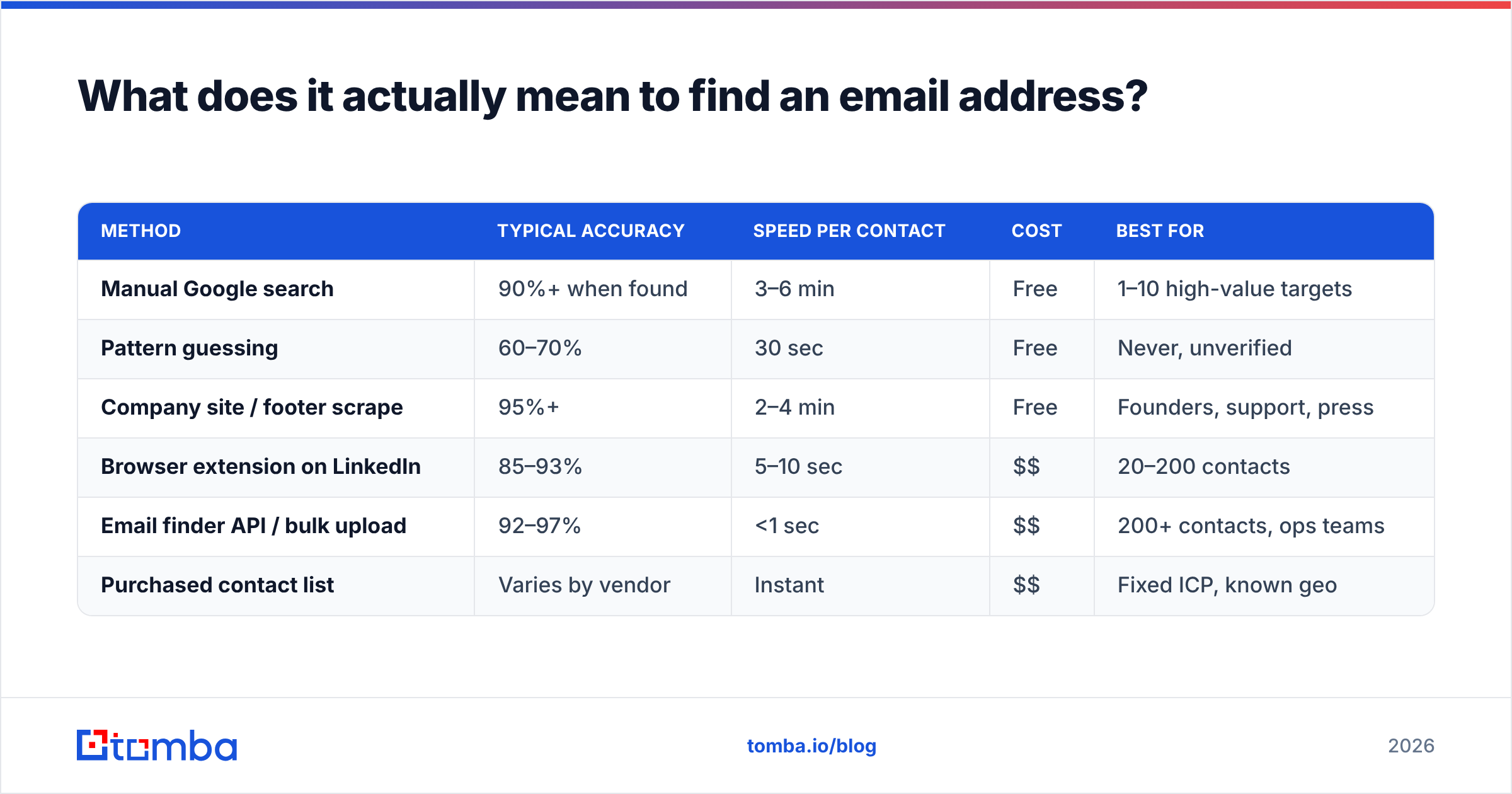
Here's how the main approaches stack up before we go deep on each:
| Method | Typical accuracy | Speed per contact | Cost | Best for |
|---|---|---|---|---|
| Manual Google search | 90%+ when found | 3–6 min | Free | 1–10 high-value targets |
| Pattern guessing | 60–70% | 30 sec | Free | Never, unverified |
| Company site / footer scrape | 95%+ | 2–4 min | Free | Founders, support, press |
| Browser extension on LinkedIn | 85–93% | 5–10 sec | $$ | 20–200 contacts |
| Email finder API / bulk upload | 92–97% | <1 sec | $$ | 200+ contacts, ops teams |
| Purchased contact list | Varies by vendor | Instant | $$ | Fixed ICP, known geo |
What are the fastest free ways to find an email address?#
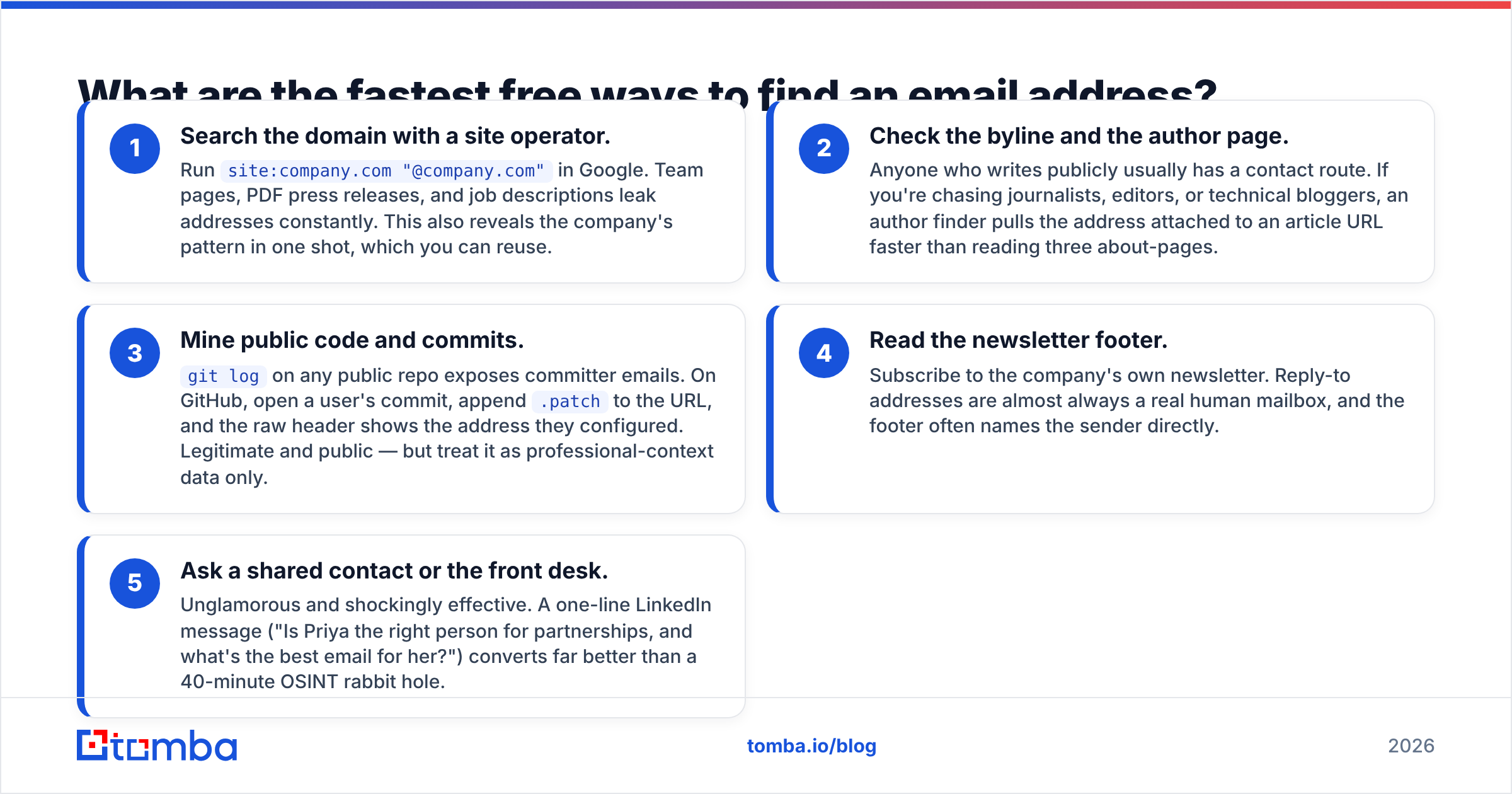
If you only need a handful of contacts, you do not need a subscription. These five methods cost nothing but attention.
- Search the domain with a site operator. Run
site:company.com "@company.com"in Google. Team pages, PDF press releases, and job descriptions leak addresses constantly. This also reveals the company's pattern in one shot, which you can reuse. - Check the byline and the author page. Anyone who writes publicly usually has a contact route. If you're chasing journalists, editors, or technical bloggers, an author finder pulls the address attached to an article URL faster than reading three about-pages.
- Mine public code and commits.
git logon any public repo exposes committer emails. On GitHub, open a user's commit, append.patchto the URL, and the raw header shows the address they configured. Legitimate and public — but treat it as professional-context data only. - Read the newsletter footer. Subscribe to the company's own newsletter. Reply-to addresses are almost always a real human mailbox, and the footer often names the sender directly.
- Ask a shared contact or the front desk. Unglamorous and shockingly effective. A one-line LinkedIn message ("Is Priya the right person for partnerships, and what's the best email for her?") converts far better than a 40-minute OSINT rabbit hole.
The ceiling here is throughput, not accuracy. Ten minutes a contact is fine for ten prospects and impossible for a thousand.

How do email finder tools actually find the address?#
Modern finders don't have a giant table of "person → email." They run a waterfall, and understanding it tells you when to trust the output.
Step 1 — Pattern detection. The tool looks up every known address on company.com and infers the dominant format. If 87 of 90 known addresses are first.last@, the confidence on that pattern is high.
Step 2 — Candidate generation. It applies the pattern to your target's name, then generates fallbacks: flast@, first@, firstl@, plus handling for hyphenated and non-Latin names.
Step 3 — Source corroboration. Candidates are checked against crawled public sources — company sites, filings, technical documentation, public repositories, press pages. A candidate seen in the wild jumps to high confidence. This is the part where where the data comes from matters more than the marketing page.
Step 4 — SMTP validation. The tool opens a conversation with the receiving mail server and asks whether the mailbox exists, without delivering a message. Servers that answer honestly give you a clean valid/invalid. Servers configured as catch-all accept everything, which is why catch-all handling deserves its own section.
Step 5 — Confidence scoring. The output is a percentage, not a yes. A 97% result corroborated by three sources is very different from a 72% result that is pattern math alone. Filter on the score. Most bounce problems come from teams who exported everything above 50 and hit send.

Accuracy claims on vendor sites are self-reported and measured on the vendor's own sample. The only number that matters is your bounce rate on your ICP. Run 200 contacts through two tools, send, and compare — that costs an afternoon and settles the argument permanently.
Which tool should you use to find an email address?#
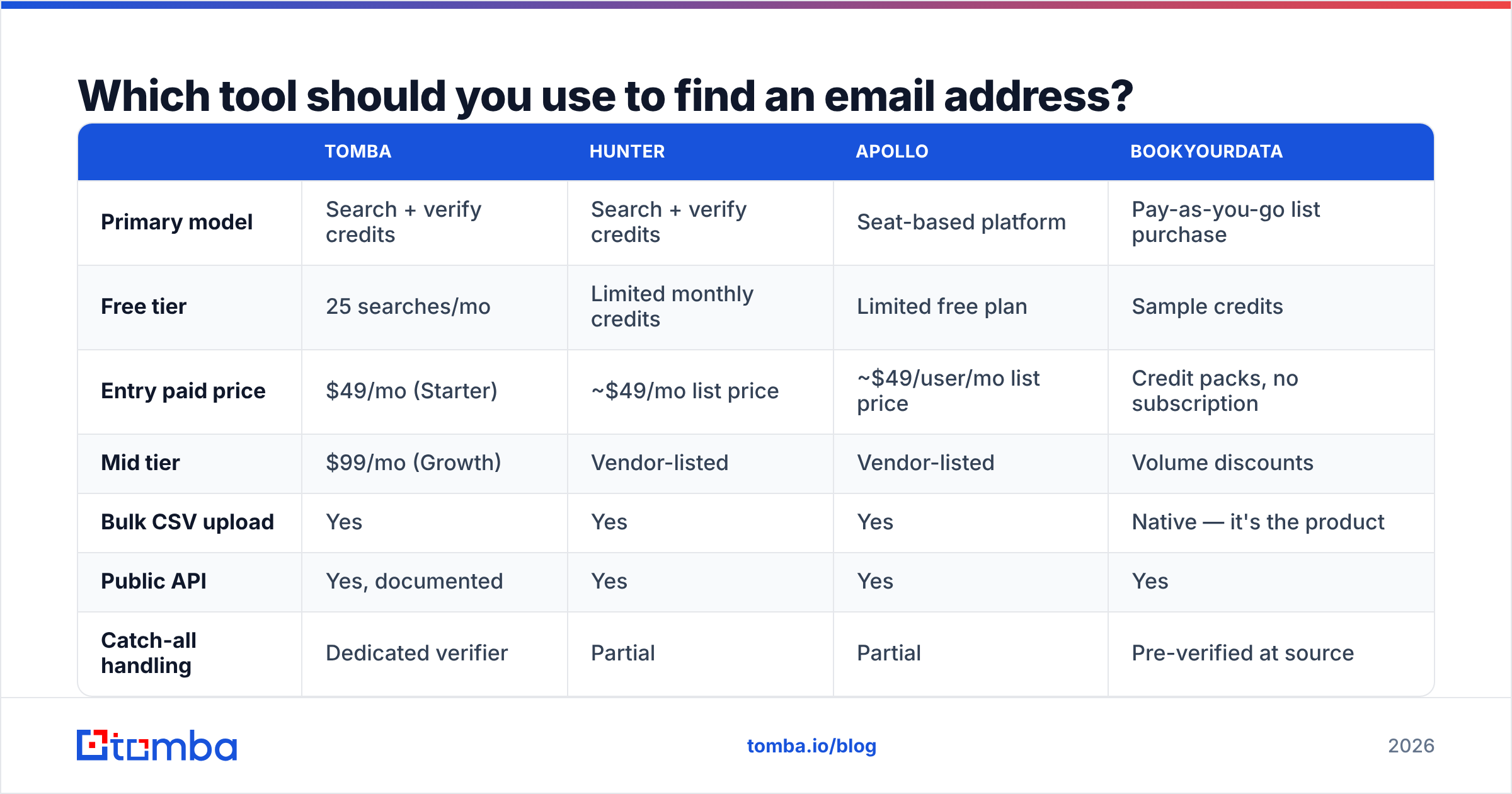
Pick by workflow, not by feature count. If you live in LinkedIn, buy an extension. If you live in a spreadsheet, buy bulk credits. If you live in code, buy API calls.
| Tomba | Hunter | Apollo | BookYourData | |
|---|---|---|---|---|
| Primary model | Search + verify credits | Search + verify credits | Seat-based platform | Pay-as-you-go list purchase |
| Free tier | 25 searches/mo | Limited monthly credits | Limited free plan | Sample credits |
| Entry paid price | $49/mo (Starter) | ~$49/mo list price | ~$49/user/mo list price | Credit packs, no subscription |
| Mid tier | $99/mo (Growth) | Vendor-listed | Vendor-listed | Volume discounts |
| Bulk CSV upload | Yes | Yes | Yes | Native — it's the product |
| Public API | Yes, documented | Yes | Yes | Yes |
| Catch-all handling | Dedicated verifier | Partial | Partial | Pre-verified at source |
| Phone numbers | Yes | No | Yes | Yes |
| Sequencing / sending | No — finder only | No | Yes, built in | No |
| Best fit | Finding + verifying at volume, API-first teams | Simple domain lookups | All-in-one prospect-to-send | Buying a clean list for a fixed ICP |
Prices are list prices at time of writing; confirm current numbers on each vendor's page — Tomba pricing, Hunter, and Apollo all revise tiers regularly.

A few honest notes on fit:
- Apollo wins when you want finding, sequencing, and a CRM-ish layer in one seat. The tradeoff is that its data quality varies more by region than a dedicated finder's, and you pay per seat whether or not the seat prospects.
- BookYourData is a genuinely different shape: you buy a pre-built, pre-verified list matched to your ICP rather than looking people up one at a time. If your ICP is stable ("HR directors, US, 200–2000 employees"), that's often the cheapest path to 5,000 usable contacts. If your targets change weekly, a lookup tool fits better.
- Tomba sits in the find-and-verify lane: email finder, verifier, domain search, and enrichment behind one API, with a free tier of 25 searches a month to test before you commit. It does not send email, which is a feature if you already own your sending stack.
Cross-check any shortlist against real reviews on G2 before you buy. Vendor accuracy pages and buyer complaints tell very different stories.

How do you verify an email address before you send?#
Verification is four checks, run in order, each cheaper than the next one down:
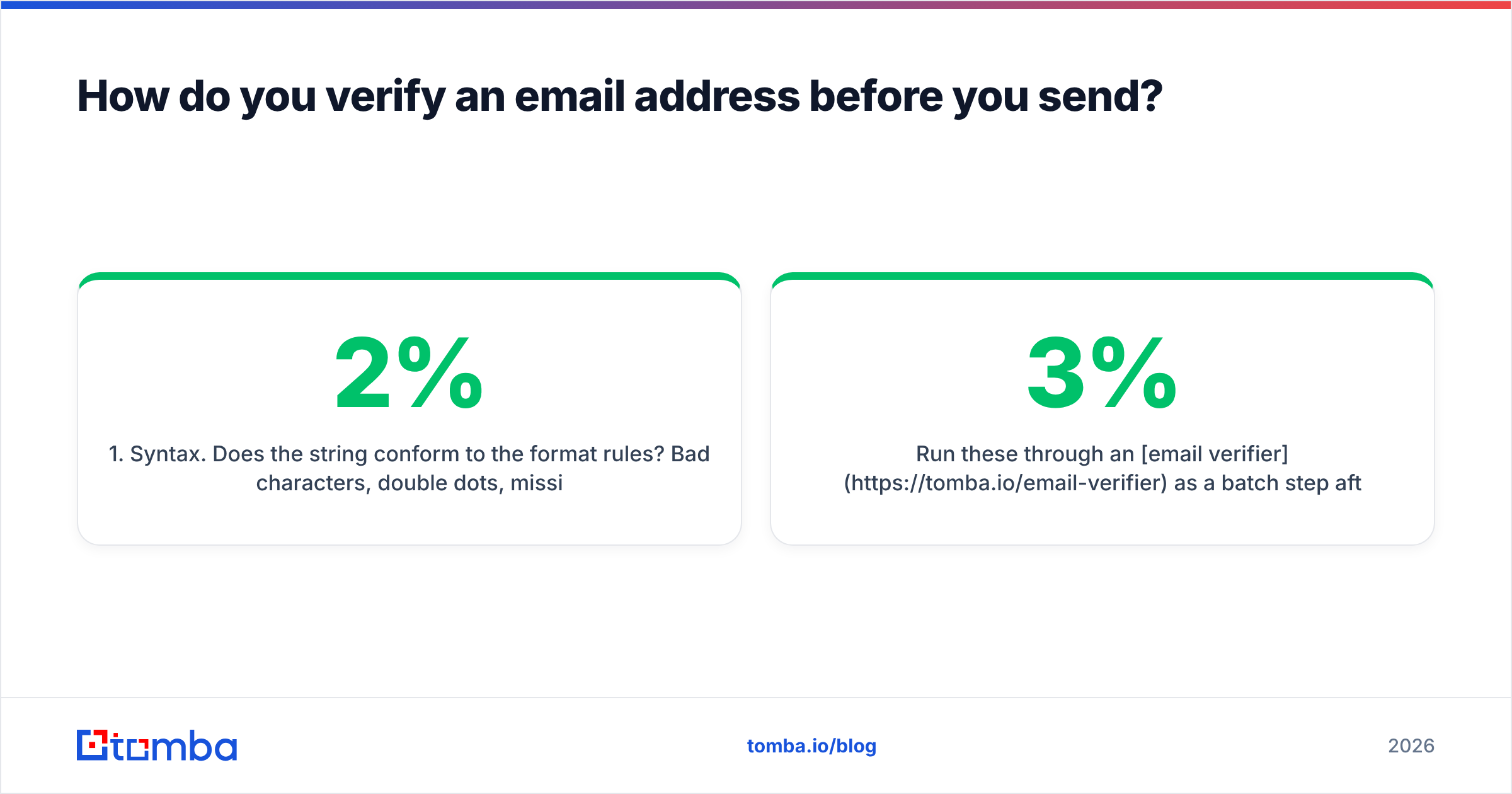
- Syntax. Does the string conform to the format rules? Bad characters, double dots, missing TLD — free to catch, and it kills 1–2% of any scraped list.
- Domain and MX. Does the domain resolve, and does it publish MX records? A domain with no mail exchanger cannot receive mail, full stop. Dead startups fail here constantly.
- Mailbox (SMTP). Ask the server whether the mailbox exists. This is the check that actually predicts bounces.
- Risk flags. Is it a role account (
info@,sales@), a disposable domain, a known spam trap, or a catch-all? Role accounts don't bounce but they don't reply either, and spam traps are actively harmful.
Run these through an email verifier as a batch step after finding, not as an afterthought. Google's and Microsoft's filtering both weight bounce rate heavily; the practical ceiling is 2–3% before your email deliverability starts degrading, and above 5% you're in real trouble.
What do you do about catch-all domains?#
Catch-all domains accept every address at the domain, valid or not, so SMTP validation returns "accepted" for asdfgh@company.com just as happily as for the real person. Roughly a fifth to a third of B2B domains are configured this way, and they're overrepresented among mid-market companies running Microsoft 365.
Three workable options:
- Segment and send carefully. Put catch-all contacts in their own batch, send from a secondary domain, and watch the engagement signal. If nothing opens, the addresses probably aren't real.
- Use a dedicated catch-all check. A catch-all verifier applies additional signals — historical activity, pattern corroboration, source count — to score the address beyond the binary SMTP answer.
- Route around it. Find a phone number or a LinkedIn path for that account instead. A phone finder result on a high-value logo is worth more than a coin-flip email.
What you should not do is drop every catch-all from your list. In some verticals that's 40% of your TAM.
How do you find email addresses at scale?#
Above roughly 200 contacts, manual and extension workflows collapse. Three patterns work:
Bulk CSV. Export company + first name + last name, upload, download enriched. A bulk email finder run of 5,000 rows finishes in minutes and costs one credit per row. This is the right default for most sales teams.
Domain sweep. When you want everyone at a target account rather than one named person, search the domain and filter by department or seniority. Useful for account-based plays where you don't yet know who owns the problem.
API in the pipeline. Call the Tomba API at the moment a lead enters your system — a form fill, a webinar signup, a website visitor reveal — so enrichment happens once, at the source, instead of in a weekly cleanup job. This is also the only pattern that keeps your CRM from rotting, because records get enriched on write rather than on a quarterly panic.
One operational rule: cap credits per campaign. Unbounded enrichment jobs are how teams burn a month of credits on a list nobody sends to.
Is it legal to find someone's email address?#
Yes, with conditions, and the conditions differ by geography. Business contact data is generally treated as legitimate-interest processing under GDPR when you're contacting someone in their professional capacity about something plausibly relevant to their role — but you still owe them notice, an opt-out, and a real deletion path on request. CAN-SPAM in the US is looser: accurate headers, no deceptive subject lines, a physical address, and a working unsubscribe.
Practical guardrails that keep you clean regardless of jurisdiction:
- Target roles, not individuals' personal lives. Work domains only.
- Honor unsubscribes across every tool, not just the one that sent the message.
- Keep a record of where each contact came from. If you can't say why a record is in your database, delete it.
- Never buy a list whose provenance the vendor won't explain.
The background on address formats and standards is worth skimming once on Wikipedia if you're building anything programmatic — the rules on valid local parts are stranger than most validators assume.
What's the fastest workflow end to end?#
For a typical 500-contact campaign, this takes under an hour:
- Build the account list (firmographics, funding, tech stack — whatever defines your ICP).
- Get names and titles from LinkedIn Sales Navigator or a database export.
- Bulk-find emails against company domains.
- Verify everything; drop invalid, quarantine catch-all, drop role accounts.
- Segment: verified-clean sends from your primary domain, catch-all from a secondary.
- Send, then measure bounce rate per source so you know which step to fix next time.
Step 6 is the one everyone skips, and it's the one that compounds. Track bounce rate by data source for two months and you'll know exactly which tool to cancel.
Start finding verified addresses#
If you want the discovery and the verification in one place, start with the Tomba Email Finder. The free tier gives you 25 searches a month — enough to test it against a list you already know the answers to, which is the only benchmark worth trusting. If it holds up, Starter is $49/mo and Growth is $99/mo, with bulk upload, catch-all checks, and a documented API on every paid plan.
Test it on 50 contacts you can verify by hand. Whatever tool wins that test is the one to buy.
Related guides#
// get started
Find, verify and enrich your first contacts today
Start on the free plan with 25 searches a month, then scale when your team is ready.
Free plan · No credit card required · GDPR & CCPA
// about the author