How To Find An Email Address With A Phone Number in 2026
Reverse phone-to-email lookup works, but not the way most guides claim. Here are the five methods that actually return a verified work email, what each one costs, and where the legal lines sit.
TL;DR
- Reverse phone-to-email lookup is real, but hit rates are far lower than vendors imply: expect 20-45% on B2B mobile numbers, not the "95% coverage" on the pricing page.
- The reliable path is almost never phone → email directly. It is phone → identity (name + company) → email, using a reverse email lookup or domain-based finder to close the loop.
- Consumer people-search sites (Whitepages, Spokeo, BeenVerified) return personal Gmail addresses that are useless for B2B outreach and risky under GDPR.
- Whatever method you use, verify before sending. An unverified reverse-lookup email carries a bounce rate 4-6x higher than a domain-pattern match.
- Budget reality: a $49/mo B2B data tool plus disciplined verification beats a $99/mo people-search subscription for almost every sales use case.
Why would you need to find an email address with a phone number?#
You have a phone number and nothing else. That happens more often than people admit.
The common scenarios: a webform capture where the prospect typed a mobile but skipped the email field; a trade-show badge scan that only pulled a phone; a CRM record migrated from an old system with half its columns dropped; an inbound voicemail from someone who never spelled their name; a list bought from a broker where the "email" column is 60% blank.
In each case the phone number is a key, not an answer. Your job is to turn that key into an identity, then turn the identity into a deliverable work email. Skipping the middle step is where most people waste money — they buy a reverse-lookup subscription, get back jenny.hardy1987@yahoo.com, send a cold pitch to a personal inbox, and get marked as spam.
Before you start, be clear about what you actually want. A personal Gmail is a different asset from a corporate address at @company.com, and only one of them belongs in a B2B sequence.
How does reverse phone-to-email lookup actually work?#
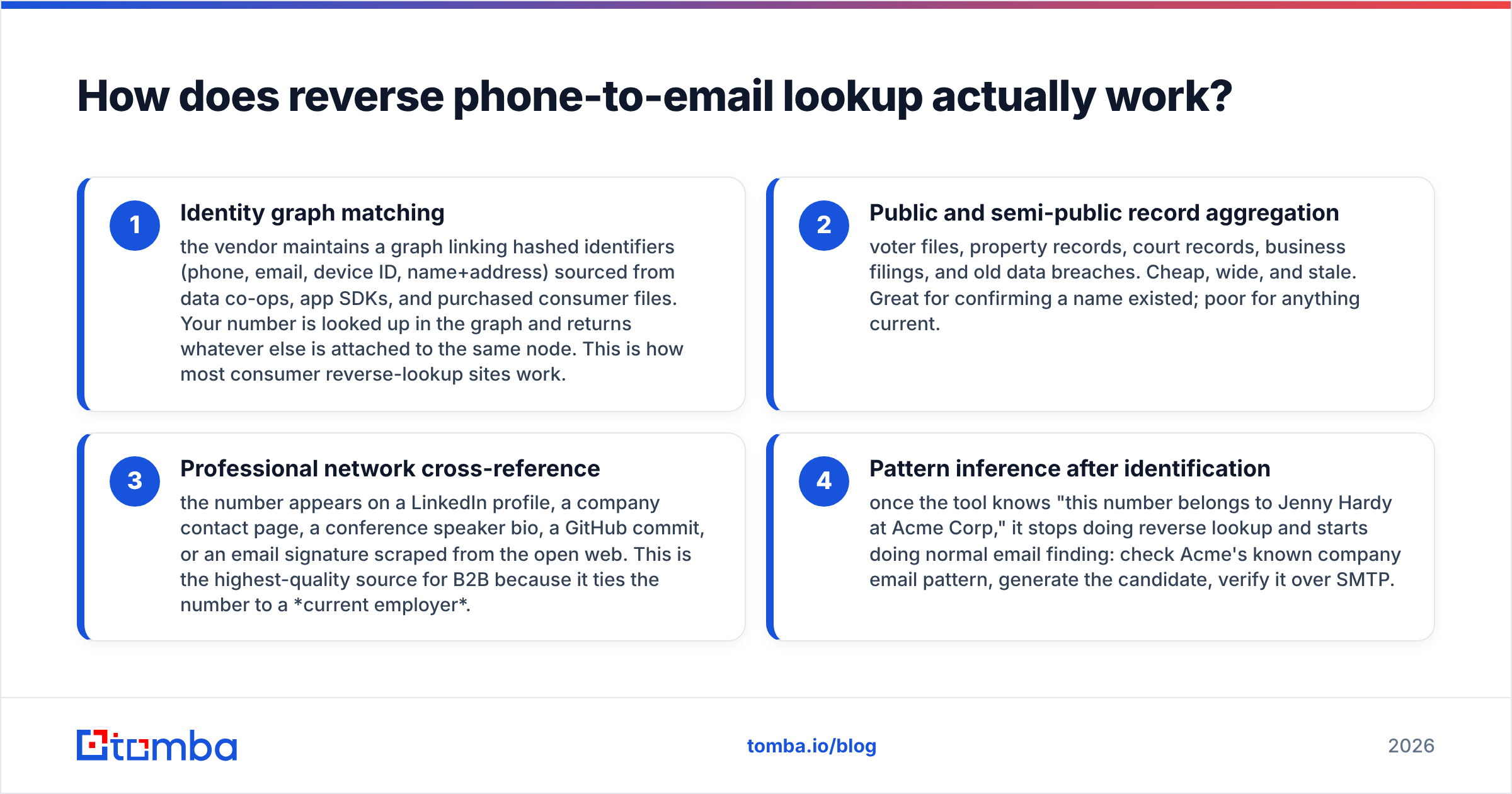
There is no central registry mapping phone numbers to email addresses. Nobody has one. Every tool that claims to do this is doing one of four things underneath:
- Identity graph matching — the vendor maintains a graph linking hashed identifiers (phone, email, device ID, name+address) sourced from data co-ops, app SDKs, and purchased consumer files. Your number is looked up in the graph and returns whatever else is attached to the same node. This is how most consumer reverse-lookup sites work.
- Public and semi-public record aggregation — voter files, property records, court records, business filings, and old data breaches. Cheap, wide, and stale. Great for confirming a name existed; poor for anything current.
- Professional network cross-reference — the number appears on a LinkedIn profile, a company contact page, a conference speaker bio, a GitHub commit, or an email signature scraped from the open web. This is the highest-quality source for B2B because it ties the number to a current employer.
- Pattern inference after identification — once the tool knows "this number belongs to Jenny Hardy at Acme Corp," it stops doing reverse lookup and starts doing normal email finding: check Acme's known company email pattern, generate the candidate, verify it over SMTP.
Method 4 is the one that produces addresses you can actually mail. Methods 1-3 are the identification layer that makes method 4 possible.

The practical consequence: your success rate is capped by the identification step, not the email step. If a tool can tell you who owns the number and where they work, finding the email is close to solved. If it cannot, no amount of credits will help.
What are the five methods that actually work?#
Ranked by how well they perform on B2B numbers.
1. Phone → identity → domain search. Identify the person and employer from the number, then run a domain search on the company to pull the email pattern and matching contact. Highest accuracy, works at scale, and returns corporate addresses. This is the workflow to default to.
2. Reverse lookup inside a B2B data platform. Tools that hold both phone and email on the same contact record can resolve the number directly against their own index. Coverage is narrower than consumer sites but every hit is a real business contact. A phone validator run first will tell you whether the number is a mobile, landline, or VoIP — mobile numbers match far better in B2B graphs.
3. Manual search-engine triangulation. Paste the number in quotes into Google, then again with dashes stripped, then in international format. Check LinkedIn, company team pages, Crunchbase profiles, PDF conference agendas, and old press releases. Slow — three to eight minutes per contact — but free and surprisingly effective for founders, recruiters, and anyone who has ever published a contact page.
4. Messaging-app identity probes. Adding a number to your phone contacts and opening WhatsApp, Telegram, or Signal often surfaces a display name and profile photo. That gives you a name to run through an email finder. Use this sparingly and never at scale — it is a privacy grey zone and platforms actively rate-limit it.
5. Consumer people-search sites. Whitepages, Spokeo, BeenVerified and similar. They will return something for most US numbers, but that something is usually a personal email, an outdated address, or a relative's record. Useful for debt collection and skip tracing, mostly wrong for B2B sales.
Which tools should you compare?#
Coverage claims are marketing. What matters is match rate on your list — B2B mobiles in your target geography. Run a 100-row test before committing to any annual plan.
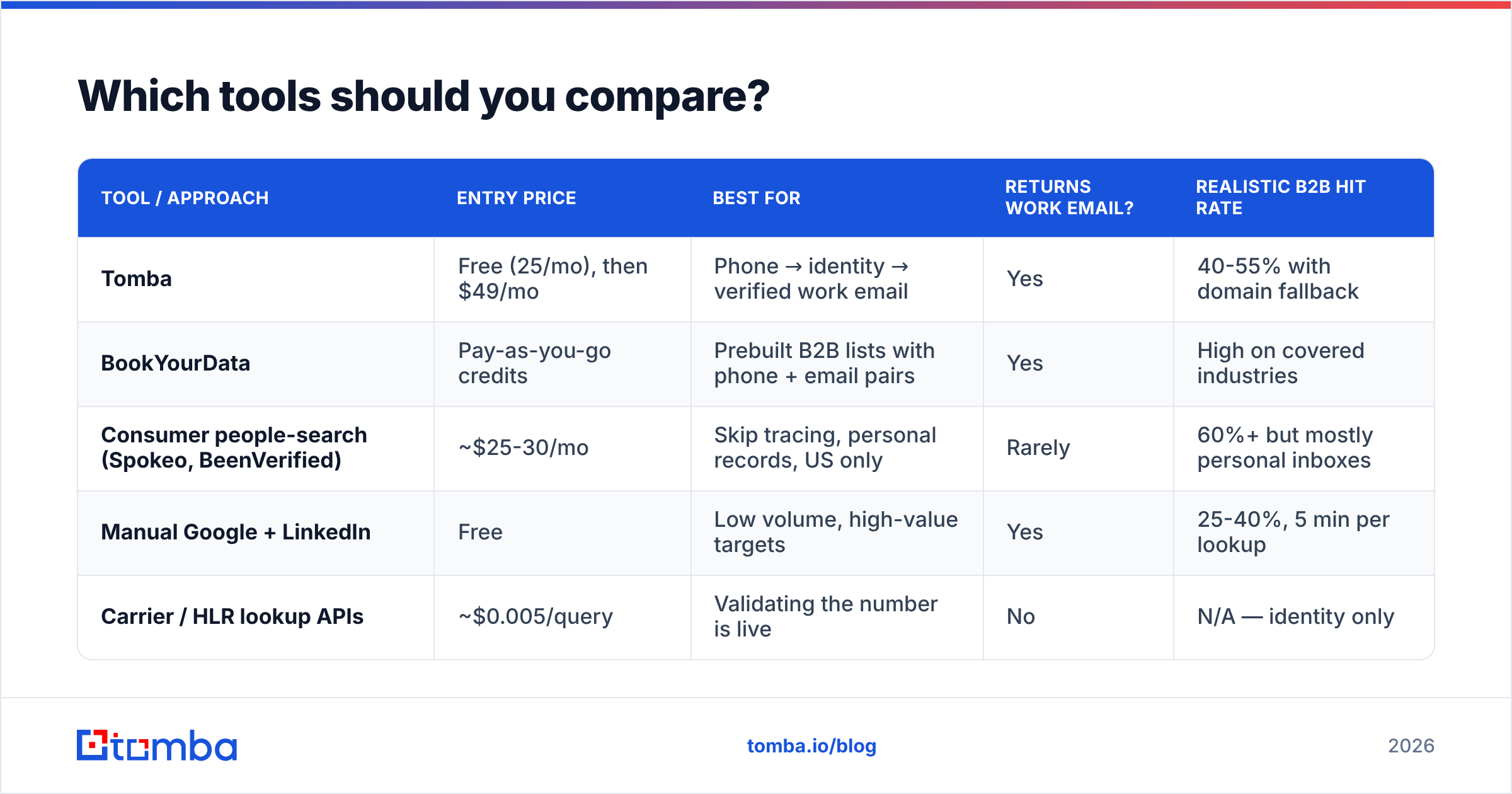
| Tool / approach | Entry price | Best for | Returns work email? | Realistic B2B hit rate |
|---|---|---|---|---|
| Tomba | Free (25/mo), then $49/mo | Phone → identity → verified work email | Yes | 40-55% with domain fallback |
| BookYourData | Pay-as-you-go credits | Prebuilt B2B lists with phone + email pairs | Yes | High on covered industries |
| Consumer people-search (Spokeo, BeenVerified) | ~$25-30/mo | Skip tracing, personal records, US only | Rarely | 60%+ but mostly personal inboxes |
| Manual Google + LinkedIn | Free | Low volume, high-value targets | Yes | 25-40%, 5 min per lookup |
| Carrier / HLR lookup APIs | ~$0.005/query | Validating the number is live | No | N/A — identity only |
Two notes on reading that table. First, "hit rate" and "email delivered" are different numbers — always discount a vendor's stated coverage by the share of results you can verify. Second, the free-tier column matters more than the headline price. A tool you can test with 25 free searches before paying tells you the truth in an afternoon; one that requires a sales call to see coverage is asking you to buy blind.
For a broader view of vendor positioning, G2's sales intelligence category is a reasonable neutral starting point — filter reviews by company size, since coverage quality diverges sharply between SMB and enterprise datasets.
What is the step-by-step workflow?#
Here is the sequence that produces the highest ratio of deliverable emails per dollar. It assumes you have a spreadsheet of phone numbers and little else.
Step 1 — Normalize and validate the numbers. Strip formatting, convert everything to E.164 (+14155551234). Drop duplicates. Run each number through a phone validator to flag disconnected lines, VoIP, and landlines. Roughly 8-15% of any aged phone list is dead; do not pay to enrich dead rows.
Step 2 — Resolve identity, not email. Query your data provider for name and current employer. Accept partial results — a name with no company is still progress, and a company with no name lets you target by role instead.
Step 3 — Pull the company email pattern. With a domain in hand, run a domain search to see the dominant format (first.last@, flast@, first@). Most companies use one pattern for 90%+ of employees, so this single lookup unlocks every future contact there.
Step 4 — Generate and verify. Build the candidate address from name + pattern, then run it through an email verifier. Accept only valid. Treat catch-all as a separate bucket and route it through a catch-all verifier before deciding whether to mail it.
Step 5 — Enrich and log provenance. Write back the source of every email — reverse lookup, pattern match, or manual find — into your CRM. When bounce rates spike three months later, provenance tells you which source rotted. Data enrichment at this stage also backfills title, seniority, and company size so your sequencing has something to personalize on.
Step 6 — Batch it. Once the workflow is proven on 100 rows, move it to a bulk email finder or the Tomba API so it runs against thousands of rows without a human in the loop.

Is it legal to find someone's email from their phone number?#
Short answer: usually yes for B2B, with real constraints, and you should read this section rather than skim it.
Under GDPR (EU/UK): a phone number and an email address are both personal data. Processing them requires a lawful basis — for cold B2B outreach that is normally legitimate interest, which obliges you to run a balancing test, disclose where you got the data, and honor deletion requests immediately. Enriching a consumer's personal mobile into a personal Gmail for marketing is much harder to justify than resolving a work number to a work address. The ICO's guidance on legitimate interests is the primary source worth reading rather than a vendor's summary of it.
Under CAN-SPAM (US): finding an address is not itself restricted. What is regulated is the message — accurate headers, non-deceptive subject line, physical postal address, working opt-out honored within 10 business days. The FTC's compliance guide is short and worth reading once in full.
Under TCPA (US): this is the one people miss. If you resolve an email but also plan to call or text the number you started with, TCPA consent rules apply to that channel independently. Finding the email does not launder the phone number.
Three practical rules that keep you out of trouble regardless of jurisdiction: prefer corporate addresses over personal ones; keep a record of your data source per contact; and process deletion requests within days, not quarters.
How do you keep the accuracy high over time?#
Contact data decays at roughly 25-30% per year, and phone-derived records decay faster because mobile numbers move with people across jobs while corporate emails die at the job change.
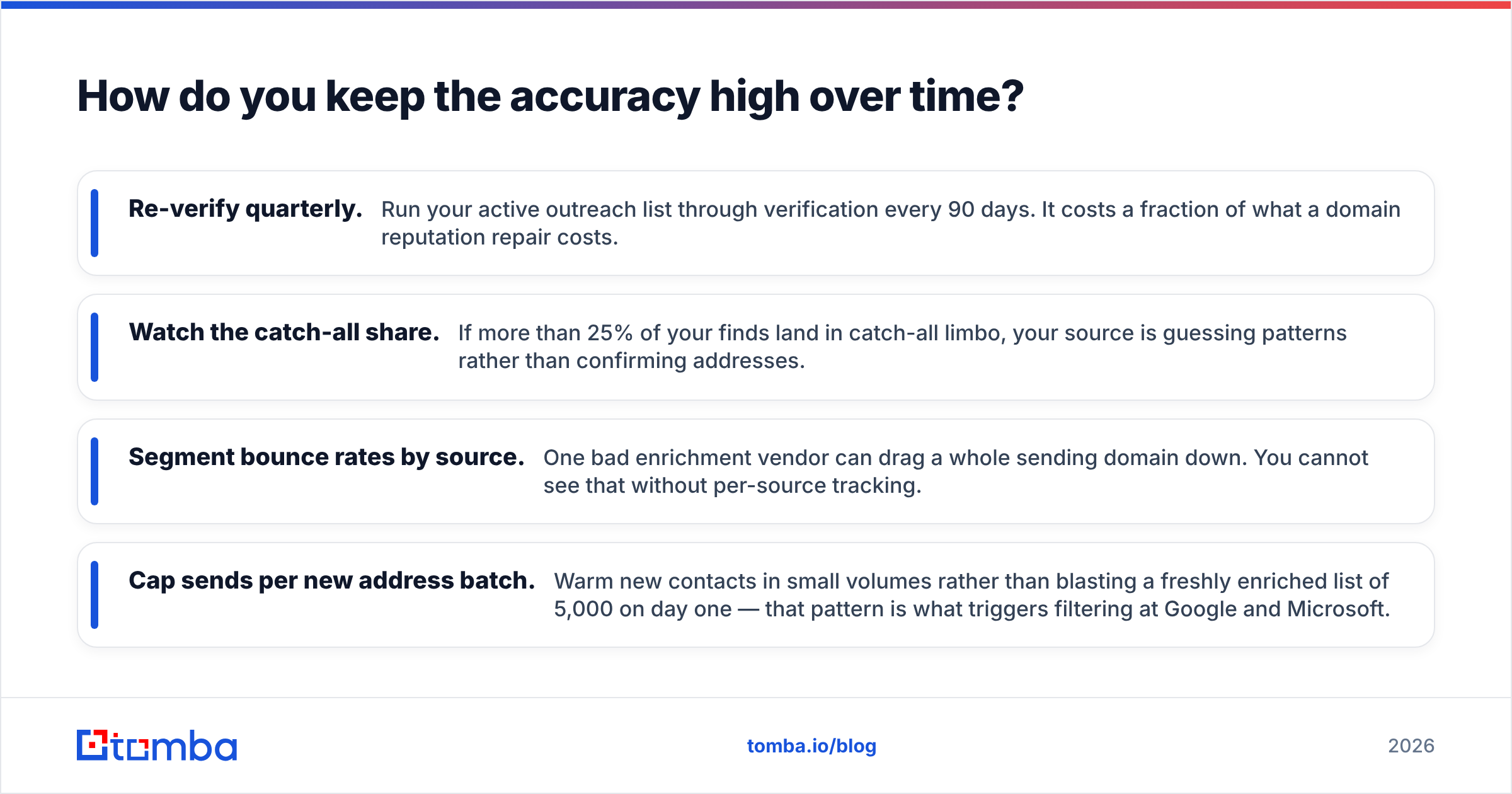
Four habits that hold quality up:
- Re-verify quarterly. Run your active outreach list through verification every 90 days. It costs a fraction of what a domain reputation repair costs.
- Watch the catch-all share. If more than 25% of your finds land in catch-all limbo, your source is guessing patterns rather than confirming addresses.
- Segment bounce rates by source. One bad enrichment vendor can drag a whole sending domain down. You cannot see that without per-source tracking.
- Cap sends per new address batch. Warm new contacts in small volumes rather than blasting a freshly enriched list of 5,000 on day one — that pattern is what triggers filtering at Google and Microsoft.
None of this is exotic. It is just the difference between a list that produces meetings in month six and a domain that lands in spam by month two.
What should you do next?#
Start with the identification step, not the email step — that is where the whole workflow succeeds or fails. Validate your numbers, resolve name and employer, then let pattern matching and verification do the easy part.
If you want to run that sequence end to end, the Tomba Email Finder handles the identity-to-verified-email leg with domain search, catch-all handling, and verification in one pass. The free tier gives you 25 searches a month — enough to test your own list against it before spending anything — and paid plans start at $49/mo with bulk and API access as volume grows. Check current Tomba pricing for the tier that matches your list size, and run a 100-row sample before you commit to anything annual. Your own match rate is the only benchmark that matters.
Related guides#
// get started
Find, verify and enrich your first contacts today
Start on the free plan with 25 searches a month, then scale when your team is ready.
Free plan · No credit card required · GDPR & CCPA
// about the author