How To Find An Employee Of A Company: 7 Methods That Work
Need to reach a specific person inside a target account? Here are 7 practical methods to find an employee of a company, get their verified email, and skip the gatekeeper.
TL;DR
- The fastest path is company-first, not person-first: pull the employee list from LinkedIn or a B2B database, then resolve the specific name to a verified work email.
- LinkedIn Sales Navigator is the best discovery layer; it is a poor contact layer. It shows you who works there, not how to reach them.
- Email pattern inference (
first.last@,flast@) gets you close, but unverified guesses are what burn a sending domain. - Expect 60-75% coverage on mid-market and enterprise employees, and much lower on companies under 20 people with no web presence.
- Budget roughly $49-$99/month for a tool-assisted workflow; free methods work but cap out around 10-20 lookups a day before they get tedious.
Why is finding a specific employee harder than it looks?#
Because company data and people data live in different places, and neither one is complete.
Think of it like trying to reach a specific apartment in a building where the buzzer panel only lists surnames. You can see the building (the company domain), you can often see who lives there (LinkedIn, press mentions, GitHub), but connecting a name to a working entry point takes a third step that nobody hands you for free.
Three specific frictions get in the way:
- LinkedIn hides contact details by default. You can see that Sarah Chen is Head of RevOps at Acme, but her profile shows no email unless she chose to publish one.
- Company websites list executives, not the people who actually own the problem. The VP of Engineering is on the About page; the platform lead you need is not.
- Email formats vary and change. Acme might use
first@for the founding team andfirst.last@for anyone hired after Series A. Guessing one format across a whole company produces bounces. - Employee turnover runs 15-25% annually in tech. Any list you built six months ago is already 10% stale.
So the workflow that actually works has three stages: identify the person, infer or retrieve the contact route, then verify it before you send. Skipping stage three is where most outbound programs quietly break.
What are the 7 methods to find an employee of a company?#
Here is the practical ranking, from fastest to most manual. Most teams end up combining two or three.
1. Domain search (company-first). You start with the company domain and pull back every employee email the tool has on record, with names and job titles attached. This is the highest-leverage move when you know the account but not the person. A domain search on stripe.com returns a list you can filter by department instead of hunting profile by profile.
2. LinkedIn people filter. Go to the company page, click "People," and filter by title, location, or school. Free, accurate on employment status, and gives you the exact name spelling you need for the next step. With Sales Navigator you can layer on seniority and function filters. Then push those names through a LinkedIn finder to resolve work emails.
3. Name plus domain lookup. You know the person and the company. An email finder takes "Sarah Chen" plus "acme.com" and returns the address with a confidence score. This is the single most common prospecting motion in B2B.
4. Email pattern inference. Determine the company's format once — from a known contact, a press release, or a company email pattern check — then apply it to every other name. Cheap and scalable, but always verify the output.
5. Content author lookup. If the person publishes — blog posts, research, docs — an author finder pulls the email tied to their byline. This works unusually well for marketing, developer relations, and technical leadership roles.
6. Public web footprint. GitHub commit logs, conference speaker pages, patent filings, SEC filings, podcast show notes, and press quotes all leak names and sometimes addresses. Slow, but it finds people who are invisible on LinkedIn.
7. Ask a human. Call the main line and ask for the department. Email info@ and ask who owns a specific area. Low tech, surprisingly effective at companies under 200 people, and it produces a warm referral rather than a cold hit.

Which method should you use for your situation?#
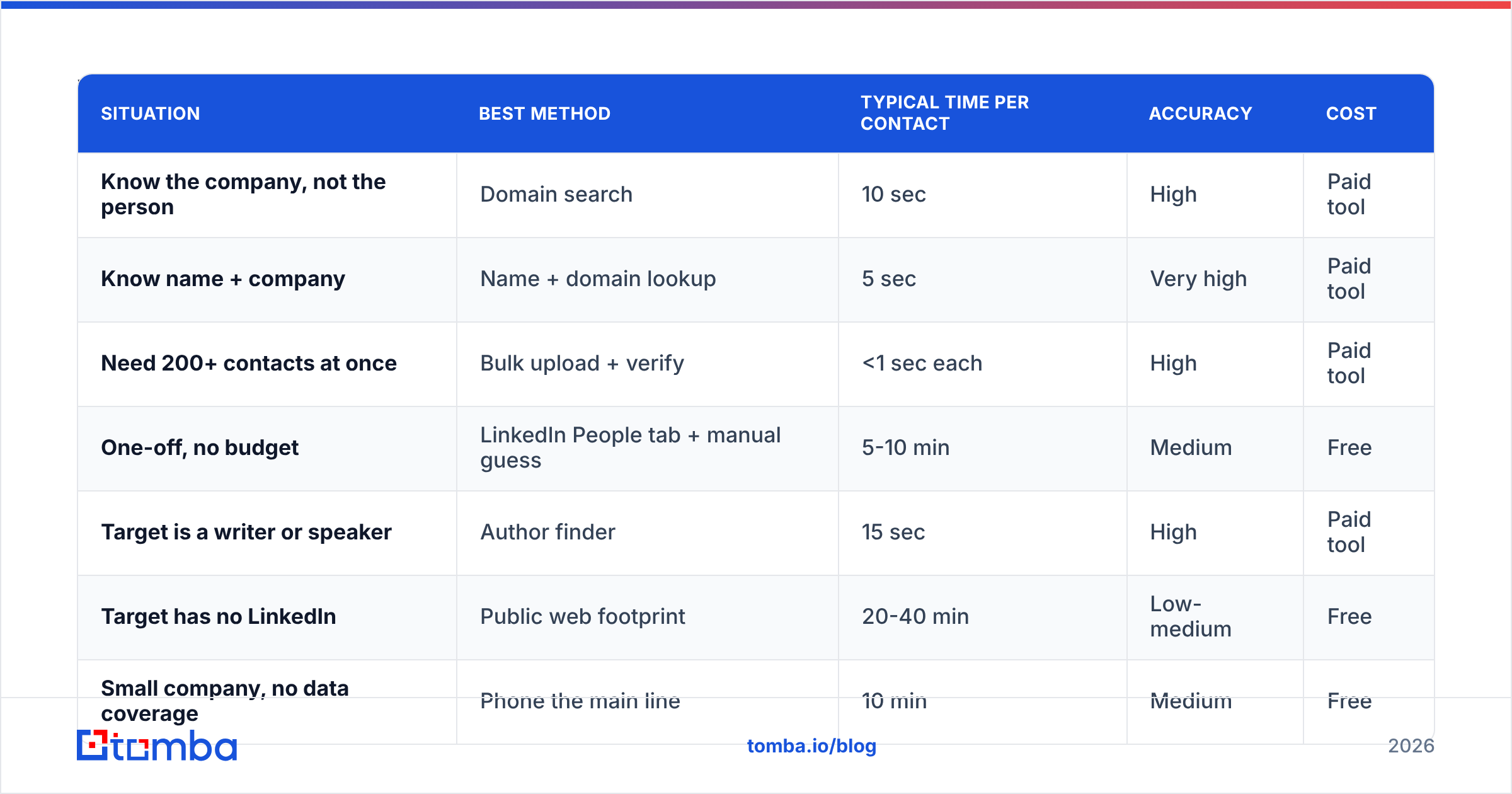
Match the method to what you already know and how many people you need.
| Situation | Best method | Typical time per contact | Accuracy | Cost |
|---|---|---|---|---|
| Know the company, not the person | Domain search | 10 sec | High | Paid tool |
| Know name + company | Name + domain lookup | 5 sec | Very high | Paid tool |
| Need 200+ contacts at once | Bulk upload + verify | <1 sec each | High | Paid tool |
| One-off, no budget | LinkedIn People tab + manual guess | 5-10 min | Medium | Free |
| Target is a writer or speaker | Author finder | 15 sec | High | Paid tool |
| Target has no LinkedIn | Public web footprint | 20-40 min | Low-medium | Free |
| Small company, no data coverage | Phone the main line | 10 min | Medium | Free |
The pattern to notice: free methods are fine for one or two contacts. The moment you need a repeatable list, per-contact time cost dominates everything else. Ten minutes per lead across 100 leads is a full working week.
How do you find an employee's email address specifically?#
Five steps, in order. Do not reorder them.
Step 1 — Confirm the domain. Companies use different domains for marketing and mail. acme.io may serve the website while employees send from acme.com. Check an employee signature, a press release, or the MX records before you build a list on the wrong root.
Step 2 — Get the exact name. Legal name, not display name. "Mike" on LinkedIn may be "michael.torres@" in the directory. Check the profile URL slug and any published bylines for the formal version.
Step 3 — Retrieve or infer the address. Retrieval beats inference. A lookup against a real dataset returns an address someone has actually observed in the wild; inference returns a plausible string. If you must infer, use an email permutator to generate the candidate set rather than typing variants by hand.
Step 4 — Verify. Run every address through SMTP-level validation before it enters a sequence. An email verifier checks syntax, domain, MX records, and mailbox existence. Catch-all domains — which accept everything at the server level and bounce silently later — need a dedicated catch-all verifier to separate real mailboxes from black holes.
Step 5 — Enrich and log. Attach title, seniority, location, and LinkedIn URL so the record is useful to whoever picks it up next quarter. Data enrichment turns a raw address into a routable, scoreable lead record.
Anyone who tells you step 4 is optional has not watched a domain get throttled. Google and Microsoft both weight bounce rate heavily in inbox placement decisions; Google's own bulk sender guidelines put a hard 0.3% spam-complaint ceiling on senders, and bounce behavior feeds the same reputation signal. Keeping bounce rate under 2% is the practical floor, and the only reliable way there is verification before send. If you want the underlying mechanics, the email deliverability primer covers how reputation compounds.
How do the main tools compare for employee lookup?#
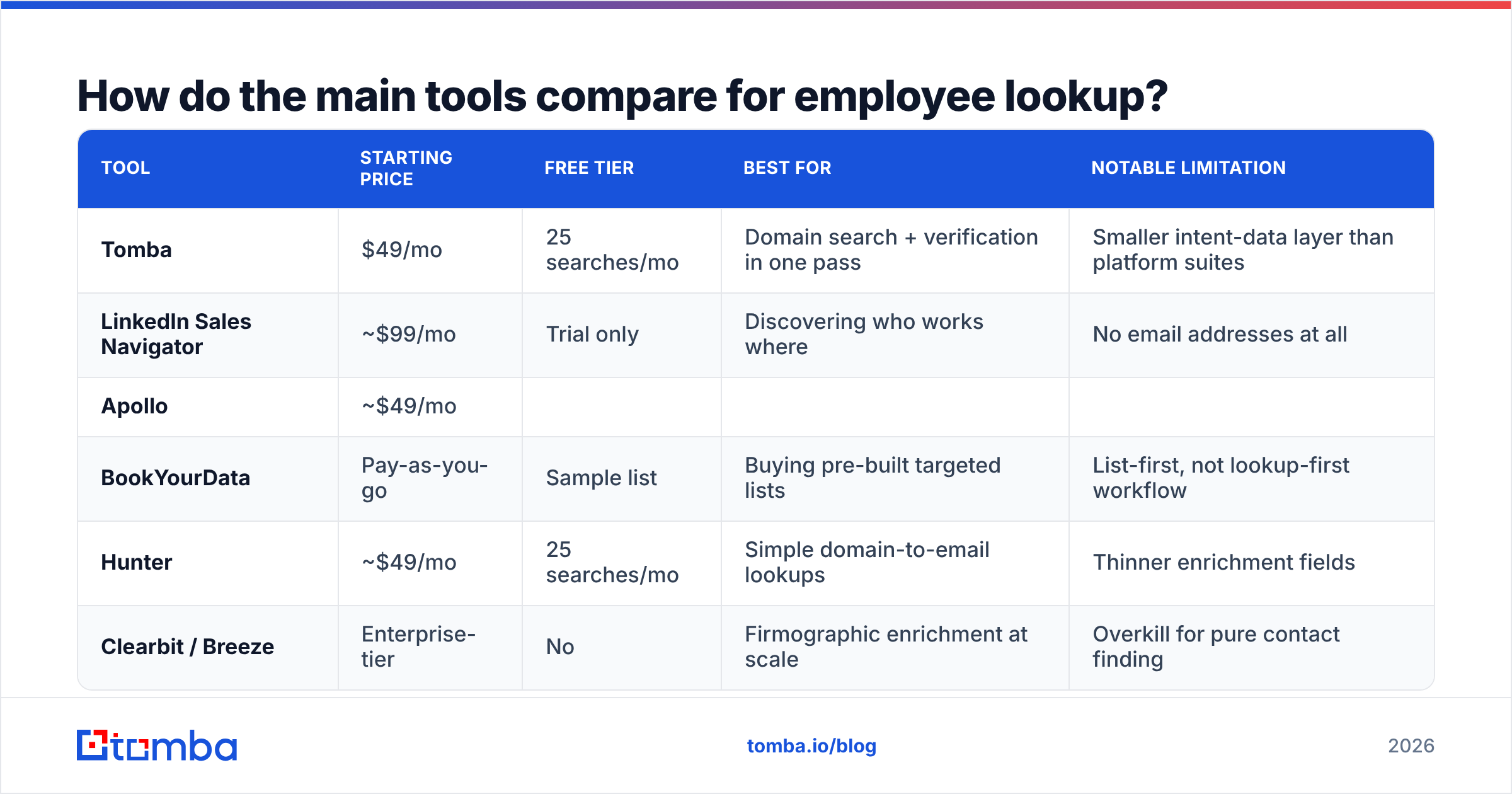
Coverage, price, and workflow fit differ more than the marketing pages suggest. Here is the honest shape of the market as of 2026.
| Tool | Starting price | Free tier | Best for | Notable limitation |
|---|---|---|---|---|
| Tomba | $49/mo | 25 searches/mo | Domain search + verification in one pass | Smaller intent-data layer than platform suites |
| LinkedIn Sales Navigator | ~$99/mo | Trial only | Discovering who works where | No email addresses at all |
| Apollo | ~$49/mo | |||
| Limited credits | All-in-one database + sequencing | Data freshness varies by segment | ||
| BookYourData | Pay-as-you-go | Sample list | Buying pre-built targeted lists | List-first, not lookup-first workflow |
| --- | --- | --- | --- | --- |
| Hunter | ~$49/mo | 25 searches/mo | Simple domain-to-email lookups | Thinner enrichment fields |
| Clearbit / Breeze | Enterprise-tier | No | Firmographic enrichment at scale | Overkill for pure contact finding |
A few things worth saying plainly. Sales Navigator is not a competitor to an email finder — it is the discovery half of the same workflow, and most serious teams pay for both. BookYourData takes a different approach entirely: rather than looking up contacts one at a time, you build and buy a filtered list up front, which suits teams running large single-shot campaigns more than teams doing account-by-account research. Apollo bundles sequencing, which is genuinely convenient if you have no sending stack, and genuinely redundant if you already run Instantly or Smartlead.
Tomba's angle is that finding and verifying happen in the same place. Tomba pricing runs Free (25 searches), Starter at $49/mo, Growth at $99/mo, and Pro at $249/mo, with verification included rather than metered separately. If you would rather compare vendor claims against third-party reviews, G2's lead intelligence category is the least biased place to start.

What accuracy should you actually expect?#
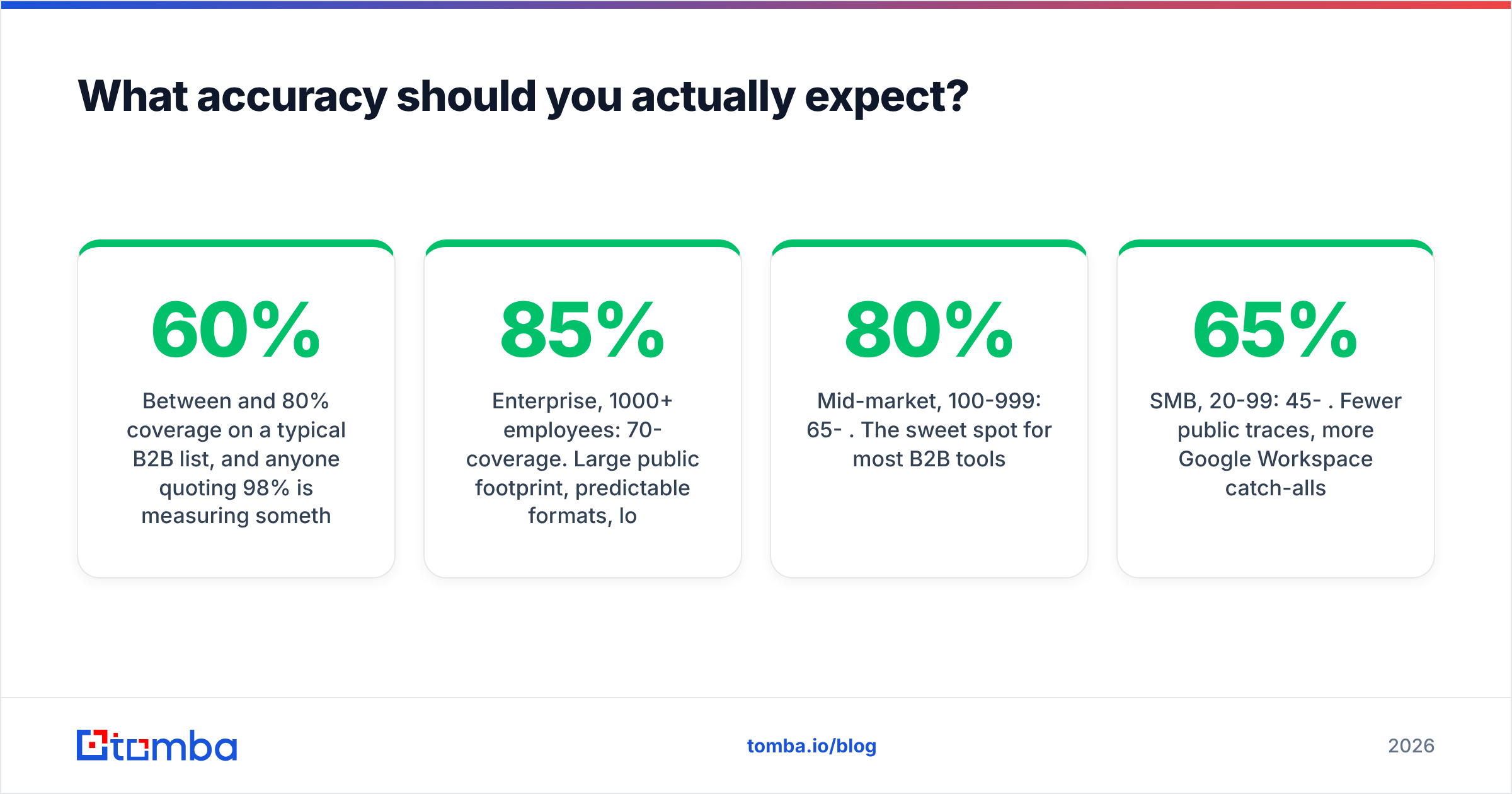
Between 60% and 80% coverage on a typical B2B list, and anyone quoting 98% is measuring something narrower than what you are asking for.
Coverage varies sharply by segment:
- Enterprise, 1000+ employees: 70-85% coverage. Large public footprint, predictable formats, lots of observed addresses.
- Mid-market, 100-999: 65-80%. The sweet spot for most B2B tools.
- SMB, 20-99: 45-65%. Fewer public traces, more Google Workspace catch-alls.
- Micro, under 20: 25-45%. Often a single
hello@inbox and nothing else. - Non-US / non-English domains: subtract 10-20 points across the board.
Also distinguish two numbers vendors blur together. Coverage is what fraction of your input list returns any address. Accuracy is what fraction of returned addresses are real and deliverable. A tool can hit 90% coverage with 60% accuracy by guessing aggressively — which is worse than 60% coverage at 95% accuracy, because the bad half damages your sender reputation. Ask vendors for both numbers separately, and if they only publish one, assume the other is unflattering.
The bounce rate on your first send is the real audit. Run 200 verified addresses; if more than 4 or 5 hard-bounce, the source is weaker than advertised.
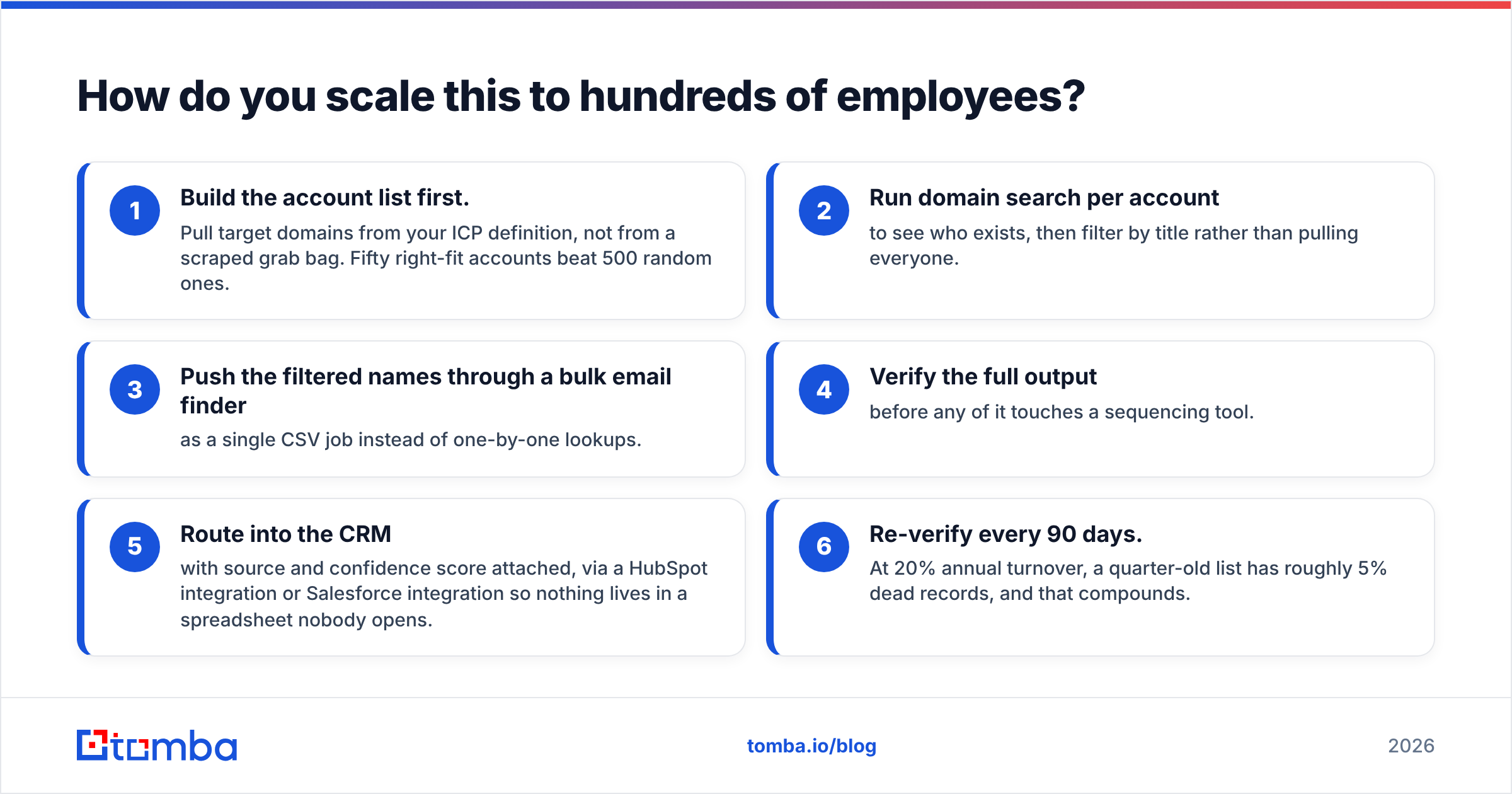
How do you scale this to hundreds of employees?#
Batch it, and put verification in the pipeline rather than at the end.
The workflow that holds up at volume:
- Build the account list first. Pull target domains from your ICP definition, not from a scraped grab bag. Fifty right-fit accounts beat 500 random ones.
- Run domain search per account to see who exists, then filter by title rather than pulling everyone.
- Push the filtered names through a bulk email finder as a single CSV job instead of one-by-one lookups.
- Verify the full output before any of it touches a sequencing tool.
- Route into the CRM with source and confidence score attached, via a HubSpot integration or Salesforce integration so nothing lives in a spreadsheet nobody opens.
- Re-verify every 90 days. At 20% annual turnover, a quarter-old list has roughly 5% dead records, and that compounds.
Teams doing this programmatically skip the UI entirely and hit the Tomba API from their enrichment job, so a new account in the CRM triggers a lookup automatically. That is the difference between a list-building task and an always-on data layer.
One caveat on scale: bigger batches make it easier to stop looking at the data. Spot-check 20 random rows from every 500-row job. You will catch format drift, wrong-domain matches, and stale titles that a confidence score alone will not surface.
Is any of this legal and compliant?#
Yes, with real conditions attached — and the conditions differ by jurisdiction.
Business contact data sits in a different regulatory bucket than consumer data in most regimes. Under GDPR, processing a work email for B2B outreach can rest on legitimate interest, but you owe the recipient a clear identity, a stated purpose, and a working opt-out on first contact. The ICO's guidance on direct marketing is the plainest official reading available. In the US, CAN-SPAM is more permissive: accurate headers, a physical address, and a functioning unsubscribe.
Practical rules that keep you clean:
- Use business addresses only. Personal Gmail belonging to an employee is a different risk category.
- Honor opt-outs across your entire database, not just the sequence they replied to.
- Keep a record of where each contact came from. "We do not know" is not a defensible answer to a data-subject request.
- Suppress anyone who asks, permanently, within days rather than weeks.
Check where a vendor sources records before you commit. Tomba publishes its data sources openly, which is the baseline you should demand from anyone selling contact data.
What should you do next?#
Pick the method that matches what you know, and put verification between discovery and send — that single habit separates programs that scale from programs that get their domain throttled in month three.
If you already have a target account list, start company-first: run the domain, filter by title, verify the shortlist, then write to the five people who actually own the problem instead of the fifty who happen to work there.
Ready to try it on a real account? The Tomba Email Finder resolves a name and domain into a verified work email in seconds, with 25 free searches a month to test coverage against your own list before you pay anything. Run your ten hardest-to-find prospects through it — that is the only benchmark that matters.
Related guides#
// get started
Find, verify and enrich your first contacts today
Start on the free plan with 25 searches a month, then scale when your team is ready.
Free plan · No credit card required · GDPR & CCPA
// about the author