How to Find a CEO Email Address for Free in 2026
Nine free methods to find a CEO's email address, ranked by hit rate and time cost — plus the verification step most people skip and pay for later with bounces.
TL;DR
- CEO emails are findable for free, but "free" splits into two buckets: free tools with monthly credit limits, and manual research that costs you time instead of money.
- The single highest-hit-rate free move is figuring out the company's email pattern from any employee, then applying it to the CEO's name. Hit rate lands around 70-85% at companies with 20+ staff.
- Never send to a guessed address. One unverified guess to a small domain can cost you a hard bounce, and enough of those degrade your sending domain for months.
- Free tiers worth knowing: Tomba gives 25 searches/mo, Hunter gives 25, Snov.io gives 50 credits, and Apollo's free plan includes limited email credits.
- The realistic workflow for one CEO: pattern-guess (2 min) → verify with a free checker (30 sec) → fall back to a paid credit only if verification comes back risky.
Why is a CEO email address harder to find than anyone else's?#
Because CEOs are the most-targeted inbox in B2B, and their companies know it.
Three things work against you. First, CEOs at companies past Series A often route through a hello@ or an executive assistant, and their personal address is deliberately absent from the site. Second, larger companies increasingly use catch-all domains, which accept every address you throw at them and tell you nothing about whether a mailbox exists. Third, the CEO is frequently the one person whose email pattern breaks from the company norm — the founder kept dave@company.com from 2014 while everyone hired since uses first.last@.
That last point is the one most guides miss. The pattern-guessing method that works beautifully for a VP of Sales fails more often on founders precisely because they were employee number one.
So the practical goal shifts. You are not trying to find the CEO email. You are trying to generate two or three plausible candidates and then prove which one is real without sending anything.
What are the free methods, and how do they actually rank?#
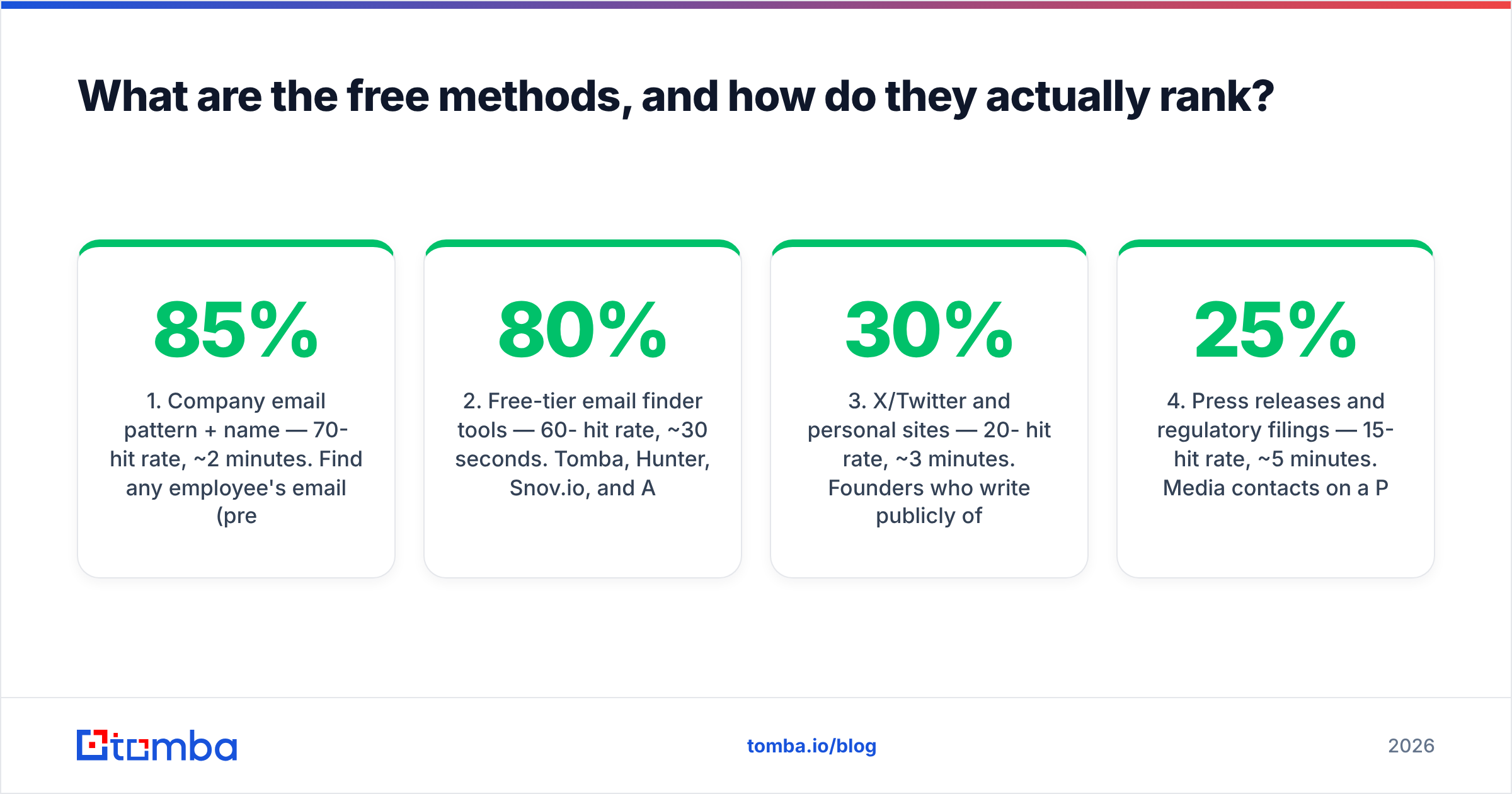
Here is the honest ranking based on hit rate versus time spent. "Hit rate" means the share of attempts that produce a deliverable address for a typical 20-500 person B2B company.
- Company email pattern + name — 70-85% hit rate, ~2 minutes. Find any employee's email (press page, blog byline, GitHub commit), extract the pattern, apply it to the CEO. This is the workhorse.
- Free-tier email finder tools — 60-80% hit rate, ~30 seconds. Tomba, Hunter, Snov.io, and Apollo all have free plans. Limited monthly credits, but the credits are exactly where you should spend them.
- X/Twitter and personal sites — 20-30% hit rate, ~3 minutes. Founders who write publicly often list an address in a bio, an about page, or a newsletter footer. Search
site:twitter.com "ceo name" email. - Press releases and regulatory filings — 15-25% hit rate, ~5 minutes. Media contacts on a PR Newswire release, SEC filings for public companies, and Companies House records in the UK sometimes carry direct addresses.
- GitHub commit history — 10-40% hit rate, ~2 minutes, but wildly skewed. Near-zero for non-technical CEOs, near-40% for technical founders. Check
github.com/<user>then append.patchto any commit URL to reveal the author email. - Conference speaker pages and podcast show notes — 10-20% hit rate. Event organizers often publish a speaker contact, and podcast hosts sometimes leave the guest's booking address in the notes.

Methods 3 through 6 are worth knowing but should not be your default. If you are prospecting more than five CEOs a week, methods 1 and 2 will carry the load and the rest are cleanup for the stubborn ones.
How do you find a company's email pattern for free?#
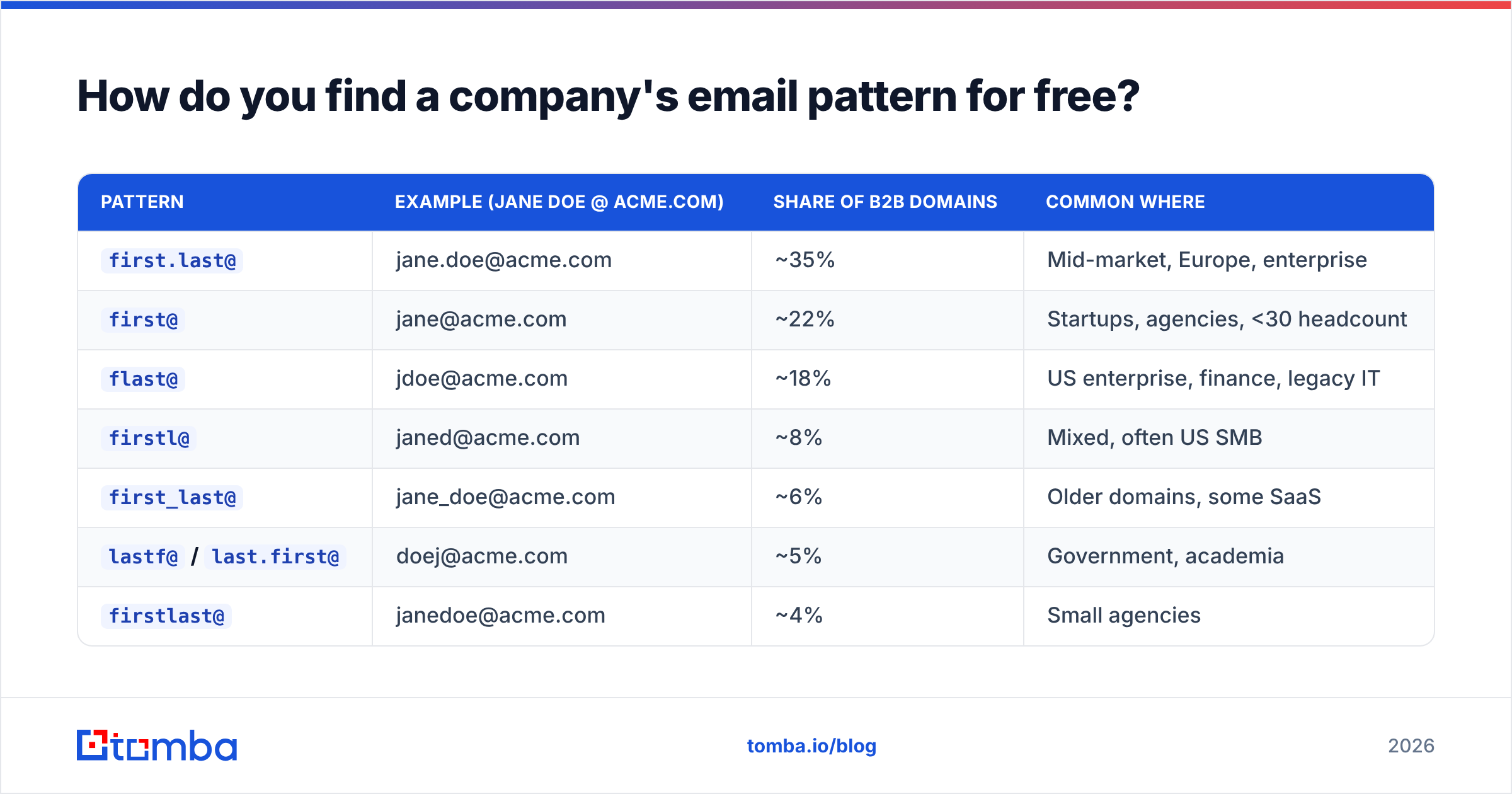
Pull one known employee address and reverse-engineer the format. There are only about eight formats in wide use.
| Pattern | Example (Jane Doe @ acme.com) | Share of B2B domains | Common where |
|---|---|---|---|
first.last@ |
jane.doe@acme.com | ~35% | Mid-market, Europe, enterprise |
first@ |
jane@acme.com | ~22% | Startups, agencies, <30 headcount |
flast@ |
jdoe@acme.com | ~18% | US enterprise, finance, legacy IT |
firstl@ |
janed@acme.com | ~8% | Mixed, often US SMB |
first_last@ |
jane_doe@acme.com | ~6% | Older domains, some SaaS |
lastf@ / last.first@ |
doej@acme.com | ~5% | Government, academia |
firstlast@ |
janedoe@acme.com | ~4% | Small agencies |
| Non-standard / alias | hi@acme.com | ~2% | Solo founders, personal brands |
To source that one known address, work through these in order:
- The company blog. Author bios frequently include a contact address. A free author finder pulls the byline address directly from an article URL.
- The press or media page.
acme.com/pressalmost always lists a real human contact. - The privacy policy or terms page. GDPR requires a contact route, and it is often a named person rather than a generic box.
- Job postings. Smaller companies list "email your resume to..." with a hiring manager's real address.
- A free email pattern checker. Run the domain through a company email pattern tool and it returns the dominant format observed across known addresses.
Once you have the pattern, apply it to the CEO's name. If you cannot confirm the pattern, an email permutator generates every plausible combination in one click — then you verify the list rather than sending to it.
Which free email finder tools give you the most per month?#
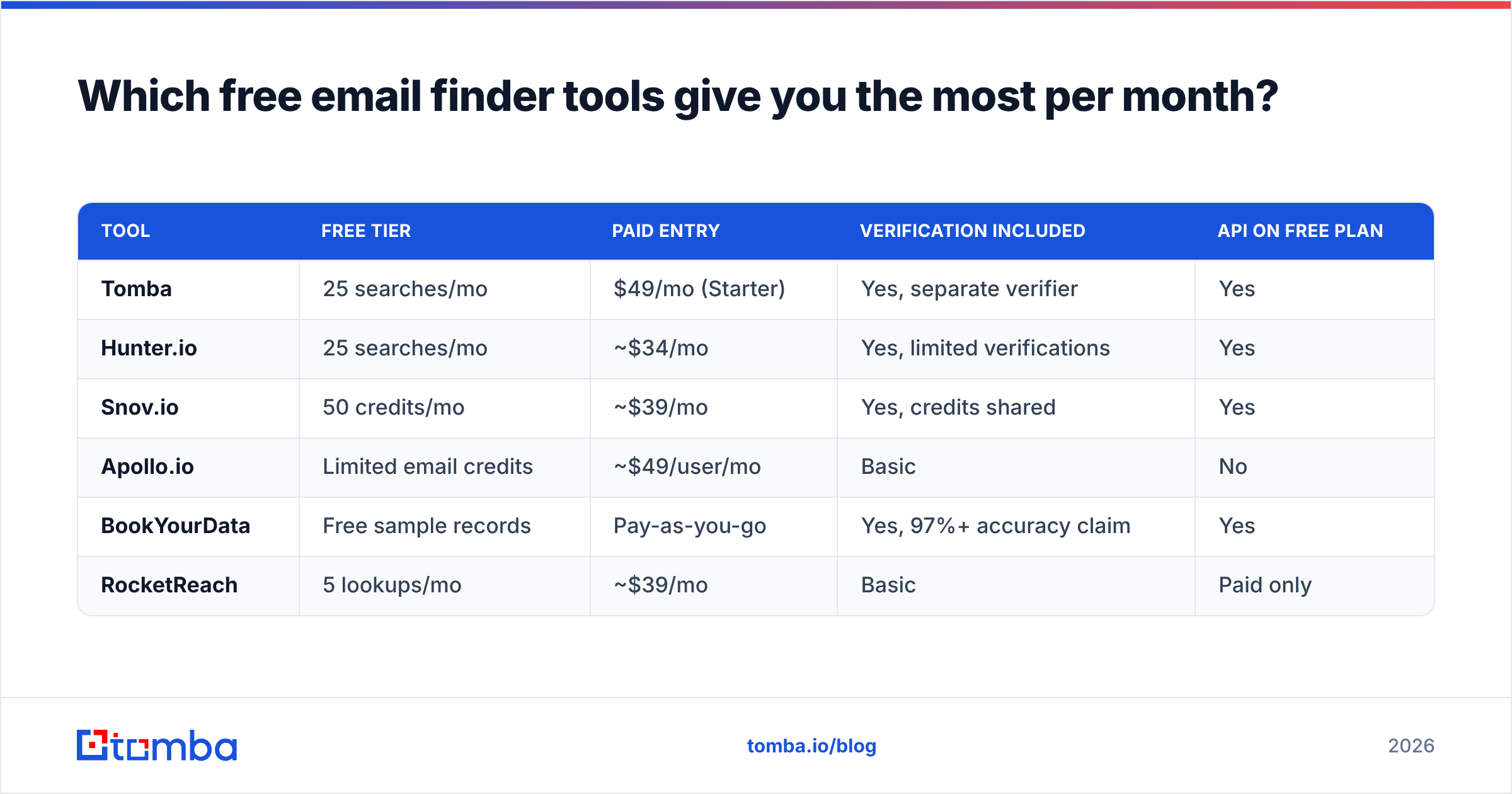
Free tiers vary more than the marketing pages suggest. What matters is not just the credit count but whether verification is bundled, whether a credit is consumed on a failed search, and whether you get an API on the free plan.
| Tool | Free tier | Paid entry | Verification included | API on free plan |
|---|---|---|---|---|
| Tomba | 25 searches/mo | $49/mo (Starter) | Yes, separate verifier | Yes |
| Hunter.io | 25 searches/mo | ~$34/mo | Yes, limited verifications | Yes |
| Snov.io | 50 credits/mo | ~$39/mo | Yes, credits shared | Yes |
| Apollo.io | Limited email credits | ~$49/user/mo | Basic | No |
| BookYourData | Free sample records | Pay-as-you-go | Yes, 97%+ accuracy claim | Yes |
| RocketReach | 5 lookups/mo | ~$39/mo | Basic | Paid only |
A few notes that change the calculus:
Credits are not equal. Some tools burn a credit whether or not they return an address. Check the policy before you spend your 25. Tomba and Hunter both only charge on a successful find, which effectively makes 25 searches worth more than a competitor's 50 charged-on-attempt credits.
Verification is where free tiers get stingy. Finding is cheap; SMTP verification is the expensive part. If a free plan gives you 100 finds and 10 verifications, the real limit is 10.
Pay-as-you-go beats subscriptions for low volume. If you need 40 CEO emails a quarter, a monthly subscription is waste. BookYourData's credit model and similar pay-per-record options fit that shape better than any $49/mo plan, including Tomba's — worth saying plainly since it is true.

For a full breakdown of what each vendor charges past the free tier, the Tomba pricing page lists the tiers side by side: Free (25 searches/mo), Starter $49/mo, Growth $99/mo, Pro $249/mo, and Enterprise custom.
How do you verify a CEO email without sending anything?#
Run an SMTP check. It opens a connection to the receiving mail server and asks whether the mailbox exists — without delivering a message.
A verifier returns one of four states, and how you treat each one matters:
- Valid — the mailbox exists and accepts mail. Send.
- Invalid — the mailbox does not exist. Discard; sending guarantees a hard bounce.
- Catch-all / accept-all — the domain accepts every address, so the check is inconclusive. This is where most CEO lookups land, because larger companies configure catch-alls deliberately.
- Risky / unknown — greylisting, rate limiting, or a temporarily unreachable server. Retry later before deciding.
Catch-all is the trap. Roughly a fifth of B2B domains are catch-all, and a naive verifier marks them "valid," which is how people end up with a clean-looking list that bounces at 12%. A dedicated catch-all verifier applies pattern confidence and secondary signals rather than trusting the SMTP response alone.
The free path: run your candidate through a free email checker for a single address, or use the email verifier for volume. For one CEO, the free checker is enough.
Why bother when you could just send and see? Because bounce rate is a sender reputation input, not a vanity metric. Google and Microsoft both throttle domains with elevated bounce rates, and the Google Workspace sender guidelines spell out the thresholds. A 5% bounce rate on a cold campaign is enough to start seeing placement problems, and recovery takes weeks of reduced volume.
What about LinkedIn — does that still work in 2026?#
Partially. LinkedIn remains the best place to confirm a CEO's exact name spelling and current company, which is the input every other method depends on. It is a weak source for the address itself.
What still works:
- Contact info panel. If you are a first-degree connection, LinkedIn shows whatever the person chose to publish. Many founders leave an email there. This costs nothing but requires the connection.
- Featured section and About text. Founders promoting a newsletter or a book often paste an address in plain text.
- Recent posts. "DM me or email me at..." appears more than you would expect in founder posts. Search their activity feed.
What no longer works: scraping the profile at scale. LinkedIn's enforcement has tightened considerably, and browser extensions that bulk-export profiles carry real account-restriction risk. If you want the LinkedIn-to-email path without the scraping exposure, a LinkedIn finder resolves a profile URL to a verified address server-side rather than automating your logged-in session.
Treat LinkedIn as the identity layer — name, title, company, tenure — and let a finder handle the email layer. That division keeps your account safe and your data clean.
When is free no longer worth it?#
When your time is worth more than the credit.
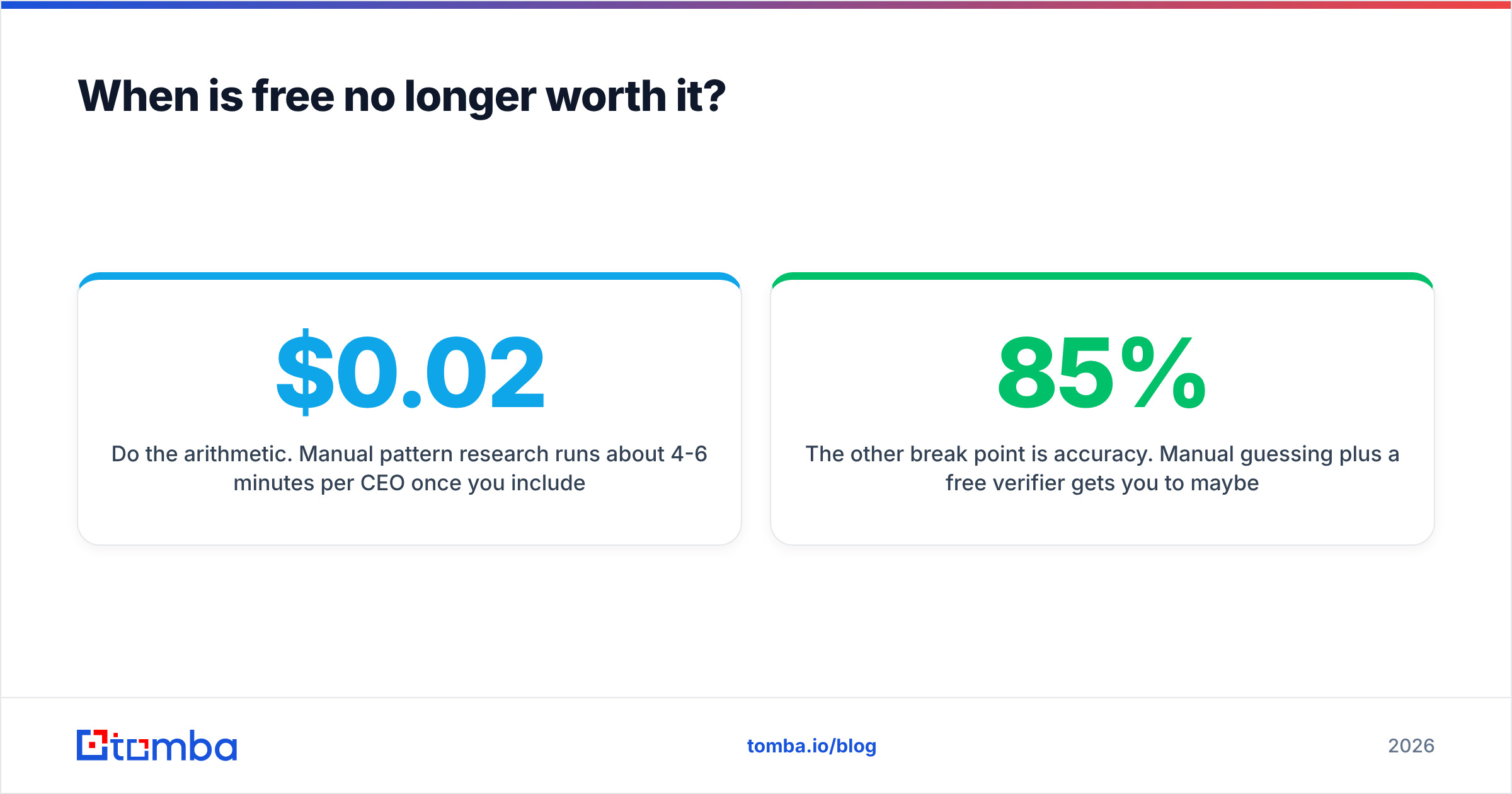
Do the arithmetic. Manual pattern research runs about 4-6 minutes per CEO once you include verification. At 30 prospects, that is roughly three hours. A paid credit costs somewhere between $0.02 and $0.10 depending on the plan. If your hourly cost is above $20, the free route stops making sense somewhere around prospect number 15.
The other break point is accuracy. Manual guessing plus a free verifier gets you to maybe 85% deliverable. Paid finders with waterfall enrichment — querying multiple data sources and taking the highest-confidence result — push that toward 95%. The gap is 10 percentage points, which on a 500-contact campaign is 50 wasted sends and a measurable hit to your domain reputation.
Three concrete signals that you have outgrown the free tier:
- You are hitting the monthly cap in the first week. 25 searches is a week of light prospecting, not a month of real outbound.
- You need bulk. Uploading a CSV of 200 companies and getting back verified CEO addresses is not something any free tier supports. That is what a bulk email finder exists for.
- You want it in your stack. Free plans rarely include the CRM connectors. If the addresses need to land in HubSpot or Salesforce automatically, you need a paid plan and an integration.
For teams evaluating the jump, G2's email-finder category is a reasonable neutral read on where each vendor's users actually land, and it is more useful than any vendor's own comparison page — including this one.
What is the fastest end-to-end workflow?#
Six steps, roughly five minutes, mostly free:
- Confirm the name. LinkedIn or the company's about page. Get the exact spelling, including hyphenated surnames and preferred first names — "Mike" versus "Michael" changes everything.
- Get the domain. Use the company's primary domain, not a marketing subdomain.
acme.com, notgo.acme.com. - Find the pattern. Run a domain search or check the press page for any known employee address.
- Generate candidates. Apply the pattern. If the CEO is a founder, also generate
first@domain.comas a second candidate — founders keep short addresses. - Verify each candidate. Free checker for one, verifier for a batch. Discard anything invalid. Flag catch-alls for the catch-all verifier.
- Enrich before you write. A verified address with no context produces a generic email. Pull the company size, funding stage, and tech stack so the first line is specific. That is what data enrichment is for.
Skip step 5 and the whole thing is pointless. A found address you did not verify is a guess with extra steps.
Ready to stop guessing?#
If you are looking up a handful of CEOs a month, the free path in this post works — pattern research, a free verifier, and a bit of patience. Start there.
If you are running real outbound and the guessing has become the bottleneck, the Tomba Email Finder resolves a name plus a domain to a verified address in one call, with SMTP verification built into the same request rather than bolted on afterward. The free tier gives you 25 searches a month to test the hit rate on your own target accounts before you pay anything — which is the only benchmark that actually tells you whether a tool works for your market.
Related guides#
// get started
Find, verify and enrich your first contacts today
Start on the free plan with 25 searches a month, then scale when your team is ready.
Free plan · No credit card required · GDPR & CCPA
// about the author