How to Find Company CEO Email Address: 9 Methods (2026)
CEO inboxes are the hardest to reach and the most valuable. Here are nine tested methods for finding a company CEO email address, ranked by accuracy, cost, and how fast you get a verified hit.
TL;DR
- The fastest reliable path is domain search plus a name: pull the company's email pattern, apply it to the CEO's first and last name, then verify before you send.
- Manual methods (WHOIS, SEC filings, press releases, GitHub commits) still work and cost nothing, but they take 5–15 minutes per contact and fail on large companies.
- Pattern guessing without verification is how you burn a sending domain. Every guessed address needs an SMTP-level check first.
- For CEOs at companies under ~200 employees, hit rates of 70–85% are realistic. At Fortune 500 scale, expect 30–50% and plan a fallback channel.
- Free tools get you started; paid tools (Tomba, Hunter, Apollo, RocketReach, BookYourData) get you volume and verification in one step.
Reaching a CEO is not a data problem in the abstract. It has a very specific shape. There is exactly one right answer per person, that answer is not published on purpose, and a wrong guess costs you more than sending nothing.
So the real question is how to find company CEO email address records that are current, correct, and safe to send to. This guide walks the nine methods that produce a working address. It covers what each one costs in time and money, and the verification step that separates a reply from a bounce.
Why is a CEO email address so hard to find?#
CEOs sit behind three layers of protection. Each one defeats a different scraping technique.
The first layer is publication policy. Executive addresses are almost never on the company website. Contact pages route to info@, press@, or a form. That's deliberate — the address exists, it's just not indexed.
The second layer is alias routing. Many CEOs at mid-size companies use a personal alias (sarah@company.com) that forwards to a longer canonical address. Both work. But only one shows up in leaked datasets, and the alias often has a tighter spam filter.
The third layer is the EA. At companies above roughly 300 employees, an executive assistant or a rules engine filters the CEO's inbox. Your address may be perfectly valid and still never be read by the person whose name is on it.
That last point reframes the whole exercise. Finding the address is step one. Getting past the filter is a separate problem, and you solve it with relevance, not with data quality.
How to find company CEO email address: the 9 methods#
Here they are ordered roughly by how much work each one costs relative to hit rate.
Domain search on the company — Run the company domain through a domain search tool. It returns every known address on that domain plus the dominant pattern (
first.last@,flast@,first@). Once you have the pattern, the CEO's address is a two-second substitution. This is the single highest-leverage move and should be your default.Email pattern + permutation — If domain search returns a pattern but not the CEO specifically, generate every plausible variant with an email permutator and verify the list. Twelve candidates, one valid, eleven rejected — the verifier does the sorting.
LinkedIn profile mining — Some executives put a contact email in the "Contact info" panel or the About section. A LinkedIn finder resolves a profile URL to a work email without connecting. Hit rate is lower for CEOs than for ICs, because CEOs curate their profiles more carefully.
WHOIS records — For companies that registered their domain before GDPR-era privacy proxies became standard (roughly pre-2018), WHOIS often lists the founder's personal email as the registrant. Free, instant, and surprisingly effective for startups founded 2010–2017. Check with any registrar lookup.
SEC and regulatory filings — For US public companies and anyone who has filed a Form D, S-1, or 10-K, the SEC EDGAR database contains contact blocks with executive names and, in some filings, direct addresses. Slow but authoritative.
GitHub commit history — If the CEO is technical (extremely common in SaaS), their commit history exposes the email attached to their git config.
git log --format='%ae' | sort -uon a public repo they've contributed to. Often a personal Gmail, which sometimes works better than the corporate address.Press releases and podcast show notes — Media contacts and guest bios frequently include a direct line. Search
"CEO name" + emailor"CEO name" + "reach me at". Podcast show notes are the most underused source in this list.Author bylines on company blogs — CEOs at content-heavy companies write posts. An author finder pulls the email attached to a byline URL, which is frequently the real, monitored address rather than a routing alias.
Ask the front desk — Call the main line and ask what format the company uses for email addresses. Not who the CEO's address is — just the format. Receptionists answer that question roughly half the time because it feels like a non-question.
Most successful workflows chain two of these: method 1 to get the pattern, method 9 or 5 to confirm the CEO's exact legal name spelling, then verification.
Which method has the highest accuracy?#
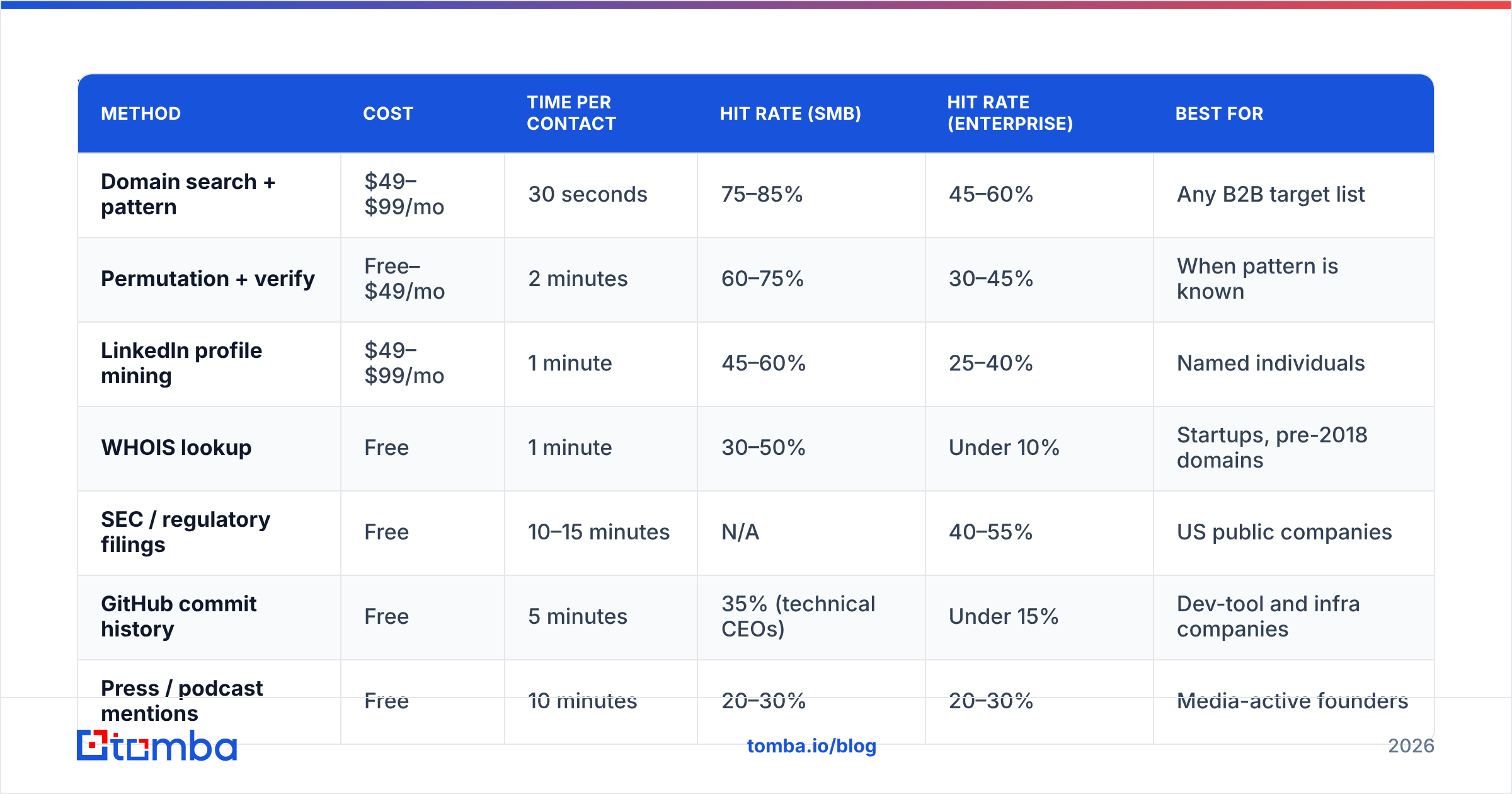
Accuracy varies more by company size than by method. Here's what to expect in practice.
| Method | Cost | Time per contact | Hit rate (SMB) | Hit rate (Enterprise) | Best for |
|---|---|---|---|---|---|
| Domain search + pattern | $49–$99/mo | 30 seconds | 75–85% | 45–60% | Any B2B target list |
| Permutation + verify | Free–$49/mo | 2 minutes | 60–75% | 30–45% | When pattern is known |
| LinkedIn profile mining | $49–$99/mo | 1 minute | 45–60% | 25–40% | Named individuals |
| WHOIS lookup | Free | 1 minute | 30–50% | Under 10% | Startups, pre-2018 domains |
| SEC / regulatory filings | Free | 10–15 minutes | N/A | 40–55% | US public companies |
| GitHub commit history | Free | 5 minutes | 35% (technical CEOs) | Under 15% | Dev-tool and infra companies |
| Press / podcast mentions | Free | 10 minutes | 20–30% | 20–30% | Media-active founders |
Two things stand out. First, the free methods aren't bad — they're slow. If you need 5 CEO addresses, WHOIS and EDGAR are fine. If you need 500, the arithmetic collapses.
Second, enterprise hit rates are roughly half of SMB rates across every method. That is a structural fact about how large companies manage identity, not a failure of any particular tool.

Recommended visual: side-by-side screenshot of a domain search result panel showing the detected email pattern and confidence score for a sample company.
How do you verify a CEO email before sending?#
Never send to an unverified guess. A single hard bounce on a cold domain measurably damages sender reputation. Executive-level domains often run aggressive filtering, and one bounce becomes a signal about every future message from you.
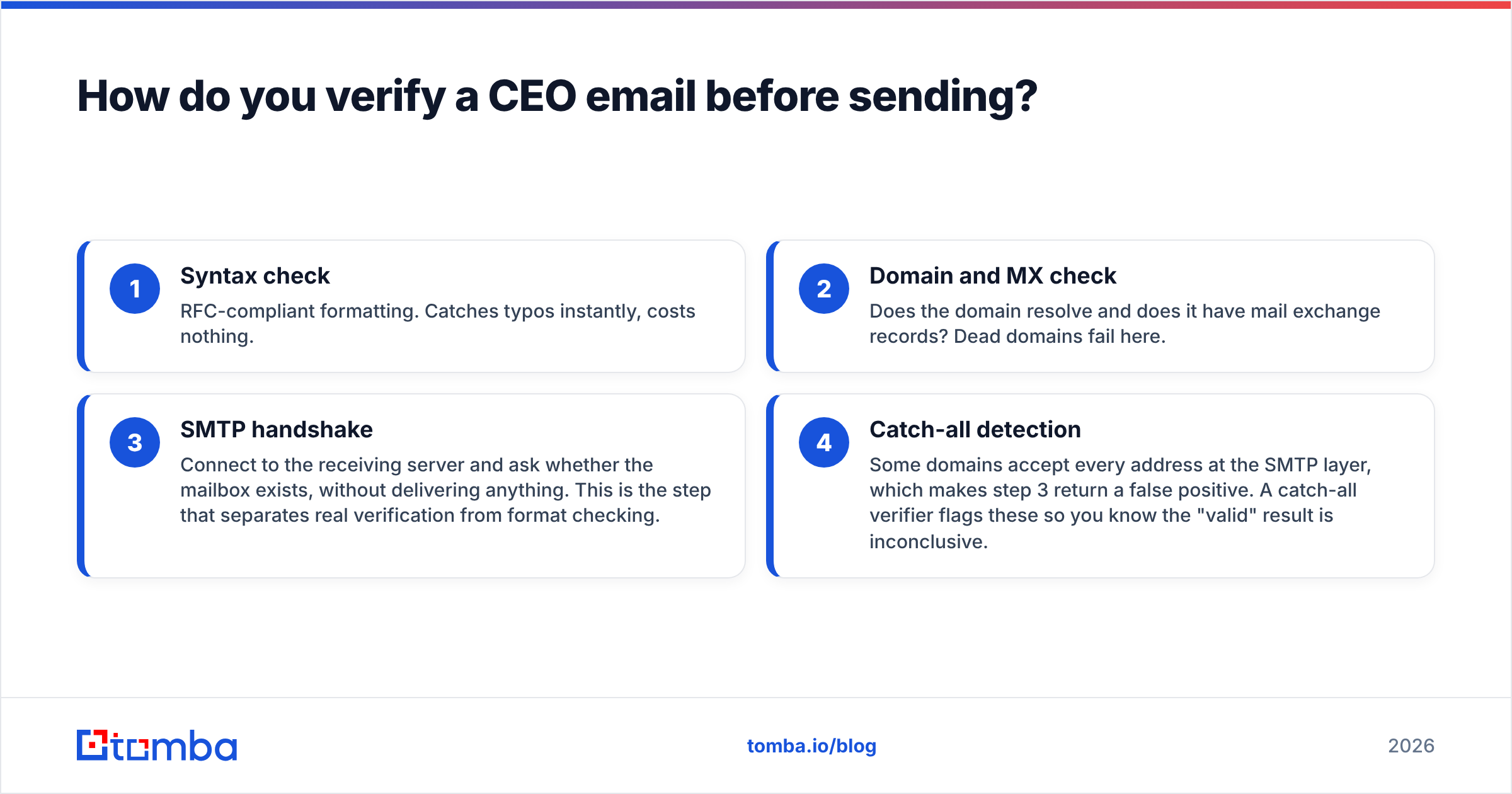
Verification runs in four stages, and a good email verifier does all four:
- Syntax check — RFC-compliant formatting. Catches typos instantly, costs nothing.
- Domain and MX check — Does the domain resolve and does it have mail exchange records? Dead domains fail here.
- SMTP handshake — Connect to the receiving server and ask whether the mailbox exists, without delivering anything. This is the step that separates real verification from format checking.
- Catch-all detection — Some domains accept every address at the SMTP layer, which makes step 3 return a false positive. A catch-all verifier flags these so you know the "valid" result is inconclusive.
Catch-all domains are disproportionately common at exactly the companies you want to reach — enterprises with legacy mail infrastructure. When you hit one, you can send anyway at reduced confidence. Or you can fall back to a phone finder and open the conversation on another channel.
Which tools should you use for CEO email lookup?#
The tool market splits into three groups: pure finders, finder-plus-database platforms, and verification specialists. For CEO work you want one tool that finds and verifies in the same pass. A two-tool workflow doubles your per-contact cost.
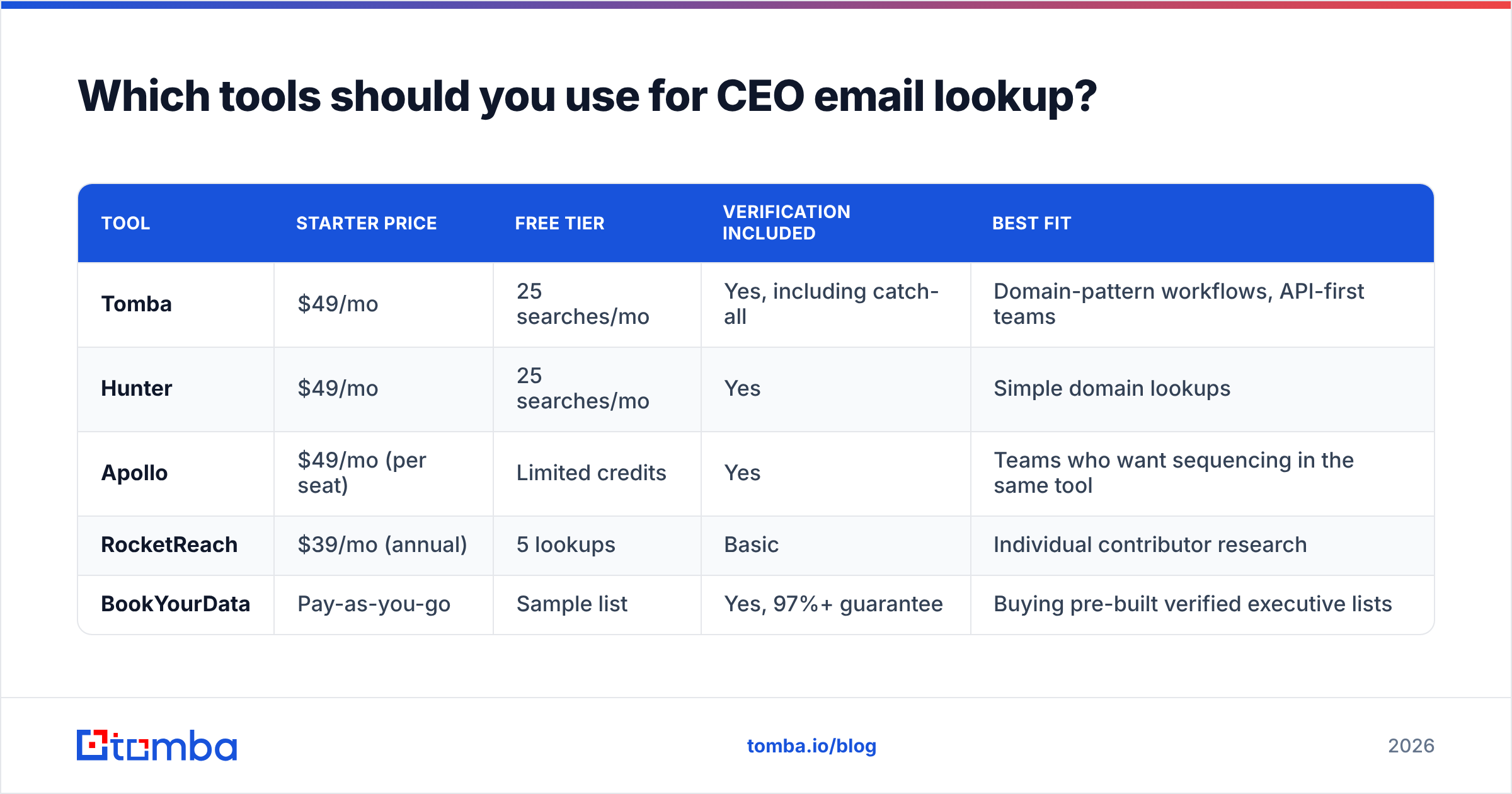
| Tool | Starter price | Free tier | Verification included | Best fit |
|---|---|---|---|---|
| Tomba | $49/mo | 25 searches/mo | Yes, including catch-all | Domain-pattern workflows, API-first teams |
| Hunter | $49/mo | 25 searches/mo | Yes | Simple domain lookups |
| Apollo | $49/mo (per seat) | Limited credits | Yes | Teams who want sequencing in the same tool |
| RocketReach | $39/mo (annual) | 5 lookups | Basic | Individual contributor research |
| BookYourData | Pay-as-you-go | Sample list | Yes, 97%+ guarantee | Buying pre-built verified executive lists |
BookYourData is worth calling out separately because it solves a different shape of the problem. Instead of finding one CEO at a time, you buy a filtered, pre-verified list of executives by industry, headcount, and geography.
If your motion is "reach 400 CEOs of manufacturing companies in the Midwest," that's faster than 400 individual lookups. If your motion is "reach these 12 specific people," a finder is better.

Check current Tomba pricing before assuming any figure here is still accurate — this market reprices often. And read independent reviews on G2 rather than trusting any vendor's own comparison page, including the one you're reading.
Recommended visual: screenshot of a bulk enrichment run in progress, showing a CSV of company names resolving into verified executive addresses with confidence scores.
How do you scale this to a list of 100+ companies?#
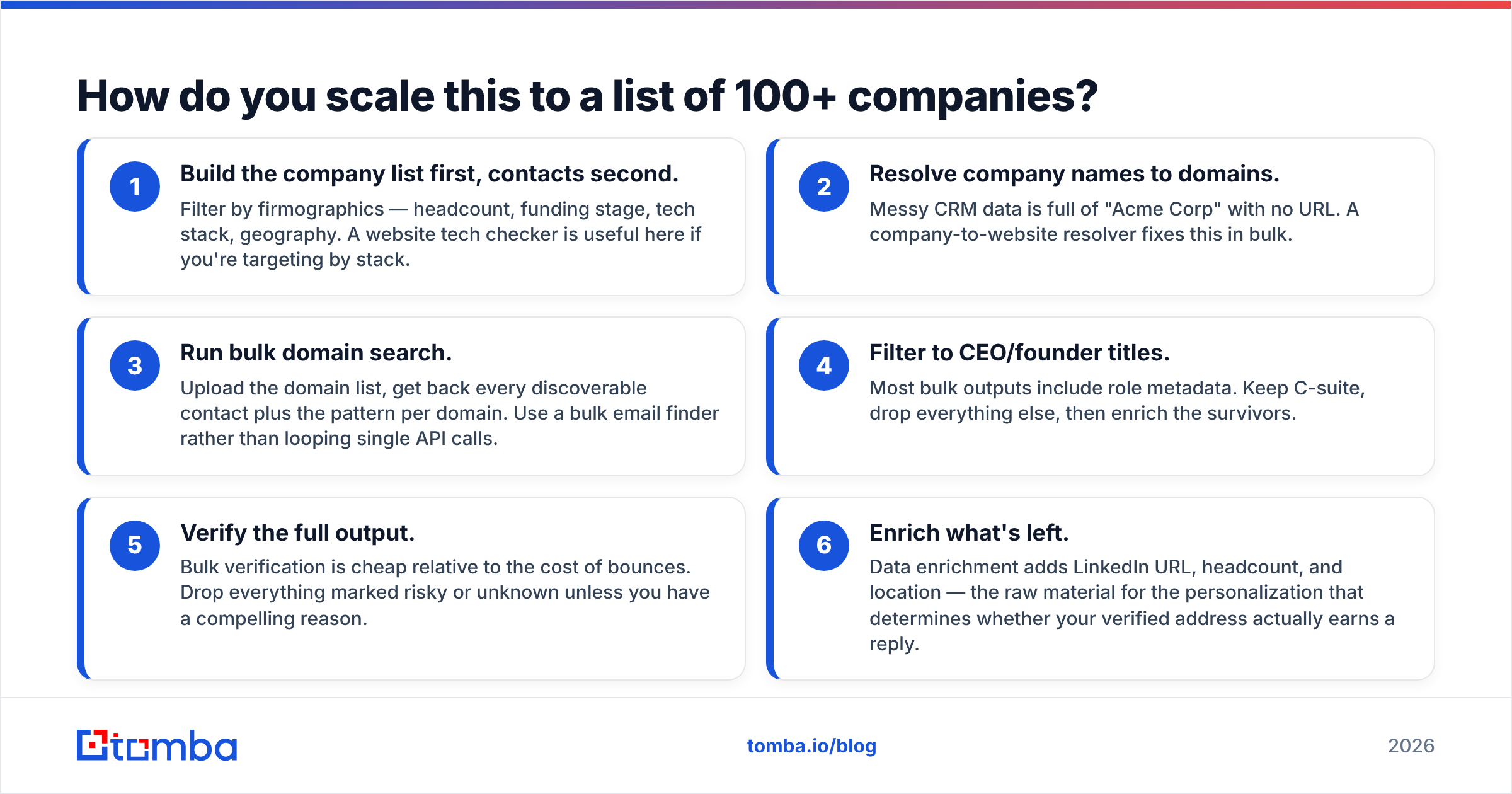
One-at-a-time lookups stop working past about 20 contacts. The batch workflow looks like this:
- Build the company list first, contacts second. Filter by firmographics — headcount, funding stage, tech stack, geography. A website tech checker is useful here if you're targeting by stack.
- Resolve company names to domains. Messy CRM data is full of "Acme Corp" with no URL. A company-to-website resolver fixes this in bulk.
- Run bulk domain search. Upload the domain list, get back every discoverable contact plus the pattern per domain. Use a bulk email finder rather than looping single API calls.
- Filter to CEO/founder titles. Most bulk outputs include role metadata. Keep C-suite, drop everything else, then enrich the survivors.
- Verify the full output. Bulk verification is cheap relative to the cost of bounces. Drop everything marked risky or unknown unless you have a compelling reason.
- Enrich what's left. Data enrichment adds LinkedIn URL, headcount, and location. That is the raw material for personalization, which decides whether your verified address earns a reply.
If you're running this repeatedly, wire it through the Tomba API or push results straight into your CRM with a HubSpot integration so the enriched records land where reps actually work. HubSpot's own prospecting documentation covers the downstream sequencing side well.
Is emailing a CEO directly even legal?#
Yes, in most places, with conditions. But the conditions differ by region, so know which set applies to you.
Under CAN-SPAM (US), B2B cold email is legal. You need accurate header information, a non-deceptive subject line, a physical postal address in the message, and a working opt-out mechanism that you honor within 10 business days. No prior consent required.
Under GDPR (EU/UK), you generally rely on legitimate interest rather than consent for B2B outreach. That requires a documented balancing test, relevance to the recipient's professional role, and easy opt-out. A generic pitch to a CEO's personal Gmail found in a GitHub commit is a much weaker position than a role-relevant message to their corporate address.
Under CASL (Canada), the bar is higher. You typically need express or implied consent. Implied consent covers existing business relationships, or a published address that carries no "no unsolicited email" notice.
Practical translation: use the corporate address, keep it role-relevant, include a real opt-out, and don't scrape personal addresses for bulk sends. The methods in this guide are all legal. How you use the output is what carries risk. Consult counsel if you're operating at scale across regions.
What should you do after you find the address?#
Getting the address is maybe 30% of the work. The rest is earning the open.
- Send from a warmed domain. A brand-new sending domain hitting executive inboxes goes straight to spam. Check your email deliverability fundamentals — SPF, DKIM, DMARC — before your first send.
- Keep it under 90 words. CEO attention is measured in seconds. Every sentence that isn't about them is a reason to archive.
- Lead with a specific, verifiable observation. Not "I saw you're growing fast." Something you could only know if you'd actually looked at their business.
- Expect the EA. Write the email so it survives being forwarded with "should I book this?" attached to it.
- Have a second channel ready. LinkedIn, a warm intro, or a call. The email is one attempt in a sequence, not the whole plan.
The pattern that consistently underperforms is a verified CEO address plus a generic template. You've done the hard technical work and then thrown it away on the easy creative work. Match the effort.
Get verified CEO addresses without the guesswork#
If you're doing this manually right now — WHOIS lookups, permutation spreadsheets, hoping the address resolves — you're spending 10 minutes per contact on something a tool does in 30 seconds with a confidence score attached.
The short answer to how to find company CEO email address data at scale is simple: stop guessing and let a verified finder do the lookup. Tomba's Email Finder turns a company domain and an executive name into a verified address in one call. SMTP-level checking and catch-all detection are built in, so you know what you're holding before you send. Start on the free tier at 25 searches a month, and move to Starter at $49/mo when the volume justifies it. Your bounce rate — and your sending domain — will thank you.
Related guides#
// get started
Find, verify and enrich your first contacts today
Start on the free plan with 25 searches a month, then scale when your team is ready.
Free plan · No credit card required · GDPR & CCPA
// about the author