How To Find the Correct Email Address for Anyone in 2026
Guessing an email address costs you a bounce, a bit of sender reputation, and a prospect. Here are seven methods that actually return the correct address — ranked by hit rate, speed, and cost.
TL;DR
- The fastest reliable path is pattern detection plus SMTP verification: figure out the company's email format, apply it to your target's name, then confirm the mailbox actually accepts mail.
- Manual methods (Google operators, LinkedIn, GitHub commits, WHOIS, author bylines) work and cost nothing, but top out around 40–60% coverage and eat 3–6 minutes per contact.
- Automated finders push coverage to 70–90% on the same list in seconds — the gap between tools is verification quality, not database size.
- Never send to an unverified guess. A single bad send is cheap; a 12% bounce rate on a new domain is not.
- Catch-all domains are the hard 20%. Treat them as "risky," not "valid," and route them through a catch-all check before they hit your main sequence.
You have a name, a company, and a deadline. What you don't have is the one string that makes the whole outreach work: firstname.lastname@company.com — or is it flastname@? Or first@? Get it wrong and your message lands in a bounce log instead of an inbox, and your sending domain absorbs the damage.
This guide walks through every practical method for finding a correct email address, ranked by how often each one actually works. No filler — just the sequence a working SDR or founder should run.
What makes an email address "correct" in the first place?#
Correct means three things at once, and most people only check the first.
- Syntactically valid — it parses as an email address.
john.smith@acme.compasses;john.smith@acmedoesn't. This is trivial and catches almost nothing useful. - Deliverable — the domain has MX records and the mail server accepts messages for that specific mailbox. This is the check that matters.
- Actually the right person —
j.smith@acme.commight belong to Jane Smith in finance, not John Smith in procurement. Deliverable but wrong. - Still active — the person hasn't left. B2B contact data decays roughly 22–30% per year as people change jobs, so an address that was correct in January can be a hard bounce by October.
Miss any of the four and you get the same outcome: no reply. Miss #2 at scale and you get something worse — a rising bounce rate that mailbox providers read as a spam signal. Google and Microsoft both throttle senders whose bounce rate climbs past a few percent, and once your email deliverability drops, even your correct addresses stop landing.
How do you find an email address manually, for free?#
Manual methods are worth knowing because they're free, they work on obscure targets that databases miss, and they teach you what the automated tools are doing under the hood.
Google search operators. Search "@company.com" "firstname lastname" or site:company.com "@company.com". Press releases, PDF investor decks, conference speaker pages, and support docs leak addresses constantly. Add filetype:pdf to surface documents that never got indexed as HTML.
The company's own website. Check /about, /team, /contact, /press, and the careers page. Legal pages are underrated — privacy policies and terms of service almost always list a real, monitored mailbox, and that mailbox tells you the domain's format.
LinkedIn. People list work emails in their Contact Info panel more often than you'd expect, especially consultants, recruiters, and anyone in business development. It's also the single best source for verifying that the person still works there — which solves problem #4 above.
GitHub. For anyone technical, run git log on a repo they've contributed to, or check the commits API. Commit metadata contains the author's email, and developers frequently commit with their work address. This method has a very high hit rate for engineering targets and a near-zero one for everyone else.
Twitter/X and personal sites. People post their email as an image or with [at] substitutions to dodge scrapers. A quick scan of the bio and pinned posts costs ten seconds.
WHOIS lookup. For smaller companies that haven't enabled privacy protection, the domain registration record lists an administrative contact. Mostly dead for enterprises, occasionally a jackpot for SMBs and solo operators.
Newsletter signup. Subscribe to the company's list. The reply-to address on their marketing email is often a real human's mailbox, and the header reveals their sending infrastructure.
Realistically, this stack gets you 40–60% coverage at three to six minutes per contact. Fine for 10 targets. Unworkable for 500.
How do email address patterns actually work?#
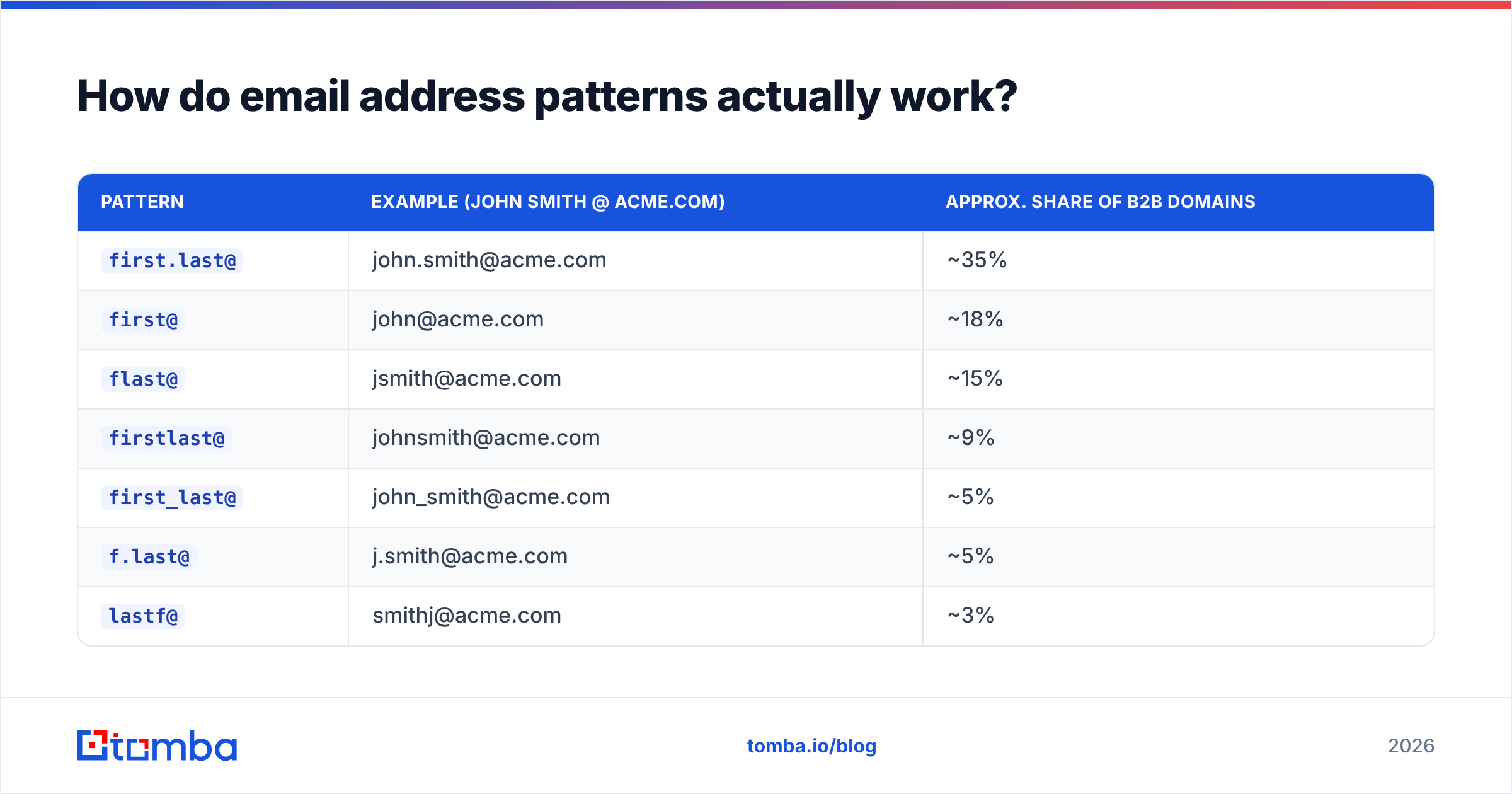
Here's the leverage point: companies don't assign emails randomly. IT provisions them from a template, and there are only about eight templates in wide use.
| Pattern | Example (John Smith @ acme.com) | Approx. share of B2B domains |
|---|---|---|
first.last@ |
john.smith@acme.com | ~35% |
first@ |
john@acme.com | ~18% |
flast@ |
jsmith@acme.com | ~15% |
firstlast@ |
johnsmith@acme.com | ~9% |
first_last@ |
john_smith@acme.com | ~5% |
f.last@ |
j.smith@acme.com | ~5% |
lastf@ |
smithj@acme.com | ~3% |
| Other / custom | js@acme.com, john.s@ | ~10% |
So the workflow becomes: find one confirmed address at the company, infer the pattern, apply it to your target's name. One data point unlocks the entire org chart. A company email pattern checker does this lookup in a second, and an email permutator generates every candidate variant if you'd rather brute-force the list and verify each one.
Two caveats. First, large companies run multiple patterns — legacy employees on flast@, post-2020 hires on first.last@, acquired teams on whatever their old company used. Second, collisions force exceptions: the second John Smith gets john.smith2@ or jsmith2@. Pattern inference gets you a strong candidate, not a certainty. Which is why the next step is non-negotiable.
How do you verify an email address before you send?#
Verification is where correctness is actually established. A good verifier runs a cascade:
- Syntax check — RFC 5322 compliance. Instant, free, catches typos.
- Domain and MX record check — does the domain exist and does it publish mail exchanger records? No MX, no mailbox. See the Wikipedia entry on SMTP if you want the protocol detail.
- Disposable / role detection — flags
mailinator.comthrowaways and role accounts likeinfo@,sales@,support@. Role accounts are technically deliverable but convert terribly and are more likely to mark you as spam. - SMTP handshake — connect to the mail server, issue
RCPT TO, and read the response code without ever delivering a message. A 250 means the mailbox exists. A 550 means it doesn't. - Catch-all detection — some servers accept mail for every address at the domain, so
asdkjhasd@company.comreturns 250 too. This is the single biggest source of false confidence in email verification.

Accuracy claims in this category deserve skepticism. When a vendor advertises "99% accuracy," ask what the denominator is. Accuracy on verified results is a different number from coverage across your whole list, and a tool that returns fewer results with higher confidence can easily beat one that returns more results padded with catch-alls marked "valid."
The practical benchmark: run 100 known-good addresses and 100 known-dead ones through any tool. Count false positives (dead marked valid — these bounce and hurt you) separately from false negatives (good marked risky — these just cost you a lead). False positives are the expensive error.
Run any candidate through an email verifier before it enters a sequence. If you're working in bulk, a bulk verify pass on the full list is cheaper than one deliverability incident.
What about catch-all domains?#
Catch-all domains accept everything, which means standard SMTP verification returns "valid" for addresses that don't exist. Roughly 15–20% of B2B domains are configured this way, and they skew toward enterprise — exactly the accounts you care about.
Your options, in order of preference:
- Use a dedicated catch-all check. A catch-all verifier cross-references pattern data, historical send signals, and secondary sources to estimate whether a specific mailbox exists behind the wildcard. Not certainty, but a real probability score instead of a meaningless 250.
- Corroborate from a second source. If the address also appears in a public document, a git commit, or a signature, treat it as confirmed regardless of what SMTP says.
- Segment and isolate. Send catch-all addresses from a secondary domain or a lower-volume sequence so any bounces don't contaminate your primary sender reputation.
- Drop them if your domain is new. Under 90 days old with no send history? Skip catch-alls entirely until you've built sender reputation.
Never dump unverified catch-alls into your main sequence to "see what happens." You already know what happens.
Which email finder tool should you use?#
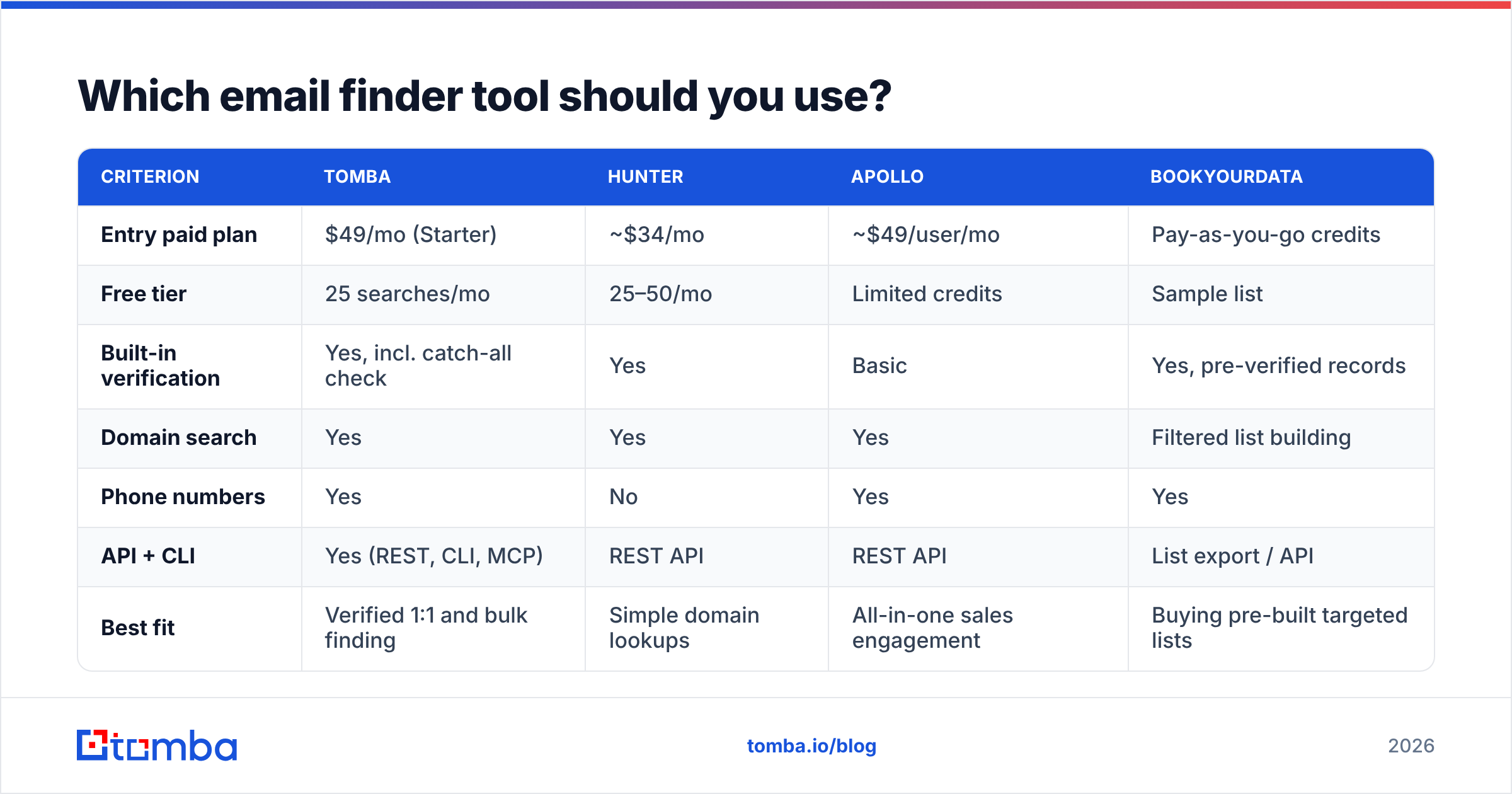
Once you're past ten contacts a week, manual work stops making sense. Here's how the main options compare on the criteria that determine whether you get the correct address, not just an address.

| Criterion | Tomba | Hunter | Apollo | BookYourData |
|---|---|---|---|---|
| Entry paid plan | $49/mo (Starter) | ~$34/mo | ~$49/user/mo | Pay-as-you-go credits |
| Free tier | 25 searches/mo | 25–50/mo | Limited credits | Sample list |
| Built-in verification | Yes, incl. catch-all check | Yes | Basic | Yes, pre-verified records |
| Domain search | Yes | Yes | Yes | Filtered list building |
| Phone numbers | Yes | No | Yes | Yes |
| API + CLI | Yes (REST, CLI, MCP) | REST API | REST API | List export / API |
| Best fit | Verified 1:1 and bulk finding | Simple domain lookups | All-in-one sales engagement | Buying pre-built targeted lists |
Pricing and features shift; check each vendor's own page before you commit, and read recent reviews on G2 rather than trusting any single comparison post — including this one.
The honest framing: these tools are not interchangeable but they're also not that different in what they do. They differ in where their data comes from and how aggressively they mark uncertain results as valid. BookYourData, for instance, plays a different game entirely — it sells pre-verified list segments rather than looking up individuals on demand, which suits teams that want a targeted list delivered rather than a search workflow. Apollo bundles finding with sequencing, which is convenient if you want one vendor and constraining if you already run Outreach or Salesloft. Tomba and Hunter both sit in the focused-finder lane, with Tomba adding catch-all handling, phone finder, and a CLI/MCP surface for people who'd rather script it than click it.

What's the fastest end-to-end workflow?#
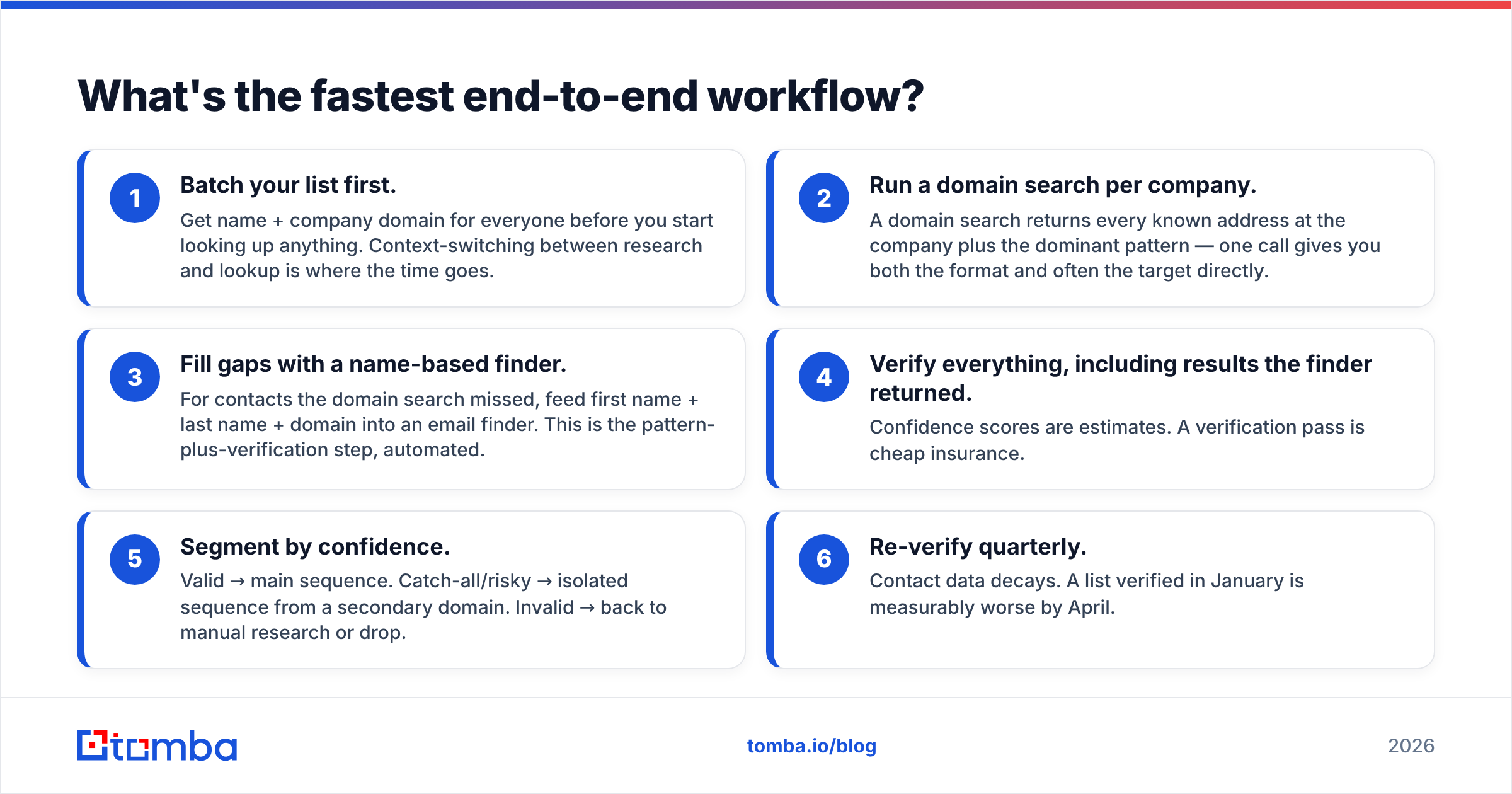
Here's the sequence that gets you from "name at company" to "verified address in your CRM" with the least wasted motion.
- Batch your list first. Get name + company domain for everyone before you start looking up anything. Context-switching between research and lookup is where the time goes.
- Run a domain search per company. A domain search returns every known address at the company plus the dominant pattern — one call gives you both the format and often the target directly.
- Fill gaps with a name-based finder. For contacts the domain search missed, feed first name + last name + domain into an email finder. This is the pattern-plus-verification step, automated.
- Verify everything, including results the finder returned. Confidence scores are estimates. A verification pass is cheap insurance.
- Segment by confidence. Valid → main sequence. Catch-all/risky → isolated sequence from a secondary domain. Invalid → back to manual research or drop.
- Re-verify quarterly. Contact data decays. A list verified in January is measurably worse by April.
For teams working inside a spreadsheet, the Google Sheets add-on and Excel add-in run steps 2–4 as formulas over a column. For engineering-led workflows, the Tomba API handles the same sequence in a few lines and slots directly into an enrichment job.
What mistakes should you avoid?#
Sending to guesses. The whole point. A pattern-derived candidate is a hypothesis until a verifier confirms it.
Blasting role accounts. info@ and sales@ are usually deliverable and almost never useful. They're monitored by people with no authority to buy and a low tolerance for cold outreach.
Trusting one source. If the finder says one thing and LinkedIn says the person left eight months ago, LinkedIn wins.
Ignoring your own bounce data. Your bounce log is the highest-quality accuracy dataset you have about your specific market. If a tool consistently produces bounces on a particular company size or region, note it and adjust.
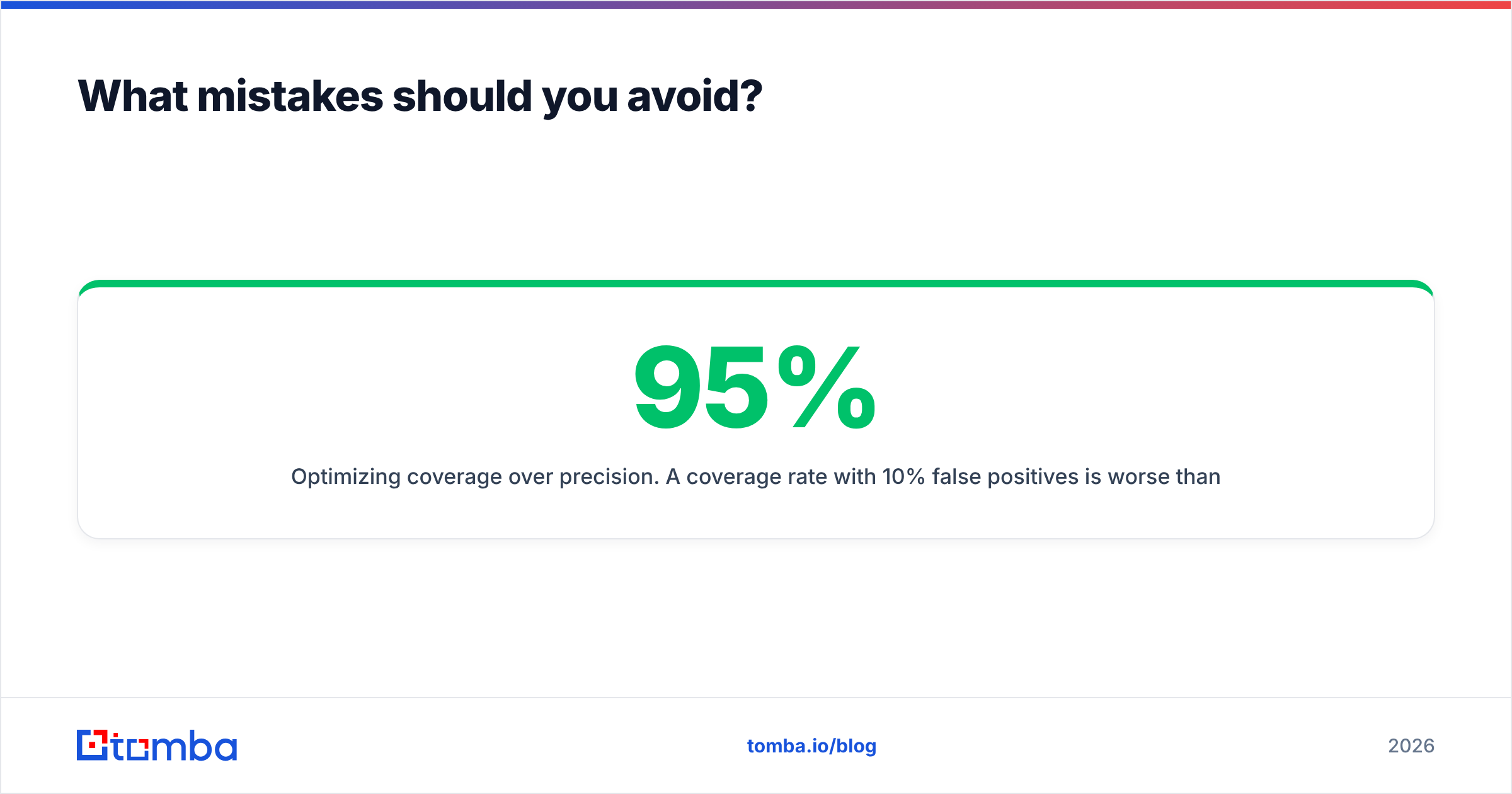
Optimizing coverage over precision. A 95% coverage rate with 10% false positives is worse than 75% coverage with 1%. The first number looks better on a dashboard; the second one keeps your domain alive.
Ready to stop guessing?#
You now have the full sequence: infer the pattern, apply it to the name, verify the mailbox, isolate catch-alls, re-check quarterly. The manual version works and costs nothing but time. The automated version does the same thing in seconds and — critically — tells you how confident it is.
If you want to test that on your own list, the Tomba Email Finder includes 25 free searches per month with verification built in, so you can measure the false-positive rate on contacts you already know before paying for anything. Paid plans start at $49/mo, and full Tomba pricing is on the site. Run 50 known contacts through it, count the misses, and let the data decide.
Related guides#
// get started
Find, verify and enrich your first contacts today
Start on the free plan with 25 searches a month, then scale when your team is ready.
Free plan · No credit card required · GDPR & CCPA
// about the author