How to Find Domain Email Address: 7 Methods Tested in 2026
Seven tested ways to find domain email address contacts — from free MX and WHOIS lookups to pattern guessing and bulk domain search — plus which ones survive verification.
Figuring out how to find domain email address contacts comes down to two jobs. Either you list every address on a domain, or you pin down one person's. Both take minutes once you pick the right tool. This guide ranks seven tested methods for how to find domain email address data, and shows how to verify each result before you send.
TL;DR
- The fastest reliable route is a domain search tool. Enter
company.comand get every public email tied to that domain, plus the naming pattern, in one query. - Free manual methods still work and cost nothing. Site footers, WHOIS, Google operators, and GitHub commits are just slow and incomplete.
- Guessing a pattern like
first.last@domain.comis fine only if you verify the result. Unverified guesses are how you burn a sending domain. - Catch-all domains break normal verification. You need a dedicated catch-all check, not a green checkmark from a generic validator.
- Budget $0.005–$0.02 per verified contact at the volumes most SMB teams run. Anything cheaper usually means stale data.
What does "how to find domain email address" actually mean?#
It means one of two different jobs. Pick the wrong one and you waste hours.
Job A — find every email on a domain. You know the company (stripe.com) but not the person. You want the full list of published addresses plus the naming rule the company uses. This is a domain search problem.
Job B — find one specific person's email at that domain. You know the name and the domain. You need the address. This is an email finder problem. The tool infers the pattern, generates candidates, and validates which one exists.
Most people search "how to find domain email address" wanting Job B. Then they get frustrated when a generic WHOIS lookup hands them admin@. Decide which job you're on before you open a tool.
There's a third thing people mean: the format. That's the rule the company uses to build addresses. It's the highest-leverage answer. Once you know a domain uses finitial+lastname@, you can build hundreds of contacts and verify them in bulk.
How to find domain email address data: the 7 methods ranked#
Ranked by hit rate against real B2B domains, from most reliable to most desperate.
- Domain search tools — Enter the domain. Get published and inferred addresses with confidence scores and sources. Highest coverage, seconds per domain, works in bulk. Costs money past the free tier.
- Email finder by name + domain — You supply "Jane Okafor" and "acme.com". The tool returns the verified address. Best precision when you already know the target.
- Company website recon — Check
/contact,/about,/team,/press, and the privacy policy. Legal and press pages leak real addresses more often than contact pages, which now hide behind forms. - Google search operators —
site:acme.com "@acme.com"or"@acme.com" "head of marketing"surfaces addresses indexed in PDFs, slide decks, and job posts. Free, unpredictable, occasionally gold.
The last three are fallbacks. Reach for them when the first four come up empty.
- WHOIS and DNS records —
whois acme.comstill returns registrant contacts on a minority of domains. GDPR redaction killed most of it. MX records tell you the mail provider (Google Workspace, Microsoft 365, Zoho), which shapes your verification strategy. - Developer and community footprints —
git logon a public repo exposes commit author emails. Conference speaker pages, academic papers, and SEC filings are the same idea in other markets. - Pattern permutation + verification — Generate every plausible combination, then verify each one. Use it as a last resort, and only with real SMTP-level validation attached.
How to find domain email address patterns manually#
Start from a single known address, then generalize.
Find one confirmed employee email — a press contact, a support rep, a GitHub committer. Say you find m.torres@acme.com and you know his name is Marco Torres. That tells you the pattern is finitial.lastname@. Every other employee on that domain follows the same rule. Expect a few exceptions for duplicate names and legacy hires.
The eight patterns that cover the overwhelming majority of B2B domains:
first.last@— the most common corporate defaultfirst@— startups and small teams under ~50 peopleflast@— enterprises, banks, and anything with an on-prem AD legacyfirst_last@— less common but persistent in APAC and older orgsfirstlast@— agencies and consultanciesf.last@— European mid-marketlastf@— rare, usually Nordic or Germanfirstl@— occasional US SaaS
Once you know the rule, an email permutator will build the candidates for you. You can also check the convention directly with a company email pattern lookup. The manual version is fine for one domain. It falls apart at fifty.
How accurate are these methods in practice?#
Accuracy is where free methods quietly cost you money. A bounce isn't just a lost contact. It's a hit to your sender reputation, and mailbox providers weigh recent bounce rates heavily. Google's Postmaster Tools guidance says plainly that sending to invalid addresses damages domain reputation. Most ESPs suspend accounts above a 5% bounce rate.
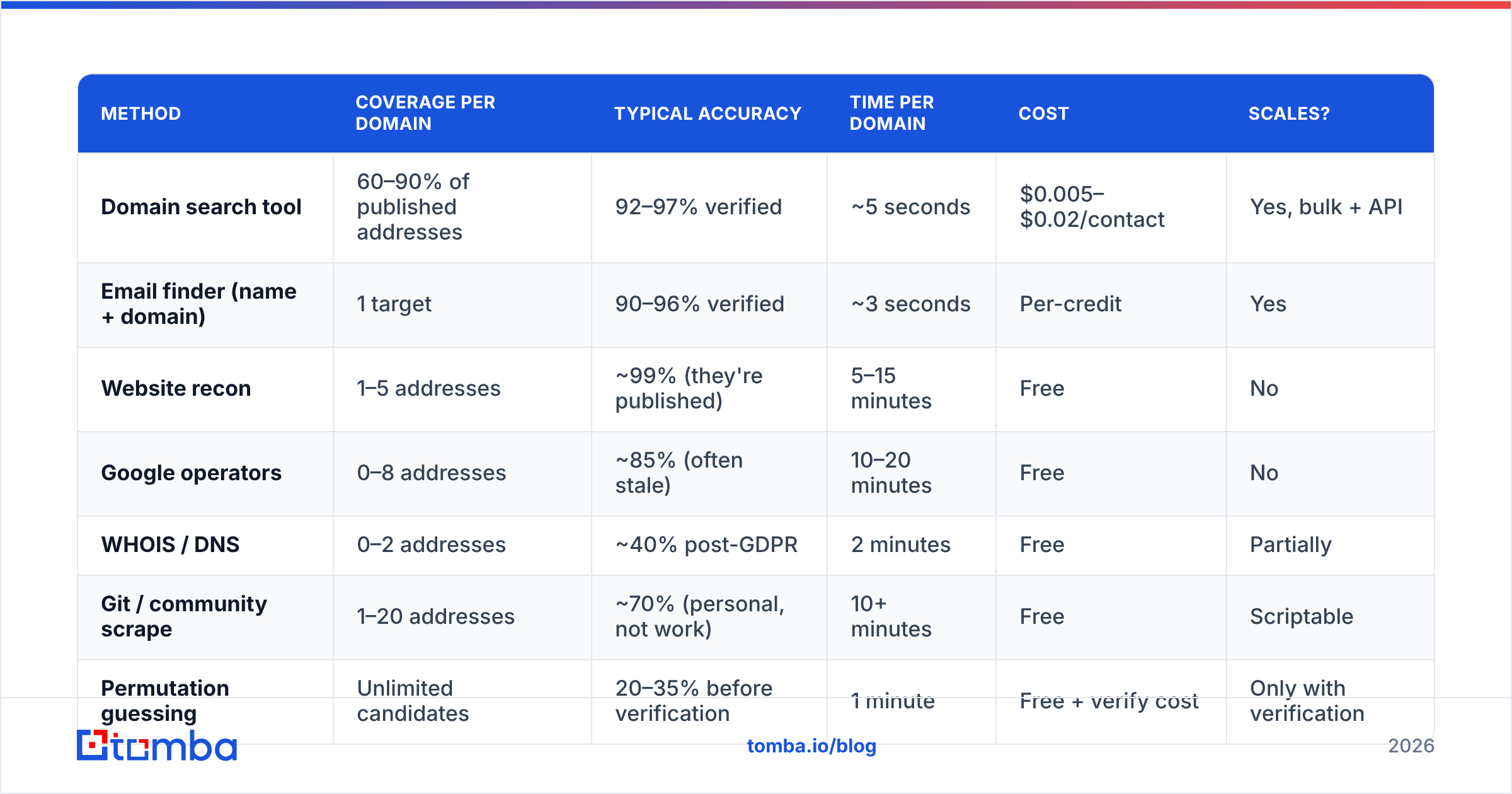
Here's how the methods compare on the numbers that matter:
| Method | Coverage per domain | Typical accuracy | Time per domain | Cost | Scales? |
|---|---|---|---|---|---|
| Domain search tool | 60–90% of published addresses | 92–97% verified | ~5 seconds | $0.005–$0.02/contact | Yes, bulk + API |
| Email finder (name + domain) | 1 target | 90–96% verified | ~3 seconds | Per-credit | Yes |
| Website recon | 1–5 addresses | ~99% (they're published) | 5–15 minutes | Free | No |
| Google operators | 0–8 addresses | ~85% (often stale) | 10–20 minutes | Free | No |
| WHOIS / DNS | 0–2 addresses | ~40% post-GDPR | 2 minutes | Free | Partially |
| Git / community scrape | 1–20 addresses | ~70% (personal, not work) | 10+ minutes | Free | Scriptable |
| Permutation guessing | Unlimited candidates | 20–35% before verification | 1 minute | Free + verify cost | Only with verification |
Two things jump out. First, published addresses are the most accurate data you'll ever get. They just don't cover the person you actually want. Second, permutation without verification hits about one in four. Mail all of them and you'll pay for it.

Which tools do this well in 2026?#
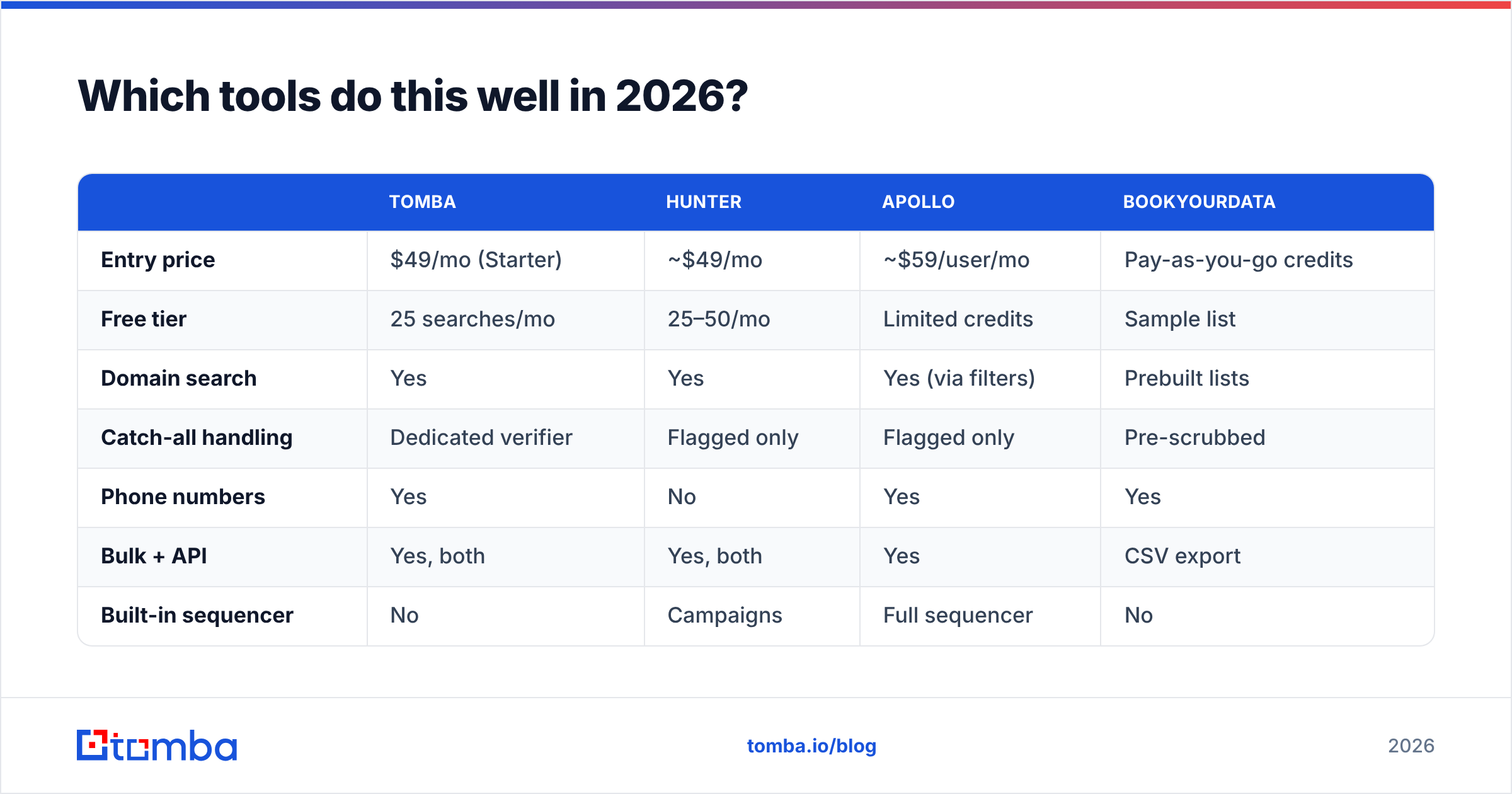
The market splits into three shapes: pure finders, finder-plus-sequencer suites, and database-first platforms that sell records in bulk.
| Tomba | Hunter | Apollo | BookYourData | |
|---|---|---|---|---|
| Entry price | $49/mo (Starter) | ~$49/mo | ~$59/user/mo | Pay-as-you-go credits |
| Free tier | 25 searches/mo | 25–50/mo | Limited credits | Sample list |
| Domain search | Yes | Yes | Yes (via filters) | Prebuilt lists |
| Catch-all handling | Dedicated verifier | Flagged only | Flagged only | Pre-scrubbed |
| Phone numbers | Yes | No | Yes | Yes |
| Bulk + API | Yes, both | Yes, both | Yes | CSV export |
| Built-in sequencer | No | Campaigns | Full sequencer | No |
| Best for | Finding + verifying at the source | Simple domain lookups | All-in-one outbound | Buying targeted lists |

Pick by workflow, not by feature count.
Already running Instantly or Smartlead for sending? You want a finder with a clean API and no sequencer tax. Tomba pricing starts at $49/mo for Starter, $99/mo for Growth, and $249/mo for Pro. The free tier covers 25 searches a month for testing.
Want one login for prospecting and sending? Apollo's bundle makes sense despite the per-seat cost. Would you rather buy a finished list than build one? BookYourData's pay-as-you-go model is a real shortcut for well-defined ICPs. You skip discovery and pay for pre-scrubbed records.
Check independent review volume on G2 before you commit to an annual plan. Category leaders shuffle every few quarters, and pricing pages change faster than blog posts do.
How do you verify a domain email address before sending?#
Never send to an address you haven't verified. This step separates a 1% bounce rate from a suspended account.
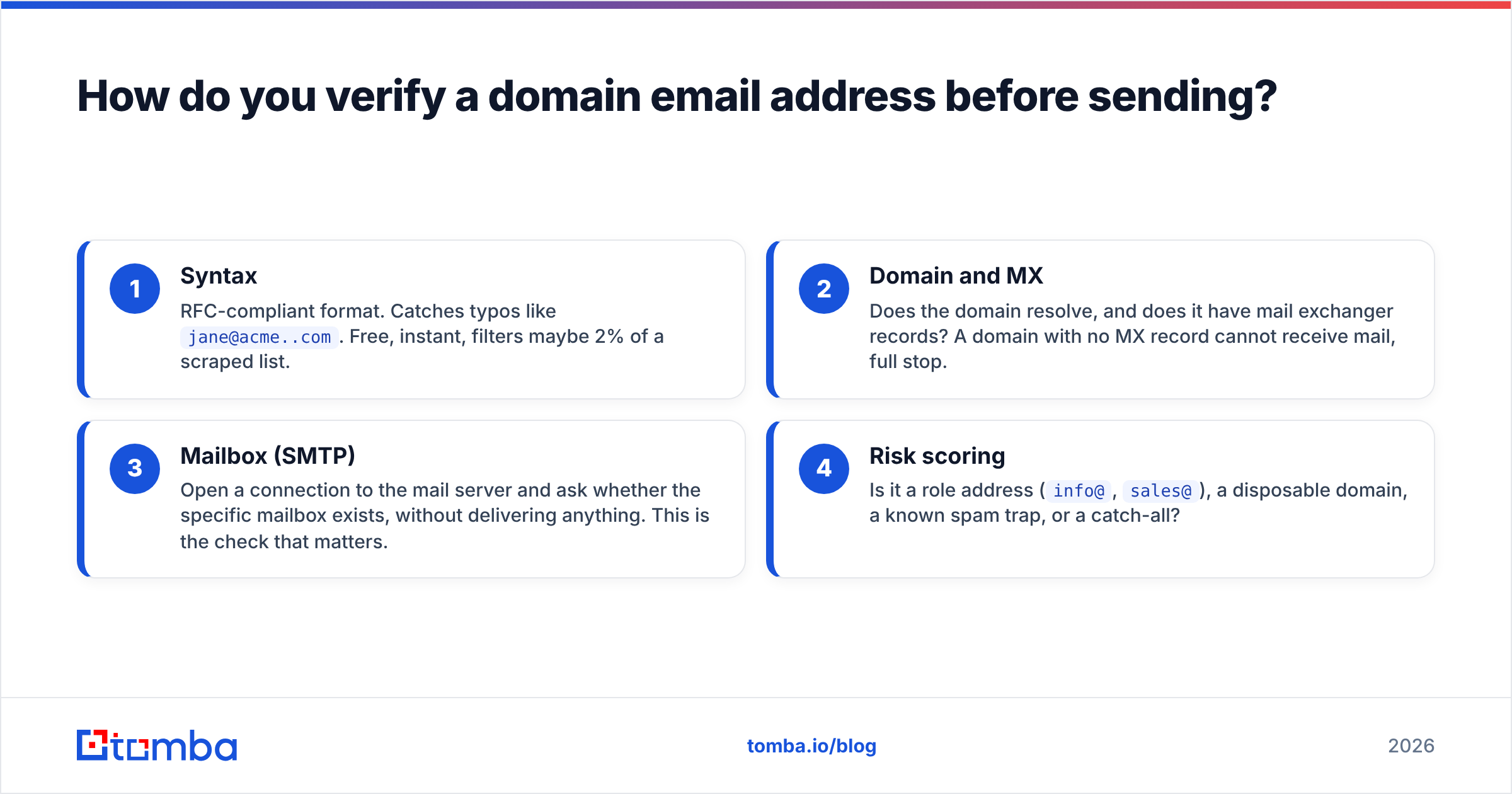
A real verification runs four checks in sequence:
- Syntax — RFC-compliant format. Catches typos like
jane@acme..com. Free, instant, filters maybe 2% of a scraped list. - Domain and MX — Does the domain resolve, and does it have mail exchanger records? A domain with no MX record cannot receive mail, full stop.
- Mailbox (SMTP) — Open a connection to the mail server and ask whether the mailbox exists, without delivering anything. This is the check that matters.
- Risk scoring — Is it a role address (
info@,sales@), a disposable domain, a known spam trap, or a catch-all?
An email verifier runs all four and returns a single status. For a one-off check, a free email checker does the job without an account.
The complication is catch-all domains. A catch-all server accepts mail sent to anything at that domain. So asdfgh@acme.com returns the same "valid" response as jane.okafor@acme.com.
Standard SMTP verification is blind here, and plenty of tools will hand you a green checkmark that means nothing. Roughly a fifth of B2B domains are set up this way. You need a catch-all verifier that uses secondary signals — pattern confidence, third-party sightings, historical engagement — instead of trusting the SMTP handshake alone.
What about privacy law and compliance?#
Finding a business email address from public sources is legal in most places. What you do next is where the rules bite.
Under GDPR, a work email tied to a named person is personal data. You need a lawful basis to process it. For B2B outreach that's usually legitimate interest, which requires a documented balancing test, real relevance to the recipient's role, and a working opt-out in every message. The ICO's direct marketing guidance is the clearest free reference on where the line sits.
In the US, CAN-SPAM is looser. No prior consent is required, but you must include a valid physical postal address, honor unsubscribes within 10 business days, and never use deceptive subject lines or headers. Canada's CASL is stricter than both. It effectively requires consent or a documented existing business relationship.
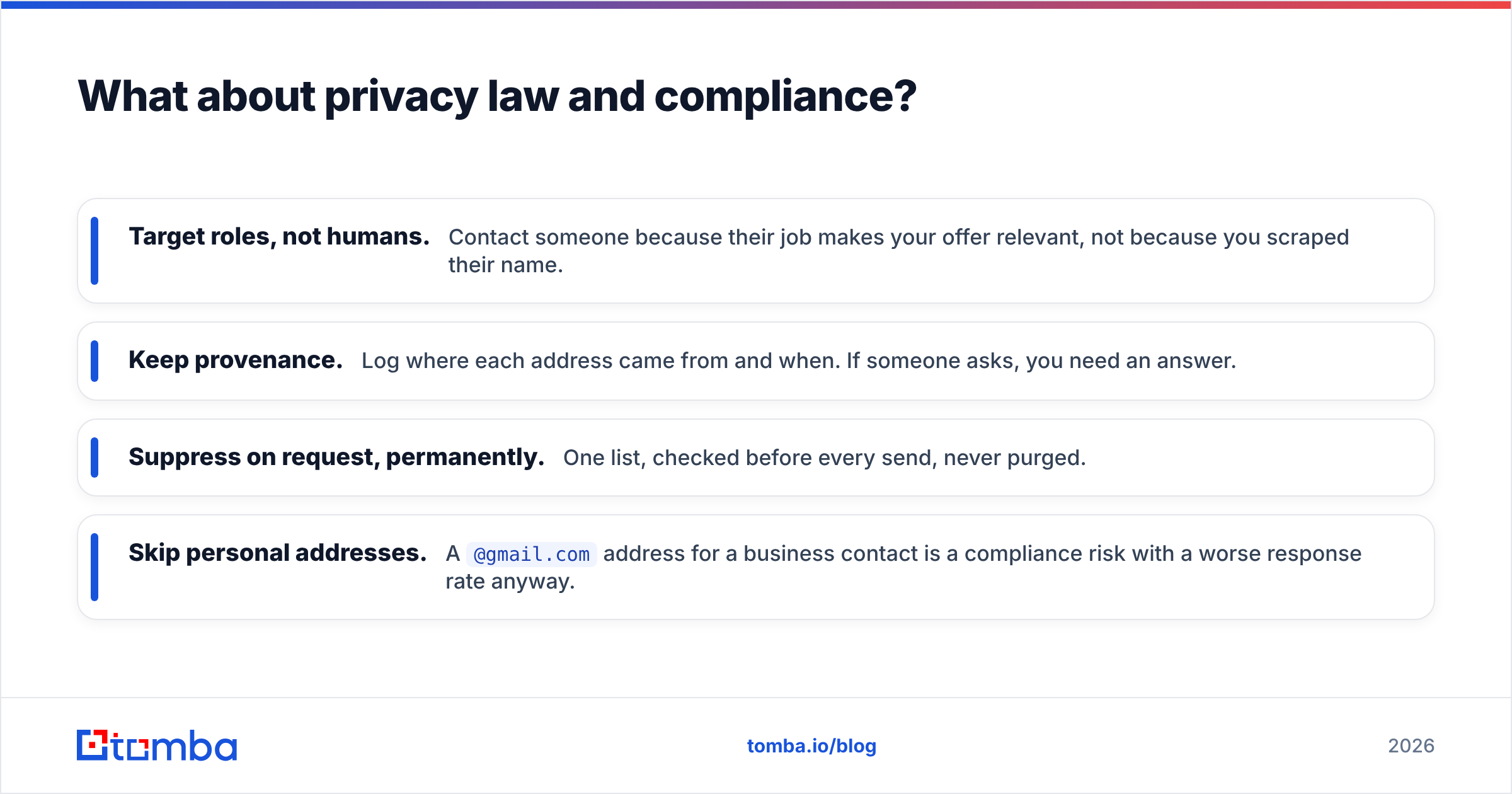
Practical rules that keep you clean everywhere:
- Target roles, not humans. Contact someone because their job makes your offer relevant, not because you scraped their name.
- Keep provenance. Log where each address came from and when. If someone asks, you need an answer.
- Suppress on request, permanently. One list, checked before every send, never purged.
- Skip personal addresses. A
@gmail.comaddress for a business contact is a compliance risk with a worse response rate anyway.
How to find domain email address contacts at scale#
The manual methods stop working somewhere around domain fifteen. Here's the workflow that holds up at volume.
Step 1 — Build the domain list. Export accounts from your CRM, pull a filtered list from a B2B database, or scrape a directory. You want clean root domains, no www, no tracking parameters.
Step 2 — Run domain search in bulk. Upload the CSV to a bulk email finder and let it return addresses plus patterns per domain. Expect 60–90% coverage on established companies and much less on stealth startups.
Step 3 — Fill gaps with named lookups. For domains where discovery returned nothing but you have a target name, run name+domain finds. A LinkedIn finder closes the loop when the profile is your only starting point.
Step 4 — Verify everything, including what the finder already scored. Confidence scores are probabilistic. Verification is empirical. Run the whole set through validation and split by status.
Step 5 — Segment by risk before sending. Valid addresses go into the main sequence. Catch-alls go into a separate low-volume sequence on a secondary domain. Unknowns and role addresses get dropped or handled by hand.
Step 6 — Automate the refresh. B2B data decays at roughly 2–2.5% per month as people change jobs. A list built in January is meaningfully wrong by summer. Wire the Tomba API into your enrichment job and re-verify quarterly instead of rebuilding from scratch.
That last point is the one teams skip. Knowing how to find domain email address contacts is a solved problem. Keeping them correct twelve months later is the actual work.
What's the fastest path if you just need one address right now?#
Three steps, under two minutes:
- Run the domain through a domain search. If the person's address is published, you're done.
- If not, use name + domain in an email finder. It'll infer the pattern and return the best candidate with a confidence score.
- Verify the result before it touches your sequencer.
Skip steps 1 and 2 and you're guessing. Skip step 3 and you're gambling with your sending domain.
Ready to stop guessing? Tomba's Email Finder turns a name and domain into a verified professional address in about three seconds. Every result carries catch-all detection and source attribution, so you know the address and where it came from.
The free tier includes 25 searches a month, no card required. That's enough to test it against a handful of domains where you already know the answers. If it works on those, it'll work on the ones you don't.
Related guides#
// get started
Find, verify and enrich your first contacts today
Start on the free plan with 25 searches a month, then scale when your team is ready.
Free plan · No credit card required · GDPR & CCPA
// about the author