How to Find Email Address of Company Employees in 2026
Seven working methods to find employee emails at any company — from free pattern guessing to bulk domain search — plus which ones actually survive a verification check in 2026.
This guide covers how to find email address of company employees — seven methods, all tested in 2026. Most still work. Two quietly waste your time.
TL;DR
- The fastest reliable route is domain search. Enter a company domain, get back every publicly indexed employee email plus the company's dominant pattern. Verify before you send.
- Free manual methods still work: Google operators, site footers, LinkedIn, GitHub commits. They cap out at roughly 5-15 contacts an hour.
- Pattern guessing is the cheapest fallback. Run every guess through a verifier. Unverified guesses are what tank sender reputation.
- Catch-all domains are the biggest source of "valid" emails that bounce. Treat them as a separate workflow, not a normal verification result.
- Budget: free tiers cover 25-50 lookups a month. Serious prospecting starts around $49/mo, including Tomba pricing.
Why is finding employee emails harder in 2026 than it was in 2020?#
Three things changed at once.
First, LinkedIn cracked down on scraping. Bulk export tools that once pulled 10,000 profiles a week now get rate-limited or banned within days. Second, Google and Microsoft raised the bar on inbound filtering. A list with 8% invalid addresses used to slip through. Now it gets your domain throttled after a few hundred sends. Third, companies stopped publishing staff directories. The "Team" page with 40 headshots and 40 firstname@ links is mostly gone.
So sourcing is now two jobs, not one. Finding a plausible address is step one. Proving it will accept mail is step two, and step two is where most outbound programs quietly fail. A 2024 HubSpot analysis of sales outreach found bounce rate to be the strongest predictor of whether a domain got filtered into spam within 30 days.
Every method below gets judged on two things: how many addresses it produces, and how many of those survive verification.

How to find email address of company employees: the 7 methods that work#
Here they are in the order I'd try them, fastest to slowest per contact.
- Domain search — Feed a company domain into a tool. You get back known employee emails with confidence scores, plus the company's email format. Best when you want everyone at a company, not one specific person.
- Name + domain lookup — You know "Priya Raman works at Figma." A dedicated email finder resolves that to an address in under two seconds. Best for a named target list.
- Pattern inference + verification — Find the company's format (
first.last@,flast@,first@), generate candidates, then verify each one. Free, slow, and only as good as your verifier. - Google search operators —
site:company.com "@company.com"or"firstname lastname" email -site:linkedin.com. Zero cost. Works well for technical and academic orgs.
Those four cover most lists. The last three fill the gaps:
- Public code and docs —
git logon any public repo exposes committer emails. Conference speaker pages, PDF whitepapers, and press releases leak them too. - LinkedIn-adjacent lookup — Take the profile URL and resolve it to a work email with a LinkedIn finder. You're not scraping the profile, just resolving an identity.
- Ask directly — The support form, the receptionist, the person's colleague. Underused. "Who handles vendor onboarding, and what's their email?" gets answered more often than you'd expect.
Most teams stop at method 3, then wonder why their bounce rate is 12%. The mix matters more than any single technique.
How do you use Google search operators to find employee emails?#
Search operators are the free baseline. They cost nothing and work on any company with a web presence.
Start with these five, replacing example.com and the name:
site:example.com "@example.com"— surfaces any page on their own site that leaks an address. Careers pages and press kits are the usual hits."@example.com" "head of marketing"— role-targeted, catches directory listings and event pages."Jordan Ellis" "example.com" email— direct name hunt across the open web.site:github.com "@example.com"— engineering orgs leak constantly through commit metadata.filetype:pdf "@example.com"— investor decks, annual reports, and conference programs are full of addresses.
Two caveats. Operators find published addresses. That skews heavily toward press, recruiting, and engineering, so you will rarely find a VP of Ops this way. And published addresses are often role aliases (press@, careers@) that route to a shared inbox and get ignored.
Realistic throughput: 10-20 minutes per company for maybe two or three usable addresses. Fine for a 15-account ABM list. Useless for 500 accounts.
Can you just guess the email pattern?#
You can. It works about 60-70% of the time on the first guess if you know the company's dominant format. The problem is the other 30-40%.
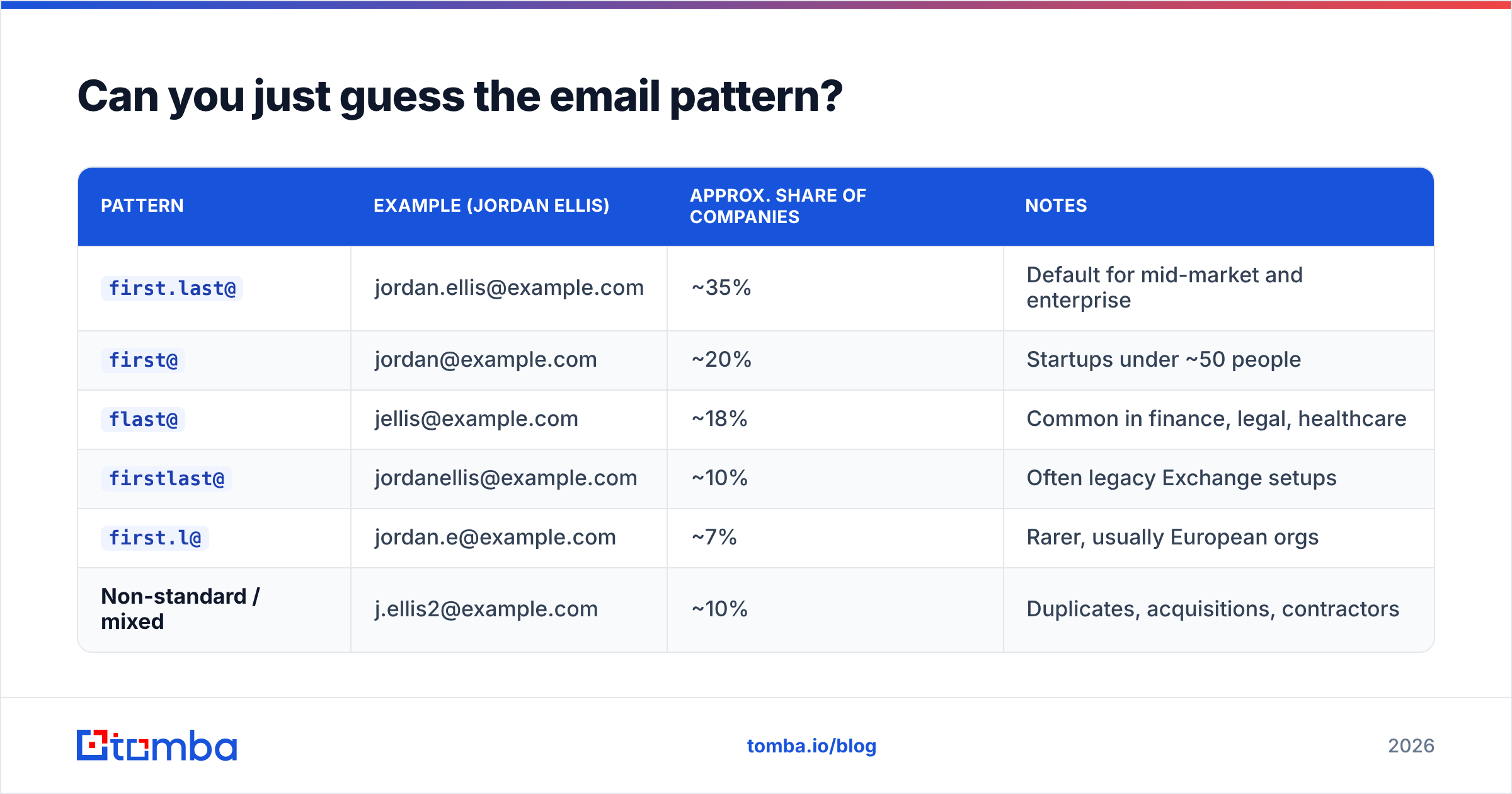
Most B2B companies use one of six patterns:
| Pattern | Example (Jordan Ellis) | Approx. share of companies | Notes |
|---|---|---|---|
first.last@ |
jordan.ellis@example.com | ~35% | Default for mid-market and enterprise |
first@ |
jordan@example.com | ~20% | Startups under ~50 people |
flast@ |
jellis@example.com | ~18% | Common in finance, legal, healthcare |
firstlast@ |
jordanellis@example.com | ~10% | Often legacy Exchange setups |
first.l@ |
jordan.e@example.com | ~7% | Rarer, usually European orgs |
| Non-standard / mixed | j.ellis2@example.com | ~10% | Duplicates, acquisitions, contractors |
That last row is what kills pure guessing. When a company buys another one, you often get two live patterns on one domain. When two people share a name, someone gets a numbered address. And a small but real slice of companies randomize on purpose.
Free helpers speed this up. An email permutator generates every candidate from a name and domain. A company email pattern checker finds the dominant format before you generate anything. Identify first, generate second. It cuts your verification volume by 80%.
One step you can't skip: run every guess through verification. Sending to unverified permutations is the fastest way to burn a sending domain. Google's own postmaster guidance ties high bounce rates directly to inbox placement penalties.
Which tools do this at scale, and what do they cost?#
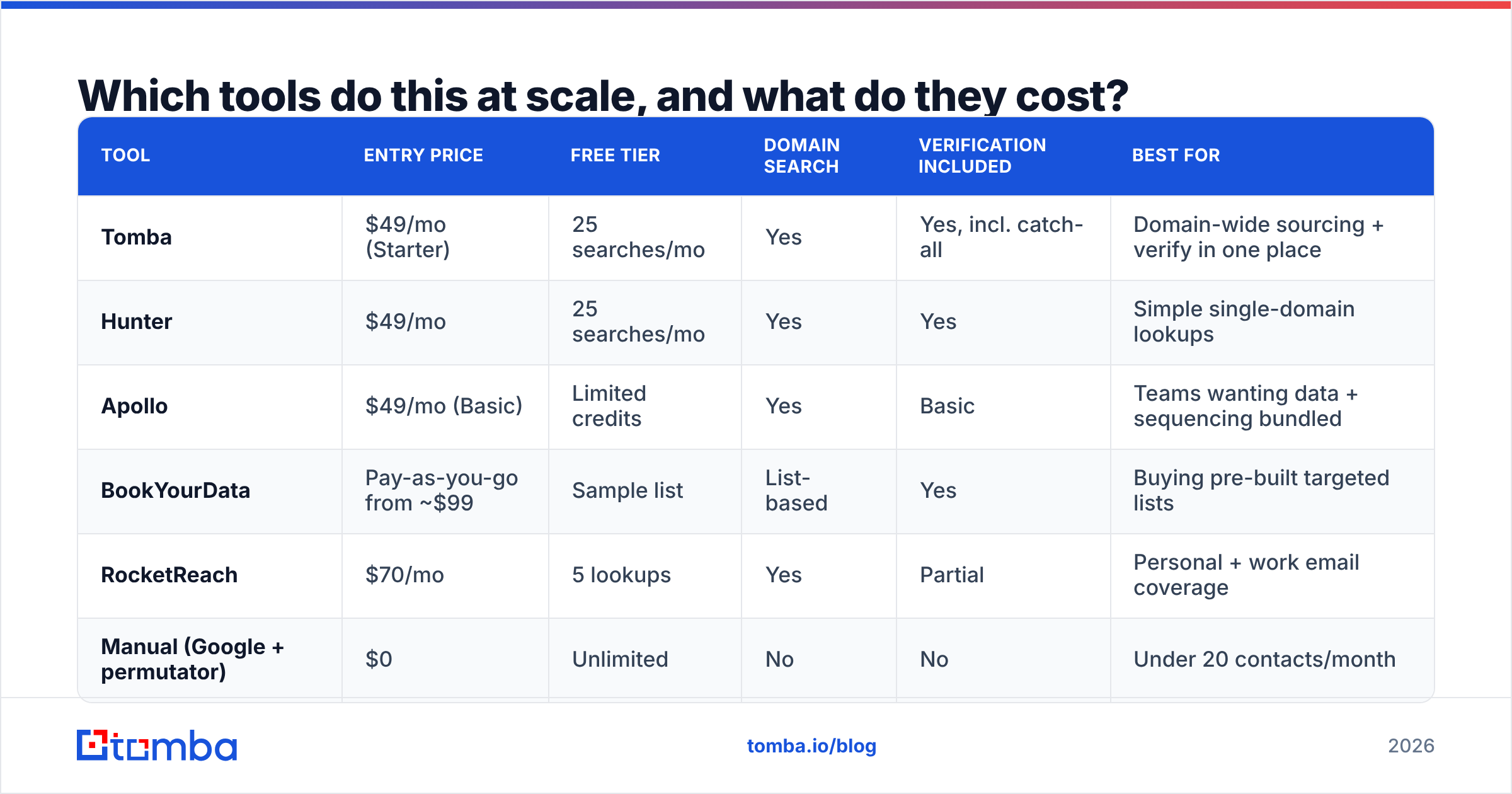
Once you're past 20-30 contacts, manual methods stop making sense. Here's how the main categories compare.
| Tool | Entry price | Free tier | Domain search | Verification included | Best for |
|---|---|---|---|---|---|
| Tomba | $49/mo (Starter) | 25 searches/mo | Yes | Yes, incl. catch-all | Domain-wide sourcing + verify in one place |
| Hunter | $49/mo | 25 searches/mo | Yes | Yes | Simple single-domain lookups |
| Apollo | $49/mo (Basic) | Limited credits | Yes | Basic | Teams wanting data + sequencing bundled |
| BookYourData | Pay-as-you-go from ~$99 | Sample list | List-based | Yes | Buying pre-built targeted lists |
| RocketReach | $70/mo | 5 lookups | Yes | Partial | Personal + work email coverage |
| Manual (Google + permutator) | $0 | Unlimited | No | No | Under 20 contacts/month |
A few honest notes on that table.
Bundled vs. best-of-breed. Apollo bundles a database with sequencing. That's convenient, but you pay for the sequencer whether you use it or not. If you already run Instantly, Smartlead, or Outreach, a focused finder is cheaper. Tomba, Hunter, and BookYourData all sit in that focused lane. BookYourData is closer to list purchasing than live lookup, which is better if you want a clean, pre-filtered slice of an industry.
Free tiers are real but small. 25 searches gets you through one company, maybe two. Useful for checking accuracy before you commit, not for running a pipeline.
Credits are not comparable across vendors. Some charge a credit for a failed search, some don't. Some charge separately for verification. Read the fine print, or run the same 50-contact test list through two trials. Compare cost per verified address. That's the only number that matters.

How do you verify the emails you find?#
Verification is a four-stage funnel. Knowing the stages tells you which "valid" results you can actually trust.
Stage 1 — Syntax. Is it a well-formed address? This catches typos, stray spaces, and missing TLDs. Instant and free.
Stage 2 — Domain/MX. Does the domain exist, and does it have mail exchanger records? This catches dead companies and typo'd domains (gmial.com). Also instant.
Stage 3 — SMTP handshake. The verifier opens a connection to the receiving mail server and asks whether that mailbox exists, without sending anything. Most of the signal lives here. A clean 250 response means the mailbox is real.
Stage 4 — Catch-all detection. Some domains answer 250 to every address, real or not. These are catch-all (or "accept-all") domains, and they make up roughly 15-20% of B2B domains. A standard verifier marks them "unknown" or "risky" and stops.
That fourth stage is where tools split apart. A catch-all verifier uses secondary signals to push some of those unknowns into a confident verdict: historical send data, pattern consistency across the domain, engagement records. If many of your target accounts are catch-all, common in enterprise and EU companies, this feature alone changes your usable-lead count by double digits.
Practical rule: send to valid. Skip invalid. For catch-all, run the deeper check or route them to a separate, low-volume sending domain, so a bad batch can't hurt your primary.

What's the fastest end-to-end workflow?#
Here's the sequence I'd run for a 200-account list, assuming you want work emails for two contacts per account.
Step 1 — Normalize your account list. Get every company down to a clean root domain. No www, no subdomains, no landing-page URLs. A website to company resolver handles the messy ones.
Step 2 — Run domain search per account. For each domain, pull the full known-employee list plus the detected pattern. That gives you two things: real addresses, and the format you need for anyone the tool doesn't have. Use domain search or the Tomba API if you're scripting it.
Step 3 — Fill gaps with named lookups. For the titles you want that didn't show up in step 2, run name + domain through the finder. The pattern from step 2 does most of the work here.
Step 4 — Bulk verify everything. Every address from every source goes through one verification pass. Do this in bulk, not one at a time. A bulk email finder run on 400 addresses takes minutes.
Step 5 — Segment by verdict. Valid goes to your main sequence. Catch-all goes to a secondary domain or a deeper check. Invalid gets dropped and logged, so you don't re-source the same dead contact next quarter.
Step 6 — Enrich before you write. Job title, seniority, company size, tech stack. Data enrichment on a verified list is cheap. On an unverified one, you're paying to enrich addresses you'll never use. Order matters.
Total time for 200 accounts: roughly 45-90 minutes with bulk operations, versus 30+ hours by hand. That ratio is the whole argument for tooling.
Is any of this legal?#
Short answer: finding business contact information is legal in most places. Sending to it has rules.
Under GDPR, business email addresses are personal data. But Article 6(1)(f) legitimate interest can cover B2B outreach, provided you're relevant to the recipient's job, you identify yourself, and you honor opt-outs right away. Some member states (Germany, Austria) are stricter, so check locally.
Under CAN-SPAM in the US, cold B2B email is legal. You need accurate headers, a real physical address, a working unsubscribe, and no misleading subject lines. No prior consent required.
Under CASL in Canada, you need consent or a documented existing business relationship. It's the strictest of the three. The official CASL guidance is worth reading if you prospect into Canada.
Two things are not fine anywhere: scraping against a site's terms of service, and reselling harvested personal data without a lawful basis. Sourcing published and inferred business data is a different activity from scraping a platform that forbids it. Stay on the right side of that line.
What should you do next?#
Pick your method by volume. Under 20 contacts a month, Google operators plus a free permutator and a free email checker will get the job done at zero cost. Between 20 and 500, a $49/mo finder pays for itself in the first week of saved hours. Above that, you want API access and bulk operations.
Whatever you pick, don't skip verification. It is the difference between a list that converts and a list that gets your domain filtered. That, in one line, is how to find email address of company employees without burning your sender reputation.
If you want the domain-search-then-verify workflow in one place, start with the Tomba Email Finder. The free tier gives you 25 searches a month, enough to run one real account and compare the hit rate against your current tool. Starter is $49/mo when you're ready to scale, with catch-all verification and bulk operations included rather than sold as an upsell.
Related guides#
// get started
Find, verify and enrich your first contacts today
Start on the free plan with 25 searches a month, then scale when your team is ready.
Free plan · No credit card required · GDPR & CCPA
// about the author