How to Find Email Addresses of Company Directors in 2026
Director-level inboxes are guarded, gated, and rarely listed. Here are seven repeatable methods to find email addresses of company directors — plus how to verify them before you send.
TL;DR
- Director-level emails almost always follow the same company pattern as everyone else — the hard part is confirming which pattern and which spelling of the name.
- The fastest reliable stack: official company registry (for the legal name) → LinkedIn or the company site (for the role) → a domain search + email finder (for the address) → verification (before you send).
- Free manual methods work at 5–10 contacts. Past that, you need a pattern-based finder with an API or bulk upload, or you will burn a week and still bounce.
- Public registries like Companies House, OpenCorporates, and SEC EDGAR give you director names for free — they rarely give you working emails.
- Never send to an unverified director address. One bounce-heavy send to a small executive list does more reputation damage than a hundred sends to a clean SDR list.
Why are director emails harder to find than anyone else's?#
Because directors are the most-targeted inboxes in B2B, and they know it.
Three things make them hard. First, directors rarely appear on public "contact us" pages — companies route inbound to a shared address on purpose. Second, senior people often sit on a different email convention than the rest of staff: a company might use first.last@ for everyone but keep flast@ for a founder whose address predates the current scheme. Third, director names are legally recorded in registries under formal spellings ("Robert" on the filing, "Bob" in the inbox), so a naive guess fails on the name before it fails on the format.
The upside: director emails are still company emails. They live on the same mail server, under the same DNS, subject to the same conventions. That means the problem is solvable with pattern detection plus verification — not with luck.

What information do you need before you start searching?#
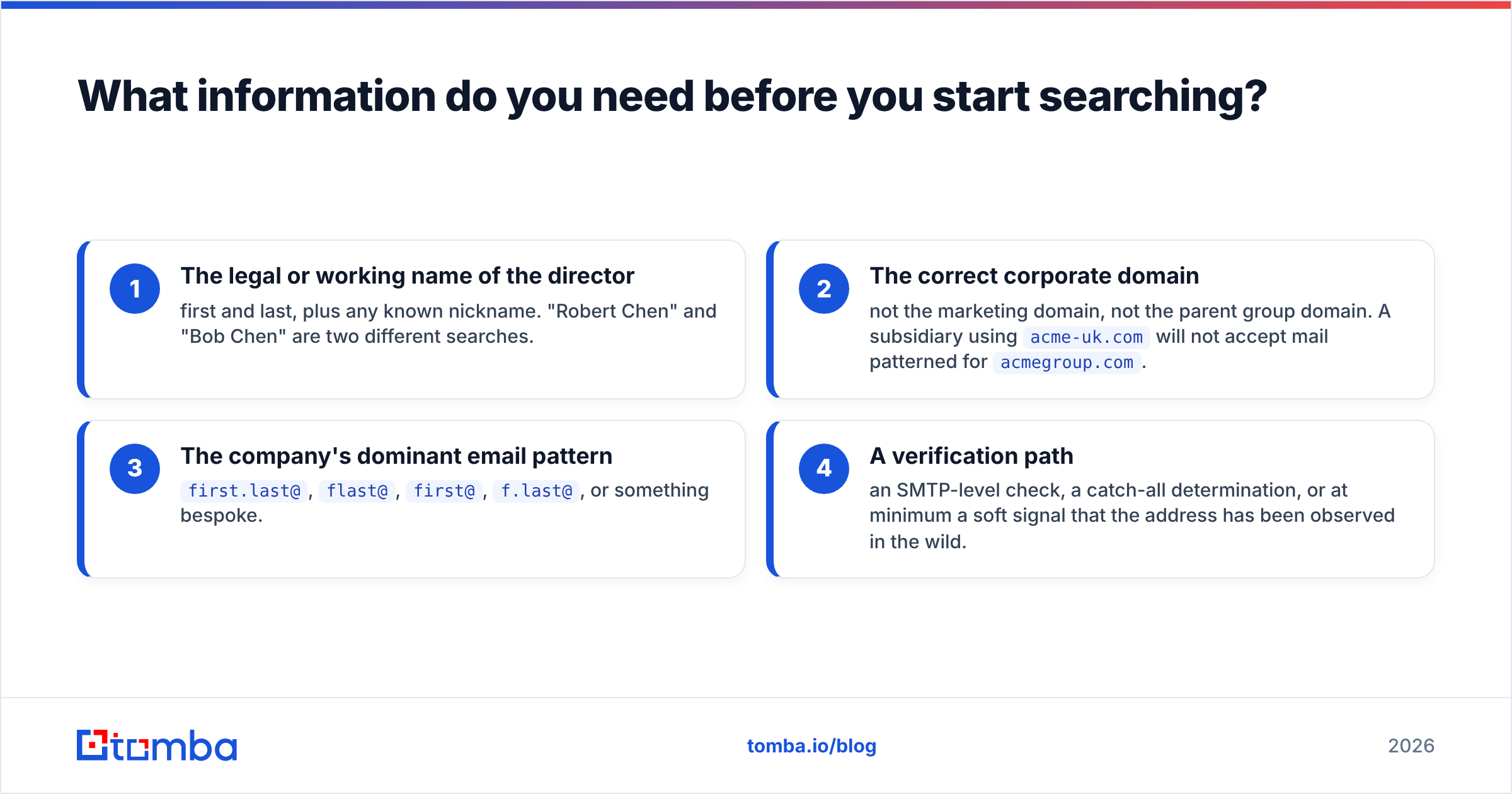
You need four inputs. Miss any of them and every downstream method degrades.
- The legal or working name of the director — first and last, plus any known nickname. "Robert Chen" and "Bob Chen" are two different searches.
- The correct corporate domain — not the marketing domain, not the parent group domain. A subsidiary using
acme-uk.comwill not accept mail patterned foracmegroup.com. - The company's dominant email pattern —
first.last@,flast@,first@,f.last@, or something bespoke. - A verification path — an SMTP-level check, a catch-all determination, or at minimum a soft signal that the address has been observed in the wild.
Get those four and the actual "finding" step takes about ninety seconds per contact.
Which methods actually work to find email addresses of company directors?#
Here are the seven that hold up, roughly ordered by hit rate on real director-level targets.
1. Public company registries (for names, not emails)#
Start here when you don't yet know who the directors are. Companies House publishes UK director appointments free. SEC EDGAR covers US public-company officers via DEF 14A proxy statements and Form 3/4 filings. OpenCorporates aggregates roughly 200 jurisdictions.
What you get: full legal names, appointment dates, service addresses, other directorships. What you don't get: email. Registries are step zero, not the answer.
2. Company website and press assets#
Check /about, /leadership, /team, /investors, and — most usefully — the press kit and PDF press releases. Media contacts and investor-relations pages leak real executive addresses more often than any other public source, because a human needed a working reply-to.
3. LinkedIn (role confirmation, then match)#
LinkedIn confirms current title and tenure, which registries lag on by months. Once you have the profile, a LinkedIn finder resolves the profile to a work address without you manually reconstructing anything. Do not scrape LinkedIn contact-info fields at volume — that violates their terms and gets accounts restricted.
4. Domain search to reveal the company pattern#
This is the highest-leverage move. Run a domain search on the company domain, look at 10–20 returned addresses, and the convention becomes obvious. Once you know Acme uses first.last@acme.com, you can construct the director's address with high confidence — then verify it.
5. Direct email finder lookup#
Give a name plus domain to an email finder and it returns the most probable address with a confidence score and, ideally, the public sources where the address was observed. This is the single-contact workflow: name in, verified address out.
6. Pattern generation plus verification#
When a company is small enough that no addresses are indexed anywhere, generate the candidate set with an email permutator and verify each candidate. Six to eight permutations covers most conventions. The verification step is what turns guessing into a method.
7. Warm-path referral#
Slowest, highest converting. Find who in your network already emails the director, and ask for a forward. No tool beats this — it just doesn't scale, which is why it's number seven and not number one.
How do the main approaches compare?#
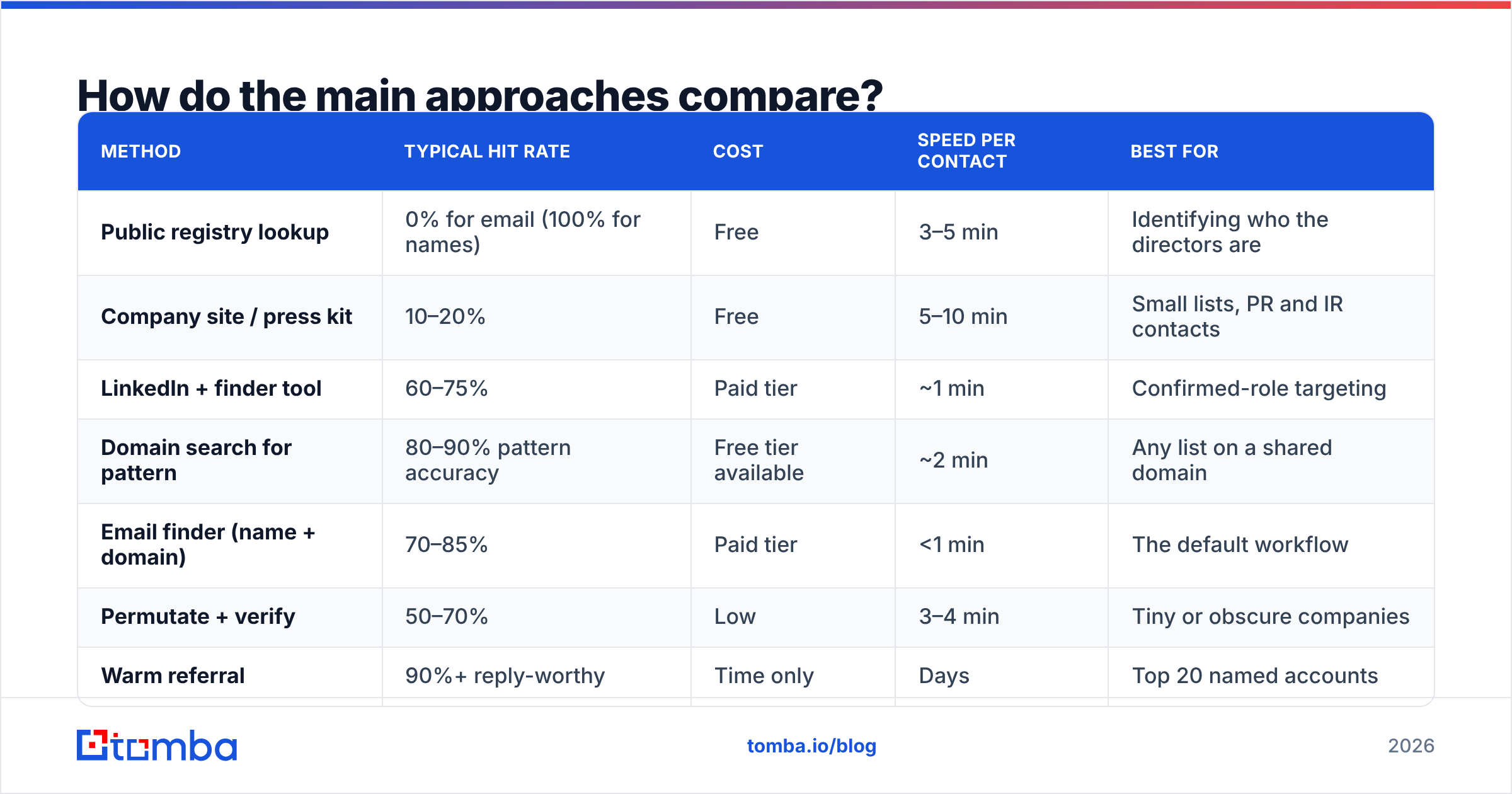
| Method | Typical hit rate | Cost | Speed per contact | Best for |
|---|---|---|---|---|
| Public registry lookup | 0% for email (100% for names) | Free | 3–5 min | Identifying who the directors are |
| Company site / press kit | 10–20% | Free | 5–10 min | Small lists, PR and IR contacts |
| LinkedIn + finder tool | 60–75% | Paid tier | ~1 min | Confirmed-role targeting |
| Domain search for pattern | 80–90% pattern accuracy | Free tier available | ~2 min | Any list on a shared domain |
| Email finder (name + domain) | 70–85% | Paid tier | <1 min | The default workflow |
| Permutate + verify | 50–70% | Low | 3–4 min | Tiny or obscure companies |
| Warm referral | 90%+ reply-worthy | Time only | Days | Top 20 named accounts |
Read that table as a stack, not a menu. In practice you use registry → LinkedIn → domain search → finder → verifier, in that order, and you drop out early whenever you get a confident hit.

Which tools should you use, and what do they cost?#
Most people evaluating this are choosing between a general sales-intelligence platform and a focused finder. They solve different problems.
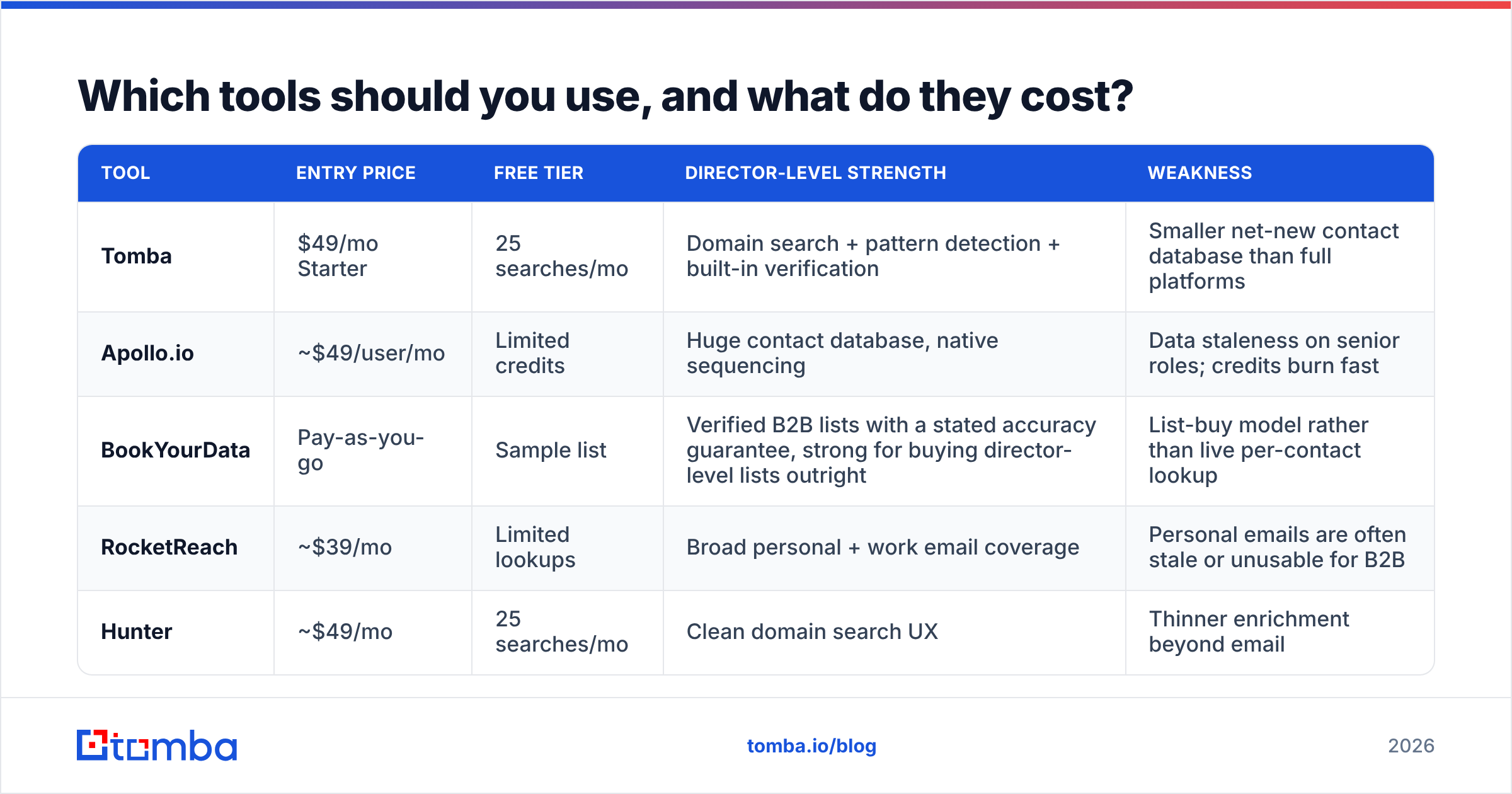
| Tool | Entry price | Free tier | Director-level strength | Weakness |
|---|---|---|---|---|
| Tomba | $49/mo Starter | 25 searches/mo | Domain search + pattern detection + built-in verification | Smaller net-new contact database than full platforms |
| Apollo.io | ~$49/user/mo | Limited credits | Huge contact database, native sequencing | Data staleness on senior roles; credits burn fast |
| BookYourData | Pay-as-you-go | Sample list | Verified B2B lists with a stated accuracy guarantee, strong for buying director-level lists outright | List-buy model rather than live per-contact lookup |
| RocketReach | ~$39/mo | Limited lookups | Broad personal + work email coverage | Personal emails are often stale or unusable for B2B |
| Hunter | ~$49/mo | 25 searches/mo | Clean domain search UX | Thinner enrichment beyond email |
Full Tomba pricing runs Free (25 searches/mo), Starter $49/mo, Growth $99/mo, Pro $249/mo, and Enterprise custom. If your work is "I have a list of 400 companies and I need the ops director at each," the domain-search-plus-verify path is what you're paying for, and per-credit cost matters more than database size.

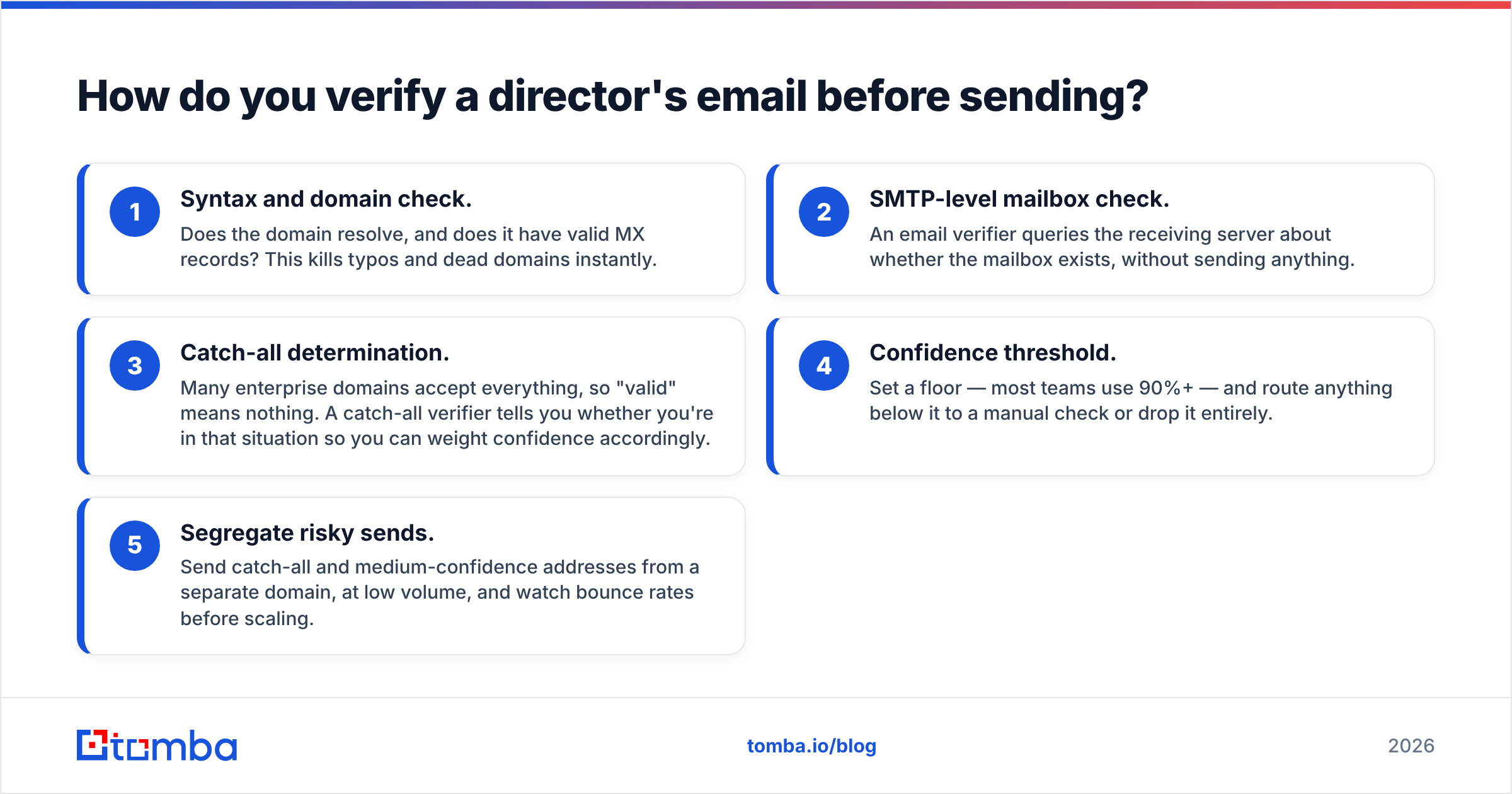
How do you verify a director's email before sending?#
Verify every address. Executive lists are small, so a single bad send is a large percentage of your volume — and small, high-bounce sends are exactly the pattern spam filters are tuned to catch.
A workable verification sequence:
- Syntax and domain check. Does the domain resolve, and does it have valid MX records? This kills typos and dead domains instantly.
- SMTP-level mailbox check. An email verifier queries the receiving server about whether the mailbox exists, without sending anything.
- Catch-all determination. Many enterprise domains accept everything, so "valid" means nothing. A catch-all verifier tells you whether you're in that situation so you can weight confidence accordingly.
- Confidence threshold. Set a floor — most teams use 90%+ — and route anything below it to a manual check or drop it entirely.
- Segregate risky sends. Send catch-all and medium-confidence addresses from a separate domain, at low volume, and watch bounce rates before scaling.
That last point is where most teams get burned. According to HubSpot's research on email performance, list quality is the dominant lever on deliverability outcomes — and your sender reputation does not distinguish between "I guessed" and "I was misinformed."

How do you scale this from ten directors to a thousand?#
Manual methods collapse somewhere around contact number thirty. Past that you need three things.
Bulk processing. Upload a CSV of names and domains and get addresses back as a batch. A bulk email finder turns a two-week manual project into an afternoon. Structure your input as first_name, last_name, domain, company — clean inputs are 80% of output quality.
API automation. If director lookup is a recurring step in your pipeline rather than a one-off project, wire it in directly. A Tomba API call inside your enrichment job means new accounts get contact data the moment they enter your CRM, without anyone opening a browser tab.
Where the data comes from. Before committing to any provider at scale, read their data sources documentation. Providers that rely purely on scraped aggregation age badly at director level, because senior people change roles and the scrape doesn't notice for months. Providers that combine crawling with live verification hold up better. G2's category reviews are useful here mostly for spotting recurring complaints about staleness rather than for the star ratings.
What legal and ethical rules apply?#
Short version: finding a business email is legal in most jurisdictions; what you do with it is regulated.
- GDPR (EU/UK). Legitimate interest can cover B2B outreach to a role-based business address, but you must be able to justify relevance, name your source if asked, and honor deletion requests immediately.
- CAN-SPAM (US). No opt-in required, but you must include a physical address, a working unsubscribe, and honest headers and subject lines.
- CASL (Canada). Strictest of the three — implied consent is narrow and time-limited. Check before you send.
- Platform terms. Bulk-scraping LinkedIn profile data violates their user agreement regardless of what your local law says.
- Practical rule. If the director could reasonably ask "why are you contacting me at this address," you should have a one-sentence answer that isn't "we bought a list."
Being able to explain where an address came from is not just compliance hygiene — it's why source transparency in a finder tool is worth paying for.
What's the fastest end-to-end workflow?#
Here's the sequence that works for a typical 50-company target list:
- Build the company list first, not the people list. Domains are stable; people are not.
- Pull director names from the registry or LinkedIn, and record both the formal and informal first name.
- Run domain search on each domain to learn the pattern and catch any directors already indexed — this often solves 40–60% of the list outright.
- Run the finder on the remainder using name plus domain.
- Verify everything, including the addresses that came back with high confidence.
- Enrich what survives with title, seniority, and company size via data enrichment, so your messaging can actually be specific.
- Send in tranches — 20 addresses, check bounce rate, then scale.
Steps 3 through 5 are the ones people skip, and they're the ones that determine whether the campaign works.
Ready to find director-level contacts without guessing?#
Start with the Tomba Email Finder. Give it a director's name and their company domain, and it returns the most probable address with a confidence score and the public sources it was observed on — then run it straight through the verifier before anything hits your sequencer. The free tier includes 25 searches a month, which is enough to test the workflow on a real target list before you commit to a plan. If it holds up, Starter is $49/mo and adds bulk uploads and API access for when your list outgrows manual work.
Related guides#
// get started
Find, verify and enrich your first contacts today
Start on the free plan with 25 searches a month, then scale when your team is ready.
Free plan · No credit card required · GDPR & CCPA
// about the author