How to Find Emails for Cold Emailing: 7 Methods for 2026
Seven repeatable ways to find and verify prospect emails before you send — what each method costs, how accurate it really is, and when to skip it entirely.
TL;DR
- The fastest reliable path is domain-first: pull a company's email pattern, apply it to your target's name, then verify the result before it enters your sequence.
- Manual methods (Google operators, personal sites, GitHub commits) are free and accurate but cap out at roughly 10–20 contacts per hour — fine for enterprise ABM, useless for volume.
- Bulk finders and APIs move you to thousands per hour, but only if you verify. Unverified lists routinely bounce at 15–40%, and anything above 3% starts damaging your sending domain.
- Permutators are a fallback, not a method. Generating twelve guesses and blasting all of them is how new domains get burned in week one.
- Budget realistically: expect $0.01–$0.10 per verified contact depending on volume and how obscure your targets are.
What does "finding emails for cold emailing" actually mean?#
It means three separate jobs that people keep collapsing into one.
Job one is discovery — figuring out which companies and which humans inside them are worth contacting. Job two is resolution — turning "Sarah Chen, VP Ops at Acme" into schen@acme.com. Job three is validation — proving that mailbox exists and accepts mail before your sending domain vouches for it.
Most guides on how to find emails for cold emailing only cover job two. That's why so many lists look great in a spreadsheet and fall apart on send day. A contact that resolves but doesn't validate is worse than no contact at all, because it costs you reputation instead of just costing you time.
Think of it like a delivery driver with a stack of addresses. Finding the street is easy. Confirming someone still lives there is the part that decides whether the package arrives or comes back stamped "return to sender" — and enough returns get your route flagged.
Why do most cold email lists fail before the first send?#
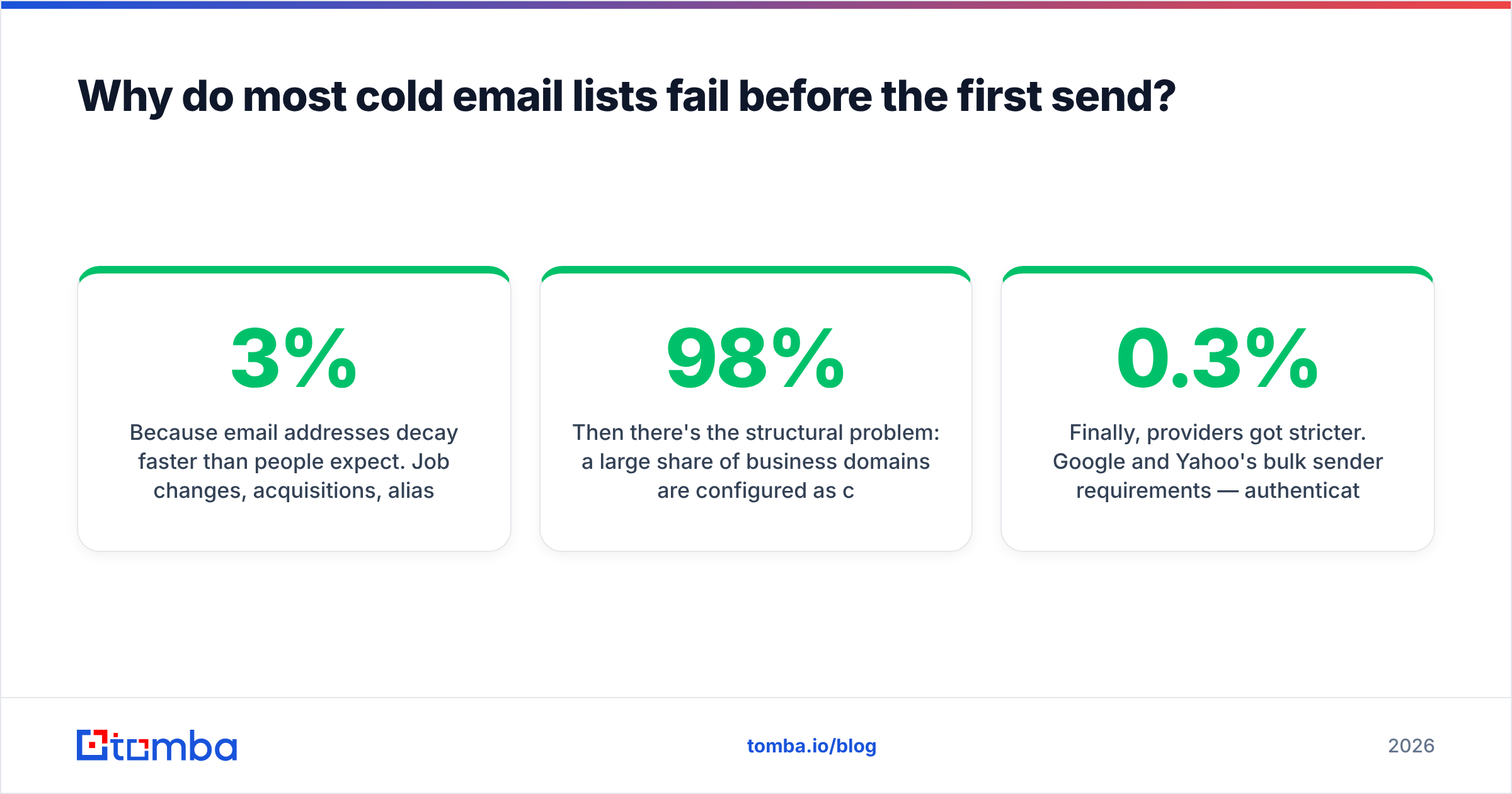
Because email addresses decay faster than people expect. Job changes, acquisitions, alias retirements, and domain migrations chew through B2B contact data at roughly 2–3% per month. A list you scraped in January is meaningfully worse by April and close to unusable by the following January.
Then there's the structural problem: a large share of business domains are configured as catch-all, meaning the mail server accepts anything at that domain and sorts it out later. Standard SMTP verification returns "valid" for asdfgh@catchall-company.com on a catch-all domain, which is how a list can look 98% clean and still bounce hard. Catch-all handling is the single biggest difference between verification tools, and it's rarely on the pricing page.
Finally, providers got stricter. Google and Yahoo's bulk sender requirements — authentication, one-click unsubscribe, and a spam complaint rate under 0.3% — turned sloppy list hygiene from a nuisance into a deliverability cliff. If you want the mechanics, email deliverability and sender reputation are the two concepts to internalize before you build any list at all.

What are the seven ways to find emails for cold emailing?#
Ranked from most manual to most automated. Most teams end up using three or four of these together, not one.
Google search operators.
site:acme.com "@acme.com"surfaces published addresses in PDFs, press pages, and job listings. Addfiletype:pdffor investor decks and conference programs, which leak direct addresses constantly. Free, slow, and surprisingly good for mid-market companies with sloppy web hygiene.Company website mining. About pages, press-contact footers, author bylines, and support docs. This gives you the pattern even when it doesn't give you the person — one confirmed
first.last@address unlocks the whole org chart.GitHub and open-source commits. For engineering and technical-founder targets, commit metadata often contains work emails.
git logon a public repo is a legitimate, public source. High accuracy, narrow applicability.Email finder tools by domain. Feed a domain, get back every known address plus the dominant pattern and a confidence score. A domain search is the highest-leverage single action in prospecting because it answers "what's the format here?" in one call instead of ten guesses.
Name + domain lookup. You know the person and the company; the tool resolves the address. This is the workhorse for ABM and for enriching inbound signups. Accuracy depends entirely on whether the provider has verified pattern data for that domain.
Bulk finding and enrichment. Upload a CSV of names and companies, get back resolved and verified addresses. Bulk email finder workflows are where per-contact cost drops and where quality control matters most — one bad batch pollutes a whole quarter's pipeline.
API and workflow automation. Resolve contacts at the moment they enter your CRM, not in a monthly batch. This is what stops list decay: you're finding the email the day you need it, not the day you exported it.
Which method should you use for which situation?#
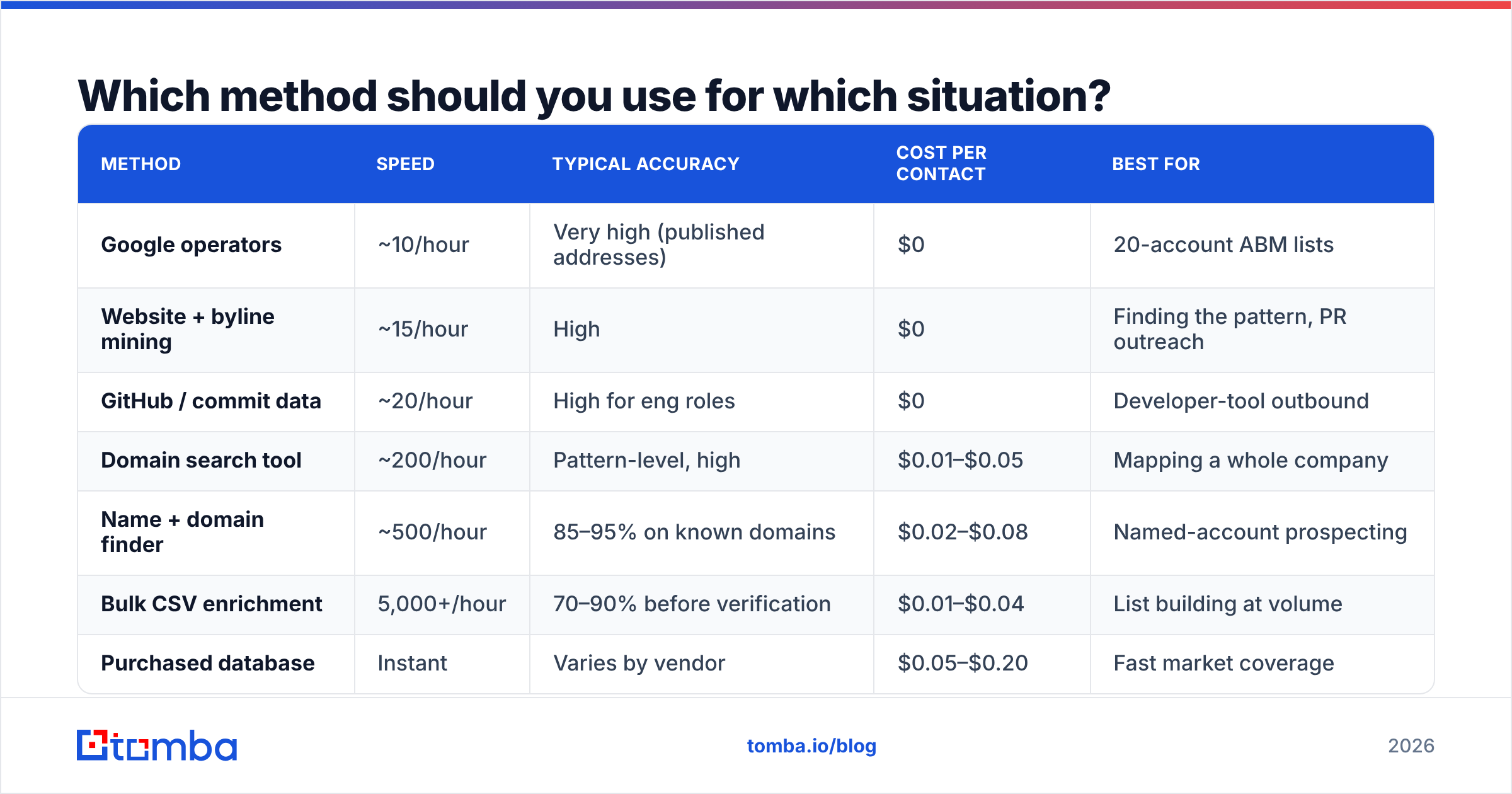
| Method | Speed | Typical accuracy | Cost per contact | Best for |
|---|---|---|---|---|
| Google operators | ~10/hour | Very high (published addresses) | $0 | 20-account ABM lists |
| Website + byline mining | ~15/hour | High | $0 | Finding the pattern, PR outreach |
| GitHub / commit data | ~20/hour | High for eng roles | $0 | Developer-tool outbound |
| Domain search tool | ~200/hour | Pattern-level, high | $0.01–$0.05 | Mapping a whole company |
| Name + domain finder | ~500/hour | 85–95% on known domains | $0.02–$0.08 | Named-account prospecting |
| Bulk CSV enrichment | 5,000+/hour | 70–90% before verification | $0.01–$0.04 | List building at volume |
| Purchased database | Instant | Varies by vendor | $0.05–$0.20 | Fast market coverage |
Read that table as a ladder, not a menu. Under 50 accounts, manual research wins on accuracy and costs nothing but your afternoon. Between 50 and 1,000, tooling pays for itself immediately. Above 1,000, the bottleneck stops being discovery and becomes verification throughput.
How do you find one specific person's email fast?#
Work the pattern, not the person.
Start by confirming the company's format with any single known address — a press contact, a support alias reply, a careers@ autoresponder header. Roughly 60–70% of B2B domains use first.last@, first@, or flast@. Once you know which one, applying it to your target takes seconds.
If nothing is published, use an email finder with the person's name and the company domain. Good tools return a confidence score alongside the address; treat anything under about 90% as "verify before sending, and don't put it in an aggressive sequence."
Only reach for an email permutator when both of the above fail. A permutator generates every plausible combination — s.chen@, sarah.c@, schen@, and so on. It is a hypothesis generator, not an answer. Sending to all twelve permutations is the fastest way to torch a new domain, because eleven of them will bounce and mail providers notice patterns like that instantly.
For prospects you only know from LinkedIn, a LinkedIn finder maps profile to work address without the manual company-lookup step in between.
How do you build a list of 500 contacts without wrecking your domain?#
Sequence matters more than tooling here.
Build the account list first. Firmographic filters — industry, headcount, tech stack, funding stage — before any name enters a spreadsheet. A tight 300-account list beats a loose 3,000-account one on every downstream metric, and it's cheaper to enrich.
Resolve in bulk, then verify in bulk, as two separate passes. Resolution tells you an address probably exists. Verification tells you the mail server accepts it. Vendors that blur the two are the ones whose "verified" lists bounce.
Segment the verification output into three buckets. Valid goes to your sequencer. Invalid gets deleted, not "saved for later." Risky and catch-all go to a holding list you either drop or test at low volume from a secondary domain.
Cap catch-alls at a fixed share of any send. If more than 20% of a batch is catch-all, you have no reliable read on your true bounce rate. A dedicated catch-all verifier resolves a meaningful portion of these using pattern and historical-engagement signals rather than SMTP alone.
Warm before you scale. New domain, new inbox, or a 5x volume jump all require ramping — 20–30 sends a day for the first week, doubling weekly. Skipping this step invalidates every other precaution on this list.

Do you need to verify if the finder already says "valid"?#
Yes, and the distinction is worth understanding.
A finder's confidence score is a prediction: based on pattern data, historical sightings, and source signals, this address is probably right. A verifier performs a live check: syntax, domain MX records, mailbox existence via SMTP handshake, plus role-account and disposable-domain flags. They answer different questions, and the second one is the one your sending reputation cares about.
Run every list through an email verifier immediately before the send, not immediately after the export. A verification result from six weeks ago is a historical document. The gap between export and send is exactly where decay does its damage.
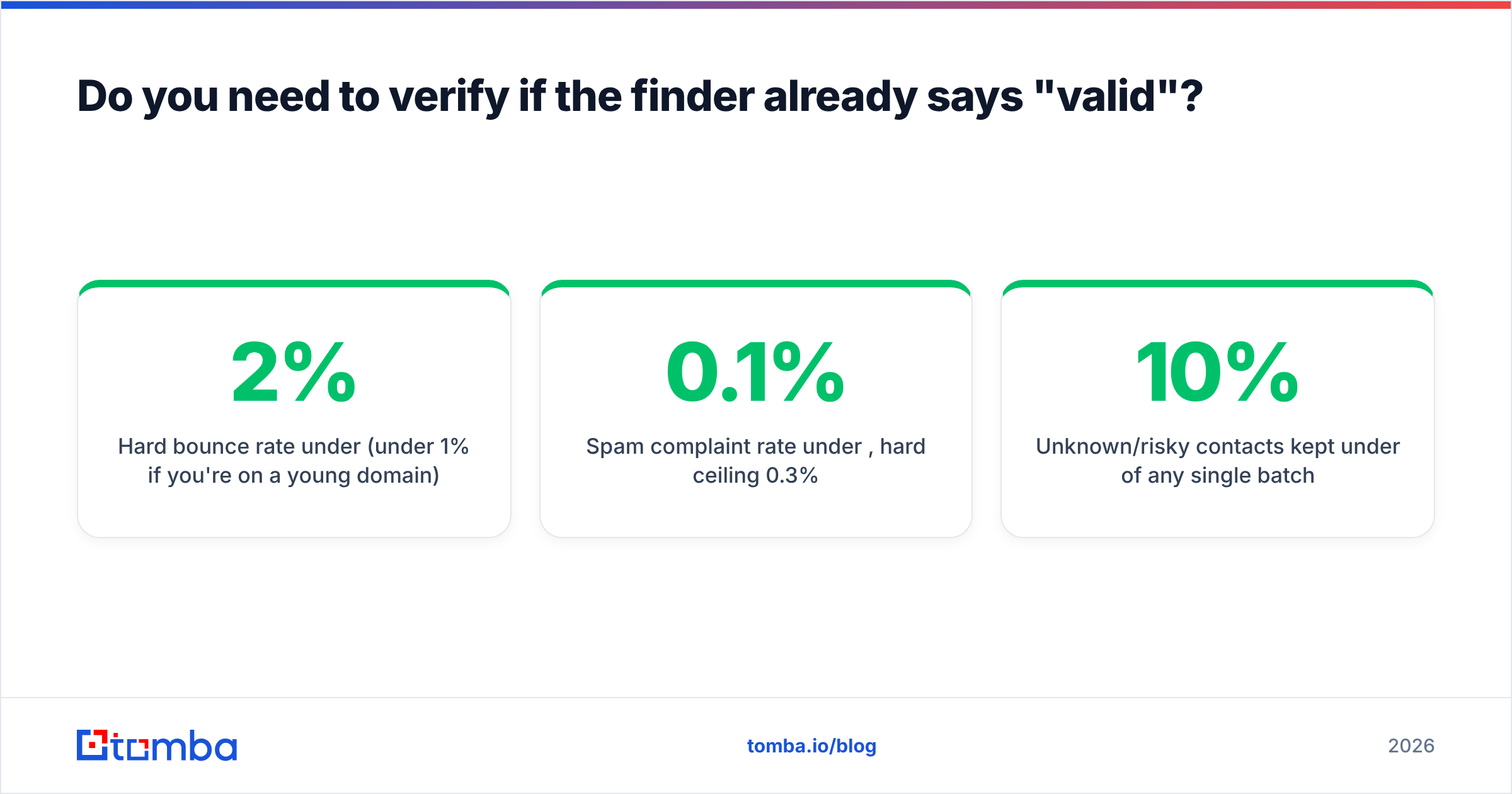
Target thresholds worth holding yourself to:
- Hard bounce rate under 2% (under 1% if you're on a young domain)
- Spam complaint rate under 0.1%, hard ceiling 0.3%
- Unknown/risky contacts kept under 10% of any single batch
- SPF, DKIM, and DMARC all passing before the first send — check your SPF record if you're unsure
Is buying a contact database a legitimate shortcut?#
Sometimes, and the honest answer depends on the vendor and the market.
Purchased data gets you coverage fast, which matters when you're entering a new vertical and have no idea who the buyers are. The risk is that most cheap lists are recycled scrapes with no freshness guarantee. The differentiator is whether the vendor re-verifies on a schedule and offers a bounce credit — BookYourData, for example, sells on a pay-as-you-go model with a stated accuracy guarantee, which is a materially different product from a $99 "10 million B2B leads" torrent.
The middle path most teams settle on: use a curated B2B database or purchased set for account discovery and market mapping, then resolve and verify the specific humans yourself. You get coverage from one source and freshness from the other.
Whichever route you take, check the compliance side. Under GDPR, B2B outreach in the EU generally relies on legitimate interest, which requires relevance, a clear opt-out, and a documented basis — not blanket consent, but not a free pass either. Under CAN-SPAM in the US, accurate headers, a physical address, and honored unsubscribes are non-negotiable. Neither regime bans cold email; both punish sloppy execution. HubSpot's guidance on GDPR-compliant outreach is a reasonable starting point, and vendor reviews on G2's lead intelligence category are useful for checking whether a data provider's freshness claims match customer experience.
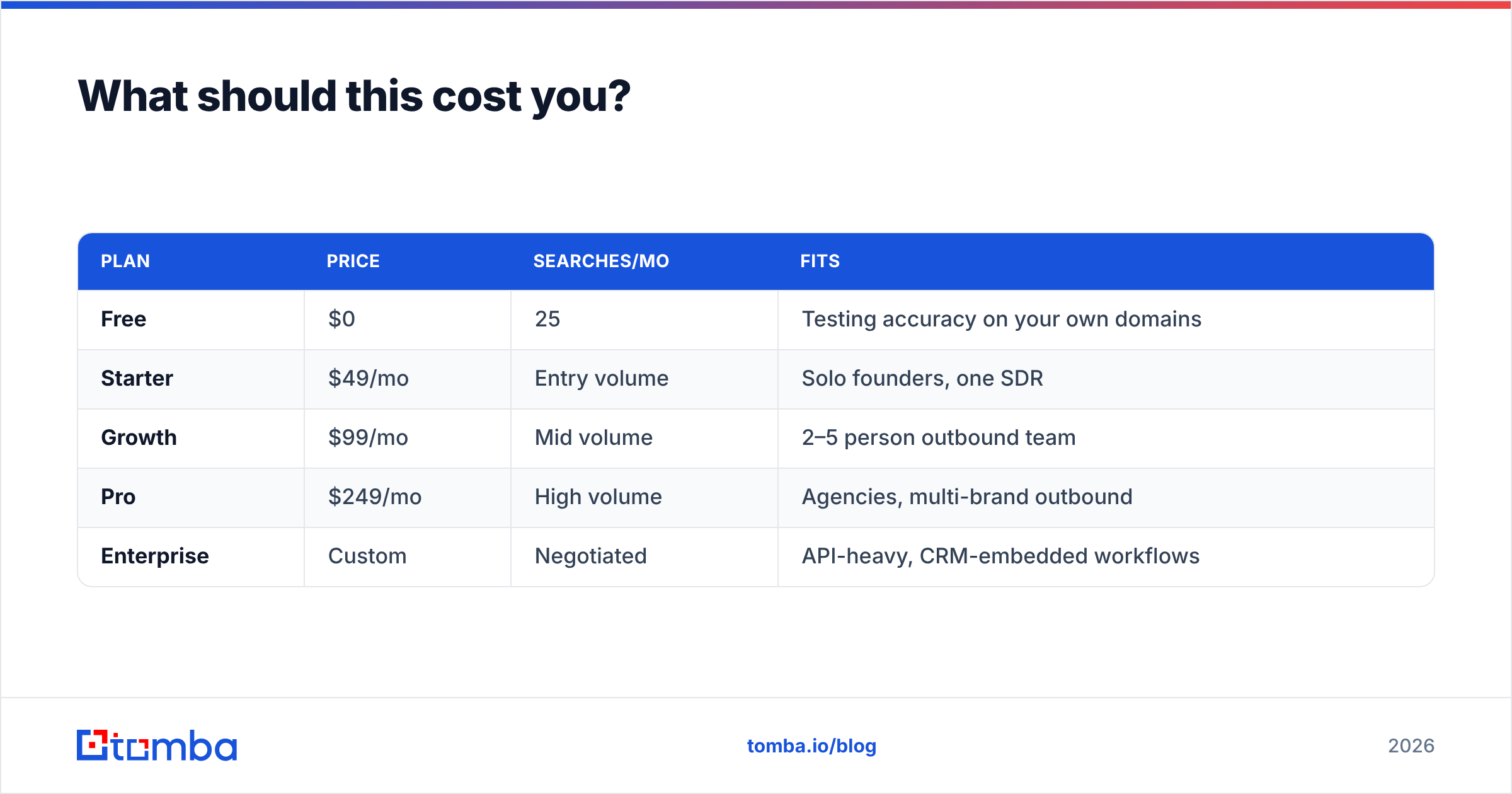
What should this cost you?#
| Plan | Price | Searches/mo | Fits |
|---|---|---|---|
| Free | $0 | 25 | Testing accuracy on your own domains |
| Starter | $49/mo | Entry volume | Solo founders, one SDR |
| Growth | $99/mo | Mid volume | 2–5 person outbound team |
| Pro | $249/mo | High volume | Agencies, multi-brand outbound |
| Enterprise | Custom | Negotiated | API-heavy, CRM-embedded workflows |
Full Tomba pricing is public, and the free tier is genuinely useful for the test that matters: take 25 contacts you already know are correct, run them through, and measure the hit rate on your market. Vendor-published accuracy averages are aggregates across every industry and geography. Your ICP's numbers will differ, sometimes by 20 points, and a 25-contact test tells you more than any comparison chart.
The number to optimize is cost per verified, replied-to contact, not cost per credit. A $0.02 credit that resolves 60% of your list is more expensive than a $0.06 credit that resolves 92%, once you count the sequencer seats, the SDR hours, and the reputation damage from bounces.
What's the workflow that actually holds up?#
Put together, the durable version looks like this:
- Define the account list with firmographic filters, not vibes.
- Run a domain search on each account to establish the email pattern and surface known contacts.
- Resolve named targets with a finder; keep confidence scores attached to the row.
- Verify the full batch within 48 hours of sending.
- Split valid / risky / invalid, and send only to valid on your primary domain.
- Re-verify anything older than 30 days before it enters a new sequence.
- Automate steps 2–4 through an API so contacts arrive fresh instead of aging in a spreadsheet.
That's the whole discipline. Nothing exotic — just refusing to let unverified data touch your sending domain.
Start with the resolution step. The Tomba Email Finder gives you name-and-domain lookup with confidence scoring, pattern detection across the whole company, and verification built into the same workflow — so contacts get checked before they reach your sequencer, not after your bounce rate tells you something went wrong. The free tier includes 25 searches a month, which is enough to benchmark accuracy against contacts you already have before you spend anything. Run that test on your own market first; then scale the method that survived it.
Related guides#
// get started
Find, verify and enrich your first contacts today
Start on the free plan with 25 searches a month, then scale when your team is ready.
Free plan · No credit card required · GDPR & CCPA
// about the author