How To Find High Quality Leads in 2026: A Practical Guide
Most pipelines fail on input quality, not effort. Here is a repeatable system for sourcing, scoring, and verifying high-quality B2B leads — plus the exact filters and checks that separate a real buyer from a row in a spreadsheet.

TL;DR
- A high-quality lead is not "someone who might buy." It is a contact who matches your ICP, shows a buying trigger, holds budget authority, and has a verified email or phone you can actually reach.
- Volume is the wrong lever. Teams that cut list size by 80% and raise scoring rigor usually see reply rates climb 2-4x on the same send capacity.
- Build the list in four passes: define fit → find accounts with triggers → find the right humans → verify the contact data before it ever touches your sequencer.
- Six filters do most of the work: firmographic fit, technographic fit, hiring/funding triggers, job-change signals, intent, and deliverability risk.
- Bad data is the silent killer. Every 10% of invalid addresses in a list drags your sender reputation down and quietly caps every campaign that follows.
What actually makes a lead "high quality"?#
A high-quality lead is a contact where four things are simultaneously true: fit, timing, authority, and reachability. Drop any one and the lead is noise dressed as pipeline.
Most teams only measure the first. They build an ICP filter in a database tool, export 10,000 rows, and call it a targeted list. Then they wonder why 3% reply. The list was targeted on one axis out of four.
Think of it like hiring. A resume that matches the job description (fit) tells you nothing about whether the person is looking right now (timing), whether they can accept an offer (authority), or whether the phone number on the resume still works (reachability). You would never make a hire on fit alone. Do not build a pipeline on it either.
Here is what each dimension means in practice:
- Fit — the account looks like your best existing customers on firmographics (size, industry, geography, revenue band) and technographics (the stack they run).
- Timing — something changed recently: funding, a new hire in the buying role, a product launch, a security incident, a competitor contract expiring.
- Authority — the human you contact owns or heavily influences the budget line your product hits. A "Marketing Coordinator" at a 3,000-person company almost never does.
- Reachability — the email is verified deliverable, the phone number connects, and the domain is not a catch-all black hole that swallows bounces silently.
- Non-exclusion — they are not an existing customer, an active opportunity, a competitor, or someone who opted out eight months ago. This one is boring and constantly skipped.
Score a lead across all five. Anything scoring below threshold on reachability should never enter a sequence, regardless of how perfect the fit is.
How do you define your ICP without guessing?#
Start from closed-won, not from ambition.
Pull your last 40-60 closed-won accounts out of your CRM and tag them on: employee count, revenue band, industry, region, tech stack, deal size, sales cycle length, and churn status at 12 months. Then pull your last 40 closed-lost and churned accounts and do the same. The gap between those two tables is your real ICP — not the one in the pitch deck.
Three questions to answer from that data:
- Which segment closes fastest? Sales cycle length is the most underrated ICP variable. A segment that closes in 21 days is worth more than a segment with a 30% higher ACV and a 140-day cycle.
- Which segment retains? If a segment closes well and churns at month 9, it is not your ICP. It is a refund with extra steps.
- What trigger preceded the deal? Go into 10 closed-won accounts and find what happened 30-60 days before the first meeting. That trigger is your highest-yield search filter.
Write the output as an explicit exclusion list too. "Companies under 15 employees," "agencies," "anything in EU public sector" — knowing who you refuse to prospect is half the quality gain.
Where do high-quality leads actually come from?#
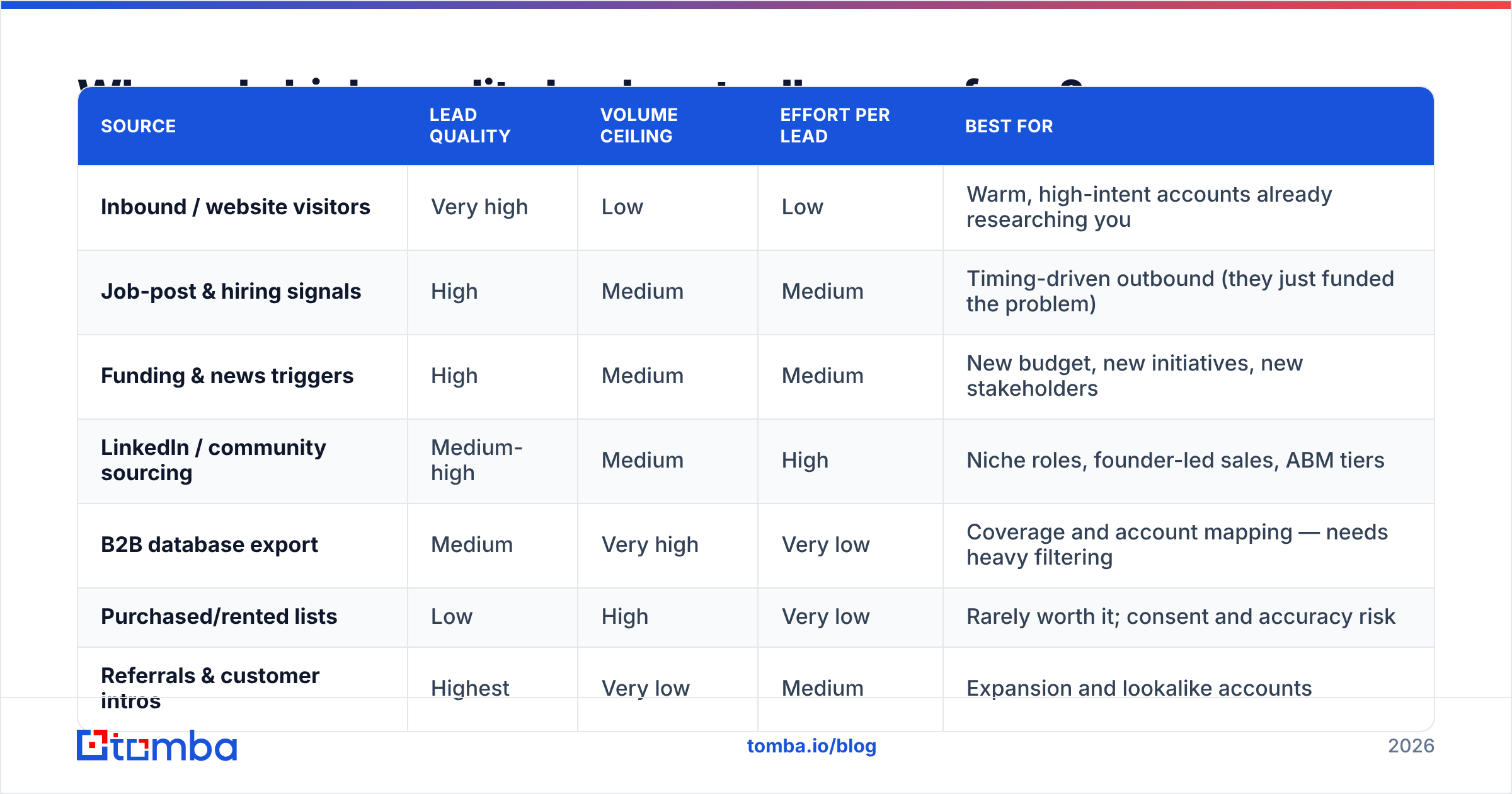
There is no single source. The teams with the cleanest pipelines run three or four in parallel and dedupe aggressively.
| Source | Lead quality | Volume ceiling | Effort per lead | Best for |
|---|---|---|---|---|
| Inbound / website visitors | Very high | Low | Low | Warm, high-intent accounts already researching you |
| Job-post & hiring signals | High | Medium | Medium | Timing-driven outbound (they just funded the problem) |
| Funding & news triggers | High | Medium | Medium | New budget, new initiatives, new stakeholders |
| LinkedIn / community sourcing | Medium-high | Medium | High | Niche roles, founder-led sales, ABM tiers |
| B2B database export | Medium | Very high | Very low | Coverage and account mapping — needs heavy filtering |
| Purchased/rented lists | Low | High | Very low | Rarely worth it; consent and accuracy risk |
| Referrals & customer intros | Highest | Very low | Medium | Expansion and lookalike accounts |
The practical mix for most B2B teams under $20M ARR: inbound reveal + trigger-based outbound + a filtered database layer for coverage. Skip purchased lists entirely — the deliverability damage outlives the campaign.
If you want a coverage layer without the usual data-decay problem, a maintained B2B database that you filter down hard beats a one-time scraped export every time. The scraped file starts decaying the day you download it; roughly 25-30% of B2B contact data goes stale annually as people change roles.
Some teams also buy from specialist providers like BookYourData, which sells pay-as-you-go verified B2B contacts — a reasonable option when you need a specific vertical slice and do not want a full platform subscription. Whichever source you use, run your own verification pass on top. No provider's freshness guarantee replaces a check performed the hour before you send.
Which six filters separate a real lead from a row?#
This is the working part of the system. Apply these in order — each one is cheaper to run than the one after it, so you shrink the list before you spend on enrichment.
Filter 1 — Firmographic fit. Employee count, revenue band, industry code, HQ country. Set hard bounds from your closed-won analysis, not soft preferences. If your best customers are 50-500 employees, exclude 501+ rather than "deprioritizing" them.
Filter 2 — Technographic fit. Does the account run the stack your product plugs into or displaces? A CRM-adjacent tool prospecting accounts with no CRM is selling the category first and the product second. That doubles your sales cycle.
Filter 3 — Trigger events. Funding round in the last 90 days, a relevant open role posted in the last 30, a leadership change, an office opening, a public compliance deadline. No trigger means you are selling into a flat calendar.
Filter 4 — Job-change signals. Someone who moved into a buying role in the last 60-120 days is the single highest-converting outbound target in B2B. New leaders replace tooling; incumbents defend it.
Filter 5 — Intent. Website visits, review-site category browsing, competitor comparison pages. G2's buyer behavior research consistently shows category browsing precedes vendor shortlisting by weeks, which is exactly the window you want.
Filter 6 — Deliverability risk. Is the address role-based (info@, sales@)? Is the domain catch-all? Is it a disposable domain? Has the mailbox bounced for anyone before? This filter is last because it runs on the smallest list — and it is the one that protects everything else.
Run all six and a 10,000-row export typically lands somewhere between 150 and 600 genuinely workable leads. That feels like a loss. It is not. You just removed the 9,400 rows that were going to burn your domain.

How do you find the right person's contact details?#
Once you have the account list, you need the human — and that human's working email.
The sequence that works:
- Identify the role, not the name. Decide the exact title band you need per account tier ("VP Demand Gen or Head of Growth at 200-1000 employees; Founder below 50"). Vague targeting produces vague lists.
- Map the account. Use domain search to pull the people and email patterns at a company in one pass. You will often find a better-fit stakeholder than the one you planned to contact.
- Resolve the individual. When you have a name and a company, an email finder returns the likely address and a confidence score. When you have a LinkedIn profile instead, a LinkedIn finder does the same from the profile URL.
- Verify before you send. Run every address through an email verifier. This is non-negotiable, and it is the step most teams skip when a deadline looms.
- Handle catch-all domains separately. Catch-all servers accept everything, so a standard SMTP check returns "valid" for addresses that do not exist. A dedicated catch-all verifier applies pattern and history checks instead of trusting the server response.
- Add a second channel for tier-1 accounts. For accounts worth real effort, pull a direct number with a phone finder so you are not betting the account on one inbox.
For volume work, batch it. Uploading a CSV to a bulk email finder and getting back found-plus-verified rows is dramatically faster than resolving contacts one at a time, and it keeps confidence scores attached to each row so your scoring model can use them.

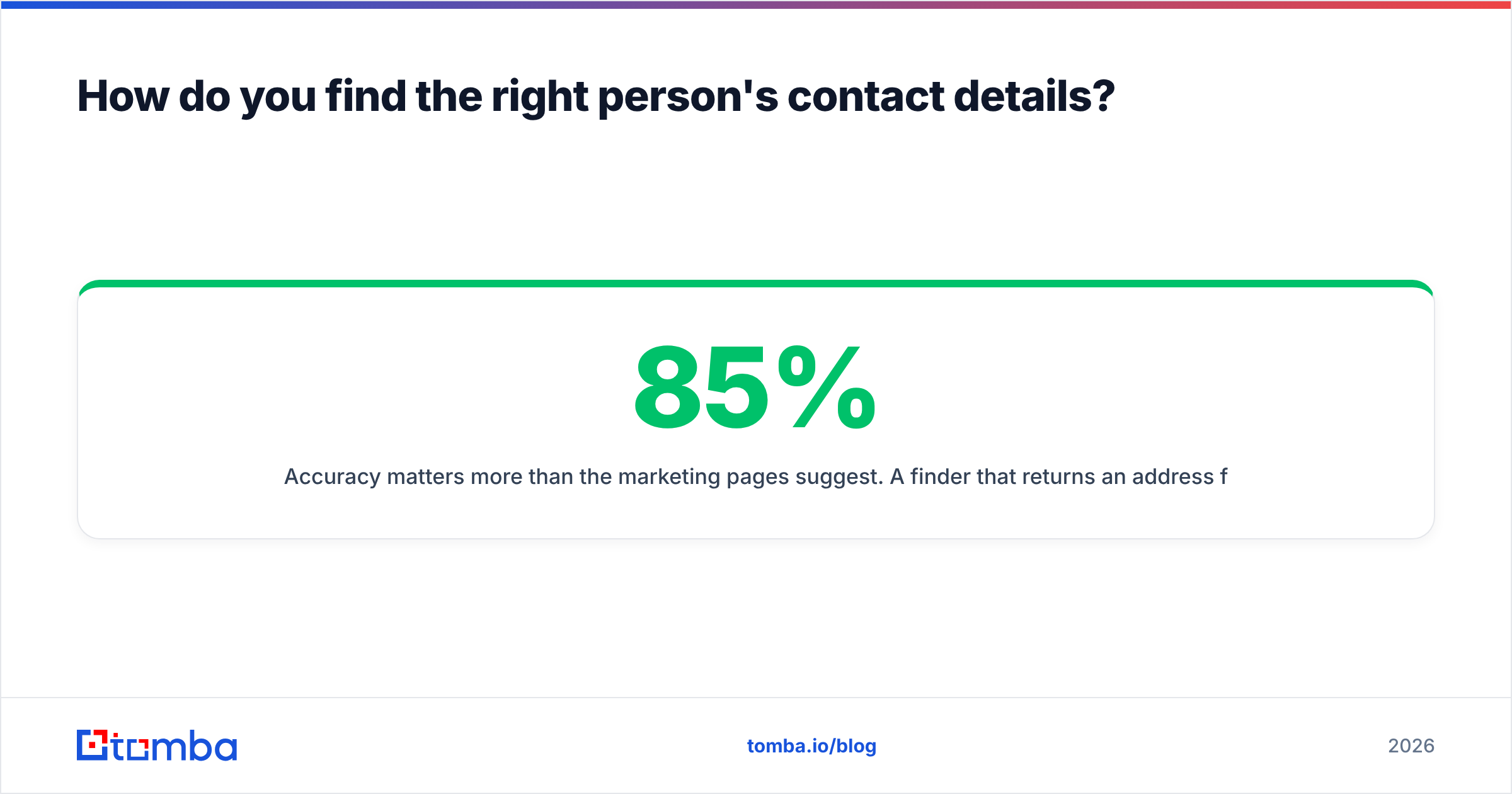
Accuracy matters more than the marketing pages suggest. A finder that returns an address for 85% of inputs at 92% accuracy delivers more usable leads than one that returns 95% at 70% accuracy — the second one just hands you bounces with a confidence badge on them.
How should you score and rank the leads you keep?#
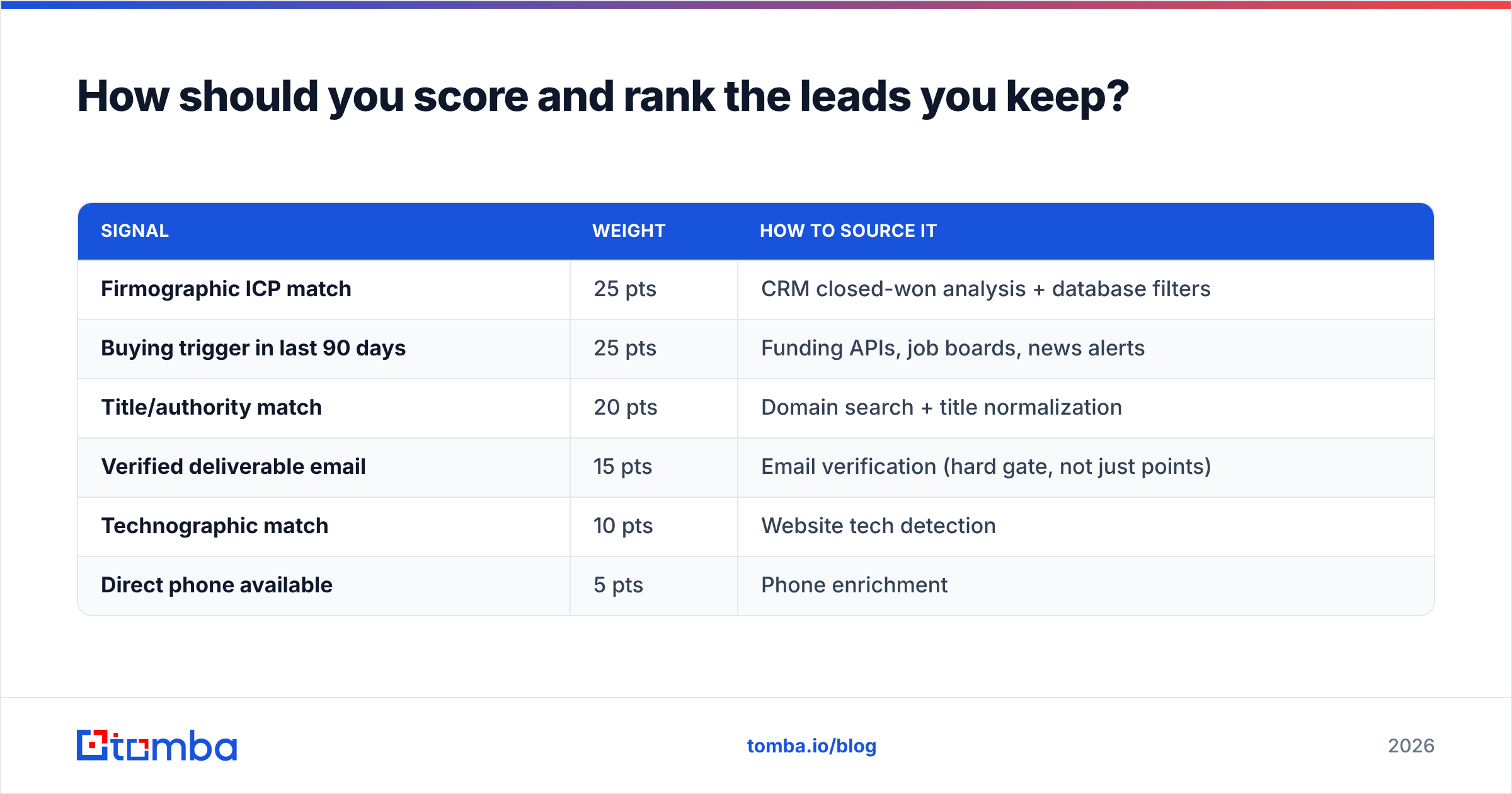
Build a simple additive model. Complexity here buys nothing.
| Signal | Weight | How to source it |
|---|---|---|
| Firmographic ICP match | 25 pts | CRM closed-won analysis + database filters |
| Buying trigger in last 90 days | 25 pts | Funding APIs, job boards, news alerts |
| Title/authority match | 20 pts | Domain search + title normalization |
| Verified deliverable email | 15 pts | Email verification (hard gate, not just points) |
| Technographic match | 10 pts | Website tech detection |
| Direct phone available | 5 pts | Phone enrichment |
Set the entry threshold at 60 and treat verification as a gate rather than a scored line item — a 95-point lead with an unverifiable address is a 0. It cannot be contacted, so it cannot convert.
Then tier the output:
- Tier 1 (85+): Manual research, personalized first touch, multichannel, phone included.
- Tier 2 (65-84): Templated-but-variable sequence, three touches, email-first.
- Tier 3 (60-64): Low-touch nurture, newsletter, retarget. Do not spend rep time here.
Anything below 60 goes back to the database for a future trigger, not to a sequencer. If you cannot articulate why a lead is in a sequence today, it should not be.
Does lead quality really affect deliverability?#
Directly and permanently. This is the part that costs teams a quarter to recover from.
Mailbox providers score your sending domain on bounce rate, spam complaints, and engagement. A list padded with unverified addresses produces bounces; bounces push your sender reputation down; a degraded reputation means your good emails to your best prospects start landing in spam. You do not get a warning, and you do not see it in your open rates until the damage is weeks old.
Keep hard bounces under 2%. Above 5% and providers begin throttling. The math is simple: verifying a 2,000-row list costs a few dollars and takes minutes. Rebuilding a burned domain takes 6-8 weeks of warmup and a lot of lost pipeline.
Practical guardrails:
- Verify every list within 48 hours of sending, not at the time you built it.
- Suppress role-based and generic addresses unless the offer is genuinely for a shared inbox.
- Re-verify any contact older than 90 days before re-engaging.
- Check your domain's SPF record, DKIM, and DMARC before scaling volume. Google's bulk sender requirements made authentication mandatory, not optional.
- Cap daily volume per mailbox. More mailboxes at low volume beats one mailbox at high volume.
What does the full workflow look like end to end?#
Here is the version you can run this week:
- Monday — ICP refresh (2 hours). Export closed-won and closed-lost from the CRM. Build the fit table. Write the exclusion list.
- Monday — Account sourcing (2 hours). Pull accounts matching the fit table from your database layer plus trigger sources (funding news, job boards). Target 300-800 accounts, not 10,000.
- Tuesday — Trigger filtering (1 hour). Keep only accounts with a trigger in the last 90 days. Expect to cut 60-75%.
- Tuesday — Contact resolution (1-2 hours). Domain search per account, pick the right title band, resolve emails in bulk.
- Wednesday — Verification (30 minutes). Run the full list through verification. Split catch-all domains into their own bucket with a separate check.
- Wednesday — Scoring and tiering (1 hour). Apply the scoring table. Tier the survivors. Route Tier 1 to reps, Tier 2 to sequences, Tier 3 to nurture.
- Thursday — Personalization and launch. Tier 1 gets researched openers; Tier 2 gets variable merge fields tied to the trigger, not to the company name.
- Friday — Measure inputs, not just outputs. Track bounce rate, response rate, and meetings-per-100-contacts by tier. If Tier 1 is not outperforming Tier 2 by a wide margin, your scoring model is wrong, not your copy.
Repeat weekly. The list gets smaller and the meeting count gets bigger. That is the whole trade.
What mistakes kill lead quality most often?#
- Optimizing for list size in the weekly standup. Whatever you report on is what the team optimizes. Report on verified Tier 1 leads added, never on rows exported.
- Enriching before filtering. Enrichment costs credits. Filter on cheap signals first, spend credits on the survivors.
- Trusting a single data source. Every provider has coverage gaps by region and company size. Cross-check on your top accounts before committing budget.
- Treating catch-all as valid. It is the most common cause of a "verified" list that still bounces.
- Never re-verifying. A contact you verified in March is a guess in September.
- Ignoring exclusions. Emailing an active opportunity's champion with a cold template is a real, recurring, entirely avoidable own-goal.
Where should you start?#
Start with the smallest possible list you would be embarrassed to send a bad email to. Fifty accounts, fully researched, fully verified, all with a trigger. Run it for two weeks and measure meetings-per-100-contacts. That number is your baseline, and it will be several times higher than whatever your bulk campaigns produce.
Then scale the process, not the list size. Add sources, add triggers, add automation to the resolution and verification steps — but keep the quality gate exactly where it is.
Ready to build the list? Start with the Tomba Email Finder to resolve the right contact at every account on your target list, then verify before you send. The free tier gives you 25 searches per month to test the workflow on real accounts; paid plans start at $49/mo on Starter, with Growth at $99/mo and Pro at $249/mo — full Tomba pricing is public, and the Tomba API drops the same lookups straight into your existing enrichment pipeline.
Related guides#
// get started
Find, verify and enrich your first contacts today
Start on the free plan with 25 searches a month, then scale when your team is ready.
Free plan · No credit card required · GDPR & CCPA
// about the author