How to Find Human Resources Contact Info at Any Company
HR gatekeepers are the hardest B2B contacts to reach. Here are seven methods that actually surface a real human resources contact — plus what each one costs you in time and accuracy.
Not sure how to find human resources contact info at a company that hides it? You are not alone. HR inboxes are the most guarded in B2B. Below are seven methods, ranked by how fast they return a real, working address.
TL;DR
- The fastest reliable route is domain search plus verification: pull every published address on the company domain, filter for HR-pattern names, then verify before sending.
- LinkedIn tells you who to contact (title, tenure, region) but almost never how — you still need an email step.
hr@,careers@, andjobs@role addresses work for vendor pitches at companies under ~200 employees and get ignored above that.- Guessing formats without verification is why HR outreach bounces at 25-58%. A verification step drops that under 3%.
- Budget 4-6 minutes per contact manually, or roughly 8 seconds per contact with a bulk workflow.
Why is HR so hard to reach compared to other departments?#
Human resources is the most defended inbox in B2B. Three structural reasons:
They are drowning in vendor mail. An HR director at a 500-person company gets pitched every week by payroll platforms, benefits brokers, ATS vendors, DEI consultants, and background-check firms. Their spam filters and their mental filters are both tuned aggressively.
Their public contact info is deliberately generic. Legal and compliance teams prefer that employment inquiries route through a monitored shared mailbox, not an individual. So the careers page shows careers@company.com and nothing else.
Titles fragment wildly. "Head of People," "Chief People Officer," "VP Talent," "Director of Employee Experience," and "HR Business Partner" can all be the person you want. Searching for "HR Manager" alone misses most of the market.
That fragmentation matters for how you search. If you only query one title, you are working with maybe 30% of the addressable list.
How to find human resources contact info: the seven methods#
Here is the full menu, ordered roughly by speed-to-result. None of these are exotic. The difference is knowing which one to reach for.
- Domain search on the company website. Pull every email address publicly tied to the domain, then filter by department. This is the highest-yield single action. It returns the pattern (first.last, f.last, firstlast) alongside the hits, so you can build addresses for people who aren't listed.
- LinkedIn title search plus email lookup. Filter by company + title keywords ("people," "talent," "human resources," "HR") and shortlist 2-3 names. Then resolve their work email. LinkedIn gives you the name and seniority; a LinkedIn finder closes the gap to an actual address.
- The careers page and job postings. Active job ads frequently list a hiring contact or a recruiter's direct line. Postings on the company's own ATS (Greenhouse, Lever, Workday) leak more than aggregator repostings do.
The next four cost nothing but take longer. Reach for them when the first three come up dry:
- Role-based addresses.
hr@,people@,careers@,talent@,recruiting@. Cheap to try, and at small companies a real person reads them. - Press releases and newsroom pages. New HR leadership hires are announced. That announcement usually names the person and sometimes the media contact who can forward you.
- SEC filings and annual reports. For public companies, the proxy statement names the CHRO and the compensation committee contacts. Free, authoritative, slow.
- Conference speaker lists and HR association directories. SHRM chapters, HR Tech, Transform, and regional people-ops meetups publish speaker rosters with company affiliations.

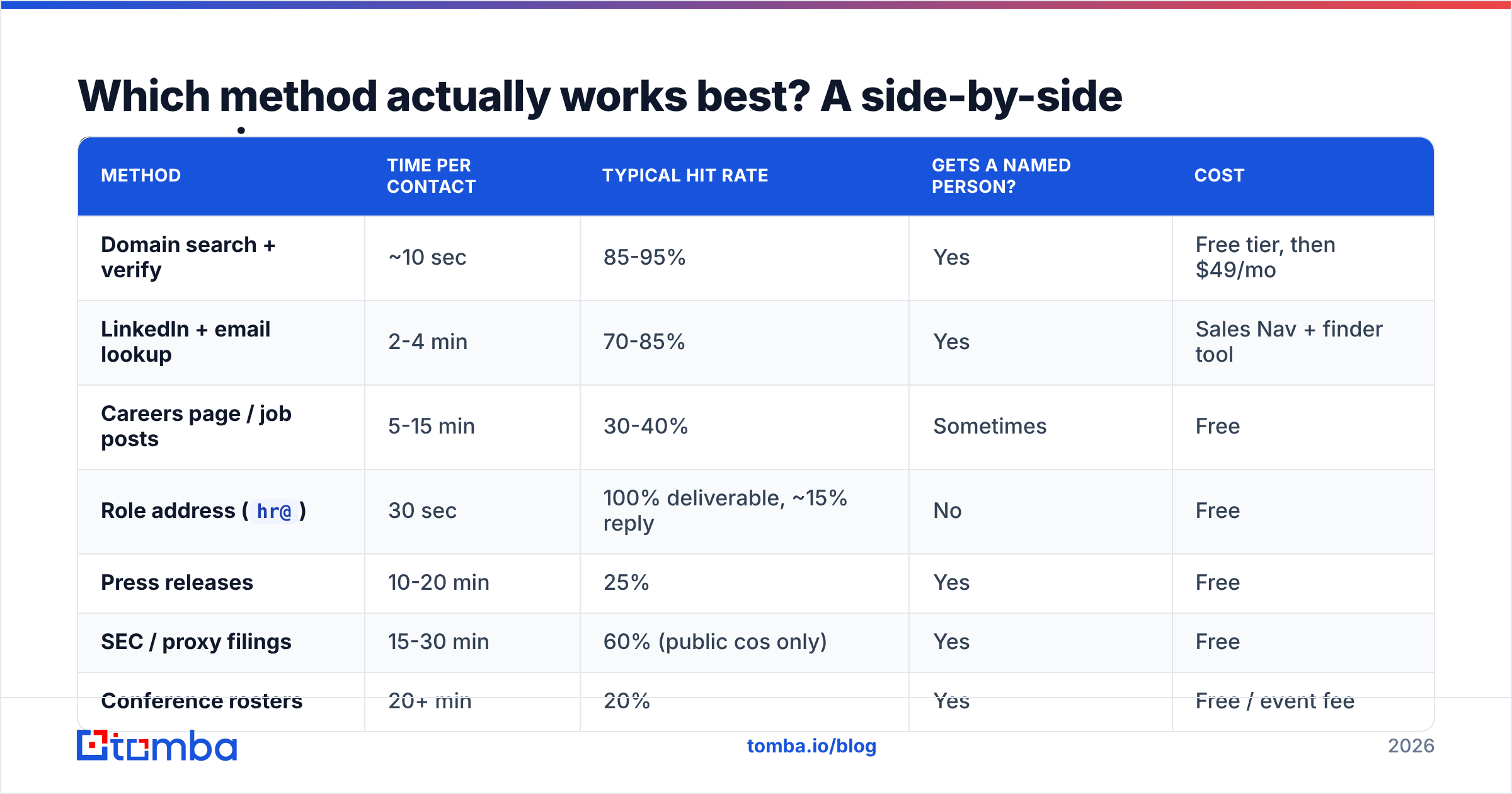
Which method actually works best? A side-by-side comparison#
Speed and accuracy pull in opposite directions on most of these. Here is how they stack up in practice:
| Method | Time per contact | Typical hit rate | Gets a named person? | Cost |
|---|---|---|---|---|
| Domain search + verify | ~10 sec | 85-95% | Yes | Free tier, then $49/mo |
| LinkedIn + email lookup | 2-4 min | 70-85% | Yes | Sales Nav + finder tool |
| Careers page / job posts | 5-15 min | 30-40% | Sometimes | Free |
Role address (hr@) |
30 sec | 100% deliverable, ~15% reply | No | Free |
| Press releases | 10-20 min | 25% | Yes | Free |
| SEC / proxy filings | 15-30 min | 60% (public cos only) | Yes | Free |
| Conference rosters | 20+ min | 20% | Yes | Free / event fee |
The pattern is obvious once it's laid out. The free methods cost you time, and that time cost scales with list size. Fine for 10 contacts. Untenable for 500.
How do you run the domain search method step by step?#
This is the workflow I'd default to for any list larger than a handful.
Step 1 — Resolve the real domain. Companies with multiple brands, recent rebrands, or country-specific TLDs will burn you here. acme.com and acmegroup.co.uk may be the same entity with different mail infrastructure. Check the domain in the footer of the careers page, not the marketing site.
Step 2 — Run a domain search. A domain search returns the published addresses on that domain grouped by department, plus the dominant email pattern. You're looking for two outputs: any HR-department hits, and the pattern itself.
Step 3 — Filter by department and title. Most tools tag results. Filter to HR/People, but also scan Operations — at companies under 100 people, HR often sits under an ops or finance leader who won't be tagged correctly.
Step 4 — Construct missing addresses from the pattern. If you know the pattern is first.last@ and LinkedIn tells you the CPO is Dana Whitfield, you now have a strong candidate: dana.whitfield@company.com. An email permutator generates every plausible variant if you want to test a few.
Step 5 — Verify before sending. Non-negotiable. Run every constructed address through an email verifier. Verification sorts addresses into valid, invalid, catch-all, and disposable. A catch-all result means the server accepts everything, so you have no real signal — treat it as unconfirmed.
Step 6 — Bulk it if the list is long. For anything past ~50 companies, upload a CSV of domains and names rather than working row by row. Bulk email finder workflows turn a multi-hour session into a coffee break.
Does the accuracy of your source actually matter?#
Yes, and it's the most under-priced variable in HR prospecting.
Google's 2024 bulk-sender rules made this expensive. Gmail and Yahoo now enforce a spam complaint rate under 0.3%. They also require authenticated sending for anyone pushing 5,000+ messages a day. Bounce rate feeds directly into how mailbox providers score your domain. Send to a list with 25% invalid addresses and you damage your sender reputation for months, not days.
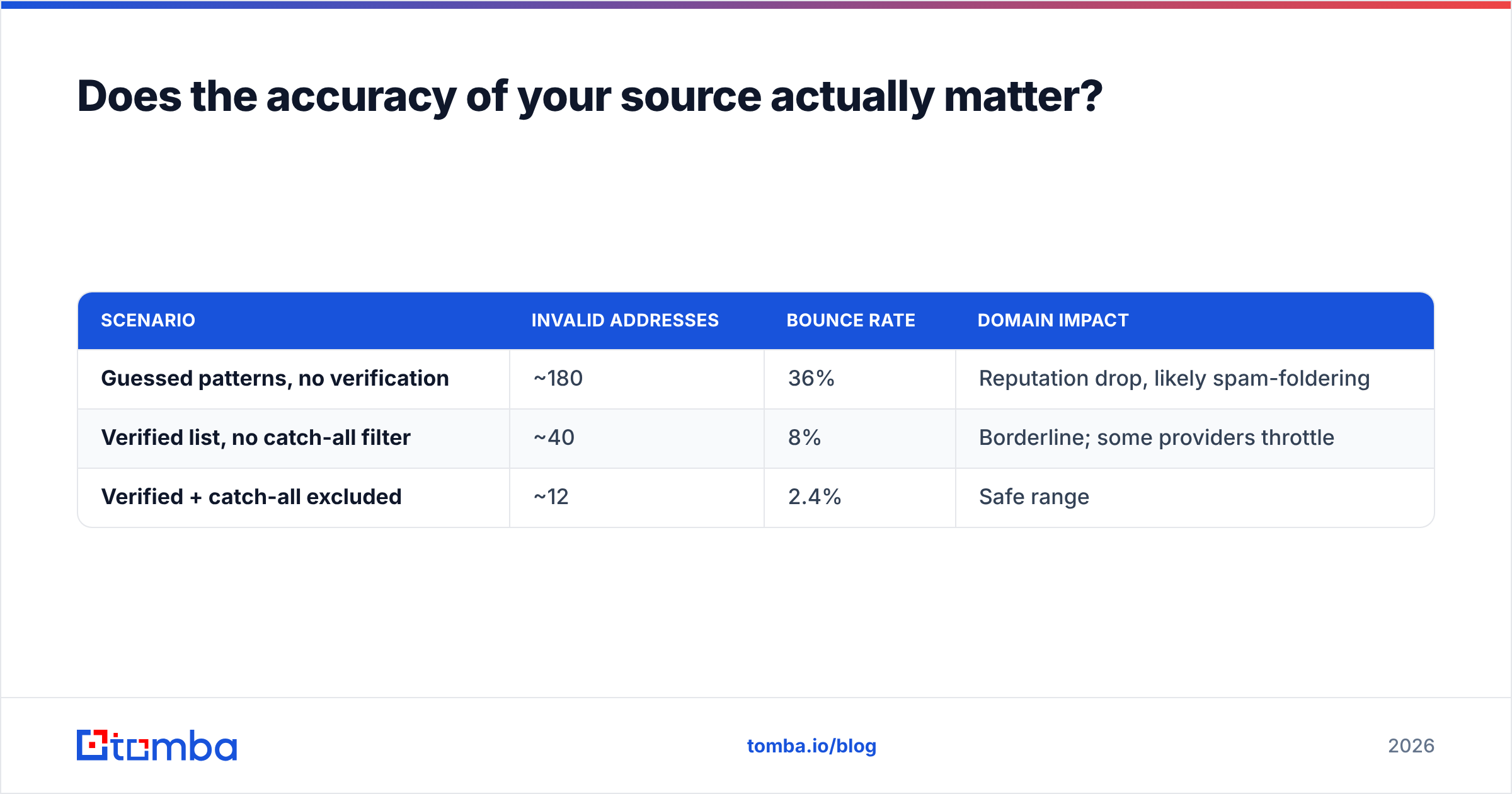
The math on a 500-contact HR campaign:
| Scenario | Invalid addresses | Bounce rate | Domain impact |
|---|---|---|---|
| Guessed patterns, no verification | ~180 | 36% | Reputation drop, likely spam-foldering |
| Verified list, no catch-all filter | ~40 | 8% | Borderline; some providers throttle |
| Verified + catch-all excluded | ~12 | 2.4% | Safe range |
Anything over roughly 5% bounce rate is where inbox providers start treating you as a low-quality sender. That's the whole argument for the verify step. It isn't hygiene — it's the difference between your next three campaigns landing or not.

Which tools should you use for HR contact discovery?#
The category splits into three buckets. Mixing one from each is usually stronger than buying a single all-in-one.
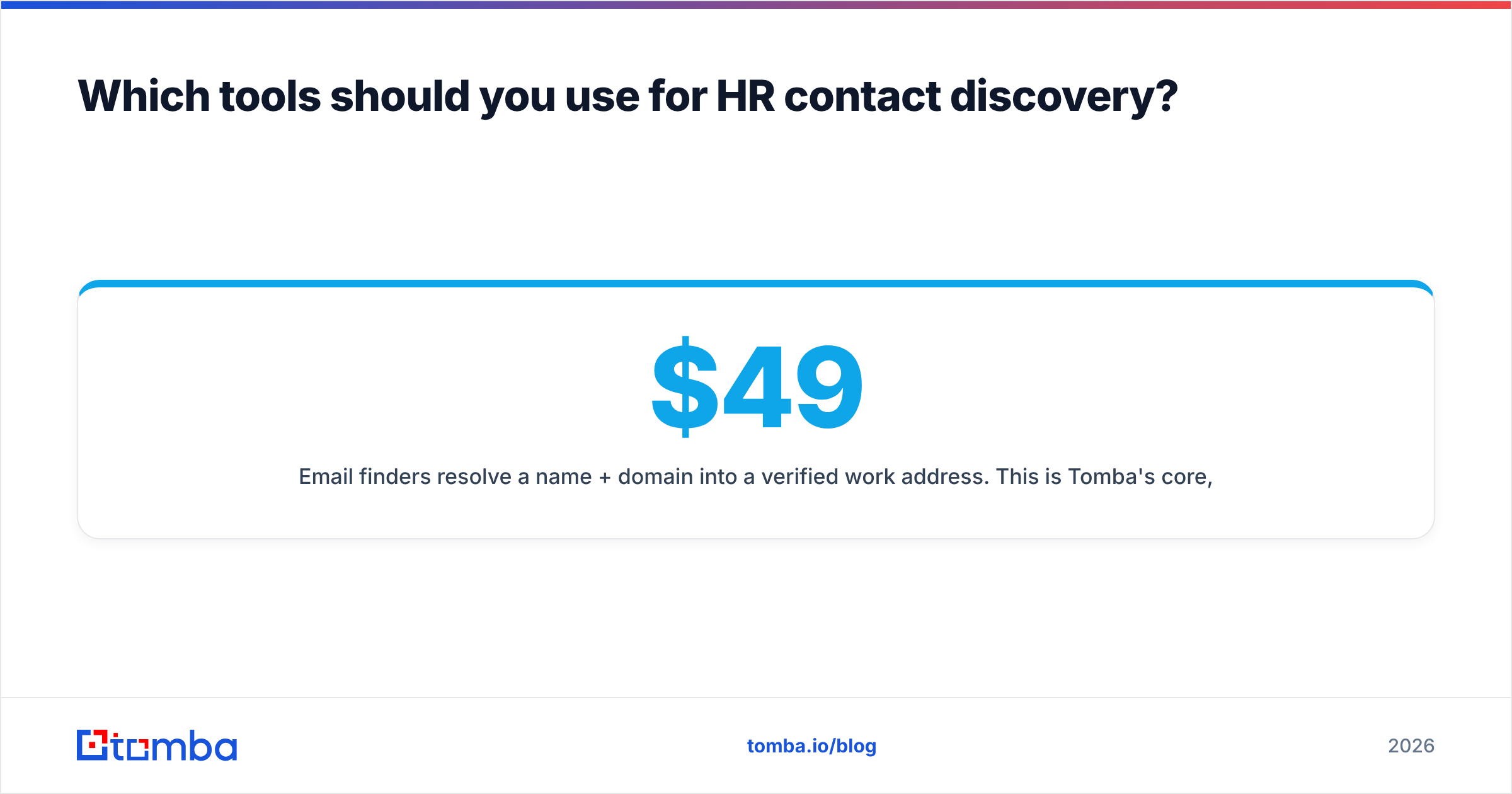
Email finders resolve a name + domain into a verified work address. This is Tomba's core, alongside Findymail and similar focused tools. Tomba pricing starts with a free tier at 25 searches a month, then $49/mo Starter, $99/mo Growth, and $249/mo Pro — useful if you want to test accuracy on your own target accounts before committing.
Contact databases give you pre-built lists you filter by title and company size. BookYourData is a strong option here — pay-as-you-go credits, HR-specific title filters, and no subscription lock-in, which suits teams doing occasional campaigns rather than continuous outbound. Databases win on breadth; finders win on freshness for a specific named person.
Sales intelligence platforms bundle finding, sequencing, and CRM sync. Broader, pricier, and often over-specified if all you need is contact data. If you're evaluating one, G2's HR software category is a reasonable place to sanity-check reviews against vendor claims.
A practical split: use a database to build the initial account list, use a finder to resolve and verify the specific decision-maker, and skip the platform entirely until your volume justifies it.
What do you do once you have the contact?#
Knowing how to find human resources contact details is only step one. The address is maybe 30% of the job. HR leaders reply to relevance, not persistence.
Reference something time-bound. A recent funding round means headcount growth means an HR problem. A new office means multi-state compliance. A wave of job postings in one function means a hiring bottleneck. Job postings are the single best public signal for HR pain — they're literally a list of the problems the department is being measured on.
Lead with the metric they own. Time-to-hire, offer acceptance rate, voluntary attrition, benefits cost per employee, compliance exposure. Not "our platform helps HR teams streamline."
Keep it under 90 words. HR inboxes get skimmed on mobile between meetings.
Respect the channel. Do not pitch to a careers@ address about your product — that mailbox is monitored by recruiters and your message gets deleted as noise. Use role addresses only when you genuinely can't find a named contact and the company is small enough that one person reads everything.
Sequence, don't spam. Two follow-ups spaced 4 and 9 days out is a reasonable ceiling. HubSpot's sales outreach research consistently shows most replies arrive on touches 1-3; touch 7 is mostly noise generation.
If phone is part of your motion, a phone finder fills the gap for direct dials — though HR is one of the departments where cold calling underperforms email, since they're the group most trained to route unsolicited calls.
What are the most common mistakes when finding HR contacts?#
Targeting the wrong seniority. At a 50-person company, the founder or COO is the HR buyer. At 5,000 people, the CHRO doesn't evaluate tools — a Director of HR Ops or a People Systems Manager does. Match the title to the headcount.
Assuming one email pattern per company. Acquired subsidiaries frequently keep legacy formats. A company using first.last@ at HQ may still have flast@ on an acquired division's domain. Verify per-contact, not per-company.
Ignoring catch-all domains. Roughly 15-20% of B2B domains accept all mail. Your verification tool returns "accept-all," you mark it valid, and it silently disappears. A dedicated catch-all verifier applies deeper checks to those specifically instead of leaving them in limbo.
Scraping without a compliance basis. GDPR applies to B2B contact data in the EU and UK. You need a legitimate-interest basis, an opt-out in every message, and a documented source for how you obtained the address. Check where your provider's data sources come from before you build a list you can't defend.
Working a stale list. HR has high turnover — the function reorganizes constantly. A contact list older than six months is meaningfully decayed. Re-verify before every major campaign.
How should you decide which method to use?#
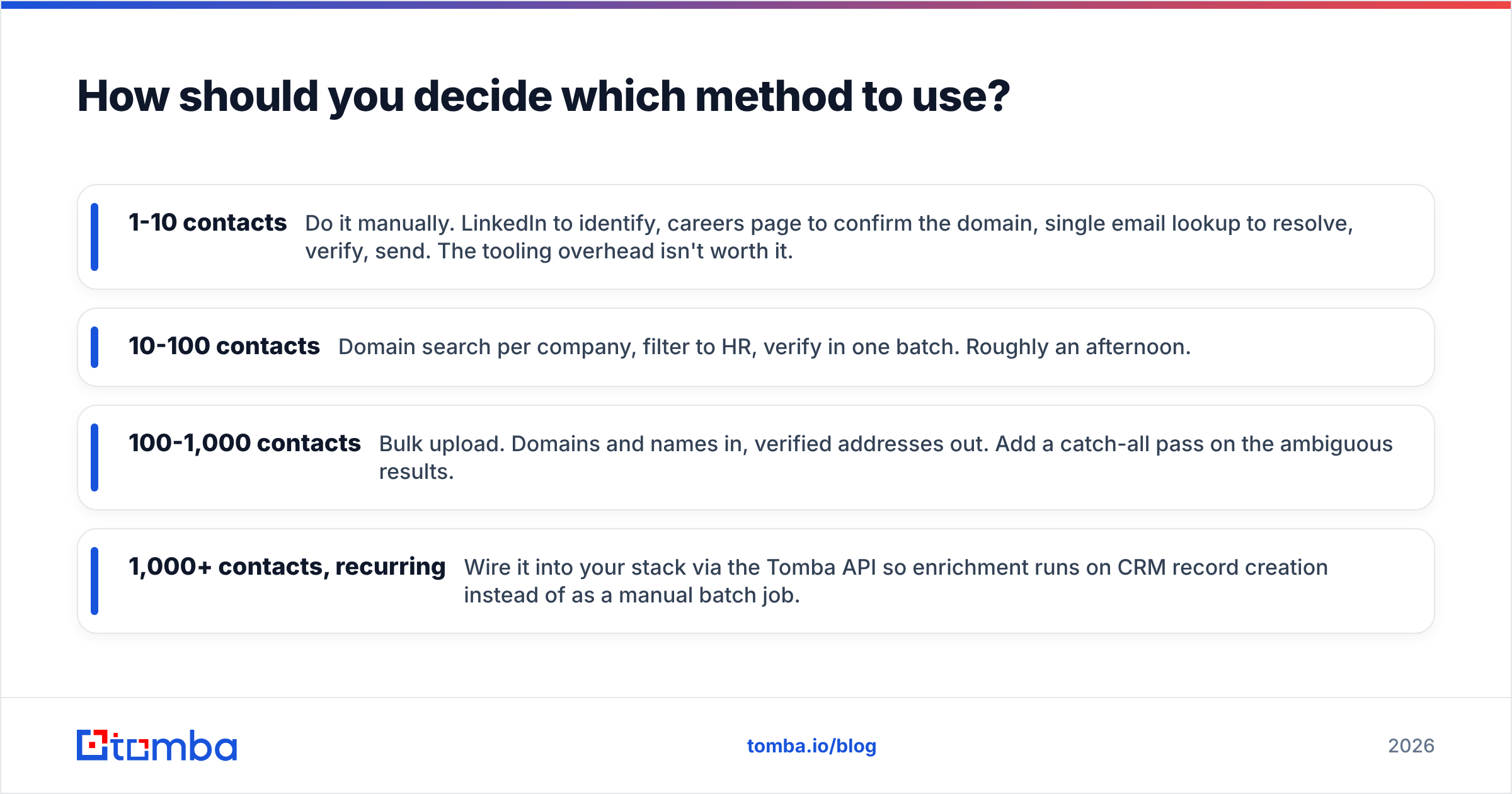
Match the method to the scale of your list:
- 1-10 contacts — Do it manually. LinkedIn to identify, careers page to confirm the domain, single email lookup to resolve, verify, send. The tooling overhead isn't worth it.
- 10-100 contacts — Domain search per company, filter to HR, verify in one batch. Roughly an afternoon.
- 100-1,000 contacts — Bulk upload. Domains and names in, verified addresses out. Add a catch-all pass on the ambiguous results.
- 1,000+ contacts, recurring — Wire it into your stack via the Tomba API so enrichment runs on CRM record creation instead of as a manual batch job.
The upgrade trigger is when manual research time exceeds the cost of tooling. At 4 minutes per contact and 200 contacts, that's 13 hours of an SDR's month — considerably more expensive than a $49 subscription.
Ready to find HR contacts without the guesswork?#
Start with the Tomba Email Finder. Give it a name and a company domain. It returns a verified professional email with a confidence score and the sources behind it, so you know you're sending to a real inbox before you spend a send on it. The free tier covers 25 searches a month — enough to test accuracy against a handful of HR leaders you can already verify. That is how to find human resources contact info without the guesswork: run the test first, then scale the workflow that survives it.
Related guides#
// get started
Find, verify and enrich your first contacts today
Start on the free plan with 25 searches a month, then scale when your team is ready.
Free plan · No credit card required · GDPR & CCPA
// about the author