How to Find Leads for Cold Email: 7 Methods That Work
Most cold email lists fail before the first send. Here are seven repeatable ways to build a lead list that actually lands — with the filters, tools, and verification steps that keep bounce rates under 2%.
TL;DR
- The bottleneck in cold email is almost never the copy — it's the list. A 200-contact list built from a real trigger beats 10,000 scraped rows every time.
- Seven sourcing methods actually scale: job-post signals, LinkedIn Sales Navigator exports, review-site filters, website visitor reveal, competitor customer lists, community/event rosters, and content author mining.
- Every method converges on the same last mile: turn a name + domain into a verified, deliverable email. That's where an email finder and verifier do the work.
- Budget roughly $50–$150/month for a solo founder or small team. Anything above that usually buys data volume you won't send to.
- Verify before you send, every time. Lists decay ~2.1% per month, and a 5% bounce rate on a new domain can cost you the domain.
Why do most cold email lead lists fail?#
Because they're built backwards. Most teams start with "who can I get contact data for?" instead of "who has a reason to reply this month?"
Think of it like fishing. You can buy the biggest net available, or you can find where the fish actually are. A generic filter — "VP Marketing, SaaS, 50–200 employees, United States" — returns 40,000 people who have zero reason to care that you emailed on a Tuesday. A trigger-based filter — "companies that posted a demand-gen role in the last 21 days" — returns 300 people with a live budget and an unsolved problem.
The three failure modes, in order of how often they kill campaigns:
- No trigger. The list is demographically correct and situationally irrelevant. Reply rates land under 1%.
- No verification. Guessed patterns (
first.last@) go out unverified, 8–14% bounce, and the sending domain gets throttled inside two weeks. - No segmentation. One message to 5,000 people instead of five messages to 1,000 each. Personalization at scale requires the list to be built in segments from the start.
Fix the list and mediocre copy still gets replies. Fix the copy on a bad list and nothing happens.

What are the 7 best ways to find leads for cold email?#
Here's the full menu, ordered by how well each method predicts a reply. Use two or three in combination — a lead that shows up in a job-post search and on a review site is a much stronger candidate than one that appears in either alone.
- Hiring signals. Scan job boards for roles that imply your problem exists. A company hiring three SDRs needs sequencing, data, and enablement. Indeed, LinkedIn Jobs, and company career pages are all free to read. This is the highest-intent public signal available.
- LinkedIn Sales Navigator. Filter by headcount growth, recent job changes (people in a new role for under 90 days buy more), technology usage, and seniority. Export the list of names + companies, then resolve emails separately — Sales Navigator itself does not give you addresses.
- Review sites. G2 and Capterra category pages tell you exactly which companies use your competitor. Reviews often name the reviewer's title and company size. Filter for reviewers who rated a competitor 3 stars or lower.
- Website visitor reveal. People already researching you are the warmest cold-email targets that exist. Deanonymizing company-level traffic with website visitor reveal turns anonymous sessions into named accounts you can prospect the same week.
- Competitor customer footprints. Case-study pages, logo walls, integration directories, and public API partner lists are all customer lists in disguise. So are Slack/Discord community member directories and conference attendee pages.
- Content and author mining. People who publish about your problem space are pre-qualified. An author finder pulls the contact behind a byline, which works well for partnerships, guest posts, and analyst outreach.
- Podcast, webinar, and event rosters. Speaker lists are public, titled, and time-bound. "I heard your session on X at Y" is a legitimate first line that isn't fabricated familiarity.
Notice what none of these are: buying a static CSV off a marketplace and blasting it. That still works in a few high-volume, low-ACV niches, but the deliverability tax is brutal and getting worse as inbox providers tighten bulk-sender rules.
How do you turn a name and company into a verified email?#
Four approaches, and they stack. Most teams end up running all four in sequence.
Domain search. You know the company but not the person. A domain search returns every publicly discoverable address at a domain plus the company's email pattern, so you can see whether they use first@, first.last@, or flast@ before you guess anything.
Named lookup. You have "Sarah Chen" and "acme.com." The email finder resolves that to a specific verified address rather than a pattern guess. This is the workhorse for Sales Navigator exports.
Bulk enrichment. You have 2,000 rows from a scrape or a CRM export. A bulk email finder processes the file in one pass instead of 2,000 API calls you write yourself.
Verification. Non-negotiable. Run every address through an email verifier before it enters a sequence. Catch-all domains — where the server accepts everything and tells you nothing — need a dedicated catch-all verifier to get a real risk score instead of a shrug.
The pattern generators floating around ({first}.{last}@domain.com, permute, send, pray) are a false economy. They cost nothing per address and everything in sender reputation. If you must permutate, permutate and then verify — never permutate and send.

Accuracy differences between finders look small on paper and enormous in practice. The gap between a 92% and 97% valid rate on a 5,000-contact campaign is 250 extra bounces — enough to move you from "healthy sender" to "throttled" on a domain that isn't fully warmed.
Which lead-sourcing tool should you actually pay for?#
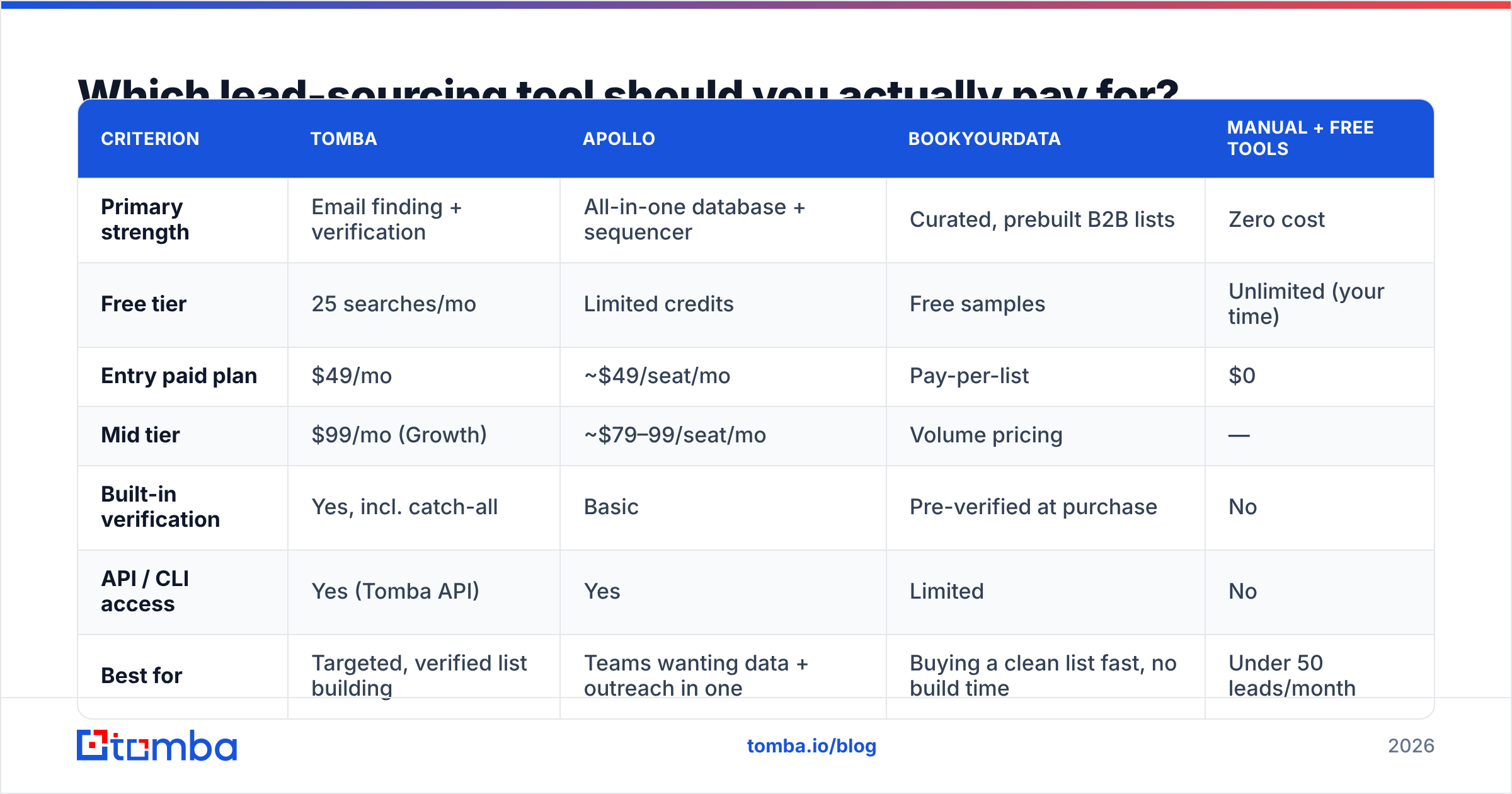
Depends entirely on whether you need a database, a finder, or both. Databases sell you volume and filters. Finders resolve specific people you've already identified. Confusing the two is how teams end up paying $1,000/month for records they never email.
| Criterion | Tomba | Apollo | BookYourData | Manual + free tools |
|---|---|---|---|---|
| Primary strength | Email finding + verification | All-in-one database + sequencer | Curated, prebuilt B2B lists | Zero cost |
| Free tier | 25 searches/mo | Limited credits | Free samples | Unlimited (your time) |
| Entry paid plan | $49/mo | ~$49/seat/mo | Pay-per-list | $0 |
| Mid tier | $99/mo (Growth) | ~$79–99/seat/mo | Volume pricing | — |
| Built-in verification | Yes, incl. catch-all | Basic | Pre-verified at purchase | No |
| API / CLI access | Yes (Tomba API) | Yes | Limited | No |
| Best for | Targeted, verified list building | Teams wanting data + outreach in one | Buying a clean list fast, no build time | Under 50 leads/month |
| Weak spot | Not a sequencer | Data quality varies by region | Less flexible than live search | Doesn't scale past ~50/mo |
Read that table as three genuinely different jobs. If you already know your accounts and need addresses, a finder is the cheapest path. If you need to discover accounts from scratch with heavy firmographic filters, a database earns its price. If you need 3,000 verified contacts by Friday and have no time to build, a curated list vendor like BookYourData is a legitimate shortcut — you're paying for someone else's verification pipeline instead of running your own.
Independent review data on G2 is worth ten minutes before you commit to any annual contract. Filter reviews by company size closest to yours; the enterprise experience of these tools bears little resemblance to the two-person experience.
How many leads do you actually need per month?#
Far fewer than most people assume. Run the arithmetic backwards from your revenue target instead of forward from your sending capacity.
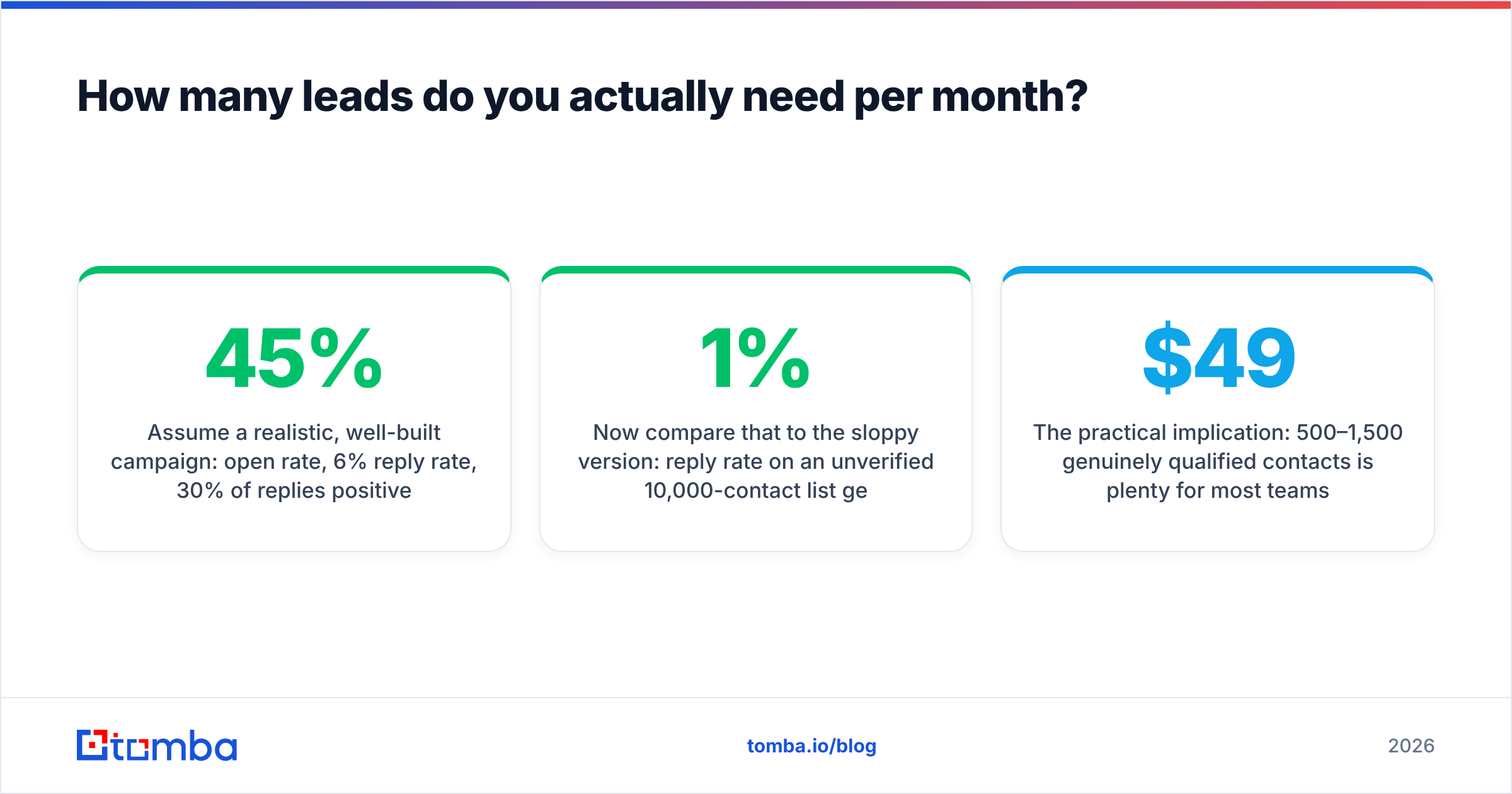
Assume a realistic, well-built campaign: 45% open rate, 6% reply rate, 30% of replies positive, 25% of positive replies become meetings, 20% of meetings close.
- 1,000 contacts → 60 replies → 18 positive → ~5 meetings → ~1 closed deal
- To close 4 deals/month, you need roughly 4,000 well-targeted contacts entering sequences
Now compare that to the sloppy version: 1% reply rate on an unverified 10,000-contact list gets you 100 replies, most of them "unsubscribe," plus a bounce rate that suspends the domain. Same effort, worse outcome, and you burned a sending domain that takes six weeks to replace.
The practical implication: 500–1,500 genuinely qualified contacts per month is plenty for most teams. That volume is buildable by one person spending three focused hours a week, and it fits comfortably inside a $49–$99 tooling budget. Check current Tomba pricing against your actual monthly contact need rather than against the biggest number on the page.
What does a repeatable weekly lead-building workflow look like?#
Here's a workflow you can run in about 90 minutes, once a week.
Monday, 30 minutes — source. Pick one trigger. Run a job-board search for your target role posted in the last 14 days. Export company names into a sheet. Aim for 80–120 companies, not 500.
Monday, 20 minutes — qualify. Kill anything that fails your basic fit test: wrong headcount, wrong region, existing customer, already in sequence. Expect to cut 30–40%. This step feels wasteful and saves the campaign.
Tuesday, 20 minutes — identify. For each surviving company, find the one person who owns the problem. Sales Navigator or the company's own team page both work. Record name + domain only.
Tuesday, 15 minutes — resolve and verify. Push the sheet through a bulk email finder, then verify. Anything returning "risky" or "unknown" goes to a separate list — either drop it or route it to LinkedIn instead of email. If you live in spreadsheets, the Google Sheets add-on does this without a CSV round trip.
Wednesday, 5 minutes — segment and load. Split by trigger detail, not by industry. "Hiring their first SDR" and "hiring their fifth SDR" are two different messages. Load into your sequencer.
That's 90 minutes for roughly 60–80 verified, trigger-qualified contacts. Do it four times a month and you have your 300. Do it with a second person and you have 600.
What kills deliverability even when the list is good?#
Three things, and only one of them is about the list.
Bounce rate above 3%. Google and Microsoft both tightened bulk-sender enforcement, and the practical threshold is lower than the published one. Verification is the entire fix. Google's own sender guidelines spell out the requirements — read them once, they take ten minutes.
Missing authentication. SPF, DKIM, and DMARC on the sending domain. If you can't explain what your DMARC policy is set to, that's the first hour of work, before you touch the list. Understanding email deliverability fundamentals prevents most of the mysterious "my emails just disappear" problems.
Volume ramp. New domain, 200 sends on day one, dead by day four. Warm up over 3–4 weeks, capping at 30–50 sends per mailbox per day. Buy more mailboxes rather than pushing one harder.
The relationship between these is multiplicative, not additive. A perfect list on an unauthenticated domain performs worse than a mediocre list on a properly configured one. Get the infrastructure right first, then the list quality becomes the variable that actually moves numbers.
How do you keep the list from going stale?#
B2B contact data decays roughly 25–30% per year — people change jobs, companies rebrand, domains migrate. A list you built in January is meaningfully worse by June and close to useless by the following January.
Three habits keep it fresh:
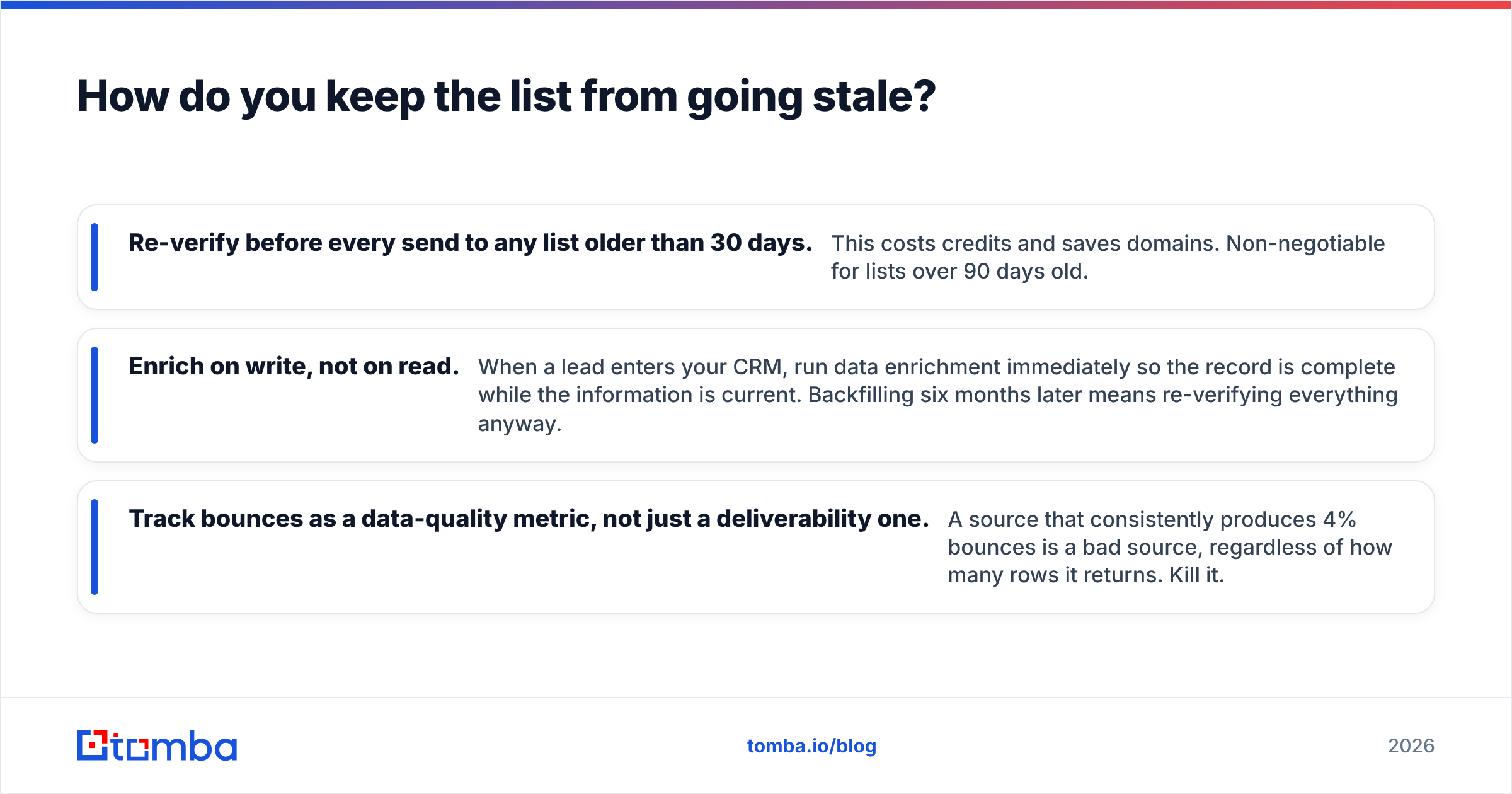
- Re-verify before every send to any list older than 30 days. This costs credits and saves domains. Non-negotiable for lists over 90 days old.
- Enrich on write, not on read. When a lead enters your CRM, run data enrichment immediately so the record is complete while the information is current. Backfilling six months later means re-verifying everything anyway.
- Track bounces as a data-quality metric, not just a deliverability one. A source that consistently produces 4% bounces is a bad source, regardless of how many rows it returns. Kill it.
One more thing worth doing: keep a suppression list that survives tool migrations. Unsubscribes, hard bounces, and closed-lost accounts should never re-enter a sequence because you switched sequencers. That's the fastest way to earn a spam complaint from someone who already told you no.
Start with 100 verified leads, not 10,000 guesses#
Pick one trigger this week. Build a list of 100 companies from it. Identify one person per company, resolve the address, verify it, and send a message that references the trigger by name. Measure the reply rate. Then decide whether to scale that trigger or try a different one.
That loop — small list, real signal, verified addresses, measured result — is the entire discipline. Everything else is volume for its own sake.
When you're ready to resolve those names into addresses that actually land, the Tomba Email Finder handles the whole last mile: find by name and domain, verify including catch-all domains, and export straight into your sequencer. The free tier gives you 25 searches a month, which is enough to test a trigger before you commit a dollar.
Related guides#
// get started
Find, verify and enrich your first contacts today
Start on the free plan with 25 searches a month, then scale when your team is ready.
Free plan · No credit card required · GDPR & CCPA
// about the author