How To Find Leads For Your Business: 9 Proven Methods
Nine lead sources ranked by cost per qualified meeting, plus the exact workflow to turn a list of companies into verified contacts you can actually email in 2026.
TL;DR
- The cheapest leads are the ones already raising their hand: website visitors, review-site traffic, and referral requests. Start there before you spend a cent on data.
- Cold outbound still works in 2026, but only when the list is built to a tight ICP and every address is verified before send. Unverified lists are the single biggest cause of dead domains.
- Buying a prebuilt list and building one from a domain search are not the same play. Prebuilt is fast and broad; built-to-order is slower and far more accurate.
- Budget roughly $0.02–$0.10 per verified B2B email if you build lists yourself, versus $0.15–$1.00+ per record on all-in-one platforms with seat minimums.
- The workflow matters more than the tool: define ICP, source companies, find contacts, verify, enrich, then sequence. Skip verification and everything downstream degrades.
What counts as a "lead" before you go looking for one?#
A lead is a person at a company who plausibly has the problem you solve, the budget to fix it, and a reason to care this quarter. Everything short of that is a name in a spreadsheet.
This distinction decides your whole strategy. If you define a lead as "anyone with a job title that matches," you'll end up with 50,000 contacts and a 0.4% reply rate. If you define it as "operations lead at a 50–200 person logistics company that just posted a job for a data analyst," you'll end up with 300 contacts and a 9% reply rate — and far less domain damage.
Before sourcing anything, write down four filters:
- Firmographics — headcount band, revenue band, industry, geography. Be specific enough that a stranger could apply the filter without asking you a question.
- Technographics — what they already run. A company using Shopify Plus and Klaviyo is a different buyer than one on a custom stack.
- Trigger events — funding rounds, new hires in the relevant function, office openings, leadership changes, tech migrations. Triggers are what make a cold email feel timed rather than random.
- Disqualifiers — the ones you skip. Existing customers, competitors, companies under a headcount floor, regions you can't support.
If you can't fill in all four, you're not ready to buy data. You're ready to do ten customer interviews.
Which lead sources actually work in 2026?#
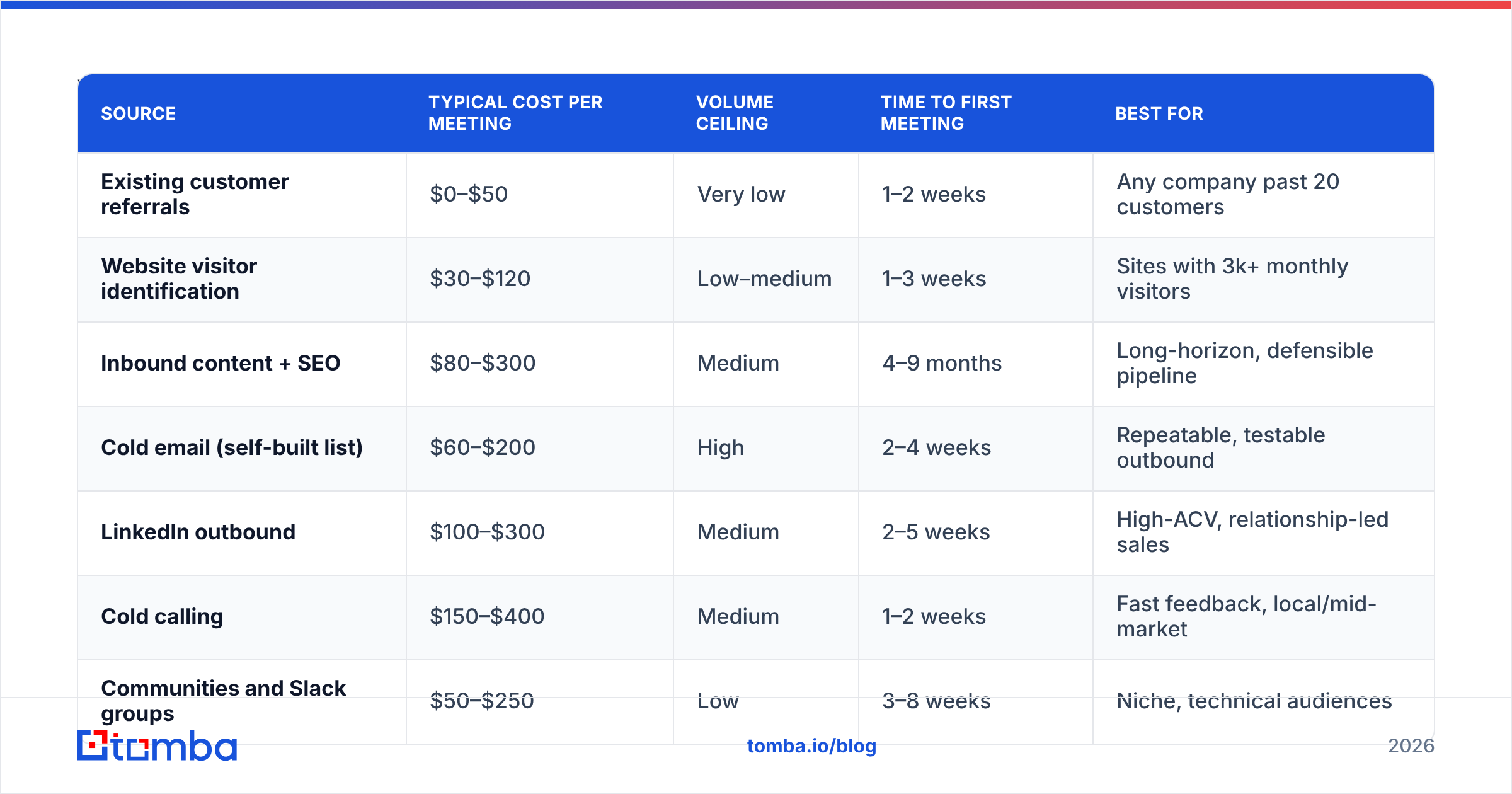
Here's the honest ranking, based on how most B2B teams see cost per qualified meeting play out. Cheap-to-acquire sources sit at the top; broad, expensive ones at the bottom.
| Source | Typical cost per meeting | Volume ceiling | Time to first meeting | Best for |
|---|---|---|---|---|
| Existing customer referrals | $0–$50 | Very low | 1–2 weeks | Any company past 20 customers |
| Website visitor identification | $30–$120 | Low–medium | 1–3 weeks | Sites with 3k+ monthly visitors |
| Inbound content + SEO | $80–$300 | Medium | 4–9 months | Long-horizon, defensible pipeline |
| Cold email (self-built list) | $60–$200 | High | 2–4 weeks | Repeatable, testable outbound |
| LinkedIn outbound | $100–$300 | Medium | 2–5 weeks | High-ACV, relationship-led sales |
| Cold calling | $150–$400 | Medium | 1–2 weeks | Fast feedback, local/mid-market |
| Communities and Slack groups | $50–$250 | Low | 3–8 weeks | Niche, technical audiences |
| Purchased contact lists | $120–$500 | Very high | 1–2 weeks | Broad TAM, high-velocity teams |
| Paid ads (search + social) | $250–$1,500 | High | 1–2 weeks | Proven message, funded budget |
Two notes on reading this table. First, the "cost per meeting" ranges assume you actually verify contacts and personalize at least the first line — skip either and every number roughly doubles. Second, volume ceiling matters more than cost when you're trying to hit an aggressive number. Referrals are the cheapest leads you'll ever get and they will never scale to 40 meetings a month.

How do you build a lead list from scratch?#
Six steps, in order. Do not reorder them.
- Source the companies, not the people. Start from a company list — from a directory, a conference attendee page, a funding database, review sites like G2, or your own CRM's closed-lost pile. Aim for 200–500 accounts per campaign, not 5,000.
- Pick the right people at each company. For each account, decide on one champion title and one economic buyer title. Two contacts per account beats eight — you're building a campaign, not a directory.
- Find the email addresses. Run the company domain through a domain search to pull known addresses and detect the company's email pattern, then use an email finder for named contacts the domain search didn't surface.
- Verify every address. SMTP-level verification before send, no exceptions. An email verifier will separate deliverable from risky from invalid, and flag catch-all domains that need a separate handling path.
- Enrich for personalization hooks. Add headcount, funding stage, tech stack, and a recent trigger. One concrete detail per contact is enough — you need a reason to write, not a dossier.
- Segment before you sequence. Split by persona and trigger. A campaign that treats a 30-person startup and a 2,000-person enterprise the same will underperform both.
The failure point is almost always step 4. Teams source aggressively, skip verification to save a few dollars, then watch bounce rates hit 12% and their sending domain quietly stop reaching inboxes. Verification is 10–20x cheaper than domain recovery.
What's the difference between buying a list and building one?#
Buying is a distribution decision; building is a precision decision. Both are legitimate.
Prebuilt B2B databases give you instant volume. You filter by industry, headcount, and title, hit export, and you have 5,000 contacts before lunch. Providers like BookYourData do this well and have built genuine reputations on verified, downloadable B2B lists — if your motion is high-velocity and your ICP is broad, that's a real advantage. The trade-off is recency: any static list starts decaying the day it's compiled, and B2B contact data churns at roughly 25–30% a year as people change roles.
Building a list resolves data at the moment you need it. You pay per lookup instead of per seat, the data is fresh, and you control the ICP filter precisely. The trade-off is throughput — you can't build 20,000 contacts in an afternoon this way, and you need a defined account list to start from.
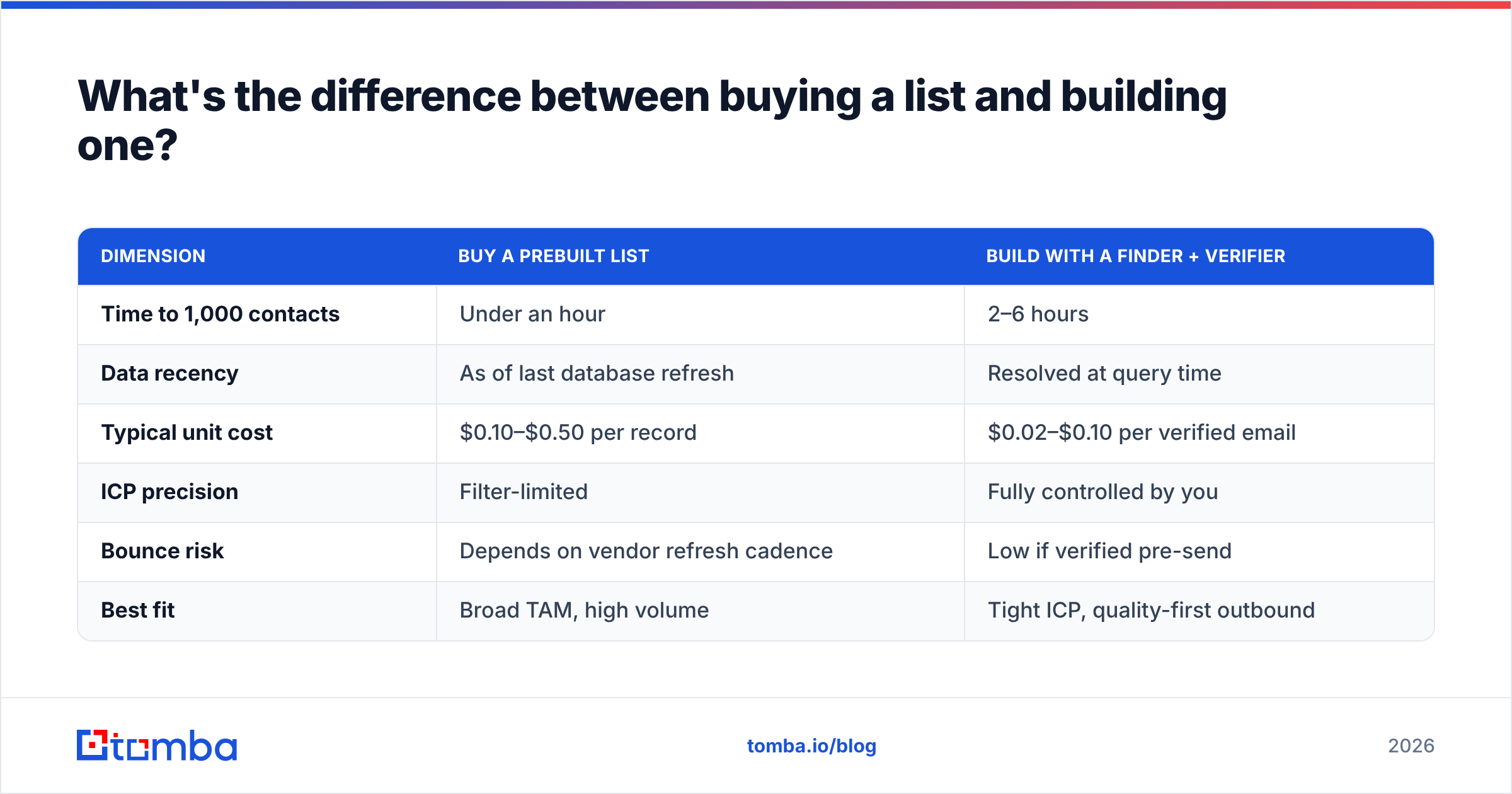
| Dimension | Buy a prebuilt list | Build with a finder + verifier |
|---|---|---|
| Time to 1,000 contacts | Under an hour | 2–6 hours |
| Data recency | As of last database refresh | Resolved at query time |
| Typical unit cost | $0.10–$0.50 per record | $0.02–$0.10 per verified email |
| ICP precision | Filter-limited | Fully controlled by you |
| Bounce risk | Depends on vendor refresh cadence | Low if verified pre-send |
| Best fit | Broad TAM, high volume | Tight ICP, quality-first outbound |
Most teams that hit their number run both: a purchased base layer for coverage, and built-to-order lists for the accounts that actually matter. What matters is that everything — bought or built — passes through verification before it reaches your sequencer.
How do you find leads without a big budget?#
Four moves that cost time instead of money.
Mine your own traffic. People visiting your pricing page are the warmest leads in existence. Website visitor reveal turns anonymous company-level traffic into named accounts you can then work manually. Even at modest traffic volumes this outperforms cold sourcing, because intent is already established.
Work the content authors in your space. If someone published a piece on the problem you solve, they own that problem. An author finder pulls contact details from a byline, which gives you both a lead and a warm opening line.
Reverse-engineer your best customers. Take your top ten accounts, find the shared attribute nobody wrote down (same association, same conference, same software), then list every company that shares it. This produces the highest-converting lists most teams never build.
Ask for referrals with a specific name. "Do you know anyone who'd find this useful?" gets nothing. "Do you know anyone at a mid-market logistics company dealing with the same routing issue?" gets a name. Specificity converts.

How do you keep the leads you find from bouncing?#
Deliverability is where good lead lists go to die. Three habits protect you.
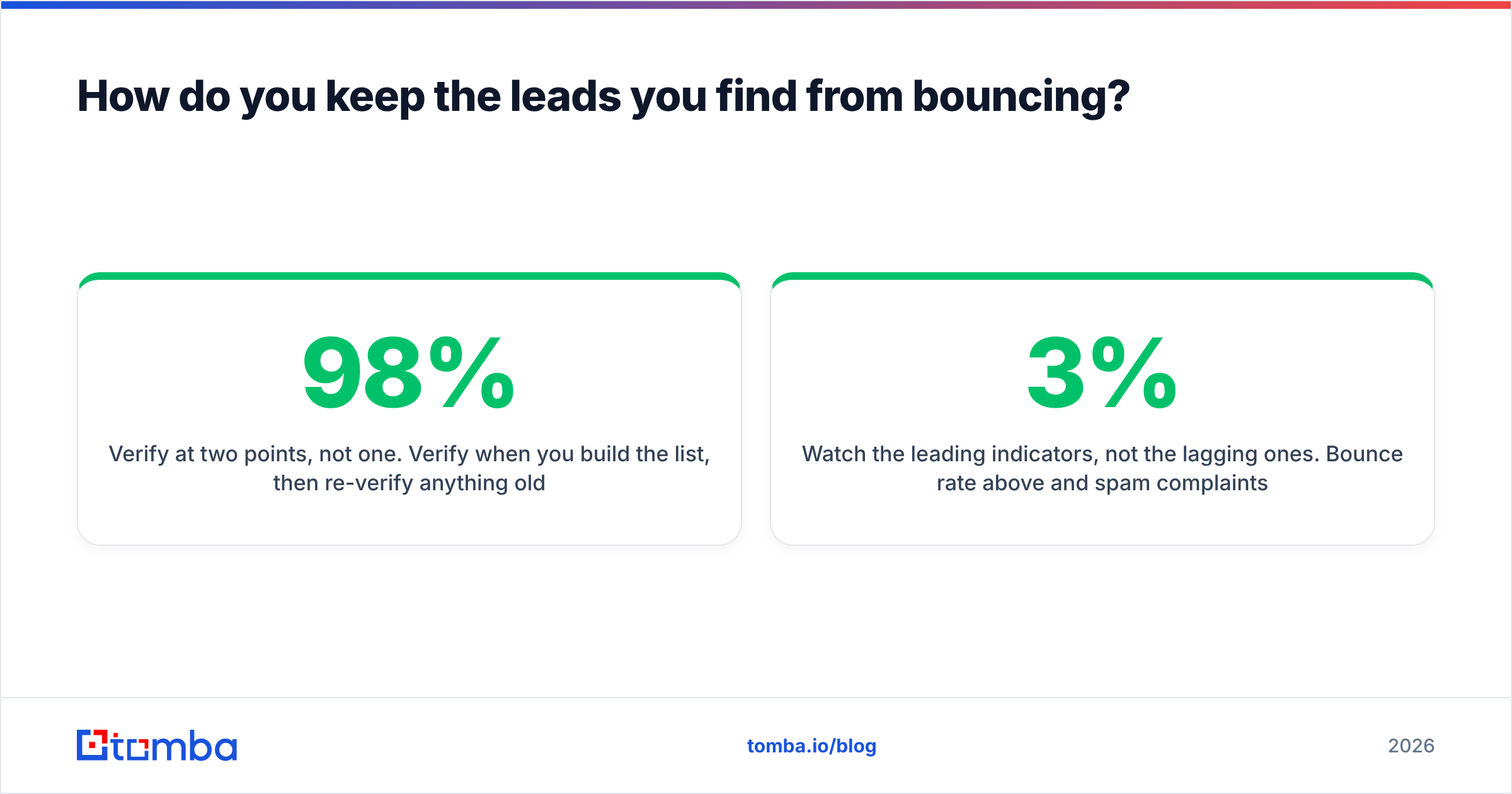
Verify at two points, not one. Verify when you build the list, then re-verify anything older than 60 days before it enters a sequence. Contact data decays continuously; a list that was 98% clean in March is not 98% clean in August.
Handle catch-all domains as their own segment. Catch-all servers accept everything at the SMTP layer, which means standard verification returns "unknown" rather than valid or invalid. Route these through a catch-all verifier and treat the survivors as a lower-confidence tier — smaller batches, separate sending domain if you can.
Watch the leading indicators, not the lagging ones. Bounce rate above 3% and spam complaints above 0.1% are the thresholds where mailbox providers start throttling. Google's Postmaster Tools shows your domain reputation directly, and Google's bulk sender requirements now make authentication and complaint rates a hard gate rather than a suggestion. Pair that monitoring with clean SPF records and proper DMARC alignment before you scale volume.
One more thing that gets missed: your sender reputation is attached to the domain, not the campaign. Burning it on one badly-sourced list costs you every future campaign from that domain.
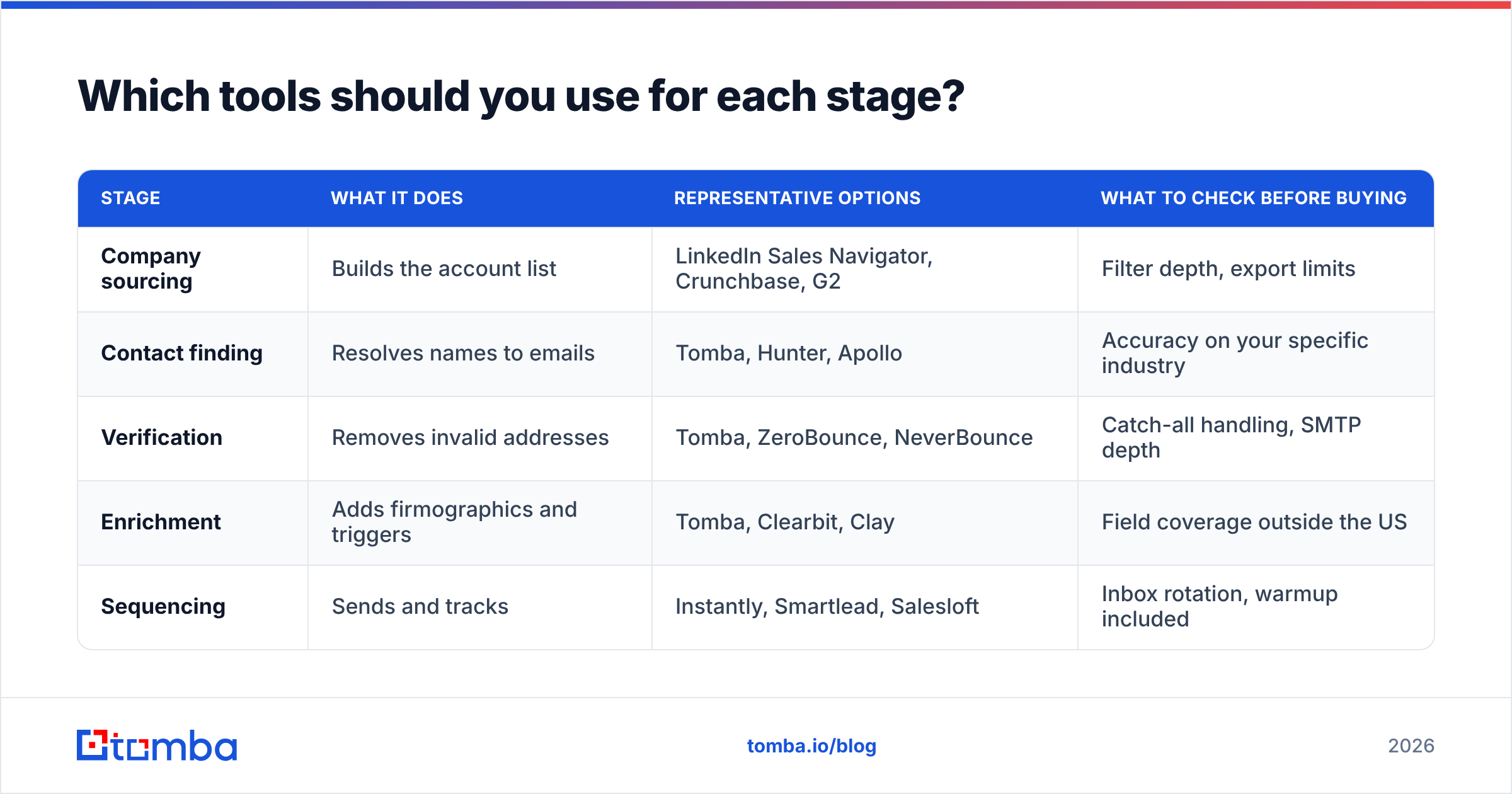
Which tools should you use for each stage?#
You don't need nine tools. You need coverage across four functions, and several tools cover more than one.
| Stage | What it does | Representative options | What to check before buying |
|---|---|---|---|
| Company sourcing | Builds the account list | LinkedIn Sales Navigator, Crunchbase, G2 | Filter depth, export limits |
| Contact finding | Resolves names to emails | Tomba, Hunter, Apollo | Accuracy on your specific industry |
| Verification | Removes invalid addresses | Tomba, ZeroBounce, NeverBounce | Catch-all handling, SMTP depth |
| Enrichment | Adds firmographics and triggers | Tomba, Clearbit, Clay | Field coverage outside the US |
| Sequencing | Sends and tracks | Instantly, Smartlead, Salesloft | Inbox rotation, warmup included |
The buying question that matters most is credit economics, not feature lists. Ask any vendor: do failed lookups consume credits? Do credits roll over? Is verification billed separately from finding? Those three answers change effective cost more than any feature comparison.
For reference, Tomba pricing runs a free tier at 25 searches a month, Starter at $49/mo, Growth at $99/mo, and Pro at $249/mo, with finding, verification, and enrichment on the same credit pool. Compare that structure against per-seat platforms where a second user doubles your bill regardless of usage. HubSpot's research on inbound and outbound benchmarks is a reasonable sanity check on the conversion rates you should expect at each stage.
How many leads do you actually need?#
Work backwards from revenue, not forwards from activity.
Say you need $50,000 in new monthly recurring revenue and your average deal is $500/mo. That's 100 new customers. At a 25% close rate from qualified meeting, you need 400 meetings. At a 4% meeting rate from a cold sequence, you need 10,000 contacts reached. At 2 contacts per account, that's 5,000 accounts — per month.
If that number looks impossible, it is, and that's useful information. It means one of three things has to change: raise the deal size, improve the conversion rate at some stage, or add a channel with better economics than cold email. Most teams respond to a pipeline gap by increasing volume, which is the one lever that also increases risk to your domain.
Run this math before you commit to a channel. A response rate improvement from 2% to 4% halves every volume requirement downstream — and improving list quality is usually the fastest way to get there.
Where should you start this week?#
Pick one account list of 200 companies that match your tightest ICP definition. Find two contacts at each. Verify all 400 addresses. Write one sequence with a real, specific first line. Send it over two weeks and measure reply rate, not open rate.
That single experiment tells you more than three months of channel research. If it works, scale the same motion. If it doesn't, you learn whether the problem is the list, the message, or the offer — and each has a different fix.
Start with the list. It's the input everything else depends on, and it's the one most teams skip past.
Ready to build it? Tomba's Email Finder resolves names and domains into verified professional emails, with verification and enrichment on the same credits — start on the free tier at 25 searches a month and see what your real bounce rate looks like before you commit a budget.
Related guides#
// get started
Find, verify and enrich your first contacts today
Start on the free plan with 25 searches a month, then scale when your team is ready.
Free plan · No credit card required · GDPR & CCPA
// about the author