How To Find Out Email Address: 7 Methods That Work in 2026
Seven tested ways to find out someone's email address — from free guesswork tools to verified lookups — plus how to check the address is real before you hit send.
TL;DR
- The fastest reliable path is a domain-based lookup: you already know the company, so search the domain, filter by name or role, then verify before sending.
- Free methods (Google operators, GitHub commits, WHOIS, LinkedIn, newsletter footers) work, but they are slow per contact and give you no confidence score.
- Pattern guessing plus SMTP verification is the cheapest scalable approach — most B2B domains use one of four patterns.
- Never send to an unverified address. A 5% bounce rate is enough to damage your sender reputation and start routing mail to spam.
- Budget reality: free tiers cover 20-50 lookups a month. Paid plans start around $39-$99/mo, with Tomba's Starter at $49/mo and a free tier at 25 searches.
What does "finding an email address" actually mean?#
There are two separate problems hiding inside the question, and confusing them wastes hours.
The first is discovery: you know a person or a company and you need a plausible address. The second is verification: you have a candidate address and you need to know whether mail sent to it will land in an inbox instead of bouncing.
Most people only solve the first one. That is why cold outreach lists routinely bounce at 8-15%, and why so many campaigns quietly stop being delivered after week two. Discovery without verification is guessing with extra steps.
Here is how the two halves break down:
- Discovery inputs — a full name plus a company domain is the strongest signal. A name alone (no company) is the weakest and most likely to fail.
- Pattern inference — most companies use one repeating format. Learn the format from any known employee and you can generate the rest.
- Source scraping — public artifacts (git commits, conference speaker pages, press releases, PDF whitepapers) frequently contain real addresses.
- Database lookup — a provider that has already crawled and indexed the domain returns the address plus a confidence score.
- Verification — SMTP handshake, MX record check, catch-all detection, and role-address flagging before the address enters your sequence.
- Enrichment — attaching job title, seniority, location, and LinkedIn profile so you can personalise the message you eventually send.
Steps 1-4 answer "how to find out email address." Steps 5-6 are what separate a list that converts from a list that gets your domain blacklisted.
Which free methods actually find an email address?#
Free methods work. They just do not scale. Use them when you need five addresses, not five hundred.
Google search operators. Search site:company.com "@company.com" or "firstname lastname" email -site:linkedin.com. Company press pages, job postings, and support docs leak addresses constantly. This is the single highest-yield free method for small companies.
GitHub commit history. If your target is technical, their commit email is public. Open any repo they contributed to, append .patch to a commit URL, and the author email appears in the header. This works even when the GitHub profile hides the address.
Newsletter and footer mining. Subscribe to the company newsletter with a burner inbox. The reply-to header is often a real human address rather than a no-reply. Corporate footers on PDFs and slide decks are similarly leaky.
WHOIS records. For smaller companies and independent operators, the domain registration record still lists a contact address. GDPR redaction killed this for EU registrants, but plenty of records remain public.
LinkedIn contact info. If you are a first-degree connection, the contact card often shows a personal or work address outright. Second and third degree, you get nothing.
Twitter/X and personal sites. People who want to be contacted usually say so. Check the bio link, the about page, and the /contact route.

The honest ceiling on free methods: roughly 10-20 minutes per contact with maybe a 40% hit rate, and zero deliverability confidence. That is fine for a founder emailing twelve dream accounts. It falls apart at any real volume.
How do email pattern generators work?#
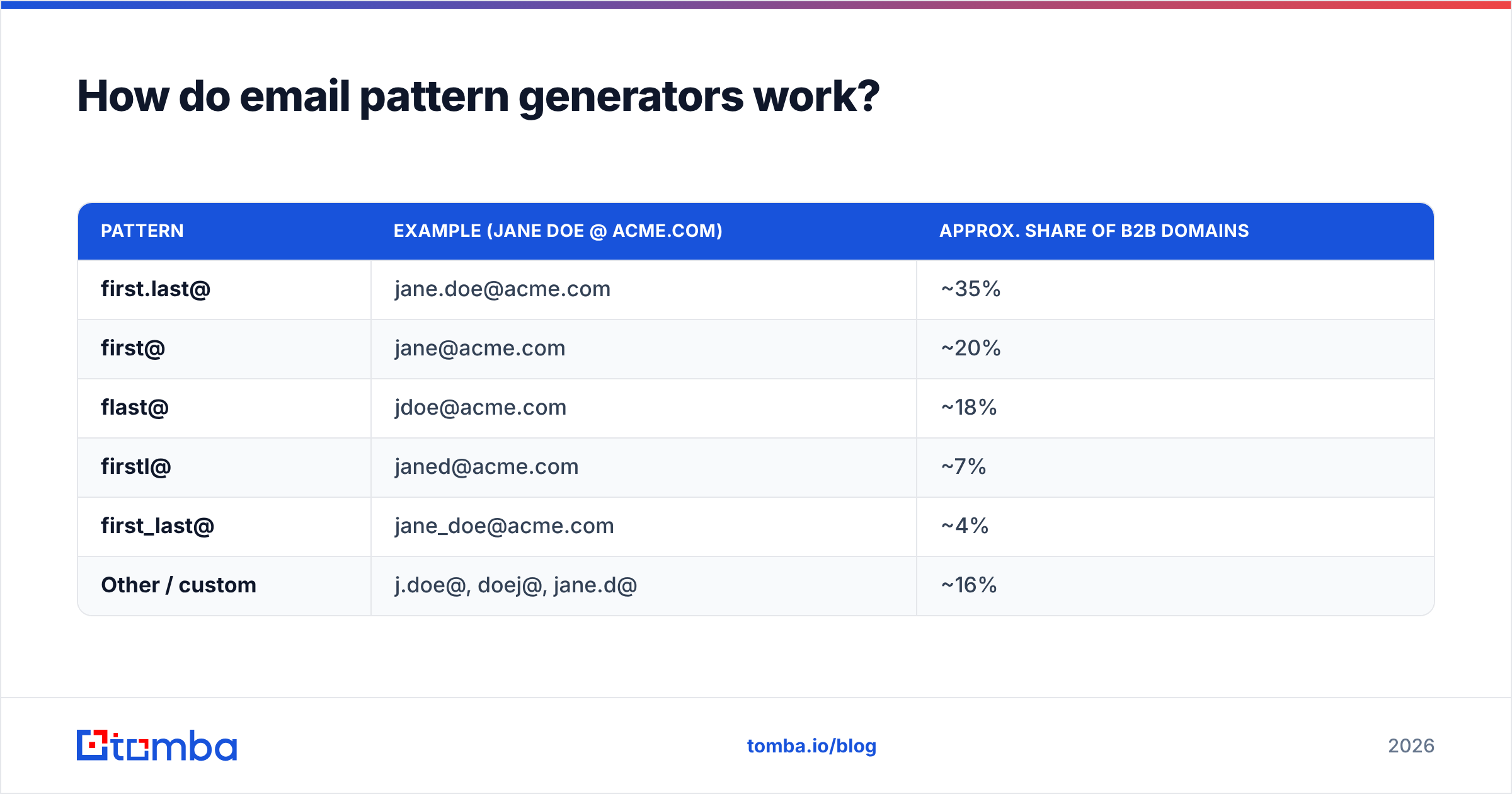
About 90% of B2B domains use one of a handful of formats. Once you know the format for one employee, you know it for everyone.
The dominant patterns, roughly in order of frequency:
| Pattern | Example (Jane Doe @ acme.com) | Approx. share of B2B domains |
|---|---|---|
| first.last@ | jane.doe@acme.com | ~35% |
| first@ | jane@acme.com | ~20% |
| flast@ | jdoe@acme.com | ~18% |
| firstl@ | janed@acme.com | ~7% |
| first_last@ | jane_doe@acme.com | ~4% |
| Other / custom | j.doe@, doej@, jane.d@ | ~16% |
The workflow is straightforward. Find one confirmed address at the domain (support@, a press contact, a GitHub commit). Infer the pattern. Generate candidates for your target with an email permutator or the company email pattern checker. Then verify each candidate.
The catch is that generation is cheap and wrong answers are expensive. If you generate six permutations and send to all six hoping one lands, you have just sent five emails to invalid addresses at the same domain — which is exactly the signature spam filters use to identify list-bombing. Generate, then verify, then send to the one that verified. Never blast permutations.
Is a dedicated email finder worth paying for?#
Once you are past roughly 30 contacts a month, yes — the arithmetic stops being close.
A dedicated finder replaces the discovery-plus-verification loop with a single API call or search. You submit a name and domain, and you get back an address with a confidence score, usually with the SMTP check already performed. Where free methods take 15 minutes, a lookup takes under a second.
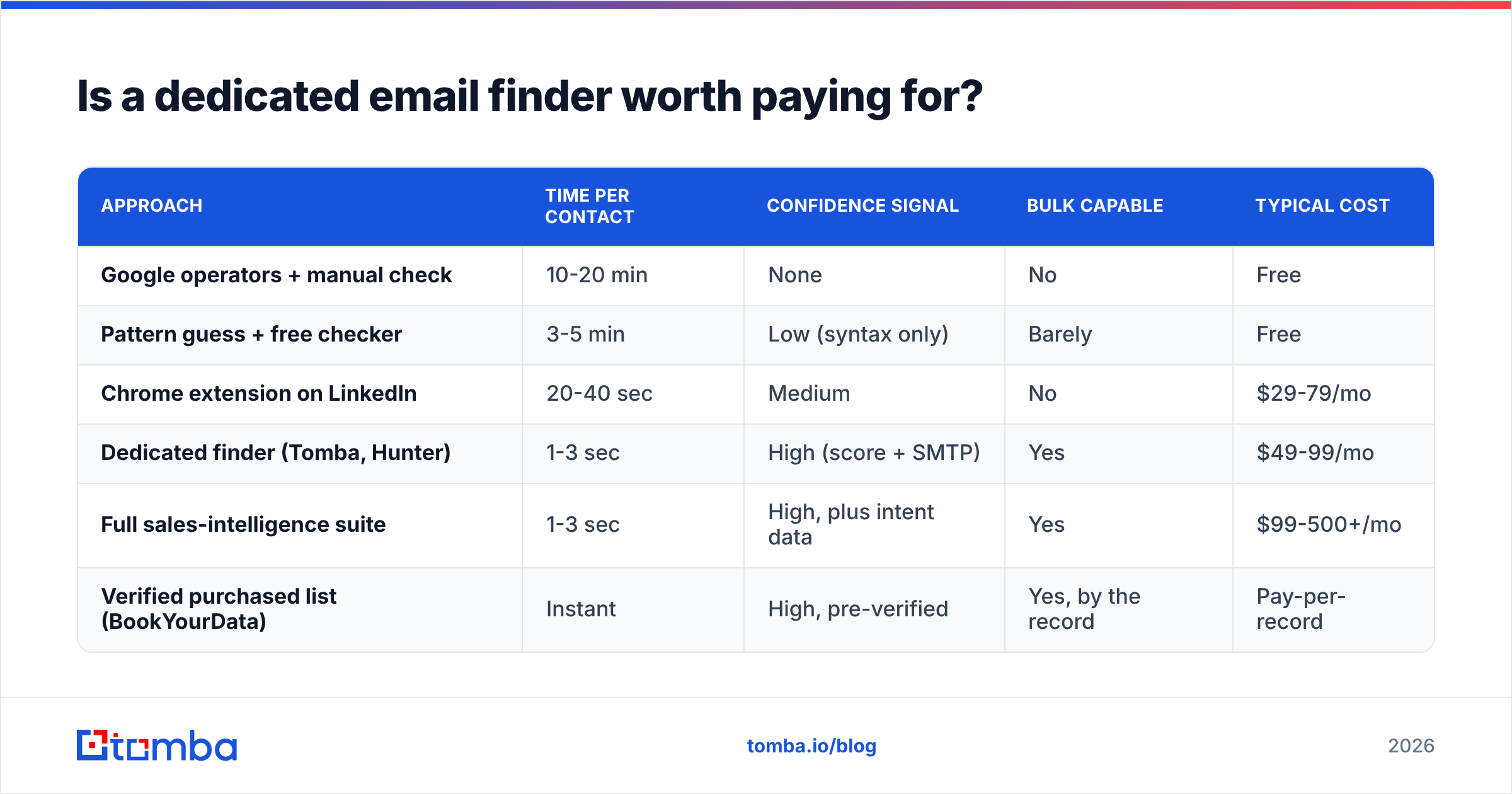
Here is how the main approaches compare on the things that actually matter:
| Approach | Time per contact | Confidence signal | Bulk capable | Typical cost |
|---|---|---|---|---|
| Google operators + manual check | 10-20 min | None | No | Free |
| Pattern guess + free checker | 3-5 min | Low (syntax only) | Barely | Free |
| Chrome extension on LinkedIn | 20-40 sec | Medium | No | $29-79/mo |
| Dedicated finder (Tomba, Hunter) | 1-3 sec | High (score + SMTP) | Yes | $49-99/mo |
| Full sales-intelligence suite | 1-3 sec | High, plus intent data | Yes | $99-500+/mo |
| Verified purchased list (BookYourData) | Instant | High, pre-verified | Yes, by the record | Pay-per-record |

Accuracy claims deserve scepticism. Every vendor publishes a number in the mid-90s, and every number is measured on a different sample. What you should actually test: run 50 contacts you already have confirmed addresses for through a trial, and count exact matches. Vendors that decline to offer a trial large enough to run that test are telling you something.
Two things separate a good finder from a bad one at the same price point. First, whether it returns "not found" instead of a confident guess — a tool that invents john.smith@ for every John Smith is worse than useless, because it converts your uncertainty into false confidence. Second, whether catch-all domains are flagged as such rather than being scored as valid.
How do the major email finder tools compare?#
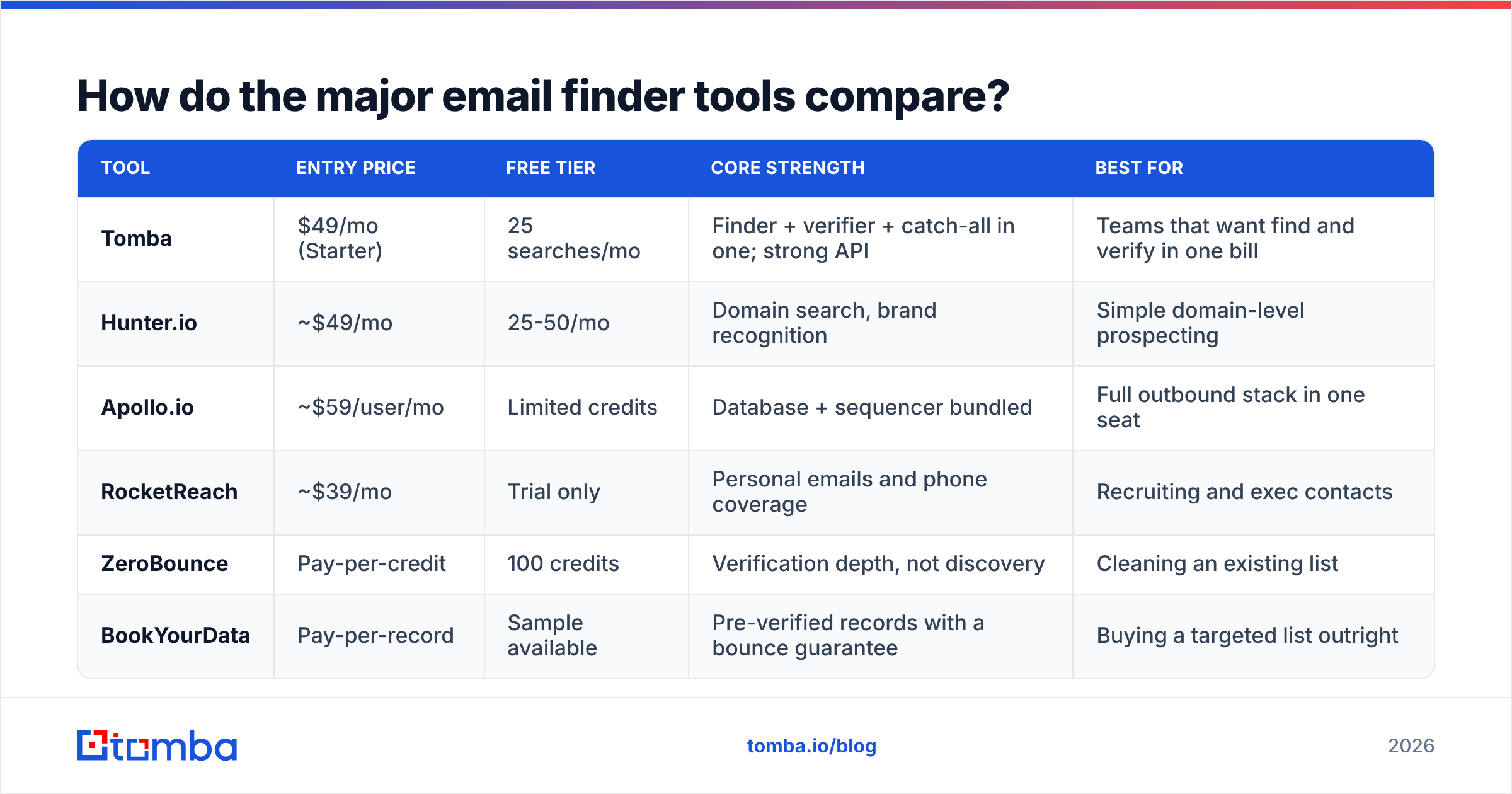
The market splits into three tiers: pure finders, verification specialists, and full sales-intelligence platforms that bundle finding into a bigger contract.

| Tool | Entry price | Free tier | Core strength | Best for |
|---|---|---|---|---|
| Tomba | $49/mo (Starter) | 25 searches/mo | Finder + verifier + catch-all in one; strong API | Teams that want find and verify in one bill |
| Hunter.io | ~$49/mo | 25-50/mo | Domain search, brand recognition | Simple domain-level prospecting |
| Apollo.io | ~$59/user/mo | Limited credits | Database + sequencer bundled | Full outbound stack in one seat |
| RocketReach | ~$39/mo | Trial only | Personal emails and phone coverage | Recruiting and exec contacts |
| ZeroBounce | Pay-per-credit | 100 credits | Verification depth, not discovery | Cleaning an existing list |
| BookYourData | Pay-per-record | Sample available | Pre-verified records with a bounce guarantee | Buying a targeted list outright |
A few practical notes on this table. Per-user pricing (Apollo) versus per-account pricing (Tomba, Hunter) matters a lot once a second SDR joins — a $59/user tool is $354/mo for a six-person team, while flat-rate plans do not move. Check Tomba pricing against a per-seat competitor at your actual headcount before committing.
Also separate discovery tools from verification tools. ZeroBounce and similar services are excellent at telling you whether an address you already have is deliverable, and they do not find anything. If you buy one of those expecting discovery, you will be disappointed. If you need both, a combined platform costs less than two subscriptions.
BookYourData occupies a different lane again: rather than looking up contacts one at a time, you buy a filtered set of already-verified records. If your ICP is broad and well-defined ("HR directors at US manufacturers, 200-1000 employees"), buying the list is often faster than looking up 800 people individually.
How do you verify an address before sending?#
This is the step people skip, and it is the one that decides whether your campaign works.
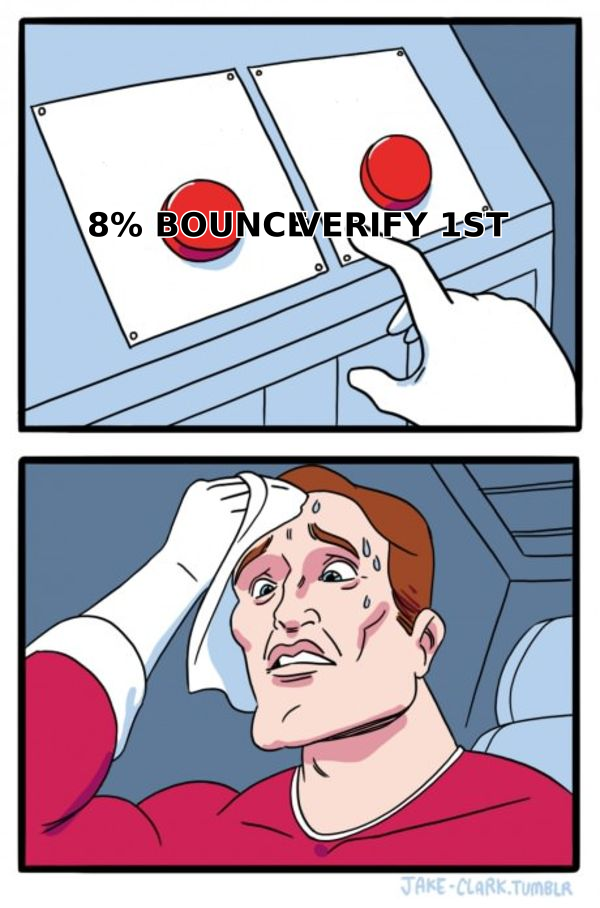
A proper verification runs several checks in sequence:
- Syntax validation — is the address structurally legal? Catches typos like
jane@acme..com. - Domain and MX record check — does the domain exist and does it accept mail at all? Dead domains fail here.
- SMTP handshake — the verifier opens a connection to the receiving mail server and asks whether the mailbox exists, without delivering a message.
- Catch-all detection — some servers accept mail for every address at the domain, so "valid" means nothing. These need flagging separately, not scoring as clean.
- Role and disposable filtering —
info@,sales@,admin@are role addresses with low reply rates and higher complaint rates. Disposable domains should be dropped outright. - Risk scoring — combine the above into a single accept/reject/review decision.
You can run a single address through a free email checker to see this in action, or push a whole list through an email verifier before import. For domains that accept everything, a dedicated catch-all verifier applies additional heuristics rather than shrugging.
The threshold that matters: keep hard bounces under 2%. Google's own sender guidelines and Microsoft's filtering both treat elevated bounce and complaint rates as spam signals, and once your domain reputation drops, even your verified addresses start landing in Promotions or worse. Email deliverability is not a separate discipline from finding addresses — it is downstream of how carefully you found them.
What does a realistic workflow look like end to end?#
Here is the sequence that works for most B2B teams, whether you are doing 20 contacts a week or 2,000.
Step 1 — Define the account list, not the contact list. Start with companies that fit your ICP. Firmographic filters (industry, headcount, tech stack, funding stage) are far more reliable than contact-level filters.
Step 2 — Pull the domain, then the org chart. For each company, run a domain search to see every indexed address at that domain, with job titles attached. This tells you both the email pattern and who actually holds the role you want.
Step 3 — Target by role, not by name. You usually do not care that it is Jane Doe. You care that it is whoever owns demand generation. Filter the domain results by title seniority and department.
Step 4 — Fill the gaps by name. For the accounts where domain search comes up thin, go name-first with the email finder using the name plus domain you already have.
Step 5 — Verify everything, drop the risky ones. Anything scored below your threshold, plus every role address and every unresolvable catch-all, comes out of the list. Yes, this shrinks your list. A 600-contact verified list outperforms a 1,000-contact unverified one, every time.
Step 6 — Enrich before you write. Titles, company size, recent funding, and tech stack give you something to say. Data enrichment turns an address into a reason to email.
Step 7 — Warm the sending domain first. If the domain is new or has been idle, ramp volume gradually over two to four weeks. Sending 500 cold emails from a fresh domain on day one is the fastest way to burn it.
For volume work, do steps 2, 4, and 5 through the API rather than the UI. The Tomba API handles find and verify in the same pipeline, so your CRM never receives an address that has not passed verification.
What mistakes cost people the most?#
Sending to permutations. Covered above, worth repeating: generating six guesses and mailing all six is list-bombing behaviour and filters recognise it.
Trusting a confidence score you have not calibrated. A score of 85 means different things at different vendors. Run your own 50-contact test and set your own threshold accordingly.
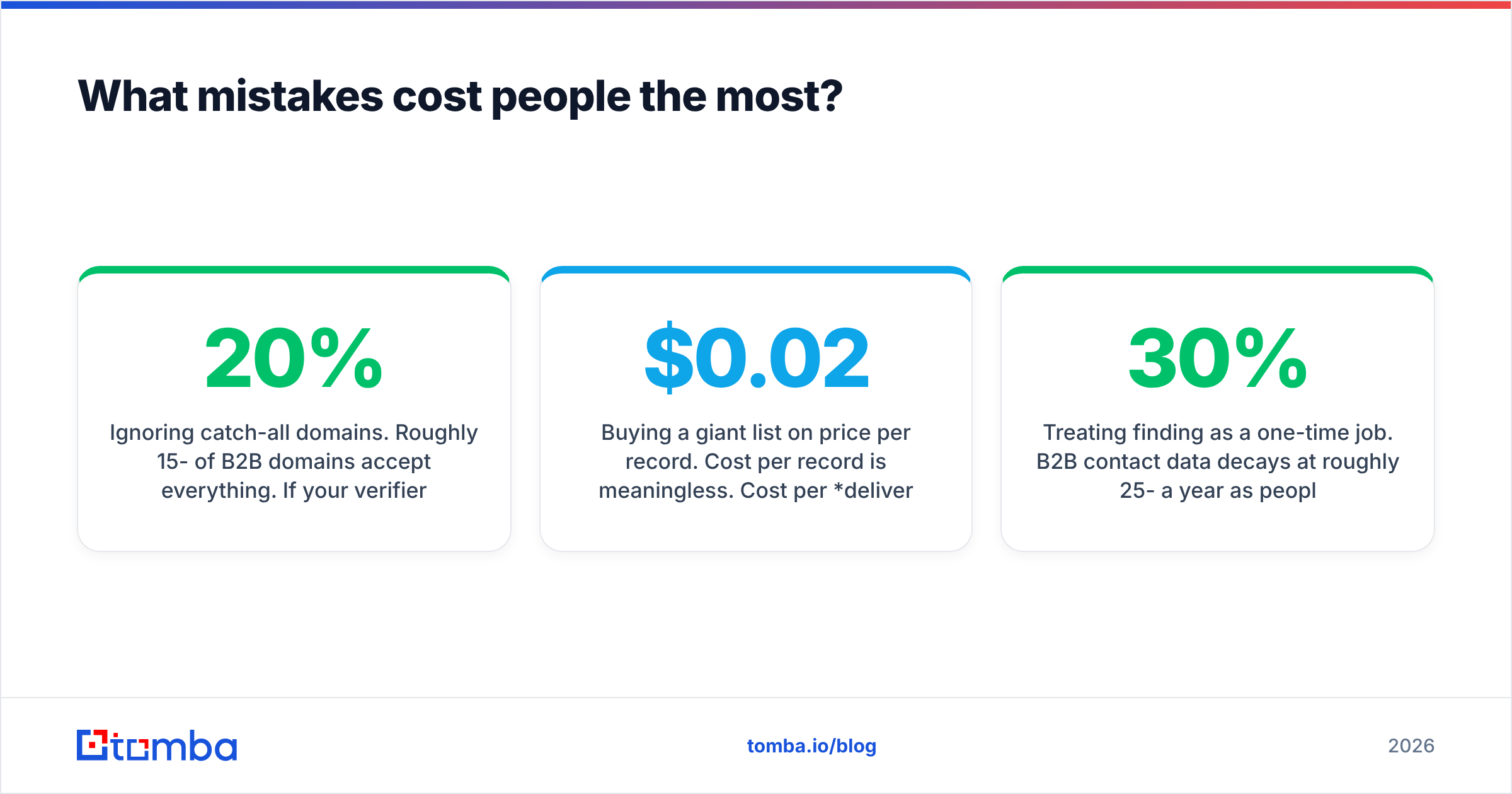
Ignoring catch-all domains. Roughly 15-20% of B2B domains accept everything. If your verifier marks these as valid, a fifth of your list is unverified and you do not know it.
Buying a giant list on price per record. Cost per record is meaningless. Cost per deliverable, correctly-titled record is the number. A $0.02 record with 40% accuracy costs more than a $0.15 record at 95%.
Skipping role-address filtering. info@ addresses inflate your list size and depress your response rate simultaneously.
Treating finding as a one-time job. B2B contact data decays at roughly 25-30% a year as people change jobs. A list you built eighteen months ago is now a third wrong. Re-verify before every major campaign.
Which method should you pick?#
Match the method to your volume and your tolerance for manual work.
- Under 10 contacts a month, no budget: Google operators, LinkedIn, and a free checker. It is tedious, and it is genuinely free.
- 10-50 contacts a month: A free tier plus pattern inference. Tomba's free tier covers 25 searches, which is enough to test the workflow before paying.
- 50-1,000 contacts a month: A paid finder with verification bundled. This is where $49-99/mo pays for itself in the first week of saved time.
- 1,000+ contacts a month, or a defined broad ICP: API-driven lookup and verification, or a purchased pre-verified dataset if your targeting is firmographic rather than person-specific.
- Existing list of unknown quality: Skip discovery entirely. Run verification first and see what survives before you spend anything on finding more.
Whichever tier you land in, the non-negotiable is the verification step. Discovery tools vary in quality and you can compensate for a mediocre one by testing more sources. There is no compensating for sending to addresses you never checked — that damage lands on your domain reputation and takes months to undo.
Start with the Tomba Email Finder if you want find, verify, and catch-all detection under one plan rather than stitching three subscriptions together. The free tier gives you 25 searches to run your own accuracy test against contacts you already know — which is the only benchmark that should decide this for you.
Related guides#
// get started
Find, verify and enrich your first contacts today
Start on the free plan with 25 searches a month, then scale when your team is ready.
Free plan · No credit card required · GDPR & CCPA
// about the author