How to Find Recruiter Emails in 2026: 9 Proven Methods
Recruiter inboxes are guarded, but their email addresses are not. Here are nine repeatable ways to find recruiter emails, verify them before you send, and avoid the bounces that kill your reply rate.
TL;DR
- Most recruiter emails follow one of six predictable company patterns — find the pattern once, and you can construct every address at that company.
- LinkedIn almost never shows the email directly. You need a pattern source (company site, press release, GitHub commit) plus a verifier.
- Free manual methods work fine for 5-20 recruiters. Past that, a dedicated email finder pays for itself in saved hours.
- Never send to an unverified address. A single bounce on a corporate mail server can suppress every later message you send to that domain.
- Agency recruiters are far easier to reach than in-house talent acquisition — start there if you want fast replies.
Why bother finding recruiter emails at all?#
Because the application portal is a black hole and the recruiter's inbox is not.
Think of it like delivering a package. Dropping your resume into an applicant tracking system is like leaving a box in a warehouse loading bay — it gets logged, sorted, and maybe opened in three weeks. Emailing the recruiter directly is handing the box to the person who actually opens boxes. Same package, wildly different outcome.
The numbers back it up. Corporate job postings routinely pull 200-500 applications, and internal recruiting teams triage them with keyword filters before a human reads anything. A direct, well-written email that lands in a recruiter's inbox skips the filter entirely. It also gives you a channel to follow up, which the portal does not.
This works in both directions, too. If you sell into HR, staffing, or recruitment tech, the same techniques build your prospect list. The mechanics of finding a recruiter's address are identical whether you want a job or want to sell them software.
What does a recruiter email address actually look like?#
Almost every company uses one of a handful of formats. Once you know which format a company uses, you know every employee's address at that company — including recruiters who have never published theirs anywhere.
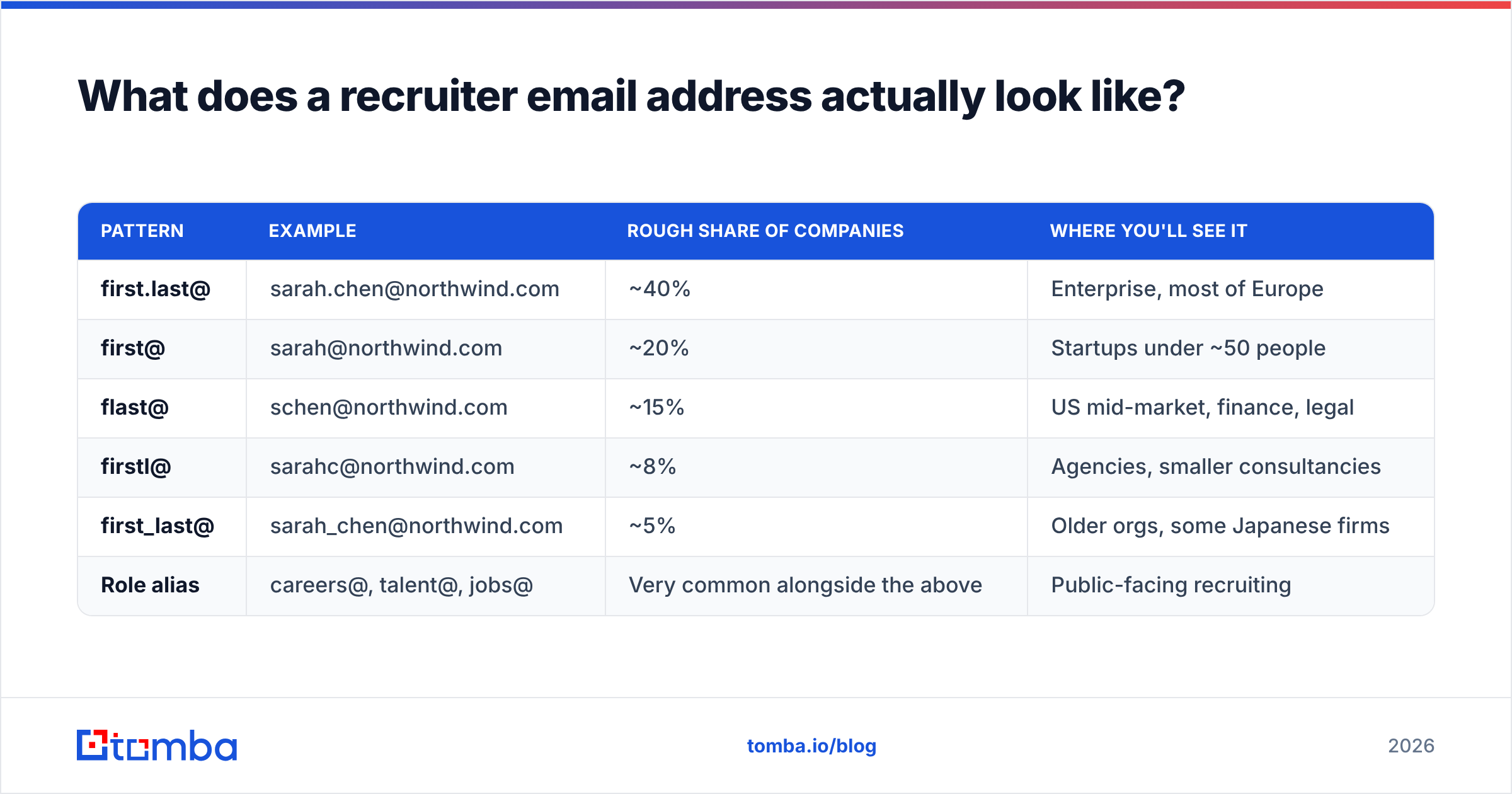
Here are the six patterns that cover the overwhelming majority of B2B domains, using "Sarah Chen at Northwind Corp":
| Pattern | Example | Rough share of companies | Where you'll see it |
|---|---|---|---|
| first.last@ | sarah.chen@northwind.com | ~40% | Enterprise, most of Europe |
| first@ | sarah@northwind.com | ~20% | Startups under ~50 people |
| flast@ | schen@northwind.com | ~15% | US mid-market, finance, legal |
| firstl@ | sarahc@northwind.com | ~8% | Agencies, smaller consultancies |
| first_last@ | sarah_chen@northwind.com | ~5% | Older orgs, some Japanese firms |
| Role alias | careers@, talent@, jobs@ | Very common alongside the above | Public-facing recruiting |
Two things follow from that table. First, role aliases like careers@ and talent@ are trivially guessable but usually monitored by a shared queue, not by a named human — expect slow, templated responses. Second, if you can confirm a single employee's address at a company, you have effectively unlocked the recruiter's address too. That's why the fastest workflow always starts with pattern discovery rather than person-by-person guessing.
You can check a domain's dominant format with a free company email pattern lookup before you spend any credits.

How do you find recruiter emails? Nine methods that work#
Ordered from fastest to most manual. Use the first one that fits the volume you need.
Run a domain search on the company. Enter
northwind.com, get back the public email addresses tied to that domain along with names, job titles, and the dominant pattern. Filter the results by department or title keyword ("recruiter", "talent", "people") and you've got your list in under a minute. Tomba's domain search and Hunter both do this; results overlap but are not identical, so a second source is worth checking on important targets.Use a LinkedIn-to-email tool. You've found the recruiter's profile but LinkedIn hides contact info behind a connection wall. A LinkedIn finder takes the profile URL and returns the work email by matching the name against the company's known pattern, then verifying deliverability. This is the highest-intent method because you've already confirmed the person owns the req you care about.
Check the job posting itself. Roughly one in five postings on company career sites — especially at companies under 200 people — names the hiring contact or includes an apply-to address. Search the page source (Ctrl+U, then Ctrl+F for "@") because some sites render the address in a mailto link that isn't visible in the text.
Mine press releases and news pages. Media contacts get published with full addresses. That single confirmed address reveals the company pattern, which you then apply to the recruiter's name. This is the cheapest way to unlock a domain when you have zero credits.
Search GitHub commits for engineering-heavy companies. Every git commit carries an author email.
site:github.com "northwind.com"in Google, or the GitHub commit API, will surface real corporate addresses. Recruiters aren't in the commit log, but the pattern is.Use advanced Google operators. Try
site:northwind.com "recruiter" "@northwind.com"or"talent acquisition" "@northwind.com" -jobs. Addfiletype:pdfto catch conference attendee lists and campus recruiting decks, which are full of recruiter contact details nobody thought to gate.Ask a warm connection for a forward. Slower, but the reply rate is several times higher. A second-degree LinkedIn connection who forwards your note to the recruiter gets you an introduction, not a cold email. Do this for your top five targets.
Check Twitter/X, personal sites, and Substack bios. Recruiters build personal brands. Many list a public email in their bio precisely so candidates can reach them. A reverse email lookup helps confirm the person behind an address you found on a personal site.
Bulk-process the whole list. If you're targeting 50+ recruiters, upload a CSV of names and domains to a bulk email finder and get verified addresses back as a batch. This is the only sane approach above roughly 20 contacts.
Which tools are worth paying for?#
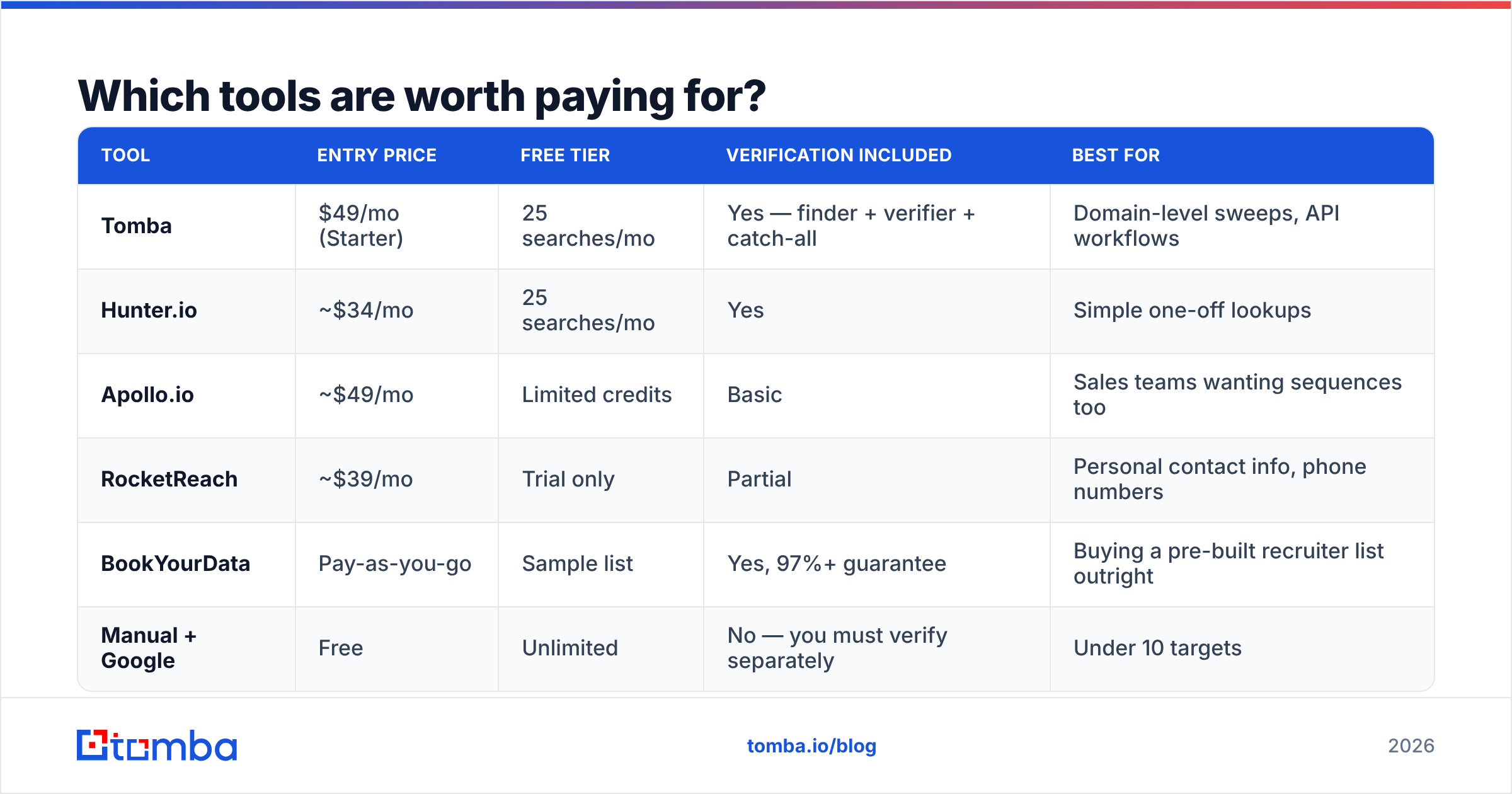
Depends entirely on volume and whether you need verification bundled in. Here's how the common options compare for this specific job — finding and confirming recruiter addresses.
| Tool | Entry price | Free tier | Verification included | Best for |
|---|---|---|---|---|
| Tomba | $49/mo (Starter) | 25 searches/mo | Yes — finder + verifier + catch-all | Domain-level sweeps, API workflows |
| Hunter.io | ~$34/mo | 25 searches/mo | Yes | Simple one-off lookups |
| Apollo.io | ~$49/mo | Limited credits | Basic | Sales teams wanting sequences too |
| RocketReach | ~$39/mo | Trial only | Partial | Personal contact info, phone numbers |
| BookYourData | Pay-as-you-go | Sample list | Yes, 97%+ guarantee | Buying a pre-built recruiter list outright |
| Manual + Google | Free | Unlimited | No — you must verify separately | Under 10 targets |

A note on how to read accuracy claims: vendors report "accuracy" differently. Some mean "percentage of returned emails that are deliverable" (a quality metric), others mean "percentage of searches that returned anything at all" (a coverage metric). A tool with 98% accuracy and 40% coverage will find fewer usable recruiter emails than one with 94% accuracy and 75% coverage. Always test both on a sample of 20 companies you already have data for before committing to an annual plan.

BookYourData deserves a mention for a different use case: if you'd rather buy a verified list of HR and talent-acquisition contacts than assemble one yourself, that's a legitimate shortcut, particularly for sales teams selling into recruiting. It's a purchase model rather than a search model, so compare cost per usable contact, not cost per credit.
For open pricing on the search-first approach, see Tomba pricing — the Free tier's 25 monthly searches covers a typical job search, and Starter at $49/mo covers a small outbound campaign.
Why must you verify before you send?#
Because bounces don't just fail — they damage everything you send afterward.
Here's the analogy: your sending domain has a credit score. Every hard bounce is a missed payment. Corporate mail servers and Google Workspace both track how many of your messages hit non-existent addresses, and once that rate climbs past roughly 2-3%, they start routing your mail to spam — including messages to addresses that are perfectly valid. One bad batch of guessed recruiter emails can quietly kill your deliverability for months.
The verification stack you actually need:
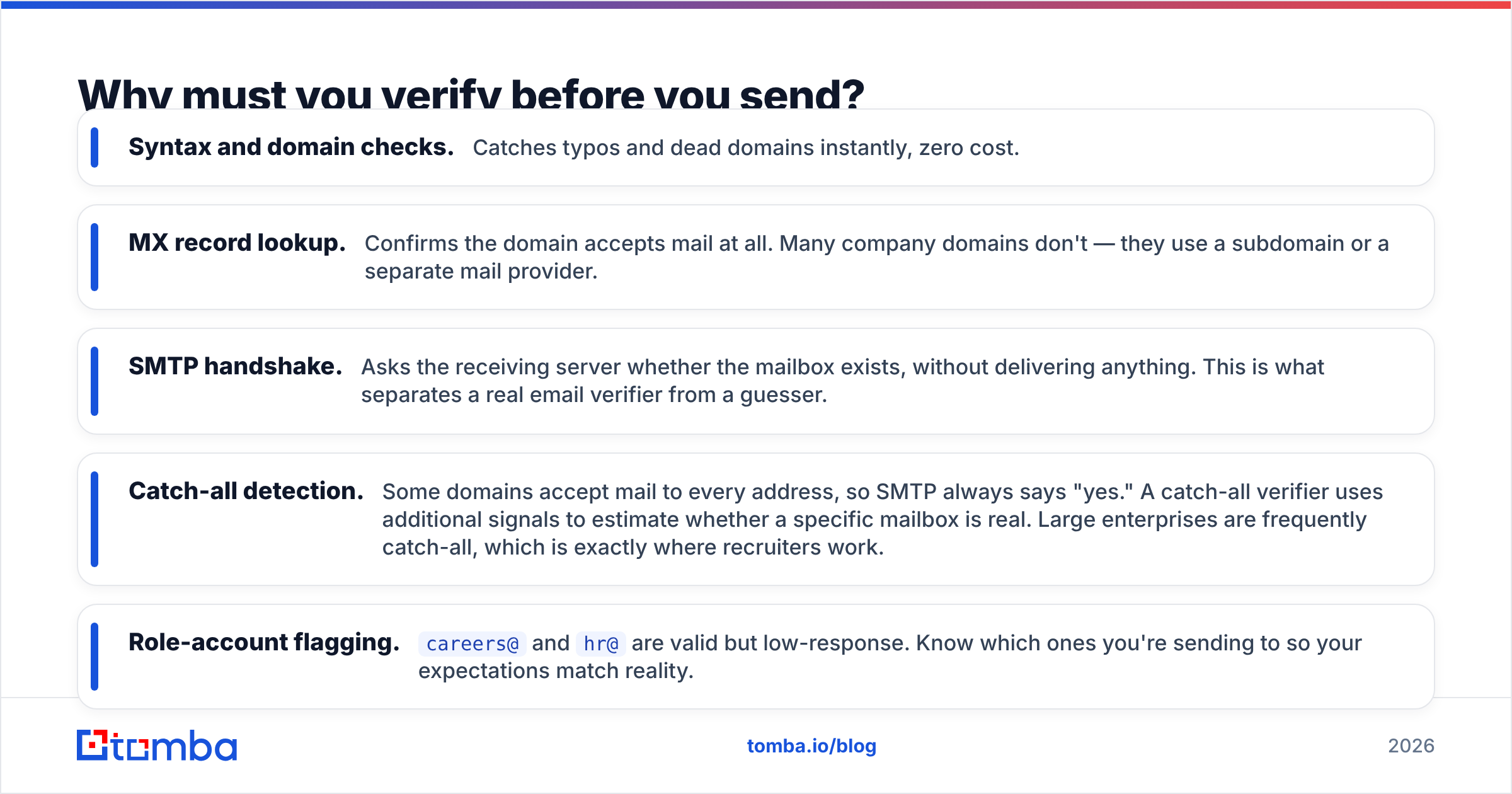
- Syntax and domain checks. Catches typos and dead domains instantly, zero cost.
- MX record lookup. Confirms the domain accepts mail at all. Many company domains don't — they use a subdomain or a separate mail provider.
- SMTP handshake. Asks the receiving server whether the mailbox exists, without delivering anything. This is what separates a real email verifier from a guesser.
- Catch-all detection. Some domains accept mail to every address, so SMTP always says "yes." A catch-all verifier uses additional signals to estimate whether a specific mailbox is real. Large enterprises are frequently catch-all, which is exactly where recruiters work.
- Role-account flagging.
careers@andhr@are valid but low-response. Know which ones you're sending to so your expectations match reality.
If you only remember one rule: never send to an address that came back "unknown" or "risky" without a second confirmation. Google's own Postmaster Tools documentation spells out how spam-rate thresholds affect delivery, and it applies to individual job seekers just as much as to bulk senders. For a deeper background read, Tomba's glossary entry on email deliverability covers the underlying mechanics.
In-house recruiter or agency recruiter — who should you email?#
Different animals, different strategies.
In-house / corporate talent acquisition. They work for one company, own specific requisitions, and are measured on time-to-fill and quality-of-hire. They receive hundreds of unsolicited emails weekly. Your message needs to map explicitly to a live req: name the job title, the req ID if you can find it, and one sentence on why you match. Anything vague gets archived.
Agency / third-party recruiters. They work on contingency across multiple clients and get paid when they place someone. Their incentive is to find placeable candidates, which means they are far more receptive to cold outreach. A generic "here's my background, here's what I'm targeting" email works with an agency recruiter and fails with a corporate one.
Executive search / retained. They work on a small number of senior mandates. Cold email rarely works unless your background is a direct match for the level they operate at. Better to build the relationship a year before you need it.
Sourcers. A distinct role at larger companies — they find candidates and hand them to recruiters. Their addresses follow the same domain pattern, and they are often more responsive than the recruiter because their entire job is intake. Underrated target.
If you're building a list for sales rather than a job search, the B2B database approach makes more sense than one-off lookups: filter by industry and title, export, verify, and load into your CRM.
What should you actually write once you have the address?#
Short. Specific. One ask.
The structure that consistently gets replies:
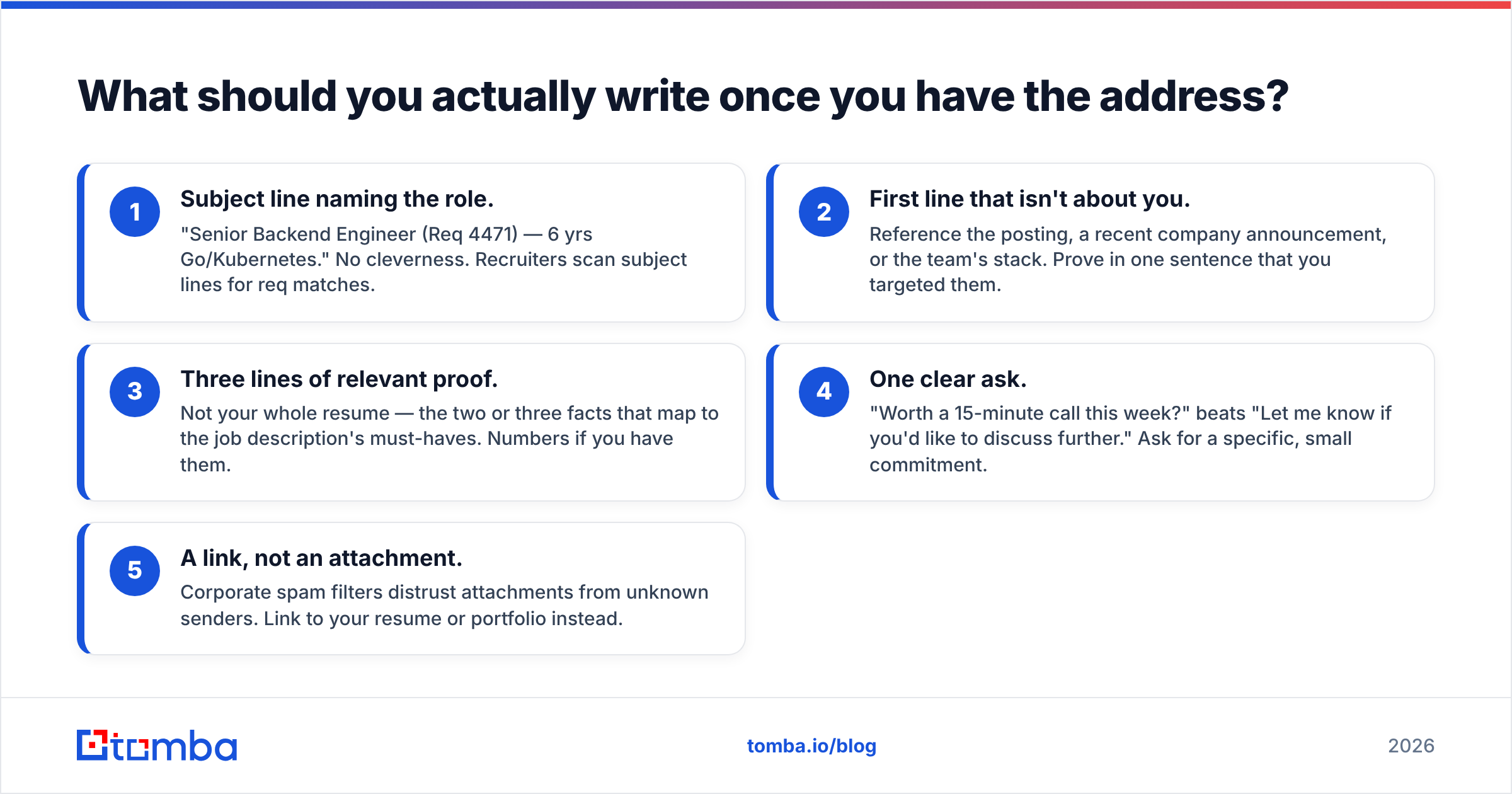
- Subject line naming the role. "Senior Backend Engineer (Req 4471) — 6 yrs Go/Kubernetes." No cleverness. Recruiters scan subject lines for req matches.
- First line that isn't about you. Reference the posting, a recent company announcement, or the team's stack. Prove in one sentence that you targeted them.
- Three lines of relevant proof. Not your whole resume — the two or three facts that map to the job description's must-haves. Numbers if you have them.
- One clear ask. "Worth a 15-minute call this week?" beats "Let me know if you'd like to discuss further." Ask for a specific, small commitment.
- A link, not an attachment. Corporate spam filters distrust attachments from unknown senders. Link to your resume or portfolio instead.
Keep the whole thing under 150 words. If you need a starting point, cold email templates will get you a skeleton you can rewrite in your own voice — and you should rewrite it, because recruiters recognize templates instantly.
Follow up twice, spaced five to seven business days apart, then stop. Persistence past three touches reads as desperate rather than diligent. LinkedIn's own Talent Blog publishes recruiter-side research on what candidate outreach actually gets read, and the consistent finding is that specificity beats volume every time.
Is any of this legal and above board?#
Yes, with caveats worth understanding.
Finding and using a business email address for genuine professional outreach is legal in most jurisdictions. In the US, CAN-SPAM permits unsolicited commercial email as long as you don't use deceptive headers or subject lines, you identify the message as an ad where applicable, and you honor opt-outs. A job application is generally not commercial email at all.
In the EU and UK, GDPR treats a work email as personal data. Legitimate interest is a workable basis for B2B outreach that's genuinely relevant to the recipient's job, but you must be able to say where the data came from and honor deletion requests promptly. The practical rules: use business addresses only, never personal Gmail; keep a record of your source; include a way to opt out; and stop immediately when asked.
Scraping LinkedIn profile data directly violates its terms of service even where courts have found public scraping lawful. Tools that derive an address from a name plus a company pattern — rather than lifting it from a gated profile — sit on much safer ground. Tomba publishes its data sources if you want to audit the provenance before you build a workflow on top of it.
Putting it together: a 30-minute workflow#
Here's the sequence that takes you from "I want to talk to recruiters at these 20 companies" to a verified, sendable list.
- Minutes 0-5. Build a spreadsheet: company name, domain, target role, recruiter name (from LinkedIn), req URL.
- Minutes 5-15. Run each domain through a domain search. Filter for "recruiter", "talent", "people ops", "sourcer". Capture the pattern column.
- Minutes 15-20. For recruiters the domain search missed, apply the confirmed pattern to their name and run the result through a verifier. Discard anything returning invalid.
- Minutes 20-25. Flag catch-all domains separately. Send to those last and in small batches, so a cluster of soft failures doesn't poison your reputation early.
- Minutes 25-30. Write one email, then personalize the first line and the proof points per recruiter. Never send the identical body to twenty people.
Send in batches of ten across several days rather than twenty at once. New senders who blast twenty cold emails in one hour get flagged; the same twenty spread over three days rarely do.
Start with a verified list, not a guess#
The difference between a job search that gets replies and one that disappears is almost never the resume — it's whether your email reached a human at all. Pattern-guessing gets you a plausible address. Verification gets you a delivered one.
Run your target companies through the Tomba Email Finder and you get the recruiter's address plus a deliverability check in the same step, so nothing leaves your outbox unless the mailbox is confirmed real. The free tier's 25 monthly searches is enough for a focused job search; if you're building a recruiting-industry prospect list, Starter at $49/mo covers the volume without an annual commitment. Either way, verify before you send — your sender reputation is the one asset in this process you can't rebuild quickly.
Related guides#
// get started
Find, verify and enrich your first contacts today
Start on the free plan with 25 searches a month, then scale when your team is ready.
Free plan · No credit card required · GDPR & CCPA
// about the author