How To Find Sales Qualified Leads: A 2026 Playbook
Most pipelines are full of leads that will never buy. Here is a repeatable system for finding sales qualified leads — scoring, sourcing, verifying, and handing off without losing the deal.
TL;DR
- A sales qualified lead (SQL) is not a lead who downloaded something. It is a lead where fit, need, timing, and authority have all been confirmed by a human or a scoring model your reps actually trust.
- The fastest path to more SQLs is not more traffic. It is a tighter ICP definition, a scoring model with negative points, and clean contact data so reps stop burning hours on bounces.
- Six sourcing methods scale reliably in 2026: intent data, website visitor identification, LinkedIn signal mining, customer-lookalike lists, partner/community sourcing, and inbound-plus-enrichment.
- Verification is the step everyone skips. A 12% bounce rate does not just waste sends — it damages sender reputation and hides real SQLs behind deliverability failures.
- Budget roughly $50-$250/month for the data layer at SMB scale. That is far cheaper than a rep spending 8 hours a week manually hunting contacts.
What is a sales qualified lead, exactly?#
A sales qualified lead is a prospect your sales team has agreed is worth a direct selling conversation, right now. That is the whole definition, and the operative word is agreed.
Think of it like a restaurant reservation. A marketing qualified lead is someone who browsed the menu online. An SQL is someone who called, gave a party size, a date, and a phone number. Both are interested. Only one has committed enough information for you to allocate a table.
Most teams get into trouble because marketing and sales use different definitions. Marketing counts an ebook download as a marketing qualified lead and passes it over. Sales calls it garbage. The handoff argument repeats every quarter.
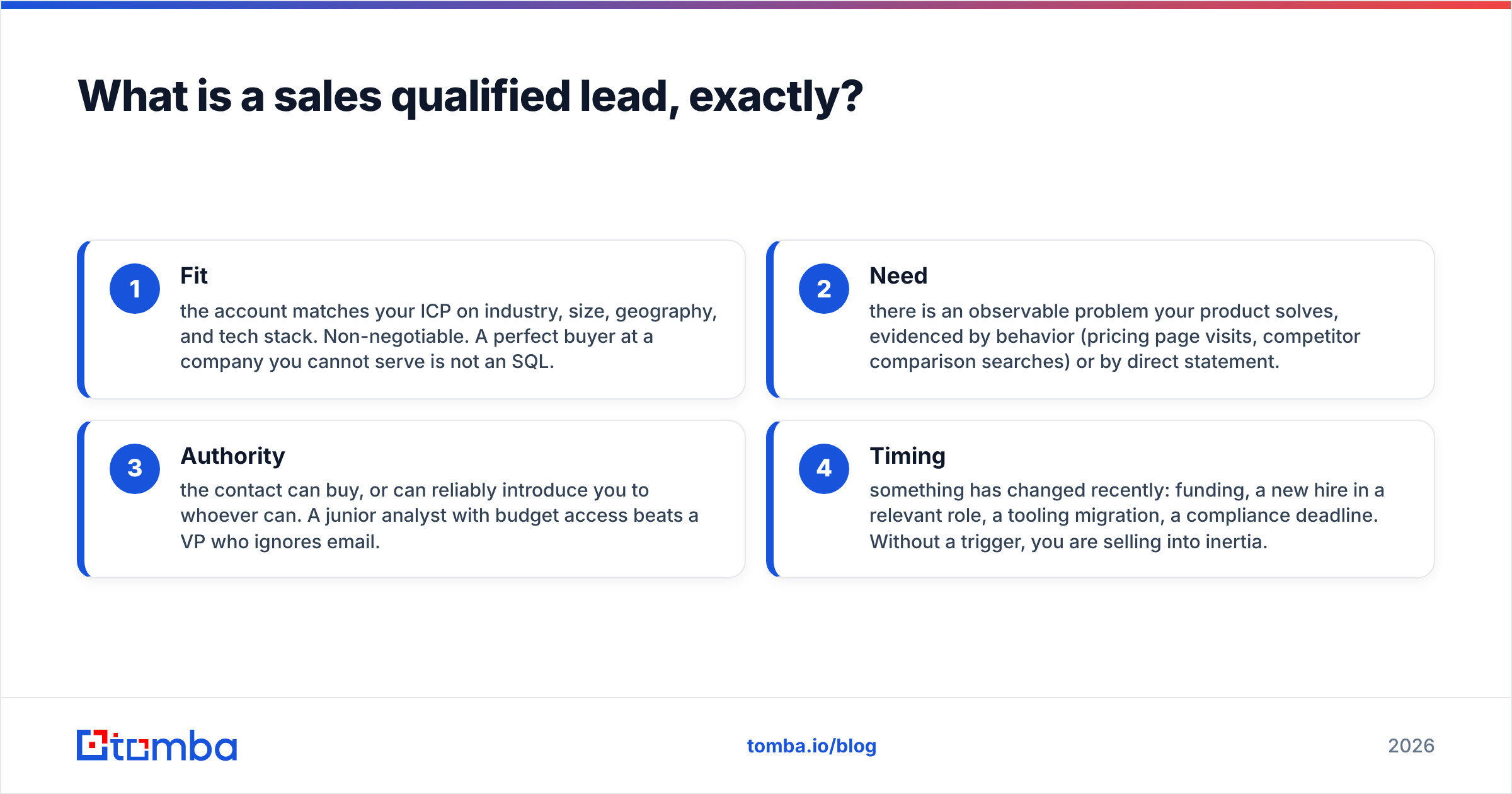
The fix is a written, shared definition with four gates:
- Fit — the account matches your ICP on industry, size, geography, and tech stack. Non-negotiable. A perfect buyer at a company you cannot serve is not an SQL.
- Need — there is an observable problem your product solves, evidenced by behavior (pricing page visits, competitor comparison searches) or by direct statement.
- Authority — the contact can buy, or can reliably introduce you to whoever can. A junior analyst with budget access beats a VP who ignores email.
- Timing — something has changed recently: funding, a new hire in a relevant role, a tooling migration, a compliance deadline. Without a trigger, you are selling into inertia.
If a lead clears all four, it is an SQL. If it clears three, it goes to nurture. Write that down in one shared document and stop relitigating it.

How is an SQL different from an MQL or a PQL?#
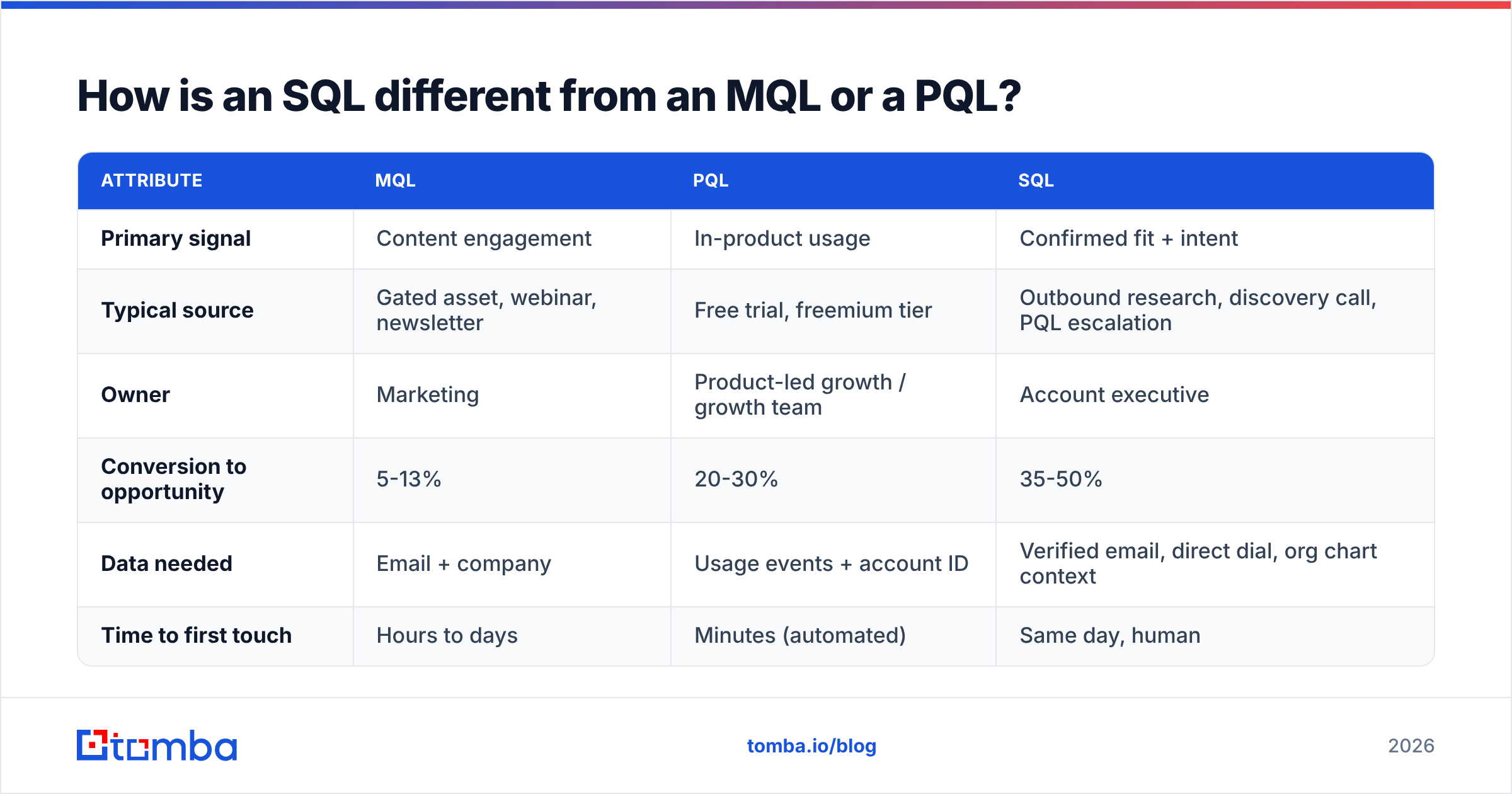
The three categories are not a hierarchy so much as three different evidence types. Confusing them is why pipeline forecasts miss.
| Attribute | MQL | PQL | SQL |
|---|---|---|---|
| Primary signal | Content engagement | In-product usage | Confirmed fit + intent |
| Typical source | Gated asset, webinar, newsletter | Free trial, freemium tier | Outbound research, discovery call, PQL escalation |
| Owner | Marketing | Product-led growth / growth team | Account executive |
| Conversion to opportunity | 5-13% | 20-30% | 35-50% |
| Data needed | Email + company | Usage events + account ID | Verified email, direct dial, org chart context |
| Time to first touch | Hours to days | Minutes (automated) | Same day, human |
Two things stand out. First, SQL conversion rates are roughly 3-5x MQL rates — which is exactly why "more MQLs" is usually the wrong goal. Second, SQLs are the only category that demands verified contact data, because a human is going to spend real time on each one.
How do you build a scoring model that actually predicts SQLs?#
Start from closed-won deals, not from theory. Pull your last 50 wins and your last 50 losses, then look for attributes that separate them. That is your model. Everything else is guessing.
A workable scoring framework has three layers:
- Firmographic points (0-40) — headcount band, revenue band, industry, region. Static, easy to score from enrichment data, and the biggest single predictor of fit for most B2B products.
- Technographic points (0-20) — do they run the stack your product complements? A company on HubSpot is a different buyer than one on Salesforce. You can check this at scale with a website tech stack lookup before a rep ever opens a tab.
- Behavioral points (0-30) — pricing page views, demo requests, repeat visits within 14 days, reply to a cold sequence, competitor comparison page views. Decay these: a pricing visit from 90 days ago is worth almost nothing.
- Trigger points (0-10) — funding round, leadership hire, office expansion, public job posting mentioning a pain you solve.
- Negative points (-10 to -50) — student or personal email domain, competitor domain, headcount below your minimum viable size, country you cannot invoice, unsubscribed in the last 6 months.
Negative scoring is the part teams skip, and it is the part that does the most work. Without it, a free-email-domain job seeker who reads five blog posts outscores a VP of Ops at a target account who visited pricing once.
Set your SQL threshold so that roughly the top 15-20% of scored leads clear it. If half your leads are SQLs, your bar is too low and your reps will stop trusting the flag inside a month.
Where do you actually find sales qualified leads in 2026?#
Six sourcing motions carry most of the load. Run two or three well rather than six badly.
1. Intent data. Third-party intent vendors flag accounts researching your category. Useful as a prioritization layer over an existing account list, weak as a standalone list builder — the signal is account-level, not person-level, so you still have to find the human.
2. Website visitor identification. Somewhere between 2% and 5% of your site traffic fills out a form. The rest leaves anonymously. De-anonymizing company-level traffic and routing high-fit visitors to sales turns existing demand into SQLs without new spend. Tomba's visitor identification handles the reveal step; your scoring model handles the rest.
3. LinkedIn signal mining. Job changes, promotions, and hiring posts are the highest-quality timing triggers available for free. Someone who started as Head of Revenue Operations six weeks ago is actively re-evaluating tooling. Build a saved search, check it weekly, and pull contact details with a LinkedIn finder rather than guessing at email formats.
4. Customer-lookalike lists. Take your 20 best customers, extract shared attributes, and build a target account list from a B2B database filtered to match. Slow, unglamorous, and consistently the highest-converting outbound source.
5. Partner and community sourcing. Integration partners, agency partners, and niche communities produce warm SQLs at conversion rates outbound cannot touch. The tradeoff is volume — this channel does not scale on demand.
6. Inbound plus enrichment. A form fill with just an email is not an SQL. Enrich it with company size, industry, funding, and role, score it, and only then decide. Contact enrichment turns a thin form into a scoreable record in seconds.
Which tools do the sourcing and data work?#
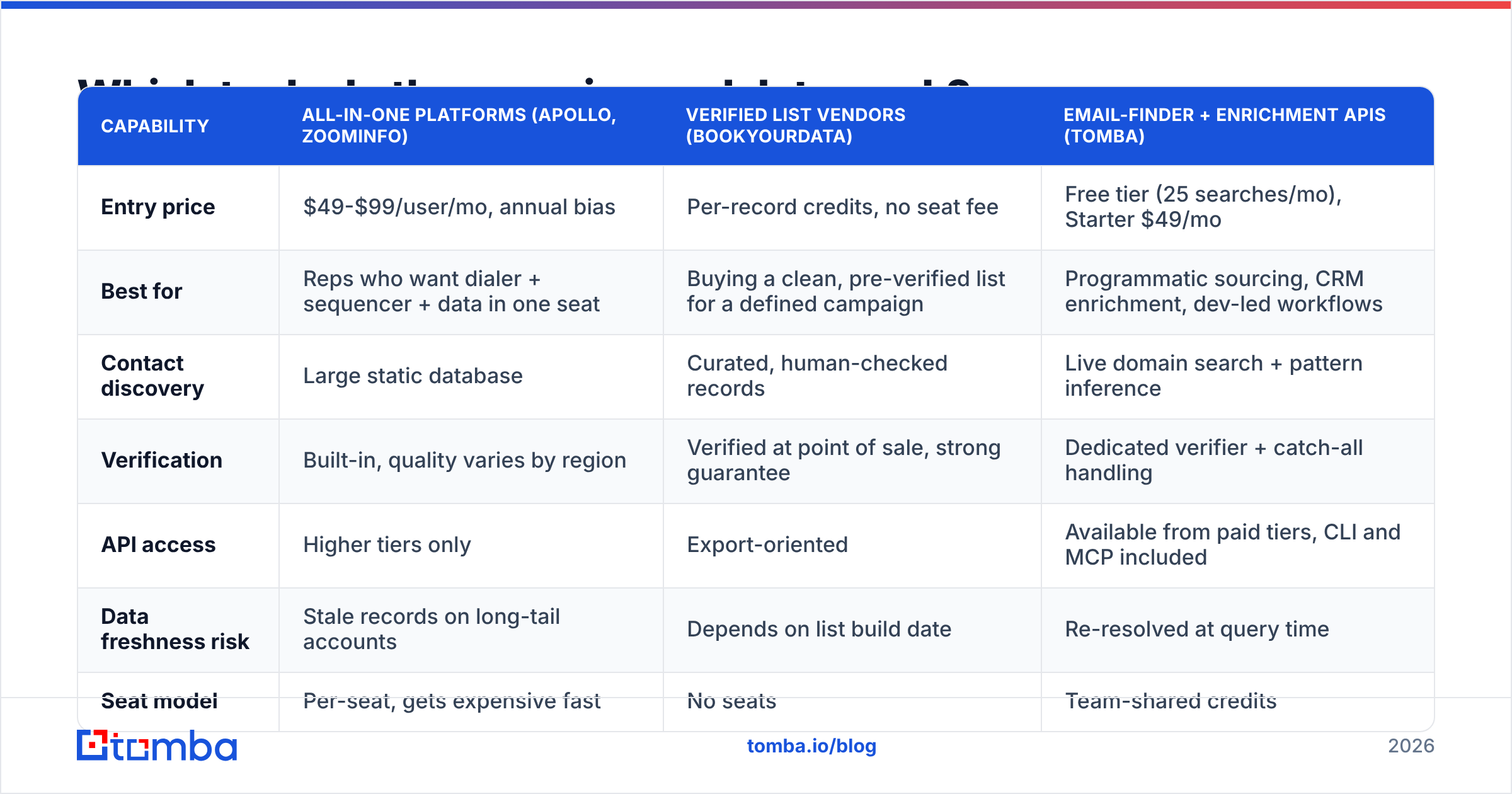
Tool categories overlap enough to be confusing. Here is how the main options compare on the jobs that matter for SQL generation.
| Capability | All-in-one platforms (Apollo, ZoomInfo) | Verified list vendors (BookYourData) | Email-finder + enrichment APIs (Tomba) |
|---|---|---|---|
| Entry price | $49-$99/user/mo, annual bias | Per-record credits, no seat fee | Free tier (25 searches/mo), Starter $49/mo |
| Best for | Reps who want dialer + sequencer + data in one seat | Buying a clean, pre-verified list for a defined campaign | Programmatic sourcing, CRM enrichment, dev-led workflows |
| Contact discovery | Large static database | Curated, human-checked records | Live domain search + pattern inference |
| Verification | Built-in, quality varies by region | Verified at point of sale, strong guarantee | Dedicated verifier + catch-all handling |
| API access | Higher tiers only | Export-oriented | Available from paid tiers, CLI and MCP included |
| Data freshness risk | Stale records on long-tail accounts | Depends on list build date | Re-resolved at query time |
| Seat model | Per-seat, gets expensive fast | No seats | Team-shared credits |
The honest read: all-in-one platforms are the right call if your reps need dialing and sequencing in the same window and you can absorb per-seat pricing. Verified list vendors like BookYourData make sense when you know exactly which segment you want and would rather buy a clean file than build a pipeline. API-first tools like Tomba fit teams enriching inside their own systems — a CRM workflow, a Sheets model, a nightly job that finds contacts for newly scored accounts.
Most teams over-buy here. Check Tomba pricing against a per-seat quote before committing to an annual contract; if your SDR team is three people and your enrichment volume is a few thousand records a month, the Growth plan at $99/mo covers it.
Why does contact data quality decide whether SQLs convert?#
Because an SQL you cannot reach is not an SQL. It is a note in a CRM.
B2B contact data decays at roughly 22-30% per year. People change jobs, companies get acquired, domains migrate. A list built in January is meaningfully wrong by September. That decay shows up as bounces, and bounces do more damage than most teams realize.
Mailbox providers treat hard bounce rate as a core reputation input. Google's Postmaster Tools documentation is explicit that sending to invalid addresses degrades domain reputation. Once reputation drops, your good emails start landing in spam — meaning bad data does not just waste the bad sends, it suppresses the good ones. Your SQLs are still there; they just never see you.
Three habits fix most of it:
- Verify before every send, not once at import. Run new records through an email verifier as part of the enrichment step. Treat anything above a 3% projected bounce rate as a stop sign.
- Handle catch-all domains deliberately. Roughly a third of enterprise domains accept everything at the SMTP layer, which means standard verification returns "unknown." A catch-all verifier resolves a good portion of these instead of leaving reps to gamble.
- Re-verify quarterly. Anything sitting in your CRM untouched for 90+ days should be re-checked before a rep touches it.
Also watch your sender reputation directly rather than inferring it from open rates, which have been unreliable since Apple Mail Privacy Protection.
How should marketing hand SQLs to sales without losing them?#
Speed is the whole game. Research summarized by HubSpot and repeatedly replicated shows contact rates collapse when first response slips past the first hour — and the drop from five minutes to thirty minutes is steeper than most teams assume.
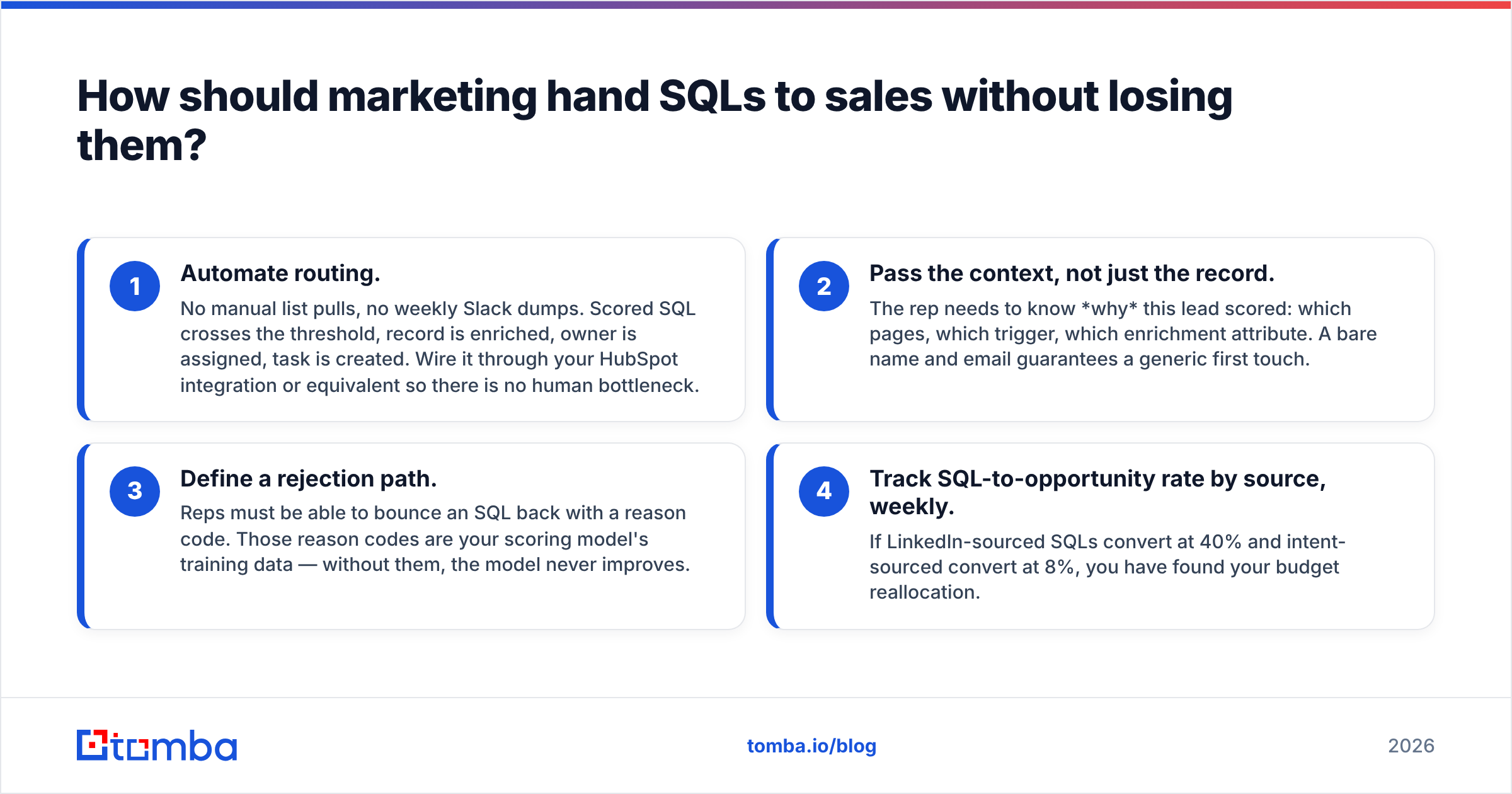
Build the handoff around four rules:
- Automate routing. No manual list pulls, no weekly Slack dumps. Scored SQL crosses the threshold, record is enriched, owner is assigned, task is created. Wire it through your HubSpot integration or equivalent so there is no human bottleneck.
- Pass the context, not just the record. The rep needs to know why this lead scored: which pages, which trigger, which enrichment attribute. A bare name and email guarantees a generic first touch.
- Define a rejection path. Reps must be able to bounce an SQL back with a reason code. Those reason codes are your scoring model's training data — without them, the model never improves.
- Track SQL-to-opportunity rate by source, weekly. If LinkedIn-sourced SQLs convert at 40% and intent-sourced convert at 8%, you have found your budget reallocation.
Add a phone path for high-value accounts. Email-only outbound leaves conversion on the table for enterprise deals, and a verified direct dial from a phone finder often beats a fifth follow-up email.
What kills SQL volume, and how do you fix it fast?#
Five failure patterns account for most of the damage:
- Threshold drift. Someone lowers the SQL bar to hit a monthly number. Conversion craters, reps disengage, and the flag becomes meaningless. Audit the threshold quarterly against actual opportunity conversion.
- ICP too broad. If your ICP fits half the internet, your scoring model has nothing to discriminate on. Narrow until it feels uncomfortably specific, then measure.
- No negative scoring. Covered above, and worth repeating because it is the single cheapest fix on this list.
- Data collected once, never refreshed. Enrichment is not an import event. It is a recurring job.
- No feedback loop. Marketing never learns which SQLs closed. Close the loop with a shared dashboard, not a monthly meeting.
Fix the feedback loop first. Everything else gets easier when both teams can see the same win rate by lead source.
What does a 30-day implementation look like?#
Week 1 — Define. Write the four-gate SQL definition. Get sales leadership to sign it. Pull 50 wins and 50 losses and identify the separating attributes.
Week 2 — Score. Build the model in your CRM or marketing automation platform. Include negative points. Backtest it against last quarter's leads and check that the top 15-20% would have contained most of your real opportunities.
Week 3 — Source and enrich. Pick two sourcing motions. Wire enrichment and verification into the intake path so no unverified record reaches a rep. Set up a bulk email finder run for your target account list.
Week 4 — Route and measure. Automate assignment, add reason codes for rejection, and stand up a weekly dashboard: SQL volume, SQL-to-opportunity rate, and bounce rate by source. Review it every Monday for the next quarter.
Thirty days gets you a working system. The next ninety are about tightening the model with the rejection data your reps generate.
Start with contact data you can actually reach#
Every step above — scoring, routing, sequencing, calling — depends on one thing: a real, deliverable contact record for the person who can buy. Get that wrong and the rest of the machine spins on empty.
Tomba's Email Finder resolves professional email addresses from a domain, a name, or a company, and pairs with a verifier that flags risky and catch-all addresses before your reps burn a send on them. The free tier gives you 25 searches a month to test against your own target list — run your ten best-fit accounts through it, check the results against what your current data source returned, and decide from evidence rather than from a pricing page. Paid plans start at $49/mo, and the Tomba API means you can wire enrichment directly into the scoring workflow you just built.
Related guides#
// get started
Find, verify and enrich your first contacts today
Start on the free plan with 25 searches a month, then scale when your team is ready.
Free plan · No credit card required · GDPR & CCPA
// about the author