How to Find Website Email Address: 9 Proven Methods
Contact pages hide real inboxes behind forms. Here are nine practical ways to find the actual email address behind any website — plus how to verify it before you hit send.
Most contact pages hide the real inbox behind a form. This guide shows you how to find website email address contacts in minutes. Nine methods, ranked by speed, each with a way to check the address is live before you send.
TL;DR
- The fastest reliable path is a domain search. Enter the domain, get back the published inbox, named employee addresses, and the company's email pattern.
- Free manual methods still work: WHOIS records, page source, social bios, Google site operators. They just take minutes per site and fail on private domains.
info@andcontact@are the worst addresses you can email. A named person's inbox beats a generic alias by a wide margin.- Never send to an address you have not verified. Bounces above 3-4% are what damage your sender reputation.
- Budget matters less than you think. A free tier of 25 searches covers occasional lookups, and paid plans start at $49/mo.
Why is finding a website's email address so hard now?#
Because the open mailto: link is close to extinct. Fifteen years ago most business sites listed a plain address in the footer. Then scrapers got industrial and spam volume exploded. Companies answered by replacing addresses with contact forms, hidden JavaScript, image text, and private WHOIS records.
The result is a mismatch. The company still wants to hear from a customer, a journalist, or a partner. It just does not want a bot to read its inbox off the page. So the address exists. It is simply not where you would expect it.
That is the problem this guide solves. Every method below finds an address that is either published or easy to work out. Then you confirm it is live before you spend a send on it.
One framing helps here. Think of a website like a house with the doorbell removed. The door still opens. You just have to check the side entrance, the mailbox, or the neighbours.
How to find website email address contacts without a tool#
Start with the free options. If the site is small or the address is published, you will find it in under two minutes.
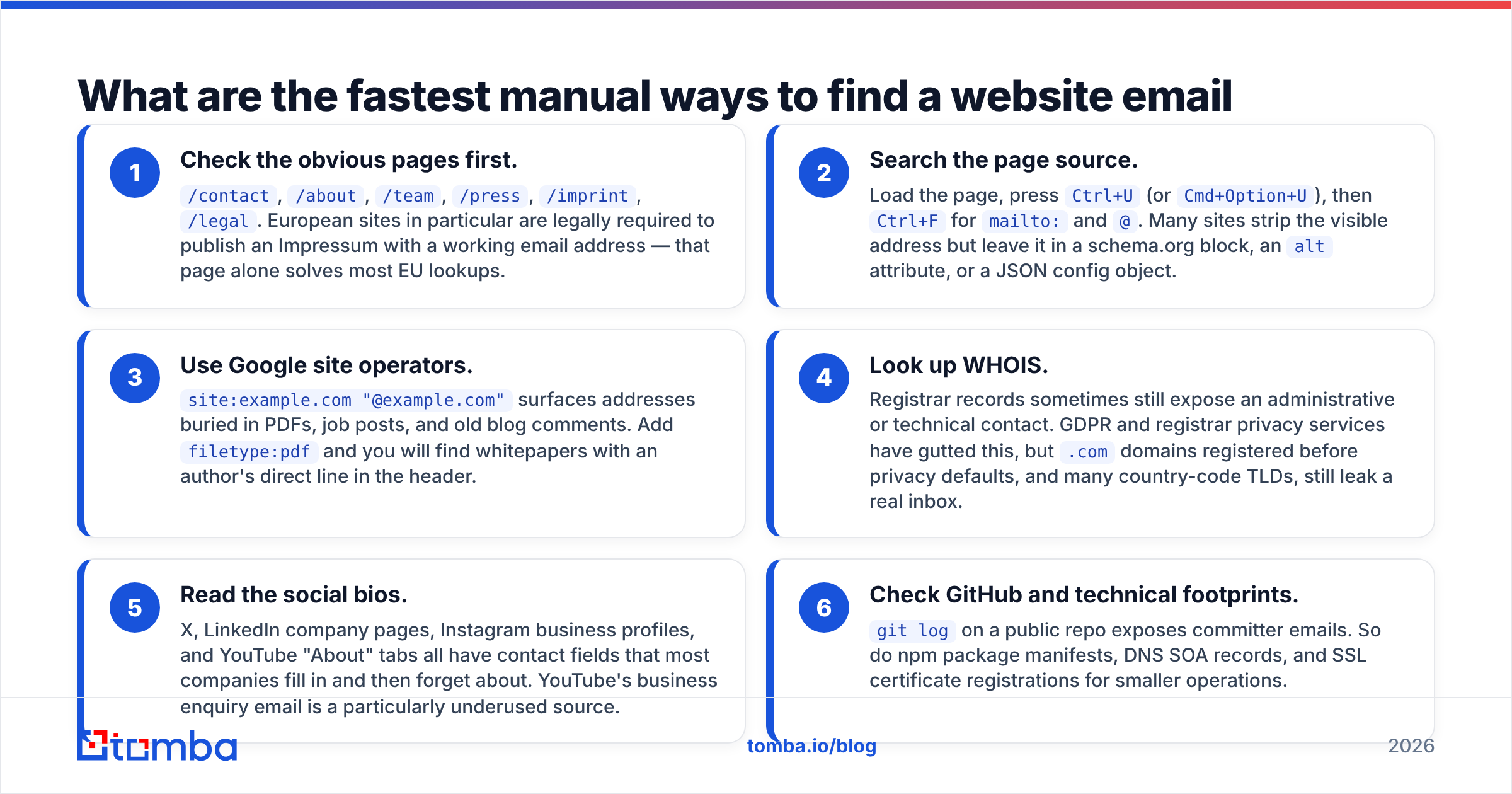
Check the obvious pages first.
/contact,/about,/team,/press,/imprint,/legal. European sites must publish an Impressum with a working email address. That page alone solves most EU lookups.Search the page source. Load the page, press
Ctrl+U(orCmd+Option+U), thenCtrl+Fformailto:and@. Many sites hide the visible address but leave it in a schema.org block, analtattribute, or a JSON config.Use Google site operators.
site:example.com "@example.com"surfaces addresses buried in PDFs, job posts, and old blog comments. Addfiletype:pdfto find whitepapers with an author's direct line in the header.Look up WHOIS. Registrar records sometimes still show an admin or technical contact. GDPR and privacy services have gutted this. But older
.comdomains and many country-code TLDs still leak a real inbox.Read the social bios. X, LinkedIn company pages, Instagram business profiles, and YouTube "About" tabs all have contact fields. Most companies fill them in once and then forget. YouTube's business enquiry email is badly underused.
Check GitHub and technical footprints.
git logon a public repo exposes committer emails. So do npm package manifests, DNS SOA records, and SSL certificates for smaller operations.
These six cost nothing. They also cost you time, and they fail silently. You cannot tell the difference between "no address published" and "address published somewhere I didn't check."

How do email finder tools actually find the address?#
An email finder does three things you cannot do by hand at scale. It crawls a very large corpus, it learns the company's email pattern, and it checks the result against the receiving mail server.
The pattern step is the important one. Almost every company uses one format: first.last@, flast@, first@, firstl@. Once a tool has seen five confirmed addresses at example.com and four are first.last@, it can build a high-confidence guess for any employee whose name you know. That is why a domain search returns both the addresses it found and the pattern it inferred.
The validation step separates a real tool from a guess generator. Free permutator sites hand you twelve versions of a name and let you find out which one bounces. A real finder does an SMTP handshake with the recipient server, checks for catch-all setup, screens against known spam traps, and returns a confidence score.
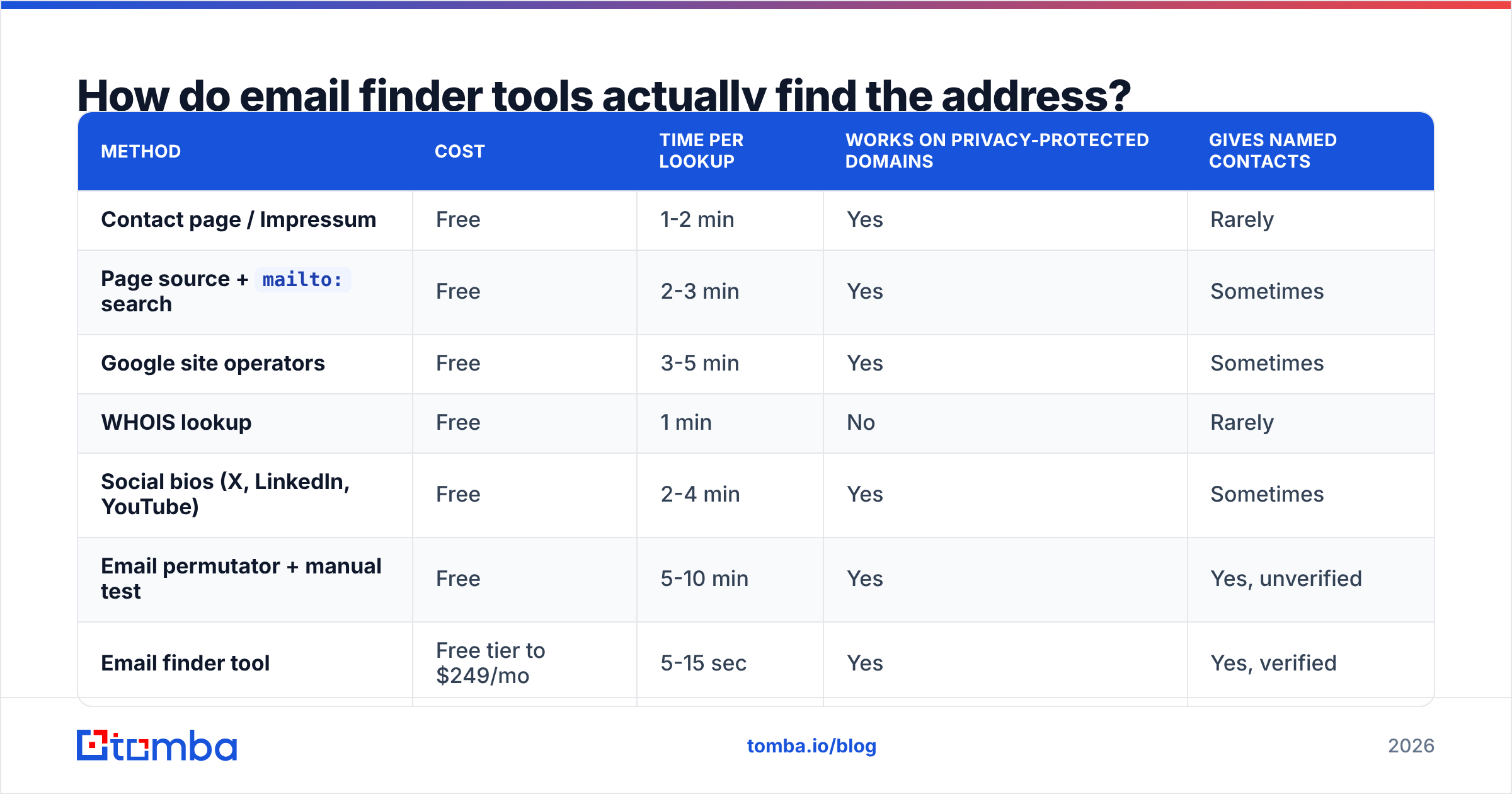
Here is what each source type is actually good for:
| Method | Cost | Time per lookup | Works on privacy-protected domains | Gives named contacts |
|---|---|---|---|---|
| Contact page / Impressum | Free | 1-2 min | Yes | Rarely |
Page source + mailto: search |
Free | 2-3 min | Yes | Sometimes |
| Google site operators | Free | 3-5 min | Yes | Sometimes |
| WHOIS lookup | Free | 1 min | No | Rarely |
| Social bios (X, LinkedIn, YouTube) | Free | 2-4 min | Yes | Sometimes |
| Email permutator + manual test | Free | 5-10 min | Yes | Yes, unverified |
| Email finder tool | Free tier to $249/mo | 5-15 sec | Yes | Yes, verified |
| B2B contact database | $39-$500+/mo | Instant | Yes | Yes, varies by refresh rate |

The accuracy gap between vendors is real. It comes down to how recently the data was confirmed. An address that was correct in 2023 is roughly a coin flip today. B2B contact data decays around 25-30% per year as people change jobs, according to repeated CRM hygiene analyses published on G2 and by vendors like HubSpot.
Which tools should you compare for website email lookup?#
The category splits into three groups. Picking the wrong group is the most common mistake.
Finders take a domain, or a name plus a domain, and return an address. They are cheap, fast, and precise. Tomba, Hunter, Findymail, and Snov.io sit here.
Databases sell you a pre-built contact set you filter by title, industry, and geography. Apollo, ZoomInfo, and BookYourData sit here. BookYourData is worth a look if you want to buy a targeted list outright rather than look up domains one at a time. It is a different buying motion, and for some teams it fits better.
Verifiers do not find anything. They tell you whether an address you already have is deliverable. ZeroBounce, NeverBounce, and Tomba's email verifier sit here.
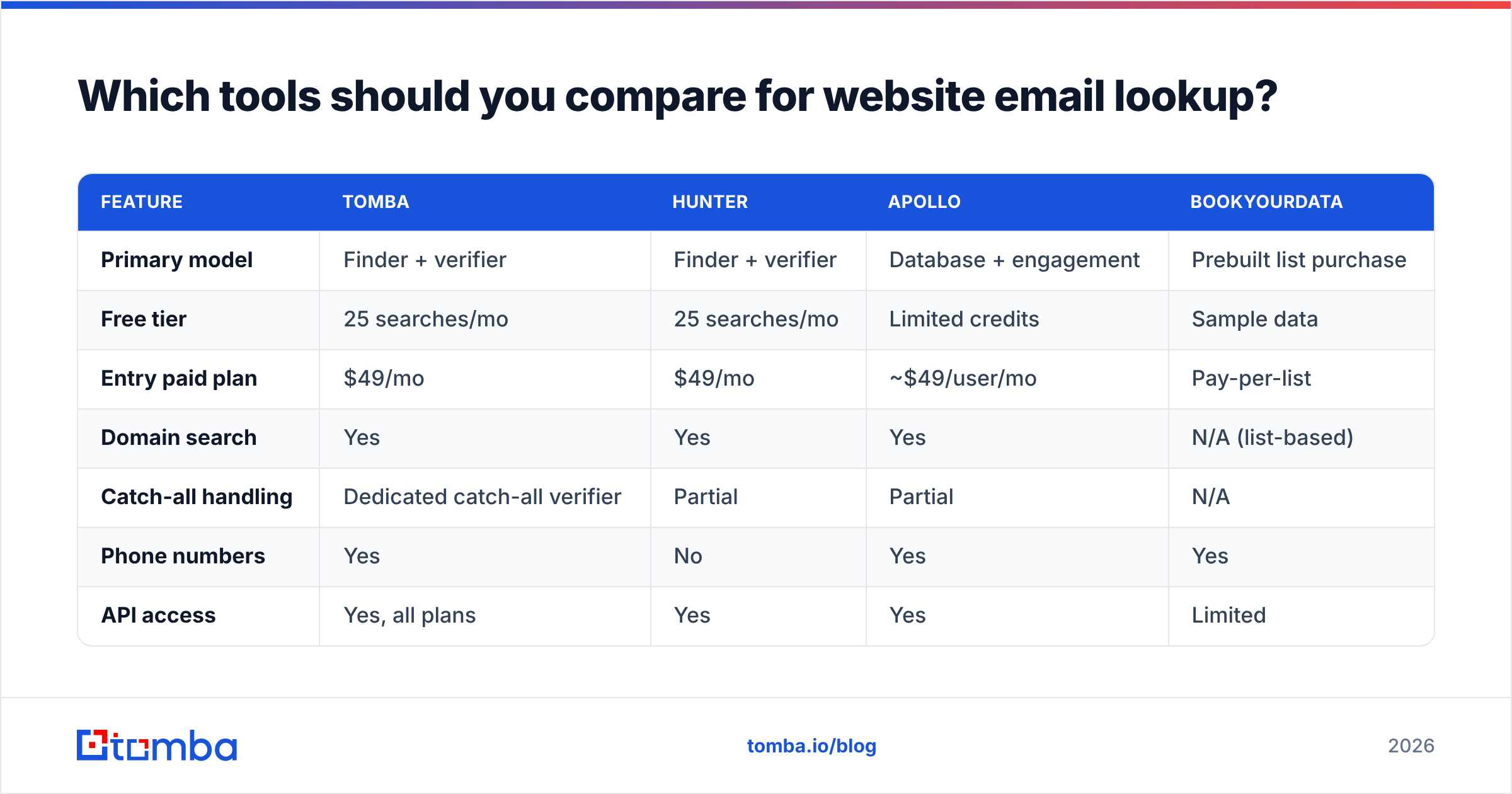
| Feature | Tomba | Hunter | Apollo | BookYourData |
|---|---|---|---|---|
| Primary model | Finder + verifier | Finder + verifier | Database + engagement | Prebuilt list purchase |
| Free tier | 25 searches/mo | 25 searches/mo | Limited credits | Sample data |
| Entry paid plan | $49/mo | $49/mo | ~$49/user/mo | Pay-per-list |
| Domain search | Yes | Yes | Yes | N/A (list-based) |
| Catch-all handling | Dedicated catch-all verifier | Partial | Partial | N/A |
| Phone numbers | Yes | No | Yes | Yes |
| API access | Yes, all plans | Yes | Yes | Limited |
| Best for | Precise per-domain lookups | Precise per-domain lookups | Volume prospecting + sequencing | Buying a targeted list upfront |

Pick the group that matches your job. Contacting fifty companies you already picked? A finder is right, and a database is costly overkill. Need two thousand marketing directors in fintech? A database or a bought list wins. Inherited a stale CRM export? You need a verifier and nothing else.
Should you email info@ or a named person?#
Email the named person. This is the highest-leverage choice in the whole process. Most people get it backwards because generic aliases are easier to find.
Generic aliases (info@, contact@, hello@, sales@) route to a shared inbox. It is watched at random, filtered hard, and owned by nobody. "Owned by nobody" is the killer. No one's job depends on answering it.
A named inbox is read daily by one person who is judged on their own replies. Across published cold outreach benchmarks, named-contact sends beat generic aliases on both open and reply rates. The gap is often a multiple, not a margin. It also lifts your response rate on follow-ups, because a human owns the thread.
The practical sequence:
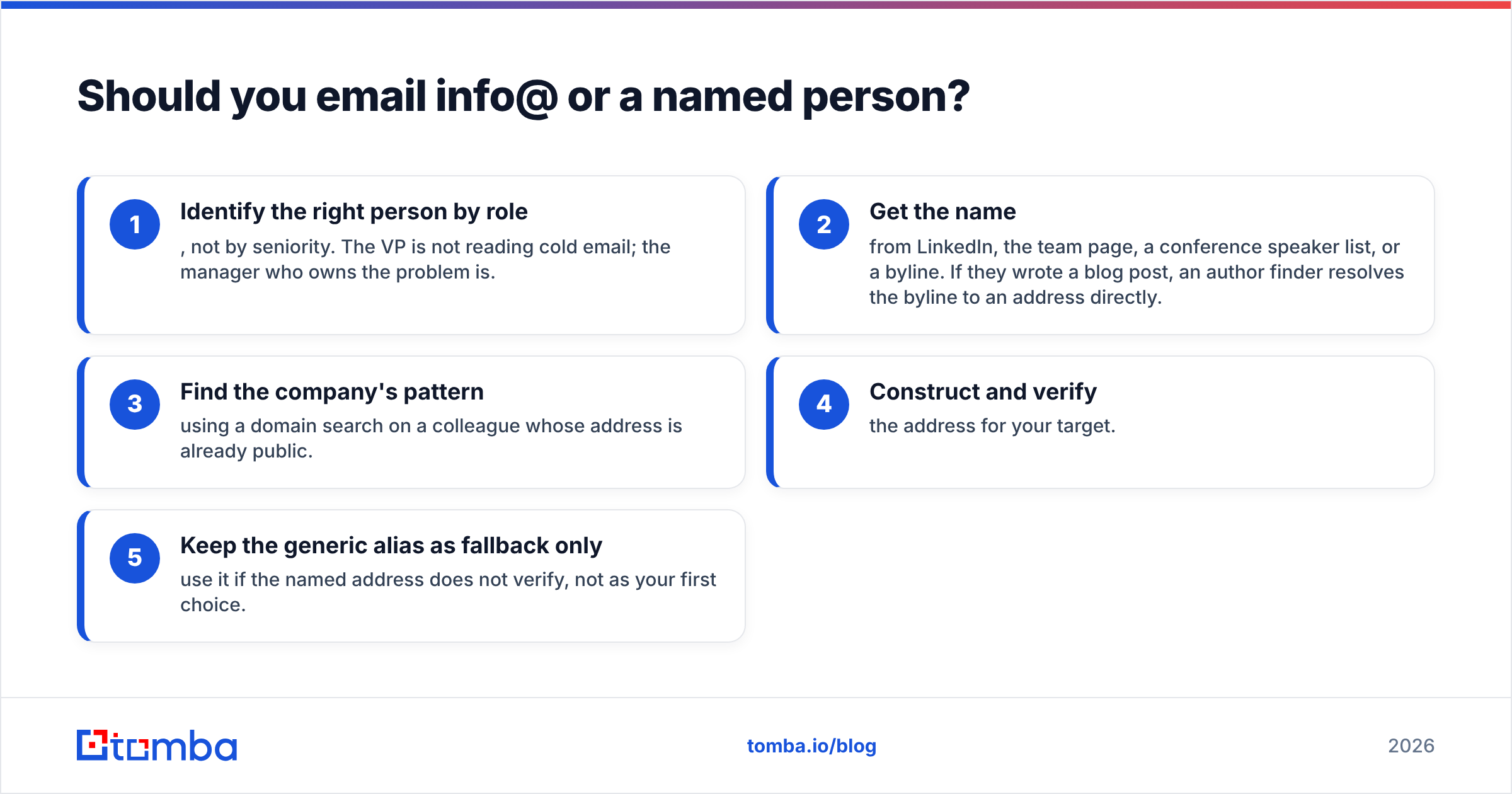
- Identify the right person by role, not by seniority. The VP is not reading cold email. The manager who owns the problem is.
- Get the name from LinkedIn, the team page, a speaker list, or a byline. If they wrote a blog post, an author finder turns the byline into an address.
- Find the company's pattern with a domain search on a colleague whose address is already public.
- Construct and verify the address for your target.
- Keep the generic alias as fallback only. Use it if the named address does not verify, never as your first choice.

How do you verify the address before sending?#
Verification is not optional, and the reason is mechanical rather than ethical. Mailbox providers score you on bounce rate. Push past roughly 3-4% hard bounces and you start to see throttling, spam-folder placement, and blocks that take weeks to undo. Your sender reputation is slow to build and fast to destroy.
A proper verification pass checks, in order:
- Syntax — is it a valid address at all
- Domain and MX records — does the domain exist and accept mail
- Disposable and role detection — is this a throwaway or a
noreply@ - SMTP handshake — does the mailbox exist on that server
- Catch-all detection — does the server accept everything, making the last check meaningless
- Spam trap screening — is this a recycled address that now only catches senders
That fifth step is where most tools quietly fail. A catch-all domain returns "valid" for asdfghjkl@example.com just as happily as for a real employee. If your verifier calls every address at a domain valid, that is a red flag, not a win. A dedicated catch-all verifier uses extra signals to tell real mailboxes from blanket acceptance.
For anything above a handful of addresses, run the list through a bulk verify job instead of checking one at a time. If you work in a spreadsheet, the Google Sheets add-on removes the copy-paste step.
Is scraping website emails legal?#
Short answer: finding a published business address is generally fine. How you use it is where the rules bite.
Under GDPR, a work email at a company domain is still personal data when it identifies a person. You need a lawful basis, and legitimate interest is the usual one for B2B outreach. You also need real relevance to the person's job, a clear statement of who you are, and a working opt-out. Blasting an unrelated offer to every address you scraped does not meet that bar.
CAN-SPAM in the US is more relaxed about the first send but strict on mechanics. It requires accurate headers, honest subject lines, a physical postal address, and an opt-out honoured within ten business days. CASL in Canada is the strictest of the three. It usually requires consent or a documented business relationship.
Three rules that keep you compliant in practice:
- Only contact people the message is relevant to. A CFO getting a pitch about CFO software is defensible. The same CFO getting a pitch about pet insurance is not.
- Honour opt-outs at once and forever, across every campaign and every sending domain.
- Do not harvest indiscriminately. Collecting every address on a domain and mailing all of them is the pattern regulators actually chase. Targeted lookup of specific people is not.
Check the Wikipedia overview of GDPR for the basics, then get real advice if you operate at scale in the EU.
What should your workflow look like end to end?#
Here is the sequence that holds up for five lookups or five hundred.
- Define the target company list first. Domains, not names. A list of domains is machine-actionable; a list of company names is not.
- Run a domain search on each to pull the pattern and any published addresses. This is where the email finder does the heavy lifting.
- Identify the specific human for each domain by role. Cross-reference LinkedIn or the team page.
- Resolve name plus domain to an address, using the pattern the domain search returned.
- Verify everything before it enters your sending tool. Drop anything below your confidence threshold rather than "trying it and seeing."
- Enrich what survives with title, company size, and location so your first line is not generic. Data enrichment turns an address into a reason to write.
If you live in a browser, the Tomba Chrome extension collapses steps two through five into one click on the company's site. If you are building this into a product or a script, the Tomba API exposes the same endpoints. Pricing is per lookup rather than per seat — see Tomba pricing for current tiers.
One last thing worth remembering. Knowing how to find website email address contacts is the easy 20% of the job. Most outreach fails on the message, not the address. Spend the time you saved on what you write.
Ready to stop hunting through contact pages?#
Try the Tomba Email Finder. Enter a domain and get back the published inboxes, the company's email pattern, and named employee addresses. Each one carries a confidence score and an SMTP-level check. The free tier includes 25 searches a month, enough to work through a first target list without a card. When you need volume, Starter is $49/mo, with the same lookups via API, Chrome extension, Google Sheets, and Excel.
Find the address, verify it, then write something worth reading.
Related guides#
// get started
Find, verify and enrich your first contacts today
Start on the free plan with 25 searches a month, then scale when your team is ready.
Free plan · No credit card required · GDPR & CCPA
// about the author