How to Follow Up With Potential Clients Without Being Pushy
Most deals die in the silence after the first email. Here is a 7-touch follow-up cadence with timing windows, channel choices, and templates that get replies instead of polite ghosting.
TL;DR
- Most opportunities are not lost to a competitor. They are lost to silence — the prospect got busy, and nobody followed up a fourth, fifth, or sixth time.
- A workable default is 7 touches over 21 days, mixing email, phone, and LinkedIn, with each message adding something new instead of "just bumping this up."
- Timing beats cleverness: the first follow-up belongs 2–3 days after the initial contact, not two weeks later.
- Follow-up only works if the message lands. Bad contact data quietly kills 20–30% of sequences before a human ever reads them.
- Track reply rate per touch number, not just overall. If touch 5 outperforms touch 2, you are stopping too early.
Why do most deals die in the follow-up gap?#
Because the buyer never said no. They said nothing.
Think of follow-up like watering a plant you can't see. You put a seed in the ground with your first email, and then you walk away because nothing sprouted in 48 hours. The seed was fine. The schedule was the problem.
In practice, three things happen after your first touch:
- The prospect reads it on a phone, in a hallway, between meetings, and intends to reply later.
- "Later" gets buried under 60 other emails by end of day.
- Your message is now functionally invisible unless you resurface it.
Sales teams consistently underestimate how many touches this takes. Ask any rep how many follow-ups they send before giving up and the honest answer is usually two. Ask them how many touches it took to book their last five meetings and the answer is almost never two. That gap is the entire opportunity.
Follow-up is also the cheapest revenue in your pipeline. You already paid for the list, the research, the first message, and the tooling. Sending touch four costs you 90 seconds. Sourcing a brand-new prospect costs you far more.
What actually counts as a follow-up?#
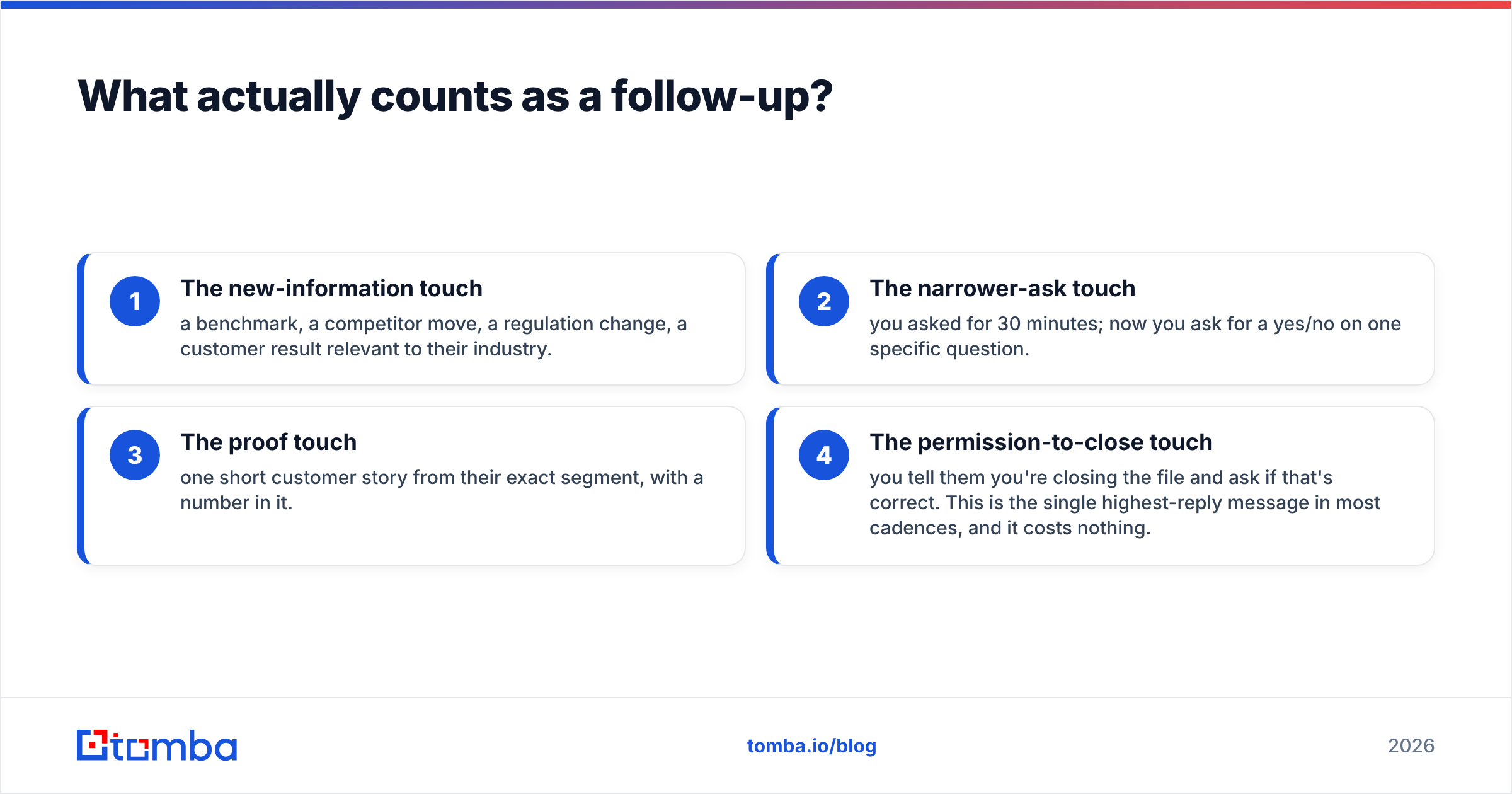
A follow-up is a message that gives the recipient a new reason to reply. Anything else is a nudge, and nudges train people to ignore you.
Here is the practical test: if you deleted your previous email from the thread, would this message still make sense and still be worth reading? If yes, it's a follow-up. If it collapses into "did you see my last email?", it's noise.
Four formats that pass the test:
- The new-information touch — a benchmark, a competitor move, a regulation change, a customer result relevant to their industry.
- The narrower-ask touch — you asked for 30 minutes; now you ask for a yes/no on one specific question.
- The proof touch — one short customer story from their exact segment, with a number in it.
- The permission-to-close touch — you tell them you're closing the file and ask if that's correct. This is the single highest-reply message in most cadences, and it costs nothing.
What doesn't count: "just circling back," "bumping this to the top of your inbox," "checking in," and any message whose only content is the previous message quoted underneath.
How long should you wait between follow-ups?#
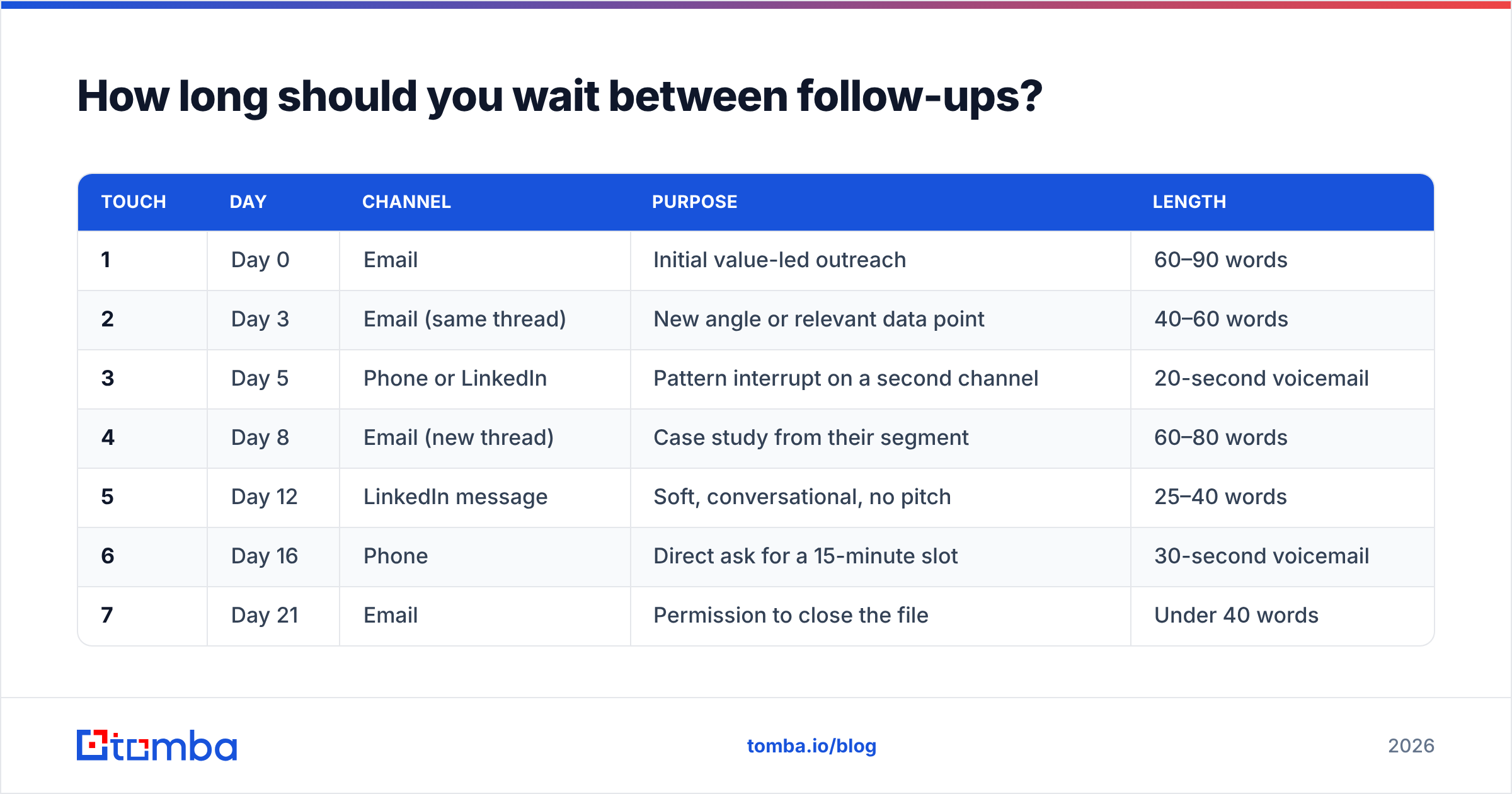
Front-load the cadence. Interest decays fast in week one and slowly after that, so your touches should be dense early and spaced out later.
| Touch | Day | Channel | Purpose | Length |
|---|---|---|---|---|
| 1 | Day 0 | Initial value-led outreach | 60–90 words | |
| 2 | Day 3 | Email (same thread) | New angle or relevant data point | 40–60 words |
| 3 | Day 5 | Phone or LinkedIn | Pattern interrupt on a second channel | 20-second voicemail |
| 4 | Day 8 | Email (new thread) | Case study from their segment | 60–80 words |
| 5 | Day 12 | LinkedIn message | Soft, conversational, no pitch | 25–40 words |
| 6 | Day 16 | Phone | Direct ask for a 15-minute slot | 30-second voicemail |
| 7 | Day 21 | Permission to close the file | Under 40 words |
Two rules make this cadence survive contact with reality. First, never send two touches from the same channel back to back if you can avoid it — channel variety is what breaks the "ignore this sender" reflex. Second, when someone engages at any point, the cadence stops and a human takes over. Automated sequences that keep firing after a reply are the fastest way to lose a warm deal.
If you sell into enterprise, stretch the same seven touches over 35–45 days instead of 21. Buying committees move slower and denser cadences read as desperation. If you sell to SMB owners, compress to 14 days — they decide fast or never.
What should each follow-up actually say?#
Short, specific, and easy to answer in one line on a phone. That's the whole formula.
Below are the four messages that do the heaviest lifting in a seven-touch sequence. Adapt the specifics; keep the shape.
Touch 2 — the new angle (Day 3)
Subject: (keep the original thread subject)
One thing I left out: teams like yours usually hit this when headcount crosses ~40. The fix took [Company] about two weeks and cut their onboarding time by a third.
Worth 15 minutes, or is this not on your roadmap this quarter?
Touch 4 — the proof touch (Day 8)
Subject: How [Similar Company] handled [specific problem]
[Similar Company] had the same setup you do — [detail you actually verified]. They changed one thing in their process and went from [before number] to [after number] in a quarter.
Happy to send the one-page breakdown. Want it?
Asking for permission to send something is far easier to say yes to than asking for a meeting. A "yes, send it" reply is a live conversation.
Touch 5 — the LinkedIn soft touch (Day 12)
Saw your post on [topic] — the point about [specific detail] matches what we see across [industry]. Not pitching here, just wanted to say it's a rare take.
No ask at all. This touch exists to convert you from "vendor" to "person."
Touch 7 — permission to close (Day 21)
Subject: Closing the file?
I've reached out a few times about [problem] and haven't heard back, which usually means it isn't a priority right now. I'll stop here unless you tell me otherwise.
Should I close the file, or check back in Q3?
Roughly a fifth of the replies a good cadence generates come from this last message. People who ignore requests will answer a departure. If you need a starting library, the cold email templates collection and a quick pass through a subject line generator will save you an hour of blank-page time.
Which channel works best at each stage?#
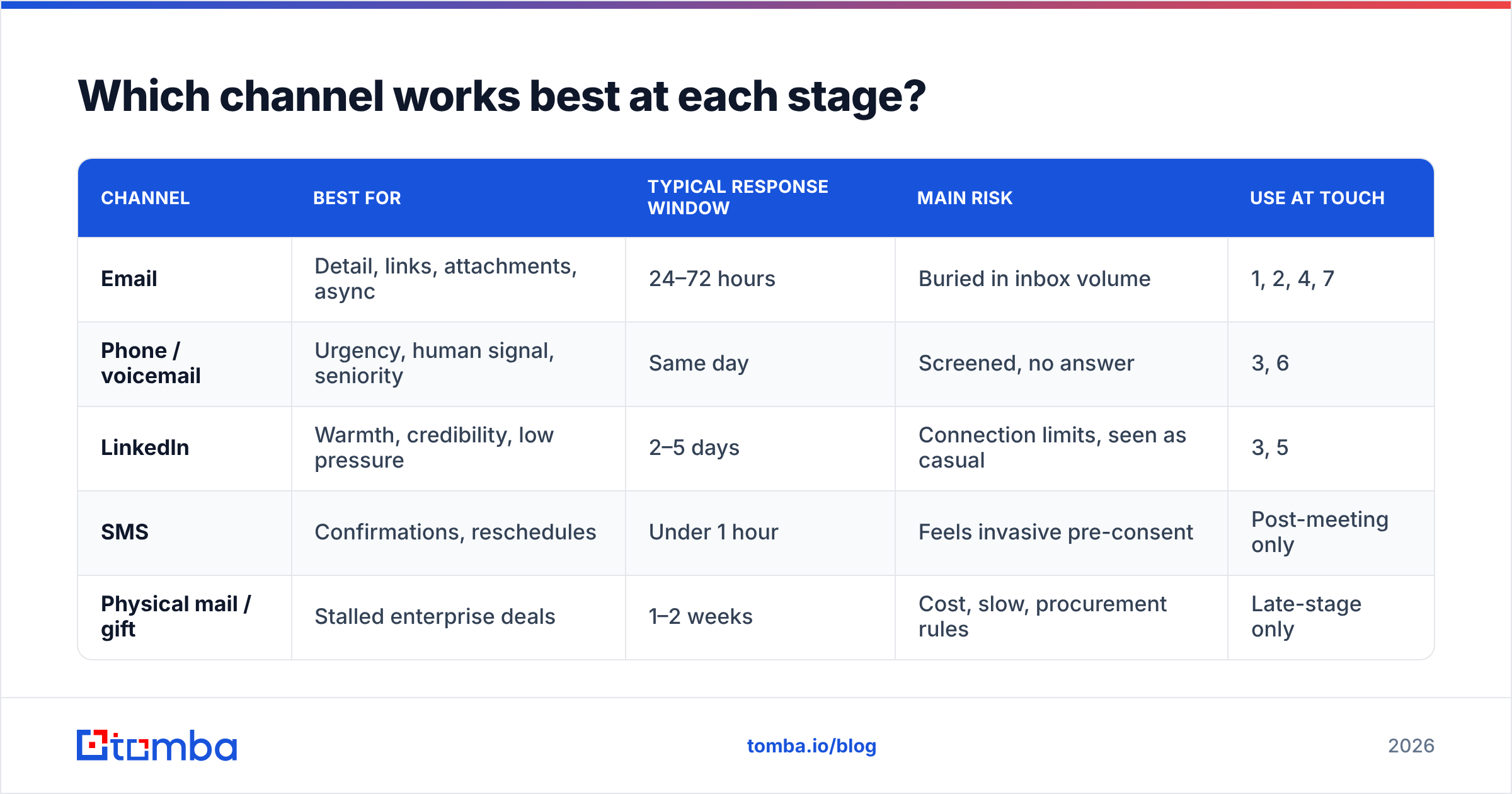
Every channel does one job well and the others badly. Match the job to the touch.
| Channel | Best for | Typical response window | Main risk | Use at touch |
|---|---|---|---|---|
| Detail, links, attachments, async | 24–72 hours | Buried in inbox volume | 1, 2, 4, 7 | |
| Phone / voicemail | Urgency, human signal, seniority | Same day | Screened, no answer | 3, 6 |
| Warmth, credibility, low pressure | 2–5 days | Connection limits, seen as casual | 3, 5 | |
| SMS | Confirmations, reschedules | Under 1 hour | Feels invasive pre-consent | Post-meeting only |
| Physical mail / gift | Stalled enterprise deals | 1–2 weeks | Cost, slow, procurement rules | Late-stage only |
The common mistake is running the whole cadence over email because it's the easiest to automate, then concluding that follow-up "doesn't work." A sequence that touches two channels typically outperforms email-only by a wide margin — not because phones are magic, but because a second channel proves a human is behind the messages.
HubSpot's sales blog and Gartner's sales research hub both publish ongoing data on multi-channel buyer engagement if you want to pressure-test your own cadence against broader benchmarks.
What if you don't have their direct contact details?#
This is where most follow-up plans quietly fail. You can write a perfect touch 4, but if it goes to info@company.com or a mailbox that was decommissioned last year, you get silence that looks exactly like rejection.
Three cases and what to do about each:
- You have the company but not the person. Run a domain search to pull the verified addresses on that domain, then pick the role that owns the problem you solve.
- You have the name but not the address. An email finder resolves first name, last name, and domain into a deliverable address, with a confidence score attached.
- You have an old list. Run it through an email verifier before the cadence starts. Contact data decays roughly 2–3% per month as people change jobs, which means a twelve-month-old list is already meaningfully wrong.
Verification matters more for follow-up than for the first touch, and this is counterintuitive. Bounces cluster: if touch 1 hard-bounces, touches 2 through 7 bounce too, and your sender reputation takes seven hits instead of one. Cleaning the list before the sequence starts is cheap insurance for your entire domain.
If you're building lists at volume, both Tomba and specialist database vendors like BookYourData are reasonable places to source verified B2B contacts — the former if you want find-and-verify tooling plus an API in one place, the latter if you prefer buying pre-built, filtered lists outright. They solve adjacent problems, and plenty of teams use both.
How many follow-ups is too many?#
The honest answer: you'll know from the reply mix, not from a rule.
Watch three signals. If your unsubscribe and spam-complaint rates stay flat as touch count rises, you have room. If negative replies ("stop emailing me") start outnumbering neutral ones, you've crossed the line. And if touch 6 and 7 still produce replies at a rate comparable to touch 2, stopping at four was leaving money on the table.
Some practical guardrails:
- Cap at 7–9 touches per sequence. Beyond that, returns collapse and brand damage starts.
- Wait 60–90 days before re-entering a prospect into a new sequence with a genuinely different angle.
- Never restart the same cadence with the same messages. Prospects remember, and it reads as a broken robot.
- Honor opt-outs instantly and permanently, across every channel — not just the one they replied on.
How do you tell whether the follow-up system is working?#
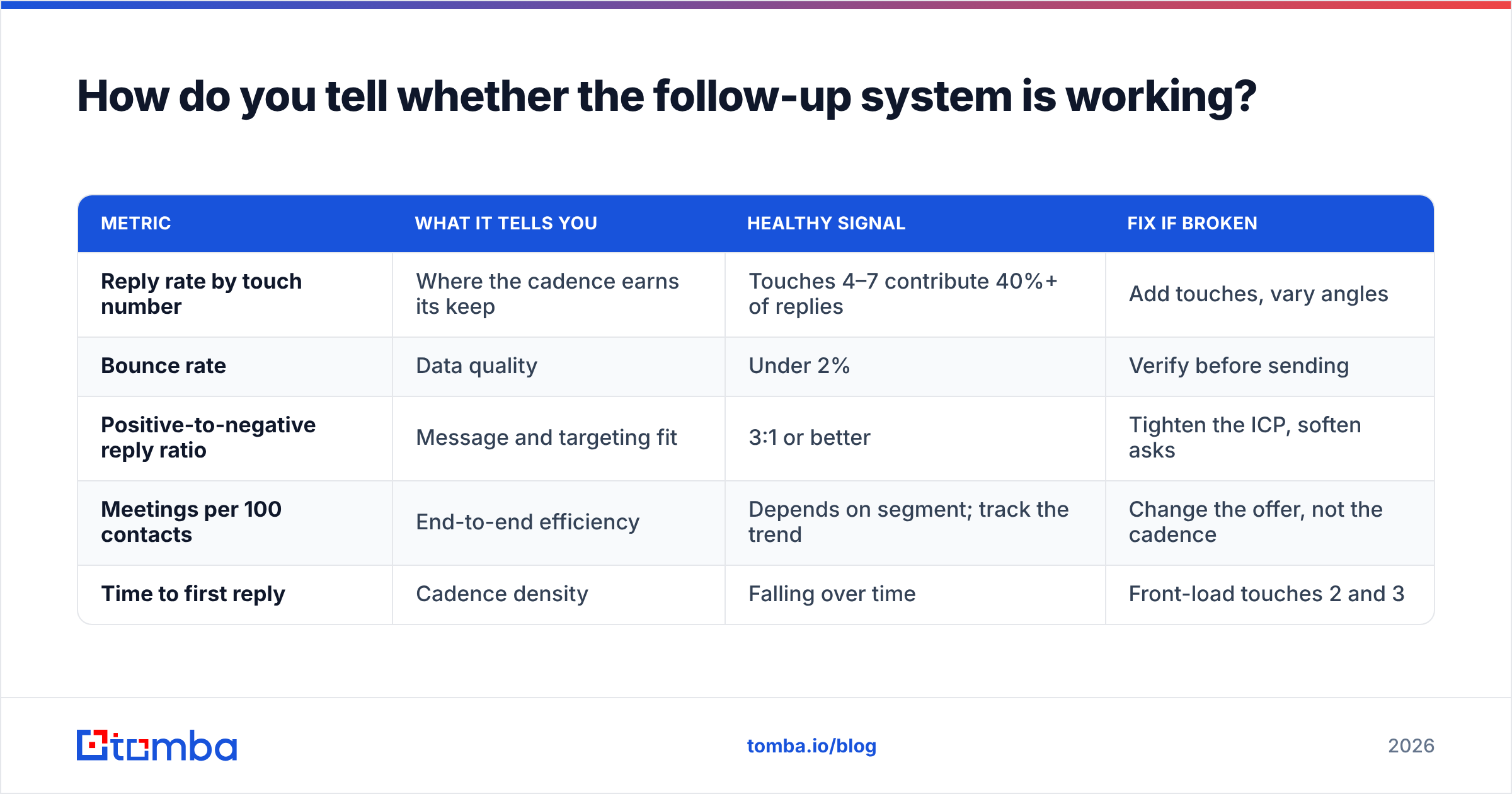
Measure per-touch, not per-campaign. An aggregate 4% reply rate hides everything useful.
| Metric | What it tells you | Healthy signal | Fix if broken |
|---|---|---|---|
| Reply rate by touch number | Where the cadence earns its keep | Touches 4–7 contribute 40%+ of replies | Add touches, vary angles |
| Bounce rate | Data quality | Under 2% | Verify before sending |
| Positive-to-negative reply ratio | Message and targeting fit | 3:1 or better | Tighten the ICP, soften asks |
| Meetings per 100 contacts | End-to-end efficiency | Depends on segment; track the trend | Change the offer, not the cadence |
| Time to first reply | Cadence density | Falling over time | Front-load touches 2 and 3 |
Track these in your CRM rather than a spreadsheet so the numbers survive rep turnover. If you're on HubSpot, a direct HubSpot integration keeps enriched contact records and sequence outcomes in the same place, which is the only way per-touch reporting stays honest month to month. Reviews on G2 are a reasonable sanity check when you're comparing sequencing platforms — filter by company size, since enterprise and SMB reviewers rate these tools very differently.
One last habit worth building: read your own losses. Once a quarter, pull ten closed-lost opportunities that never replied and ask what touch 5 would have said if you'd sent it. That exercise produces better cadence improvements than any template library.
Where should you start?#
Pick one segment, write the seven messages once, verify the contact list, and run it for 30 days without changing anything. Then read the per-touch numbers and cut or extend based on evidence rather than instinct. Follow-up is not a personality trait — it's a system, and systems can be measured.
The part most teams get wrong first is the data underneath the system, not the copy on top of it. If your follow-up sequence is landing on stale or guessed addresses, none of the timing advice above matters. Start with the Tomba Email Finder to build a verified contact base — the free tier gives you 25 searches a month to test the workflow, and paid plans start at $49/mo for Starter with Growth at $99/mo when you're ready to run cadences at volume. Get the addresses right, then let the seven touches do their job.
Related guides#
// get started
Find, verify and enrich your first contacts today
Start on the free plan with 25 searches a month, then scale when your team is ready.
Free plan · No credit card required · GDPR & CCPA
// about the author