How to Generate an Email List in 2026: 7 Proven Methods
Buying a list is the fastest way to burn a domain. Here are seven ways to generate an email list that actually converts — with real costs, deliverability risk, and a build-vs-buy verdict.
TL;DR
- There are two legitimate ways to generate an email list: collect opt-ins (slow, high intent, works for marketing email) and build a targeted prospect list (fast, cold, works for outbound sales). Mixing them is how domains get blocked.
- Bought lists are the worst option per dollar. Typical purchased B2B files bounce at 20-40%, and anything over ~3% starts damaging your sender reputation.
- The reliable outbound stack is: define ICP → source companies → find contacts by domain → verify → warm up → send. Skipping verification is the single most common failure.
- Budget roughly $0.01-$0.05 per verified B2B email if you build it yourself, versus $0.10-$0.50 per contact on data marketplaces with worse freshness.
- For opt-in lists, a single well-placed content upgrade usually outperforms a sitewide popup by 3-5x on conversion rate.
What does "generate an email list" actually mean?#
Two completely different jobs share one phrase, and conflating them is expensive.
Job 1 — Opt-in marketing list. People give you their address in exchange for something: a newsletter, a template, a discount, a webinar seat. You own the relationship, you can send broadcast campaigns, and you are covered under GDPR consent and CAN-SPAM. This list grows slowly and converts well.
Job 2 — Outbound prospect list. You identify companies that match your ideal customer profile, then find the work email of a specific decision-maker at each one. Nobody opted in. You send one-to-one style cold email under legitimate-interest (GDPR Art. 6(1)(f)) or CAN-SPAM rules, with clear identification and opt-out.
Everything below is organized around which job you're doing. If you try to run job-2 contacts through a job-1 tool — dumping 5,000 scraped emails into Mailchimp and blasting a newsletter — you will get suspended. That's not a warning, it's the documented policy of every major ESP.

How do the main methods compare on cost and risk?#
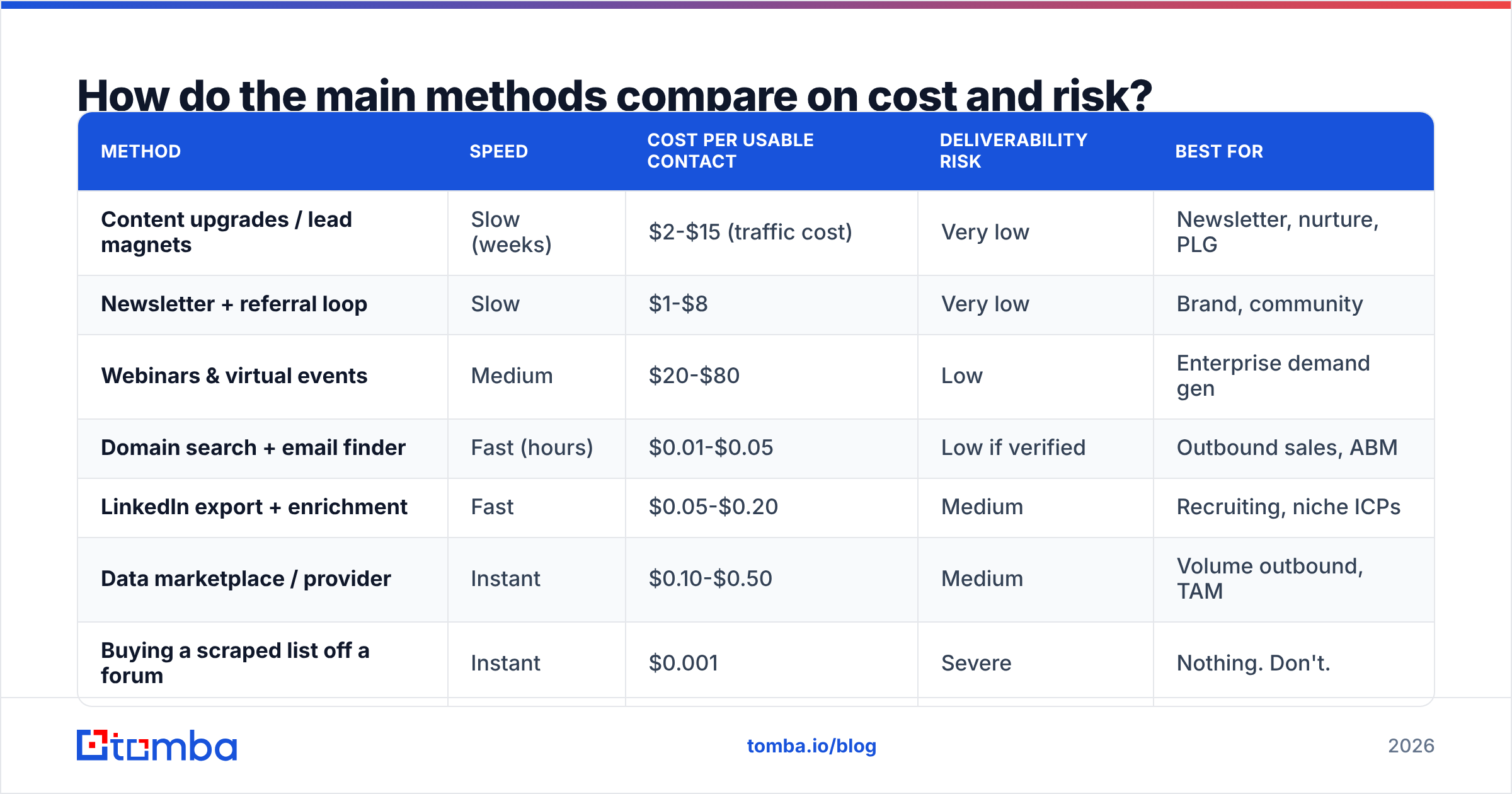
Here's the honest scoreboard. "Deliverability risk" means the chance the method damages your sending domain.
| Method | Speed | Cost per usable contact | Deliverability risk | Best for |
|---|---|---|---|---|
| Content upgrades / lead magnets | Slow (weeks) | $2-$15 (traffic cost) | Very low | Newsletter, nurture, PLG |
| Newsletter + referral loop | Slow | $1-$8 | Very low | Brand, community |
| Webinars & virtual events | Medium | $20-$80 | Low | Enterprise demand gen |
| Domain search + email finder | Fast (hours) | $0.01-$0.05 | Low if verified | Outbound sales, ABM |
| LinkedIn export + enrichment | Fast | $0.05-$0.20 | Medium | Recruiting, niche ICPs |
| Data marketplace / provider | Instant | $0.10-$0.50 | Medium | Volume outbound, TAM |
| Buying a scraped list off a forum | Instant | $0.001 | Severe | Nothing. Don't. |
The bottom row exists because people keep trying it. A $200 "5 million B2B contacts" file is recycled scrape data, often years stale, seeded with spam traps. One send to it can put your domain on Spamhaus and cost you months of recovery.
How do you build an opt-in list that actually grows?#
Start with placement, not volume. The highest-converting email capture on most B2B sites isn't a popup — it's a content upgrade: an asset that only makes sense to someone who read that specific page.
- Pick your five highest-traffic pages. Check analytics, sort by organic sessions, ignore the homepage.
- Build one asset per page. A pricing calculator on the pricing post. A swipe file on the templates post. Not a generic "ultimate guide" PDF.
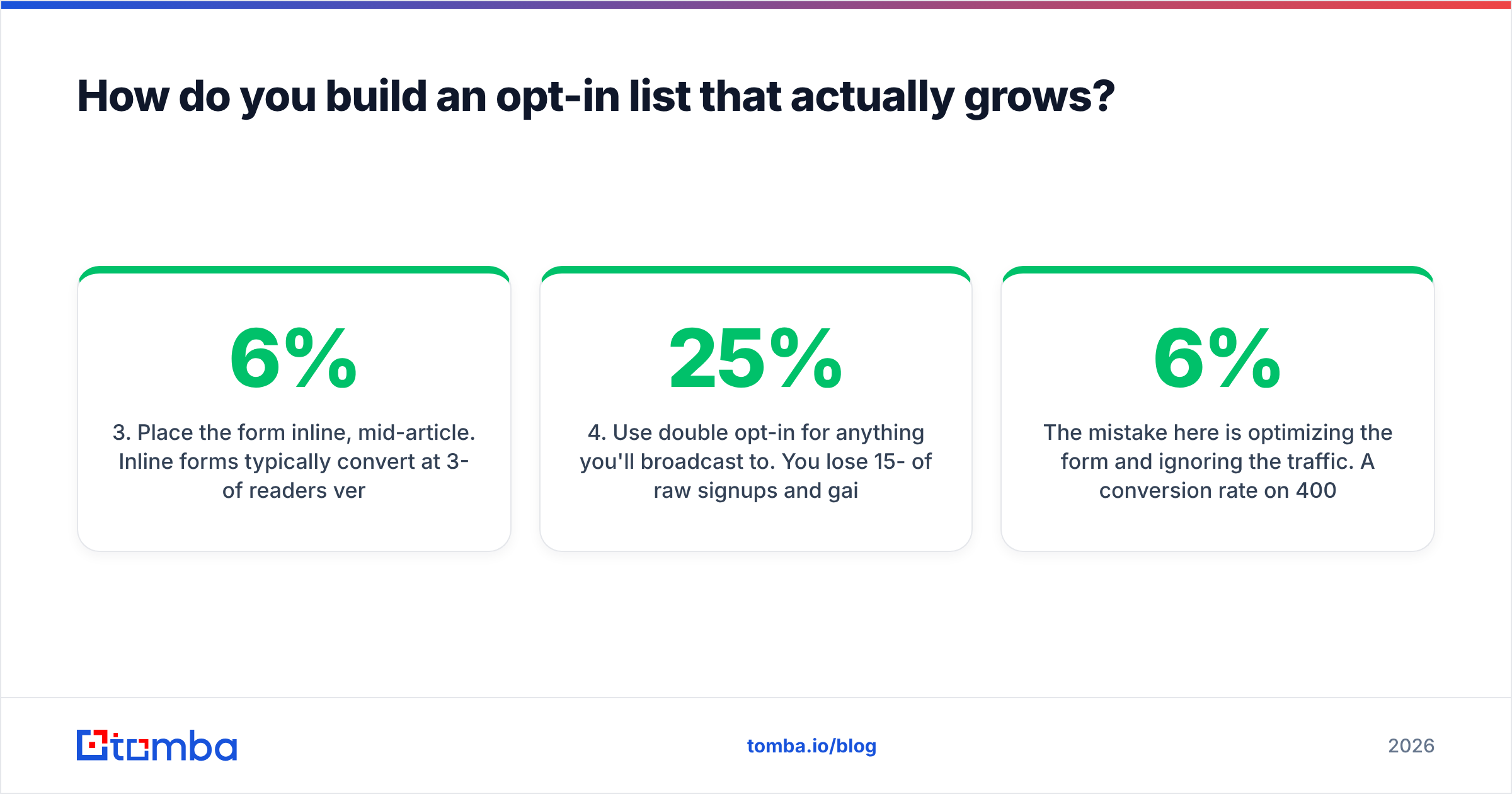
- Place the form inline, mid-article. Inline forms typically convert at 3-6% of readers versus 1-2% for sitewide exit popups, because the ask matches the intent.
- Use double opt-in for anything you'll broadcast to. You lose 15-25% of raw signups and gain a list that doesn't bounce. Gmail and Yahoo's 2024 bulk-sender rules made this non-optional at scale — see Google's sender guidelines for the current thresholds.
- Add a referral mechanic once you're past 1,000 subscribers. Below that, there aren't enough sharers for the loop to compound.
- Re-permission every 12 months. Segment out anyone with zero opens in a year, send one reactivation email, then suppress. Dead weight drags your whole domain down.
The mistake here is optimizing the form and ignoring the traffic. A 6% conversion rate on 400 monthly visitors is 24 subscribers. Fix the traffic first.
How do you build a targeted outbound list from scratch?#
This is the part most "how to generate an email list" guides skip, and it's where B2B revenue actually comes from. The workflow has five stages.
Stage 1 — Define the ICP in filters, not adjectives. "Mid-market SaaS companies" is useless. "US-based, 50-250 employees, uses HubSpot, hired a demand-gen role in the last 90 days" is a query you can run. Write down 4-6 hard filters.
Stage 2 — Source the company list. Pull from job boards (hiring signals), G2 category pages, conference exhibitor lists, funding announcements, or your existing customers' lookalikes. You want domains, not contacts, at this stage. Aim for 200-500 companies before you touch contact data — it's cheaper to cut companies than to cut contacts you already paid for.
Stage 3 — Find the people. For each domain, you need the right role and their work email. A domain search returns every known address at a company with its role and department, which is faster than guessing names first. If you already have first name + last name + domain, an email finder resolves the specific address. For lists that came out of LinkedIn, a LinkedIn finder maps profiles to work emails.
Stage 4 — Verify before you send. Non-negotiable. Run every address through an email verifier and drop anything that isn't valid. Catch-all domains need their own treatment — a catch-all verifier tells you whether an accept-all server is actually routing mail to a real mailbox, which a standard SMTP check can't.
Stage 5 — Warm the sending infrastructure. New domain, new inbox, 2-4 weeks of warmup before volume. Authenticate SPF, DKIM, and DMARC first. Poor email deliverability will waste a perfect list.
Why does verification matter so much?#
Because bounce rate is a reputation signal, not a vanity metric.
Mailbox providers treat hard bounces as evidence that you don't know who you're mailing. Industry guidance across ESPs converges on the same threshold: keep hard bounces under 2-3%. Above that, inbox placement degrades for your entire domain, including the transactional email your product depends on.
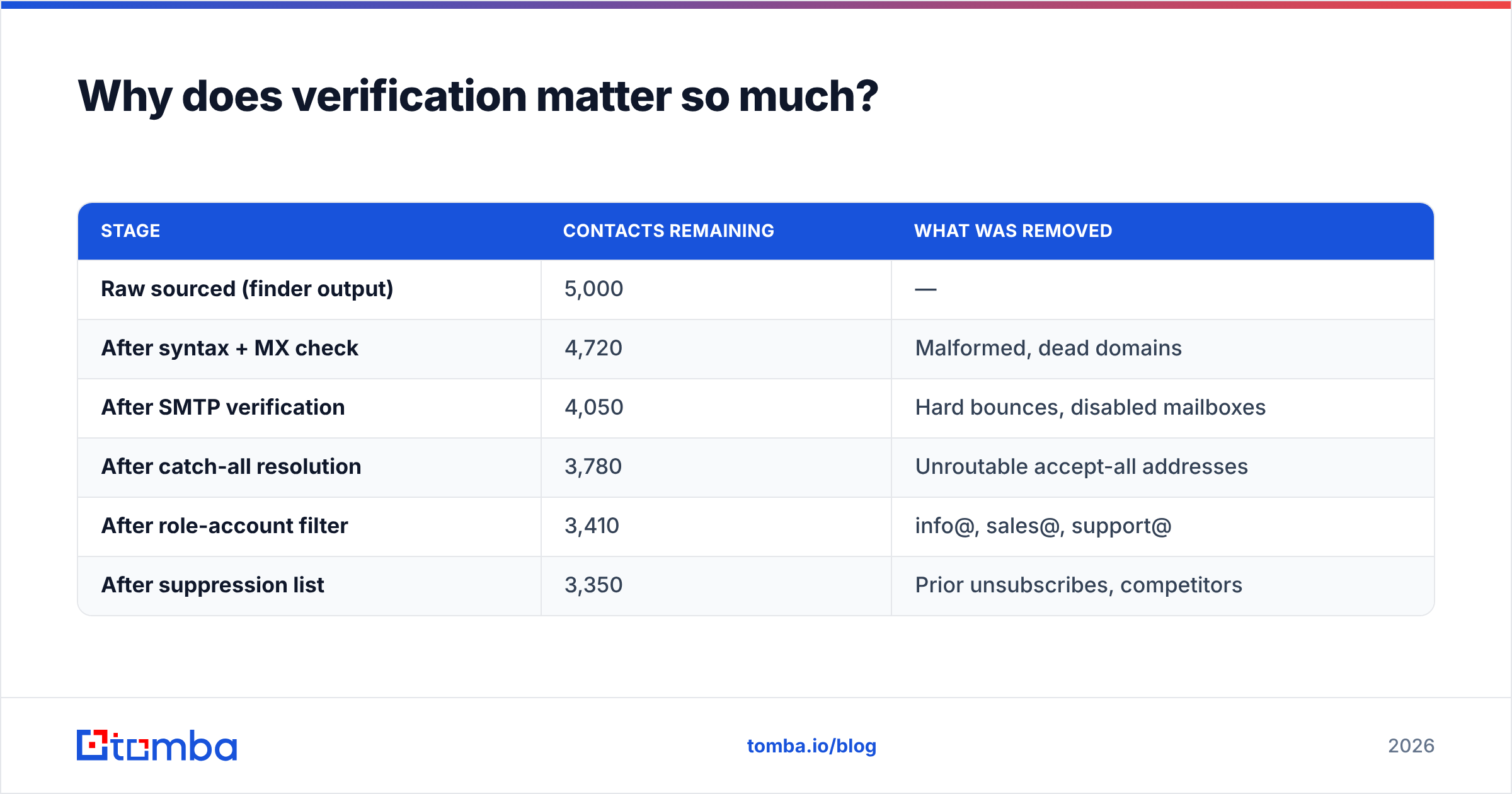
Here's what happens to a typical 5,000-contact list at each stage:
| Stage | Contacts remaining | What was removed |
|---|---|---|
| Raw sourced (finder output) | 5,000 | — |
| After syntax + MX check | 4,720 | Malformed, dead domains |
| After SMTP verification | 4,050 | Hard bounces, disabled mailboxes |
| After catch-all resolution | 3,780 | Unroutable accept-all addresses |
| After role-account filter | 3,410 | info@, sales@, support@ |
| After suppression list | 3,350 | Prior unsubscribes, competitors |
You lose a third. That's normal and correct — those 1,650 addresses were going to bounce, land in spam, or annoy someone. Paying to remove them is cheaper than paying with your domain reputation.
A note on data freshness: B2B contact data decays at roughly 22-30% per year through job changes alone, a figure consistently cited in Gartner and Forrester research on data quality. A list you built in January is meaningfully worse in December. Re-verify before every major campaign, not once at purchase.
Should you build the list or buy it?#
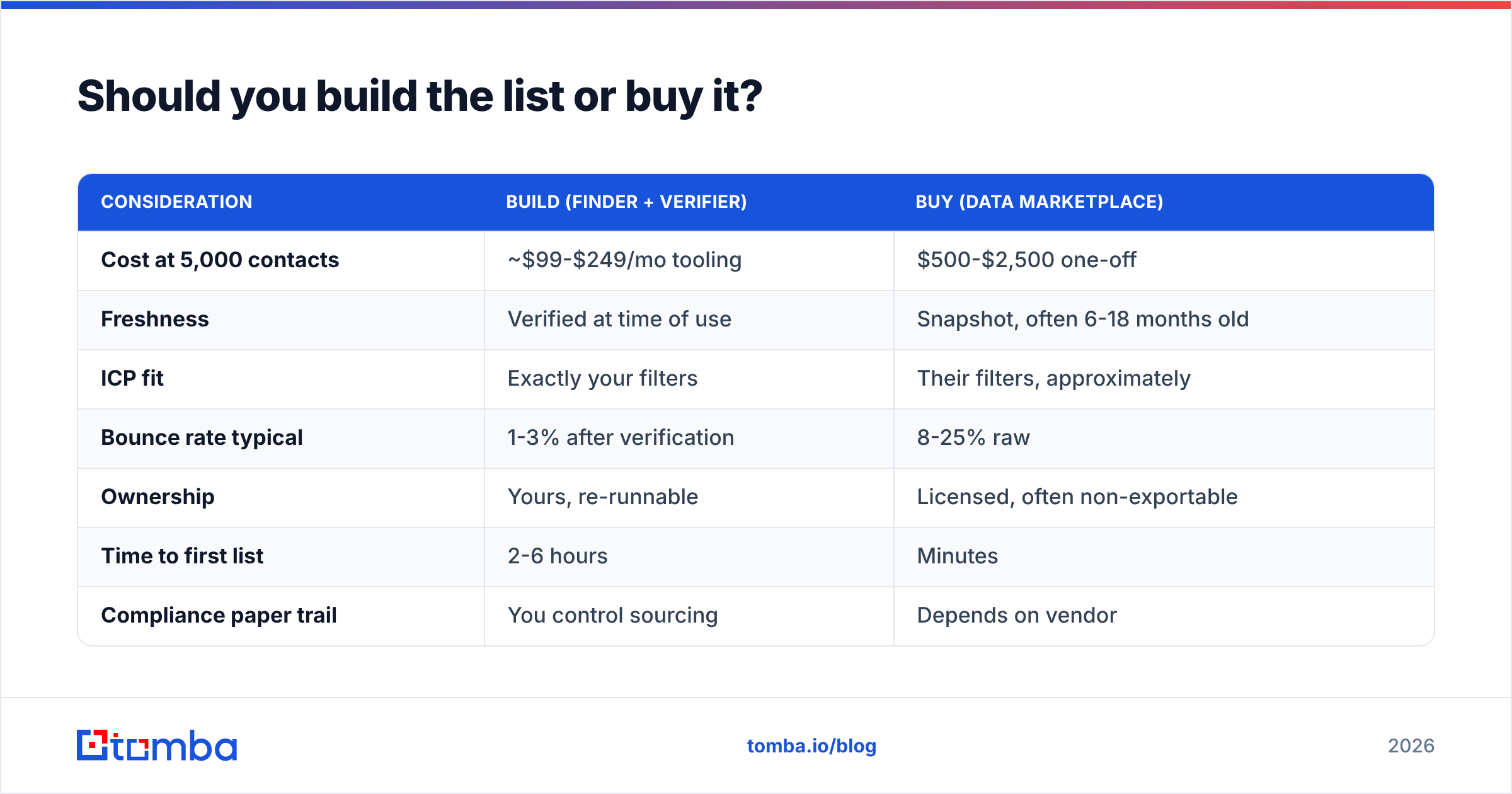
Build for precision, buy for coverage. Most teams need both, in that order.
| Consideration | Build (finder + verifier) | Buy (data marketplace) |
|---|---|---|
| Cost at 5,000 contacts | ~$99-$249/mo tooling | $500-$2,500 one-off |
| Freshness | Verified at time of use | Snapshot, often 6-18 months old |
| ICP fit | Exactly your filters | Their filters, approximately |
| Bounce rate typical | 1-3% after verification | 8-25% raw |
| Ownership | Yours, re-runnable | Licensed, often non-exportable |
| Time to first list | 2-6 hours | Minutes |
| Compliance paper trail | You control sourcing | Depends on vendor |
Providers worth knowing in the buy column: BookYourData sells pay-as-you-go B2B lists with a bounce guarantee and is a reasonable option when you need coverage in a vertical you can't source yourself. Apollo and ZoomInfo sit at the platform end — broad databases bundled with sequencing, priced accordingly. Compare current options on G2 rather than trusting any vendor's own comparison page, this one included.
The build path costs less per contact and gives you a repeatable process. Tomba pricing starts with a free tier at 25 searches/month, then Starter at $49/mo, Growth at $99/mo, and Pro at $249/mo — which at Growth volume works out to a few cents per verified contact. If you need lists in bulk, the bulk email finder processes CSVs rather than one lookup at a time.
How do you generate a list at scale without manual work?#
Once the manual process works, automate it. The shape is always the same: a trigger fires, a company enters the pipeline, contacts get found and verified, clean records land in the CRM.
- Spreadsheet-native. Paste domains into a sheet, use the Google Sheets add-on or Excel add-in to fill in contacts and verification status. Fine up to a few thousand rows.
- No-code pipeline. A Zapier integration or Make scenario watching a source (new funding round, new job post, form fill) that enriches and pushes into your CRM. Good for signal-based outbound.
- Direct to CRM. The HubSpot integration enriches contacts as they're created, so reps never work a record with a missing or stale email.
- API. For product-embedded or high-volume use, the Tomba API handles finder, verifier, and enrichment calls programmatically. This is the path if list generation is part of your product, not just your GTM.
- Website visitors. Visitor identification turns anonymous traffic on your pricing page into named companies you can then run through the same finder-verifier pipeline. Highest-intent source you have, and most teams ignore it.
Whichever route you pick, keep the verification step inside the automation. The most common scaling failure is automating discovery and leaving verification as a manual step that someone eventually skips.
What are the legal limits you need to respect?#
Short version: consent rules differ by jurisdiction, and "everyone does it" is not a defense.
- GDPR (EU/UK). B2B cold email can be sent under legitimate interest, but you must be able to document the interest, offer opt-out in every message, and honor deletion requests. Consumer addresses need actual consent. Individual member states vary — Germany and Italy are stricter than Ireland or the Netherlands.
- CAN-SPAM (US). No prior consent required, but you must identify yourself, include a physical postal address, avoid deceptive subject lines, and process unsubscribes within 10 business days.
- CASL (Canada). Consent-based and strict. Implied consent exists for published business addresses relevant to the recipient's role, with a shelf life.
- Everywhere. Maintain a global suppression list. Honor unsubscribes across all campaigns and all sending domains, not just the one that received the request.
Document where each contact came from. If a regulator or a large prospect asks, "we bought a file" is a bad answer and "we sourced it from the company's public domain records on this date" is a fine one.
What's the fastest path from zero to a working list?#
If you have a defined ICP and need contacts this week:
- Build a list of 250 target company domains from a signal source (hiring, funding, tech stack).
- Run domain search across all 250 to pull contacts by department.
- Filter to the 1-2 correct roles per company. Drop role accounts.
- Verify everything. Drop non-valid and unresolved catch-alls.
- Split into batches of 50 per inbox per day across warmed domains.
- Track bounce rate on batch one before sending batch two. Above 3%, stop and re-verify.
That's a 300-500 contact working list in an afternoon, with a bounce rate low enough that your domain survives it.
Ready to build a list that doesn't bounce?#
The method matters less than the verification step — but the method determines how targeted your list is, and targeting determines reply rate. Start with the Tomba Email Finder to turn a list of target companies into verified, role-matched contacts. The free tier gives you 25 searches to test accuracy against your own ICP before you commit to a plan, and every result runs through verification before it reaches your CSV. Build the list once, verify it before every send, and stop renting other people's stale data.
Related guides#
// get started
Find, verify and enrich your first contacts today
Start on the free plan with 25 searches a month, then scale when your team is ready.
Free plan · No credit card required · GDPR & CCPA
// about the author