How to Generate Leads for Software Sales: 2026 Playbook
Software buyers ignore 97% of cold outreach. Here are the seven lead sources that still convert for SaaS teams in 2026, ranked by cost per meeting and speed to first reply.
TL;DR
- Software lead generation in 2026 is a distribution problem, not a volume problem. The teams winning are running 4-6 narrow channels instead of one wide one.
- Cost per booked meeting ranges from roughly $45 (outbound to a well-researched list) to $900+ (paid search on high-intent SaaS keywords). Know your number before you scale anything.
- Contact data quality is the single biggest lever on outbound ROI. A 12% bounce rate does more damage to your pipeline than bad copy ever will.
- Product-led signals — free-trial signups, docs visitors, integration page views — outperform firmographic lists on every metric except volume.
- Pick two channels, instrument them properly for 90 days, then add a third. Running seven half-configured channels is how software teams end up with a full CRM and an empty pipeline.
Why is generating leads for software sales harder than it used to be?#
Because the buyer got there first. Gartner's B2B buying research has consistently found that buyers spend only a small slice of the purchase cycle with any single vendor's sales rep — most of the journey happens in independent research, peer conversations, and vendor websites before anyone fills out a form. By the time a software buyer talks to you, they've usually shortlisted three competitors and read your G2 reviews.
Three structural changes hit software lead generation between 2023 and 2026:
- Inbox filtering got aggressive. Google and Yahoo's 2024 bulk-sender requirements — authentication, one-click unsubscribe, and a spam-complaint threshold under 0.3% — knocked out the spray-and-pray outbound that used to fund early-stage SaaS pipeline.
- Buying committees grew. A mid-market software purchase now routinely involves 6-10 stakeholders including security, finance, and a data-privacy reviewer. One champion is no longer enough.
- AI-generated outreach flooded the channel. Everyone got the same tooling at the same time, so generic personalization ("I saw you're the VP of Sales at [Company]") now reads as automated noise.
None of that means outbound is dead. It means the margin moved from volume to precision — better targeting, cleaner data, sharper reason-to-reach-out.
What are the seven lead sources that actually work for software sales?#
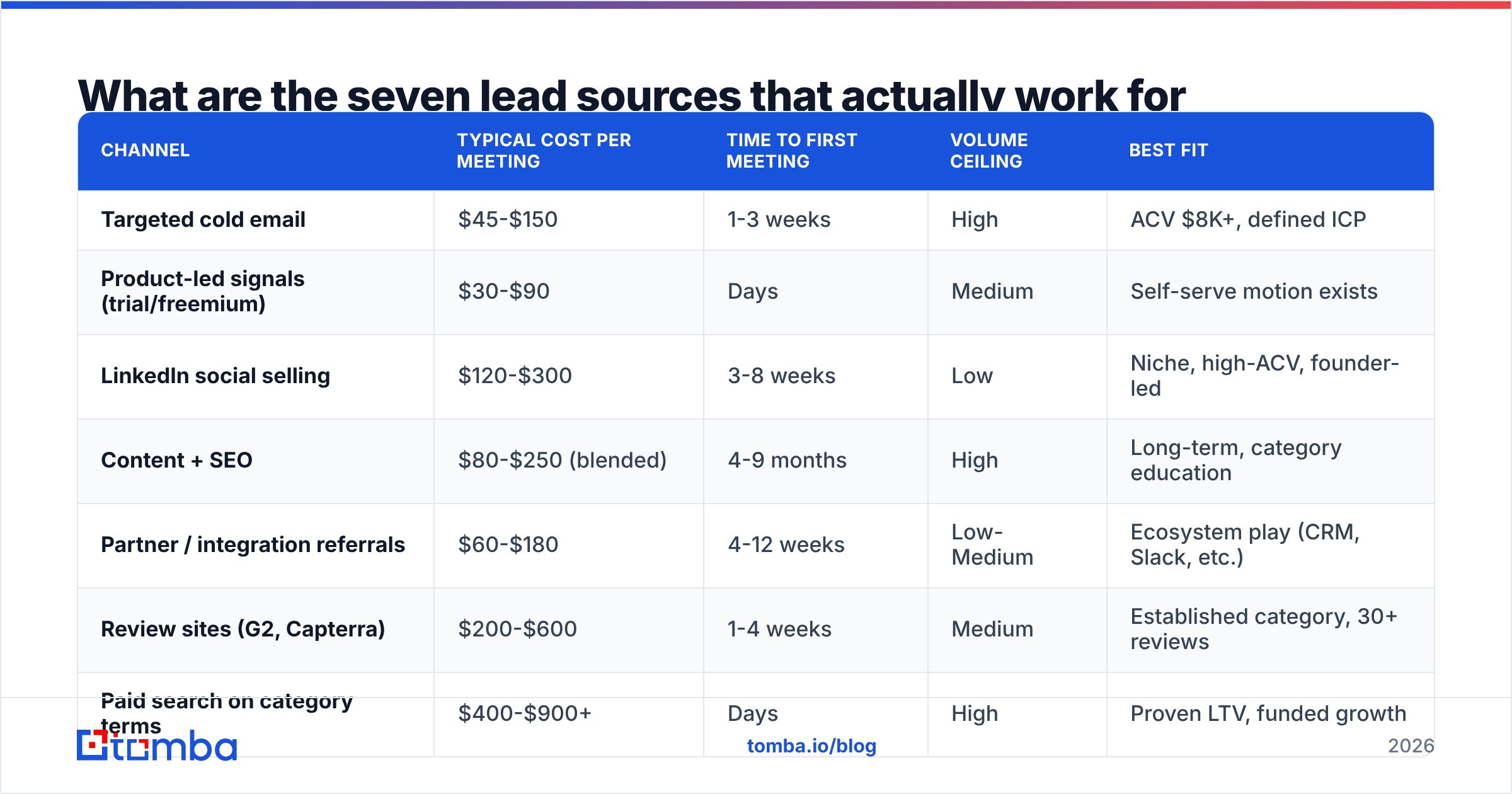
Here's the honest ranking. Costs are directional benchmarks from mid-market SaaS teams ($10K-$60K ACV) — your numbers will move with market and motion.
| Channel | Typical cost per meeting | Time to first meeting | Volume ceiling | Best fit |
|---|---|---|---|---|
| Targeted cold email | $45-$150 | 1-3 weeks | High | ACV $8K+, defined ICP |
| Product-led signals (trial/freemium) | $30-$90 | Days | Medium | Self-serve motion exists |
| LinkedIn social selling | $120-$300 | 3-8 weeks | Low | Niche, high-ACV, founder-led |
| Content + SEO | $80-$250 (blended) | 4-9 months | High | Long-term, category education |
| Partner / integration referrals | $60-$180 | 4-12 weeks | Low-Medium | Ecosystem play (CRM, Slack, etc.) |
| Review sites (G2, Capterra) | $200-$600 | 1-4 weeks | Medium | Established category, 30+ reviews |
| Paid search on category terms | $400-$900+ | Days | High | Proven LTV, funded growth |
Two things stand out. First, the cheapest channels — outbound and PLG signals — are also the ones most dependent on execution quality. Second, the fastest channels are not the cheapest. Paid search books meetings this week and drains budget by Friday.
The strategic read: use one fast channel to learn what messaging works, and one slow channel to compound. Most software teams that hit predictable pipeline run outbound plus content, then layer partners once the ICP is provably tight.
How do you build a prospect list that doesn't bounce?#
Start with the account, not the person. Software sales lists built from job title alone produce garbage; lists built from account-fit signals then filtered by role produce meetings.
A workable sequence:
- Define the trigger, not the persona. "Series B fintech that just posted a Head of Compliance role" beats "VP Ops at any SaaS company." Triggers include funding rounds, hiring signals, tech-stack changes, leadership moves, and product launches.
- Build the account list from a source that reflects the trigger. Job boards, funding databases, and tech-stack detection give you accounts. A website tech stack check tells you whether a company already runs a competing tool.
- Map the buying committee per account. Three to five contacts: the economic buyer, the day-to-day user, and one technical evaluator. Software deals stall when you only reach one of the three.
- Find and verify contact data. This is where most lists die. Use a domain search to pull known addresses at the account, then run everything through an email verifier before it touches your sending tool.
- Enrich with context, not just fields. A job title is not a reason to write. Recent posts, conference talks, changelog entries, and open roles are.
- Suppress aggressively. Existing customers, open opportunities, churned accounts, and anyone who unsubscribed. One bad send to a current customer costs more than fifty missed prospects.
On step four: verification is not optional in 2026. Google's bulk-sender rules mean a domain that repeatedly hits invalid addresses gets throttled quietly — you don't get a bounce message, you get silence. A 3% bounce ceiling is the working standard; under 2% is where healthy programs sit.

Catch-all domains complicate this. Roughly a third of B2B domains accept mail to any address, which means a standard SMTP check returns "unknown" rather than valid or invalid. A catch-all verifier resolves a meaningful share of those instead of forcing you to either dump them or risk them.
Which email-finding tool should a software sales team use?#
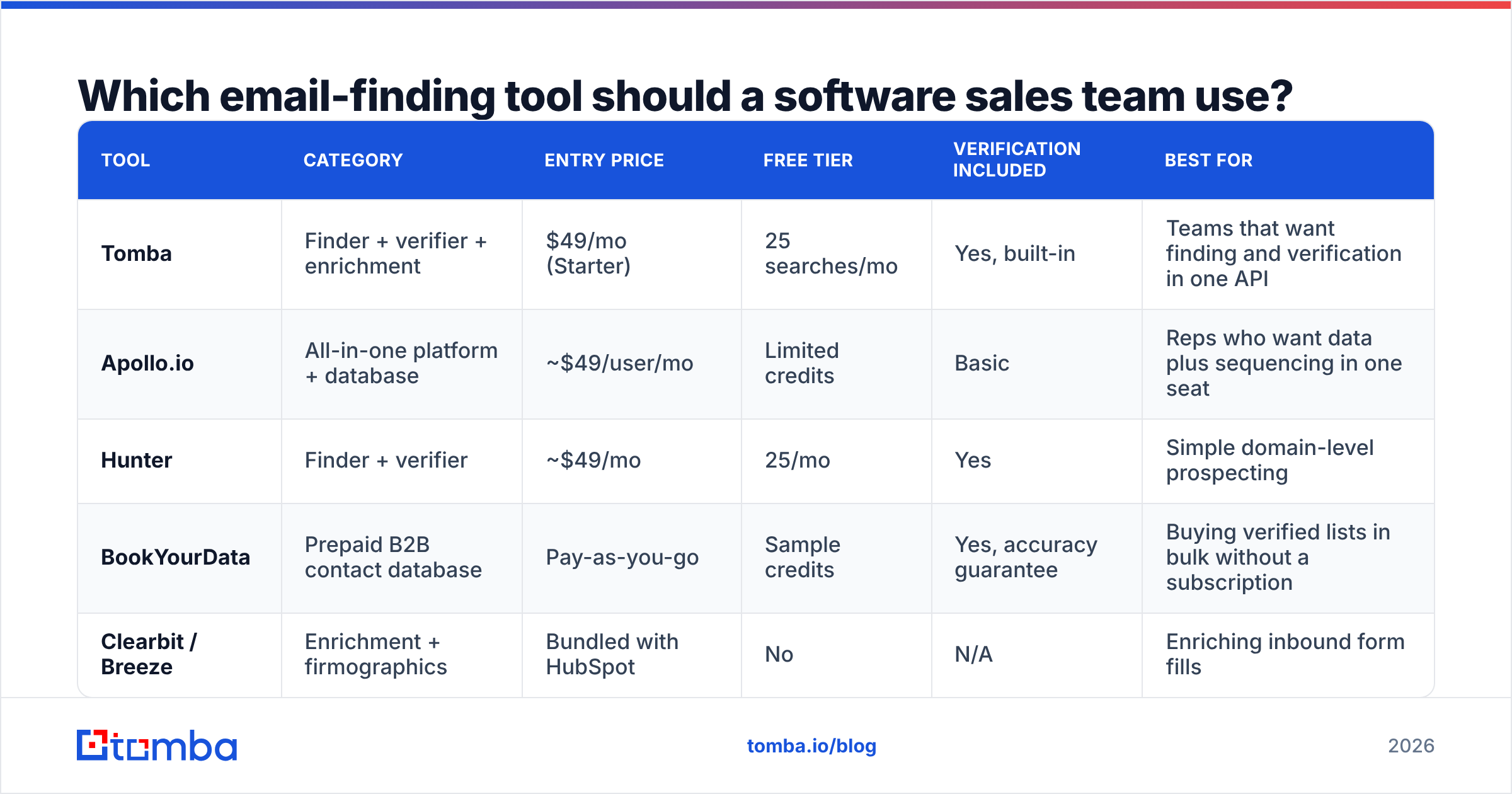
The market splits into three shapes: all-in-one sales platforms with bundled data, dedicated finder/verifier tools, and pure database vendors. They solve different problems and price very differently.
| Tool | Category | Entry price | Free tier | Verification included | Best for |
|---|---|---|---|---|---|
| Tomba | Finder + verifier + enrichment | $49/mo (Starter) | 25 searches/mo | Yes, built-in | Teams that want finding and verification in one API |
| Apollo.io | All-in-one platform + database | ~$49/user/mo | Limited credits | Basic | Reps who want data plus sequencing in one seat |
| Hunter | Finder + verifier | ~$49/mo | 25/mo | Yes | Simple domain-level prospecting |
| BookYourData | Prepaid B2B contact database | Pay-as-you-go | Sample credits | Yes, accuracy guarantee | Buying verified lists in bulk without a subscription |
| Clearbit / Breeze | Enrichment + firmographics | Bundled with HubSpot | No | N/A | Enriching inbound form fills |
A few honest distinctions. Apollo's strength is that data and sequencing live in one seat — for a small team that matters more than marginal accuracy. BookYourData works differently from the subscription tools: you buy credits, filter a database, and export, which suits teams that need a list once a quarter rather than continuous discovery. Tomba's angle is the API and integration surface — Tomba pricing starts at $49/mo for Starter, $99/mo for Growth, and $249/mo for Pro, with the same finder, verifier, and enrichment endpoints available across plans rather than gated behind tiers.

The practical test: run 100 known-good contacts through any tool you're evaluating and measure hit rate and bounce rate against your own data. Vendor-published accuracy numbers are measured on vendor-chosen samples. Yours won't match.
If your workflow lives in spreadsheets rather than a CRM, a Google Sheets add-on or the Tomba API removes the export-import loop entirely — you enrich in place and the list never goes stale in a CSV on someone's desktop.
How do you turn product-led signals into sales leads?#
If you have a free trial or freemium tier, your best leads are already in your database and nobody is calling them.
The mechanics:
- Score on behavior, not demographics. A user who invited two teammates and hit an API rate limit is worth ten who match your ICP on paper. Weight activation events — first successful action, second user added, integration connected — above company size.
- Identify anonymous traffic. Docs pages, pricing pages, and integration pages get visited by evaluators who never sign up. Website visitor reveal turns a share of that traffic into named accounts you can route.
- Set a handoff threshold and honor it. Define what makes a product-qualified lead — say, 3+ activation events within 14 days at a company with 50+ employees — and route it to a rep within an hour. Speed-to-lead research consistently shows response inside five minutes dramatically outperforms an hour.
- Reach the buyer, not just the user. The engineer who signed up for your trial rarely holds budget. Map upward: find the VP or department head at the same domain, reference the trial, and open with the team's actual usage.
That last step is where an email finder earns its keep. You have the domain from the signup email; you need the two people above the user who will sign the contract.

What does a cold outreach sequence for software look like in 2026?#
Short, specific, and built around one testable hypothesis about the account's problem. Structure that holds up:
- Email 1 (day 0): 60-90 words. One observed trigger, one consequence, one question. No calendar link.
- Email 2 (day 3): A relevant proof point — a customer in the same segment with a specific number. Still no pitch deck.
- LinkedIn touch (day 5): Connection request with zero pitch, or a comment on something they actually posted.
- Email 3 (day 8): Reframe. Offer a different angle on the problem in case the first one missed.
- Email 4 (day 15): Permission close. "Should I close the file on this?" — still the highest reply-rate line in B2B, mostly because it's honest.
Volume discipline matters more than the copy. Keep sends under 50 per mailbox per day, run dedicated sending domains separate from your corporate domain, and confirm your SPF record and DMARC alignment before the first send. A spam checker run on your template catches the obvious triggers — link-heavy bodies, tracking pixels on cold sends, spam-flagged phrases.
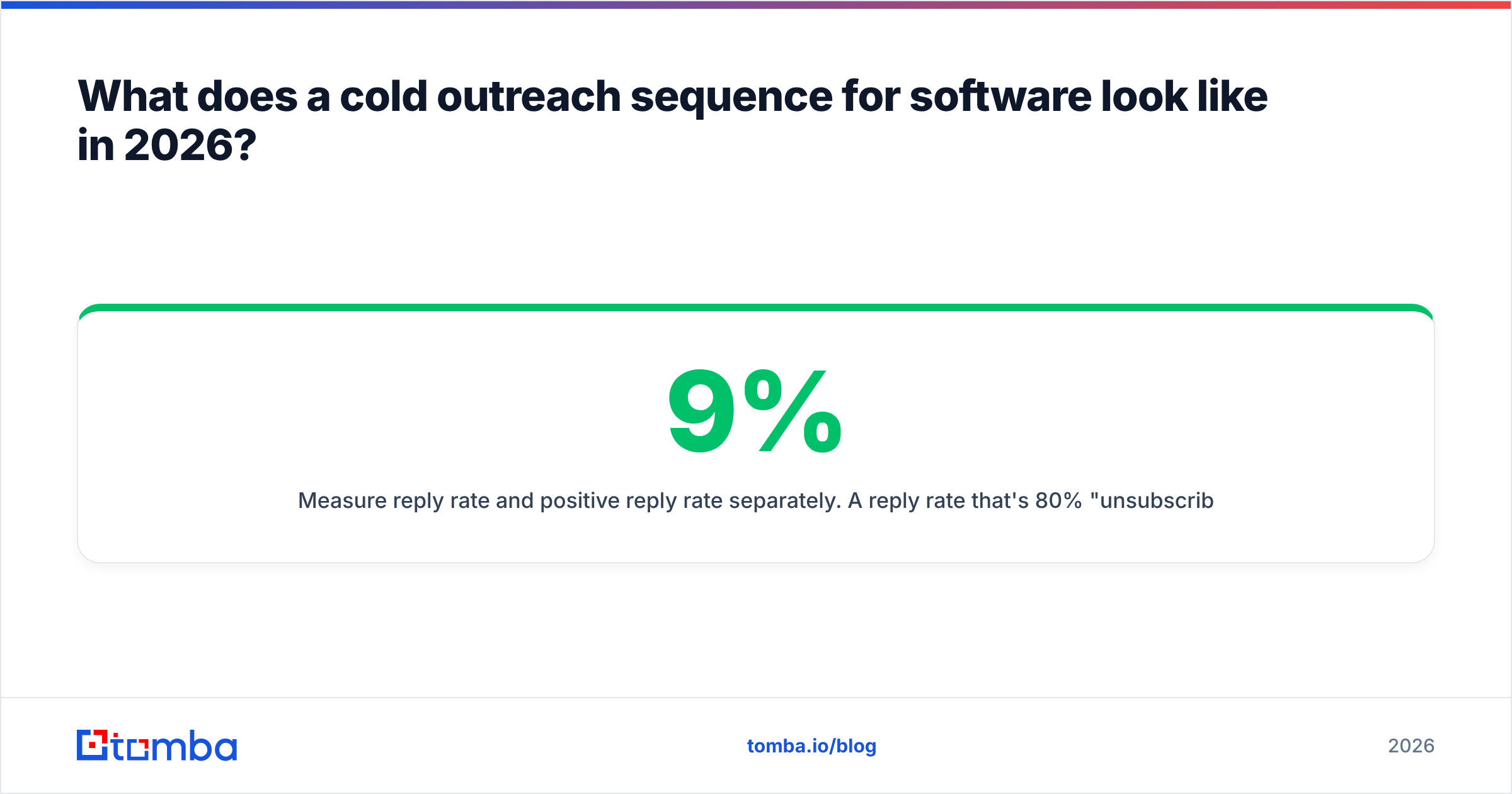
Measure reply rate and positive reply rate separately. A 9% reply rate that's 80% "unsubscribe" is a worse result than 4% that's half meetings. Track your response rate by segment, not in aggregate, or you'll optimize toward the wrong ICP.
How should you allocate budget across channels?#
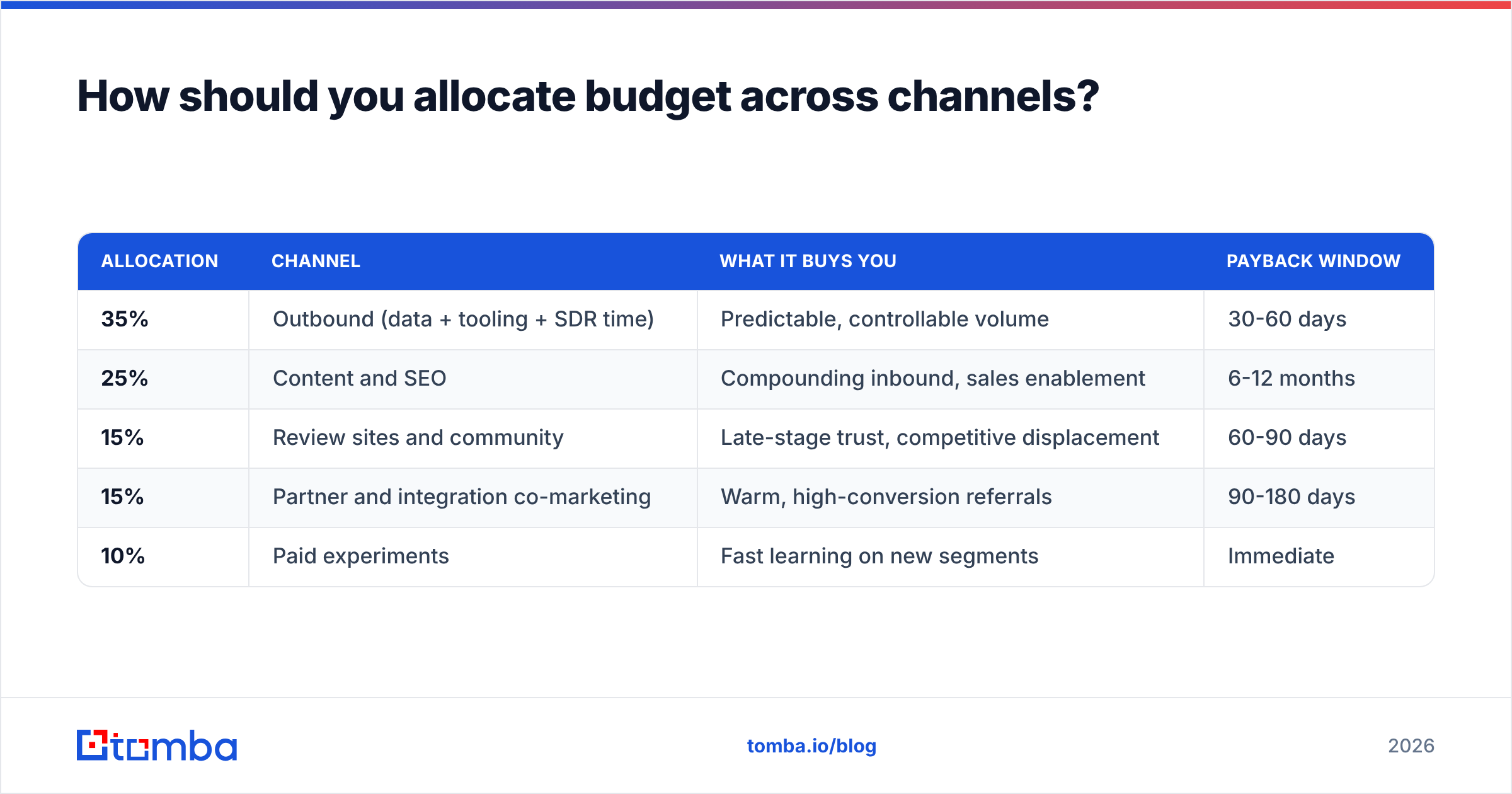
A defensible starting split for a software team doing $2M-$10M ARR:
| Allocation | Channel | What it buys you | Payback window |
|---|---|---|---|
| 35% | Outbound (data + tooling + SDR time) | Predictable, controllable volume | 30-60 days |
| 25% | Content and SEO | Compounding inbound, sales enablement | 6-12 months |
| 15% | Review sites and community | Late-stage trust, competitive displacement | 60-90 days |
| 15% | Partner and integration co-marketing | Warm, high-conversion referrals | 90-180 days |
| 10% | Paid experiments | Fast learning on new segments | Immediate |
The 10% experiment budget is the part teams skip and later regret. It's what lets you test a new vertical without renegotiating the whole plan.
One rule: don't add a channel until the previous one has 90 days of clean attribution. Software teams routinely run six channels badly because each one looked promising in month one. Two channels executed well beat six executed at 40%.
For benchmarking your own numbers against the market, G2's software buyer behavior research and HubSpot's annual State of Sales data are both free and reasonably rigorous — use them as directional context, not targets.
What should you stop doing?#
- Buying unverified bulk lists. The math never works once you account for domain damage. If you buy data, buy from a vendor that verifies and stands behind it.
- Personalizing at the wrong layer. Mentioning someone's alma mater is not personalization. Mentioning that they just opened three SRE roles is.
- Sending from your primary domain. One aggressive campaign can cost you internal email deliverability for weeks.
- Treating MQLs as pipeline. An ebook download is not intent. Score on behavior that correlates with closed-won in your own historical data.
- Chasing volume before the ICP is proven. Scaling a 1.2% reply rate just produces more of the same disappointment at higher cost.
Where does data quality fit in all of this?#
It's the floor everything else stands on. Your sequence copy, your channel mix, your SDR headcount — all of it multiplies against contact accuracy. A 15% invalid rate doesn't cost you 15% of results; it costs you that plus the deliverability damage plus the rep hours spent on dead records plus the CRM pollution that corrupts next quarter's reporting.
Set three internal standards and hold to them:
- Bounce rate under 3%, measured weekly per sending domain.
- Every record verified within 90 days of use — B2B contact data decays at roughly 25-30% per year as people change jobs.
- Catch-all domains handled explicitly, not silently dropped or blindly sent to.
If you're processing volume, a bulk email finder run before each campaign is faster than fixing the damage afterward. For ongoing enrichment, data enrichment that runs on a schedule keeps your CRM from quietly rotting between quarters.
Getting started this week#
Pick one account list of 100 companies that match a trigger you can actually observe. Map three contacts per account. Verify every address. Write one 80-word email built around the trigger. Send 25 a day for four days and read the replies carefully — not the open rate, the replies.
That test costs you almost nothing and tells you more about your market than another quarter of channel planning will.
When you're ready to build the list, Tomba Email Finder finds professional email addresses by domain, name, or company, with verification built into the same call — so the contacts hitting your sequence are ones that will actually land. Start on the free tier at 25 searches a month, or move to Starter at $49/mo when the volume justifies it.
Related guides#
// get started
Find, verify and enrich your first contacts today
Start on the free plan with 25 searches a month, then scale when your team is ready.
Free plan · No credit card required · GDPR & CCPA
// about the author