How To Generate Leads From Website Visitors in 2026
98% of your website traffic leaves without filling in a form. Here are seven concrete methods to identify, qualify, and contact those anonymous visitors before your competitors do.
TL;DR
- Roughly 97-98% of B2B website visitors never fill in a form, so form-only lead capture throws away almost all of your paid and organic traffic.
- The practical stack is three layers: identify the company (reverse-IP or pixel), enrich it into named contacts with verified emails, and route it to a rep or sequence within hours.
- Reverse-IP identification works well for mid-market and enterprise traffic on corporate networks; it degrades badly for remote workers, mobile, and SMB.
- Person-level identification exists in the US but carries real GDPR risk in the EU and UK — treat it as a jurisdiction decision, not a tooling decision.
- Cost per identified company ranges from roughly $0.10 to $2.00 depending on tool and volume. Enrichment adds a few cents per contact. Compare that to your blended CAC before you buy anything.
Why does most of your website traffic disappear?#
Because forms are a terrible net. A visitor has to want your content badly enough to trade an email for it, trust you not to spam them, and be at a stage where being contacted feels welcome. That is a narrow slice of people. Everyone else — the VP evaluating three vendors, the analyst building a shortlist, the engineer checking your API docs at 11pm — reads and leaves.
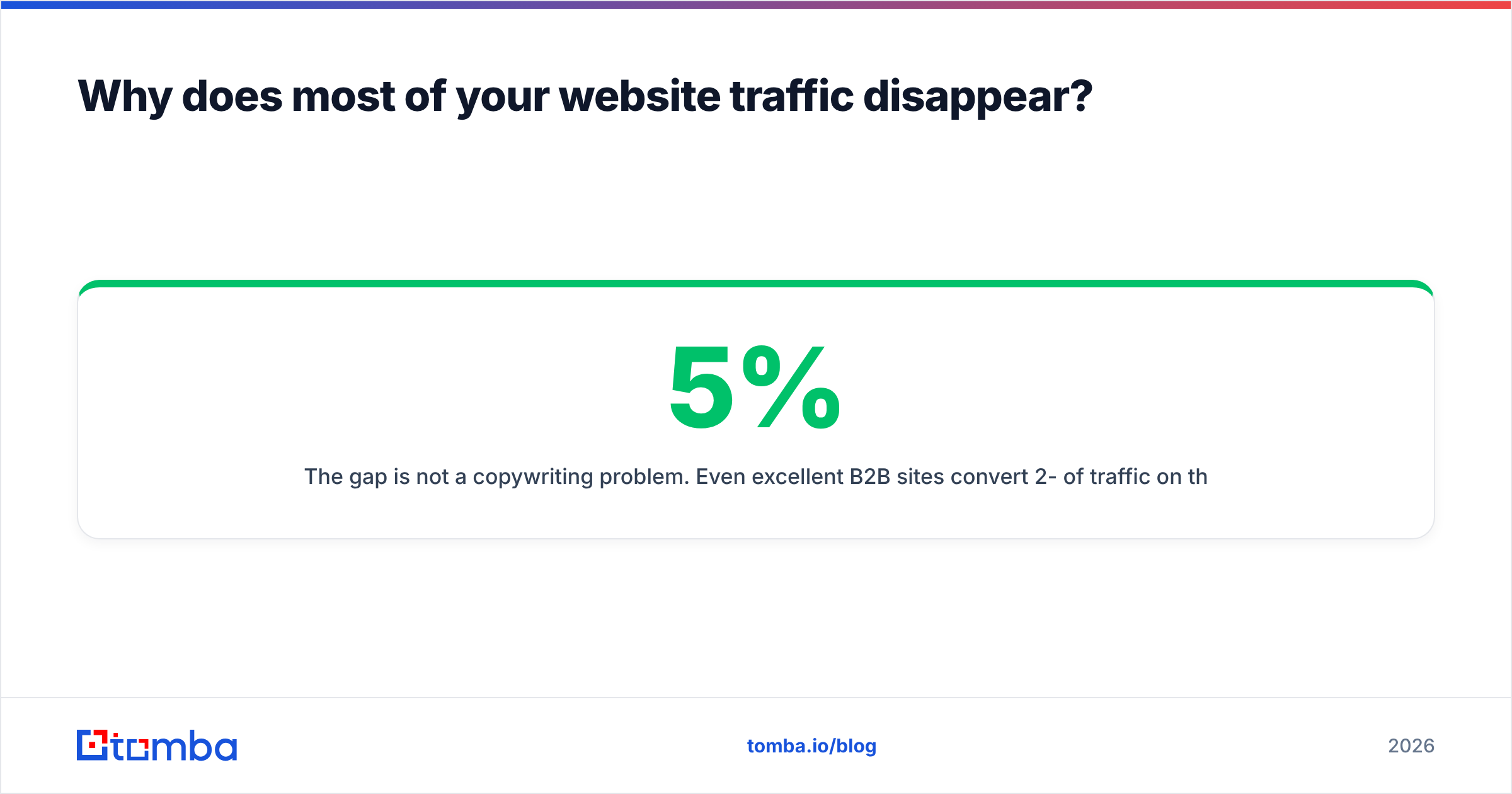
The gap is not a copywriting problem. Even excellent B2B sites convert 2-5% of traffic on their best pages and well under 1% sitewide. If you spend $20,000 a month on ads and convert 1%, you paid full price for 99% of clicks and got a name from one in a hundred.
Generating leads from website visitors means building a second capture path that does not depend on the visitor volunteering anything. That path has three jobs: figure out who is on the site, turn that signal into a contactable human, and act on it while intent is still warm.

What are the seven ways to generate leads from website visitors?#
Here is the full menu, ordered roughly from cheapest to most technical. Most teams end up running three or four of these together.
Reverse-IP company identification. A script on your site maps visitor IP addresses to company names using an IP-to-organization database. You learn that someone at Siemens read your pricing page — not who. This is the workhorse method for B2B and the one most "visitor identification" vendors sell.
Contact enrichment on top of the company signal. Once you know the account, you find the people. Feed the domain into a domain search to pull the relevant role holders, then verify each address before it touches a sequence.
Pixel-based person identification. A tag matches hashed identifiers against a consented data cooperative to return individual names and emails. High yield in the US, legally fraught in Europe. More on this below.
Progressive and low-friction forms. Replace a nine-field gated demo form with an email-only step, then enrich the rest server-side. You keep the conversion and lose the friction.
Chat and intent triggers. Fire a targeted prompt when a known-account visitor hits pricing twice in a week. Not a chatbot on every page — a specific offer at a specific moment.
Content-led capture with real value. Calculators, benchmark tools, and audits still convert because the visitor gets something back immediately. A generic ebook does not.
Retargeting against the identified account list. Push the identified companies into LinkedIn or a display audience so the account keeps seeing you while your rep works the contact list.
Which visitor identification method should you use?#
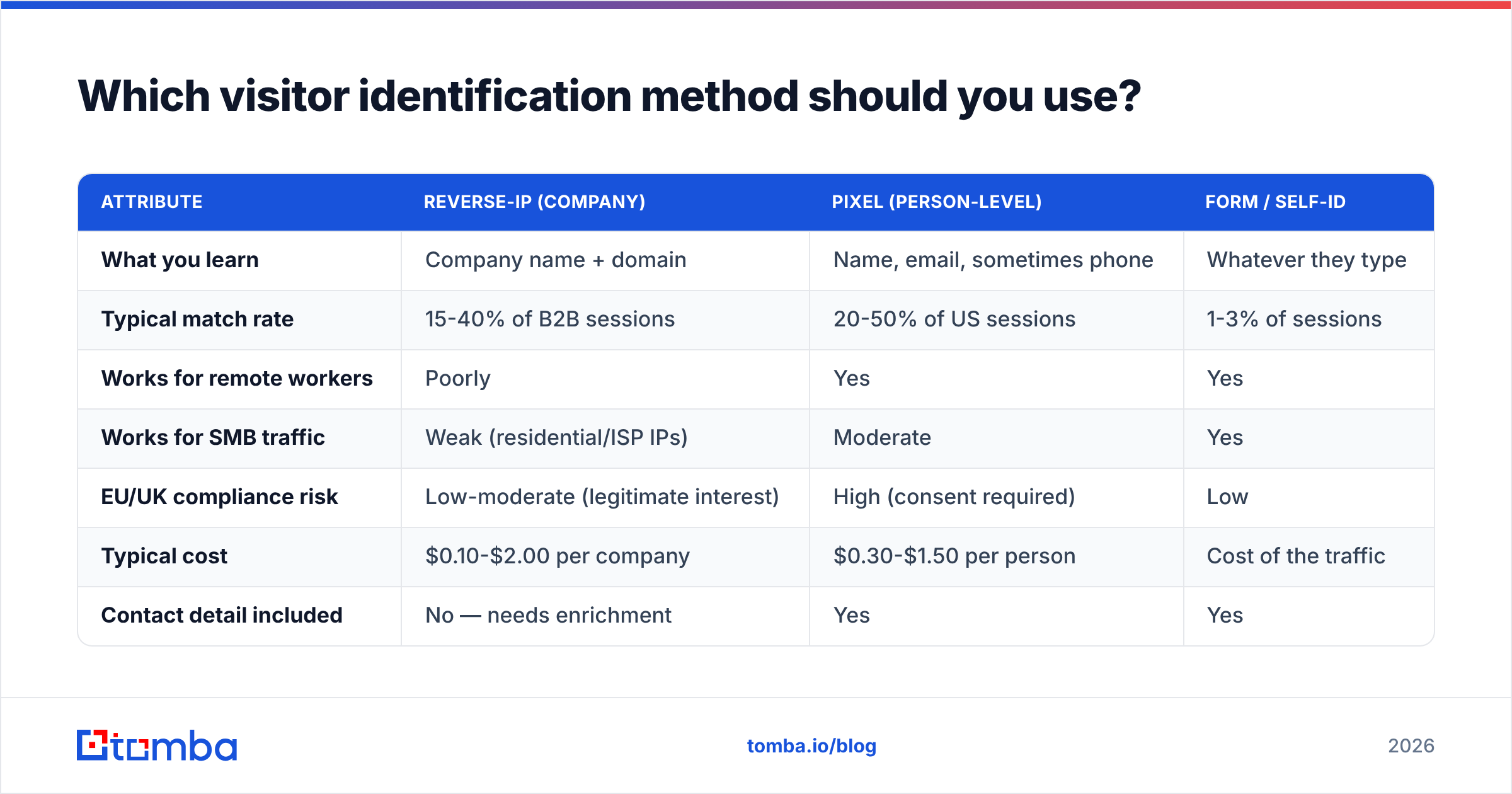
Depends on where your traffic sits and where your buyers live. This table covers the three identification approaches head to head.
| Attribute | Reverse-IP (company) | Pixel (person-level) | Form / self-ID |
|---|---|---|---|
| What you learn | Company name + domain | Name, email, sometimes phone | Whatever they type |
| Typical match rate | 15-40% of B2B sessions | 20-50% of US sessions | 1-3% of sessions |
| Works for remote workers | Poorly | Yes | Yes |
| Works for SMB traffic | Weak (residential/ISP IPs) | Moderate | Yes |
| EU/UK compliance risk | Low-moderate (legitimate interest) | High (consent required) | Low |
| Typical cost | $0.10-$2.00 per company | $0.30-$1.50 per person | Cost of the traffic |
| Contact detail included | No — needs enrichment | Yes | Yes |
| Setup effort | One script tag | Tag + legal review | Form build |
The honest read: reverse-IP is the default starting point for B2B because it is cheap, low-risk, and pairs cleanly with enrichment. Person-level pixels produce more direct leads but concentrate your legal exposure. If you sell into the EU or UK, get counsel involved before you install one — the ICO and EU regulators have been explicit that matching a site visitor to a named individual without consent is processing personal data. The GDPR text on lawful basis is worth reading in full rather than trusting a vendor's compliance page.
How do you turn an identified company into a real contact?#
This is where most visitor-identification deployments stall. The dashboard fills with logos, the sales team says "great, now what," and the project quietly dies in month three. A company name is not a lead. Someone has to become contactable.
The working sequence:
- Filter the account list to ICP fit. Discard your own employees, competitors, bots, agencies, and anything outside your firmographic range. On a typical site this cuts the raw list by half or more.
- Score by behaviour, not just fit. Three pricing-page views in a week beats one blog visit from a bigger logo. Weight pages by commercial intent: pricing, docs, integrations, case studies, careers (careers usually means job seeker — score it negative).
- Find the right roles at the account. Use the company domain to pull contacts by title. You want the two or three people who would actually own the purchase, not a 40-person dump.
- Verify before sending. Enriched data decays fast — B2B contact records go stale at roughly 25-30% a year as people change jobs. Run every address through an email verifier so your bounce rate stays under 2% and your domain reputation survives.
- Enrich the context. Company size, tech stack, funding stage, and recent hiring signals give the rep something to open with beyond "I saw you visited our site" — which, said plainly, unsettles people.
- Route within 24 hours. Intent decays. A visit worked on day one converts far better than the same visit worked on day nine.
That step-4 discipline matters more than the tooling choice. Sending to unverified enriched data is the single fastest way to burn a sending domain, and a burned domain costs you more than the entire visitor-identification subscription.
What does this stack actually cost to run?#
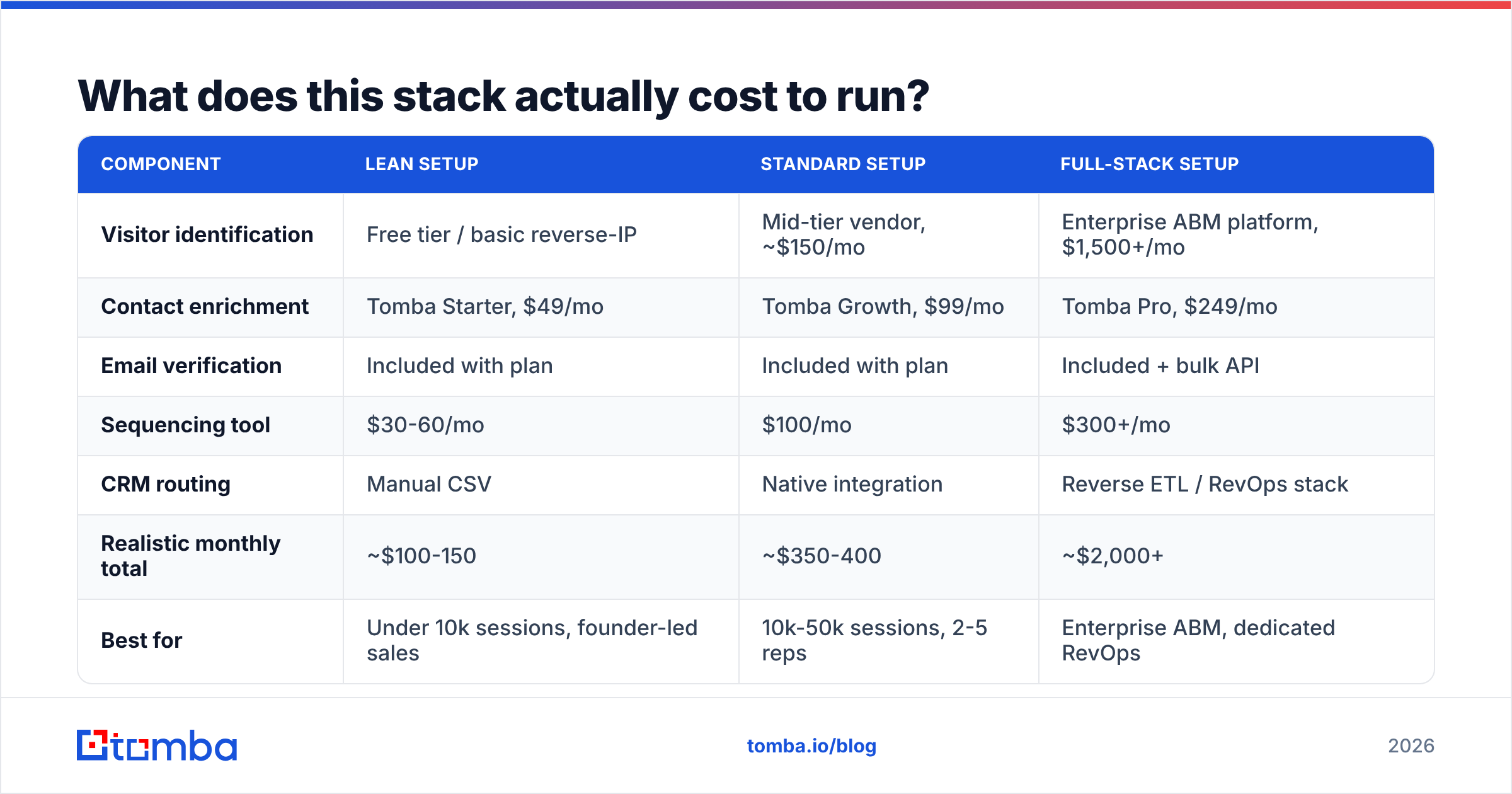
Below is a realistic monthly build for a team doing roughly 25,000 B2B sessions a month, with three plausible configurations.
| Component | Lean setup | Standard setup | Full-stack setup |
|---|---|---|---|
| Visitor identification | Free tier / basic reverse-IP | Mid-tier vendor, ~$150/mo | Enterprise ABM platform, $1,500+/mo |
| Contact enrichment | Tomba Starter, $49/mo | Tomba Growth, $99/mo | Tomba Pro, $249/mo |
| Email verification | Included with plan | Included with plan | Included + bulk API |
| Sequencing tool | $30-60/mo | $100/mo | $300+/mo |
| CRM routing | Manual CSV | Native integration | Reverse ETL / RevOps stack |
| Realistic monthly total | ~$100-150 | ~$350-400 | ~$2,000+ |
| Best for | Under 10k sessions, founder-led sales | 10k-50k sessions, 2-5 reps | Enterprise ABM, dedicated RevOps |
A note on pricing shape: most visitor-ID vendors charge by identified companies per month, while enrichment tools charge by credit. Those two meters run at different speeds. If your identification tool surfaces 800 companies and you only enrich the 200 that fit your ICP, you are paying for 800 and using 200 — budget on the identification meter, not the enrichment one.
For enrichment specifically, Tomba's plans start with a free tier at 25 searches a month, then Starter at $49/mo, Growth at $99/mo, and Pro at $249/mo. That is usually the cheapest line item in the stack, which is worth knowing before you over-invest in the identification layer and under-invest in turning those companies into people.

Is website visitor identification worth it for your business?#
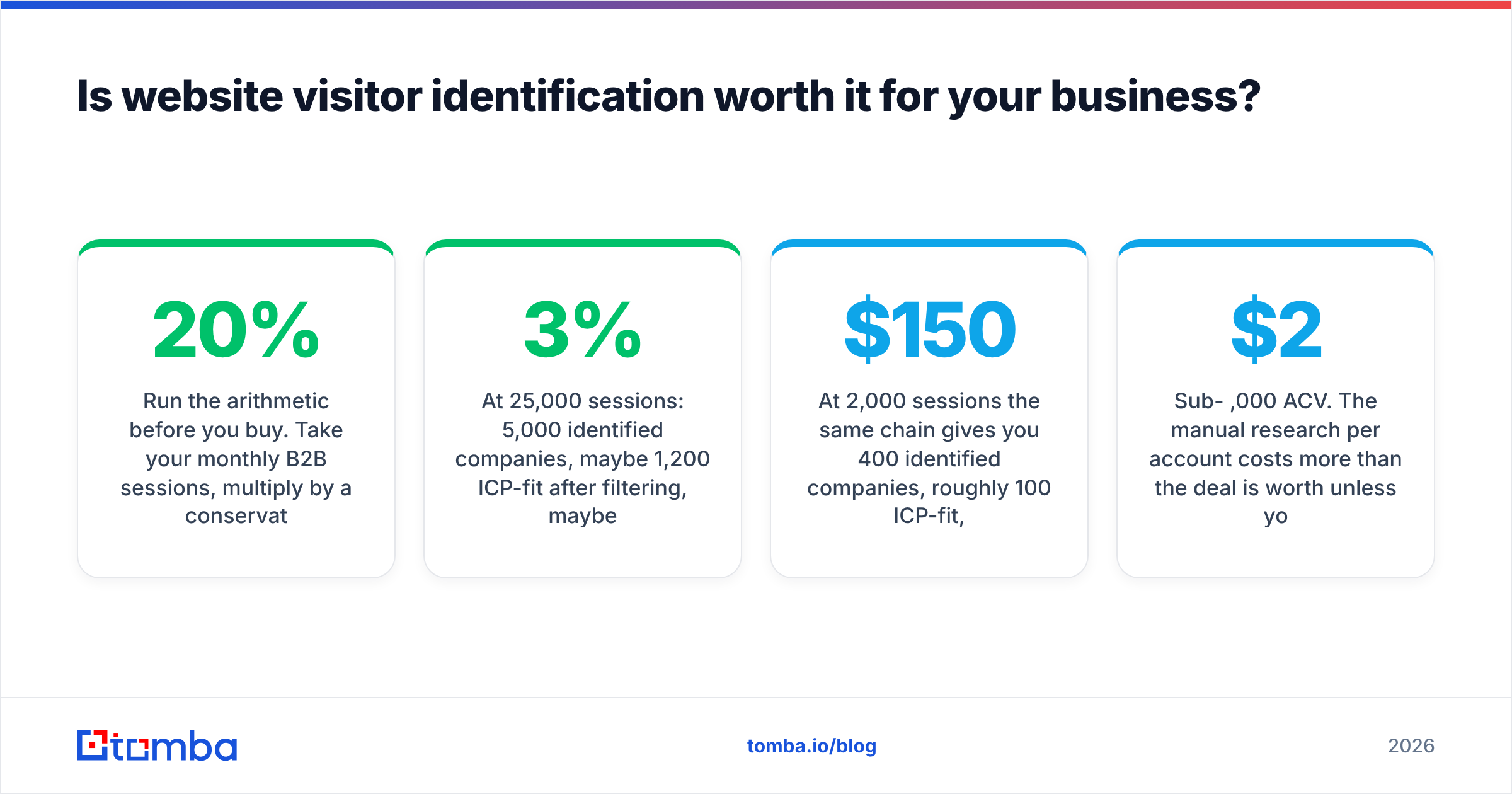
Run the arithmetic before you buy. Take your monthly B2B sessions, multiply by a conservative 20% match rate, then by your ICP-fit rate, then by a realistic 2-4% meeting rate on well-researched outbound to warm accounts.
At 25,000 sessions: 5,000 identified companies, maybe 1,200 ICP-fit after filtering, maybe 30-45 meetings at a 3% rate if your outreach is genuinely good. If your average deal is $12,000 and you close 20% of meetings, that is six to nine deals. Against a $400/month stack, the math works comfortably.
At 2,000 sessions the same chain gives you 400 identified companies, roughly 100 ICP-fit, and three meetings a month. Still positive against a $150 stack, but thin enough that execution quality decides the outcome entirely.
Where it does not work:
- Consumer or prosumer products. Residential IPs identify as ISPs, not companies. Match rates collapse.
- Traffic that is mostly mobile. Mobile carrier IPs are close to useless for company matching.
- Sub-$2,000 ACV. The manual research per account costs more than the deal is worth unless you automate hard.
- No sales capacity. A list of 1,200 warm accounts with nobody to work them is an expensive spreadsheet.
G2's lead capture software category is a reasonable place to compare vendors on verified reviews rather than vendor claims — pay attention to reviews mentioning match rate specifically, since that is the number vendors are loosest about.
How do you avoid the compliance and creepiness traps?#
Two separate problems: what is legal, and what makes buyers recoil.
On the legal side, keep three things straight. First, your privacy policy must describe what you collect and why — including third-party identification scripts. Second, in the EU and UK, cookie consent gates most identification tags; firing them before consent is the most common violation. Third, person-level identification generally needs a consent basis, not just legitimate interest. Company-level reverse-IP has a much stronger legitimate-interest argument because an IP-to-company lookup arguably identifies an organisation, not a person — but "arguably" is doing real work in that sentence, so document your assessment.
On the creepiness side, one rule: never open with surveillance. "I noticed you were on our pricing page yesterday for four minutes" is technically accurate and reliably kills the deal. Reference the topic, not the tracking. If they read your Salesforce integration docs, lead with a Salesforce-specific observation about their stack. The intent signal should shape what you say, never how you know.
The other guardrail is volume discipline. Warm-account outbound only stays warm if you keep list hygiene tight. Deduplicate before sending, suppress existing customers and open opportunities, and run bulk lists through bulk verification rather than sending straight from an enrichment export. A 12% bounce rate on a 2,000-address send will damage your sender reputation for weeks.
What does a working 30-day rollout look like?#
Week one: install identification, exclude internal IPs, and let it collect. Do not contact anyone yet — you need a baseline match rate to know whether the tool is worth its price.
Week two: build the ICP filter and the intent scoring. Define which pages count as high-intent and which accounts are automatically excluded. Export a week of data and hand-check 20 rows for accuracy. Vendors overstate match quality; verify it yourself.
Week three: enrich the top 50 accounts into named contacts, verify every address, and write three sequence variants based on which page cluster triggered the identification — pricing-triggered, docs-triggered, and comparison-page-triggered should not get the same email.
Week four: send, measure reply rate by trigger type, and kill the variants under 3%. Then decide whether to scale spend on the identification layer or spend that money on more traffic instead. That comparison — identify more of what you have versus buy more visitors — is the real budget question, and most teams never explicitly ask it.
Where should you start?#
Start with the layer that is cheapest to test and hardest to fake: contact data quality. Visitor identification is worthless if the emails you generate from it bounce. Take a handful of companies you already know visited your site, run them through a domain search, and check whether the contacts and formats come back accurate against what you can verify manually. If that layer is solid, everything upstream gets easier.
Tomba's Email Finder turns a company domain from your visitor report into verified, role-targeted contacts, with verification built into the same workflow so nothing unverified reaches your sequencer. Start on the free tier at 25 searches a month to test match quality against your own visitor list, then scale to Starter at $49/mo once you know the numbers hold. Test it against the accounts you already have — that is the only benchmark that matters.
Related guides#
// get started
Find, verify and enrich your first contacts today
Start on the free plan with 25 searches a month, then scale when your team is ready.
Free plan · No credit card required · GDPR & CCPA
// about the author