How to Get Data for Cold Calling: 7 Sources That Work
Bad phone data kills cold calling before you dial. Here are seven ways to source, verify, and enrich B2B phone numbers in 2026 — with a cost-per-connect breakdown of each.
TL;DR
- Cold calling data comes from five practical places: your own CRM and website traffic, licensed B2B databases, waterfall enrichment tools, community/association directories, and manual research. Most teams need three of them, not one.
- Phone data decays faster than email data — roughly 25-30% of direct dials go stale each year as people change roles. Budget for refresh, not just acquisition.
- Never buy on record count. Buy on connect rate: usable direct dials divided by records paid for. A 40,000-record list with a 12% connect rate is worse than 5,000 records at 45%.
- Validate before you dial. Line-type checks, DNC scrubbing, and carrier lookups cost pennies and keep you out of TCPA trouble.
- The cheapest reliable stack for most SMB teams: a licensed database for coverage, an enrichment API for fill-in-the-gaps, and a phone validator on top.
Why is cold calling data so hard to get right?#
Because phone numbers are the least standardized data point in B2B. An email address follows a predictable pattern — first.last@company.com — that you can infer, test, and verify with an SMTP handshake. A direct dial has no pattern at all. It is issued by a carrier, assigned by an IT admin, sometimes forwarded to a mobile, sometimes tied to a desk nobody sits at anymore.
Think of it like street addresses versus apartment numbers. Anyone can find the building. Getting the right unit number requires someone on the inside to tell you, or a lot of guessing.
That structural problem produces three symptoms every SDR knows:
- Switchboard-only coverage. The vendor sells you 50,000 "phone numbers" and 80% of them are the corporate main line. Technically accurate, operationally useless.
- Role decay. The number was correct when it was collected in 2024. The person left in 2025. Nobody updated the record.
- Line-type mismatch. You bought mobile numbers for a compliance-heavy industry and now your list needs DNC scrubbing you didn't budget for.
Fixing the data problem is upstream of every call script, every talk track, every objection-handling framework. You cannot coach your way out of dialing dead lines.
What are the actual sources for cold calling data?#
There are seven that hold up in practice. Here's each one with its realistic cost, coverage, and failure mode.
1. Your own CRM and closed-lost pipeline. Free, highest intent, smallest volume. Anyone who demoed and didn't buy 18 months ago is a warm-ish call. Most teams under-mine this. Export everything with stage = closed-lost and a close date older than 12 months, re-verify the numbers, and dial.
2. Website visitor identification. Companies visiting your pricing page are already in-market. Reveal tooling maps anonymous traffic to firmographic records, then you find the right person inside that account. Tomba's website visitor reveal handles the first half; you still need contact-level data for the second.
3. Licensed B2B databases. The workhorse. Vendors like ZoomInfo, Cognism, Lusha, and BookYourData sell access to compiled contact records with direct dials and mobiles. Coverage varies enormously by geography — North American mobile coverage is generally strongest, EMEA direct dials are thinner and more regulated.
4. Waterfall enrichment APIs. Instead of buying one database, you query several in sequence until one returns a hit. You pay per successful match rather than per seat. This is usually the best cost-per-usable-record for teams doing under 20,000 lookups a month.
5. Association and event directories. Trade association member lists, conference attendee rosters, and industry award lists are public, niche-specific, and criminally underused. Coverage is small but relevance is enormous.
6. LinkedIn + inference tooling. Sales Navigator gives you the person and the company; a LinkedIn finder resolves the contact details. Strong for identifying who to call, weaker for the number itself unless paired with a phone-specific source.
7. Manual research. A rep with a browser, the company's About page, a receptionist, and 90 seconds. Terrible for volume, unbeatable for a 50-account named-list territory. If your ACV is above $50k, this is not beneath you.
How do the main data sources compare on cost and coverage?#
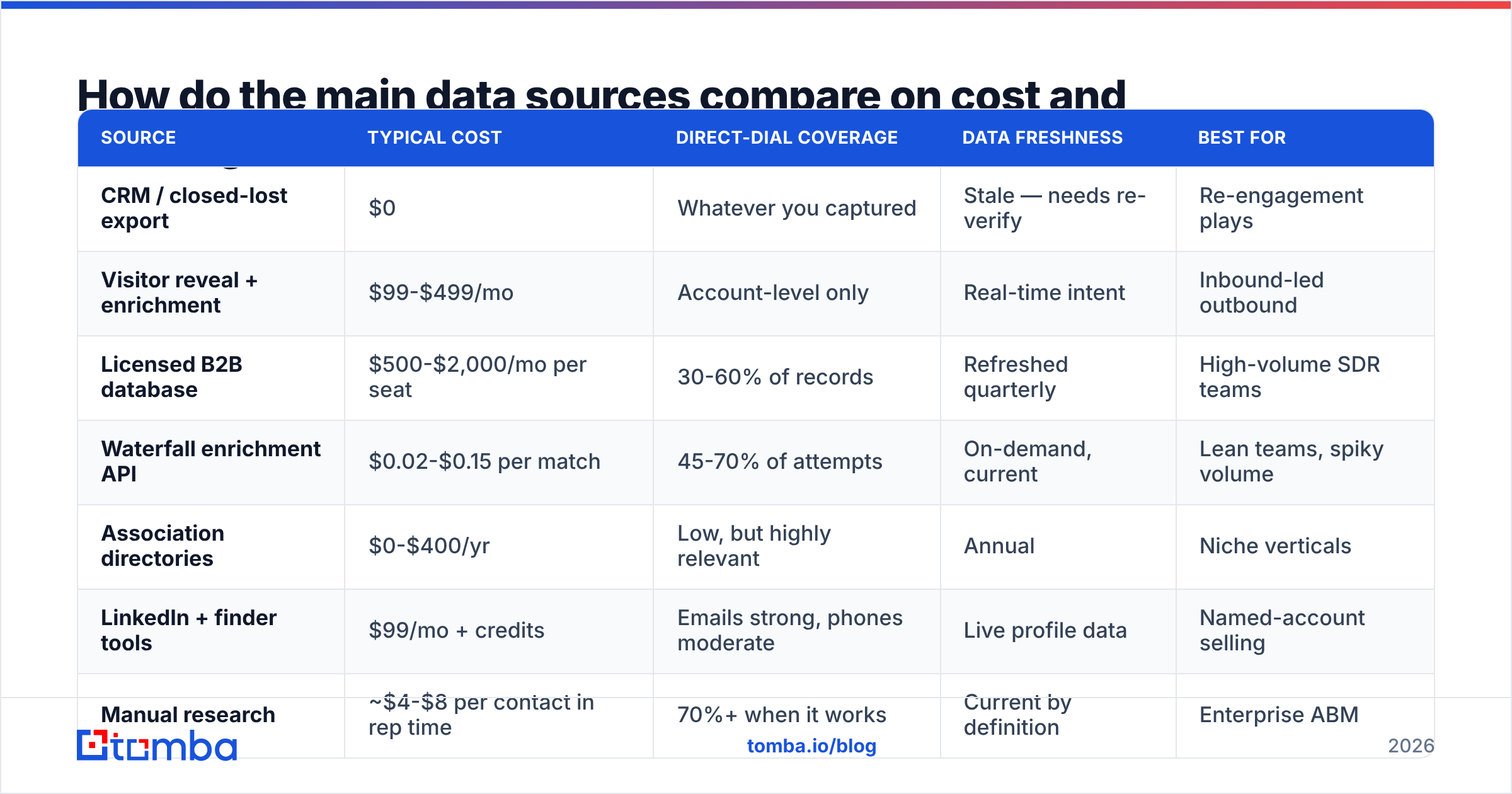
| Source | Typical cost | Direct-dial coverage | Data freshness | Best for |
|---|---|---|---|---|
| CRM / closed-lost export | $0 | Whatever you captured | Stale — needs re-verify | Re-engagement plays |
| Visitor reveal + enrichment | $99-$499/mo | Account-level only | Real-time intent | Inbound-led outbound |
| Licensed B2B database | $500-$2,000/mo per seat | 30-60% of records | Refreshed quarterly | High-volume SDR teams |
| Waterfall enrichment API | $0.02-$0.15 per match | 45-70% of attempts | On-demand, current | Lean teams, spiky volume |
| Association directories | $0-$400/yr | Low, but highly relevant | Annual | Niche verticals |
| LinkedIn + finder tools | $99/mo + credits | Emails strong, phones moderate | Live profile data | Named-account selling |
| Manual research | ~$4-$8 per contact in rep time | 70%+ when it works | Current by definition | Enterprise ABM |
The row that surprises people is manual research. At $8 per contact it looks absurd next to a $0.05 API call — until you compare it against connect rate. A manually researched mobile number for a named VP connects at 30-40%. A bulk-purchased record connects at 8-12%. Cost per conversation is what matters, and the gap narrows fast.
What is the difference between a phone number and a usable phone number?#
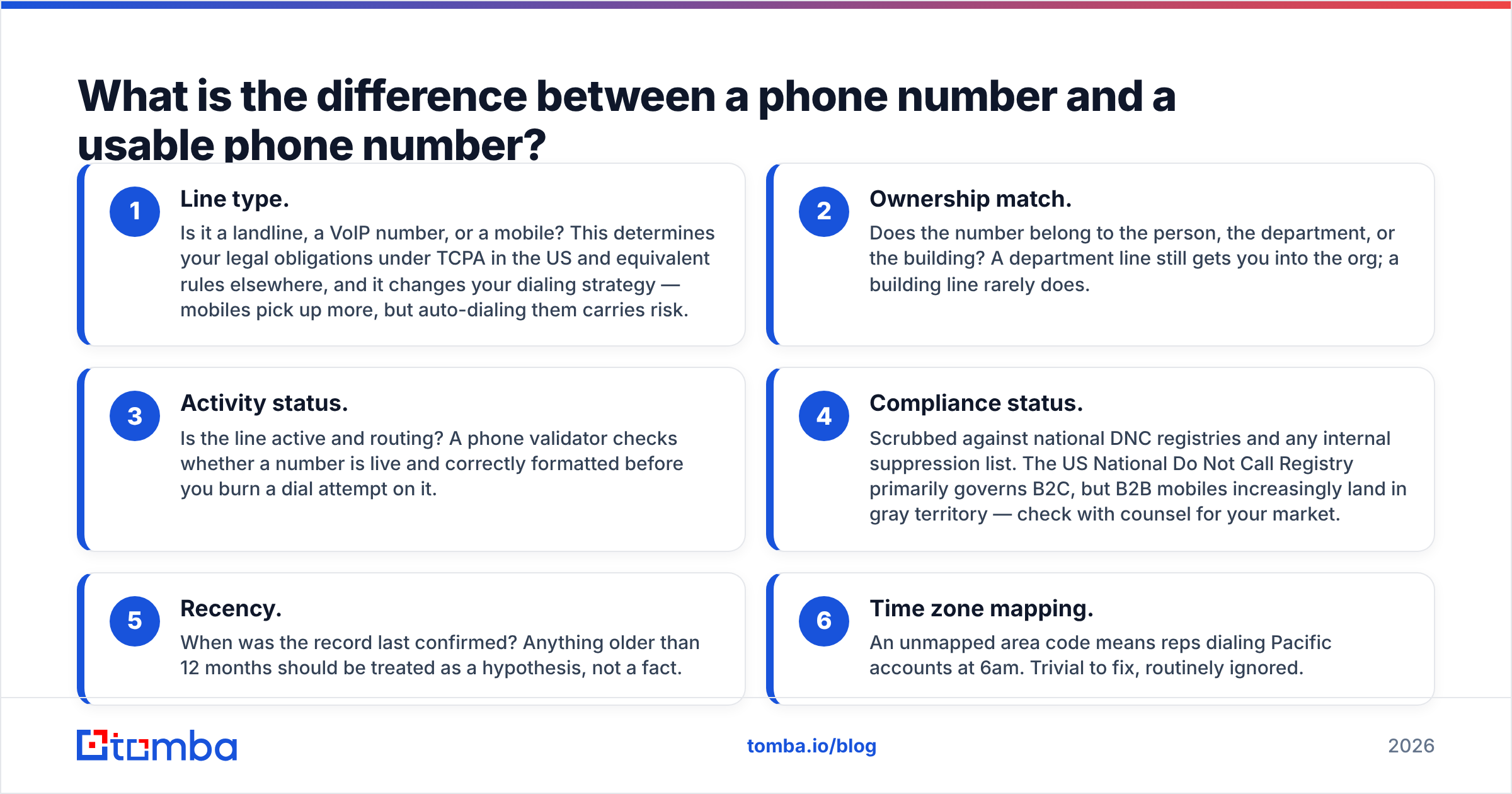
Four attributes separate the two. Run every list through this filter before it hits a dialer.
- Line type. Is it a landline, a VoIP number, or a mobile? This determines your legal obligations under TCPA in the US and equivalent rules elsewhere, and it changes your dialing strategy — mobiles pick up more, but auto-dialing them carries risk.
- Ownership match. Does the number belong to the person, the department, or the building? A department line still gets you into the org; a building line rarely does.
- Activity status. Is the line active and routing? A phone validator checks whether a number is live and correctly formatted before you burn a dial attempt on it.
- Compliance status. Scrubbed against national DNC registries and any internal suppression list. The US National Do Not Call Registry primarily governs B2C, but B2B mobiles increasingly land in gray territory — check with counsel for your market.
- Recency. When was the record last confirmed? Anything older than 12 months should be treated as a hypothesis, not a fact.
- Time zone mapping. An unmapped area code means reps dialing Pacific accounts at 6am. Trivial to fix, routinely ignored.
Skip these and your dialer will happily burn through 400 attempts to produce nine conversations. Apply them and the same 400 attempts produce 30 or more.
How should you build a cold calling data stack in 2026?#
Layer it. One vendor will not cover your whole territory, and pretending otherwise is how teams end up paying $24,000 a year for a database that covers 40% of their ICP.
Layer 1 — Identification. Decide who you want to call before you buy any data. Firmographic filters (industry, headcount, tech stack, funding stage) plus a persona definition. If you cannot describe the account in one sentence, no vendor can find it for you.
Layer 2 — Coverage. A licensed database or a B2B database that gives you broad reach across your defined segment. This is your baseline.
Layer 3 — Fill. An enrichment API for the records the baseline missed. Send the name + company, get back a phone and email. Pay per match, not per record queried. Tomba's phone finder sits at this layer, and the data enrichment endpoint returns firmographic context alongside contact details.
Layer 4 — Validation. Phone validation plus email verification before anything enters the dialer or the sequence. Cheap insurance.
Layer 5 — Refresh. A quarterly job that re-checks every record older than 90 days. This is the layer everyone skips and everyone regrets skipping.
Is buying a list ever the right move?#
Sometimes — with conditions.
Buying makes sense when you're entering a genuinely new segment, when speed matters more than precision, or when your total addressable market is small enough that you can buy the whole thing and work it properly. It stops making sense when you're buying volume to feed an under-performing script, which is the usual reason.
Before you buy, ask the vendor these five questions and hold them to the answers:
- What percentage of these records include a direct dial or mobile, not a switchboard? Get a number, not a range.
- When was each record last verified, and how? "Continuously updated" is marketing. Ask for the mechanism.
- What's your replacement policy on bad records? Reputable vendors credit back bounces and dead lines.
- Can I test on a sample of 100 before committing? Anyone who refuses is hiding coverage gaps.
- What's the data provenance? Opt-in, public web, partner contribution, or purchased? This matters for GDPR compliance in EU markets, where legitimate interest has to be documented.
Run the 100-record sample through a validator, dial 50 of them yourself, and calculate the real connect rate. That single afternoon will tell you more than any G2 review. Speaking of which — G2's sales intelligence category is a reasonable place to sanity-check vendor claims against actual user reports, though bear in mind review volume skews toward the biggest marketing budgets.
How do you keep cold calling data from rotting?#
Treat it like inventory with a shelf life, not like an asset you own forever.
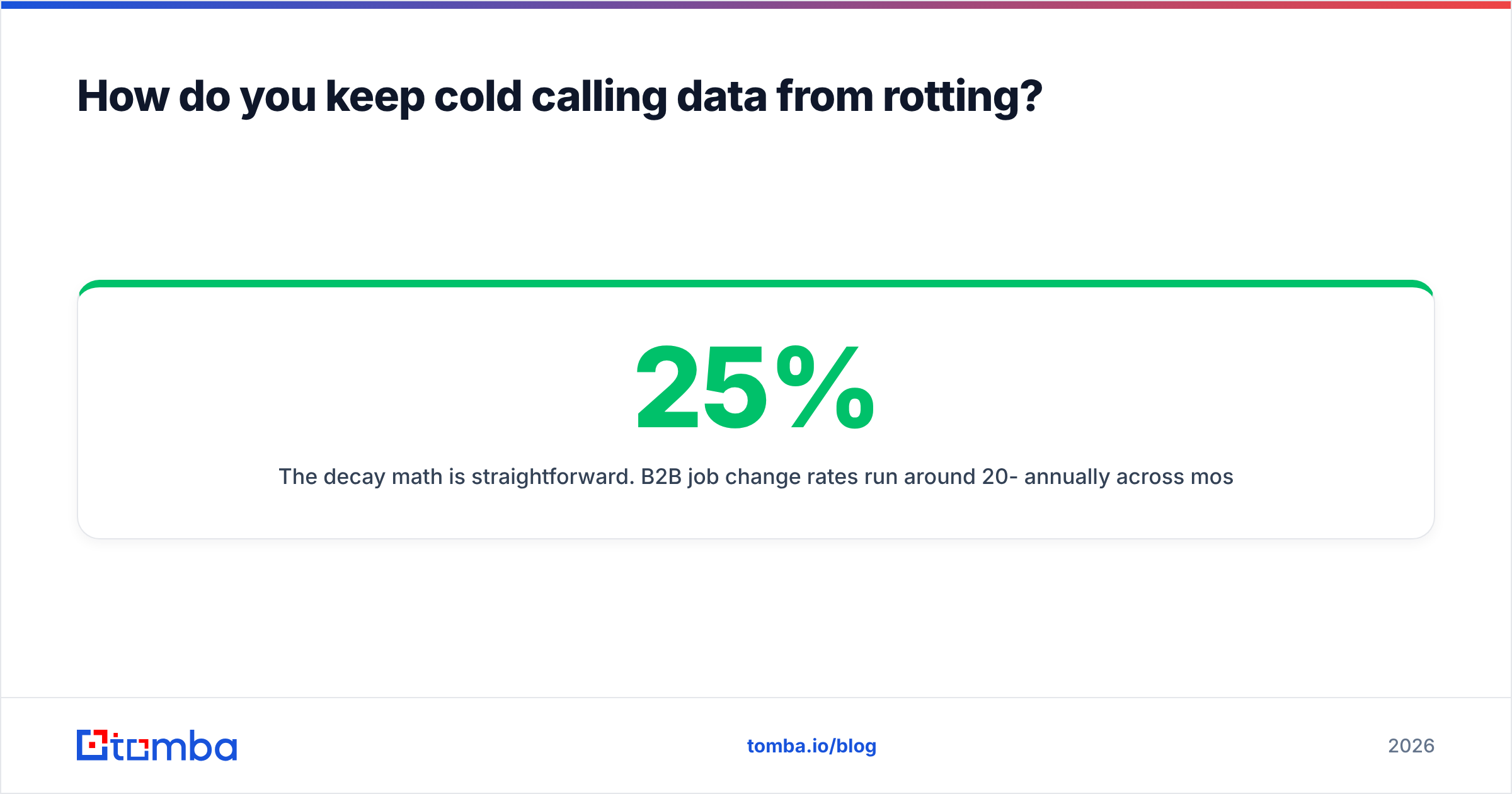
The decay math is straightforward. B2B job change rates run around 20-25% annually across most industries, and every job change invalidates the direct dial. Add company moves, phone system migrations, and the ongoing shift away from desk phones entirely, and a list that was 60% accurate on purchase day is roughly 45% accurate a year later.
Three habits keep the rot manageable:
Re-verify on a schedule, not on failure. Waiting until a rep reports a dead number means the bad record already cost you a dial attempt and a note-taking cycle. Batch re-verification quarterly through a bulk verification run is dramatically cheaper.
Capture corrections at the point of contact. When a gatekeeper says "she's got a new extension, it's 4471," that correction needs to land in the CRM inside 30 seconds. Build the field, train the habit, audit it monthly.
Track connect rate by source, monthly. Tag every record with its origin. When a vendor's connect rate drops below your threshold two months running, you have a renewal conversation to have. Most teams discover their most expensive source is not their best one. Tracking this alongside response rate on the email side gives you a full picture of which data sources actually produce pipeline.
For a broader framework on how contact data feeds pipeline health, HubSpot's sales research publishes ongoing benchmark data worth calibrating against.
What does a realistic cold calling data budget look like?#
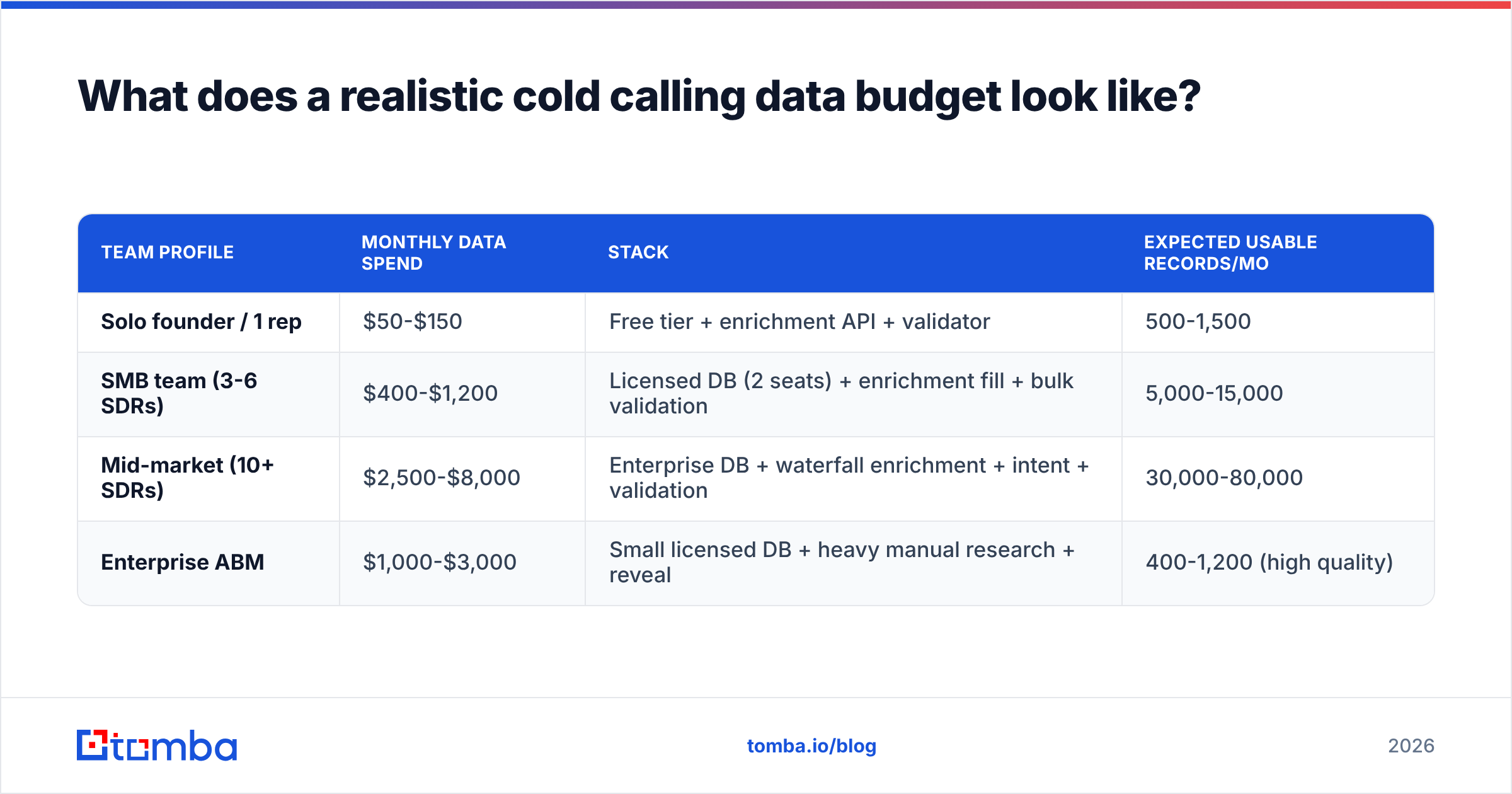
Here's how three team profiles typically allocate.
| Team profile | Monthly data spend | Stack | Expected usable records/mo |
|---|---|---|---|
| Solo founder / 1 rep | $50-$150 | Free tier + enrichment API + validator | 500-1,500 |
| SMB team (3-6 SDRs) | $400-$1,200 | Licensed DB (2 seats) + enrichment fill + bulk validation | 5,000-15,000 |
| Mid-market (10+ SDRs) | $2,500-$8,000 | Enterprise DB + waterfall enrichment + intent + validation | 30,000-80,000 |
| Enterprise ABM | $1,000-$3,000 | Small licensed DB + heavy manual research + reveal | 400-1,200 (high quality) |
Notice the enterprise ABM row spends real money for a fraction of the volume. That's correct. When a single closed deal is worth $200k, spending $8 per researched contact is a rounding error.
For reference on where API-based pricing lands, Tomba pricing runs a free tier at 25 searches per month, Starter at $49/mo, Growth at $99/mo, and Pro at $249/mo — which puts the enrichment-and-validation layer of most SMB stacks well under $250 monthly.
What mistakes should you avoid?#
- Optimizing for record count. 50,000 records at a 9% connect rate produce fewer conversations than 8,000 at 42%, and cost more to store, clean, and route.
- Skipping the sample test. Every vendor demo shows their best coverage. Test on your ICP, in your geography.
- Ignoring line type until compliance calls. Retrofitting DNC scrubbing onto an active campaign is painful. Do it before the first dial.
- Buying phone data without email data. Cold calling works best as one channel in a sequence. If you have the number but not the email, you've bought half a contact. Pair phone sourcing with a proper email finder so the multi-touch sequence actually works.
- Never auditing source performance. If you can't say which vendor produced last quarter's best-connecting records, you're renewing on vibes.
- Treating GDPR as someone else's problem. For EU contacts, document your legitimate interest basis before the campaign starts, not after a complaint arrives.
Start with the contact layer#
Cold calling data is a supply chain problem, not a shopping problem. You need a broad source for coverage, a precise source for fill, and a validation step so nothing dead reaches the dialer — and then you need to run that loop every quarter rather than once at contract signing.
If you're building that stack now, start with the layer everything else depends on: accurate contact records for the people you've decided to call. Tomba Email Finder resolves professional contact details by name, domain, or company, and pairs with phone finding, validation, and enrichment on the same credit pool — so you can test coverage on your actual ICP with the free tier before committing a budget line. Run 25 of your target accounts through it, dial the results, and let your own connect rate decide.
Related guides#
// get started
Find, verify and enrich your first contacts today
Start on the free plan with 25 searches a month, then scale when your team is ready.
Free plan · No credit card required · GDPR & CCPA
// about the author