How To Get Email Lists in 2026: 7 Legal, Reliable Methods
Buying a list is the fastest way to torch your domain. Here are seven ways to get email lists that actually deliver, what each costs, and the one rule that separates a usable list from a spam trap.
TL;DR
- There are two honest ways to get email lists: build them yourself (opt-in or verified outbound) or license them from a vetted B2B data provider. Everything else is a bounce factory.
- A "cheap" 100k-contact CSV for $99 typically lands at 30-60% deliverable. After bounces, spam complaints, and a burned sending domain, it is the most expensive list you will ever touch.
- Verified, targeted lists of 500-2,000 contacts consistently outperform 50,000 scraped rows on reply rate, and cost less in total.
- The non-negotiable step regardless of source: verify every address before send, and re-verify anything older than 90 days.
- Budget reality: $0 with manual research, roughly $49-$99/mo for a self-serve finder like Tomba, $200-$1,000+/mo for enterprise database seats.
What does "getting an email list" actually mean?#
It means one of three very different things, and people conflate them constantly.
1. Building an opt-in list. People give you their address through a signup form, lead magnet, webinar registration, or purchase. This is the only list you can legally send marketing newsletters to in most jurisdictions. It grows slowly. It converts best.
2. Building a targeted outbound list. You define an ideal customer profile, identify specific companies and people, then find their business email addresses through an email finder or data provider. This is B2B cold outreach territory — legal in the US under CAN-SPAM and in most of the EU under legitimate interest, with conditions.
3. Buying a pre-made list. Someone hands you a CSV of 250,000 "verified CEOs." You did not choose those contacts. Neither did they choose you. This is where domains go to die.
Method 2 is what most people actually need when they search for how to get email lists. It is targeted, current, and you control the quality gate. The rest of this post is mostly about doing it well — plus an honest look at when licensed data (method 3, done properly) is the right call.

How do the main methods compare on cost and quality?#
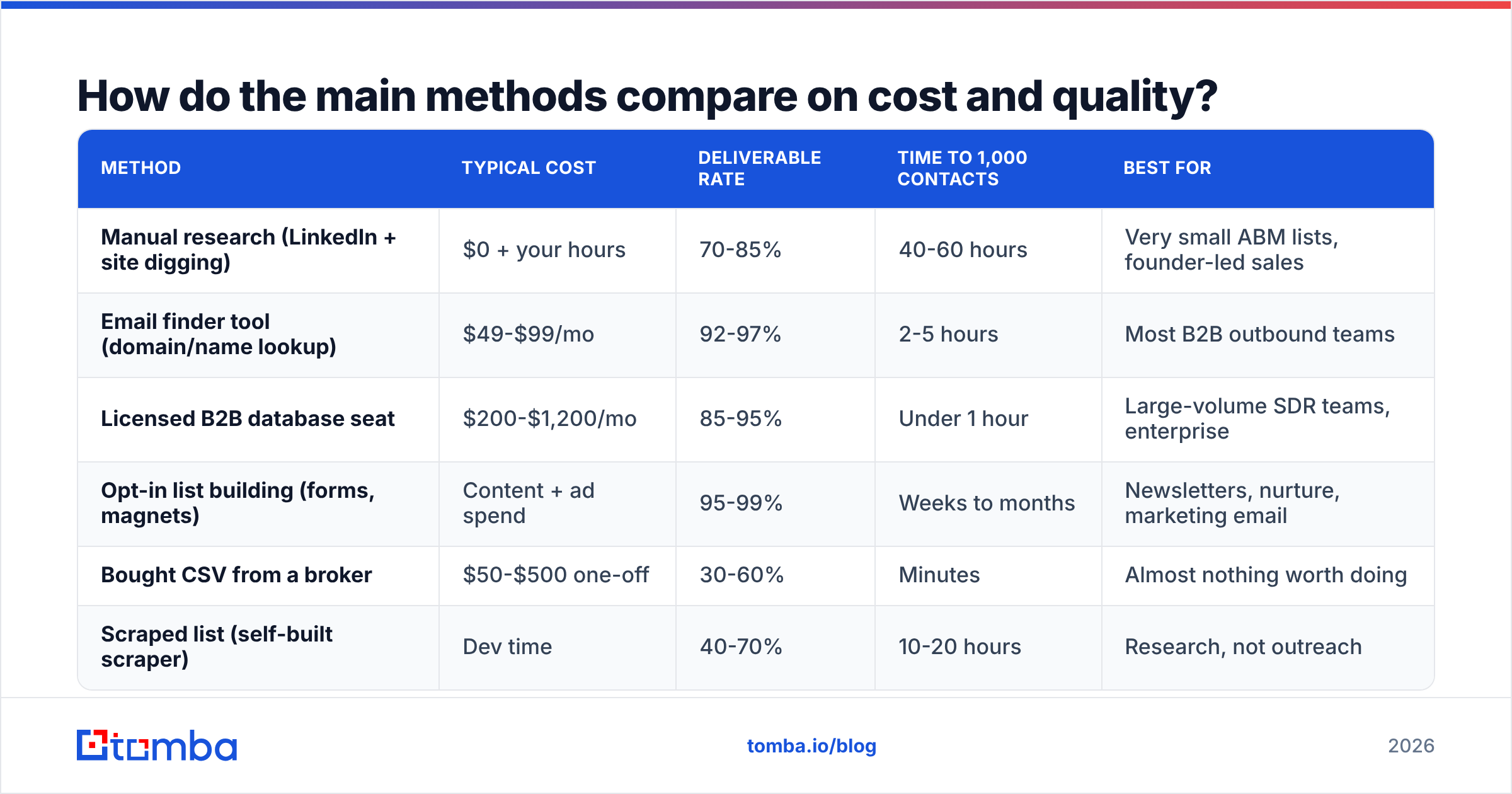
Here is the honest scorecard. Deliverability figures are typical ranges observed across B2B outbound programs, not guarantees.
| Method | Typical cost | Deliverable rate | Time to 1,000 contacts | Best for |
|---|---|---|---|---|
| Manual research (LinkedIn + site digging) | $0 + your hours | 70-85% | 40-60 hours | Very small ABM lists, founder-led sales |
| Email finder tool (domain/name lookup) | $49-$99/mo | 92-97% | 2-5 hours | Most B2B outbound teams |
| Licensed B2B database seat | $200-$1,200/mo | 85-95% | Under 1 hour | Large-volume SDR teams, enterprise |
| Opt-in list building (forms, magnets) | Content + ad spend | 95-99% | Weeks to months | Newsletters, nurture, marketing email |
| Bought CSV from a broker | $50-$500 one-off | 30-60% | Minutes | Almost nothing worth doing |
| Scraped list (self-built scraper) | Dev time | 40-70% | 10-20 hours | Research, not outreach |
The pattern is obvious once you see it laid out: speed and quality are not opposites. The bought CSV is fast and terrible. The finder-tool route is fast and good. What you actually trade away with the good methods is targeting breadth — you have to know who you want before you can find them.

Why do bought email lists fail so reliably?#
Four reasons, and they compound.
- Decay. B2B contact data degrades roughly 22-30% per year through job changes alone. A list assembled 18 months ago is already half wrong before anyone touches it.
- Resale. Broker lists are sold repeatedly. The people on it have been hit by dozens of senders. Their complaint reflex is already trained.
- Spam traps. Recycled traps (abandoned addresses reactivated by mailbox providers) and pristine traps (never-used addresses seeded to catch scrapers) are dense in broker files. One hit can put your sending domain on a blocklist.
- No targeting logic. You did not pick these people. Relevance is what makes cold email work; a list you did not select cannot be relevant.
The failure mode is not "low reply rate." It is domain reputation damage that also destroys the deliverability of your good email — invoices, support replies, and legitimate sequences to opted-in contacts. Google's bulk sender requirements put a hard 0.3% spam complaint ceiling on senders; broker lists blow past that within a single campaign.
If you must evaluate a paid list source, use one that operates as a transparent, verified database rather than an anonymous broker. BookYourData, for example, sells pay-as-you-go B2B contacts with a stated accuracy guarantee and per-record verification — a materially different product from a scraped CSV on a marketplace. The distinction that matters is whether the vendor verifies at the moment of purchase, not whether they call themselves "verified."
How do you build a targeted list yourself, step by step?#
This is the workflow that produces the highest reply rates per hour invested.
Step 1 — Define the segment before you collect anything. Write down firmographics (industry, headcount, geography, tech stack) and the exact job titles with buying authority. If your definition is "SaaS companies," it is too broad. "Series A-B B2B SaaS, 30-150 employees, US, with an existing SDR team" is a segment.
Step 2 — Build the company list first, people second. Sources: G2 category pages, industry association directories, conference exhibitor lists, funding announcements, job boards (companies hiring SDRs are companies with outbound budget). Aim for 200-500 companies before you look for a single person.
Step 3 — Identify the right person at each company. LinkedIn search filtered to your target titles, company About pages, press releases. Record first name, last name, company domain. That is all you need for the next step.
Step 4 — Resolve addresses at scale. Feed names + domains into an email finder to get verified professional addresses, or use domain search to pull every public address at a company plus its email pattern. For volume, a bulk email finder handles thousands of rows from one CSV upload.
Step 5 — Verify before you send. Always. Run the finished list through an email verifier. Drop anything marked invalid. Treat catch-all domains as a separate, lower-confidence segment — a catch-all verifier helps you decide which are worth the risk.
Step 6 — Enrich, then segment. Add company size, funding stage, and role seniority so your copy can actually reference something specific. Contact enrichment fills these fields automatically.
The whole loop for 1,000 contacts takes an afternoon once you have the company list. The company list is the part nobody wants to do, and it is the part that determines whether the campaign works.
Is it legal to get email lists this way?#
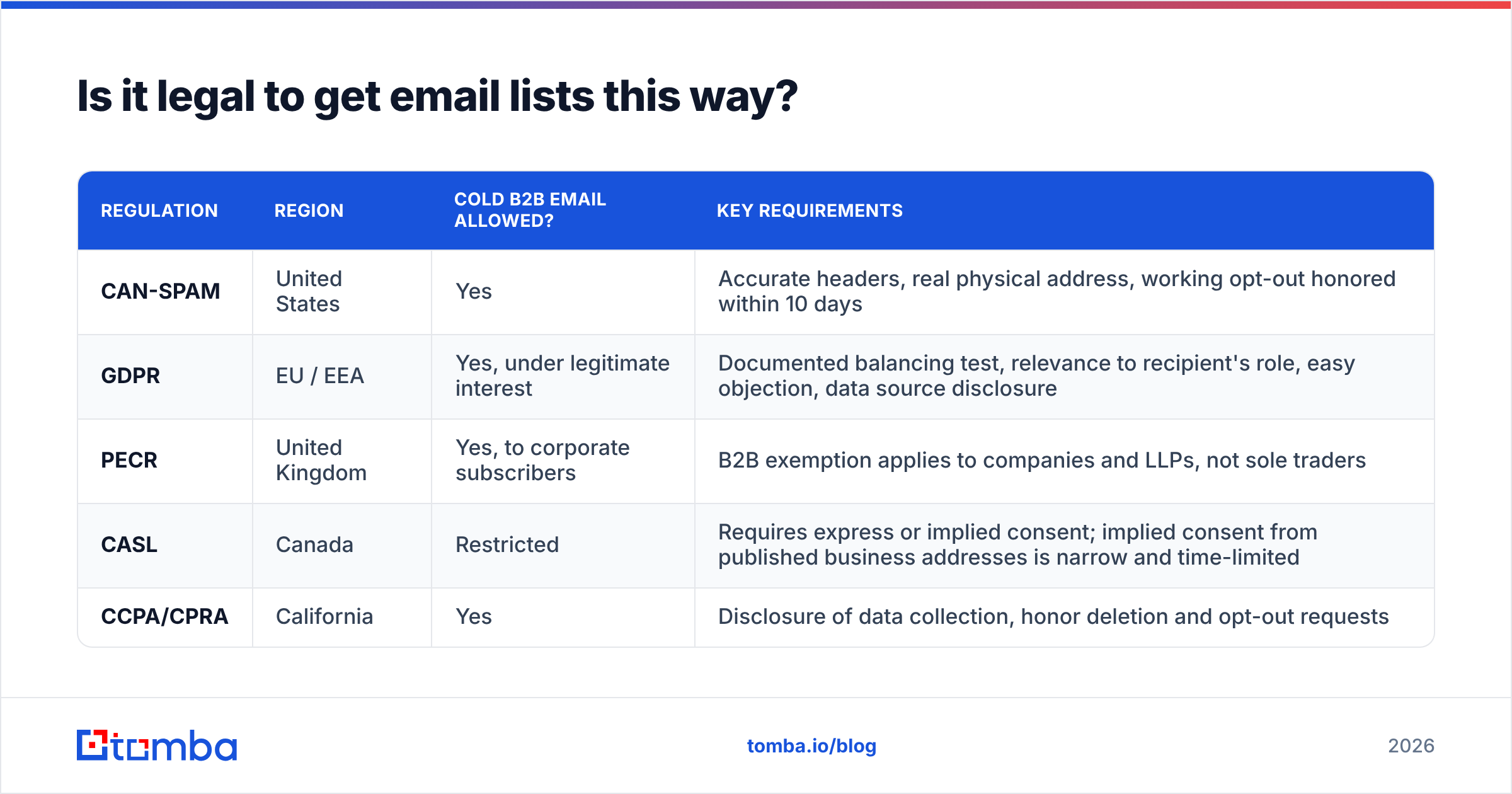
Short answer: business-to-business outbound email to a work address is legal in the US, Canada, the UK, and the EU — under specific conditions that differ by region. Marketing email to consumers generally requires opt-in.
| Regulation | Region | Cold B2B email allowed? | Key requirements |
|---|---|---|---|
| CAN-SPAM | United States | Yes | Accurate headers, real physical address, working opt-out honored within 10 days |
| GDPR | EU / EEA | Yes, under legitimate interest | Documented balancing test, relevance to recipient's role, easy objection, data source disclosure |
| PECR | United Kingdom | Yes, to corporate subscribers | B2B exemption applies to companies and LLPs, not sole traders |
| CASL | Canada | Restricted | Requires express or implied consent; implied consent from published business addresses is narrow and time-limited |
| CCPA/CPRA | California | Yes | Disclosure of data collection, honor deletion and opt-out requests |
Two practical rules cover most of it. First, only email work addresses about things plausibly relevant to that person's job. Second, keep a record of where each contact came from — under GDPR you must be able to tell someone how you got their address. A provider that publishes its data sources makes that answer easy.
None of this is legal advice. If you are sending at scale into the EU, have counsel review your balancing test once. It is a one-time cost.
Which tool should you use to get email lists?#
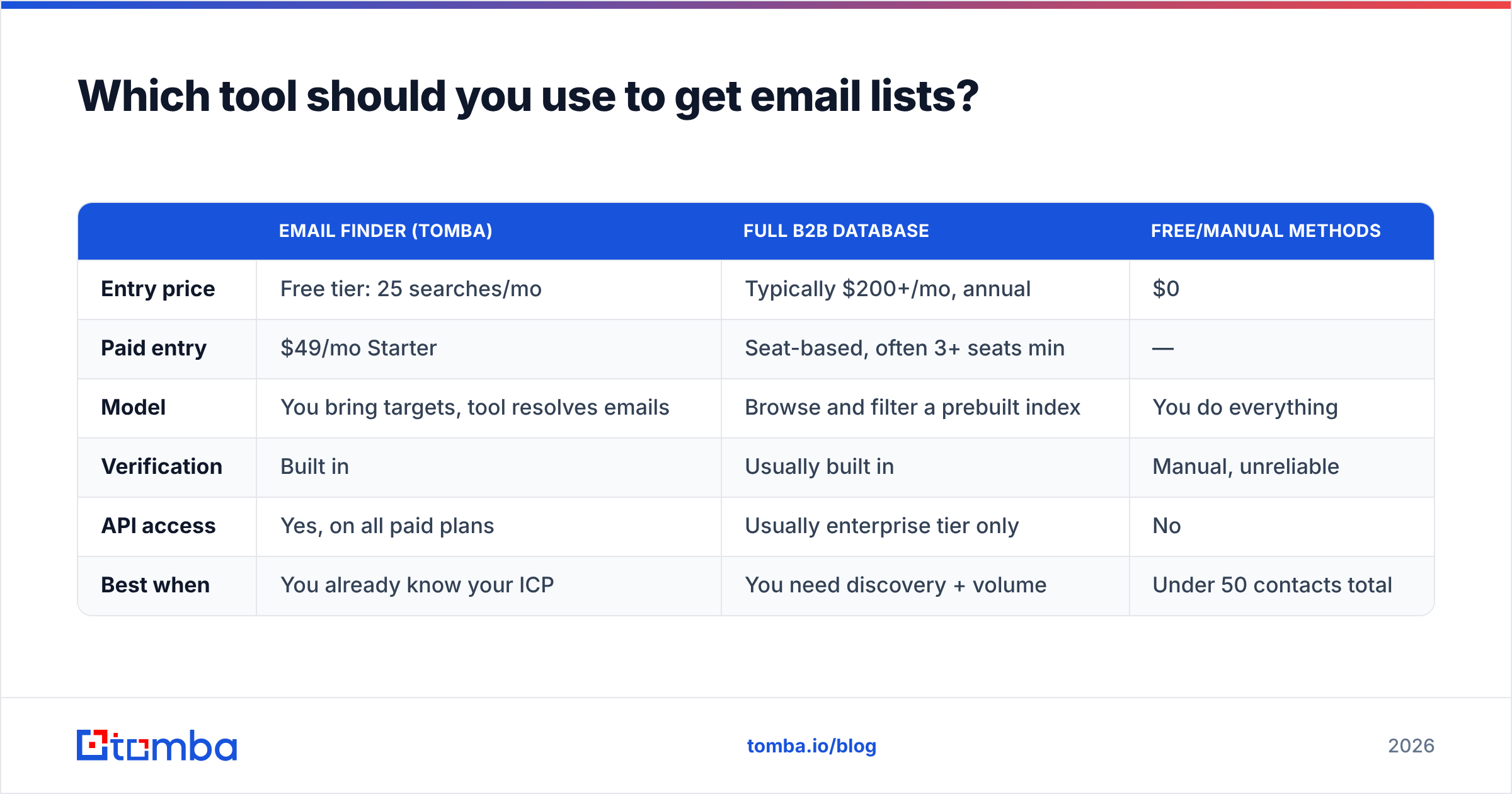
Depends on volume and whether you need a database to browse or a resolver to look things up.
| Email finder (Tomba) | Full B2B database | Free/manual methods | |
|---|---|---|---|
| Entry price | Free tier: 25 searches/mo | Typically $200+/mo, annual | $0 |
| Paid entry | $49/mo Starter | Seat-based, often 3+ seats min | — |
| Model | You bring targets, tool resolves emails | Browse and filter a prebuilt index | You do everything |
| Verification | Built in | Usually built in | Manual, unreliable |
| API access | Yes, on all paid plans | Usually enterprise tier only | No |
| Best when | You already know your ICP | You need discovery + volume | Under 50 contacts total |
The finder model wins for most teams because targeting quality is the bottleneck, not contact volume. A database gives you a million rows you did not choose; a finder gives you exactly the people you decided to pursue, verified. Tomba pricing runs Free (25 searches/mo), Starter $49/mo, Growth $99/mo, Pro $249/mo, with Enterprise custom — and the Tomba API is available on paid plans if you want to wire lookups directly into your CRM or a workflow tool.


How do you keep an email list from rotting?#
A list is not an asset you acquire once. It is inventory with an expiry date.
- Re-verify every 90 days. Job change rates make this the single highest-ROI hygiene task. Bulk re-verification of a 5,000-row list costs a fraction of one bounced campaign.
- Suppress hard bounces permanently. Never retry an address that hard-bounced. Maintain a global suppression file across every sending tool you use.
- Segment by engagement, not just firmographics. Contacts who have never opened after four sequences should move to a cold-storage segment, not stay in rotation.
- Watch complaint rate weekly. Above 0.1% is a warning; above 0.3% is an emergency. Postmaster Tools and your ESP both report this.
- Warm new sending domains before volume. A perfect list on a cold domain still lands in spam. Ramp over 3-4 weeks.
- Track source per contact. When a segment underperforms, you want to know which source produced it so you can cut the source, not guess.
The teams that get compounding results from outbound are the ones treating list maintenance as a recurring calendar item rather than a project. Everyone else re-buys data every quarter because their last list stopped working and they never diagnosed why.
What is the fastest path from zero to a working list?#
If you need something usable this week:
- Day 1: Write the ICP definition. One paragraph, specific enough that you could reject a company for not matching.
- Day 1-2: Assemble 200-300 target companies from directories, funding news, and job boards. A spreadsheet is fine.
- Day 2: Find the right title at each company via LinkedIn. Record name + domain.
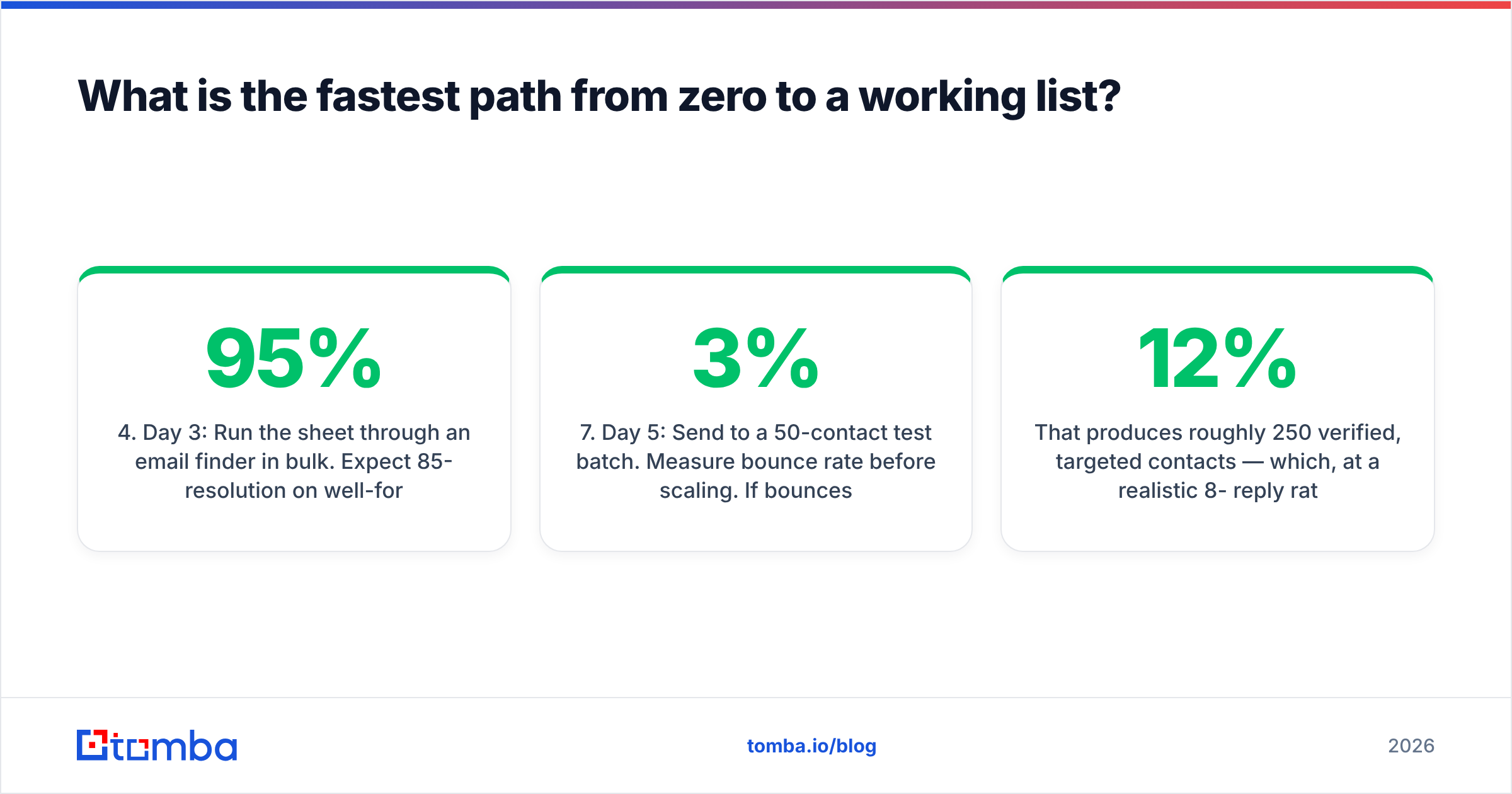
- Day 3: Run the sheet through an email finder in bulk. Expect 85-95% resolution on well-formed rows.
- Day 3: Verify the output. Split into "valid" and "catch-all" segments.
- Day 4: Enrich, personalize the first line per segment, load into your sequencer.
- Day 5: Send to a 50-contact test batch. Measure bounce rate before scaling. If bounces exceed 3%, stop and re-check your verification step.
That produces roughly 250 verified, targeted contacts — which, at a realistic 8-12% reply rate on a well-segmented B2B list, is 20-30 conversations. Compare that to a 50,000-row bought list generating 40% bounces and a blocklisting.
Where should you start?#
Start with the segment definition, then resolve addresses with a tool that verifies as it finds. That single sequencing choice — targeting before volume — is what separates lists that generate pipeline from lists that generate complaints.
If you want the resolver piece handled, the Tomba Email Finder takes a name and a company domain and returns a verified professional address, with a free tier of 25 searches a month so you can test accuracy against contacts you already know before paying anything. Paid plans start at $49/mo and include bulk processing, verification, and API access — everything the workflow above requires, in one place. Run 25 free lookups against people whose addresses you can confirm. That test tells you more about any data vendor than a page of accuracy claims.
Related guides#
// get started
Find, verify and enrich your first contacts today
Start on the free plan with 25 searches a month, then scale when your team is ready.
Free plan · No credit card required · GDPR & CCPA
// about the author