How to Get Emails of Potential Customers: 9 Methods That Work in 2026
Nine tested ways to get emails of potential customers, ranked by accuracy, cost, and how fast they break. Includes a method-by-method comparison table and the verification step most teams skip.
TL;DR
- There are only four real sources of B2B email addresses: the person published it, a data vendor collected it, a pattern engine guessed it, or the prospect handed it to you. Everything else is a wrapper around those four.
- Pattern-based email finders are the cheapest per contact and cover the long tail of small companies that database vendors miss. Prepaid verified lists are faster when you need 5,000 contacts by Friday.
- Never skip verification. A list that looked clean 90 days ago is typically 15-25% stale today because people change jobs.
- Inbound capture (lead magnets, newsletter, website visitor reveal) produces the highest reply rates but the lowest volume. Run it alongside outbound, not instead of it.
- Budget reality: a free tier gets you 25 searches to test quality. Serious prospecting starts around $49/mo and scales with volume, not seats.
What does "getting emails of potential customers" actually mean?#
It means turning a name, a company, or a job title into a deliverable inbox — repeatably, at a cost per contact you can live with, without torching your sending domain.
That last clause is where most teams fail. Getting an email address is trivial. Getting an address that (a) belongs to the right person, (b) still exists, and (c) accepts mail without bouncing is the actual job. A 4% bounce rate is the line where Google and Microsoft start throttling you, and a single bad batch can undo three months of warmup.
So treat this as a supply chain problem with three stages: source, verify, enrich. Skip any one and the other two stop mattering.
Where do B2B emails actually come from?#
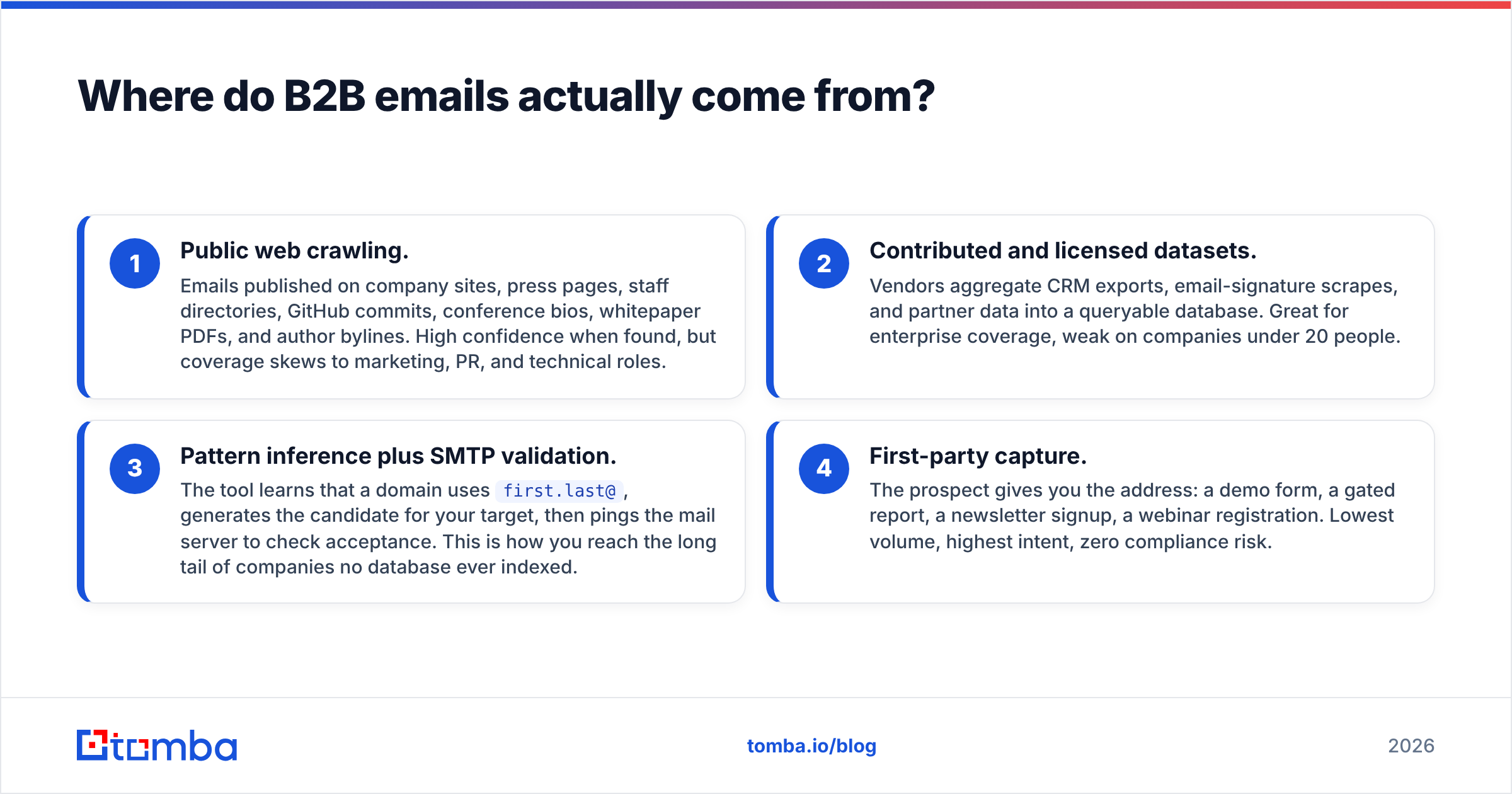
Every tool on the market — every scraper, every database, every Chrome extension — pulls from one of these four origins. Knowing which one your tool uses tells you exactly where it will fail.
- Public web crawling. Emails published on company sites, press pages, staff directories, GitHub commits, conference bios, whitepaper PDFs, and author bylines. High confidence when found, but coverage skews to marketing, PR, and technical roles.
- Contributed and licensed datasets. Vendors aggregate CRM exports, email-signature scrapes, and partner data into a queryable database. Great for enterprise coverage, weak on companies under 20 people.
- Pattern inference plus SMTP validation. The tool learns that a domain uses
first.last@, generates the candidate for your target, then pings the mail server to check acceptance. This is how you reach the long tail of companies no database ever indexed. - First-party capture. The prospect gives you the address: a demo form, a gated report, a newsletter signup, a webinar registration. Lowest volume, highest intent, zero compliance risk.
The best stacks combine 3 and 4 for quality, and lean on 2 only when volume matters more than precision.
What are the 9 ways to get emails of potential customers?#
1. Domain search (start here)#
Give a tool a company domain and get back every known address on it, with role labels and confidence scores. This is the fastest way to map an account before you pick a target. Tomba's domain search returns the department, source URLs, and the detected email pattern, which is the input for everything below.
Best for: account-based outbound where you already know the target companies.
2. Name-plus-domain lookup#
You know it's Sarah Chen at Acme. A dedicated email finder resolves that into s.chen@acme.com and tells you the confidence. This is the single highest-leverage method because your list of names is usually easier to build (LinkedIn, conference agendas, G2 reviews, podcast guests) than your list of addresses.
Best for: precision outbound to named individuals.
3. LinkedIn-sourced prospecting#
Build a Sales Navigator search, export the profiles, then resolve work emails from name + company. LinkedIn itself will never give you the address — you need a resolution layer. Keep your exports modest; aggressive scraping gets accounts restricted.
Best for: title-based targeting where the org chart matters.
4. Email pattern deduction#
If you know one address at a company, you know most of them. john.smith@acme.com tells you the format is first.last. Run the pattern against your name list, then verify each candidate before sending. A company email pattern checker does this in one step instead of manual guessing.
Best for: small companies with no database presence.

5. Prepaid verified list purchase#
Buying is legitimate when the vendor is transparent about sourcing, offers filters that match your ICP, and guarantees deliverability. BookYourData, for example, sells pay-as-you-go verified B2B contacts with a bounce guarantee — a reasonable fit when you need a defined slice of a market immediately and don't want a subscription. The risk isn't buying per se; it's buying from vendors who won't tell you where the data came from or when it was last checked.
Best for: fast market entry, event lists, one-off campaigns.
6. Website visitor identification#
Most of your site traffic never fills in a form. Reverse-IP and identity-graph tools resolve anonymous company visits into named accounts you can then prospect. Tomba's website visitor reveal turns "someone from a 200-person fintech read your pricing page twice" into an actionable account.
Best for: warm outbound with a genuine reason to reach out.
7. Lead magnets and gated content#
A benchmark report, a calculator, a template pack, a teardown of a competitor. You trade utility for an address plus explicit permission. HubSpot's research on inbound lead generation still holds: gated assets with a specific, narrow promise outperform broad ebooks by a wide margin.
Best for: building a compliant, high-intent list over months.
8. Author and content-based outreach#
If your buyer publishes — blog posts, research, documentation, conference talks — the byline is a targeting signal. An author finder resolves an article URL into the writer's contact details, which is how link-building, PR, and partner outreach teams operate at scale.
Best for: content partnerships, digital PR, analyst relations.
9. Communities, events, and podcasts#
Attendee lists, Slack communities, Discord servers, podcast guest archives, and G2 reviewer profiles all produce names attached to companies. You still need step 2 to turn those names into addresses, but the intent signal is far better than a raw title filter. Browse the tooling landscape on G2's lead intelligence category if you want to see how vendors segment this space.
Best for: niche markets where the total addressable list is under 5,000 companies.
Which method should you use for your situation?#
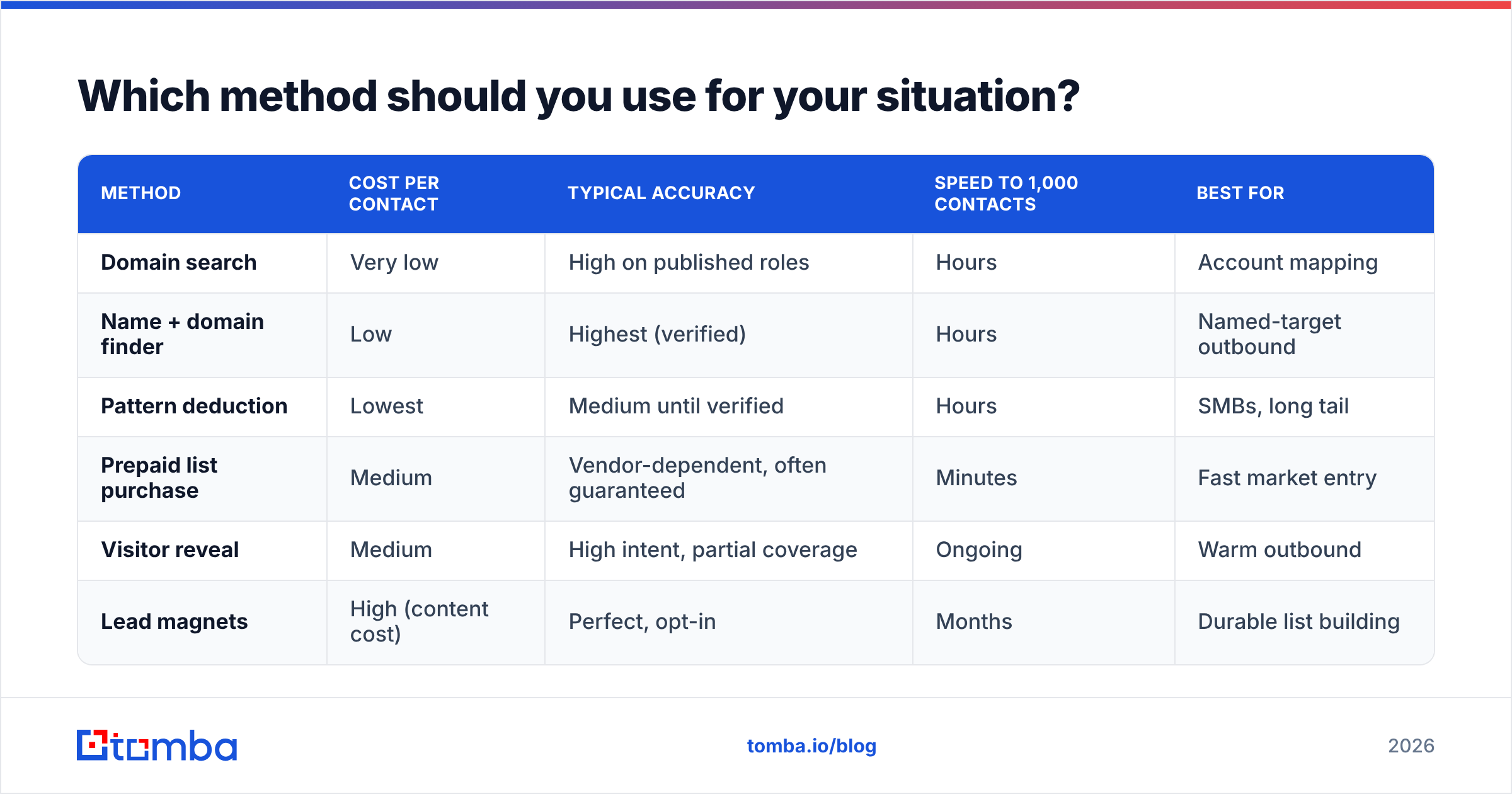
| Method | Cost per contact | Typical accuracy | Speed to 1,000 contacts | Best for |
|---|---|---|---|---|
| Domain search | Very low | High on published roles | Hours | Account mapping |
| Name + domain finder | Low | Highest (verified) | Hours | Named-target outbound |
| Pattern deduction | Lowest | Medium until verified | Hours | SMBs, long tail |
| Prepaid list purchase | Medium | Vendor-dependent, often guaranteed | Minutes | Fast market entry |
| Visitor reveal | Medium | High intent, partial coverage | Ongoing | Warm outbound |
| Lead magnets | High (content cost) | Perfect, opt-in | Months | Durable list building |
Read that table as a portfolio, not a menu. Most teams that consistently book meetings run two or three rows simultaneously: a finder for precision, a purchased or database slice for volume, and inbound capture compounding in the background.
How much does this cost in practice?#
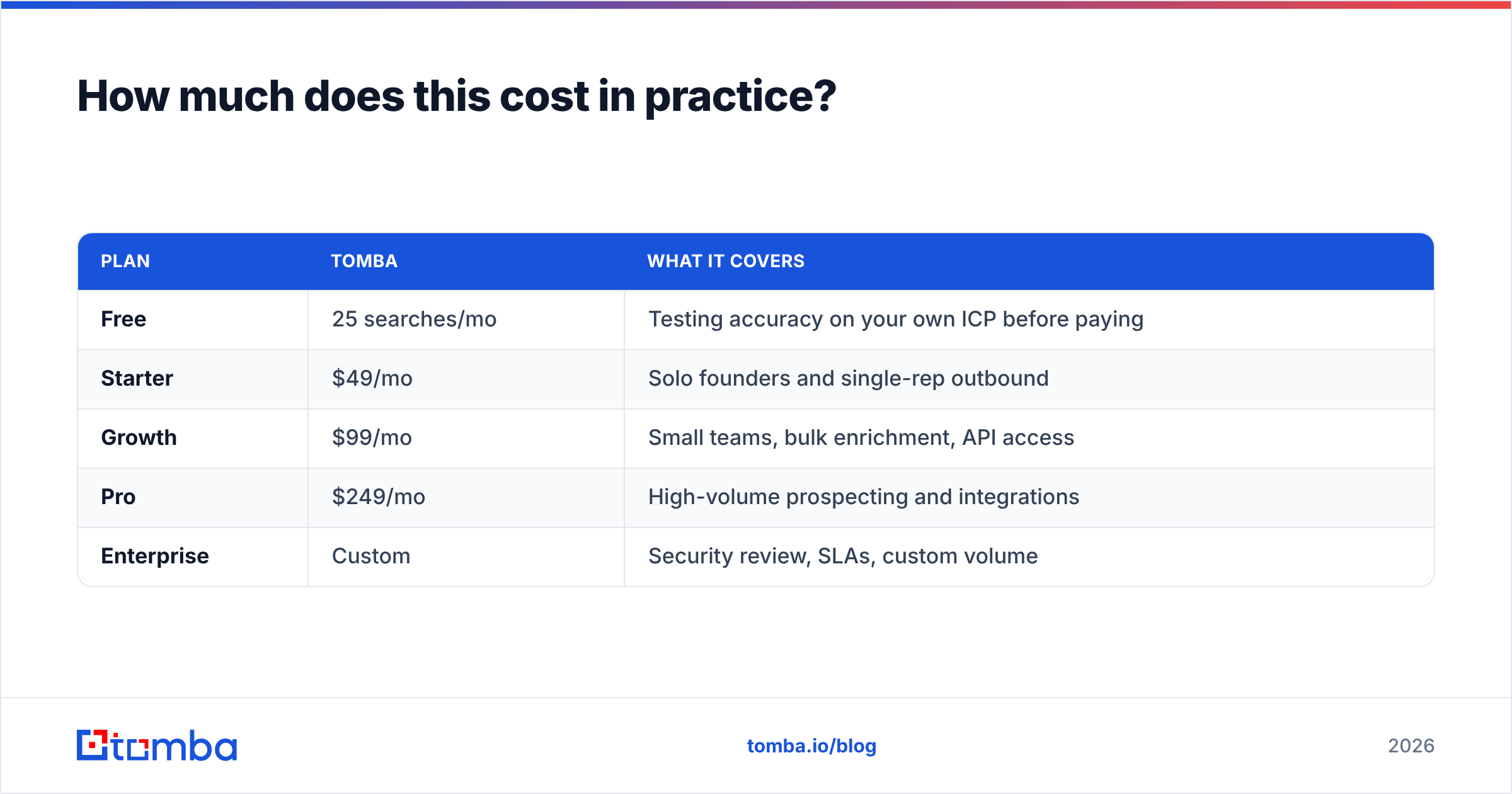
Pricing in this category is almost always credit-based, so compare cost per verified contact, not headline monthly price. A $79/mo tool that returns 60% valid addresses is more expensive than a $99/mo tool at 95%.
| Plan | Tomba | What it covers |
|---|---|---|
| Free | 25 searches/mo | Testing accuracy on your own ICP before paying |
| Starter | $49/mo | Solo founders and single-rep outbound |
| Growth | $99/mo | Small teams, bulk enrichment, API access |
| Pro | $249/mo | High-volume prospecting and integrations |
| Enterprise | Custom | Security review, SLAs, custom volume |
Full breakdown on the Tomba pricing page. Whatever vendor you evaluate, run the same 50 known-good contacts through every free tier and score the results yourself. Vendor-published accuracy numbers are measured on the data they're strongest at.
Why does verification matter more than sourcing?#
Because your source decays. People change jobs roughly every two to three years, which means a static list loses somewhere between 20% and 30% of its accuracy annually — and the decay isn't evenly spread. Fast-growing startups churn faster than mature enterprises.

A defensible pre-send routine looks like this:
- Syntax and domain check. Kill malformed addresses and dead domains before spending a credit on anything heavier.
- MX record lookup. No mail exchanger, no delivery. Free and instant.
- SMTP handshake. Ask the receiving server whether the mailbox exists, without sending mail.
- Catch-all handling. Some domains accept everything, so a handshake proves nothing. A catch-all verifier applies additional signals to score these instead of dumping them.
- Role-account triage.
info@,sales@,support@are valid but rarely reach a decision maker. Segment them out rather than deleting them.
Run the whole batch through an email verifier immediately before the campaign launches — not when you built the list three weeks ago. And if you're processing thousands of rows, a bulk email finder beats one-off lookups on both cost and time.
Is any of this legal?#
Mostly, with real constraints that differ by jurisdiction.
In the United States, the CAN-SPAM Act permits unsolicited commercial email to business addresses provided you identify yourself accurately, use a truthful subject line, include a physical postal address, and honor opt-outs within 10 business days. There is no consent requirement.
In the EU and UK, GDPR applies to business contact data that identifies a person. Cold B2B email is generally defensible under legitimate interest, but you need to document that assessment, name your data source in your privacy notice, and honor deletion requests. Some member states layer stricter ePrivacy rules on top.
Practical guardrails that keep you safe almost everywhere:
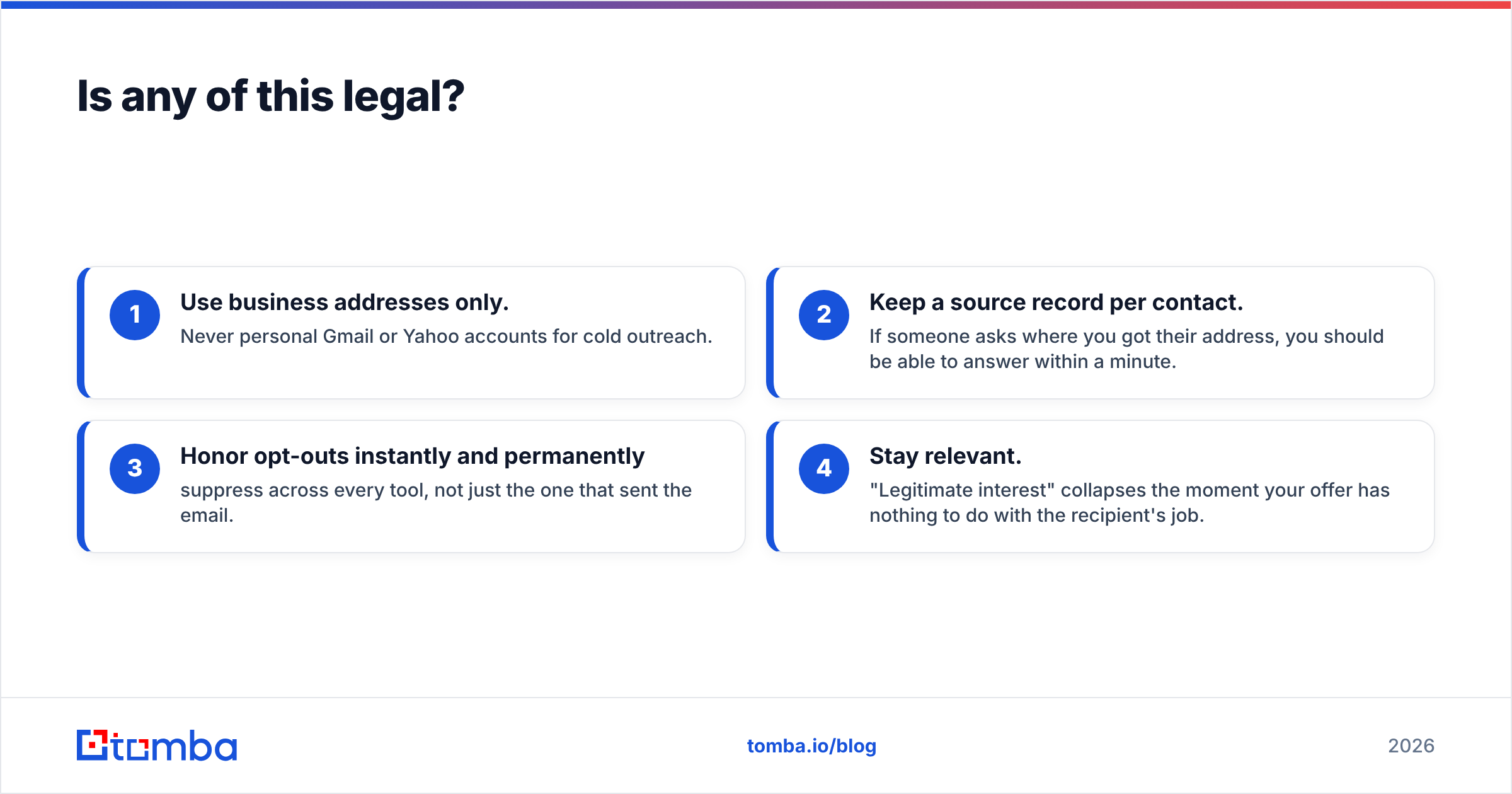
- Use business addresses only. Never personal Gmail or Yahoo accounts for cold outreach.
- Keep a source record per contact. If someone asks where you got their address, you should be able to answer within a minute.
- Honor opt-outs instantly and permanently — suppress across every tool, not just the one that sent the email.
- Stay relevant. "Legitimate interest" collapses the moment your offer has nothing to do with the recipient's job.
What does a repeatable workflow look like?#
Here's the loop that works whether you're sending 50 emails a week or 5,000:
- Define the account list. Firmographic filters first — industry, headcount, geography, tech stack. Fifty right accounts beat five thousand random ones.
- Map each account. Run domain search to see who's there and what the email pattern is.
- Pick named targets. Two to four people per account, not one. Buyers change roles; committees decide.
- Resolve addresses. Name plus domain through your finder. Push anything unresolved into pattern deduction.
- Verify the full batch. Drop hard bounces, segment catch-alls into a lower-priority sequence.
- Enrich for personalization. Job title, seniority, LinkedIn URL, recent funding, tech stack — this is what makes the first line non-generic. Data enrichment handles this in the same pass.
- Sync to your stack. Push to your CRM or sequencer directly rather than passing CSVs around. Check the integrations list or wire it up through the Tomba API.
- Measure and feed back. Track bounce rate, reply rate, and meeting rate by source. If purchased data bounces at 8% and finder data at 1%, reallocate the budget.
Step 8 is the one teams skip, and it's the one that compounds. After two months of tracking, you'll know exactly which of the nine methods deserves your spend for your ICP — which is a far more useful answer than anything a blog post can give you.
What should you do first?#
Start narrow. Take 50 target accounts you genuinely want as customers, map them properly, resolve and verify the contacts, and send a sequence you'd be happy to receive. Measure the bounce and reply rates. Then scale the method that worked instead of buying volume you can't process.
If you want to test the sourcing layer without committing budget, the Tomba Email Finder free tier gives you 25 searches a month — enough to run your own accuracy benchmark on companies you already know, before you pay anyone a cent. Paid plans start at $49/mo, and every result comes with confidence scoring and source attribution, so you always know where an address came from and how much to trust it.
Related guides#
// get started
Find, verify and enrich your first contacts today
Start on the free plan with 25 searches a month, then scale when your team is ready.
Free plan · No credit card required · GDPR & CCPA
// about the author