How To Get Past Executive Assistant Gatekeepers in 2026
Executive assistants block roughly 80% of vendor calls before they reach a decision-maker. Here are seven scripts, tactics, and data workflows that actually move you forward.
TL;DR
- The executive assistant is not an obstacle to defeat — they are a qualified buyer-side researcher who decides what reaches the calendar. Treat them as a decision influencer and your connect rate climbs.
- Tricks like "he's expecting my call" or claiming to be a friend get you blacklisted in the assistant's CRM notes, and those notes outlive your quota.
- The three tactics with the best measured return: give the EA a one-sentence reason tied to their exec's stated priority, call outside the 9–5 shield window, and arrive with a warm reference or referral already named.
- A verified direct dial or personal email removes the gate entirely for many prospects — build that data layer before you build the script.
- Multithreading below the exec (VP, director, chief of staff) usually beats a fourth attempt at the same switchboard.
Why do executive assistants block your call in the first place?#
Because that is literally the job. A C-level executive at a mid-market company gets somewhere between 40 and 120 unsolicited vendor contacts a week. The assistant's mandate is to protect calendar time for revenue-generating and board-level work. Every minute they hand to an unqualified vendor is a minute stolen from something their boss actually asked for.
Think of the EA like the bouncer at a private club. The bouncer isn't rejecting you personally — they're checking whether you're on the list, whether you look like you belong, and whether letting you in creates a problem later. Arguing with the bouncer never works. Being on the list does.
Two practical consequences follow from that framing:
- The EA has memory. Most assistants keep a running note of vendors who lied, who were rude, or who called five times in a week. Salesforce's own sales research on trust has consistently found that buyers reward transparency and punish manipulation — and the assistant is the first person your transparency gets tested by.
- The EA has criteria. They usually know the top three initiatives their executive owns this quarter. If your opener maps to one of those, you're a helpful signal. If it doesn't, you're noise.
So the real question is not "how to get past executive assistant screening" — it's "how do I become the kind of call the EA wants to pass along?"

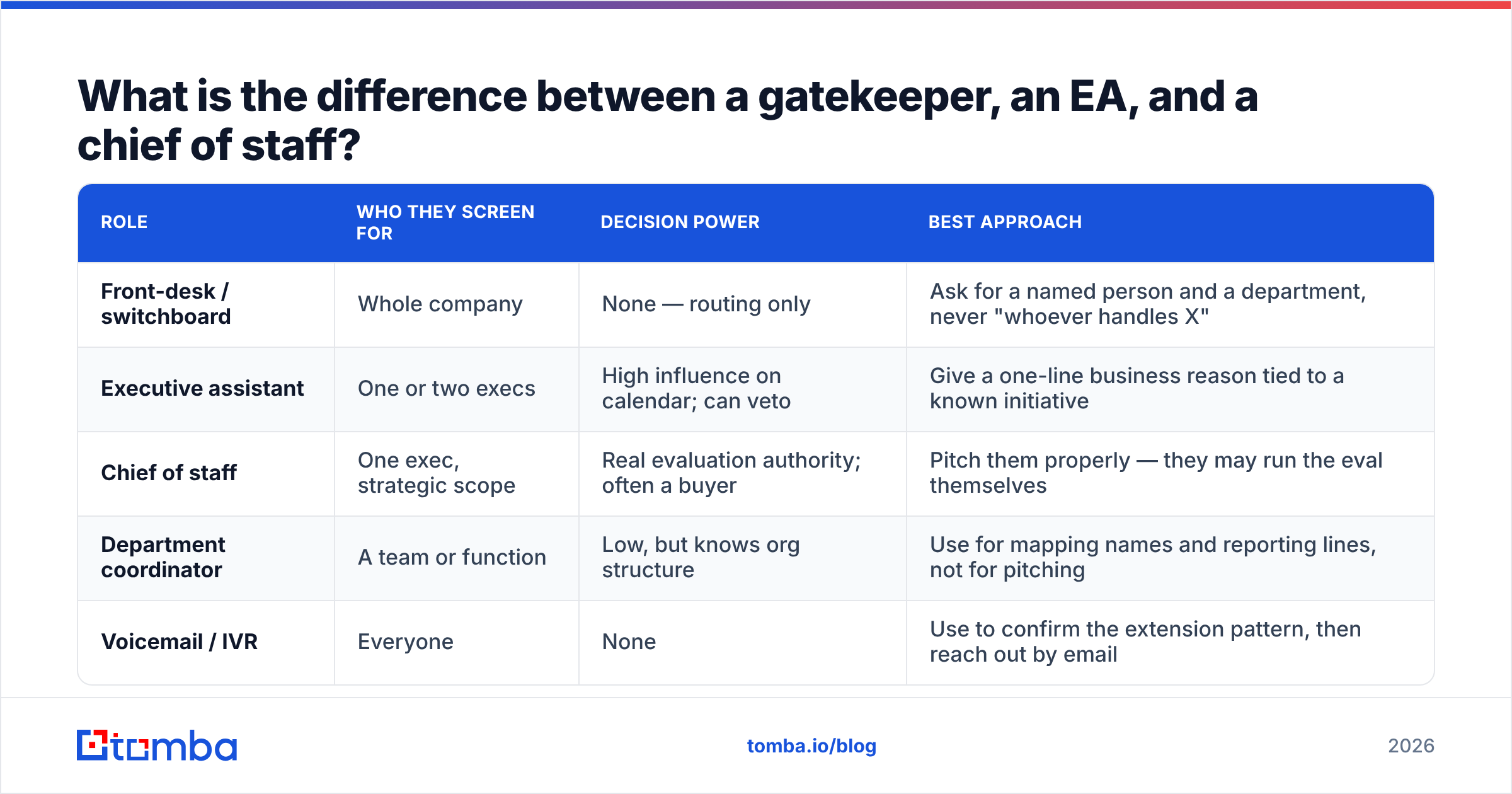
What is the difference between a gatekeeper, an EA, and a chief of staff?#
These are not the same role, and the tactic changes depending on which one picked up.
| Role | Who they screen for | Decision power | Best approach |
|---|---|---|---|
| Front-desk / switchboard | Whole company | None — routing only | Ask for a named person and a department, never "whoever handles X" |
| Executive assistant | One or two execs | High influence on calendar; can veto | Give a one-line business reason tied to a known initiative |
| Chief of staff | One exec, strategic scope | Real evaluation authority; often a buyer | Pitch them properly — they may run the eval themselves |
| Department coordinator | A team or function | Low, but knows org structure | Use for mapping names and reporting lines, not for pitching |
| Voicemail / IVR | Everyone | None | Use to confirm the extension pattern, then reach out by email |
Misreading the role is the most common failure. Reps pitch the switchboard operator (who cannot help) and try to charm the chief of staff (who wants substance, not charm). Ask one clarifying question early — "Are you the right person to help me get 15 minutes on Dana's calendar, or should I be talking to someone else?" — and you'll usually get an honest answer.
How do you get past an executive assistant without lying?#
Seven tactics, ordered by how reliably they work in practice.
1. Name the initiative, not the product. Compare "I'd like to talk to her about our data enrichment platform" with "I'm following up on the Q3 hiring-efficiency push she mentioned at the RevOps summit — we work with three companies that solved the same reporting gap." The second one gives the EA a reason to pass it along. The first gives them a reason to end the call.
2. Ask for help, explicitly. "I'm hoping you can point me in the right direction" outperforms any assertive script. Assistants are hired for competence and rarely get to use it on inbound vendors. Give them the chance.
3. Be honest about what you are. "This is a sales call — I'll keep it to 30 seconds and you can tell me if it's a no." It disarms the reflex. Reps report noticeably higher pass-through with a stated frame than with an evasive one, because the assistant no longer has to spend energy figuring out what you're hiding.
4. Call outside the shield window. Assistants typically cover 9:00–17:00. Executives frequently answer their own line before 8:15 and after 18:00, and on Fridays when the assistant is offsite. This isn't a trick — it's a scheduling fact.
5. Get referred sideways. A warm intro from a VP inside the same company converts far better than any cold approach to the exec. Ask the EA: "Who on the team owns the day-to-day of this?" Then work upward from that person.
6. Send something before you call. A short, specific email that lands the day before gives the EA a document to evaluate instead of a voice to judge. If the exec forwards it with "look into this," you've been let in through the front door.
7. Skip the switchboard with verified data. If you already have the mobile number or personal email, the entire gatekeeper problem dissolves. This is the least glamorous tactic and the highest-leverage one.
What does not work: pretending you already know the executive, claiming a return call, using "he asked me to reach out" when he didn't, or repeatedly calling from different numbers. All four are logged, and all four get your domain and company name flagged.
What should you actually say? Scripts by scenario#
Scripts are starting points, not lines to read. Adapt the wording to how you actually talk.
Scenario: first contact, no prior relationship
"Hi, this is Sam at Northbrook. I'm trying to reach Dana about the vendor-consolidation work her team posted about last month. I'll be honest — this is an outbound call, not a scheduled one. Is she the right person for that, or is someone else running it?"
Scenario: the EA asks "what is this regarding?"
"Fair question. We help RevOps teams cut duplicate contact records before a CRM migration. Three companies in the same situation as yours saw the migration timeline drop by weeks. If that's not a live problem for Dana right now, tell me and I'll stop."
Scenario: the EA offers to take a message
"I'd appreciate that. Two things to include: the topic is CRM data quality ahead of the migration, and I'm happy to send a one-page summary instead of taking a meeting if that's easier for her. What's the best address for that?"
That last line matters. Offering an alternative that costs the exec less time signals that you value their calendar, and it usually gets you a working email address.
Scenario: hard no
"Understood. Is there someone on the operations side I should be talking to instead? And is there a better time of year to check back?"
Never argue with a no. Convert it into a routing question or a calendar entry.
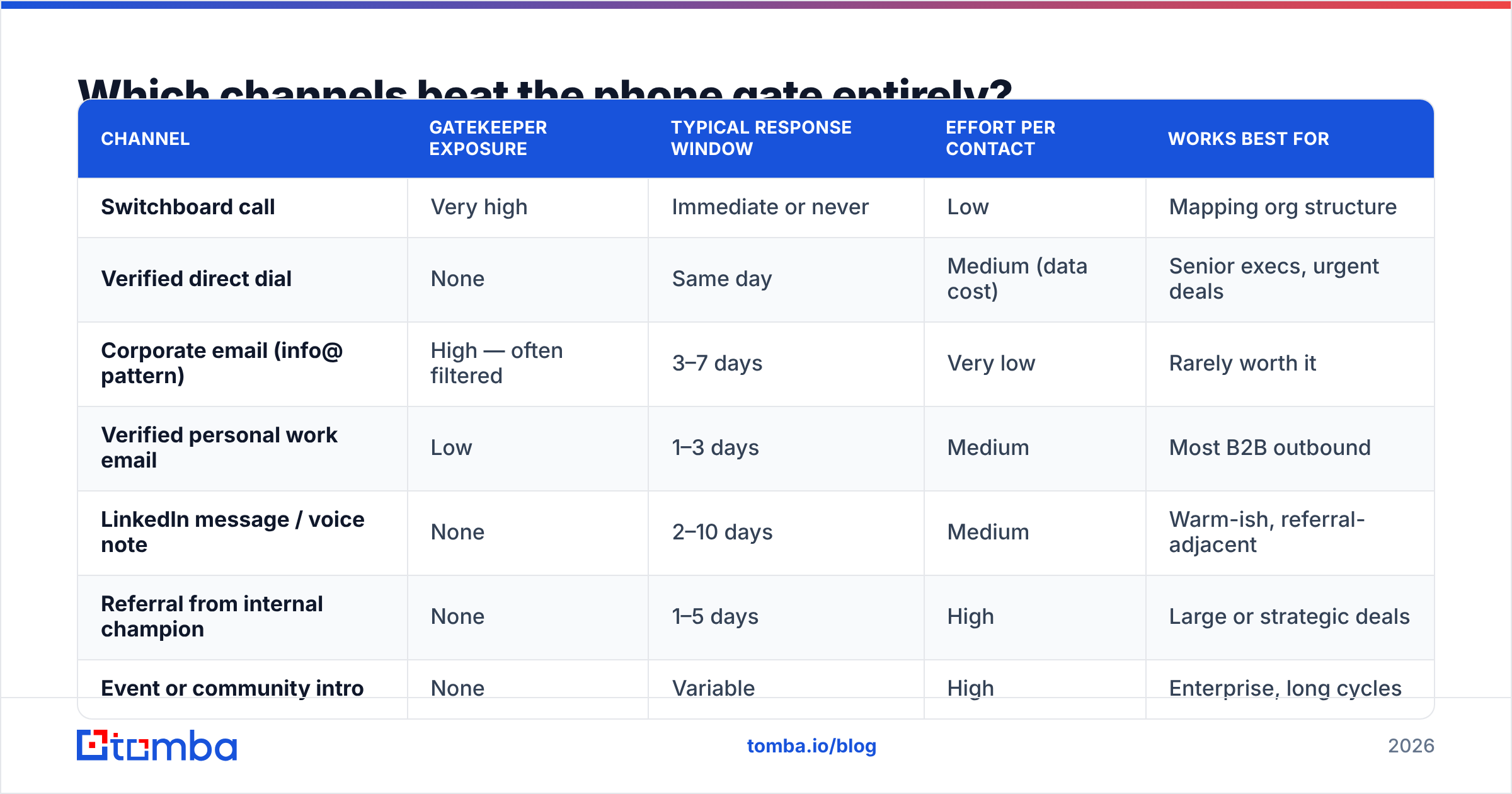
Which channels beat the phone gate entirely?#
The honest answer for 2026: the phone is one channel in a stack, and the gate exists mainly on that channel. Here is how the main routes compare.
| Channel | Gatekeeper exposure | Typical response window | Effort per contact | Works best for |
|---|---|---|---|---|
| Switchboard call | Very high | Immediate or never | Low | Mapping org structure |
| Verified direct dial | None | Same day | Medium (data cost) | Senior execs, urgent deals |
| Corporate email (info@ pattern) | High — often filtered | 3–7 days | Very low | Rarely worth it |
| Verified personal work email | Low | 1–3 days | Medium | Most B2B outbound |
| LinkedIn message / voice note | None | 2–10 days | Medium | Warm-ish, referral-adjacent |
| Referral from internal champion | None | 1–5 days | High | Large or strategic deals |
| Event or community intro | None | Variable | High | Enterprise, long cycles |
Two observations from that table. First, every low-gate channel depends on having accurate contact data — a wrong direct dial is worse than no direct dial, because it burns a call slot and can route you to a stranger. Second, the highest-converting routes (referral, event) don't scale on their own, which is why most teams pair them with a verified-email motion for volume.
If your contact list is stale, none of the scripts above matter. Run your list through an email verifier before a campaign, and use domain search to pull the current roster at the target company rather than relying on a list you exported eighteen months ago.
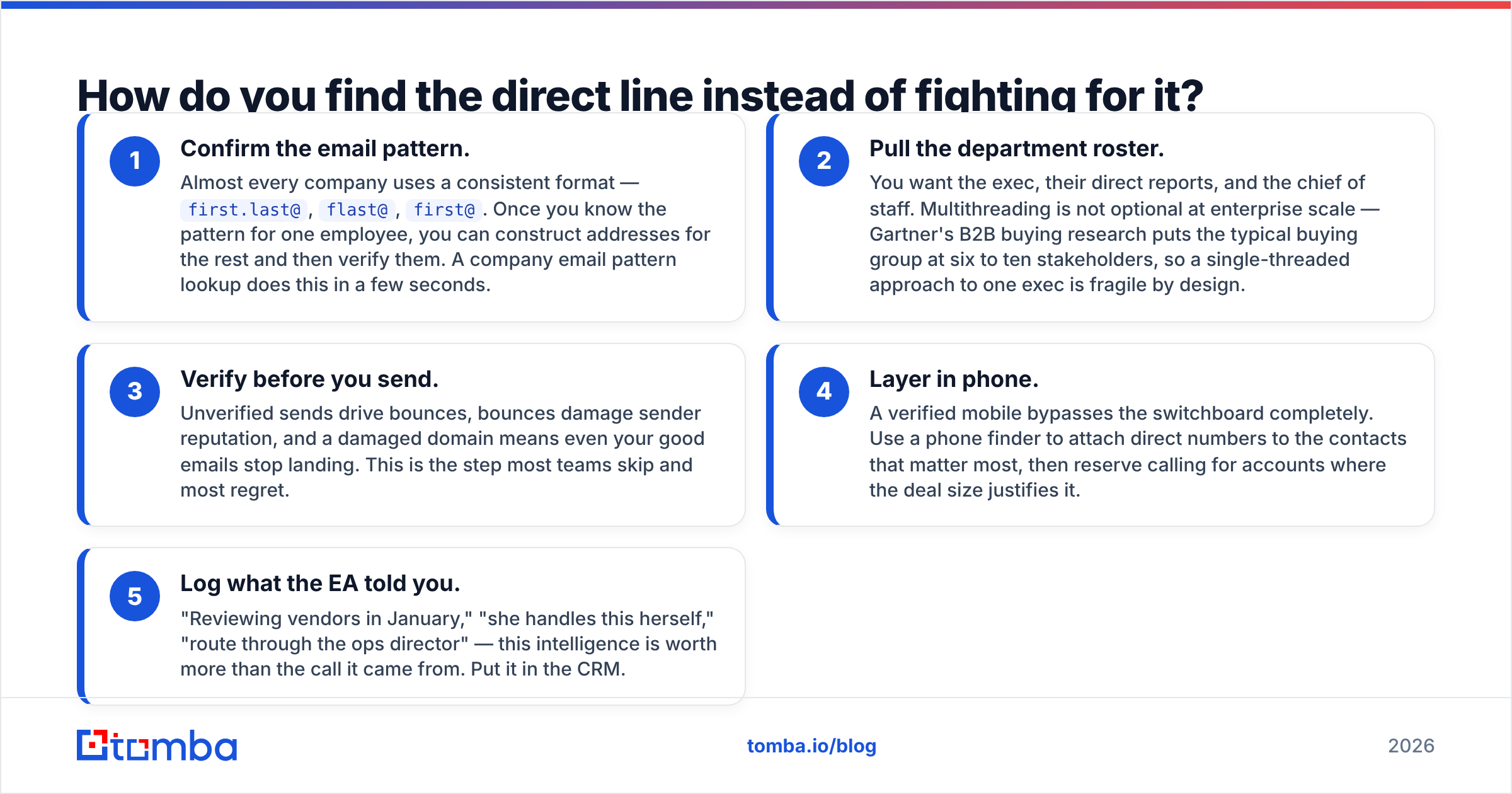
How do you find the direct line instead of fighting for it?#
Work in this order.
- Confirm the email pattern. Almost every company uses a consistent format —
first.last@,flast@,first@. Once you know the pattern for one employee, you can construct addresses for the rest and then verify them. A company email pattern lookup does this in a few seconds. - Pull the department roster. You want the exec, their direct reports, and the chief of staff. Multithreading is not optional at enterprise scale — Gartner's B2B buying research puts the typical buying group at six to ten stakeholders, so a single-threaded approach to one exec is fragile by design.
- Verify before you send. Unverified sends drive bounces, bounces damage sender reputation, and a damaged domain means even your good emails stop landing. This is the step most teams skip and most regret.
- Layer in phone. A verified mobile bypasses the switchboard completely. Use a phone finder to attach direct numbers to the contacts that matter most, then reserve calling for accounts where the deal size justifies it.
- Log what the EA told you. "Reviewing vendors in January," "she handles this herself," "route through the ops director" — this intelligence is worth more than the call it came from. Put it in the CRM.
The economics here are simple. If a rep makes 60 switchboard dials to reach 4 executives, and verified direct data lets them reach 4 executives in 12 dials, the data cost is trivial compared to the recovered selling hours.
What about the EA's own perspective?#
Worth reading the other side of the table. Assistants consistently report the same complaints in community forums and on review sites like G2's sales-tool discussions: reps who won't state their purpose, reps who call the exec's cell after being told not to, reps who pretend a prior relationship exists, and reps who are dismissive once they realize they're not talking to the boss.
They also report what earns access: brevity, honesty about being a vendor, respecting a "not now," and — this one comes up constantly — treating the assistant with the same courtesy as the executive. Several assistants have said outright that they've booked meetings for reps purely because the rep was decent to them when they had no obligation to be.
There's a practical upside too. An EA who likes you will tell you when their exec's priorities shift, when budget cycles open, and when a competitor's contract is up. That's competitive intelligence you cannot buy.
How should you sequence a full gatekeeper-aware outbound play?#
A workable 14-day sequence for a single target account:
- Day 0 — Research. Identify the exec, the chief of staff, and two directors beneath them. Confirm the email pattern and verify addresses.
- Day 1 — Email the director. Lower gate, higher reply rate, and their answer tells you whether the exec is even the right target.
- Day 3 — LinkedIn connection to the exec with a one-line note referencing something specific and public. No pitch.
- Day 5 — Call the main line. Goal is not the exec; goal is to reach the EA, be honest, and get routing information plus the correct email.
- Day 7 — Email the exec with a one-page summary and an explicit "reply no and I'll close the loop" opt-out.
- Day 10 — Direct dial, early morning, if you have a verified mobile and the account justifies it.
- Day 14 — Break-up email to both the exec and the director, with a genuine resource attached and a specific date to revisit.
Notice that only two of seven steps involve the gate at all. That's the design goal. If your process routes every attempt through one switchboard, you've built a single point of failure into your pipeline. Track the whole thing against your response rate baseline so you know which steps are actually pulling weight.
What are the common mistakes that kill your access permanently?#
- Calling more than twice a week through the same line. You become a logged nuisance.
- Refusing to say what the call is about. This is the single fastest route to a permanent block.
- Talking down to the assistant. They will remember, and they talk to other assistants.
- Using a spoofed or rotating caller ID. Compliance risk plus reputation risk.
- Sending to unverified addresses at scale. Hard bounces at a corporate domain get your sending domain flagged, which quietly kills email deliverability across every account you're working, not just this one.
- Giving up after one gate. Most reps stop at attempt two. The accounts worth having usually take five to eight touches across three channels.
Get the direct line before you need the script#
The best gatekeeper strategy is the one you never have to use. Reps who consistently reach executives aren't better talkers — they show up already holding a verified work email, a direct dial, and the name of the person who actually owns the problem. The script only matters after the data fails.
Build that data layer first. Tomba's Email Finder resolves professional email addresses by name and domain, pairs with verification so your sends don't bounce, and runs on a free tier of 25 searches per month if you want to test it against a list you already have. Paid plans start at $49/mo for Starter, $99/mo for Growth, and $249/mo for Pro — see full Tomba pricing for credit allowances. Start with ten target accounts, find the real contacts, and see how many gates you can simply walk around.
Related guides#
// get started
Find, verify and enrich your first contacts today
Start on the free plan with 25 searches a month, then scale when your team is ready.
Free plan · No credit card required · GDPR & CCPA
// about the author