How To Get Past Gatekeepers Cold Calling: 9 Proven Scripts
Gatekeepers block roughly 8 in 10 cold calls before a rep ever reaches the decision-maker. Here are nine scripts, three permission-based tactics, and the direct-dial workaround that skips the switchboard entirely.
TL;DR
- Gatekeepers screen calls because that is their job description, not because they dislike you. Treating them as an obstacle is the single most common reason reps get blocked permanently.
- The highest-connect scripts share three traits: confident tone, a specific person's name, and zero pitch. "Pitching the gatekeeper" drops connect rates hard.
- Calling before 8:30am or after 5:15pm routes you to voicemail or the decision-maker directly, because reception is not staffed.
- The most reliable long-term fix is not a script at all. It is having the direct dial and the verified email before you ever pick up the phone.
- Below: 9 scripts by scenario, a comparison of the four main bypass strategies, and how to build a direct-dial list so you stop playing switchboard roulette.
Why do gatekeepers block your call in the first place?#
Because someone told them to. That is the whole story, and it changes how you should approach the call.
An executive assistant or receptionist has an explicit mandate: protect the calendar of the person you want. They are measured on how few unqualified interruptions reach that person. When you open with "Hi, is Sarah available?" in an uncertain tone, you have handed them a clean, low-risk decision — screen it out.
Reps who struggle with gatekeepers usually make one of four errors:
- Sounding like a stranger. Rising intonation, over-explaining, apologizing for calling. All of it signals "external vendor" within two seconds.
- Pitching the wrong person. The gatekeeper cannot buy. Explaining your value proposition to them wastes both parties' time and hands them ammunition to say "we're not interested."
- Using the full name. "May I speak with Ms. Sarah Chen, the VP of Operations?" is how a cold caller talks. "Is Sarah in?" is how a colleague talks.
- Being deceptive. Claiming to be returning a call you never got, or implying an existing relationship, works exactly once and burns the account. Some of the best-connecting scripts below are entirely honest.
The gatekeeper is also, quietly, one of the best-informed people in the building. They know who owns which budget, when the decision-maker is actually at their desk, and whether a project is live. Reps who treat them as an ally get that intelligence for free.

What are the four main strategies for getting past gatekeepers?#
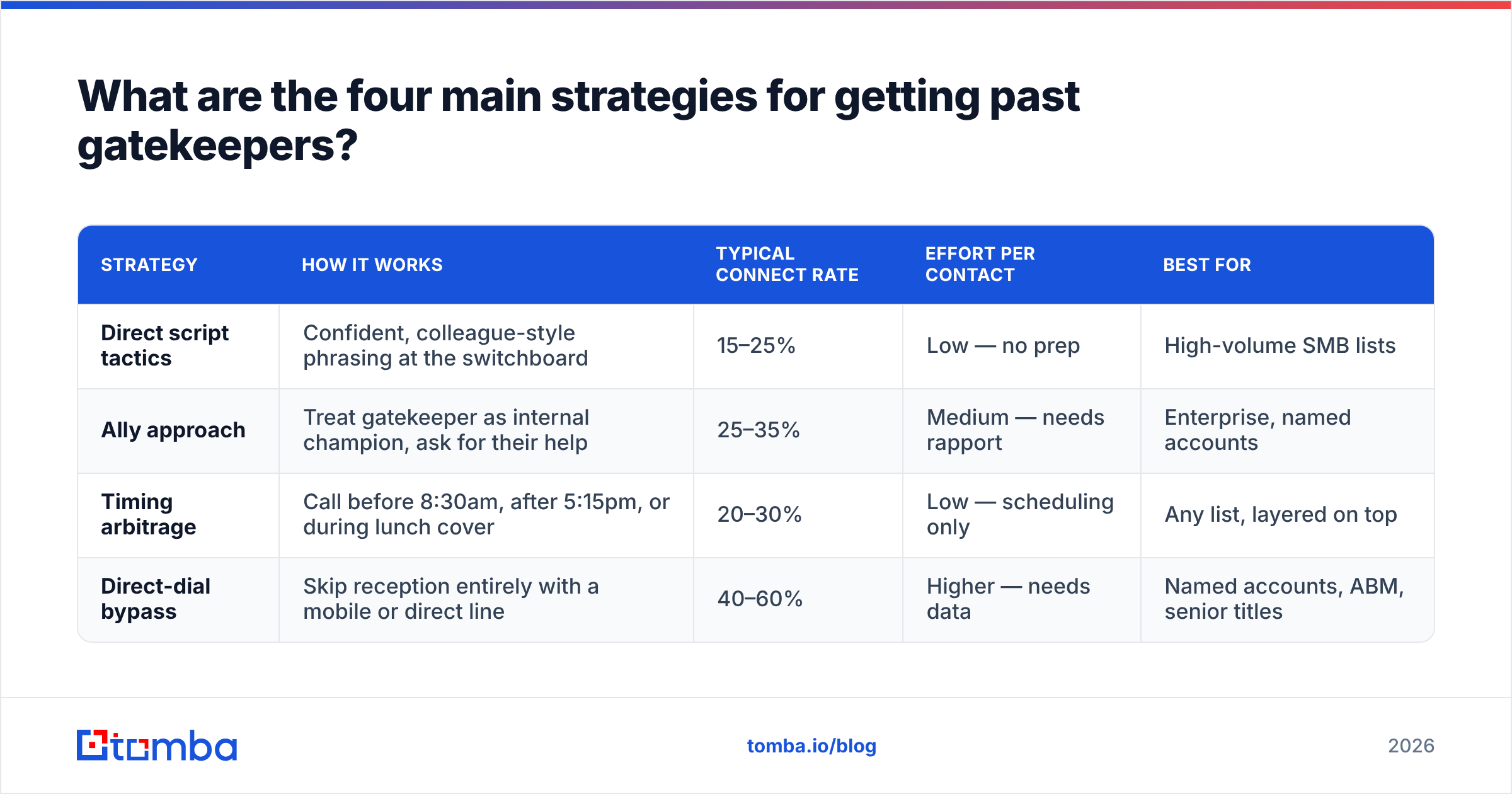
There are only four fundamental approaches. Everything else is a variation. Here is how they compare on realistic expectations for a mid-market B2B list:
| Strategy | How it works | Typical connect rate | Effort per contact | Best for |
|---|---|---|---|---|
| Direct script tactics | Confident, colleague-style phrasing at the switchboard | 15–25% | Low — no prep | High-volume SMB lists |
| Ally approach | Treat gatekeeper as internal champion, ask for their help | 25–35% | Medium — needs rapport | Enterprise, named accounts |
| Timing arbitrage | Call before 8:30am, after 5:15pm, or during lunch cover | 20–30% | Low — scheduling only | Any list, layered on top |
| Direct-dial bypass | Skip reception entirely with a mobile or direct line | 40–60% | Higher — needs data | Named accounts, ABM, senior titles |
Notice that the fourth row is not a technique you perform on a call. It is a data problem you solve before the call. That gap is the single biggest lever in phone prospecting, and most teams underinvest in it because scripts feel like the cheaper fix.
The realistic playbook is to layer all four: build direct dials where you can, use timing to bypass the desk when you cannot, and keep two or three scripts sharp for the switchboards you still have to pass through.
What scripts actually get you past the gatekeeper?#
Nine scripts, grouped by scenario. Read them aloud before you use them — anything you can't say naturally will get screened.
Scenario 1: You have the decision-maker's name
Script 1 — The colleague open. "Hi, it's Marcus. Is Sarah around?" No last name, no company, no title. Pause. This is the highest-volume script and it works because it matches the acoustic pattern of an internal call. If they ask "Marcus from where?", answer plainly: "Marcus from Tomba — she doesn't know me yet, I'm hoping to grab two minutes."
Script 2 — The stated-purpose open. "Hi, I'm hoping you can point me in the right direction. I'm calling about how your team handles outbound data — is Sarah the right person, or is that someone else now?" This asks the gatekeeper to do their favorite thing: route correctly. It also honestly signals you are external, which keeps the relationship clean.
Script 3 — The reference open. "Hi, Sarah's name came up when I was reading your Q3 announcement about the EMEA expansion. Is she available?" Specificity is the signal. Anyone can say "I'd like to speak with Sarah." Almost no cold callers cite something real.
Scenario 2: You don't have a name yet
Script 4 — The research call. "Quick question and I'll get out of your hair — who owns supplier onboarding over there these days?" Then hang up after you get the name. Call back tomorrow with Script 1. Splitting research and pitch across two calls doubles your setup work but roughly doubles connect rate on the second call.
Script 5 — The wrong-guess gambit. "Hi, I'm trying to reach whoever took over from David in RevOps?" If David doesn't exist, the gatekeeper corrects you with the real name. Use this carefully; it edges toward deceptive if you lean on it.
Scenario 3: The gatekeeper pushes back
Script 6 — "What's this regarding?" Answer with a topic, not a pitch. "It's about the data accuracy issue on their outbound lists — Sarah will know the context." Topics pass. Pitches get screened.
Script 7 — "Send me an email." "Happy to. Two things so it doesn't die in her inbox: what's the best address, and is there a subject line she actually opens?" You now have a verified email plus permission to reference the call. That is a genuine win, not a loss.
Script 8 — "She's in a meeting." "No problem — I'll try her later. When does she usually surface, morning or afternoon?" You have converted a rejection into a scheduling window. Note it in your CRM and call in that window.
Scenario 4: The recurring switchboard
Script 9 — The named ally. On call two or three: "Hi Denise, it's Marcus again — you helped me last week. Any luck catching Sarah at her desk?" Remembering the gatekeeper's name is unreasonably effective. Most reps never ask for it. Ask on call one: "Sorry, I didn't catch your name?"
Across all nine, the delivery rules are constant: speak slightly slower than feels natural, drop your intonation at the end of sentences, never apologize for calling, and stop talking after you ask a question.
When should you call to avoid the gatekeeper entirely?#
Timing is the cheapest bypass available, because reception desks are staffed on a schedule and decision-makers are not.
- Before 8:30am. Senior people arrive early and answer their own line. Reception typically starts at 8:30 or 9:00.
- After 5:15pm. Same logic, reversed. The assistant has left; the VP is still clearing their inbox.
- 12:00–1:00pm. Lunch cover is often a junior temp with no screening instructions.
- Fridays after 3pm. Lower call volume, softer screening, and people are more conversational.
Research from sales-engagement vendors and HubSpot's sales benchmarks consistently shows Wednesday and Thursday outperform Monday and Friday for overall connect rates — but the early/late windows outperform the mid-day peak on bypass rate specifically. Those are different metrics. Optimize for the one that matches your bottleneck.
One caveat: do not treat off-hours calling as a license to call at 6:45am. You are trying to catch someone at their desk, not ambush them at home.
Is a direct dial better than any gatekeeper script?#
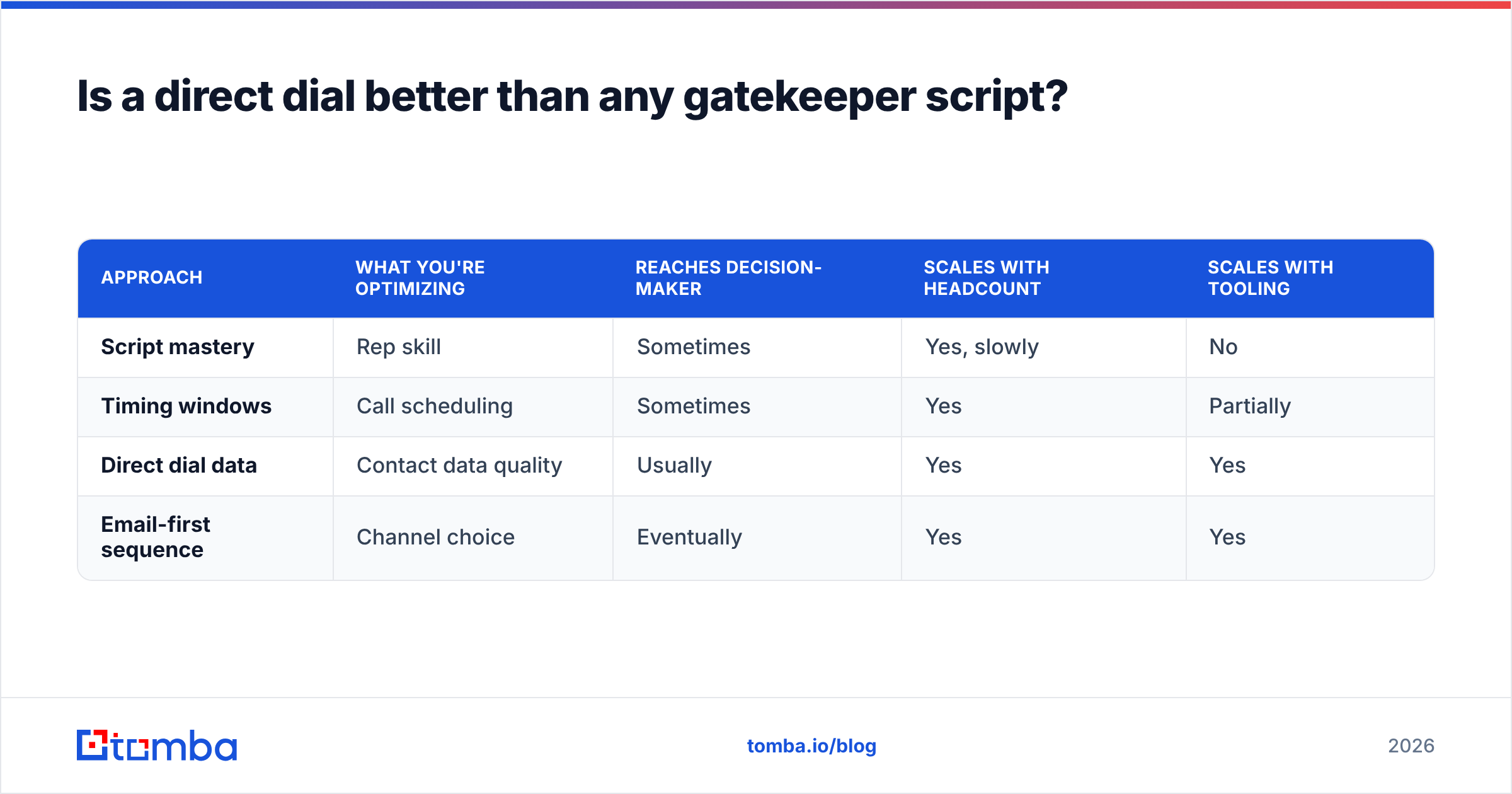
Yes, and it is not close. A direct dial or verified mobile removes the entire problem rather than negotiating with it.
Think of it like a building with a front desk and a side door your badge opens. You can spend years perfecting your front-desk small talk, or you can get a badge. Scripts are the small talk. Direct dials are the badge.
| Approach | What you're optimizing | Reaches decision-maker | Scales with headcount | Scales with tooling |
|---|---|---|---|---|
| Script mastery | Rep skill | Sometimes | Yes, slowly | No |
| Timing windows | Call scheduling | Sometimes | Yes | Partially |
| Direct dial data | Contact data quality | Usually | Yes | Yes |
| Email-first sequence | Channel choice | Eventually | Yes | Yes |
The practical setup most high-performing outbound teams run in 2026 looks like this:
- Enrich the account first. Pull the org's contact structure — names, titles, direct lines, and emails — before anyone dials. A phone finder surfaces direct-dial and mobile numbers tied to a named person, not a switchboard.
- Validate the numbers. Dialing dead lines burns rep hours and skews your connect metrics. A phone validator checks line type and reachability before the number enters a dialer.
- Pair every phone record with a verified email. Multi-channel beats single-channel. When the call goes to voicemail, the follow-up email lands the same hour.
- Keep the gatekeeper path warm anyway. Direct dials do not cover 100% of any list. Scripts 1–9 handle the remainder.
- Log gatekeeper intel in the CRM. Name, best call window, screening style. This compounds across the account.
How do you find direct dials and verified emails at scale?#
Three sources, in descending order of reliability.
Company website and filings. Investor-relations pages, press releases, and support docs frequently list department direct lines. Free, slow, and only covers a fraction of contacts.
LinkedIn and public profiles. Titles and org structure are reliable; contact details rarely are. Useful for the who, not the how to reach. The LinkedIn finder route converts a profile into a working business email, which is often faster than chasing a phone number.
Data providers. This is where volume comes from. The relevant question is not "who has the most records" but "what percentage of the records for my segment are correct." Vendor-published coverage numbers are averages across every industry and geography; your ICP may be far above or below that line. Check independent reviews on G2 and run a test batch of 100 known-good contacts before committing budget.
A few provider notes worth knowing:
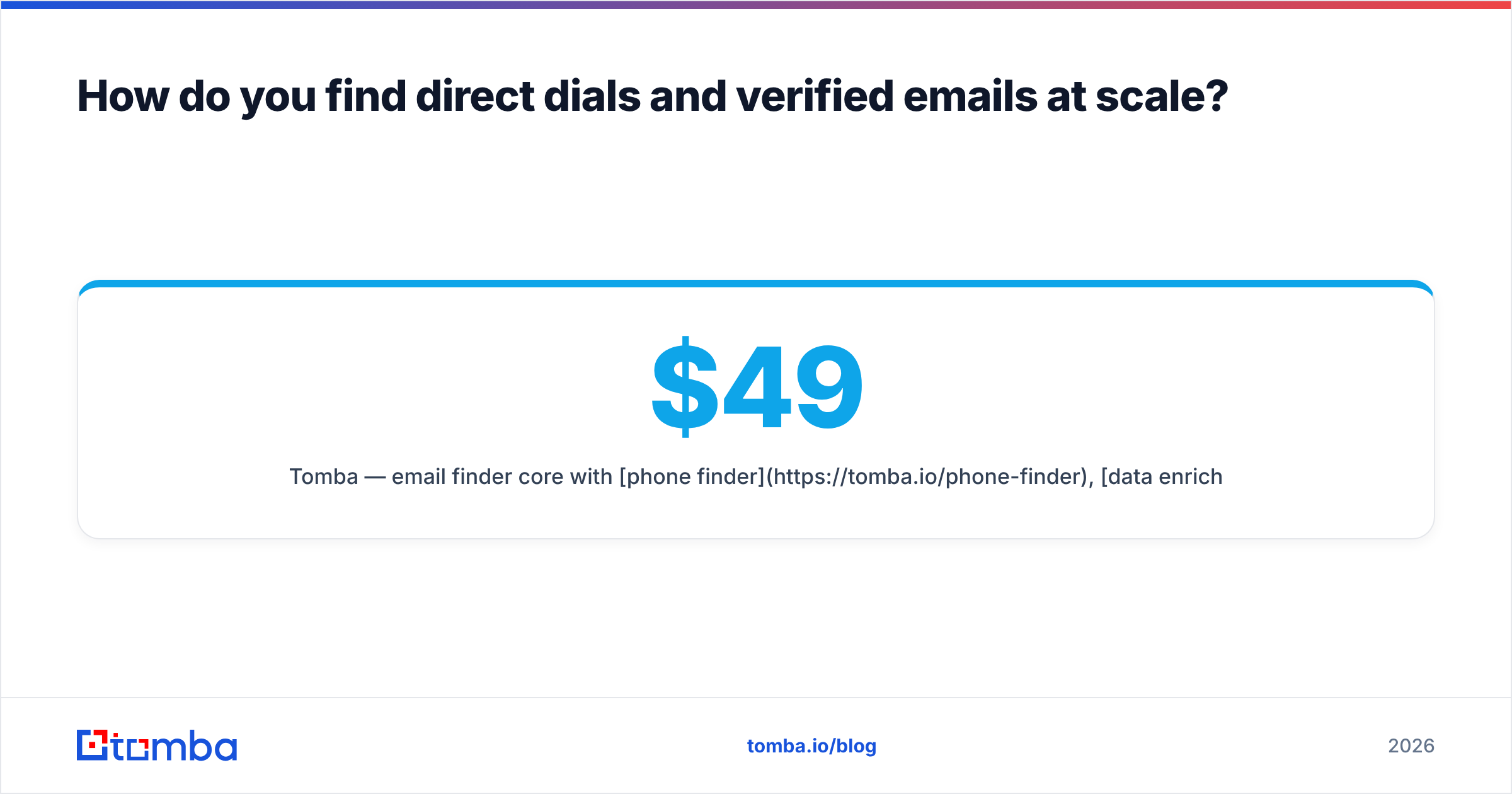
- Tomba — email finder core with phone finder, data enrichment, and domain search alongside. Free tier gives 25 searches/mo; Starter is $49/mo, Growth $99/mo, Pro $249/mo. Full Tomba pricing is public, which makes budgeting straightforward.
- BookYourData — pay-as-you-go B2B contact lists with a strong accuracy guarantee, useful when you want to buy a defined segment outright rather than run per-lookup credits. Different purchasing model, genuinely good fit for one-off campaign lists.
- Apollo, ZoomInfo, Cognism — large aggregate databases with dialer integrations built in. Higher price floors and, in most cases, annual commitments.
Whichever you pick, the workflow that matters is: enrich → validate → dial → log. Skipping validation is the most common reason a "bad data provider" is actually a bad process.
What should you never do to a gatekeeper?#
Short list, all of it learned expensively:
- Never lie about who you are. "I'm returning her call" when you aren't gets you one connection and a permanently flagged number. Enterprise gatekeepers share notes.
- Never get aggressive. Frustration in your voice is audible and it ends the account, not just the call.
- Never call more than twice a week through the same desk. You become a known nuisance.
- Never skip the thank-you. "Thanks Denise, appreciate it" costs nothing and buys you call three.
- Never pitch them. If they ask what you do, give one honest sentence and return to the routing question.
The reputational math is simple: a burned gatekeeper closes the account for every rep on your team, not just you.
How do you measure whether any of this is working?#
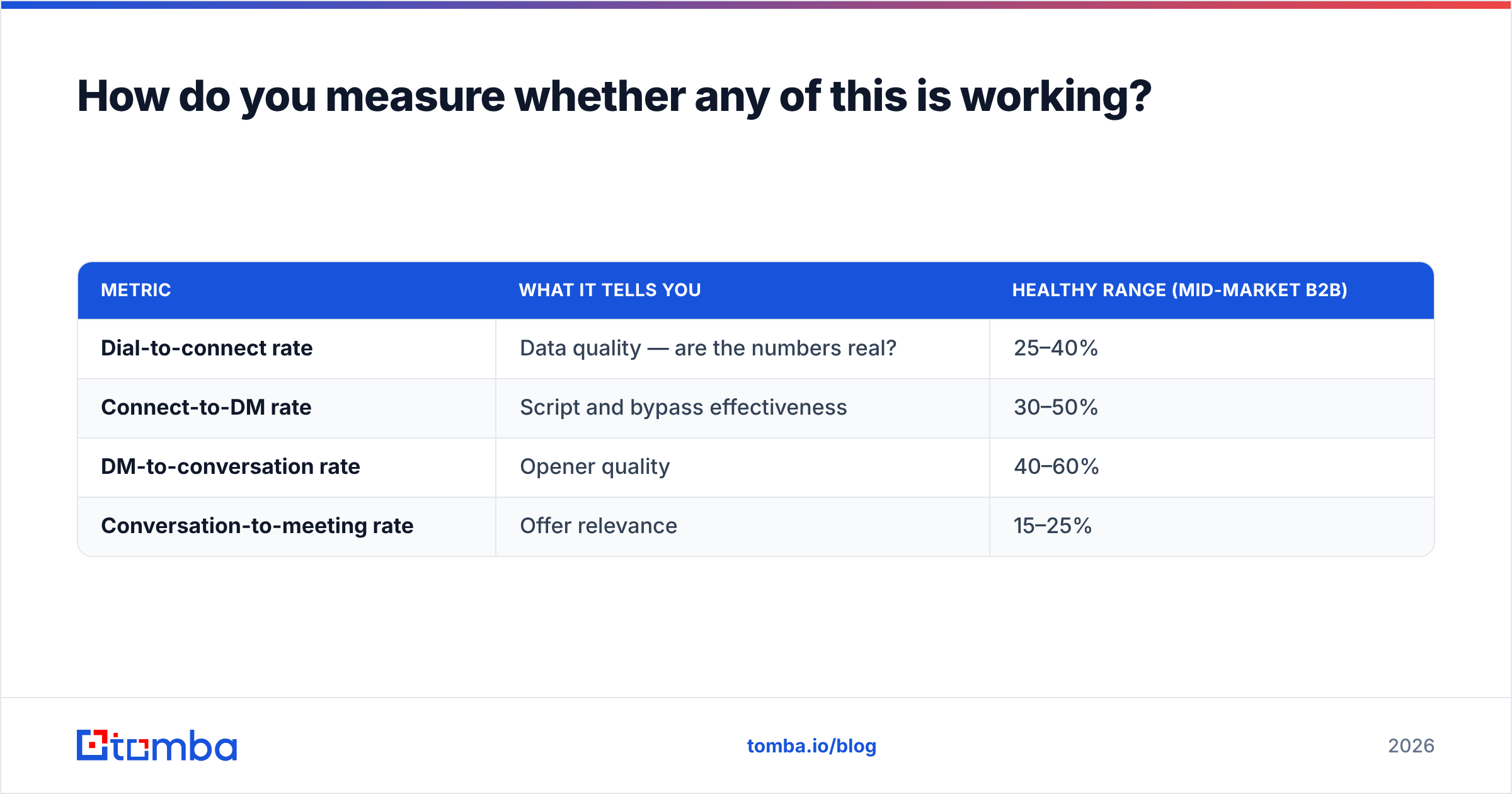
Track four numbers separately, because averaging them hides the problem:
| Metric | What it tells you | Healthy range (mid-market B2B) |
|---|---|---|
| Dial-to-connect rate | Data quality — are the numbers real? | 25–40% |
| Connect-to-DM rate | Script and bypass effectiveness | 30–50% |
| DM-to-conversation rate | Opener quality | 40–60% |
| Conversation-to-meeting rate | Offer relevance | 15–25% |
If dial-to-connect is low, no script will save you — fix the data. If dial-to-connect is healthy but connect-to-DM is under 20%, the gatekeeper stage is your bottleneck and the scripts above are the right investment. If you reach decision-makers but conversations don't convert, the problem moved downstream to your opener and your response rate on follow-ups.
Most teams diagnose this wrong. They assume a gatekeeper problem when they actually have a data problem, then spend a quarter on call coaching that could not possibly have helped.
Getting past the desk starts before you dial#
The reps who consistently reach decision-makers aren't running a magic script. They call at 8:05am with a direct dial they already verified, they know the gatekeeper's name for the accounts where reception is unavoidable, and they have a verified email queued for the moment the call goes to voicemail.
That's a data workflow with a phone attached, not a phone technique.
Start by fixing the input. Run your target account list through the Tomba Email Finder to get verified, deliverable addresses for every named decision-maker, then layer direct dials on top for the accounts that matter most. Free tier covers 25 searches a month if you want to test the accuracy on your own list first — pull 25 contacts you already know the answer for and check the hit rate yourself before you spend anything.
Related guides#
// get started
Find, verify and enrich your first contacts today
Start on the free plan with 25 searches a month, then scale when your team is ready.
Free plan · No credit card required · GDPR & CCPA
// about the author