How to Get Prospecting Lists That Actually Convert in 2026
Buying a list, scraping one, or building it yourself? Here is the honest cost, accuracy, and speed tradeoff for each way to get prospecting lists in 2026 — plus the workflow that keeps bounce rates under 2%.
TL;DR
- There are four legitimate ways to get prospecting lists: buy a static file, subscribe to a database, scrape and enrich yourself, or build list-by-list from a defined ICP. Only the last two scale without decay.
- Bought lists decay at roughly 22-30% per year because people change jobs. A file you purchased in January is measurably worse by June.
- The cheapest reliable stack in 2026 is a search layer (find the accounts), a contact layer (find the people), and a verification layer (confirm the mailbox exists) — often three tools, sometimes one.
- Budget $0.02-$0.15 per verified contact if you build. Purchased files run $0.10-$0.50 per record and usually arrive unverified.
- Never send to a list you did not verify within 30 days of sending. That single rule kills most deliverability problems before they start.
What is a prospecting list, and what makes one good?#
A prospecting list is a set of people who match your ideal customer profile, with enough contact and context data attached that you can reach them and say something relevant. That is the whole definition. Everything else is quality.
Think of it like grocery shopping. You can buy pre-made dinner from a gas station, order a meal kit, or shop the ingredients yourself. All three produce food. Only one gives you control over what is actually in it — and the gas station option looks fine until you read the label.
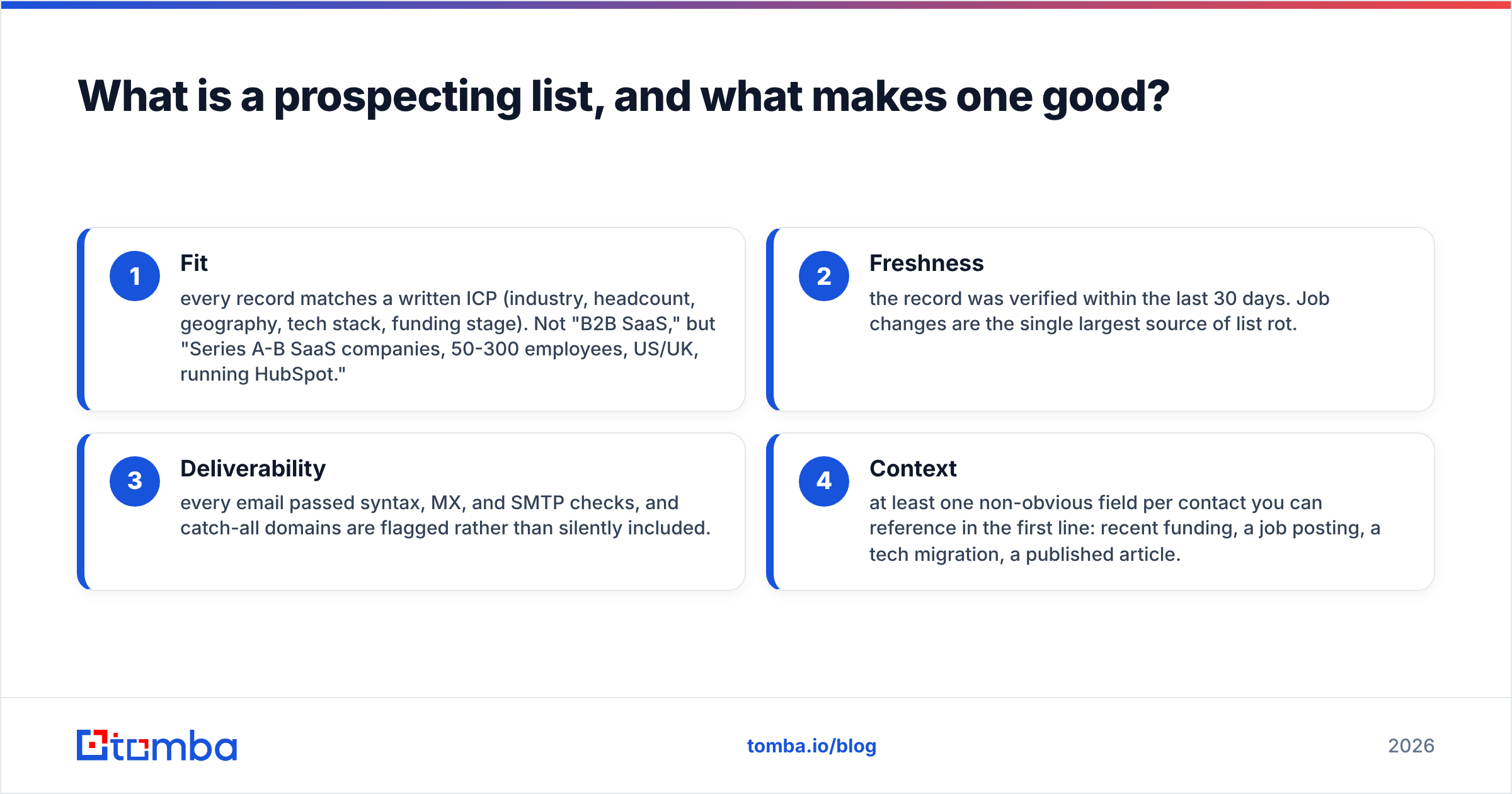
Four attributes separate a list that books meetings from a list that burns your domain:
- Fit — every record matches a written ICP (industry, headcount, geography, tech stack, funding stage). Not "B2B SaaS," but "Series A-B SaaS companies, 50-300 employees, US/UK, running HubSpot."
- Freshness — the record was verified within the last 30 days. Job changes are the single largest source of list rot.
- Deliverability — every email passed syntax, MX, and SMTP checks, and catch-all domains are flagged rather than silently included.
- Context — at least one non-obvious field per contact you can reference in the first line: recent funding, a job posting, a tech migration, a published article.
A list with 500 records and all four attributes outperforms a 50,000-record file with none of them. This is not a motivational statement — it is arithmetic. A 2% reply rate on 500 targeted contacts produces 10 conversations. A 0.1% reply rate on 50,000 unverified contacts produces 50 conversations but also produces a bounce rate that gets your domain flagged, at which point the next campaign produces zero.
How do you get prospecting lists? The four methods compared#
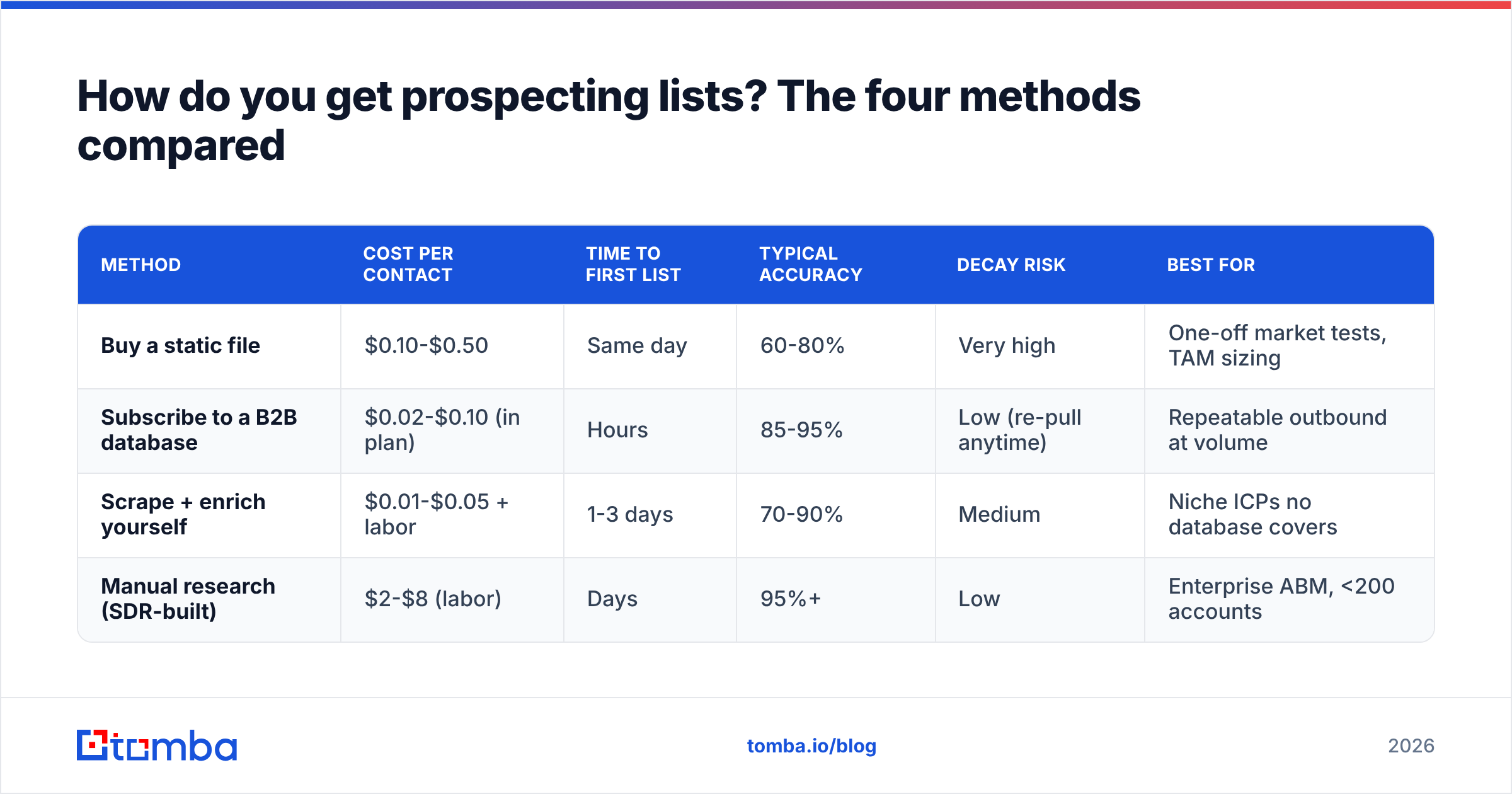
| Method | Cost per contact | Time to first list | Typical accuracy | Decay risk | Best for |
|---|---|---|---|---|---|
| Buy a static file | $0.10-$0.50 | Same day | 60-80% | Very high | One-off market tests, TAM sizing |
| Subscribe to a B2B database | $0.02-$0.10 (in plan) | Hours | 85-95% | Low (re-pull anytime) | Repeatable outbound at volume |
| Scrape + enrich yourself | $0.01-$0.05 + labor | 1-3 days | 70-90% | Medium | Niche ICPs no database covers |
| Manual research (SDR-built) | $2-$8 (labor) | Days | 95%+ | Low | Enterprise ABM, <200 accounts |
Most teams end up blending two of these. The common winning pattern in 2026: subscribe to a database for the bulk of your ICP, then hand-build the top 50 named accounts. The purchased static file is the one method that keeps losing ground — it is the only option where you pay full price for data that starts decaying the moment the CSV lands in your inbox.

Buying a static list: when it actually makes sense#
Static list purchase gets unfairly demonized. It has one legitimate use: you need to size a market or test a brand-new segment quickly and you are willing to treat the data as disposable. If you are entering the German mid-market manufacturing space and have zero signal about whether the ICP is real, a 2,000-record file for $400 is a reasonable research expense.
What you should not do is treat that file as a sending list without re-verification. Vendors that sell static files rarely re-verify on delivery. Run every record through an email verifier before a single send. Expect to discard 20-35%.
Reputable vendors in this category — including BookYourData, which sells pay-as-you-go verified B2B contacts — do publish accuracy guarantees and let you filter before you buy, which meaningfully de-risks the purchase compared to an anonymous CSV from a marketplace. The guarantee is worth reading closely: it tells you what the vendor will refund, not what the data will do for your reply rate.
Subscribing to a B2B database#
This is where most repeatable outbound lives. You pay monthly for search access plus a credit pool, then pull fresh lists whenever you need them. The advantage over a static file is structural: you re-pull instead of re-buying, so decay is the vendor's problem, not yours.
The main variables between vendors are coverage depth by region, whether phone data is bundled or a separate SKU, and how aggressively credits are consumed on failed lookups. Read that last one carefully — some tools charge a credit whether or not they return a result.
A B2B database with domain-level search lets you go from "companies using Shopify Plus in the Nordics" to a verified contact list in one session rather than three tools and a spreadsheet merge.
Scraping and enriching it yourself#
Scraping means pulling company or person identifiers from a public source — a directory, a conference exhibitor list, a G2 category page, a subreddit of practitioners — and then enriching those identifiers into contact records.
The enrichment step is where most people stall. You have 800 company domains and zero emails. That is what a domain search solves: give it a domain, get back the people and the company's email pattern. From there an email finder resolves specific first-name/last-name pairs against that pattern.
Legally, scraping public business contact data is generally permissible in the US but constrained under GDPR in the EU, where you need a lawful basis (usually legitimate interest) and must honor deletion requests. Read the GDPR guidance on legitimate interest before you build an EU list, and document your assessment. This is not optional paperwork; it is the thing regulators ask for.
Manual research#
For enterprise ABM with fewer than 200 target accounts, a human researcher still wins. They read the 10-K, find the person who owns the budget line, and note that the company just opened a Dublin office. No automated system produces that context reliably.
The cost is real — $2-$8 per contact once you count SDR time — but on a $150k ACV, twenty well-researched accounts beat two thousand scraped ones.
What does a good list-building workflow look like step by step?#
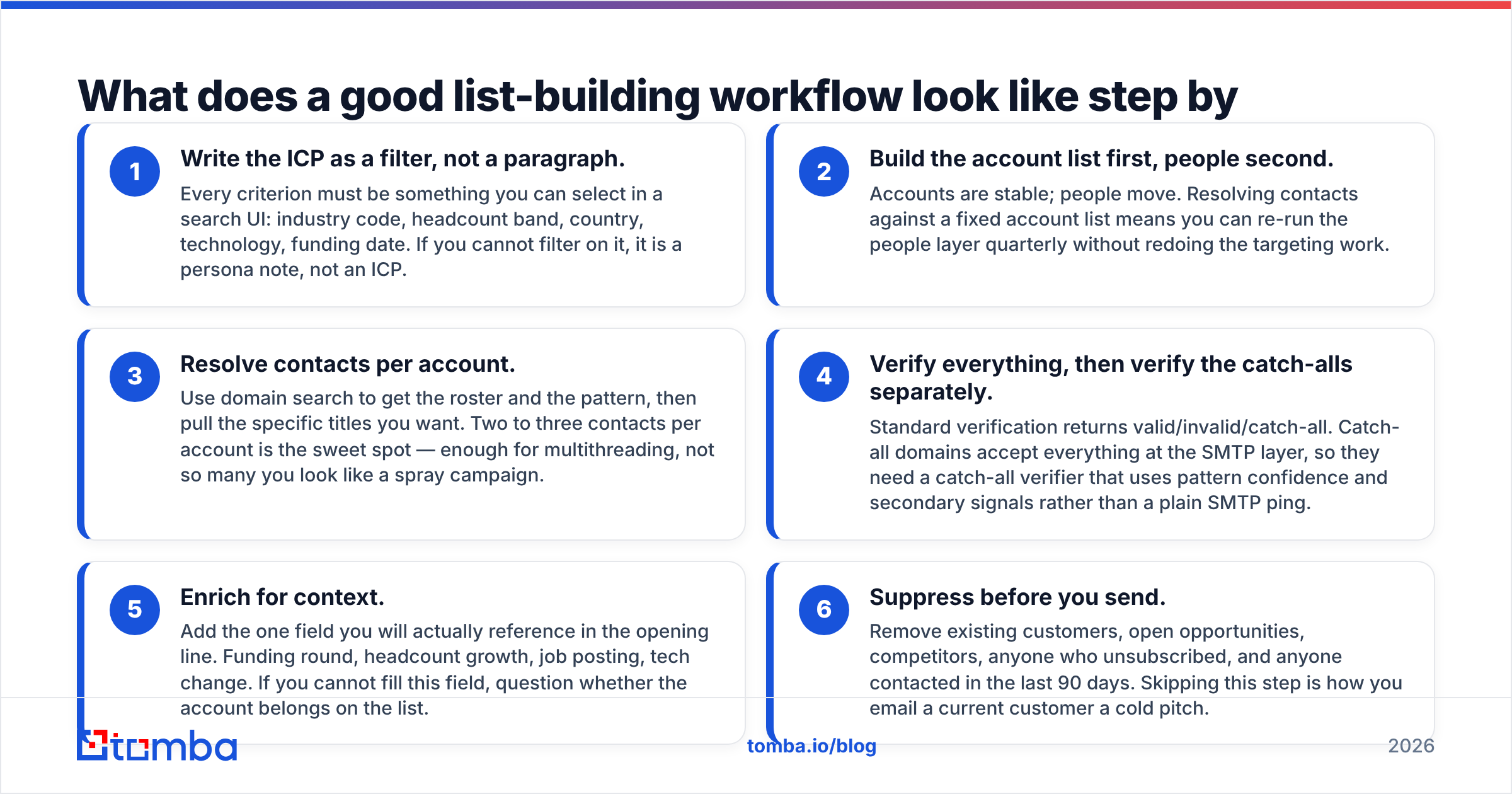
Here is the workflow that produces a sub-2% bounce rate, regardless of which sourcing method you picked:
- Write the ICP as a filter, not a paragraph. Every criterion must be something you can select in a search UI: industry code, headcount band, country, technology, funding date. If you cannot filter on it, it is a persona note, not an ICP.
- Build the account list first, people second. Accounts are stable; people move. Resolving contacts against a fixed account list means you can re-run the people layer quarterly without redoing the targeting work.
- Resolve contacts per account. Use domain search to get the roster and the pattern, then pull the specific titles you want. Two to three contacts per account is the sweet spot — enough for multithreading, not so many you look like a spray campaign.
- Verify everything, then verify the catch-alls separately. Standard verification returns valid/invalid/catch-all. Catch-all domains accept everything at the SMTP layer, so they need a catch-all verifier that uses pattern confidence and secondary signals rather than a plain SMTP ping.
- Enrich for context. Add the one field you will actually reference in the opening line. Funding round, headcount growth, job posting, tech change. If you cannot fill this field, question whether the account belongs on the list.
- Suppress before you send. Remove existing customers, open opportunities, competitors, anyone who unsubscribed, and anyone contacted in the last 90 days. Skipping this step is how you email a current customer a cold pitch.
Steps 3 and 4 are where tooling matters most. Everything else is discipline.
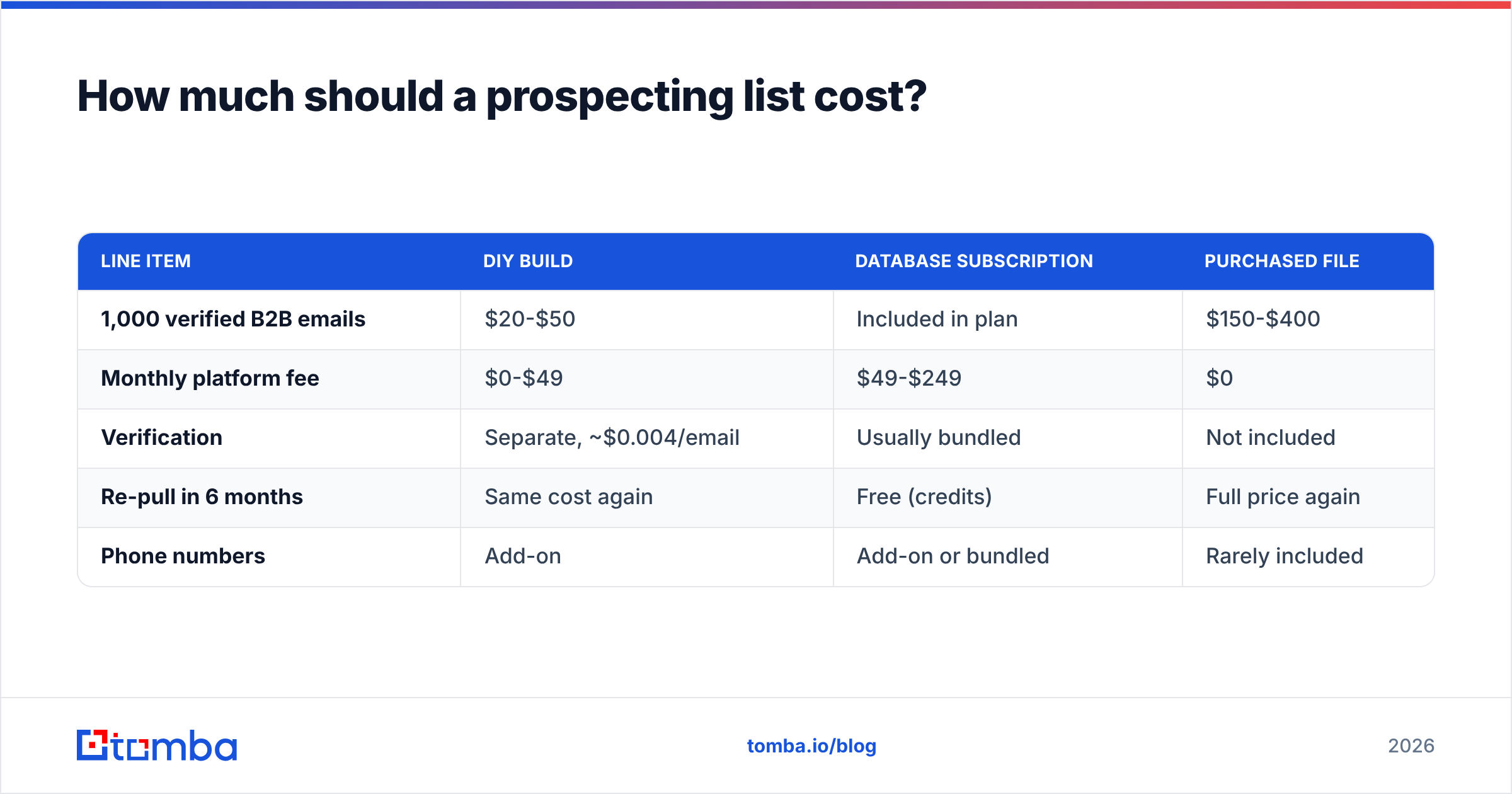
How much should a prospecting list cost?#
| Line item | DIY build | Database subscription | Purchased file |
|---|---|---|---|
| 1,000 verified B2B emails | $20-$50 | Included in plan | $150-$400 |
| Monthly platform fee | $0-$49 | $49-$249 | $0 |
| Verification | Separate, ~$0.004/email | Usually bundled | Not included |
| Re-pull in 6 months | Same cost again | Free (credits) | Full price again |
| Phone numbers | Add-on | Add-on or bundled | Rarely included |
For reference, Tomba pricing starts with a free tier at 25 searches per month, then Starter at $49/mo, Growth at $99/mo, and Pro at $249/mo, with Enterprise custom. The practical read across the market: if you send fewer than 500 cold emails a month, a starter-tier subscription plus careful manual targeting beats any file purchase. Above 5,000/month, per-contact cost starts dominating and you should be negotiating annual database pricing.
Compare vendors on effective cost per verified, deliverable contact — not list price per credit. A tool at half the price that returns results 40% of the time is more expensive. G2's data providers category is a reasonable place to sanity-check accuracy claims against user reviews rather than vendor marketing.

Is building your own list better than buying one?#
For most teams sending consistent outbound: yes, and the reason is decay, not quality.
A purchased file is a photograph. A database subscription or DIY pipeline is a live feed. Both may be equally accurate on day one. By month six, the photograph is roughly a quarter wrong — LinkedIn's workforce data has consistently shown annual job-change rates in the 20-30% range for B2B knowledge workers, and every one of those changes turns a valid contact into a bounce or a wrong-person send.
The exception is speed. If you need 3,000 records by Thursday for a trade-show follow-up and you have no infrastructure, buying is the correct call. Just budget for verification on top and treat the file as single-use.
The second exception is coverage. Some ICPs — regional trades, government suppliers, non-English markets — are poorly covered by every major database. A specialist vendor who has manually compiled that vertical may genuinely have data nobody else does. Pay for it, verify it, and do not expect it to stay fresh.
How do you keep a prospecting list from going stale?#
Treat the list as infrastructure with a maintenance schedule, not an asset you own forever.
- Re-verify monthly for active sequences, quarterly for the full database. Verification is cheap relative to a damaged sending domain.
- Watch bounce rate as a leading indicator. Above 3%, stop sending and re-verify. Above 5%, your mailbox provider is already throttling you. Google and Microsoft both tightened bulk-sender requirements, and Google's sender guidelines now spell out the spam-rate thresholds explicitly.
- Track job changes as a trigger, not just a decay problem. A champion moving to a new company is the highest-converting signal in outbound. Set up a re-check on your closed-won contacts quarterly — a reverse email lookup on a bounced address often surfaces where the person went.
- Deduplicate on every merge. Two records for the same person means two emails, which reads as automated and gets reported.
- Keep a permanent suppression list that survives tool migrations. Unsubscribes are forever, not per-platform.
The teams with the best deliverability are rarely the ones with the best copy. They are the ones who never send to an address they have not confirmed exists this month.
What tools do you actually need?#
You need three capabilities. Whether they come from one vendor or three is a budget question, not an architecture question.
- Search/targeting — filter companies by firmographic and technographic criteria to produce an account list.
- Contact resolution — turn a company plus a name or title into an email address, and ideally a phone number. A bulk email finder handles this at list scale rather than one record at a time.
- Verification — confirm the mailbox exists before you send, including honest handling of catch-all domains.
Nice-to-have but not required on day one: a browser extension for ad-hoc lookups while you browse LinkedIn, an Excel email finder or Google Sheets add-on so non-technical teammates can work in a spreadsheet, and an API for pushing enrichment into your CRM automatically. If you are running enrichment inside your own systems, the Tomba API covers finder, verifier, and enrichment endpoints from one key.
Skip the tools that promise "AI-generated leads" without telling you the data source. Ask any vendor where the data comes from and how often it is re-verified. A straight answer is a good sign; a deflection to "proprietary AI" is not.
Ready to build your first list?#
Start narrow. Pick 100 accounts that look exactly like your best current customer, resolve two contacts each, verify every address, and send. That 200-contact list will teach you more about your ICP in two weeks than a 20,000-record purchase will in a quarter.
The Tomba Email Finder handles the middle of that workflow — turning a company domain and a name into a verified professional email, with the verifier built into the same result rather than sold as a separate step. The free tier gives you 25 searches a month, which is enough to test coverage against your specific ICP before you commit to a plan. Run twenty accounts you already know through it and check the hit rate yourself. That is the only benchmark that matters.
Related guides#
// get started
Find, verify and enrich your first contacts today
Start on the free plan with 25 searches a month, then scale when your team is ready.
Free plan · No credit card required · GDPR & CCPA
// about the author