How to Get Sales Calls in 2026: A 7-Step Booking System
Booked calendars come from a repeatable system, not luck. Here are seven steps — list building, verification, multichannel sequencing, and call-to-close math — that reliably turn cold contacts into booked sales calls.
TL;DR
- Booked calls are an output of four inputs: list accuracy, targeting fit, message relevance, and touch volume. Fix them in that order.
- A 2% reply-to-meeting rate on 1,000 verified contacts beats 0.4% on 5,000 scraped ones — and costs less in domain reputation.
- Verify before you send. Bounce rates above 3% start suppressing inbox placement, which silently kills call volume weeks later.
- Multichannel (email + phone + LinkedIn) roughly doubles connect rates versus email alone, but only when the touches reference the same thread.
- Track meetings-held, not meetings-booked. No-show rates of 25-40% are normal and will wreck your forecast if you ignore them.
Why do most reps struggle to get sales calls?#
Because they optimize the last step instead of the first. Reps rewrite subject lines for a week while sending to a list where 30% of the addresses do not exist and 40% of the people are the wrong seniority. No amount of copywriting rescues that.
Think of it like a restaurant. You can plate beautifully, but if the ingredients are spoiled the dish fails at the table. Your contact list is the ingredient. Copy is the plating.
Here is the actual chain that produces a booked call:
- Correct account — the company has the problem you solve, at a size that can pay for it.
- Correct person — a buyer or influencer, not an intern with a matching title.
- Reachable channel — a deliverable email, a live direct dial, an active LinkedIn profile.
- Relevant opener — one specific reason you contacted them and not 500 lookalikes.
- Low-friction ask — a 15-minute slot, not "a quick chat about your goals."
- Persistent follow-up — 5 to 8 touches over 14 to 21 days across at least two channels.
Break any link and the chain drops the call. Most teams break links 1 through 3 and then blame link 4.
What is a realistic call-booking math model?#
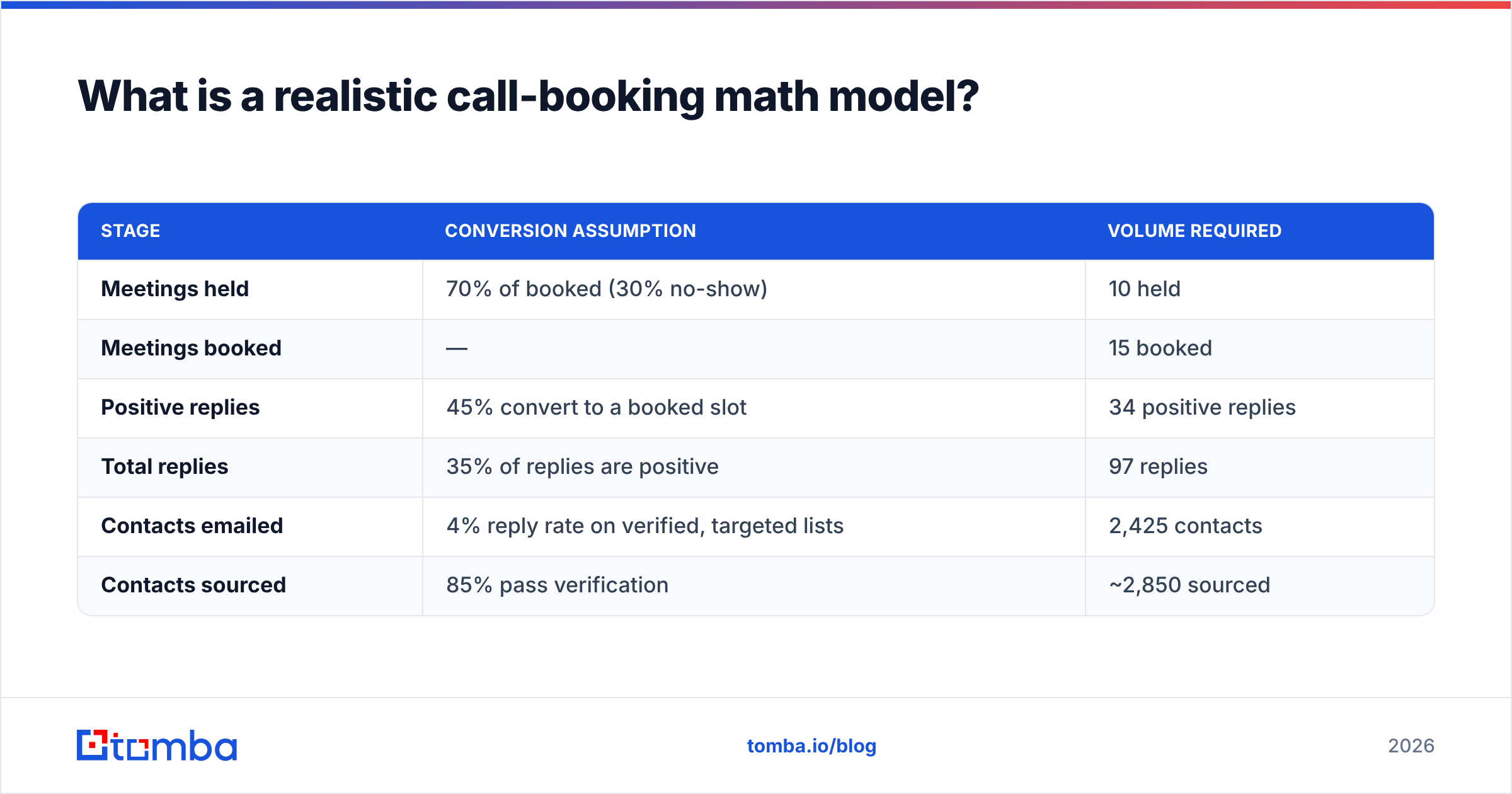
Work backward from the number of calls you need, not forward from the number of emails you can send. The arithmetic is unforgiving but it makes planning honest.
Assume you need 10 held discovery calls this month.
| Stage | Conversion assumption | Volume required |
|---|---|---|
| Meetings held | 70% of booked (30% no-show) | 10 held |
| Meetings booked | — | 15 booked |
| Positive replies | 45% convert to a booked slot | 34 positive replies |
| Total replies | 35% of replies are positive | 97 replies |
| Contacts emailed | 4% reply rate on verified, targeted lists | 2,425 contacts |
| Contacts sourced | 85% pass verification | ~2,850 sourced |
Those percentages are the ones you should argue about, not the existence of the model. If your reply rate is 1.5% instead of 4%, you need 6,500 contacts — which no single sender can deliver without torching the domain. That is the moment you stop scaling volume and start fixing relevance.
Two levers move this table materially. Raising reply rate from 2% to 4% halves your required list. Cutting no-shows from 40% to 15% adds three held calls with zero extra outbound. Reminder sequences and calendar confirmations are the cheapest wins in the whole funnel.
How do you build a list that actually converts?#
Start with a definition, not a tool. Write down the account criteria (industry, headcount, tech stack, funding stage, geography) and the persona criteria (title variants, department, seniority band). If you cannot express your ICP in filters, you cannot build a list — you can only collect names.
Then source in this order:
- Company set first. Pull 200-500 accounts that match the criteria. Buying a huge contact dump and filtering later inverts the work and inflates cost.
- Map the buying committee. For most B2B deals, you need 2-3 contacts per account: the economic buyer, the practitioner who feels the pain, and one adjacent stakeholder.
- Find the addresses by domain. A domain search against each account returns the people and the company's email pattern in one pass, which is faster than name-by-name lookups.
- Fill gaps with a name-based finder. When you know the person but not the address, an email finder resolves first name + last name + domain into a deliverable address.
- Enrich for context. Add role, seniority, location, and recent activity so your opener has something to reference. Contact enrichment turns a bare row into a message you can personalize.
- Verify everything before sending. Non-negotiable — see the next section.
Skip the temptation to buy a 50,000-row list because the per-contact price looks low. Cost per contact is the wrong metric. Cost per held meeting is the right one, and a cheap stale list usually loses on that measure by a factor of five.
Does email verification really change how many calls you book?#
Yes, and the mechanism is indirect, which is why people miss it. Verification does not make a prospect more interested. It protects the deliverability that lets your later emails reach the inbox at all.
Mailbox providers watch your bounce rate as a proxy for list hygiene. Cross roughly 3% and filtering tightens. At that point your emails still "send" — your analytics show delivery — but placement shifts to spam, replies collapse, and you spend three weeks debugging copy that was never the problem. Google's own bulk sender guidelines spell out the spam-rate and authentication thresholds you are expected to stay under.
A workable hygiene routine:
- Run every new list through an email verifier before it enters a sequence.
- Handle catch-all domains separately. A catch-all verifier tells you which accept-all servers are safe to try rather than discarding them wholesale — catch-alls are common at enterprises, and blanket-deleting them removes your best accounts.
- Suppress role addresses (info@, sales@, support@) from cold sequences. They rarely book calls and often route to spam-trap-adjacent inboxes.
- Re-verify anything older than 90 days. B2B data decays roughly 2-2.5% per month through job changes alone.
- Check your sender reputation and authentication records before volume increases, not after replies drop.

Placeholder: Google Postmaster Tools domain reputation graph showing the drop that follows an unverified send.
Which channels book the most sales calls?#
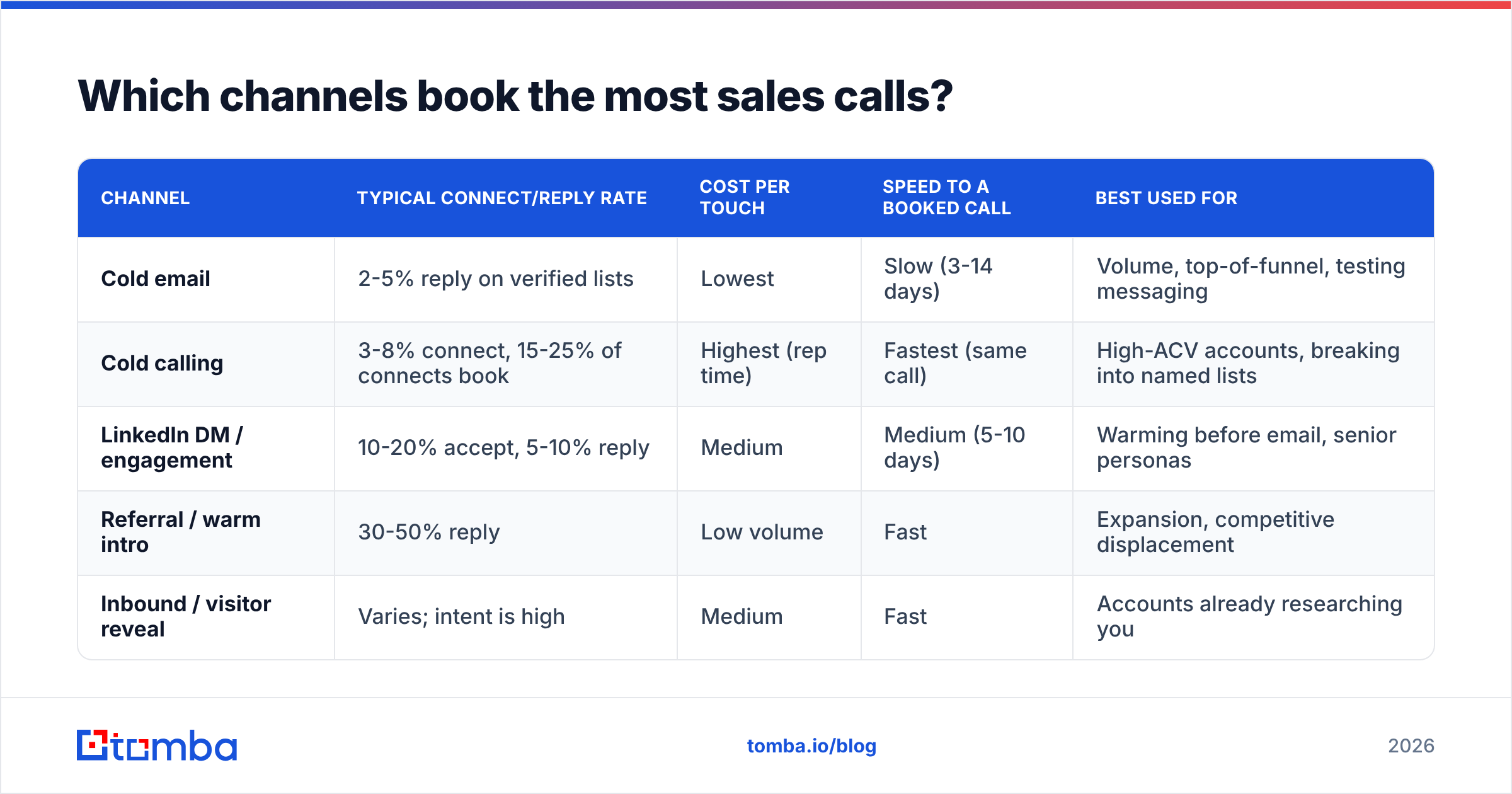
Email scales, phone converts, LinkedIn warms. Teams that only run one channel cap themselves early. Here is how the three compare on the metrics that matter for booking calls.
| Channel | Typical connect/reply rate | Cost per touch | Speed to a booked call | Best used for |
|---|---|---|---|---|
| Cold email | 2-5% reply on verified lists | Lowest | Slow (3-14 days) | Volume, top-of-funnel, testing messaging |
| Cold calling | 3-8% connect, 15-25% of connects book | Highest (rep time) | Fastest (same call) | High-ACV accounts, breaking into named lists |
| LinkedIn DM / engagement | 10-20% accept, 5-10% reply | Medium | Medium (5-10 days) | Warming before email, senior personas |
| Referral / warm intro | 30-50% reply | Low volume | Fast | Expansion, competitive displacement |
| Inbound / visitor reveal | Varies; intent is high | Medium | Fast | Accounts already researching you |
The sequencing that works looks like this: LinkedIn profile view and follow on day 1, first email day 1, call attempt day 3, LinkedIn connection request with context day 5, email reply-in-thread day 7, call attempt day 9, breakup email day 14. Each touch references the last. A cold call that opens with "I sent you a note Tuesday about your Salesforce migration" is a different conversation from a cold call that opens with "how are you today."
For the phone leg you need real direct dials, not switchboards. A phone finder with validation attached saves the 40% of dial time that otherwise goes to dead numbers and receptionists. And if you are working LinkedIn-sourced lists, a LinkedIn finder converts profiles into verified work addresses so the email leg is not guesswork.
One caution on LinkedIn automation: the platform's user agreement prohibits unauthorized scraping and automated activity, and account restrictions are common. Manual or lightly assisted engagement is the safer operating model.
What should the outreach message actually say?#
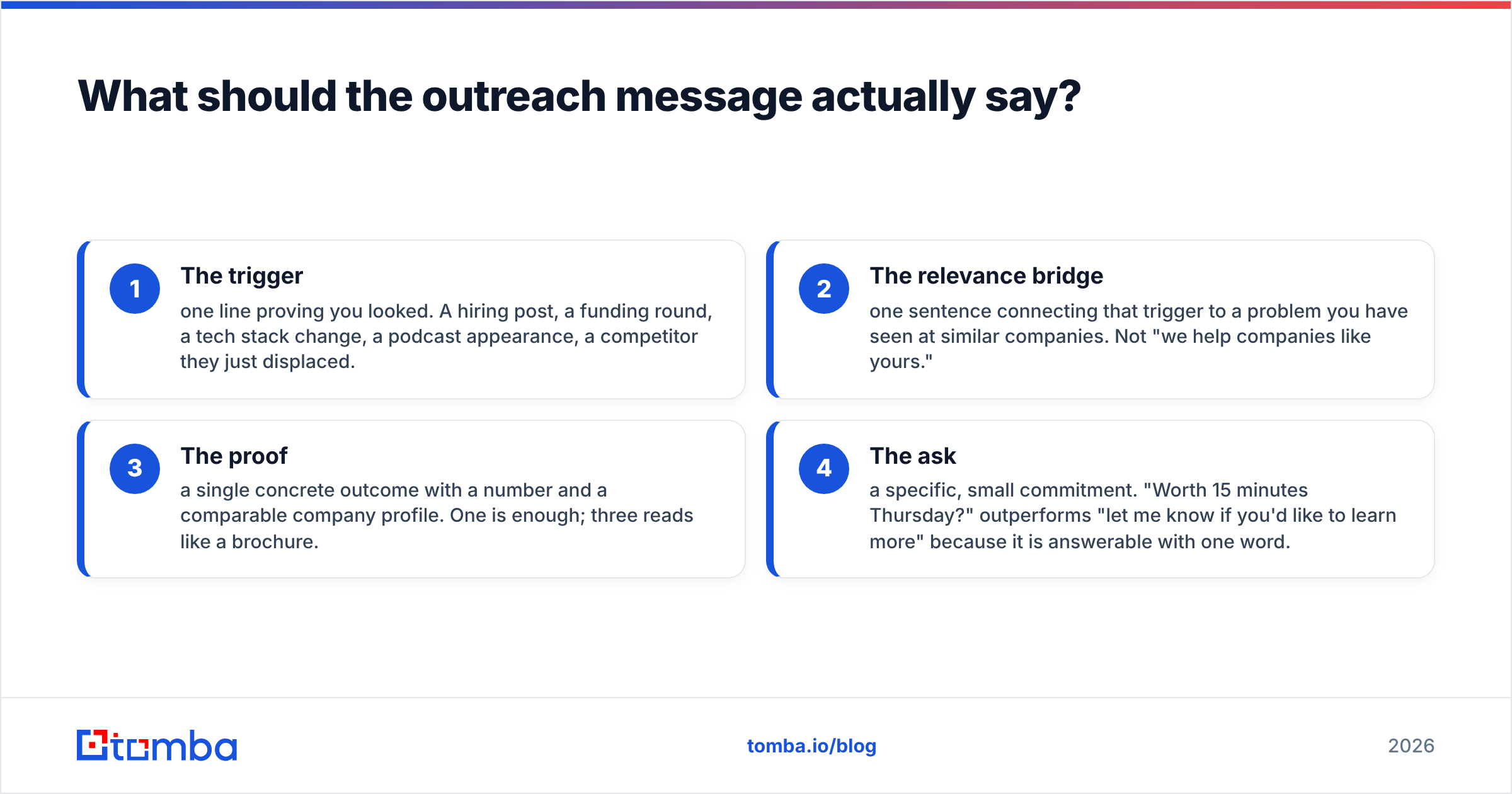
Short, specific, one ask. The structure that consistently books calls has four parts and fits in 90 words.
- The trigger — one line proving you looked. A hiring post, a funding round, a tech stack change, a podcast appearance, a competitor they just displaced.
- The relevance bridge — one sentence connecting that trigger to a problem you have seen at similar companies. Not "we help companies like yours."
- The proof — a single concrete outcome with a number and a comparable company profile. One is enough; three reads like a brochure.
- The ask — a specific, small commitment. "Worth 15 minutes Thursday?" outperforms "let me know if you'd like to learn more" because it is answerable with one word.
What to cut: your company's founding story, feature lists, three-paragraph value propositions, "I hope this email finds you well," calendar links in the first touch, and any sentence that would survive a find-and-replace of the prospect's name. That last test is the strongest personalization audit there is — if the email still makes sense addressed to anyone else, it is not personalized.
Follow-ups should add information, not apply pressure. "Bumping this to the top of your inbox" gives the reader nothing. A follow-up that shares a relevant benchmark, a customer example in their vertical, or a two-line answer to the objection you expect earns a reply on its own merits. If you want a starting structure, cold email templates are useful as skeletons — just rewrite the trigger line for every single prospect.

How do you compare the tools that support this?#
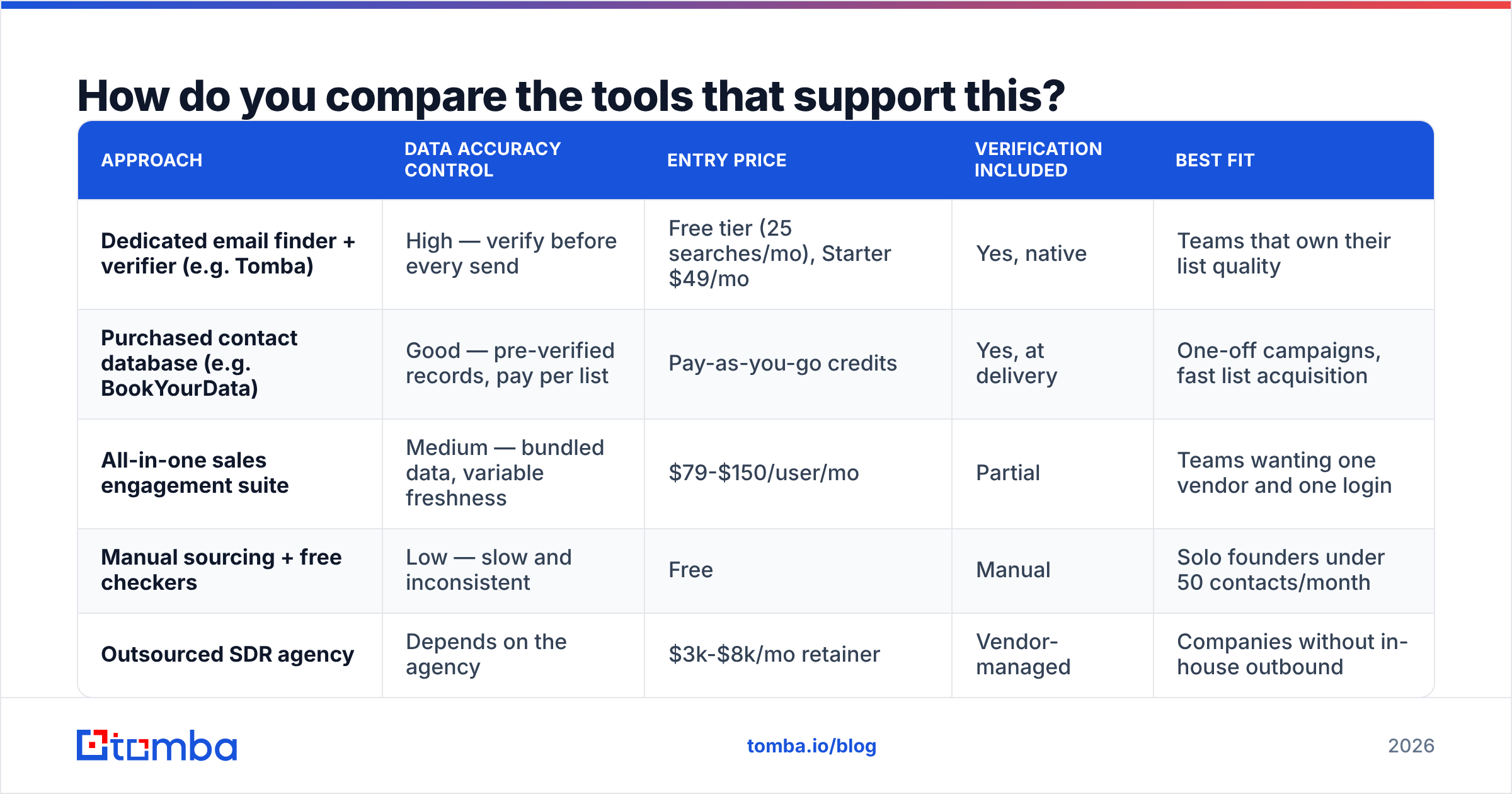
You need three capabilities: find contacts, verify them, and sequence the outreach. Some platforms bundle all three; most teams end up with a specialist for data and a specialist for sending. Here is how the common approaches stack up.
| Approach | Data accuracy control | Entry price | Verification included | Best fit |
|---|---|---|---|---|
| Dedicated email finder + verifier (e.g. Tomba) | High — verify before every send | Free tier (25 searches/mo), Starter $49/mo | Yes, native | Teams that own their list quality |
| Purchased contact database (e.g. BookYourData) | Good — pre-verified records, pay per list | Pay-as-you-go credits | Yes, at delivery | One-off campaigns, fast list acquisition |
| All-in-one sales engagement suite | Medium — bundled data, variable freshness | $79-$150/user/mo | Partial | Teams wanting one vendor and one login |
| Manual sourcing + free checkers | Low — slow and inconsistent | Free | Manual | Solo founders under 50 contacts/month |
| Outsourced SDR agency | Depends on the agency | $3k-$8k/mo retainer | Vendor-managed | Companies without in-house outbound |

A note on evaluating vendors honestly: accuracy claims in this category are self-reported and rarely comparable. Run your own test. Take 100 contacts you can independently confirm — customers, partners, people whose addresses you already have — and measure each tool against that known set. Peer reviews on G2 are a useful sanity check on support and billing behavior, but they will not tell you which tool is accurate for your segment. Only your own test does that.
Also check the operational fit, not just the data. Can it push to your CRM without a middleware layer? Does it have a bulk email finder for list-scale work? Is there an API if you want to enrich inside your own workflow? A tool that is 3% more accurate but adds a manual CSV step every morning will lose to the one your reps actually use.
How do you stop no-shows from eating your calendar?#
Booking the call is roughly two-thirds of the work. Holding it is the other third, and it is the cheapest place to gain output.
- Confirm in the booking thread within an hour. A human reply beats the automated calendar email.
- Send a value-forward reminder 24 hours out. One line on what you will cover and one question you would like them to think about. This converts a passive slot into a prepared meeting.
- Text or call 15 minutes before for high-value accounts, where you have a validated mobile number.
- Make rescheduling one click. No-shows are frequently calendar collisions, not disinterest. If rescheduling is easy, half of them come back.
- Track held-rate per source. Meetings booked from a call typically hold better than meetings booked from an email link. If one source is at 50% held rate, either qualify harder there or add a confirmation step.
Log all of this against your response rate benchmarks so you can tell whether a bad month came from fewer replies or worse holds. They demand completely different fixes.
What does a repeatable weekly cadence look like?#
Consistency beats intensity. A rep who sources 150 verified contacts and completes 250 touches every week will out-book a rep who does 800 touches in one heroic week and nothing for the next three.
A workable weekly rhythm: Monday, source and verify next week's accounts. Tuesday through Thursday, run call blocks in the morning when connect rates peak and email/LinkedIn touches in the afternoon. Friday, review the sequence data — reply rate by segment, held rate by source, which trigger types produced meetings — and cut whatever underperformed.
Change one variable at a time. If you swap the subject line, the persona, and the sending domain in the same week, you learn nothing from the result. Run tests with enough volume to be meaningful; 40 sends will not tell you which subject line won.
Ready to fill your calendar with real conversations?#
Every step above depends on the same foundation: reaching a real person at a real address. That is where most call-booking systems quietly fail, and it is the one part you can fix this week.
Tomba Email Finder resolves names and domains into verified professional email addresses, with verification, catch-all handling, and enrichment built alongside it — so your sequences hit inboxes instead of bounce logs. Start on the free tier at 25 searches a month, or check Tomba pricing when you scale past it. Build the list right, and the rest of the funnel finally behaves the way your spreadsheet says it should.
Related guides#
// get started
Find, verify and enrich your first contacts today
Start on the free plan with 25 searches a month, then scale when your team is ready.
Free plan · No credit card required · GDPR & CCPA
// about the author