How to Give a Sales Presentation That Actually Closes
Most sales presentations lose the room in the first two minutes. Here is a minute-by-minute structure, a format comparison, and the prep work that decides the outcome before you open a single slide.
TL;DR
- A sales presentation is not a pitch deck read out loud. It is a structured conversation where slides are evidence, not script.
- The outcome is usually decided before you present: bad discovery, wrong attendees, or an unqualified account cannot be rescued by good delivery.
- Use a 30-minute skeleton — 5 min recap, 3 min agenda alignment, 12 min tailored solution, 7 min proof and objections, 3 min next steps — and cut anything that does not survive it.
- Talk less than 30% of the time. Presentations that turn into dialogue close at meaningfully higher rates than monologues.
- Never end without a scheduled next step on a calendar. "I'll follow up next week" is how deals die.
What Makes a Sales Presentation Different From a Pitch Deck?#
A pitch deck is a document. A sales presentation is a meeting. Knowing how to give a sales presentation starts with accepting that the slides are the least important asset in the room.
The deck exists to do three things: keep everyone anchored to the same agenda, show proof you cannot credibly deliver verbally (numbers, architecture diagrams, customer results), and give the champion something to forward internally after you leave. Everything else — the mission slide, the founding story, the 14-logo customer wall — is filler you inherited from a marketing template.
The practical test: if you removed the deck entirely, could you still run the meeting? If the answer is no, you do not have a presentation. You have a teleprompter.
That reframing changes how you prepare. Instead of asking "what should slide 7 say?", you ask "what does this specific buying committee need to believe by minute 20 in order to say yes?" Then you build backwards.
What Do You Need to Do Before the Meeting Starts?#
Most presentations are won or lost in the prep, not the delivery. Five things matter, in this order:
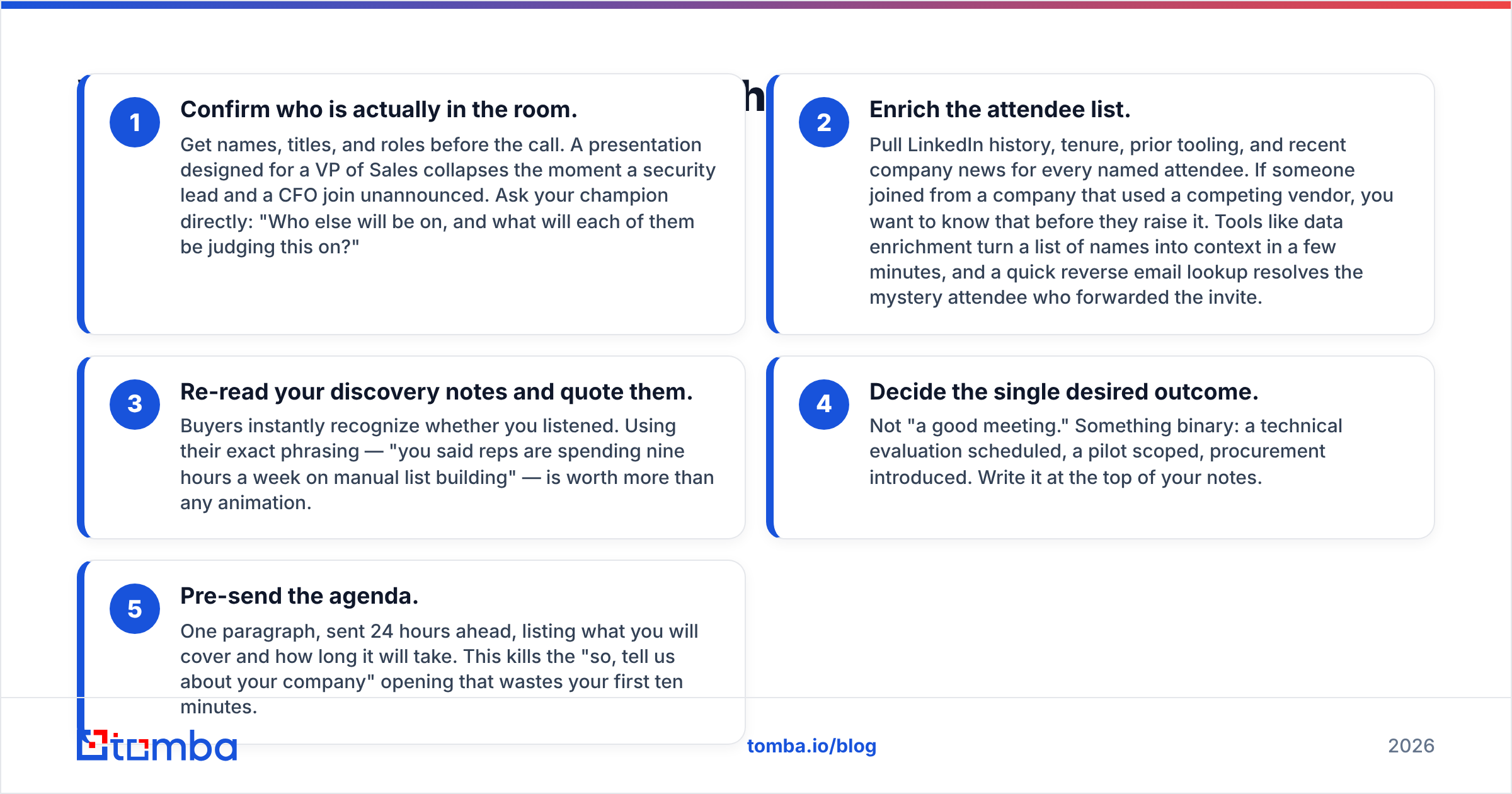
- Confirm who is actually in the room. Get names, titles, and roles before the call. A presentation designed for a VP of Sales collapses the moment a security lead and a CFO join unannounced. Ask your champion directly: "Who else will be on, and what will each of them be judging this on?"
- Enrich the attendee list. Pull LinkedIn history, tenure, prior tooling, and recent company news for every named attendee. If someone joined from a company that used a competing vendor, you want to know that before they raise it. Tools like data enrichment turn a list of names into context in a few minutes, and a quick reverse email lookup resolves the mystery attendee who forwarded the invite.
- Re-read your discovery notes and quote them. Buyers instantly recognize whether you listened. Using their exact phrasing — "you said reps are spending nine hours a week on manual list building" — is worth more than any animation.
- Decide the single desired outcome. Not "a good meeting." Something binary: a technical evaluation scheduled, a pilot scoped, procurement introduced. Write it at the top of your notes.
- Pre-send the agenda. One paragraph, sent 24 hours ahead, listing what you will cover and how long it will take. This kills the "so, tell us about your company" opening that wastes your first ten minutes.
Skip step one and step four and you are improvising. Nobody improvises their way through a committee.
What Structure Should a Sales Presentation Follow?#
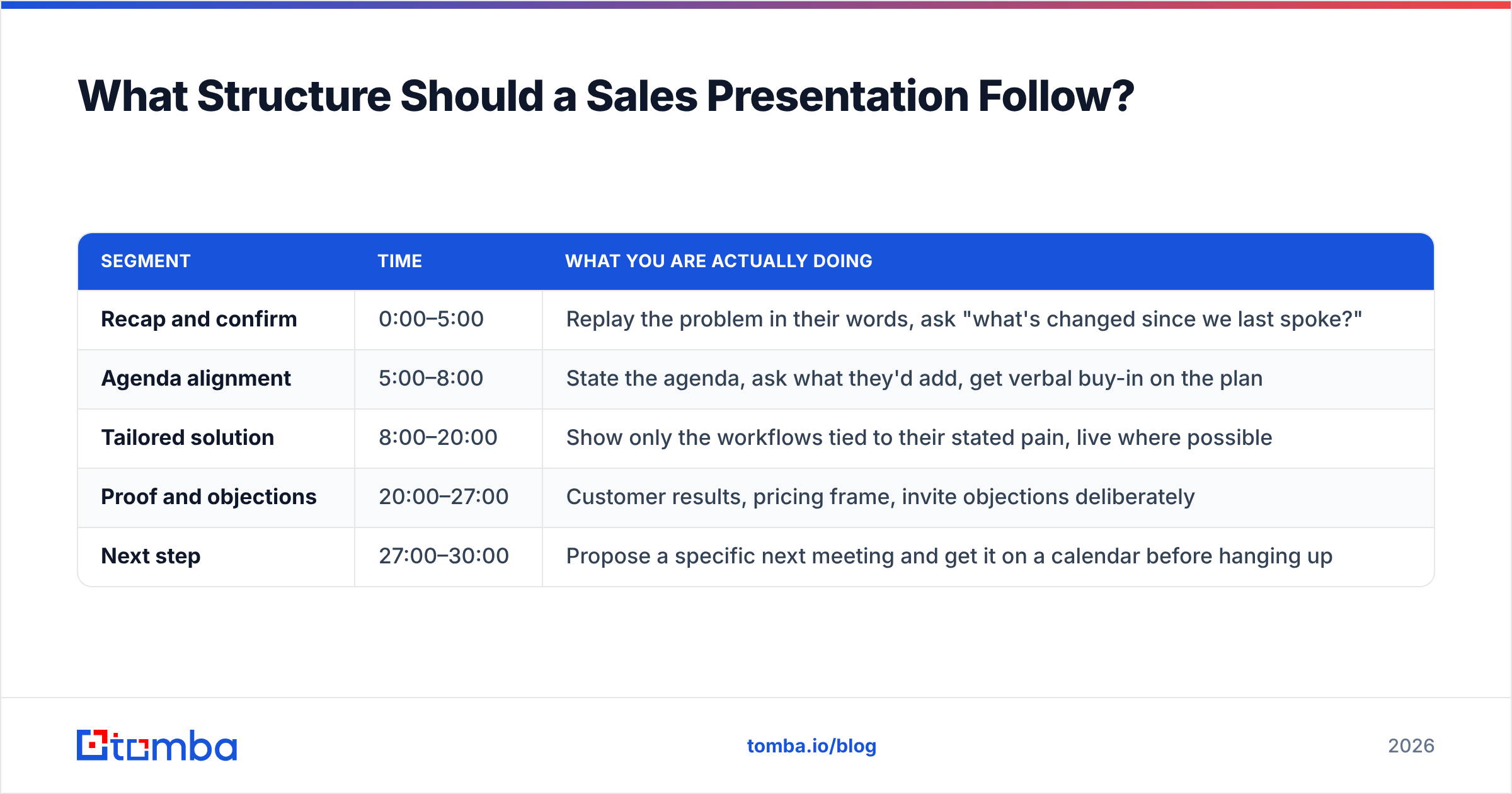
Use a fixed time skeleton and adapt the content inside it. This is the 30-minute version, which covers the majority of first solution meetings:
| Segment | Time | What you are actually doing |
|---|---|---|
| Recap and confirm | 0:00–5:00 | Replay the problem in their words, ask "what's changed since we last spoke?" |
| Agenda alignment | 5:00–8:00 | State the agenda, ask what they'd add, get verbal buy-in on the plan |
| Tailored solution | 8:00–20:00 | Show only the workflows tied to their stated pain, live where possible |
| Proof and objections | 20:00–27:00 | Customer results, pricing frame, invite objections deliberately |
| Next step | 27:00–30:00 | Propose a specific next meeting and get it on a calendar before hanging up |
Three rules make this work.
First, the recap is not a courtesy. It is a qualification checkpoint. If the buyer corrects your version of the problem, everything downstream changes and you need to know that at minute two, not minute twenty-five.
Second, the "what's changed?" question catches the silent deal-killers: a hiring freeze, a reorg, a competing project that just got funded. Reps who skip it present a beautiful solution to a problem that stopped mattering three weeks ago.
Third, the next-step block is non-negotiable time. If you are running long, cut solution content, never the close. A 20-minute presentation with a booked follow-up beats a 35-minute masterpiece that ends with "send us the deck."

Which Presentation Format Should You Use?#
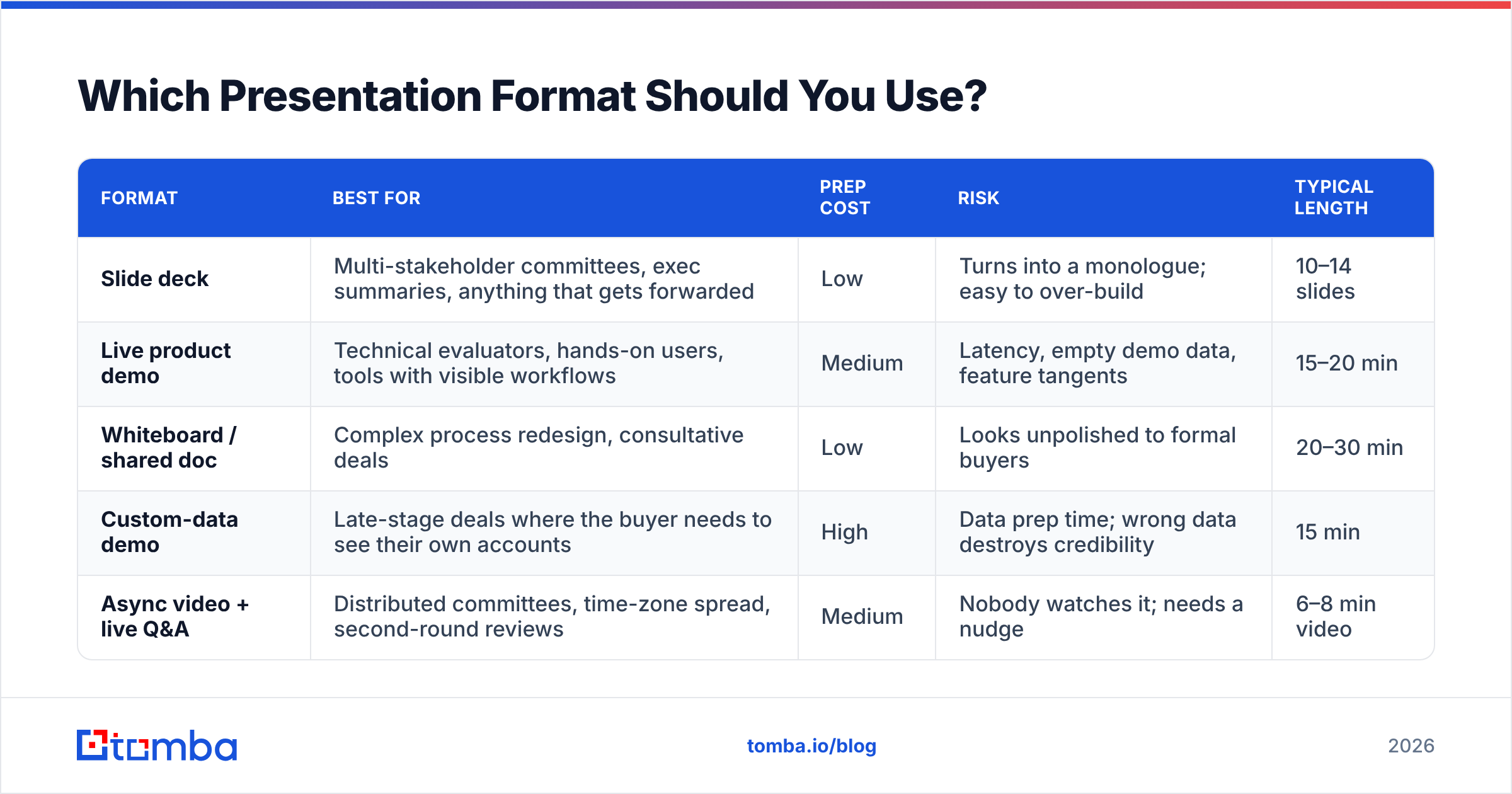
The deck is one option among several, and it is frequently the worst one. Match the format to the buyer's stage and the complexity of what you are selling.
| Format | Best for | Prep cost | Risk | Typical length |
|---|---|---|---|---|
| Slide deck | Multi-stakeholder committees, exec summaries, anything that gets forwarded | Low | Turns into a monologue; easy to over-build | 10–14 slides |
| Live product demo | Technical evaluators, hands-on users, tools with visible workflows | Medium | Latency, empty demo data, feature tangents | 15–20 min |
| Whiteboard / shared doc | Complex process redesign, consultative deals | Low | Looks unpolished to formal buyers | 20–30 min |
| Custom-data demo | Late-stage deals where the buyer needs to see their own accounts | High | Data prep time; wrong data destroys credibility | 15 min |
| Async video + live Q&A | Distributed committees, time-zone spread, second-round reviews | Medium | Nobody watches it; needs a nudge | 6–8 min video |
The custom-data demo is the most underused of the five. If you sell anything data-adjacent, running your product against the prospect's actual target market during the call is far more persuasive than a curated sandbox. For example, if the conversation is about pipeline coverage, pulling live contacts for ten of their named target accounts with a domain search in front of them turns an abstract claim into a demonstrated result. The prep cost is real, but so is the conversion difference.
The async-video option deserves a mention too. HubSpot's sales resources have documented for years that buying committees keep growing, and getting seven people on one call is often impossible. A short recorded walkthrough plus a 15-minute live Q&A respects that reality better than a rescheduled meeting that never happens.
How Do You Handle a Room With Multiple Stakeholders?#
Every attendee is scoring you on a different axis. Address them explicitly and by name.
- The economic buyer wants the cost of inaction, payback period, and what happens if the project slips a quarter. Give them a number, not a range.
- The technical evaluator wants integration surface, security posture, and API limits. Do not hand-wave; if you do not know, say so and commit to a written answer with a date.
- The end user wants to know how many clicks their day gains or loses. Show the actual screen they will live in.
- The skeptic — there is always one — wants to see whether you deflect. Invite their objection directly: "Priya, you've been quiet. What's the part of this you're least convinced by?"
That last move is the highest-leverage sentence in the meeting. Silent skeptics do not go away; they kill the deal in the internal debrief you are not invited to. Surfacing the objection while you can still answer it is worth cutting two slides for.
Track the roles formally in your CRM after the call. If your pipeline notes list one contact for a six-person deal, your forecast is fiction.
How Do You Present Proof Without Boring the Room?#
Buyers discount vendor claims automatically. Independent signals carry more weight than anything you say about yourself, which is why review platforms like G2 and analyst coverage from firms like Gartner do heavier lifting in a presentation than a testimonial slide.
Structure each proof point as a three-part unit:
- Situation: "A 40-rep SaaS team was pulling contact lists manually."
- Change: "They moved list-building into an automated workflow."
- Result with a number and a timeframe: "Prospecting hours dropped from nine to two per rep per week within six weeks."
One proof point per objection you expect. Not five. A wall of logos communicates that you have customers; a single narrative that mirrors the buyer's own situation communicates that you have their customer.
On numbers: present one headline metric and keep the supporting math in an appendix slide you only open if asked. Reps who lead with a dense ROI table lose the room in eight seconds. Reps who say "the payback is 4.2 months, and I'll show you the math if that number feels aggressive" keep control and invite engagement.
What Are the Most Common Sales Presentation Mistakes?#
These show up in nearly every recorded call review:
- Talking too much. Conversation-intelligence platforms such as Gong have popularized talk-ratio as a coachable metric for exactly this reason. If you are speaking more than a third of the meeting, you are presenting at someone rather than with them.
- Feature dumping. Showing capabilities the buyer never asked about signals that you did not listen and adds surface area for objections.
- Reading slides aloud. The audience reads four times faster than you speak. They finish the slide, get bored, and open Slack.
- Company-history openings. Nobody has ever bought because of a founding-year timeline. Move it to the appendix or delete it.
- Discounting before anyone objects. Volunteering a discount in the presentation tells the buyer your list price was never real.
- No agenda check. Without explicit buy-in on the plan, any attendee can hijack the meeting at minute six and you have no polite way to steer back.
- Ending on "any questions?" This hands the close to the buyer. End on a proposed next step instead.
How Do You Close a Sales Presentation?#
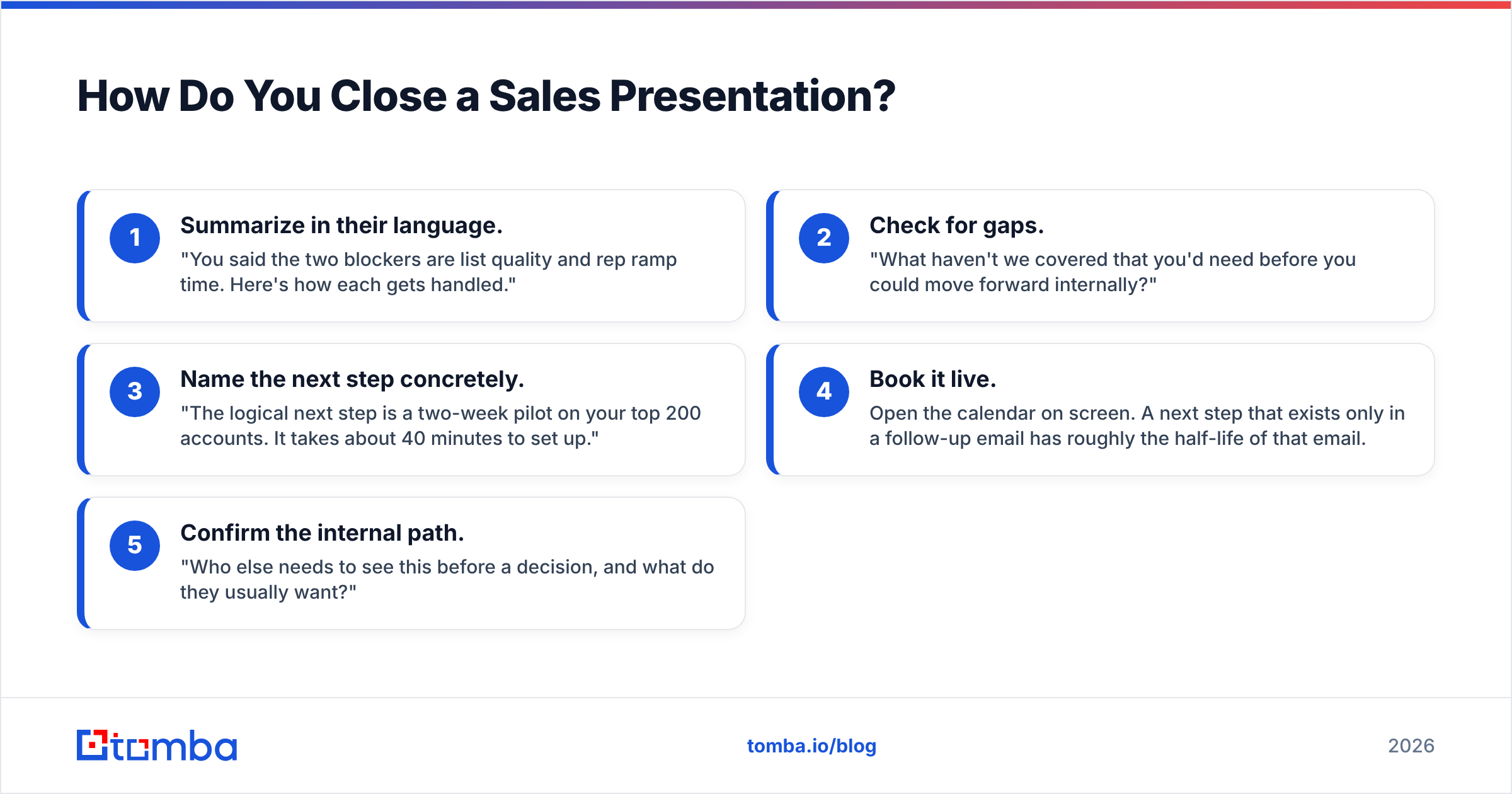
Close on process, not on emotion. The goal of a first presentation is almost never a signature — it is an agreed next step with a date.
A clean sequence:
- Summarize in their language. "You said the two blockers are list quality and rep ramp time. Here's how each gets handled."
- Check for gaps. "What haven't we covered that you'd need before you could move forward internally?"
- Name the next step concretely. "The logical next step is a two-week pilot on your top 200 accounts. It takes about 40 minutes to set up."
- Book it live. Open the calendar on screen. A next step that exists only in a follow-up email has roughly the half-life of that email.
- Confirm the internal path. "Who else needs to see this before a decision, and what do they usually want?"
Step five is the one most reps skip, and it is the one that keeps deals from stalling silently. It also tells you whether your champion actually has a path, which directly affects how you weight the deal in your forecast and your win rate analysis.
Send the recap within two hours: agenda covered, decisions made, next step, owner, date. Short. Forwardable. Written so your champion can paste it into an internal thread without editing.
How Do You Practice Without Wasting Your Team's Time?#
Record yourself once. Watch it at 1.5x with the sound off first and count how many slides you spend on your own company. Then watch with sound and mark every filler sentence.
Beyond that, three habits compound:
- Run the first five minutes only with a colleague. If the opening lands, the rest usually follows.
- Rehearse objections, not slides. Have someone play the skeptic and interrupt you three times.
- Keep a live objection log. Every new objection from a real call goes into a shared doc with the best answer the team has found. This is the cheapest enablement asset most teams never build.
Where Should You Focus If You Only Fix One Thing?#
Fix the input, not the delivery. A polished presentation to the wrong person converts worse than an average presentation to the right one. Most presentation failures trace back to a meeting that should never have been booked — wrong title, wrong company size, wrong timing.
That means your targeting and contact data are upstream of your presentation skills. If you are presenting to whoever answered, no amount of structure fixes the math.
Get the right people into the room first. Tomba's Email Finder helps you reach the actual decision-makers at your target accounts — verified work emails by name and domain, so the invite lands with the VP who owns the budget instead of a generic inbox. Start on the free tier with 25 searches a month, or step up to Starter at $49/mo when your pipeline demands more; full Tomba pricing is on the site. Better attendees, better presentations, better close rates — in that order.
Related guides#
// get started
Find, verify and enrich your first contacts today
Start on the free plan with 25 searches a month, then scale when your team is ready.
Free plan · No credit card required · GDPR & CCPA
// about the author