How to Identify Anonymous Website Visitors in 2026
Most of your traffic leaves without filling in a form. Here is how visitor identification actually works in 2026, what match rates you can expect, and which method fits your funnel.
TL;DR
- Roughly 95-98% of B2B website visitors never fill in a form, so form-only capture leaves most of your demand invisible.
- Two mechanisms do the real work: reverse IP / company identification (returns an account) and cookie-or-pixel-based person identification (returns a named individual, mostly US-only).
- Realistic match rates in 2026: 25-45% of B2B traffic resolves to a company; 8-20% resolves to a person, and far less in the EU and UK.
- Identification is only step one. The value comes from routing the resolved account to a contact, which means pairing a reveal tool with an email finder and verification layer.
- Privacy law is the binding constraint, not technology. GDPR, ePrivacy, and state-level US laws determine what you may legally do with a resolved identity.
Why does most of your website traffic stay anonymous?#
Because forms are a tax and buyers stopped paying it. A modern B2B buying committee reads your pricing page, your docs, three competitor comparisons, and a G2 category grid before anyone talks to sales. According to Gartner's B2B buying research, buyers spend only a small slice of their journey with any single supplier's sales team — the rest is independent research. None of that research generates a form fill.
Think of it like a retail store with a single guest book by the door. Two hundred people walk in, browse the shelves, and walk out. Three sign the book. You then build your entire sales forecast on those three signatures and pretend the other 197 never existed.
Visitor identification is the store camera plus a customer-recognition system. It tells you which companies walked in, what they looked at, and how long they lingered — even when nobody signed anything.

What does "identify anonymous website visitors" actually mean?#
The phrase covers two very different technical outcomes, and vendors blur the line on purpose. Separate them before you buy anything.
- Company-level identification (firmographic resolution). The tool takes the visitor's IP address, resolves it against a database of corporate IP ranges and ISP allocations, and returns a company: name, domain, industry, size, sometimes location. You learn that someone at Acme Corp read your pricing page twice.
- Person-level identification (identity resolution). The tool matches a hashed identifier — usually a cookie, device graph entry, or an email hash captured from a prior interaction across a publisher network — and returns an individual: name, work email, sometimes LinkedIn profile. You learn that Dana Ruiz, VP Ops at Acme read your pricing page.
- Self-identification (deanonymization by consent). The visitor clicks an email link with a tracking parameter, logs into a portal, or fills a progressive form. No probabilistic matching involved — the identity is handed to you.
- Intent-network identification. Third-party networks like Bombora observe content consumption across thousands of publisher sites and report which accounts are surging on a topic. You do not see your own visitors; you see market-wide signal.
- Enrichment-after-the-fact. You already hold an email or domain and expand it into a full profile through data enrichment. This is not identification — it's what you do after identification, and it's where most of the pipeline value is created.
The distinction matters commercially. Company-level tools are cheap, legally low-risk, and give you an account. Person-level tools are expensive, legally fraught outside the US, and give you a contact you still need to verify.
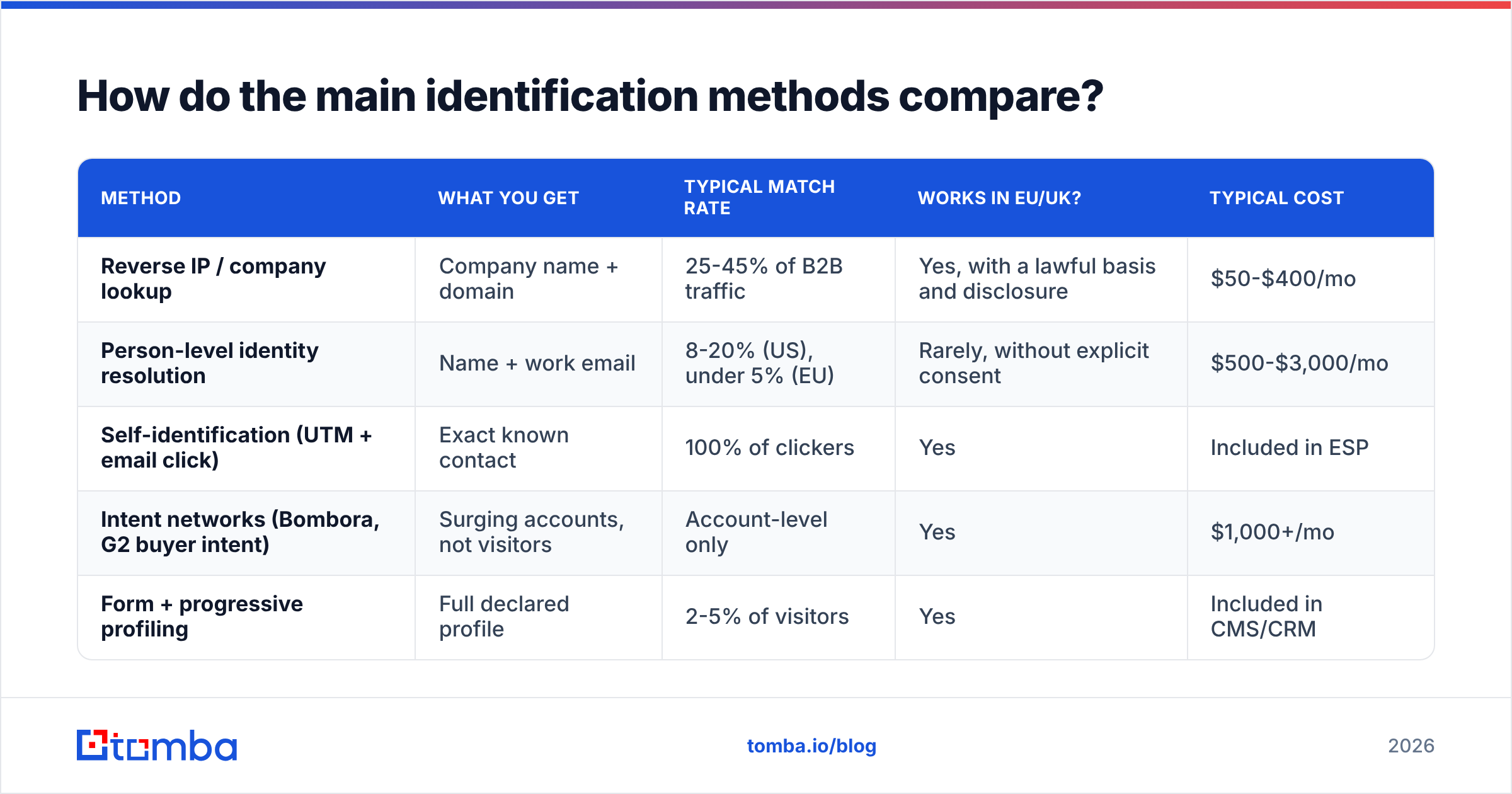
How do the main identification methods compare?#
| Method | What you get | Typical match rate | Works in EU/UK? | Typical cost |
|---|---|---|---|---|
| Reverse IP / company lookup | Company name + domain | 25-45% of B2B traffic | Yes, with a lawful basis and disclosure | $50-$400/mo |
| Person-level identity resolution | Name + work email | 8-20% (US), under 5% (EU) | Rarely, without explicit consent | $500-$3,000/mo |
| Self-identification (UTM + email click) | Exact known contact | 100% of clickers | Yes | Included in ESP |
| Intent networks (Bombora, G2 buyer intent) | Surging accounts, not visitors | Account-level only | Yes | $1,000+/mo |
| Form + progressive profiling | Full declared profile | 2-5% of visitors | Yes | Included in CMS/CRM |
Two things jump out. First, no method gives you everything: the highest-fidelity method (forms) has the lowest coverage, and the highest-coverage method (reverse IP) gives you the least detail. Second, the EU column kills a lot of vendor demos. If half your traffic is European, a person-level tool quoted at "20% match rate" will realistically deliver single digits on your actual traffic mix.
How does reverse IP company identification work under the hood?#
An IP address is like a building address, not a name badge. Reverse IP resolution asks: which organization was allocated this address block?
The pipeline runs roughly like this:
- Capture. A JavaScript snippet or server-side log records the visitor IP, page path, referrer, and timestamp.
- Filter. Bot traffic, VPN exits, datacenter ranges, and consumer ISP ranges get stripped. This is where cheap tools fail — an unfiltered feed reports "Comcast" and "Amazon AWS" as your hottest accounts.
- Resolve. The remaining IPs are matched against WHOIS records, ASN registries, and proprietary observed-traffic graphs to a company domain.
- Enrich. The domain is expanded with firmographics: employee count, industry, tech stack, funding.
- Score and route. Sessions get scored by page value and depth, then pushed to Slack, a CRM, or an outbound sequence.
The dominant failure mode in 2026 is remote work. A director working from a home fibre connection resolves to a residential ISP, not to her employer. Match rates fell hard after 2020 and never fully recovered. Any vendor quoting pre-pandemic numbers is quoting a different internet.
The second failure mode is Apple's iCloud Private Relay and similar network-level proxies, which mask the originating IP entirely for a meaningful slice of traffic. You cannot resolve what you cannot see.
Is person-level identification legal?#
It depends entirely on jurisdiction, and the honest answer is more restrictive than most vendor landing pages suggest.
In the EU and UK, the GDPR treats an IP address as personal data when it can be linked to an identifiable person, and the ePrivacy Directive requires prior consent for most non-essential cookies and device access. Person-level deanonymization of a non-consenting visitor is very hard to justify under legitimate interest. Company-level identification sits on much safer ground when it is disclosed in your privacy notice and used for B2B account context rather than profiling an individual.
In the US, the picture is patchier. State laws — CCPA/CPRA in California and analogous statutes elsewhere — grant opt-out rights over sale and sharing of personal information, and identity-resolution vendors often qualify as data brokers under those definitions. Person-level identification is broadly practiced but carries disclosure and opt-out obligations.
Practical guidance, not legal advice:
- Disclose it. Name visitor identification in your privacy policy, in plain language, with the vendor named.
- Respect the signal layer. Honor Global Privacy Control, consent-mode gating, and Do Not Track where you have committed to it.
- Geo-gate the person-level layer. Run company-level identification globally; run person-level only where you have a defensible basis.
- Keep retention short. Ninety days of session history covers almost every real sales use case.
- Do not pretend you know them. "I saw you on our pricing page at 14:32" is a fast way to turn a warm account into a complaint.
What is the actual workflow from anonymous visit to booked meeting?#
Identification without a follow-through motion is an expensive dashboard. Here is the sequence that produces revenue.
Step 1 — Instrument and segment. Install the reveal script. Tag pages by intent value: pricing, comparison, docs, and integration pages are high-intent; blog and careers are noise. A three-visit blog reader is not a buyer; a single pricing-page session from a 200-person target-ICP company is.
Step 2 — Filter to ICP. Do not act on every resolved company. Filter by employee count, industry, geography, and tech stack. A good filter reduces a 400-account weekly list to 15 that matter. If you use website visitor reveal, set the ICP filter before you route anything to a rep — unfiltered alerts destroy rep trust within two weeks.
Step 3 — Resolve account to person. This is the step that most teams botch. You have a company domain, not a human. Run a domain search to pull the relevant people at that company, filter by department and seniority, and pick the two or three roles who plausibly own the problem your pricing page solves.
Step 4 — Verify before sending. A resolved contact is a hypothesis. Run every address through an email verifier before it enters a sequence. Bounce rates above 3% will damage your domain reputation faster than any subject-line experiment can repair it.
Step 5 — Reference the behavior obliquely. Do not quote timestamps. Write to the problem implied by the page, not the page view. If they read the Salesforce integration page, open with a line about Salesforce sync pain — not "I noticed you visited our Salesforce page."
Step 6 — Measure account-level lift, not click rate. The right metric is: of accounts identified and worked, what share opened an opportunity within 90 days, versus a matched control of accounts you did not work?
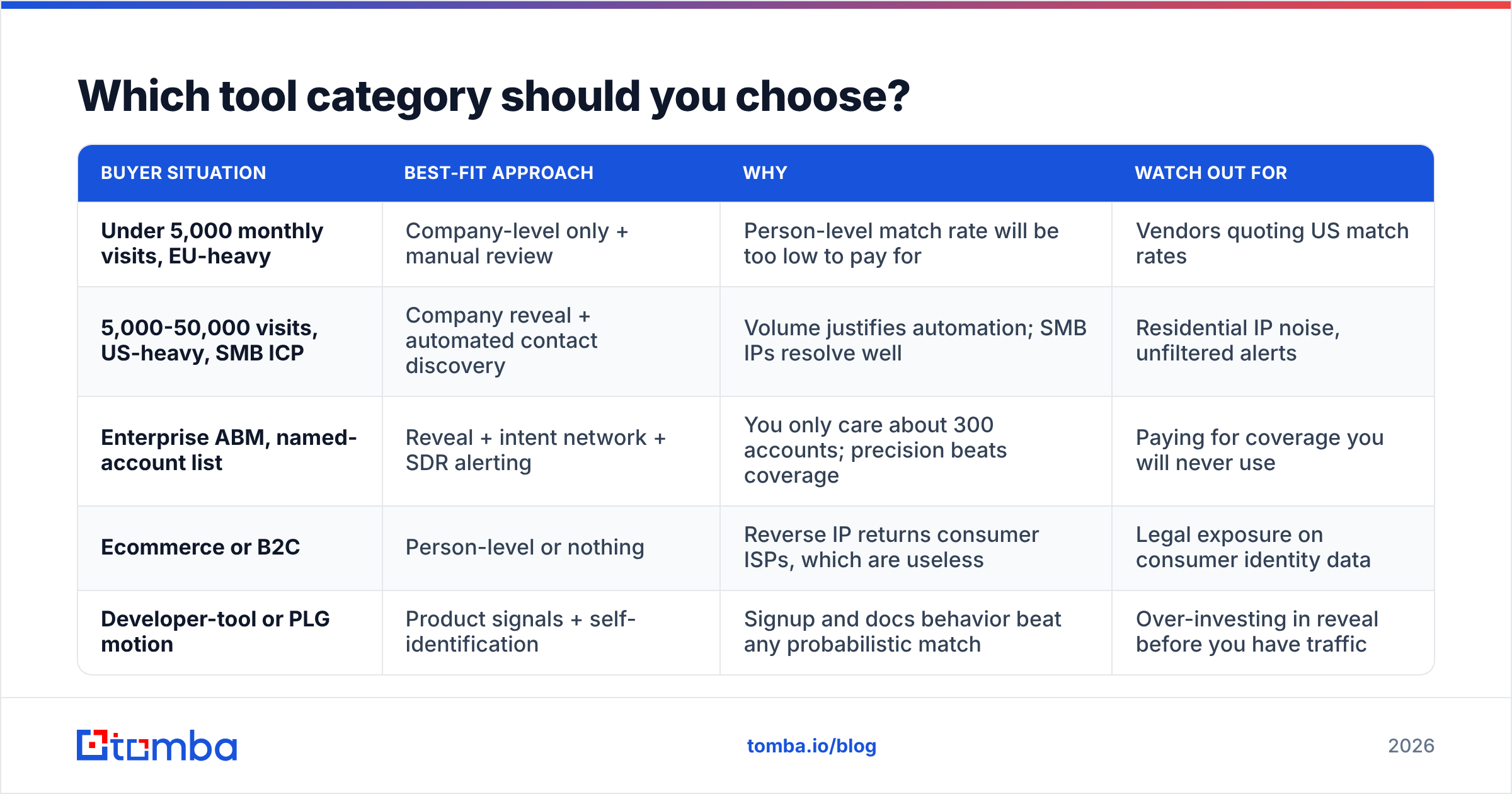
Which tool category should you choose?#
| Buyer situation | Best-fit approach | Why | Watch out for |
|---|---|---|---|
| Under 5,000 monthly visits, EU-heavy | Company-level only + manual review | Person-level match rate will be too low to pay for | Vendors quoting US match rates |
| 5,000-50,000 visits, US-heavy, SMB ICP | Company reveal + automated contact discovery | Volume justifies automation; SMB IPs resolve well | Residential IP noise, unfiltered alerts |
| Enterprise ABM, named-account list | Reveal + intent network + SDR alerting | You only care about 300 accounts; precision beats coverage | Paying for coverage you will never use |
| Ecommerce or B2C | Person-level or nothing | Reverse IP returns consumer ISPs, which are useless | Legal exposure on consumer identity data |
| Developer-tool or PLG motion | Product signals + self-identification | Signup and docs behavior beat any probabilistic match | Over-investing in reveal before you have traffic |
There is also a build-versus-buy axis. If you already log server-side requests, you can resolve IPs yourself against a commercial IP-to-company dataset and skip the dashboard entirely. Teams with a data engineer often prefer this: it costs less, keeps data in your warehouse, and avoids adding another third-party script to your site. The Tomba API fits this pattern well, since the contact-discovery step runs as a backend call rather than a browser tag.
What match rate should you actually expect?#
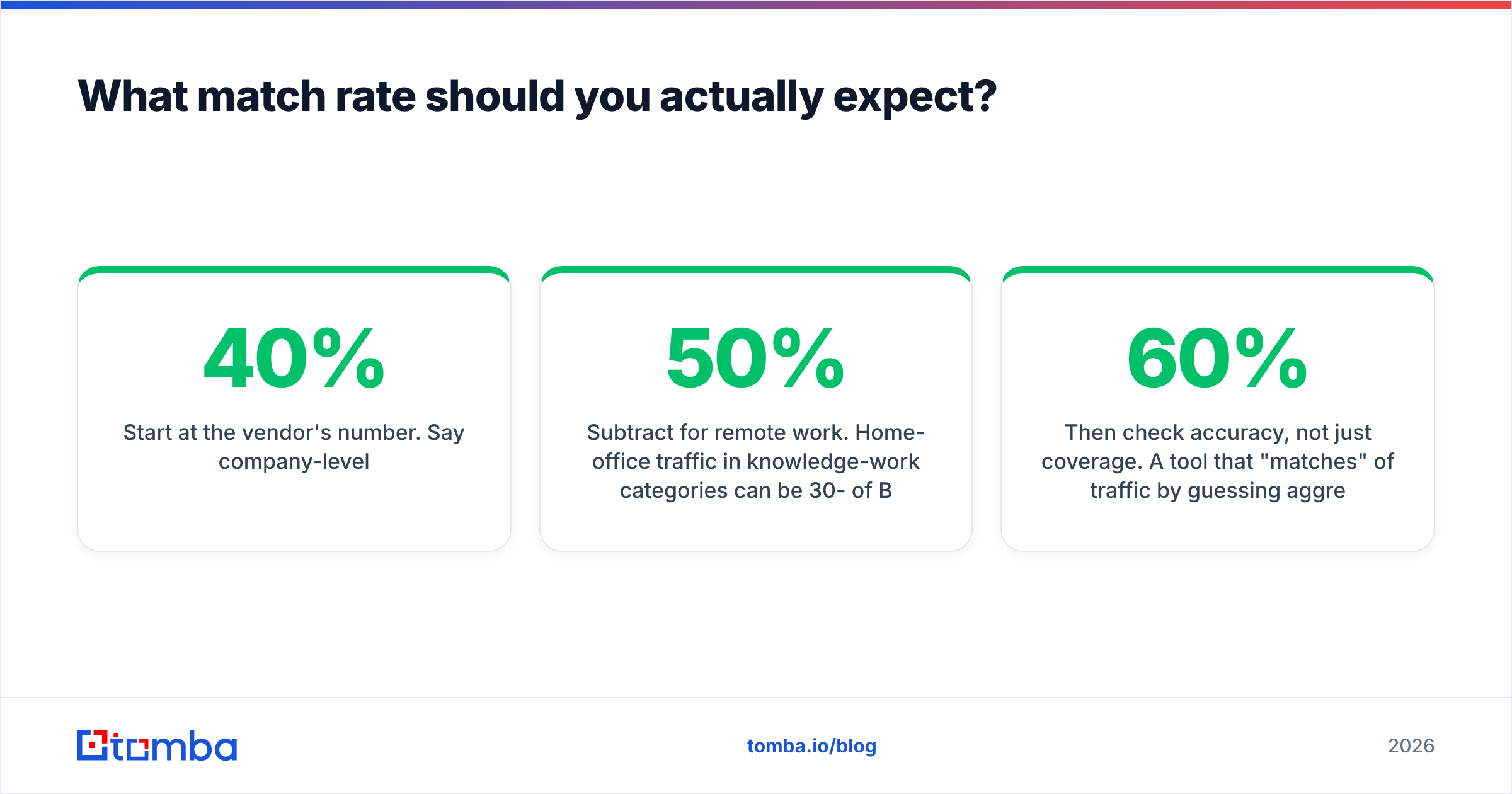
Treat every headline match rate as a ceiling measured on a favorable traffic mix. Adjust down for your reality:
- Start at the vendor's number. Say 40% company-level.
- Subtract for remote work. Home-office traffic in knowledge-work categories can be 30-50% of B2B sessions. Most of it will not resolve to an employer.
- Subtract for privacy proxies. Private Relay, corporate VPN egress through generic cloud ranges, and consent-gated script blocking each shave points.
- Subtract for geography. Non-US, non-Western-Europe traffic resolves markedly worse in most commercial IP datasets.
- Then check accuracy, not just coverage. A tool that "matches" 60% of traffic by guessing aggressively is worse than one that matches 30% with high precision, because bad matches route reps to the wrong accounts.
The best diligence test is simple: run a two-week trial, export the resolved companies, and have a rep manually check 50 of them against your own knowledge of who your customers and prospects are. If more than a fifth are obviously wrong — consumer ISPs, agencies you never sell to, companies in geographies you do not serve — walk away.
For teams comparing vendors, G2's visitor identification category is a reasonable starting point for user-reported accuracy, though weight recent reviews heavily since match rates have shifted with network changes.
How do you keep identification from becoming creepy?#
The line is behavioral, not technical. Buyers accept that companies track site usage; they react badly to being shown the surveillance.
Safe patterns:
- Route the account to a rep with context in the CRM, not in the email body.
- Time outreach loosely — a day or two after the visit, not eleven minutes.
- Use the resolved page interest to pick the topic, never to prove you were watching.
- Prioritize accounts already in an open cycle. Reveal is far more effective at accelerating existing pipeline than at creating cold interest.
Unsafe patterns: naming visit times, referencing exact page counts, or personalizing to individual behavior when the identification was probabilistic and might simply be wrong. The failure case for "Hi Dana, saw you reading our docs" is that Dana never did, and now she thinks you either lie or spy.
What should you build first?#
If you are starting from zero, sequence it this way:
- Week one: Tag high-intent pages and confirm your analytics actually distinguishes them. Most teams skip this and identify traffic they cannot value.
- Week two: Add company-level reveal. Watch the raw feed for a week before routing anything to reps.
- Week three: Write the ICP filter. Aim for fewer than 25 accounts surfaced per week per rep.
- Week four: Wire the contact-resolution step — domain search, seniority filter, verification — and start a small outbound test with a matched holdout.
- Month two: Review account-level opportunity lift. Kill it if there is none; scale the filter if there is.
Skipping straight to person-level identification is the common expensive mistake. It looks impressive in a demo, costs five to ten times more, and delivers a smaller usable list than a well-filtered company-level feed paired with good contact data.
Bottom line#
Identifying anonymous website visitors is a solved problem at the account level and a partially solved, legally constrained one at the person level. Get the account, filter it hard against your ICP, then do the work of finding and verifying the right human — that final step is where the pipeline actually comes from, and it's the step most teams under-resource.
That is exactly the gap the Tomba Email Finder fills. Once your reveal tool hands you a company domain, Tomba turns it into verified, deliverable contacts for the specific roles you want to reach — with a free tier at 25 searches a month to test the workflow, and paid plans starting at $49/mo on the Starter tier, $99/mo for Growth, and $249/mo for Pro. Check the full Tomba pricing to match a plan to your traffic volume, and start by resolving last week's identified accounts into people you can actually email.
Related guides#
// get started
Find, verify and enrich your first contacts today
Start on the free plan with 25 searches a month, then scale when your team is ready.
Free plan · No credit card required · GDPR & CCPA
// about the author