How To Identify Leads That Actually Convert in 2026
Most teams confuse a name in a spreadsheet with a lead. Here is a repeatable way to identify leads using fit signals, intent signals, and a reachability check before you spend a single sequence slot.
TL;DR
- A lead is not a name. It is a person who matches your ICP, shows a buying signal, and can actually be reached — all three, or it is just a row in a spreadsheet.
- Identify leads on two axes first: fit (firmographic + technographic match) and intent (behavioral signals like site visits, hiring posts, funding, tech changes).
- Then apply the step almost everyone skips: reachability. An unverified contact record is an unqualified lead, no matter how good the fit score looks.
- Different sourcing methods produce wildly different quality. Website visitor identification and trigger-based sourcing beat bulk list buying on conversion rate, but cost more per record.
- Score leads on a simple 10-point rubric before they touch a sequence. Anything under 6 goes to nurture, not to your SDRs.
What does "identify a lead" actually mean?#
Identifying a lead means answering three questions about a specific human being, in this order:
- Do they fit? Company size, industry, geography, tech stack, funding stage, and role all match a pattern that has bought from you before.
- Are they in motion? Something changed recently — a hire, a funding round, a new tool, a pricing page visit — that makes now different from last quarter.
- Can you reach them? You have a deliverable email address, a valid phone number, or a warm path in.
Miss any one of these and you do not have a lead. You have a contact. The distinction matters because pipeline forecasting, SDR capacity planning, and cost-per-opportunity math all break when "leads" in your CRM are actually unqualified contacts. Gartner research on B2B buying groups has been consistent for years on the same point: the average purchase involves 6 to 10 decision makers, so a single well-identified lead is really an entry point into a group, not a standalone opportunity.
Most teams get stuck at step one. They build a beautiful ICP document, buy 40,000 records that technically match it, and then wonder why reply rates sit at 0.4%. Fit alone is table stakes.
Why do most teams misidentify leads?#
Four failure modes account for most of it.
Confusing volume with coverage. A 40,000-record list of "SaaS companies, 50-200 employees, US" is not coverage of your market. It is a coarse filter that includes every company that ever raised a seed round and every agency that put "SaaS" in its LinkedIn description. Coverage means you can name the 800 accounts that actually matter and you know who is in the buying group at each one.
Treating every download as an MQL. Someone grabbing a free template is not the same as someone comparing your pricing against a competitor's. If your marketing qualified lead definition does not distinguish between those two behaviors, sales will stop trusting the handoff within a quarter.
Ignoring negative signals. Company just got acquired. Champion left three weeks ago. They already run a competing product with a 3-year contract signed last month. These are identifiable, and they should push a lead down your list, not just fail to push it up.
Skipping data hygiene entirely. Bounced email means the lead never existed as a lead. This is the cheapest fix on the list and the most commonly ignored.

What signals actually identify a qualified lead?#
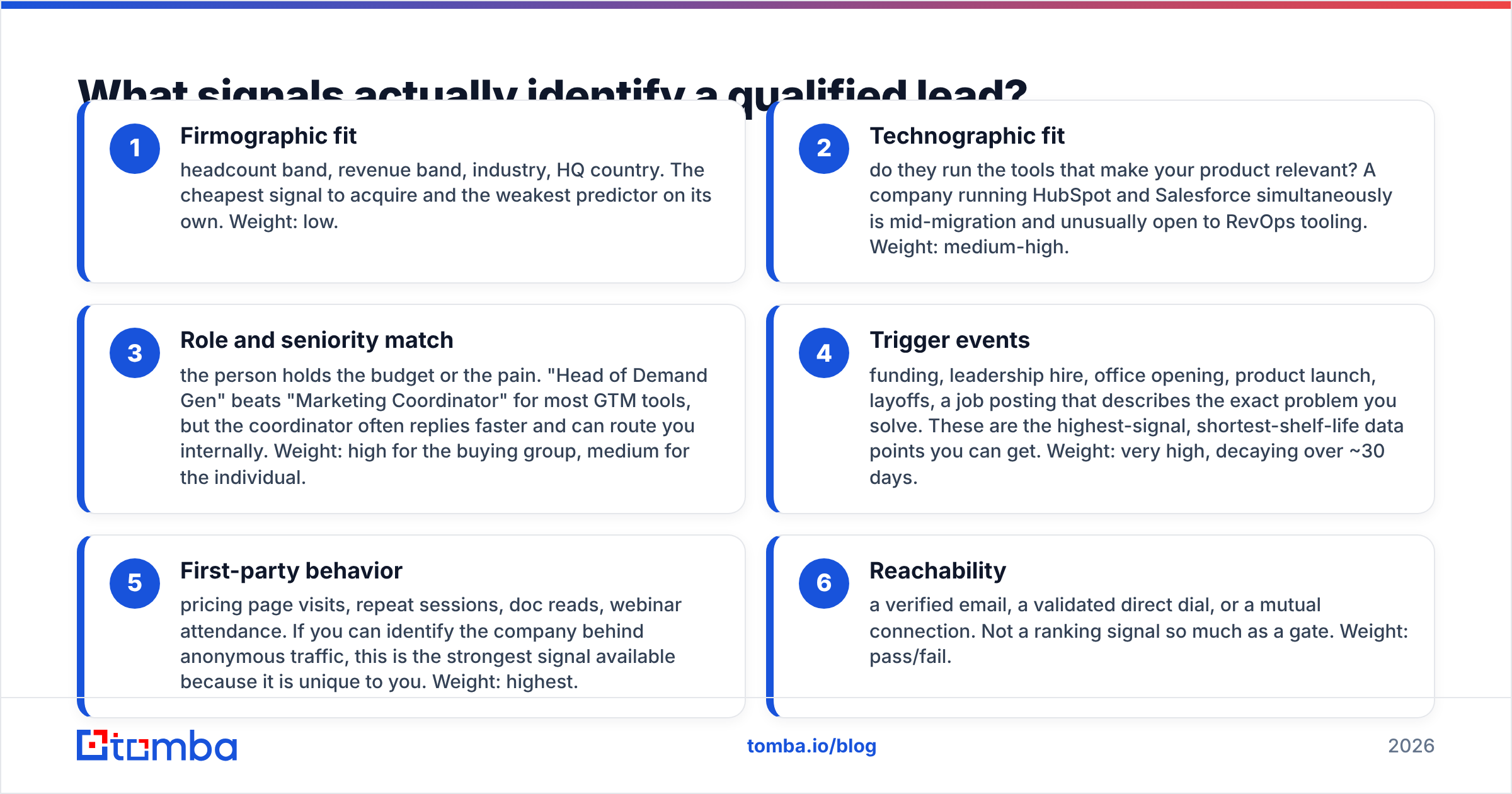
Split your signals into fit and intent, then weight them. Here is the working set most B2B teams can implement without a data science hire:
- Firmographic fit — headcount band, revenue band, industry, HQ country. The cheapest signal to acquire and the weakest predictor on its own. Weight: low.
- Technographic fit — do they run the tools that make your product relevant? A company running HubSpot and Salesforce simultaneously is mid-migration and unusually open to RevOps tooling. Weight: medium-high.
- Role and seniority match — the person holds the budget or the pain. "Head of Demand Gen" beats "Marketing Coordinator" for most GTM tools, but the coordinator often replies faster and can route you internally. Weight: high for the buying group, medium for the individual.
- Trigger events — funding, leadership hire, office opening, product launch, layoffs, a job posting that describes the exact problem you solve. These are the highest-signal, shortest-shelf-life data points you can get. Weight: very high, decaying over ~30 days.
- First-party behavior — pricing page visits, repeat sessions, doc reads, webinar attendance. If you can identify the company behind anonymous traffic, this is the strongest signal available because it is unique to you. Weight: highest.
- Reachability — a verified email, a validated direct dial, or a mutual connection. Not a ranking signal so much as a gate. Weight: pass/fail.
A lead that scores high on 4, 5, and 6 with only moderate firmographic fit will almost always outperform a perfect-fit account with no motion and a guessed email address.
Which lead identification methods should you use?#
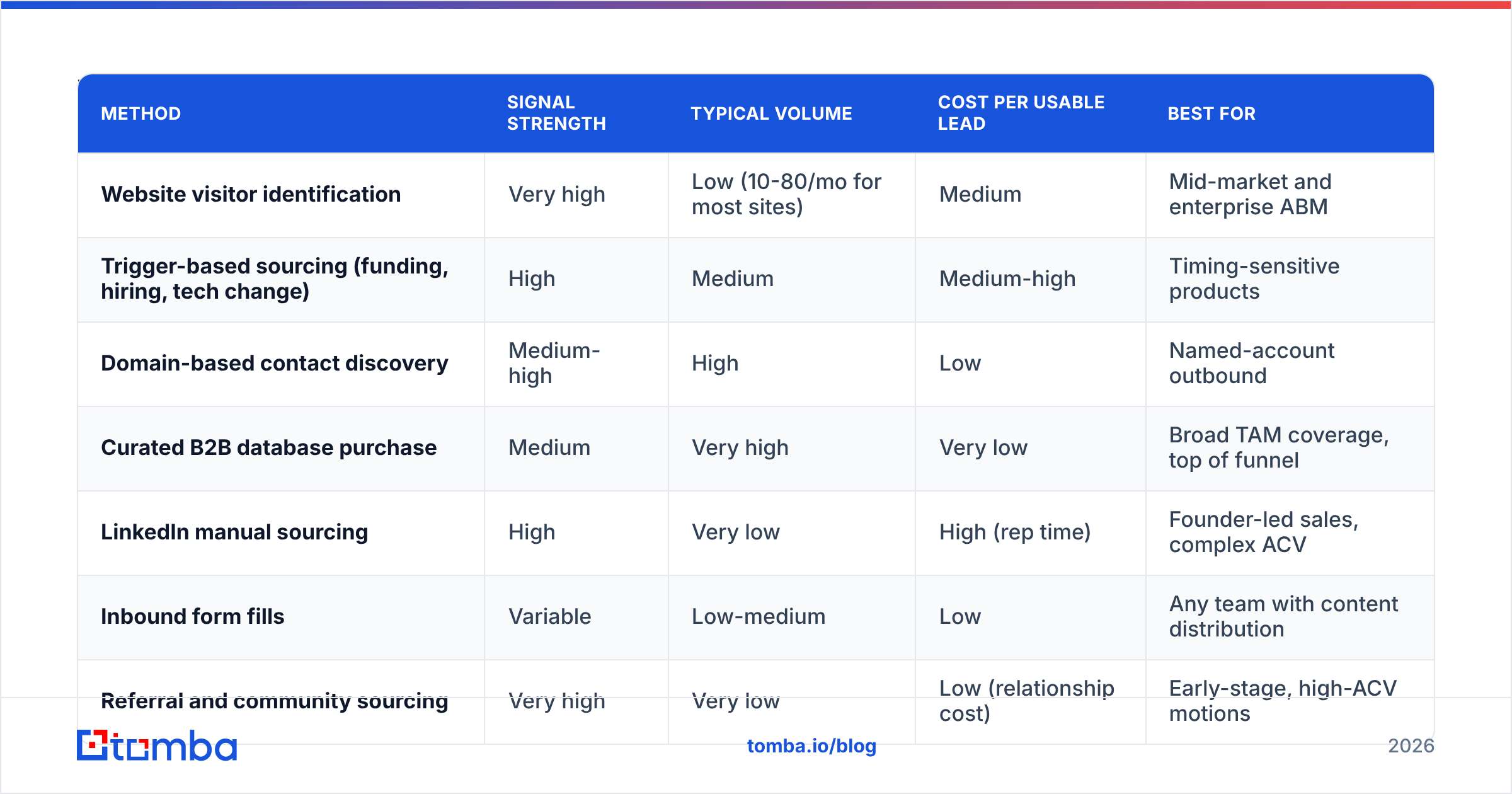
There is no single best method. There is a best method per segment, and the trade-off is almost always volume versus signal strength. Here is how the common approaches compare:
| Method | Signal strength | Typical volume | Cost per usable lead | Best for |
|---|---|---|---|---|
| Website visitor identification | Very high | Low (10-80/mo for most sites) | Medium | Mid-market and enterprise ABM |
| Trigger-based sourcing (funding, hiring, tech change) | High | Medium | Medium-high | Timing-sensitive products |
| Domain-based contact discovery | Medium-high | High | Low | Named-account outbound |
| Curated B2B database purchase | Medium | Very high | Very low | Broad TAM coverage, top of funnel |
| LinkedIn manual sourcing | High | Very low | High (rep time) | Founder-led sales, complex ACV |
| Inbound form fills | Variable | Low-medium | Low | Any team with content distribution |
| Referral and community sourcing | Very high | Very low | Low (relationship cost) | Early-stage, high-ACV motions |
Most teams should run three of these concurrently, not one. A practical blend for a 10-person GTM team: visitor identification for the accounts already looking at you, trigger-based sourcing for the accounts you want, and domain-based discovery to fill in the buying group at both.
If you want breadth quickly, curated database vendors are a legitimate starting point — BookYourData is a solid example of a pay-as-you-go source with a decent human-verification process, and it works well when you need to size a market rather than pick off named accounts. Just do not let a purchased list become your entire definition of "lead."
How do you build a lead identification workflow in under an hour?#
This is the part you can actually ship today.
Step 1 — Write your negative ICP first (10 minutes). List the five company types you should never sequence: wrong geography, regulated industries you cannot serve, sub-10-employee companies, existing customers, active competitor contracts. Filtering out is faster than filtering in.
Step 2 — Define your account list, not your contact list (15 minutes). Pull 200-800 accounts that pass the negative filter and match at least two positive fit criteria. You are identifying companies at this stage. Contacts come after.
Step 3 — Layer a trigger (10 minutes). Sort those accounts by recency of a trigger event. Hiring for a role adjacent to your category is the most underrated free trigger — job boards are public and the postings describe the pain in the company's own words.
Step 4 — Find the buying group (15 minutes). For each priority account, identify 2-4 people: the economic buyer, the practitioner who feels the pain, and one adjacent influencer. A domain search run against the company domain returns the named contacts and email patterns for the org in one call, which turns this from an afternoon of LinkedIn scrolling into a batch job.
Step 5 — Enrich the record (5 minutes). Add role, seniority, LinkedIn URL, and company metadata so your scoring model has something to chew on. Contact enrichment at this stage is cheaper than discovering mid-sequence that you sequenced an intern.
Step 6 — Verify reachability (5 minutes). Run the list through an email verifier and drop anything that comes back invalid or risky. This single step protects your sender reputation and stops you from counting undeliverable addresses as pipeline.
Step 7 — Score and route. Anything at 6+ on your rubric goes to a sequence. Everything else goes to nurture or gets re-scored next month when a new trigger fires.

How should you score the leads you identify?#
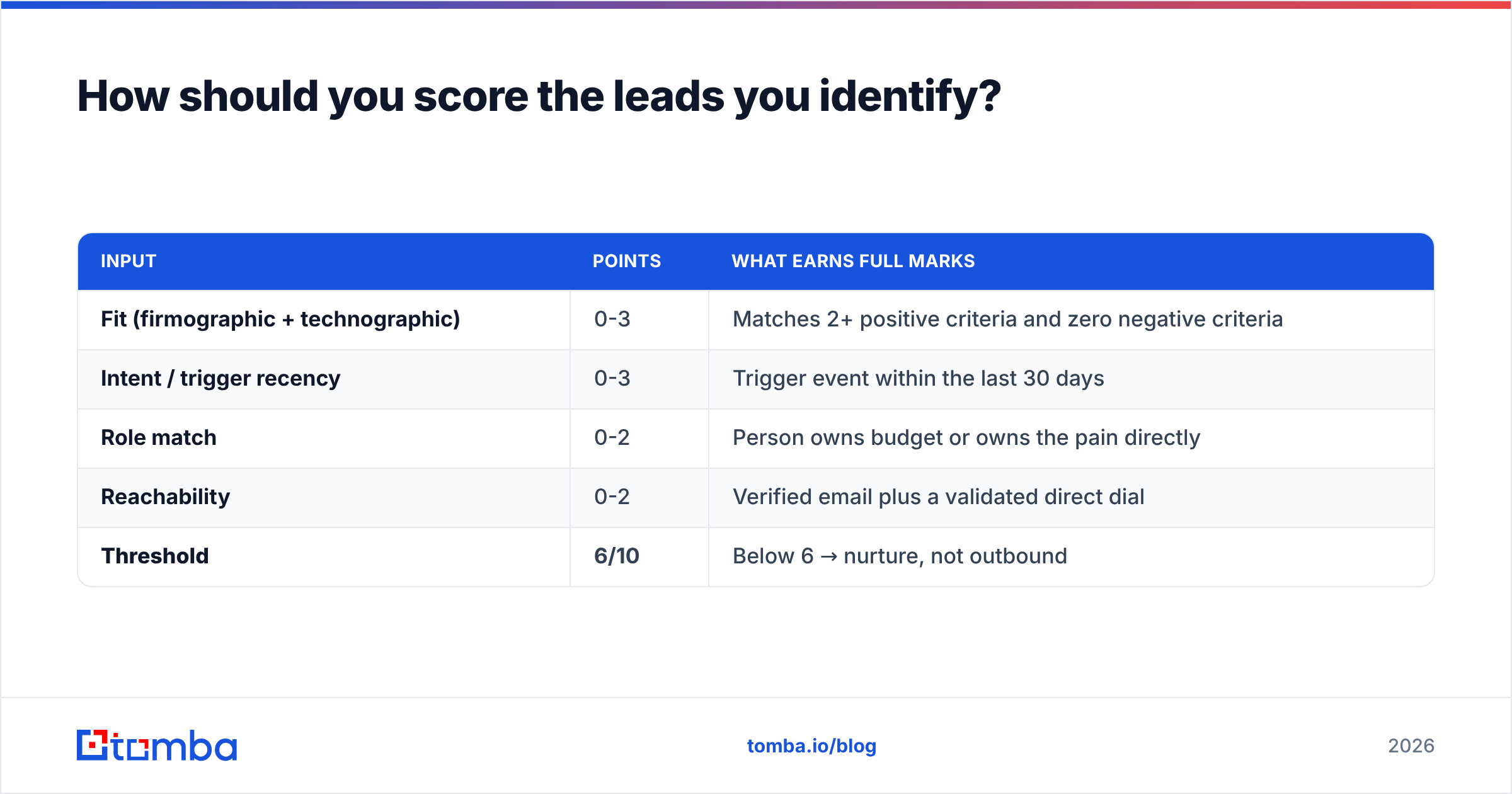
Keep the rubric small enough that a rep can apply it from memory. Ten points, four inputs:
| Input | Points | What earns full marks |
|---|---|---|
| Fit (firmographic + technographic) | 0-3 | Matches 2+ positive criteria and zero negative criteria |
| Intent / trigger recency | 0-3 | Trigger event within the last 30 days |
| Role match | 0-2 | Person owns budget or owns the pain directly |
| Reachability | 0-2 | Verified email plus a validated direct dial |
| Threshold | 6/10 | Below 6 → nurture, not outbound |
Two rules make this work in practice. First, reachability is capped low but acts as a gate — a lead with 0 reachability points is not routed regardless of total score. Second, intent decays. Re-score weekly and let stale triggers fall off, or your "hot" list will quietly fill with three-month-old funding announcements.
Teams running formal lead scoring in HubSpot or Salesforce can automate this directly. Teams without that infrastructure can run it in a spreadsheet — the rubric matters far more than the tooling.
How do you identify leads already visiting your website?#
The highest-intent leads you will ever get are the ones on your pricing page right now, and roughly 97% of them leave without filling in a form. Reverse-IP and identity-resolution tools resolve a portion of that anonymous traffic back to companies, and sometimes to individuals.
The workflow is simple: identify the company from the traffic, check it against your ICP filter, then find the right person inside that company rather than emailing whoever the tool surfaced. Website visitor reveal handles the first half; the buying-group step from earlier handles the second.
Set expectations correctly. Identification rates vary heavily by traffic mix — B2B traffic from corporate networks resolves far better than mobile or consumer ISP traffic, and privacy regulations limit what can be resolved in the EU. Treat visitor identification as a high-quality trickle, not a volume channel. Vendor comparisons on G2 are useful for gauging realistic match rates before you buy, since published marketing numbers tend to describe best-case traffic.
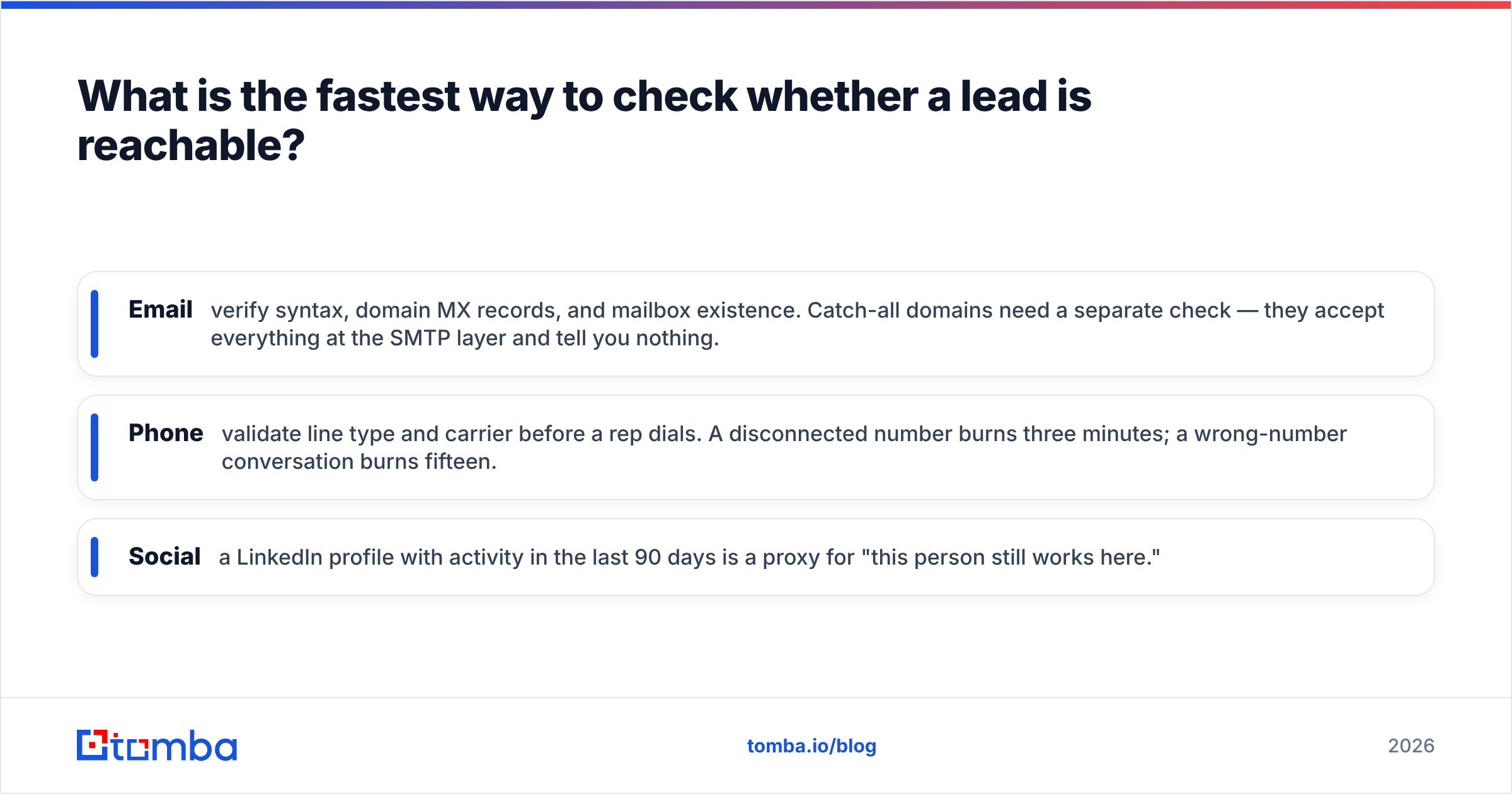
What is the fastest way to check whether a lead is reachable?#
Reachability is binary and cheap to test, which is why skipping it is indefensible.
- Email: verify syntax, domain MX records, and mailbox existence. Catch-all domains need a separate check — they accept everything at the SMTP layer and tell you nothing.
- Phone: validate line type and carrier before a rep dials. A disconnected number burns three minutes; a wrong-number conversation burns fifteen.
- Social: a LinkedIn profile with activity in the last 90 days is a proxy for "this person still works here."
Bounce rates above 3% start damaging domain reputation, and mailbox providers have tightened bulk-sender requirements considerably since 2024. The cost of verification is measured in fractions of a cent per record. The cost of a burned sending domain is measured in weeks.
Frequently asked questions#
How many leads should a single SDR work at once? For mid-market outbound, 150-250 identified, verified, scored leads in active sequence is a realistic working set. Above 400, personalization quality collapses and the whole identification exercise is wasted.
Should you identify leads or accounts first? Accounts, almost always. Identifying a person before you have confirmed the account fits means you will spend enrichment budget on companies you would have disqualified in ten seconds.
How often should you re-identify your list? Monthly for trigger data, quarterly for contact-level data. B2B contact records decay at roughly 25-30% per year through job changes alone, so a list you built in January is meaningfully wrong by summer.
Is buying a list ever the right call? Yes — for TAM sizing, for market entry into an unfamiliar segment, and for filling in accounts you already know you want. It is the wrong call as a substitute for signal-based identification.
Start with contacts you can actually reach#
Everything above collapses if the last mile fails. You can build a flawless ICP, catch a funding trigger on day two, and identify exactly the right VP of Operations — and none of it produces a meeting if the email bounces.
Run your identified account list through the Tomba Email Finder to get verified, deliverable addresses for the named contacts in each buying group, then verify in bulk before anything enters a sequence. The free tier gives you 25 searches a month to test the workflow against your own account list, and paid plans start at $49/mo on Tomba pricing if you need volume. Identify carefully, verify ruthlessly, and let your reps spend their hours on conversations instead of guesswork.
Related guides#
// get started
Find, verify and enrich your first contacts today
Start on the free plan with 25 searches a month, then scale when your team is ready.
Free plan · No credit card required · GDPR & CCPA
// about the author