How to Improve Lead Response Time: A 2026 Playbook
Most B2B teams answer inbound leads in hours, not minutes — and lose the deal to whoever replied first. Here are seven concrete fixes, with the routing math and tooling stack behind each one.
TL;DR
- Lead response time is the clock between a prospect raising their hand and a human (or a genuinely useful automated reply) reaching them. Median B2B performance is still measured in hours; winners measure it in minutes.
- The single biggest lever is not "hire more SDRs" — it's removing the three dead zones: form-to-CRM lag, enrichment lag, and routing lag.
- Speed without context backfires. A 90-second reply that says "Hi {FirstName}, saw you downloaded our guide" converts worse than a 6-minute reply that references the prospect's actual stack.
- Build a tiered SLA (5 min for demo requests, 1 hour for content downloads, same-day for cold list replies) instead of one blanket number nobody hits.
- Instrument it: if you can't see p50 and p90 response time per rep per source, you're guessing.
Speed-to-lead is the least glamorous growth lever in B2B and one of the most reliable. You already paid for the click, the content, and the demo request. Everything after that is pure execution — and most teams execute it badly, not because they're lazy, but because the handoff between "form submitted" and "human replies" passes through four systems that were never designed to talk to each other in real time.
This is a build guide, not a motivational post. Below: what the metric actually means, where the delay hides, the seven fixes ranked by effort-to-impact, and how to instrument the whole thing so it doesn't silently regress in six weeks.
What is lead response time, and how is it measured?#
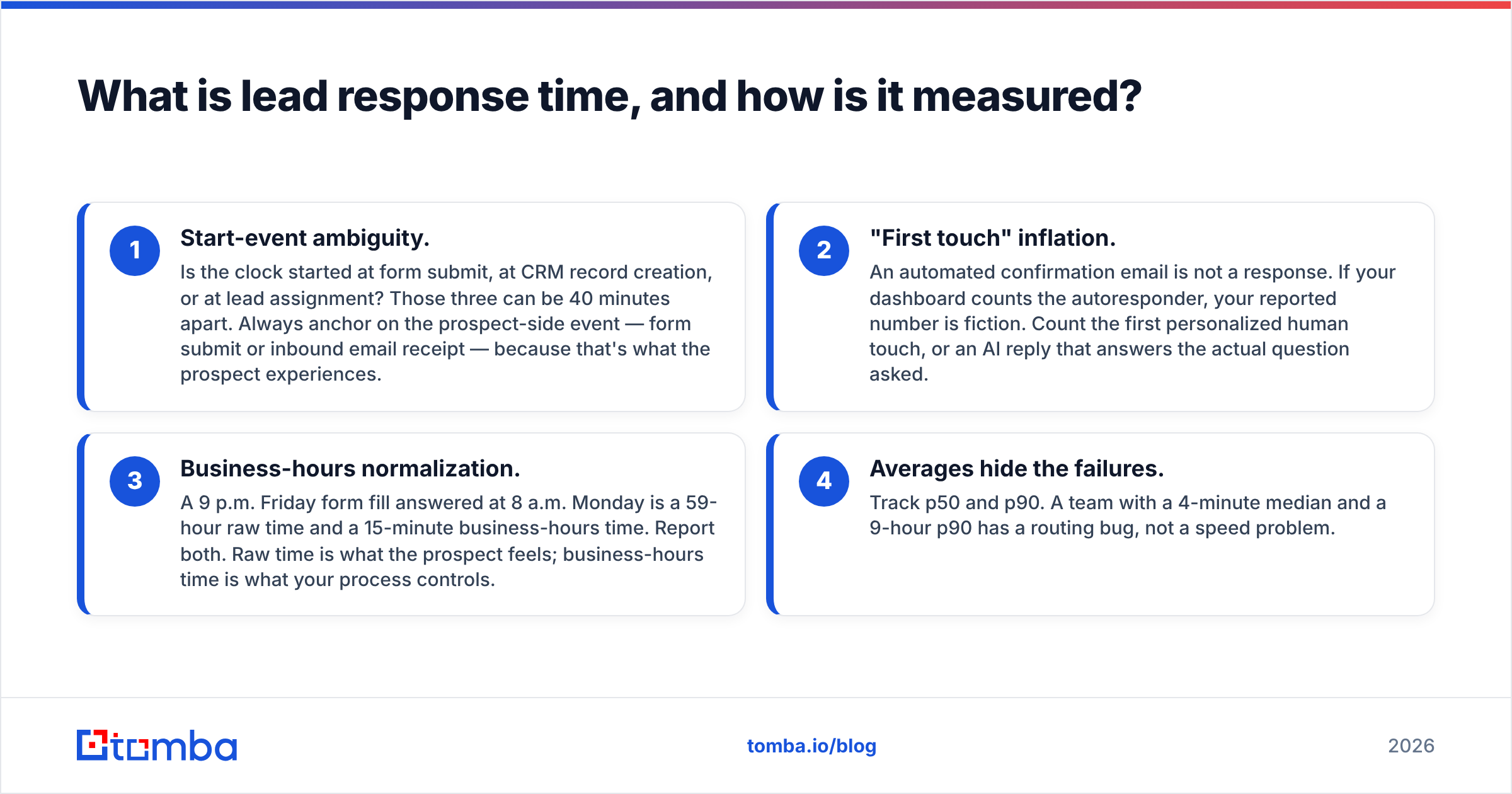
Lead response time is the elapsed clock between a lead-generating event and the first meaningful outbound touch from your team. Three definitional traps trip up most dashboards:
- Start-event ambiguity. Is the clock started at form submit, at CRM record creation, or at lead assignment? Those three can be 40 minutes apart. Always anchor on the prospect-side event — form submit or inbound email receipt — because that's what the prospect experiences.
- "First touch" inflation. An automated confirmation email is not a response. If your dashboard counts the autoresponder, your reported number is fiction. Count the first personalized human touch, or an AI reply that answers the actual question asked.
- Business-hours normalization. A 9 p.m. Friday form fill answered at 8 a.m. Monday is a 59-hour raw time and a 15-minute business-hours time. Report both. Raw time is what the prospect feels; business-hours time is what your process controls.
- Averages hide the failures. Track p50 and p90. A team with a 4-minute median and a 9-hour p90 has a routing bug, not a speed problem.
The research consensus has been stable for over a decade: contact rates and qualification rates fall off a cliff after the first few minutes. HubSpot's inbound benchmarks and the widely-cited Lead Response Management study both put the drop-off between 5 and 30 minutes at an order of magnitude. You don't need to relitigate the exact multiplier — the direction is unambiguous, and every hour you sit on an inbound lead, a competitor is closing the gap.

Why is your lead response time so slow?#
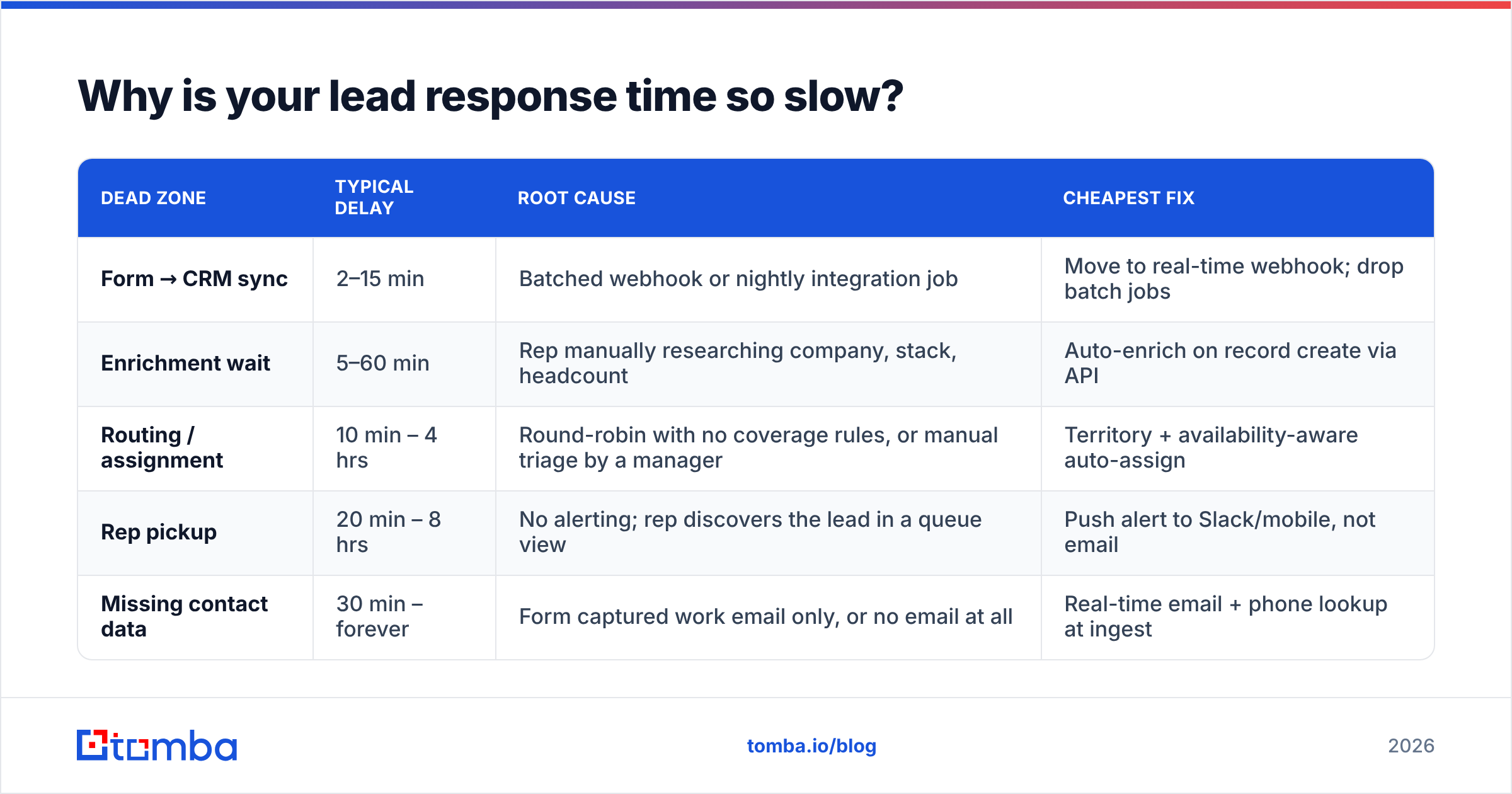
It's almost never one thing. Map your own pipeline against these five dead zones — most teams find they're losing time in three of them simultaneously.
| Dead zone | Typical delay | Root cause | Cheapest fix |
|---|---|---|---|
| Form → CRM sync | 2–15 min | Batched webhook or nightly integration job | Move to real-time webhook; drop batch jobs |
| Enrichment wait | 5–60 min | Rep manually researching company, stack, headcount | Auto-enrich on record create via API |
| Routing / assignment | 10 min – 4 hrs | Round-robin with no coverage rules, or manual triage by a manager | Territory + availability-aware auto-assign |
| Rep pickup | 20 min – 8 hrs | No alerting; rep discovers the lead in a queue view | Push alert to Slack/mobile, not email |
| Missing contact data | 30 min – forever | Form captured work email only, or no email at all | Real-time email + phone lookup at ingest |
The enrichment and missing-contact rows are the ones teams under-diagnose. A rep who has to open three tabs to figure out who they're talking to will delay the reply until they have "enough" context — and "enough" is subjective and unbounded. Give them the context automatically and the psychological reason to stall disappears.
How do you get inbound response time under five minutes?#
Seven fixes, ordered by return on effort. Start at the top.
1. Kill every batch job in the ingest path. Audit each hop from form to CRM. Anything running on a cron schedule — nightly Zapier syncs, hourly marketing-automation flushes, batched form processors — becomes your floor. If your form-to-CRM step runs every 15 minutes, a 5-minute SLA is arithmetically impossible. Replace with real-time webhooks. This is usually a one-afternoon fix that removes the largest single block of latency.
2. Enrich at ingest, not at reply time. The moment a record is created, fire an enrichment call that appends company size, industry, tech stack, LinkedIn profile, and a verified work email. Rep opens the record and everything is already there. A contact enrichment API call takes under a second; a rep doing the same research manually takes eight minutes and does it inconsistently.
3. Fix the contact-data gap before it becomes a delay. Personal Gmail on the form? Phone field left blank? Buyer replied from an alias? These are the leads that sit in the queue longest because the rep has no reliable channel. Resolve them programmatically: a reverse email lookup turns a bare address into a name, company, and role, and a domain search surfaces the right colleague when the form-filler isn't the decision-maker.
4. Route on availability, not just territory. Classic round-robin assigns leads to reps who are on PTO, in a demo, or asleep in another time zone. Layer a presence check on top: if the assigned rep hasn't acknowledged within 3 minutes, reassign to the next available rep in the pod. Every mature routing tool supports this; most teams never turn it on.
5. Alert where reps actually live. Email notification for a hot inbound lead is functionally a delay mechanism. Push to Slack with a click-to-claim button, plus SMS or mobile push for the highest-intent tier. Measure acknowledgment time separately from response time — if acknowledgment is fast and response is slow, your problem is rep workflow, not alerting.
6. Pre-build the first touch. Reps stall because writing from scratch under time pressure is hard. Give them three short, tier-specific opener templates with two merge fields max, plus a clear rule for when to call instead of email. Speed comes from removing decisions, not from typing faster. Our cold email templates library is a reasonable starting point to adapt.
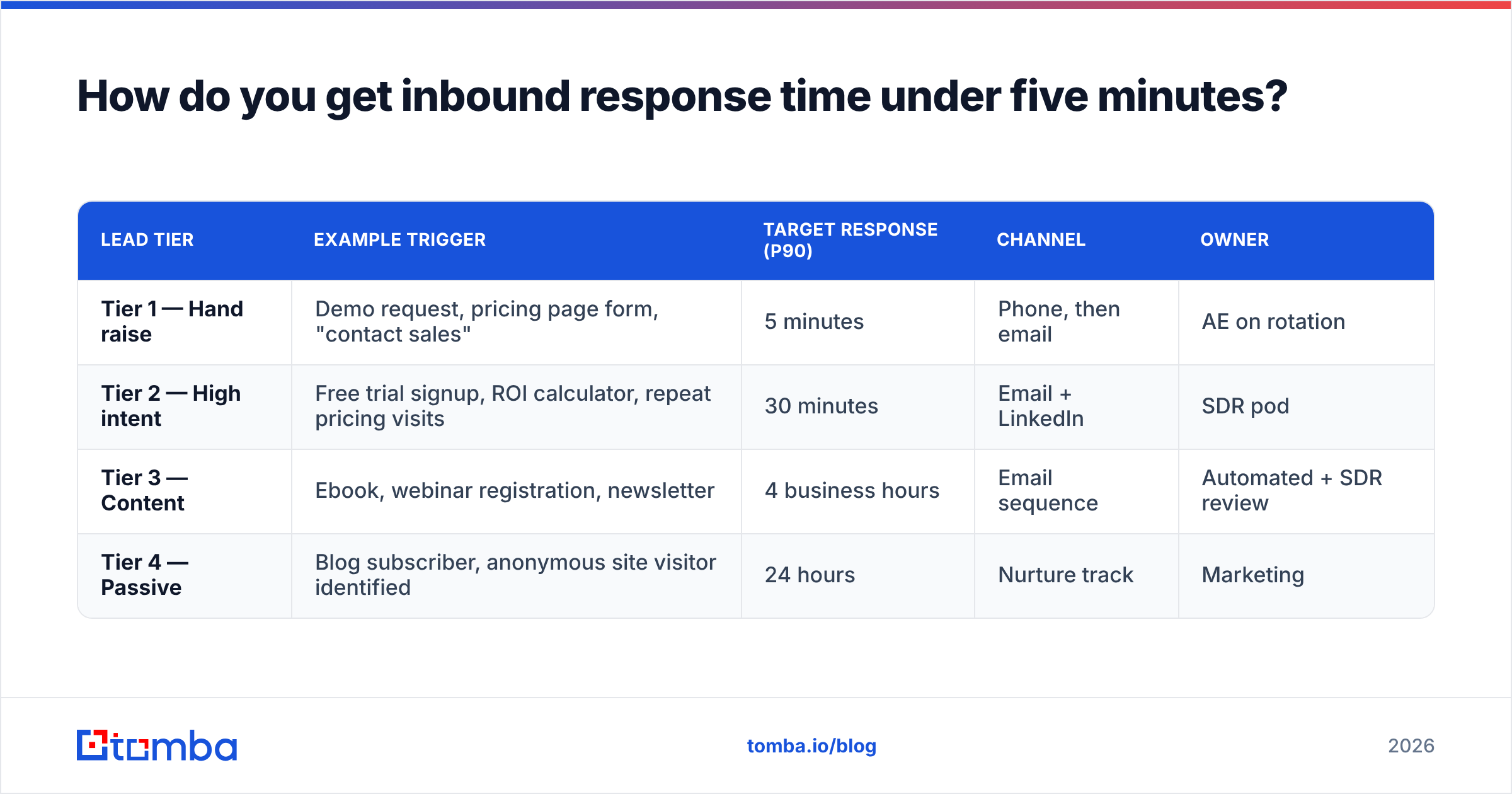
7. Set tiered SLAs and publish them. One blanket "respond in 5 minutes" rule collapses the first week because content downloads and demo requests are not the same event. Tier them, put the numbers on a wall-mounted dashboard, and review p90 weekly in pipeline review.
| Lead tier | Example trigger | Target response (p90) | Channel | Owner |
|---|---|---|---|---|
| Tier 1 — Hand raise | Demo request, pricing page form, "contact sales" | 5 minutes | Phone, then email | AE on rotation |
| Tier 2 — High intent | Free trial signup, ROI calculator, repeat pricing visits | 30 minutes | Email + LinkedIn | SDR pod |
| Tier 3 — Content | Ebook, webinar registration, newsletter | 4 business hours | Email sequence | Automated + SDR review |
| Tier 4 — Passive | Blog subscriber, anonymous site visitor identified | 24 hours | Nurture track | Marketing |
Note the ownership column. Unassigned SLAs are aspirations. Named-owner SLAs are commitments.
Which tools actually reduce response time?#
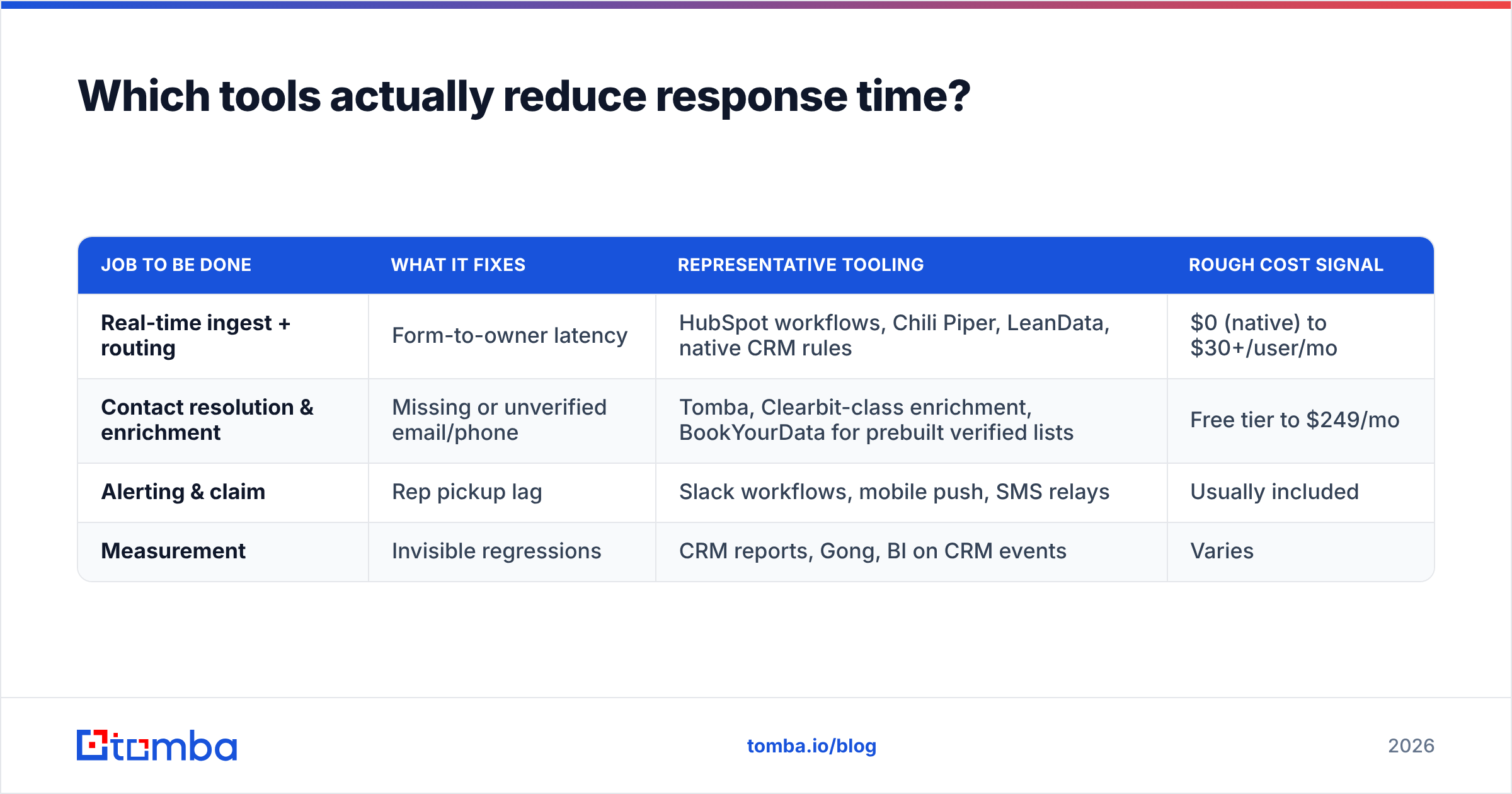
There are four distinct jobs in the speed-to-lead stack, and teams routinely buy one tool expecting it to do all four.
| Job to be done | What it fixes | Representative tooling | Rough cost signal |
|---|---|---|---|
| Real-time ingest + routing | Form-to-owner latency | HubSpot workflows, Chili Piper, LeanData, native CRM rules | $0 (native) to $30+/user/mo |
| Contact resolution & enrichment | Missing or unverified email/phone | Tomba, Clearbit-class enrichment, BookYourData for prebuilt verified lists | Free tier to $249/mo |
| Alerting & claim | Rep pickup lag | Slack workflows, mobile push, SMS relays | Usually included |
| Measurement | Invisible regressions | CRM reports, Gong, BI on CRM events | Varies |
On the enrichment row specifically, evaluate on three axes rather than headline price: match rate on your ICP's domains, verification quality (does it flag catch-all domains honestly?), and API latency. A provider with a 92% claimed match rate and 4-second latency is worse for speed-to-lead than an 85% provider that answers in 400 ms — because the slow one gets pulled out of the real-time path and moved to a nightly batch, which reintroduces the exact problem you were solving. BookYourData takes a different and perfectly valid approach here: prebuilt verified contact lists you buy upfront, which sidesteps runtime latency entirely if your motion is outbound-list-driven rather than inbound-form-driven. Match the model to your motion.
Tomba's pricing sits at Free (25 searches/mo), Starter $49/mo, Growth $99/mo, Pro $249/mo, and Enterprise custom — full detail on the Tomba pricing page. For most inbound-heavy teams, the deciding factor is not the plan tier but whether the email finder API is fast enough to call synchronously inside your form handler. Test that before you commit.

Does replying faster actually hurt quality?#
This is the legitimate objection, and it deserves a real answer: yes, if you optimize speed in isolation.
The failure mode is recognizable. A team drops response time from four hours to three minutes, celebrates, then watches meeting-held rate drop because reps are firing generic templates at leads they haven't looked at. The prospect gets a reply so fast and so hollow that it reads as automated — which is worse than a thoughtful reply an hour later.
Three guardrails keep speed and quality aligned:
- Context floor. No first touch goes out without company name, role, and one specific signal (their stack, their headcount growth, the exact page they converted on). If enrichment is doing its job, this floor costs zero seconds.
- Channel matching. Tier 1 hand-raisers get a call attempt first — response time on a demo request should be measured in dials, not sends. Tier 3 downloads should never get a phone call three minutes later; that's not speed, that's alarming.
- Quality metric alongside speed. Track meeting-held rate and reply sentiment in the same dashboard as response time. If speed goes up and held-rate goes down, you've traded, not improved. G2's category reviews for sales engagement tooling are full of teams describing exactly this trade — worth reading before you pick a stack.
The teams that get this right treat response time as a constraint, not a goal: reply within the SLA and clear the context floor. If you can't do both, the constraint is your process, and the fix is upstream automation — not a rep typing faster.
How do you measure and sustain the improvement?#
Speed programs decay. The rollout works, the number drops, and four months later it has quietly crept back because a new form was added without a routing rule, or a rep left and their round-robin slot never got reassigned.
Sustaining it takes three things:
- Event-level logging. Store a timestamp for form submit, record create, enrichment complete, assignment, acknowledgment, and first touch. Six timestamps. Without them you can't tell which dead zone regressed, and you'll waste a sprint guessing.
- A weekly p90 review. Median is a vanity metric here. Put p90 by source and by rep in the standing pipeline meeting. Outliers are process bugs — investigate them individually, not statistically.
- A synthetic canary. Once a week, someone outside the sales team fills out your own demo form with a real address and logs how long the reply takes and what it says. This catches broken webhooks, misrouted forms, and hollow templates faster than any dashboard. It is the single highest-yield 10 minutes in your RevOps week.
One more measurement note: correlate response time to win rate, not just to contact rate. Contact rate improvements are easy to produce and easy to overstate. Win rate is what the CFO is asking about, and it's the number that justifies the tooling spend when renewal comes up.
What does a fixed speed-to-lead pipeline look like end to end?#
Here's the target architecture, stated plainly:
- Prospect submits form. Client-side validation only; no server-side blocking beyond spam checks.
- Webhook fires within 1 second to your ingest handler. No queue, no cron, no batch.
- Enrichment call runs synchronously (with a hard 2-second timeout and async fallback). Appends verified email, phone, company firmographics, and LinkedIn.
- Scoring and tiering assigns Tier 1–4 from source, firmographics, and behavioral history.
- Routing assigns to an available, in-territory owner. Unacknowledged in 3 minutes → reassign.
- Alert posts to Slack with a claim button and the full enriched context inline. Tier 1 also pushes to mobile.
- Rep touches using a tier-appropriate template, clearing the context floor.
- Every step timestamped into your warehouse for the weekly p90 review.
Steps 2 and 3 are where most of the engineering effort goes and where most of the time is recovered. If you only fix those two, you'll typically cut end-to-end response time by more than half before touching rep behavior at all.
Start with the data gap. The most common reason a fast pipeline stalls at the last step is a rep sitting on a lead because they don't have a reliable email or phone number to reach the right person. Wire the Tomba Email Finder into your form handler so every inbound record arrives with a verified work email attached — no research tab, no delay, no excuse. The free tier gives you 25 searches a month to test the latency against your own stack before you decide whether Starter at $49/mo or Growth at $99/mo fits your inbound volume.
Related guides#
// get started
Find, verify and enrich your first contacts today
Start on the free plan with 25 searches a month, then scale when your team is ready.
Free plan · No credit card required · GDPR & CCPA
// about the author