How to Improve Sales Efficiency: A 2026 Operator's Playbook
Most teams chase sales efficiency by adding tools. The real gains come from cutting research time, killing bad-fit pipeline early, and fixing the data your reps sell into. Here is the operator's version.
TL;DR
- Sales efficiency is output per unit of input — revenue per rep, per hour, per dollar of CAC. It is not "activity volume."
- The average B2B rep spends under 30% of the week actually selling. The fastest efficiency win is reclaiming the other 70%, not adding headcount.
- Three levers move the number fastest: fix contact data quality, disqualify earlier and harder, and automate research/CRM hygiene.
- Track four metrics only: revenue per rep, sales cycle length, win rate by segment, and cost per qualified meeting. Everything else is noise.
- Tooling helps, but sequencing matters: data layer first, process second, automation third. Reverse that order and you automate a broken funnel.
Sales leaders usually ask the wrong first question. They ask "how do we do more?" when the fix is "how do we waste less?" A team of six reps working a clean, well-prioritized pipeline routinely outproduces a team of ten grinding through stale lists and manual CRM entry. This guide walks through the concrete moves — measurement, data, process, automation — that raise output without raising headcount.
What is sales efficiency, and how is it different from productivity?#
Sales efficiency is the ratio of revenue produced to resources consumed. Sales productivity is raw output. A rep who books 40 meetings a month is productive. A rep who books 22 meetings and closes 9 of them at a higher ACV is efficient. Efficiency asks what each hour, each dollar, and each lead actually returned.
The standard measure is the sales efficiency ratio: new revenue added in a period divided by sales and marketing spend in the prior period. Anything at or above 1.0 means you are getting a dollar back for a dollar spent — healthy for most B2B SaaS. Below 0.5 and you are buying growth at a loss.
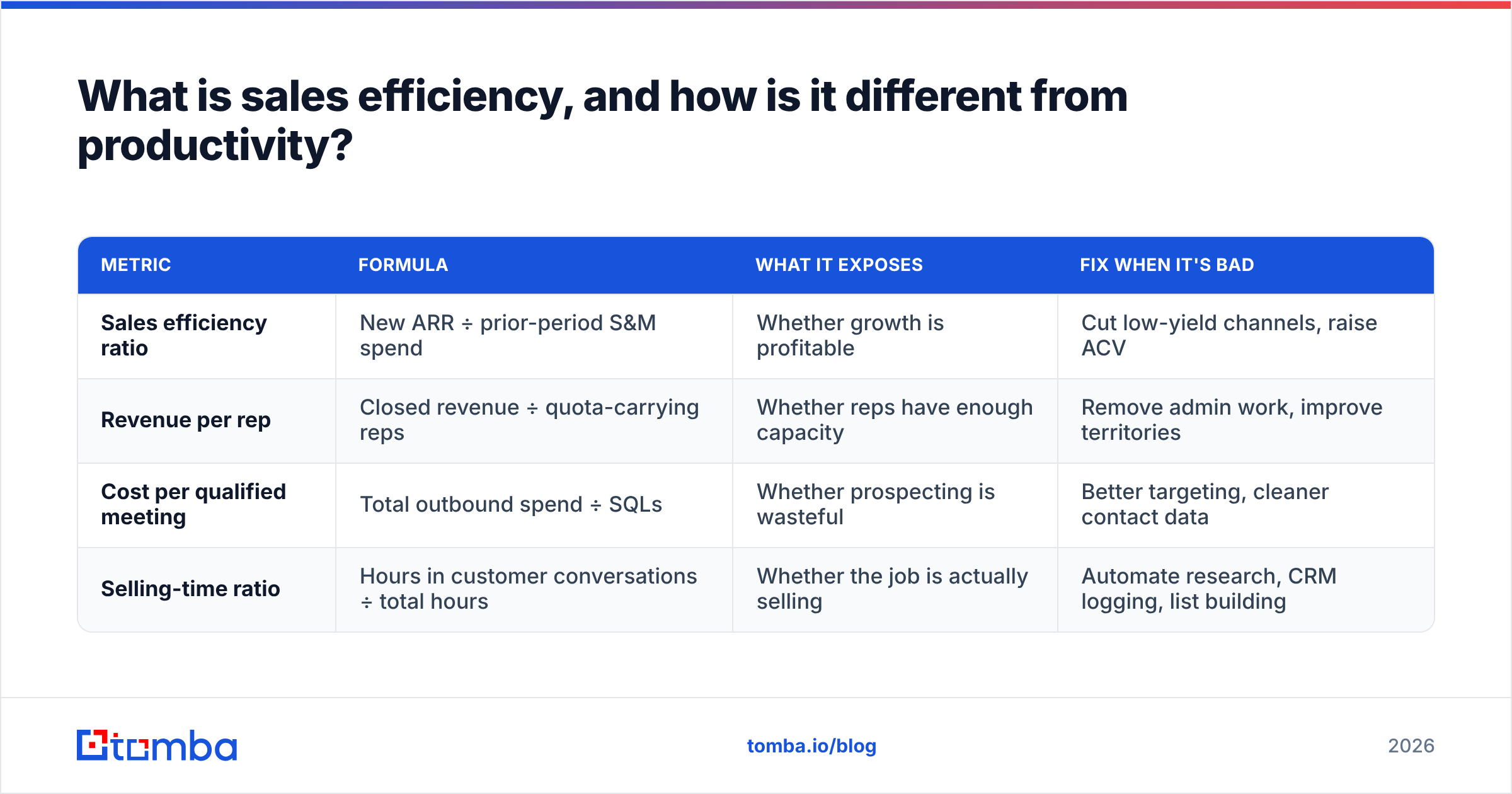
Here is how the four core efficiency measures differ in what they diagnose:
| Metric | Formula | What it exposes | Fix when it's bad |
|---|---|---|---|
| Sales efficiency ratio | New ARR ÷ prior-period S&M spend | Whether growth is profitable | Cut low-yield channels, raise ACV |
| Revenue per rep | Closed revenue ÷ quota-carrying reps | Whether reps have enough capacity | Remove admin work, improve territories |
| Cost per qualified meeting | Total outbound spend ÷ SQLs | Whether prospecting is wasteful | Better targeting, cleaner contact data |
| Selling-time ratio | Hours in customer conversations ÷ total hours | Whether the job is actually selling | Automate research, CRM logging, list building |
Most teams track the first two and ignore the last two — which is exactly backwards, because the last two are the ones you can change this quarter.
Why do reps only sell 30% of the time?#
Because the other 70% is research, data entry, list building, internal meetings, and chasing bad contact information. Salesforce's State of Sales research has consistently found reps spend the minority of their week in direct selling activity, with administrative and data tasks eating the largest share.
Break the non-selling time into buckets and the pattern is always similar:
- Prospect research — finding the right person, their email, their LinkedIn, whether the company is even a fit. Typically 8–12 hours a week for a full-cycle rep.
- CRM administration — logging calls, updating stages, writing notes that nobody reads. 5–7 hours.
- List cleanup and bounce handling — reprocessing bad contacts after a campaign burns. 2–4 hours.
- Internal coordination — pipeline reviews, handoffs, forecast calls. 4–6 hours.
- Proposal and quote assembly — rebuilding decks that should be templated. 3–5 hours.
Only buckets 4 and 5 need human judgment. Buckets 1 through 3 are data problems dressed up as work. That is where your efficiency program starts.
How does contact data quality change your efficiency math?#
Directly and brutally. Bad data compounds through every downstream stage.
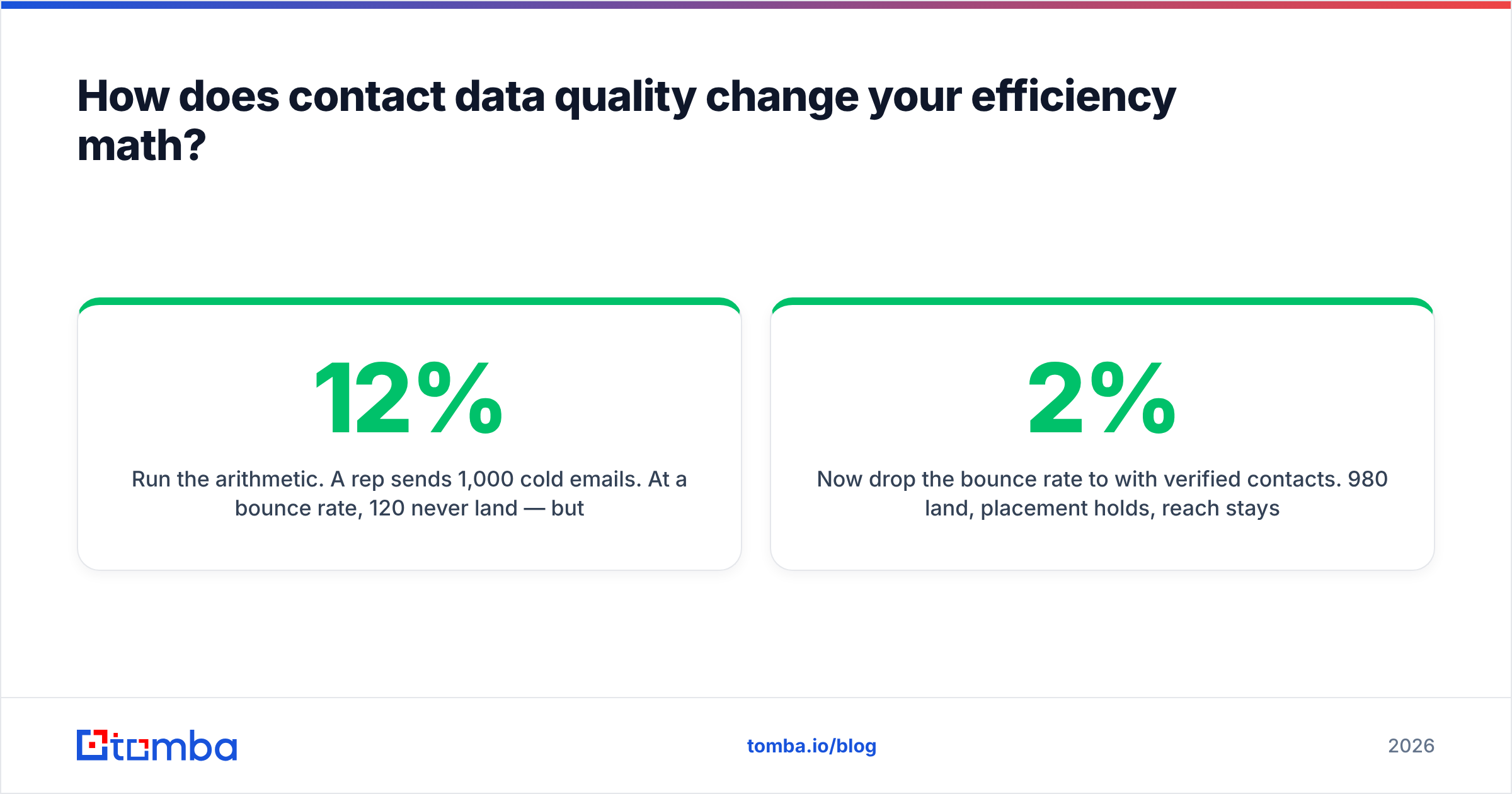
Run the arithmetic. A rep sends 1,000 cold emails. At a 12% bounce rate, 120 never land — but worse, the bounces damage sender reputation, which suppresses inbox placement for the 880 that did resolve. Effective reach drops closer to 600. Reply rate on 600 delivered is 3%, so 18 replies. Meanwhile the rep spent four hours building the list manually.
Now drop the bounce rate to 2% with verified contacts. 980 land, placement holds, reach stays near 900, and the same 3% reply rate yields 27 replies. Same effort, 50% more conversations — before you touch a single word of copy.
The mechanics that make this work:
- Verification before send. An email verifier that does SMTP-level checking catches the dead addresses your scraper happily collected.
- Catch-all handling. Roughly a fifth of B2B domains are catch-all, meaning they accept everything and tell you nothing. A dedicated catch-all verifier scores these instead of leaving them as coin flips.
- Pattern-based discovery. Most companies use one predictable email format. Resolving the pattern once via domain search lets you generate the rest of the org chart in seconds.
- Enrichment at the record level. Title, seniority, location, and tech stack turn a name into a routing decision — which is how you stop reps from working accounts they cannot win.
The point is not that data tools are magic. It is that every hour of efficiency work downstream is multiplied or divided by the quality of the record at the top.
Which process changes deliver the fastest gains?#
Four, ranked by speed-to-impact.
1. Disqualify earlier. Most pipeline waste happens because reps hold on to deals that were never winnable. Institute a hard qualification gate at the second call — budget authority confirmed, a named problem with a cost attached, and a timeline. If any of the three is missing, the deal goes to nurture, not forecast. Teams that enforce this typically see cycle length drop 15–25% because the median deal in the pipeline is now a real one.
2. Segment territories by fit, not geography. Alphabet-split or region-split territories are administrative conveniences that ignore win rate. Score accounts on your actual closed-won profile — company size, tech stack, industry — and route the top tier to your strongest reps. Your win rate by segment will tell you within a quarter whether the model holds.
3. Standardize the first three touches. Reps should not be composing cold outreach from scratch. Give them tested sequences with variable slots for the personalization that actually matters — a recent funding round, a job posting, a product launch — and let them spend their creativity on the reply, not the opener.
4. Kill the meetings that don't change decisions. A weekly 90-minute pipeline review across eight reps costs 12 rep-hours. If it does not change what anyone does on Monday, it is a 12-hour tax. Replace it with an async dashboard and a 20-minute exception review.
Should you automate before or after you fix the process?#
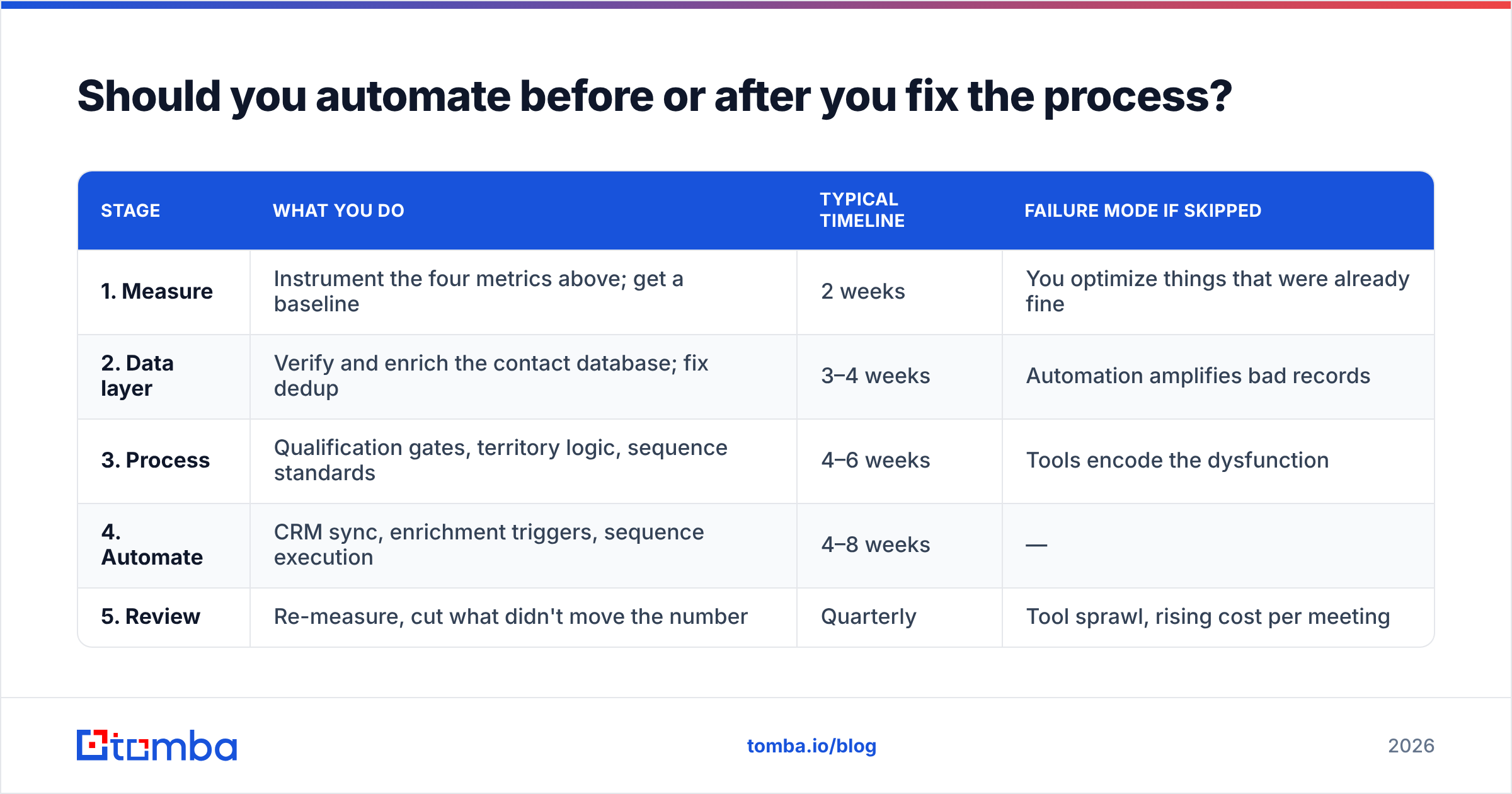
After. Always after. Automating a broken process produces broken outcomes faster, which is worse than doing nothing because it also costs money and creates the illusion of progress.
The sequencing that works:
| Stage | What you do | Typical timeline | Failure mode if skipped |
|---|---|---|---|
| 1. Measure | Instrument the four metrics above; get a baseline | 2 weeks | You optimize things that were already fine |
| 2. Data layer | Verify and enrich the contact database; fix dedup | 3–4 weeks | Automation amplifies bad records |
| 3. Process | Qualification gates, territory logic, sequence standards | 4–6 weeks | Tools encode the dysfunction |
| 4. Automate | CRM sync, enrichment triggers, sequence execution | 4–8 weeks | — |
| 5. Review | Re-measure, cut what didn't move the number | Quarterly | Tool sprawl, rising cost per meeting |
Skipping straight to stage 4 is the single most common way sales efficiency programs fail. It is also the most tempting, because buying software feels like action.
Once the process is stable, automation earns its keep in three places specifically: enrichment on record creation, CRM field population from activity, and list building from an ICP definition. A bulk email finder that turns a list of 500 target companies into verified contacts overnight removes an entire category of rep work. Connecting that to your HubSpot integration or Salesforce instance means the record arrives complete instead of half-built.

What does the tooling stack actually need to include?#
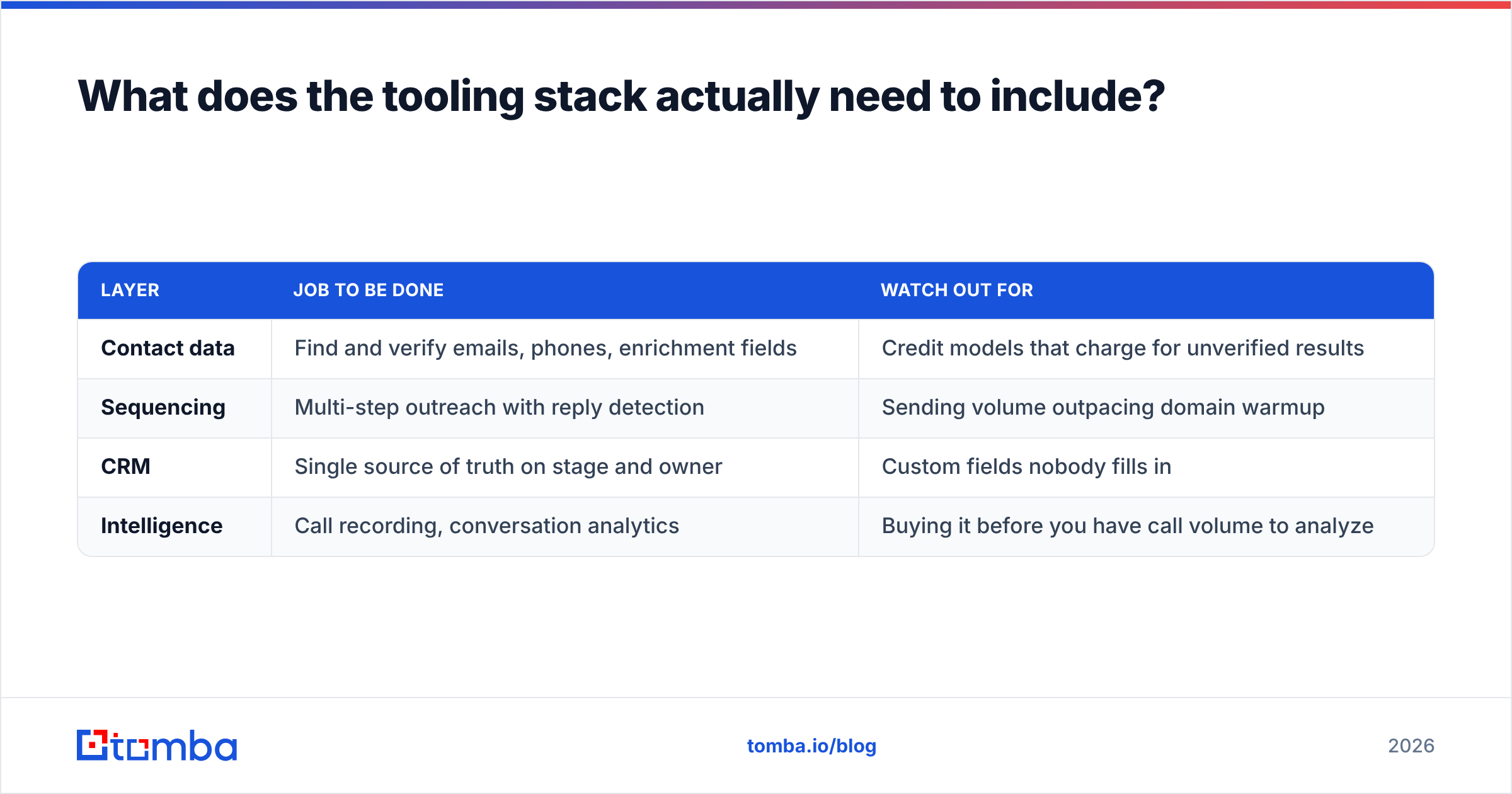
Less than most teams think. The efficiency stack has four jobs: find contacts, verify them, sequence outreach, and record outcomes. Everything beyond that is optional until you have proof it moves a metric.
| Layer | Job to be done | Watch out for |
|---|---|---|
| Contact data | Find and verify emails, phones, enrichment fields | Credit models that charge for unverified results |
| Sequencing | Multi-step outreach with reply detection | Sending volume outpacing domain warmup |
| CRM | Single source of truth on stage and owner | Custom fields nobody fills in |
| Intelligence | Call recording, conversation analytics | Buying it before you have call volume to analyze |
On the contact-data layer, buying decisions usually come down to three things: coverage in your specific market, verification depth, and whether pricing punishes you for volume. Tomba pricing starts with a free tier at 25 searches a month, then Starter at $49/mo, Growth at $99/mo, and Pro at $249/mo, with an email finder API for teams wiring it directly into their own systems. Database-first vendors like BookYourData take a different and equally valid approach — prebuilt, pay-per-record lists that suit teams who want to buy a segment outright rather than search for it. Which model fits depends on whether your ICP is stable enough to buy in bulk or fluid enough that you need to search continuously.
Whatever you choose, validate on your own accounts before committing. Pull 50 companies you know well, run them through the tool, and check the hit rate and the bounce rate yourself. Vendor-reported accuracy numbers are measured on the vendor's favorable sample. Peer reviews on G2 are useful for spotting support and billing complaints, less useful for accuracy claims.
How do you measure whether any of this worked?#
Set a 90-day baseline before you change anything, then re-measure the same four metrics. The signals of a working program:
- Selling-time ratio up 10+ points. This is the leading indicator. If reps are not spending more time in conversations, nothing else will move.
- Cost per qualified meeting down. Better targeting and cleaner data should show up here within one full cycle.
- Sales cycle shortened. Comes from disqualifying earlier, not from pushing harder.
- Win rate stable or up while volume rises. If win rate falls as volume rises, you loosened qualification instead of improving targeting.
What not to track: emails sent, calls dialed, activities logged. These are inputs, and once you make them targets, reps optimize for the target rather than the outcome. A rep can hit 100 dials a day forever without producing a single qualified opportunity.
One caution on attribution. Efficiency programs run alongside seasonality, product changes, and market shifts. Do not claim a 20% improvement without checking whether Q4 always looks like that. Compare year-over-year for the same quarter where you can.
What should you do in the first 30 days?#
A tight sequence that produces visible results inside a month:
- Week 1 — Instrument. Pull revenue per rep, cycle length, win rate by segment, and cost per qualified meeting for the last four quarters. Have reps log a time diary for five days.
- Week 2 — Audit the data. Take a 500-record sample from your CRM. Measure duplicate rate, missing-field rate, and bounce rate on a test send. This number will be worse than you expect.
- Week 3 — Cut and gate. Kill one recurring meeting. Install the two-call qualification gate. Publish the criteria so nobody argues about it.
- Week 4 — Fix the top of funnel. Run your target account list through verification and enrichment. Rebuild sequences off clean records. Set the baseline for the next 90 days.
Nothing on that list requires budget approval beyond a single data tool. That is deliberate — efficiency work that depends on a large purchase tends to stall in procurement while the underlying waste continues.
Where to start#
If your reps are spending eight hours a week hunting for contact details and another three cleaning up bounces, that is 11 hours per rep per week you can recover without changing anything about how you sell. Start there.
The Tomba Email Finder resolves verified professional email addresses by name and domain, with the verification and catch-all handling built into the same workflow so records land clean the first time. Free tier gives you 25 searches a month to test the hit rate on your own accounts before you commit to anything. Run your next 50 target companies through it, compare against what your team produces manually, and let the numbers make the decision.
Related guides#
// get started
Find, verify and enrich your first contacts today
Start on the free plan with 25 searches a month, then scale when your team is ready.
Free plan · No credit card required · GDPR & CCPA
// about the author