How to Increase Outbound Sales Calls Without Burning Your List
Most reps do not have a dialing problem — they have a data problem. Here are seven concrete levers that raise connected outbound sales calls per rep per day without hiring anyone.

TL;DR
- Call volume is an output, not an input. You raise it by removing friction — bad numbers, list-building time, admin between calls — not by telling reps to "dial more."
- The single biggest lever for most teams is phone data quality. A 40% bad-number rate silently deletes four hours of dial time per rep per week.
- Power dialers add 2-3x raw dials; parallel dialers add more but cost connect quality. Pick based on your ACV, not on vendor marketing.
- Time-blocking beats hourly quotas. Two protected 90-minute blocks outperform "dial whenever you can" by a wide margin.
- Measure connects per hour and conversations per day, not dials. Dials are the vanity metric of phone sales.
Why do outbound call volumes drop even when reps work hard?#
Because most of a rep's "calling hour" is not spent calling.
Watch a screen recording of an SDR's afternoon and you will see the same pattern: 6 minutes hunting for a direct dial on LinkedIn, 3 minutes logging the last call in the CRM, 2 minutes reading a company's about page, then 40 seconds of actual dialing. Repeat. The rep is genuinely busy for the full hour and produces eleven dials.
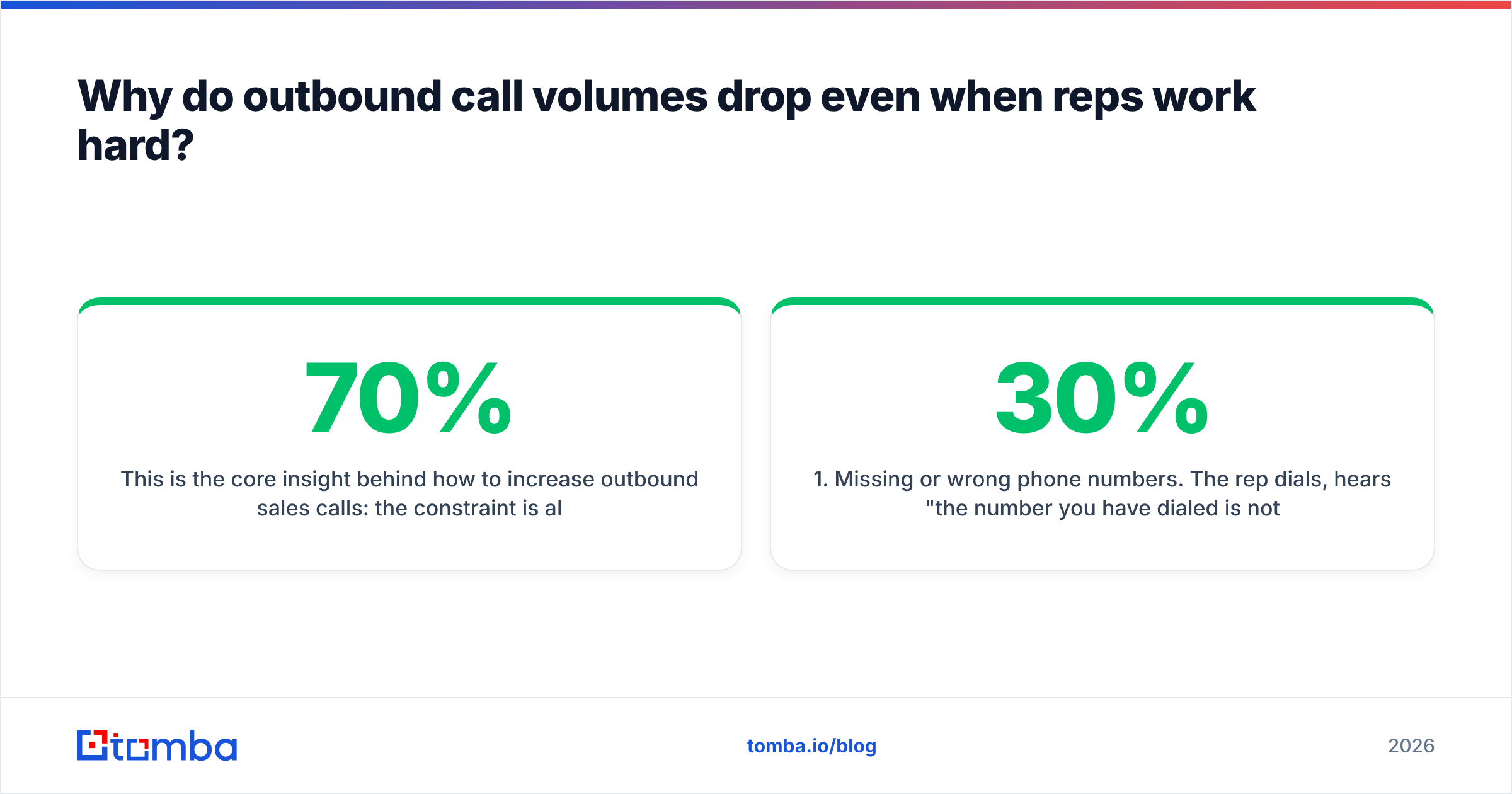
This is the core insight behind how to increase outbound sales calls: the constraint is almost never effort. It is the ratio of dial time to non-dial time. A rep who spends 70% of a calling block actually dialing will beat a harder-working rep stuck at 25%, every single week, without working an extra minute.
There are four common thieves of dial time:
- Missing or wrong phone numbers. The rep dials, hears "the number you have dialed is not in service," and goes back to research. Industry list-decay estimates put B2B contact data churn somewhere around 25-30% annually, and mobile numbers rot faster than emails.
- Just-in-time research. Building the list while calling is the most expensive way to build a list. Context switching between research mode and conversation mode costs more than the clock shows.
- Manual logging. Every field that a rep types by hand instead of picking from a dropdown is 15-40 seconds gone, multiplied by 60 calls a day.
- Unprotected calendars. Internal meetings scattered across the day fragment calling into 20-minute slivers, and nobody gets into rhythm in 20 minutes.

What is a realistic outbound call volume per rep per day?#
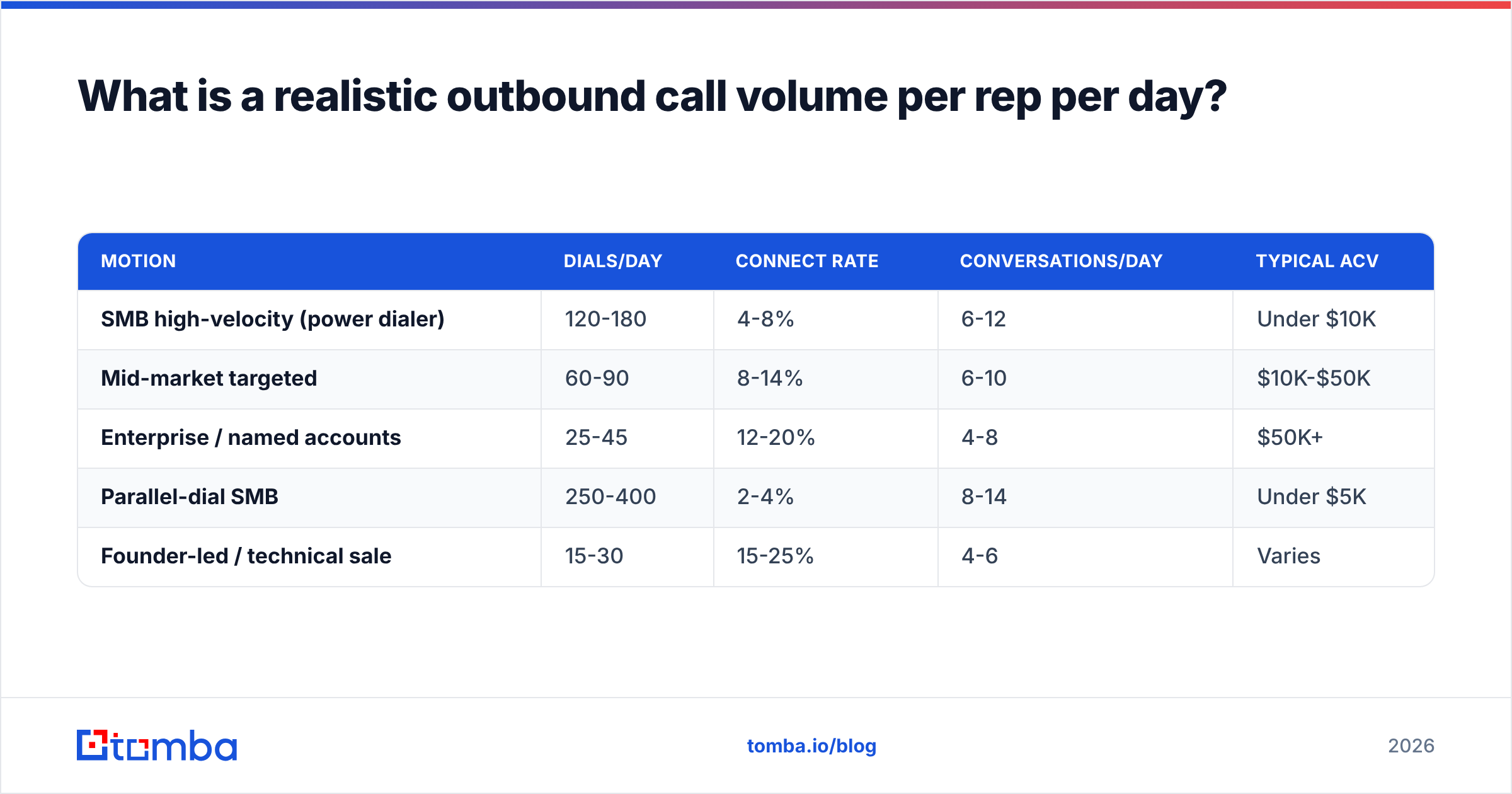
Depends entirely on your motion, and anyone quoting one universal number is selling something. Here is a working range based on how most B2B teams actually operate:
| Motion | Dials/day | Connect rate | Conversations/day | Typical ACV |
|---|---|---|---|---|
| SMB high-velocity (power dialer) | 120-180 | 4-8% | 6-12 | Under $10K |
| Mid-market targeted | 60-90 | 8-14% | 6-10 | $10K-$50K |
| Enterprise / named accounts | 25-45 | 12-20% | 4-8 | $50K+ |
| Parallel-dial SMB | 250-400 | 2-4% | 8-14 | Under $5K |
| Founder-led / technical sale | 15-30 | 15-25% | 4-6 | Varies |
Read that table sideways, not down. Notice that the enterprise rep making 30 dials and the SMB rep making 160 land in roughly the same band of conversations per day. Volume is a means, not the goal. Where you sit on this table should be a deliberate choice driven by deal size and the quality of your direct dials — not an accident of whatever your dialer defaults to.
The connect-rate column is where data quality shows up. A mid-market team with verified mobile numbers runs 12-14%. The same team on scraped switchboard numbers runs 3%. Same reps, same script, same hours — a 4x difference in output that no amount of coaching fixes.
How do you fix the phone data problem first?#
Start by auditing what you actually have. Pull 200 random contacts from your CRM and check three things: does a phone number exist, is it a direct line or a main switchboard, and is it currently valid.
Most teams discover something ugly. A typical result looks like 60% of contacts have some number, half of those are company switchboards, and a chunk of the remainder are stale. Effective direct-dial coverage: under 25%. Your reps have been compensating by researching mid-block, which is exactly the behavior you were trying to eliminate.
Fixing this is a three-step sequence:
- Enrich before you dial. Push the full target list through a phone finder in bulk so numbers exist before the calling block starts, not during it. Batch enrichment turns a per-call research tax into a one-time list-prep cost.
- Validate the numbers. A number that exists is not a number that rings. Run the list through a phone validator to strip disconnected lines, landline-vs-mobile misclassifications, and invalid formats before they reach the dialer.
- Pair every number with a verified email. Phone-only sequences underperform. When a rep leaves a voicemail, the follow-up email needs to hit the inbox within minutes — which means the address has to be real. Running contacts through an email verifier alongside phone enrichment keeps the multichannel follow-up intact.
Step 3 matters more than teams expect. The voicemail-plus-email one-two is where most phone-sourced meetings actually get booked. The call earns attention; the email gives them something to reply to. If the email bounces, you burned the call.
For teams that want the whole enrichment step in one pass, data enrichment that returns email, phone, title, and company in a single lookup removes the stitching work of running three tools and reconciling three CSVs.
Which dialer type actually increases connected calls?#
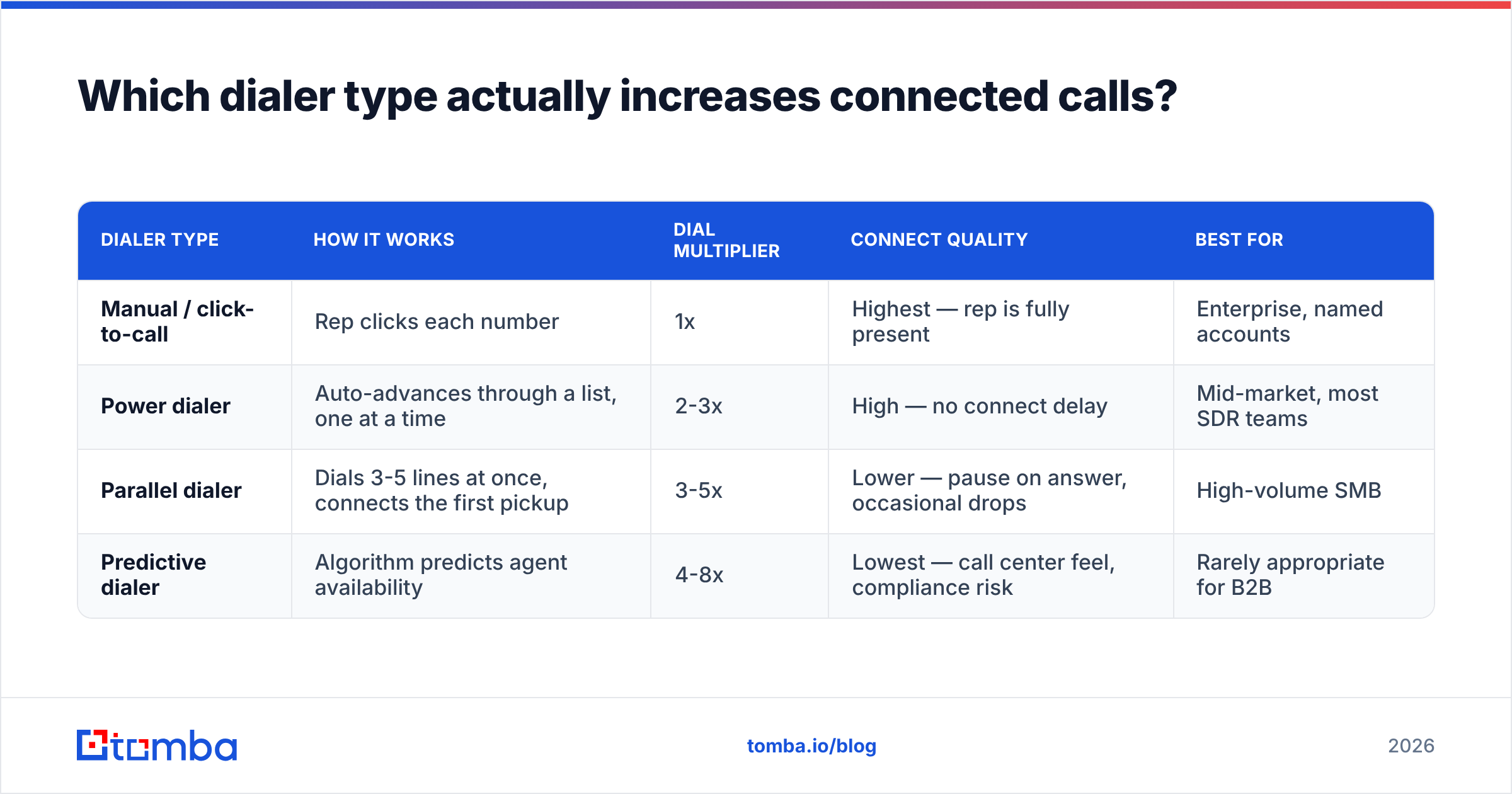
Four categories, and they are not interchangeable.
| Dialer type | How it works | Dial multiplier | Connect quality | Best for |
|---|---|---|---|---|
| Manual / click-to-call | Rep clicks each number | 1x | Highest — rep is fully present | Enterprise, named accounts |
| Power dialer | Auto-advances through a list, one at a time | 2-3x | High — no connect delay | Mid-market, most SDR teams |
| Parallel dialer | Dials 3-5 lines at once, connects the first pickup | 3-5x | Lower — pause on answer, occasional drops | High-volume SMB |
| Predictive dialer | Algorithm predicts agent availability | 4-8x | Lowest — call center feel, compliance risk | Rarely appropriate for B2B |
For most B2B teams the honest answer is a power dialer. It removes the mechanical friction — copying numbers, misdials, waiting through rings — without introducing the awkward half-second pause that makes a prospect say "hello? hello?" and hang up.
Parallel dialing is a real tool but comes with a real tradeoff. That connect delay is audible, and a portion of prospects treat it as a robocall signal. It also raises compliance considerations depending on jurisdiction; the FCC's telemarketing rules are worth reading before you scale a multi-line setup. If your ACV is $30K and every conversation matters, buying 3x dials at the cost of 30% connect quality is a bad trade. If you sell a $200/mo product to a huge TAM, the math flips.
One thing every dialer category shares: garbage in, garbage out. A parallel dialer running a list with 40% dead numbers just wastes lines faster.
How should you structure the calling day?#
Block it, protect it, and stack the blocks against your prospects' rhythms — not yours.
The two-block structure that works for most teams:
- Block one: 8:00-9:30 AM local to the prospect. Decision-makers are at their desks and gatekeepers often are not yet. This is the highest-value 90 minutes of the day for most B2B segments.
- Block two: 4:00-5:30 PM local. Same logic in reverse — the calendar has cleared, the gatekeeper has left, and the prospect is in wrap-up mode rather than deep work.
- Midday: research, list prep, follow-up email, CRM hygiene. Not calling. The 11 AM-2 PM window is the worst connect window in most datasets and the best window for the work that makes the calling blocks efficient.
- Zero internal meetings inside a calling block. This is a management decision, not a rep decision. If your standup is at 8:30, you have chosen to cut your team's best calling window in half.
- Warm-up call first. Every rep's first dial of a block is their worst. Make it a low-stakes account deliberately, so the good accounts get the warmed-up version of the rep.
- One block, one list segment. Switching personas mid-block forces a mental reset each call. Keep a block to one title or one industry so the script stays loaded.
The multi-timezone version of this is even better: if you sell across US timezones, an East Coast rep can run a prime-time block at 8 AM ET, then another at 8 AM PT (11 AM ET), then a third at 4 PM ET. Three prime windows instead of two, no extra hours worked.
Does multichannel help or hurt call volume?#
It helps, as long as the channels are sequenced rather than stacked.
The mistake is treating email, phone, and LinkedIn as three separate campaigns running in parallel against the same person. That produces noise and eats rep time three times over. The version that works uses each channel to make the next one land:
- Day 1: Email — short, specific, no ask beyond a reply.
- Day 2: Call + voicemail referencing the email by name.
- Day 3: LinkedIn connection or comment, no pitch.
- Day 5: Call at a different time of day than day 2.
- Day 8: Email — new angle, not a "just bumping this."
- Day 12: Final call, then break-up email.
Six touches, two channels doing the persuading and one doing the credibility work. Research consistently shows multi-touch, multi-channel sequences outperform single-channel — HubSpot's sales statistics roundup is a reasonable public reference point on touch counts and follow-up persistence.
Notice what this does for call volume specifically: the day-2 call is warmer because the day-1 email landed. Warmer calls convert at higher rates, which means you need fewer total dials for the same meeting count. Multichannel does not add calls; it makes the calls you already make worth more.
The precondition is deliverability. If your day-1 email hits spam, the day-2 call is cold again and you have spent budget for nothing. That is why list verification is a phone-sales concern and not just an email-team concern — sender reputation and connect rates are more connected than most orgs realize.
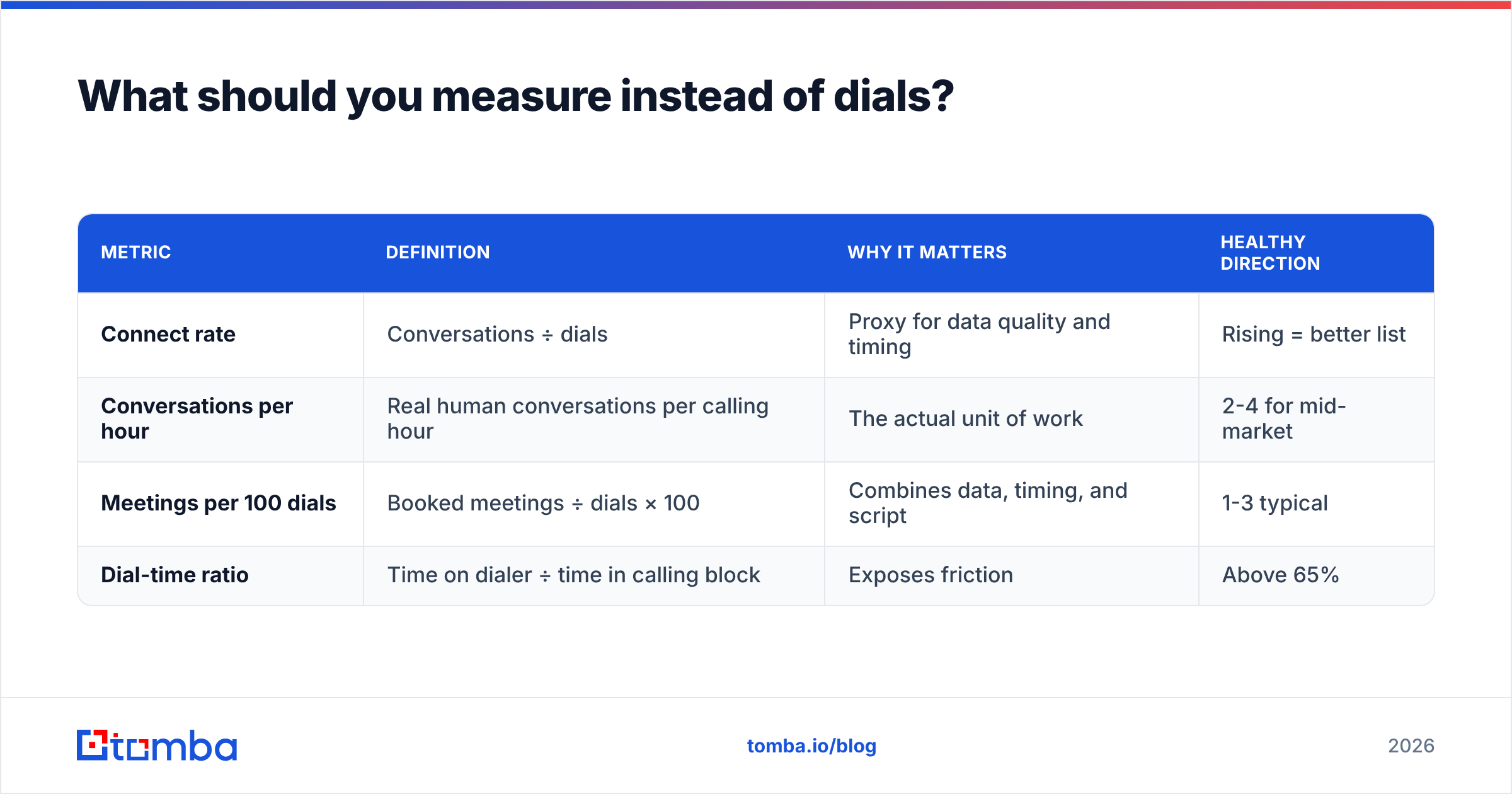
What should you measure instead of dials?#
Dials are easy to count and easy to game. A rep under a 100-dial quota will find 100 numbers to dial, and quality will not be their priority at dial 87.
Track these four instead:
| Metric | Definition | Why it matters | Healthy direction |
|---|---|---|---|
| Connect rate | Conversations ÷ dials | Proxy for data quality and timing | Rising = better list |
| Conversations per hour | Real human conversations per calling hour | The actual unit of work | 2-4 for mid-market |
| Meetings per 100 dials | Booked meetings ÷ dials × 100 | Combines data, timing, and script | 1-3 typical |
| Dial-time ratio | Time on dialer ÷ time in calling block | Exposes friction | Above 65% |
Dial-time ratio is the one most teams have never measured and the one that explains the most. If it sits at 30%, you do not have a coaching problem. You have a list-prep problem, a CRM-logging problem, or a calendar problem — all fixable with tooling and process rather than pressure.
Pair this with a healthy view of your response rate across channels so you can see whether a rise in dials is producing a rise in pipeline or just a rise in noise. If dials go up 40% and meetings stay flat, you added activity, not output. Independent review data on sales engagement platforms — G2's category listings are a decent starting point — is useful for benchmarking what tooling actually moves these numbers versus what just reports on them.
How do you build the list so reps never research mid-block?#
Separate list building from list working. Completely.
The workflow that keeps dial-time ratio high looks like this:
- Define the segment on Monday. One ICP slice — industry, headcount band, title set, and a trigger if you have one.
- Pull companies, then people. Use domain search to map the contactable people at each target account rather than guessing at names, then narrow by title.
- Bulk enrich in one job. Run the full list through bulk email finder and phone enrichment as a single batch. This is the step that most teams skip and then pay for hourly, one call at a time.
- Validate and dedupe. Strip invalid numbers, bounced emails, and duplicates before anything reaches the dialer.
- Load and freeze. The list a rep works Tuesday through Friday was finished on Monday. No mid-week additions, no mid-block research.
The point of the freeze is psychological as much as operational. When the list is fixed and finished, a rep's only decision inside a calling block is "dial the next one." Every decision you remove from a calling block converts directly into dial time.
For teams doing account research live in a browser, an email finder extension at least collapses the research step from six minutes to thirty seconds. But it is a mitigation, not a fix — batch prep is still strictly better.
Where do most teams go wrong when scaling call volume?#
Four failure modes, in order of how often they show up.
Adding headcount before fixing throughput. If your reps run at a 30% dial-time ratio, hiring a fifth rep buys you 30% of one more rep's potential. Fixing the ratio to 65% buys you the equivalent of two reps for the cost of a data subscription. Do the cheap thing first.
Buying a parallel dialer to paper over bad data. More lines dialing dead numbers is just faster failure. Fix the list, then decide whether you need the multiplier.
Setting dial quotas without connect quotas. Reps optimize for whatever you count. Count dials alone and you get dials — often to the same easy-to-reach, low-value contacts repeatedly.
Letting the CRM eat the block. Every mandatory free-text field costs real calls. Ruthlessly reduce post-call logging to dropdowns and a single notes box. If your ops team wants seventeen fields, ask them to defend it in dials.
There is a fifth, quieter one: treating the phone as a standalone channel. Teams that get the most out of calling usually have a strong email and LinkedIn outreach motion feeding it, so calls land on people who have already seen the name twice. Isolated cold calling is the hardest version of the job, and it is usually self-inflicted.
What is the fastest 30-day plan to raise call volume?#
Week 1 — Measure. Screen-record two reps for one calling block each. Calculate the actual dial-time ratio. Audit 200 CRM contacts for phone coverage and validity. Do not change anything yet.
Week 2 — Fix the data. Bulk enrich and validate the entire active target list. Kill every contact with no valid direct number and no verified email rather than letting reps burn time on them.
Week 3 — Fix the calendar. Move every internal meeting out of the two prime blocks. Publish the block schedule. Make it a manager's responsibility to defend it.
Week 4 — Fix the tooling. Add or tune the power dialer. Cut CRM logging fields. Standardize the post-call disposition list to six options or fewer.
Teams that run this sequence typically see dials rise 40-70% and conversations rise more, because the added dials are against better numbers. Notably, none of those four weeks involves telling anyone to work harder.
Ready to stop losing calling hours to bad data?#
Call volume follows data quality more reliably than it follows motivation. If your reps are researching numbers mid-block, the highest-leverage change available to you is making sure the contact data is complete and verified before the block starts.
Tomba's Email Finder gives you the verified contact layer that makes multichannel calling work — accurate professional emails paired with phone data, verification, and enrichment so your reps dial instead of dig. Start on the free tier at 25 searches per month to test the coverage against your own target accounts, then move to Starter at $49/mo or Growth at $99/mo as you scale the list. Full Tomba pricing is public, and everything is available through the Tomba API if you want enrichment running automatically against your CRM before every calling block.
Related guides#
// get started
Find, verify and enrich your first contacts today
Start on the free plan with 25 searches a month, then scale when your team is ready.
Free plan · No credit card required · GDPR & CCPA
// about the author