How to Increase Sales Conversion Rate: A 2026 Playbook
Most teams chase more leads when the real leak is further down the funnel. Here are seven tested levers that lift sales conversion rate without adding headcount or ad spend.
TL;DR
- Conversion rate is a diagnostic, not a goal. Break it into stage-by-stage rates before you touch anything — a single blended number hides where the money leaks.
- The two highest-ROI fixes for most B2B teams are contact data quality and speed-to-lead. Both are cheap, both are measurable in under 30 days.
- Qualification frameworks fail when reps score deals on enthusiasm instead of exit criteria. Define what a stage transition requires, not what it feels like.
- Pipeline reviews should remove deals, not add them. A forecast built on stalled opportunities produces the same revenue as one that's honest, but worse decisions.
- Benchmarks: B2B SaaS MQL→SQL sits near 13%, SQL→win near 20–25%. If you're far below, the problem is usually upstream of the rep.
What does "sales conversion rate" actually measure?#
Sales conversion rate is the percentage of prospects who complete a defined action within a defined window. That definition is deliberately loose, because the metric only becomes useful once you attach it to a specific stage transition.
Think of your pipeline like a series of locks on a canal. A boat that never reaches the third lock isn't a third-lock problem — it's a first-lock problem. Reporting one blended "conversion rate" is like measuring how many boats finished the canal without checking which lock they got stuck at. You learn that you have a problem. You learn nothing about where.
Break it apart:
- Lead → MQL — did the contact match your ICP and show an intent signal? Low rates here mean targeting or list quality is off.
- MQL → SQL — did a human confirm fit, need, and timing? Low rates here mean marketing and sales disagree on what "qualified" means.
- SQL → Opportunity — did the prospect agree to a next step with a date? Low rates here mean discovery calls aren't producing commitments.
- Opportunity → Proposal — did you reach a decision-maker with budget? Low rates here mean single-threading.
- Proposal → Closed-Won — did you win? Low rates here mean pricing, competition, or a missing champion.
Most teams that ask how to increase sales conversion rate discover their real drop-off is at step 1 or 2 — long before any rep gets involved. That's good news, because those stages are the cheapest to fix.
Which conversion benchmarks should you compare against?#
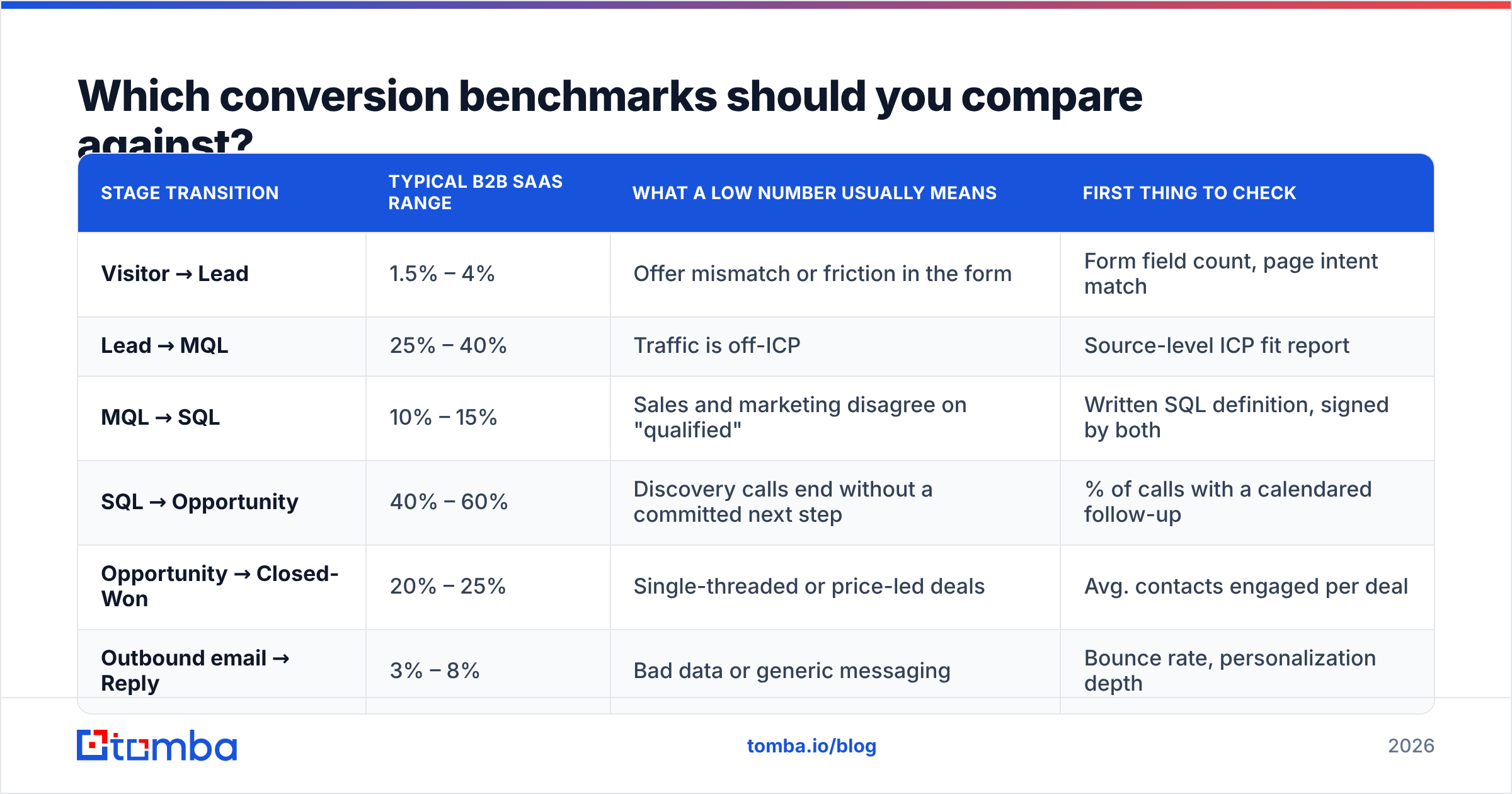
Benchmarks are useful for sanity checks, not for targets. Your motion, ACV, and deal complexity move these numbers 2–3x in either direction. But if you're an order of magnitude off a published range, something is structurally broken.
| Stage transition | Typical B2B SaaS range | What a low number usually means | First thing to check |
|---|---|---|---|
| Visitor → Lead | 1.5% – 4% | Offer mismatch or friction in the form | Form field count, page intent match |
| Lead → MQL | 25% – 40% | Traffic is off-ICP | Source-level ICP fit report |
| MQL → SQL | 10% – 15% | Sales and marketing disagree on "qualified" | Written SQL definition, signed by both |
| SQL → Opportunity | 40% – 60% | Discovery calls end without a committed next step | % of calls with a calendared follow-up |
| Opportunity → Closed-Won | 20% – 25% | Single-threaded or price-led deals | Avg. contacts engaged per deal |
| Outbound email → Reply | 3% – 8% | Bad data or generic messaging | Bounce rate, personalization depth |
Two notes on reading this table. First, the outbound reply row is the one most teams misdiagnose — a 1% reply rate is far more often a deliverability or data problem than a copy problem. Second, if your Opportunity → Closed-Won rate is above 40%, that's usually not excellence; it's a sign you're creating opportunities too late and undercounting real pipeline.
For deeper industry-level cuts, HubSpot's annual sales research and peer reviews on G2 are the two sources worth checking before you set internal targets.
How does contact data quality change conversion rate?#
Data quality is the highest-leverage input to conversion rate, and it's almost never on the fix list.
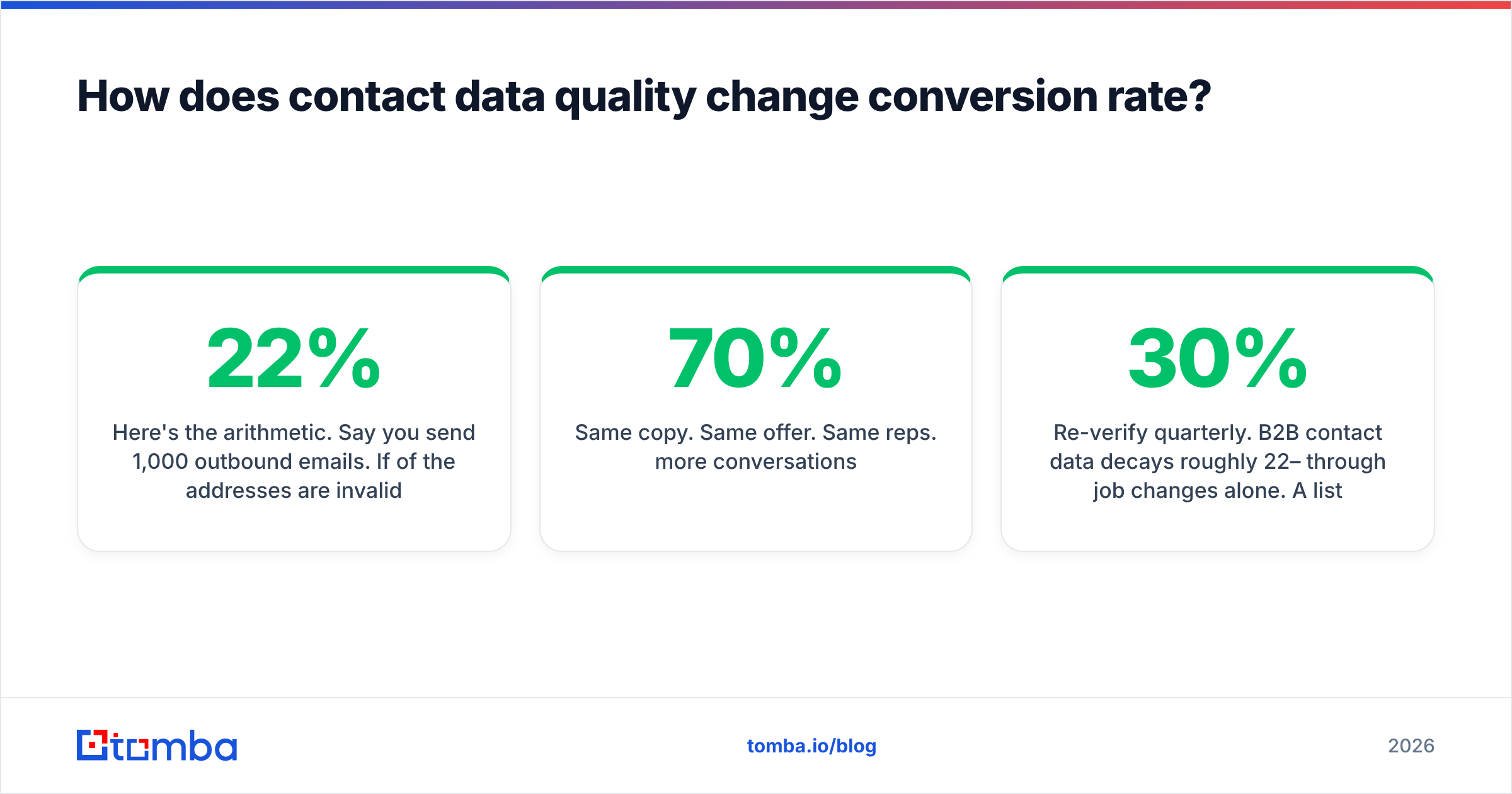
Here's the arithmetic. Say you send 1,000 outbound emails. If 22% of the addresses are invalid, 220 never land. Your provider sees a 22% bounce rate, throttles you, and inbox placement on the remaining 780 drops — call it 70% placement instead of 95%. You've now got roughly 546 delivered-and-seen emails from a 1,000-contact list. At a 5% reply rate on seen emails, that's 27 replies. Clean the list to a 2% bounce rate, keep 95% placement, and the same 1,000 contacts produce 931 seen emails and 46 replies.
Same copy. Same offer. Same reps. 70% more conversations.
That compounding effect is why email deliverability belongs in the conversion-rate conversation and not in a separate "ops" bucket. Bad data doesn't just waste the bad records — it degrades results for every good record behind them.
Practical sequence:
- Verify before send, not after bounce. Run every list through an email verifier as a pre-send gate. Catch-all domains need their own handling; a plain SMTP ping returns "unknown" and reps treat unknown as valid.
- Enrich the record, not just the address. Title, seniority, and company size drive segmentation. A verified email attached to a wrong-persona record still converts at zero. Contact enrichment closes that gap.
- Re-verify quarterly. B2B contact data decays roughly 22–30% per year through job changes alone. A list you cleaned in January is measurably worse by June.
- Track bounce rate per source. If one list vendor produces 3x the bounces, you've found a cost you're paying twice — once in credits, once in sender reputation.
If your pipeline starts with sourcing rather than an existing list, a domain search that returns verified addresses at discovery time removes the cleanup step entirely.
Why does speed-to-lead beat almost every other lever?#
Because attention has a half-life, and it's shorter than your SLA.
Lead response research consistently shows a steep decay curve: contact attempts inside the first five minutes convert dramatically better than attempts at 30 minutes, and by 24 hours the lead has usually talked to a competitor or forgotten they filled out the form. The mechanism isn't mysterious — you're the first vendor to frame the problem, so your framing becomes the buyer's evaluation criteria.
What actually blocks fast response is rarely rep laziness. It's routing:
- The form submission sits in a marketing automation queue for a batch sync.
- The record lands in the CRM without an owner assigned.
- The assigned rep is in another meeting and has no mobile alert.
- The lead has no phone number, so the only channel is email.
Fix the plumbing before you coach the behavior. Route on submit, not on sync. Alert in Slack, not just in-app. And attach a phone number at enrichment time — a phone finder that appends direct dials to inbound records converts a 24-hour email thread into a 4-minute conversation.
One caveat that gets ignored: speed only helps if the lead is qualified. Responding in 90 seconds to an off-ICP student research request burns rep capacity and inflates your activity metrics while your real conversion rate stays flat. Speed and qualification are a pair, not a trade-off.
How do you fix qualification without adding bureaucracy?#
Replace subjective scoring with exit criteria. A deal doesn't move to the next stage because the rep feels good about it; it moves because a specific, verifiable thing happened.
The difference in practice:
- Weak (feeling-based): "Prospect seems interested, moving to Demo stage."
- Strong (exit criteria): "Prospect confirmed a budget range, named the two other evaluators, and booked a technical review for the 14th. Moving to Demo stage."
Write four to six exit criteria per stage, put them in the CRM as required fields, and audit them monthly. The audit is the part teams skip and the part that makes it work.
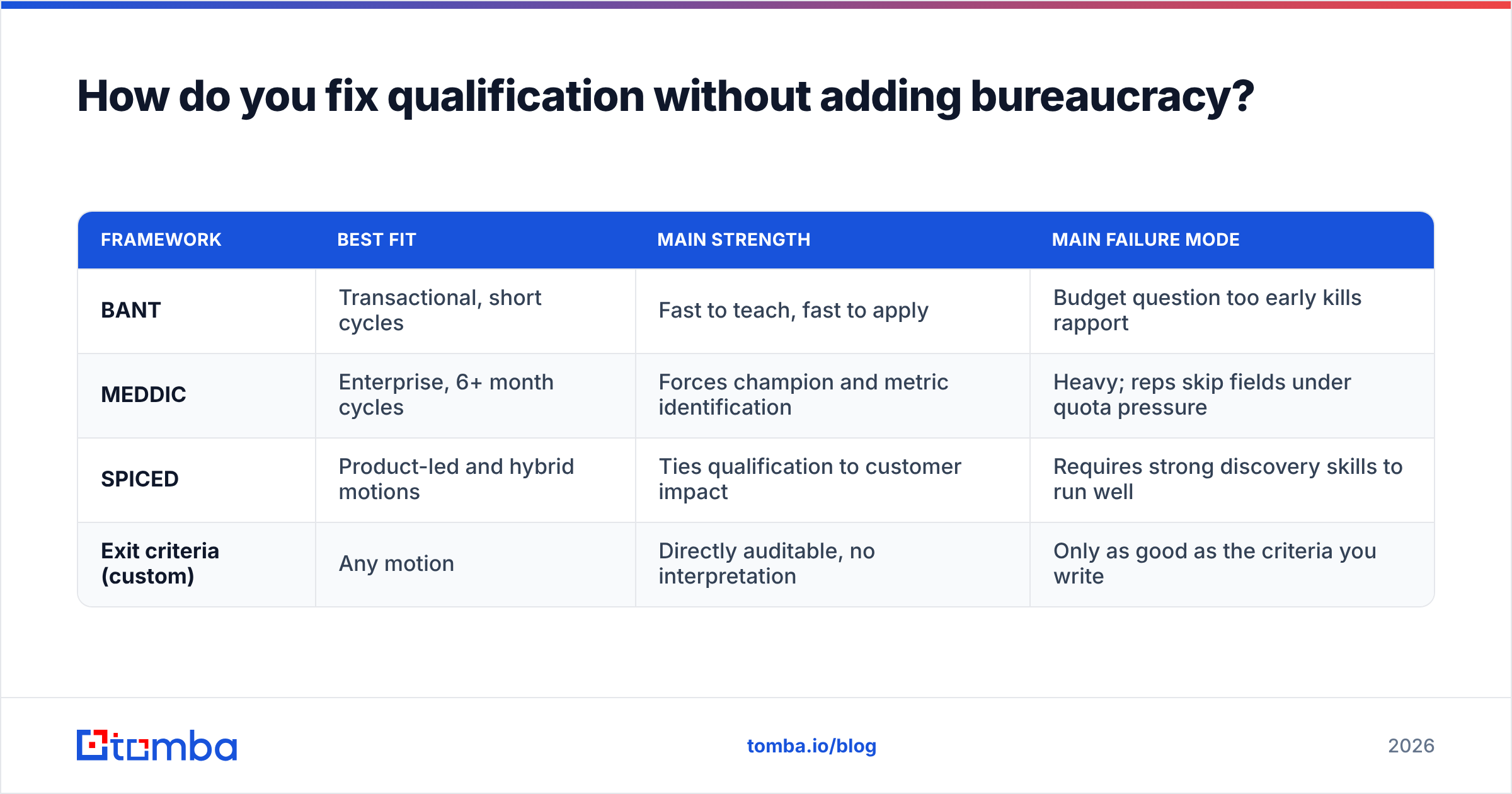
| Framework | Best fit | Main strength | Main failure mode |
|---|---|---|---|
| BANT | Transactional, short cycles | Fast to teach, fast to apply | Budget question too early kills rapport |
| MEDDIC | Enterprise, 6+ month cycles | Forces champion and metric identification | Heavy; reps skip fields under quota pressure |
| SPICED | Product-led and hybrid motions | Ties qualification to customer impact | Requires strong discovery skills to run well |
| Exit criteria (custom) | Any motion | Directly auditable, no interpretation | Only as good as the criteria you write |
Whichever you pick, the win rate improvement comes from the same source: fewer unqualified deals entering the pipeline, so rep hours concentrate on deals that can actually close. Teams often see conversion rate rise while total pipeline count falls. That's the intended outcome, and you should tell your board so in advance.
What should you change in your outreach itself?#
Assume data and routing are solid. Now the message matters. Four changes with the clearest measured impact:
- Cut the ask. Replace "book a 30-minute demo" with a question that costs the prospect ten seconds to answer. Reply rate is the leading indicator; meetings follow from threads, not from cold CTAs.
- Lead with an observation, not a compliment. "I noticed you're hiring three SDRs in EMEA" outperforms "Love what you're building." One proves research; the other proves you have a template.
- Shorten to under 90 words. Most cold email is read on a phone. If your message needs scrolling, it needs cutting. Test your draft against a spam checker before it ships — trigger words and heavy HTML depress placement independently of length.
- Follow up 4–6 times across channels. Reply rate on a first touch is low by design. The majority of positive replies in most sequences arrive on touches 2 through 5, and a LinkedIn view before an email lands measurably lifts open rates.
- Segment by trigger, not by industry. "Companies that just raised a Series B" is a segment. "SaaS companies" is a directory listing. Trigger-based segments convert several times better because the timing argument writes itself.
For the human-review layer, Gartner's research on B2B buying behavior is a useful corrective — buyers spend only about 17% of their evaluation time with vendors, and that time is split across all vendors under consideration. Your message competes for a very small slice of attention.
How do you run pipeline reviews that actually raise conversion?#
Change the default question. Most pipeline reviews ask "what's the update on this deal?" That invites narrative. Ask instead: "What has the buyer done since we last spoke?"
Buyer actions are verifiable: they took a meeting, they looped in security, they asked for a redlined contract. Rep activities are not evidence of progress — a rep can send eight emails into a dead deal and report "actively engaged."
Three review rules worth adopting:
- Default to removal. Any deal with no buyer action in two review cycles gets pushed out or closed-lost. You can always resurrect it. A forecast padded with zombie deals produces bad hiring and bad spend decisions downstream.
- Count contacts, not conversations. Deals with three or more engaged stakeholders close at materially higher rates than single-threaded ones. Make "engaged contacts" a visible column. When it reads 1, that's the coaching topic — not the close date.
- Review the losses monthly, not quarterly. Loss reasons collected 90 days late are fiction. Collect them within a week of the loss, in the rep's own words, and cluster them. Three clusters usually explain most of your losses, and two of them are fixable.
This connects directly back to data: multithreading requires finding the other stakeholders. A LinkedIn finder or bulk lookup across the account domain turns "I only have my champion's email" into a mapped buying committee in a few minutes.
What does a 90-day conversion improvement plan look like?#
Sequenced so each phase produces a measurable delta before the next begins.
Days 1–30 — Measure and clean. Instrument every stage transition separately. Verify your entire active contact database and record the before/after bounce rate. Write the SQL definition and get both sales and marketing leadership to sign it. Expected outcome: a bounce-rate drop and a clear picture of your worst-performing stage.
Days 31–60 — Fix routing and qualification. Route inbound leads on submit with mobile alerts. Append phone numbers to inbound records. Publish exit criteria per stage as required CRM fields. Expected outcome: measurably lower median response time and a smaller, cleaner pipeline.
Days 61–90 — Optimize messaging and reviews. Rewrite sequences around triggers. A/B test one variable at a time with a minimum sample of 400 sends per arm. Switch pipeline reviews to buyer-action questions and start monthly loss clustering. Expected outcome: higher response rate and a forecast that matches reality within 10%.
Resist the urge to run all three phases at once. If you change data quality, routing, and messaging in the same fortnight, you'll see a conversion lift and have no idea which change caused it — which means you can't repeat it.
Where should you start this week?#
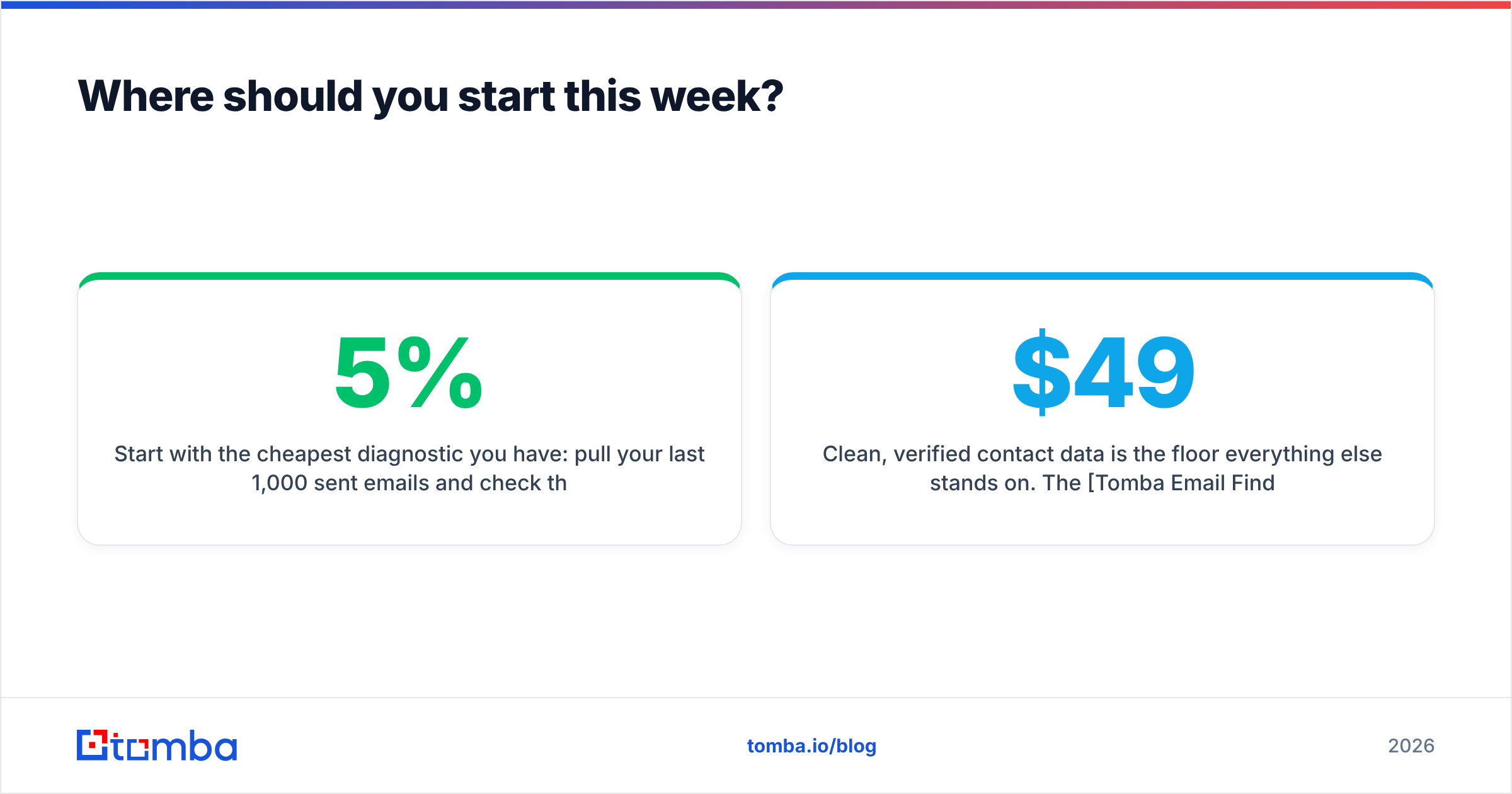
Start with the cheapest diagnostic you have: pull your last 1,000 sent emails and check the bounce rate. If it's above 5%, your data is the constraint, and no amount of copywriting or coaching will move your conversion rate until you fix it. If it's under 2%, move to stage-transition analysis and find the lock where the boats are stacking up.
Clean, verified contact data is the floor everything else stands on. The Tomba Email Finder returns verified professional addresses with a confidence score and the sources behind each result, so you're not guessing which records are safe to send. Start on the free tier at 25 searches per month to test accuracy against your own list, then move to Starter at $49/mo or Growth at $99/mo once you know the numbers hold — full Tomba pricing is public, with no per-seat charge to gate your team.
Related guides#
// get started
Find, verify and enrich your first contacts today
Start on the free plan with 25 searches a month, then scale when your team is ready.
Free plan · No credit card required · GDPR & CCPA
// about the author