How to Increase Sales Productivity: A 2026 Playbook
Reps spend under 30% of their week actually selling. Here is a concrete, tool-by-tool playbook for cutting admin time, fixing bad data, and getting more selling hours back in 2026.
TL;DR
- Sales productivity is not "more activity." It is revenue produced per hour of rep time, and most teams lose the battle on the denominator, not the numerator.
- Reps typically spend well under a third of their week in live selling conversations. The rest goes to research, data entry, list building, and internal meetings.
- The four highest-leverage fixes, in order: kill manual list building, fix bad contact data at the source, collapse your tool stack, and standardize the sales process so reps stop improvising.
- Tooling helps only after process is fixed. A CRM with garbage data makes bad decisions faster.
- Measure three numbers monthly: selling-hours per rep, cost per meeting booked, and pipeline created per rep. Everything else is vanity.
What does sales productivity actually mean?#
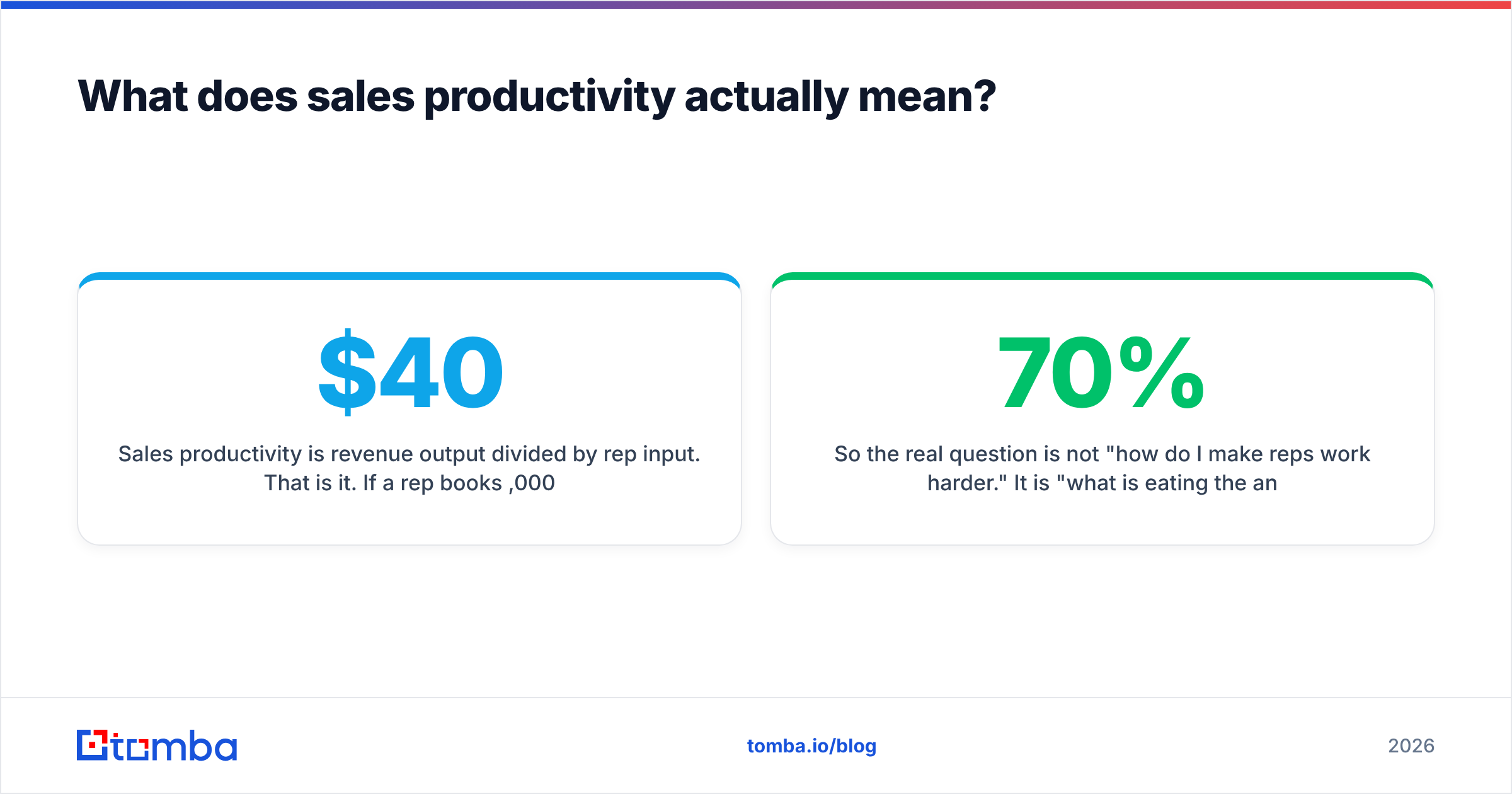
Sales productivity is revenue output divided by rep input. That is it. If a rep books $40,000 in new pipeline working 40 hours, productivity is $1,000 per hour. If you hand that same rep clean data and cut three hours of manual research per day, and pipeline holds steady, productivity climbs — even though "activity" went down.
This distinction matters because most sales productivity advice quietly optimizes the wrong variable. Adding a daily call block, a new dialer, or a stricter activity quota raises input. That improves nothing unless output moves faster than input does.
Salesforce's research on the state of sales has consistently found that reps spend the minority of their time actually selling, with the balance consumed by administrative work, prospecting research, and internal coordination. The exact percentage moves year to year and by survey methodology, but the direction never changes: the selling-hours number is small, and it is the single biggest lever you own.
So the real question is not "how do I make reps work harder." It is "what is eating the 70% and how much of it can I delete?"
Where do selling hours actually disappear?#
Before you fix anything, audit. Ask five reps to log their week in 30-minute blocks for five business days. No judgment, no performance implication — you are measuring the system, not the person. Almost every team that runs this exercise finds the same five leaks:
- Manual list building. Copying names off LinkedIn, guessing email formats, checking company websites for a contact page. This is the single largest non-selling time sink for SDRs and full-cycle AEs alike.
- Data cleanup and CRM hygiene. Deduping records, fixing job titles that changed eight months ago, chasing down phone numbers that were never valid.
- Bounce recovery. A campaign goes out, 18% bounces, and now someone spends a day figuring out which contacts were wrong and re-sourcing them.
- Internal meetings and reporting. Pipeline reviews that could be a dashboard. Forecast calls that exist because nobody trusts the CRM data.
- Tool switching. Eleven tabs open, three of which do overlapping jobs, none of which talk to each other cleanly.
Notice that leaks 1, 2, and 3 are all the same underlying problem wearing different hats: your contact data is unreliable and manually sourced. Fix that once and three of the five leaks shrink at the same time. That is why it belongs at the top of your list, ahead of the shiny AI coaching tool.
How do you cut manual list building without hurting quality?#
Replace human guessing with an API call, then spend the recovered time on personalization.
The manual workflow looks like this: find the company, find the person, guess the email pattern (first.last@, f.last@, first@), send a test, hope. That is roughly four to seven minutes per contact when it works and considerably longer when it does not. At 40 new contacts a week, you are burning three to five hours per rep on clerical work.
The automated workflow: pull the domain, run a domain search to get every publicly available address at that company with role and department context, then use the email finder for named individuals you already have on your target list. Push results straight into your CRM through the HubSpot integration or Zapier so nobody re-types anything.
Two rules keep quality high while you automate:
- Never skip verification. Sourcing an address and confirming it is deliverable are separate operations. Run every new contact through an email verifier before it enters a sequence. A 2% bounce rate protects your domain; a 12% bounce rate quietly destroys it, and then every rep's productivity drops regardless of how good your lists are.
- Keep a human on targeting. Automation should decide how you get the contact, not whether the contact is worth having. ICP definition stays a human judgment call.
The time math is straightforward. If sourcing drops from five minutes to thirty seconds per contact, a rep handling 40 contacts a week recovers about three hours. Across a team of eight, that is 24 hours a week — the equivalent of hiring most of an extra rep without adding headcount.
Which productivity levers deliver the best return?#
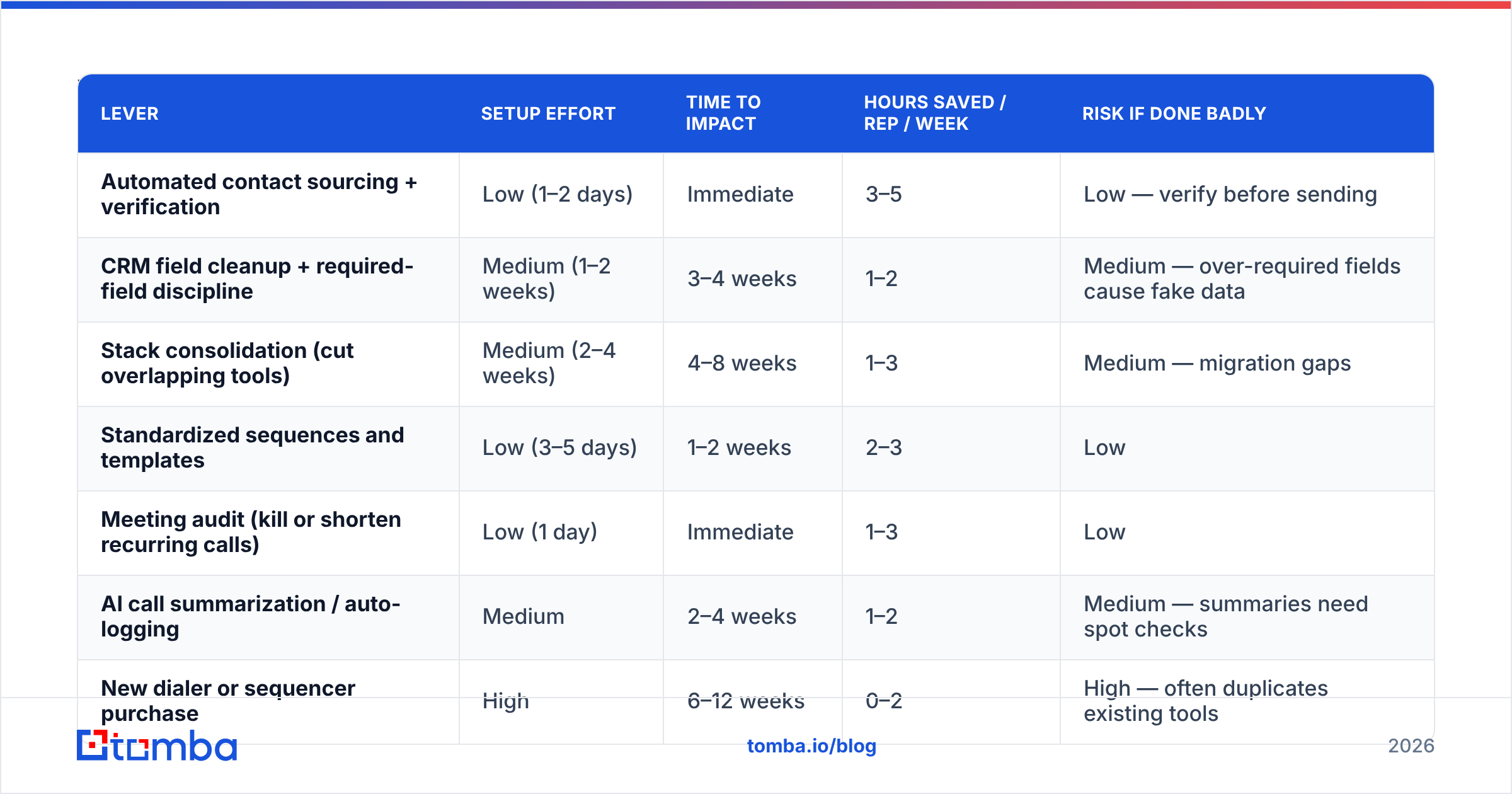
Not all fixes are equal. Here is how the common interventions compare on effort, time-to-impact, and realistic payoff for a mid-sized B2B team.
| Lever | Setup effort | Time to impact | Hours saved / rep / week | Risk if done badly |
|---|---|---|---|---|
| Automated contact sourcing + verification | Low (1–2 days) | Immediate | 3–5 | Low — verify before sending |
| CRM field cleanup + required-field discipline | Medium (1–2 weeks) | 3–4 weeks | 1–2 | Medium — over-required fields cause fake data |
| Stack consolidation (cut overlapping tools) | Medium (2–4 weeks) | 4–8 weeks | 1–3 | Medium — migration gaps |
| Standardized sequences and templates | Low (3–5 days) | 1–2 weeks | 2–3 | Low |
| Meeting audit (kill or shorten recurring calls) | Low (1 day) | Immediate | 1–3 | Low |
| AI call summarization / auto-logging | Medium | 2–4 weeks | 1–2 | Medium — summaries need spot checks |
| New dialer or sequencer purchase | High | 6–12 weeks | 0–2 | High — often duplicates existing tools |
The pattern is clear: the cheapest, fastest wins are data and process, not new software categories. Teams reliably get this backwards because buying a tool feels like progress and auditing meetings feels like admin.
How do you fix the data quality problem at the source?#
Stop treating data quality as a cleanup project and start treating it as an intake standard.
Cleanup projects fail because decay never stops. B2B contact data degrades continuously as people change jobs, companies rebrand, and domains migrate. Industry estimates for annual B2B database decay commonly land in the 25–30% range — meaning a list you scrubbed in January is meaningfully stale by summer. If your only intervention is a quarterly cleanup sprint, you are permanently behind.
The intake standard approach:
- Enforce a verification gate. No contact enters a sequence without a verification status. Unknown status is a blocker, not a warning.
- Handle catch-all domains explicitly. Catch-all servers accept everything, so standard verification returns an ambiguous result. Route those through a catch-all verifier rather than guessing or blanket-excluding them — blanket exclusion can drop a third of your enterprise TAM.
- Enrich rather than re-source. When a record is thin, run data enrichment to fill in the title, company size, and phone number instead of sending a rep back to Google.
- Set a re-verification cadence. Anything untouched for 90 days gets re-checked before reuse. Cheap in credits, expensive to skip.
- Log the source. Knowing where a record came from lets you kill the sources that consistently produce bounces.
Where you buy data matters too, and there is no single right answer. Some teams prefer a self-serve API for on-demand lookups; others want a prebuilt list they can filter and download. Providers like BookYourData sit firmly in the second camp with pay-as-you-go verified lists, which suits teams running periodic campaigns rather than continuous outbound. Tools like Tomba lean toward the first — real-time lookups by domain or name, with a documented API for embedding sourcing directly into your workflow. Plenty of teams run both: bulk lists for broad campaigns, API lookups for named-account precision.

Does consolidating your sales stack really help?#
Yes, but only if you cut duplication rather than capability.
The typical B2B sales team runs somewhere between six and fifteen tools. Each one has a login, a notification stream, a data model, and a monthly invoice. The productivity cost is not the subscription fee — it is context switching and reconciliation. When your sequencer, your CRM, and your enrichment tool each hold a slightly different version of the same contact, reps spend time deciding which one is true.
Run this audit:
- List every tool with its monthly cost and its primary job in one sentence.
- Group by job. If two tools have the same one-sentence description, one of them is going away.
- Check actual usage. Pull seat-level login data. Tools where fewer than half of licensed seats logged in last month are cancellation candidates, not training candidates.
- Map the data flow. Draw which tool is the system of record for each field. If two tools both claim "system of record" for contact email, you have found your reconciliation tax.
- Cut, then wait 30 days before evaluating the next cut. Simultaneous migrations create chaos that gets blamed on the wrong tool.
Peer review sites like G2 are useful for the replacement-shopping step, but be skeptical of category-level reviews — a tool rated highly for enterprise ABM may be miserable for a four-person outbound team.
What process changes actually move the number?#
Three, in order of impact.
Standardize the sequence, personalize the opener. Reps who write every email from scratch spend 15–20 minutes per prospect and produce inconsistent quality. Reps working from a tested structure with one genuinely researched personalization line spend four minutes and convert better. Start from proven cold email templates and adapt, rather than starting from a blank page every time.
Time-block the calendar and defend it. Two hours of uninterrupted prospecting beats six hours of prospecting interrupted by Slack. This is free to implement and consistently underused because it requires managers to stop scheduling ad-hoc calls into rep prospecting blocks.
Kill the meetings that exist because nobody trusts the data. A weekly forecast call where five people read numbers aloud from a dashboard is a data-trust problem masquerading as a meeting. Fix the pipeline hygiene, then delete the meeting. HubSpot's sales research covers the reporting side of this in depth if you want benchmarks to argue with.
One caution on AI tools: automated call summaries, AI-drafted follow-ups, and auto-logging genuinely save time, but they need spot-checking for the first month. An AI that logs the wrong next step is worse than no logging, because now the CRM is confidently wrong. Sample 10% of outputs weekly until error rates stabilize.
How do you measure whether any of this worked?#
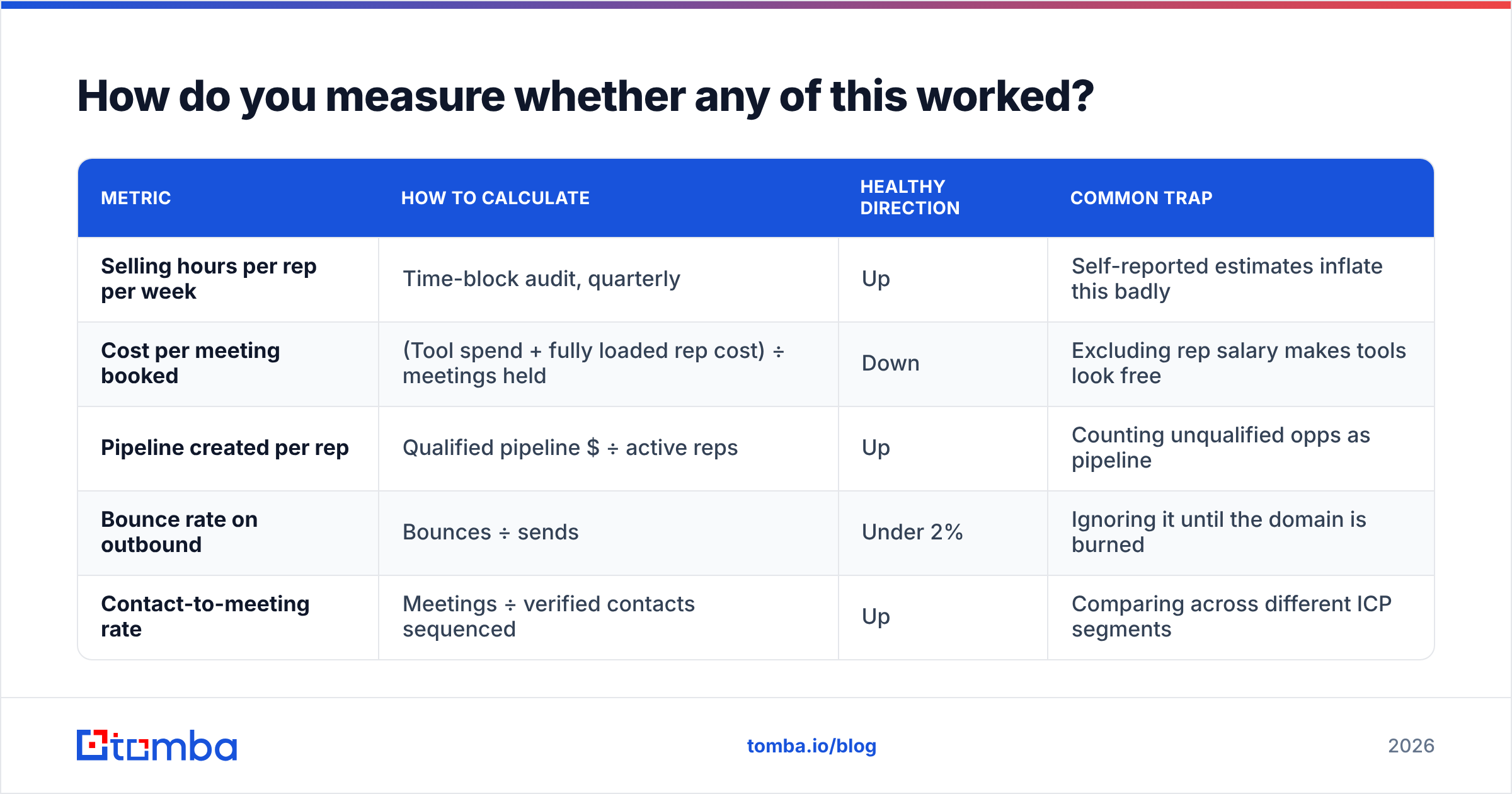
Track three numbers monthly and ignore the rest:
| Metric | How to calculate | Healthy direction | Common trap |
|---|---|---|---|
| Selling hours per rep per week | Time-block audit, quarterly | Up | Self-reported estimates inflate this badly |
| Cost per meeting booked | (Tool spend + fully loaded rep cost) ÷ meetings held | Down | Excluding rep salary makes tools look free |
| Pipeline created per rep | Qualified pipeline $ ÷ active reps | Up | Counting unqualified opps as pipeline |
| Bounce rate on outbound | Bounces ÷ sends | Under 2% | Ignoring it until the domain is burned |
| Contact-to-meeting rate | Meetings ÷ verified contacts sequenced | Up | Comparing across different ICP segments |
The reason to keep the list this short is that productivity dashboards themselves become a productivity tax. Five numbers you review seriously beat thirty you glance at.
Re-run the time audit quarterly, not weekly. Weekly measurement changes rep behavior enough to corrupt the measurement.
What should you do in your first 30 days?#
Sequence matters more than ambition here. A realistic first month:
- Week 1 — Audit. Time-block study with five reps. Pull tool login data. Pull last quarter's bounce rate.
- Week 2 — Data intake. Set up automated sourcing and a verification gate. This is the fastest measurable win and it makes weeks 3 and 4 easier.
- Week 3 — Process. Standardize sequences, publish the template library, install prospecting time blocks on the calendar.
- Week 4 — Cut. Cancel one duplicate tool. Kill or halve one recurring meeting. Publish the three metrics you will track from here.
Do not attempt a CRM migration, a new sequencer rollout, and a comp plan change in the same quarter. Pick one structural change and let it settle.
If the audit tells you what it usually tells you — that your reps are spending hours a week hunting for contact information that a lookup could return in seconds — start there. Tomba's Email Finder returns verified professional addresses by name and domain, with a free tier at 25 searches a month to test against your own target list before you commit. Paid plans start at $49/mo (Starter), $99/mo (Growth), and $249/mo (Pro); full Tomba pricing is public. Run 50 of your real target accounts through it, compare the results and bounce rate against whatever your reps produce manually, and let the numbers make the decision.
Related guides#
// get started
Find, verify and enrich your first contacts today
Start on the free plan with 25 searches a month, then scale when your team is ready.
Free plan · No credit card required · GDPR & CCPA
// about the author