How To Kindly Follow Up On An Email Without Being Annoying
Most replies come from follow-ups, not first emails. Here are the exact timing windows, templates, and tone rules that make a polite follow-up land instead of irritate.
TL;DR
- How to kindly follow up on an email, in one line: keep it short, add one new thing, ask one question, and give an easy way out.
- Roughly half of all replies to cold and warm outreach arrive after the first message, so the follow-up is not optional — it is the campaign.
- "Kindly" is not a word you type. It is a structure: short, new value, one ask, an explicit out.
- Wait 2-3 business days for the first follow-up, then 4-7, then 7-14. Same thread, same subject line, no "just bumping this."
- Never send more than 3-4 follow-ups to a cold contact, and stop instantly on any negative signal.
- A polite follow-up to a dead address still bounces. Verify before you sequence — tone can't fix bad data.
Why does the follow-up matter more than the first email?#
Because the first email almost never lands at the right moment. Your prospect was in a meeting, on PTO, mid-quarter-close, or looking at 180 unread messages. Silence is rarely rejection — it is timing.
Multiple outbound datasets put 40% to 60% of total replies on messages two through four. So a sequence of one email throws away about half the pipeline it paid to generate. You buy the data. You pay for the sending tool. You write the copy. Then you stop after email one, which is the most expensive habit in outbound.
The problem is that most people follow up badly. They resend the same pitch with "Hi again." Or they open with "I wanted to follow up on my previous email." That line carries no information. It also tells the reader you had nothing new to say. So how to kindly follow up on an email is a question about structure, not about softener words.
How to kindly follow up on an email: what makes it feel kind?#
Four things, in order of impact:
- It's short. Under 75 words. A follow-up longer than the original email reads as escalation, not politeness.
- It adds something. A case study, a relevant news item, a one-line answer to an objection you anticipated. Never a pure "bump."
- It carries one ask. One question, answerable in a single sentence. "Worth a look?" beats "Would Tuesday at 2pm or Thursday at 10am work for a 30-minute discovery call?"
- It gives an explicit out. "If this isn't a priority right now, tell me and I'll close the loop." Permission to say no is what makes persistence feel polite rather than predatory.
- It stays in the same thread. Reply to your own sent message. The recipient gets context for free and doesn't have to reconstruct who you are.
- It never guilt-trips. "I've reached out three times" makes your inbox math their problem. Delete it.
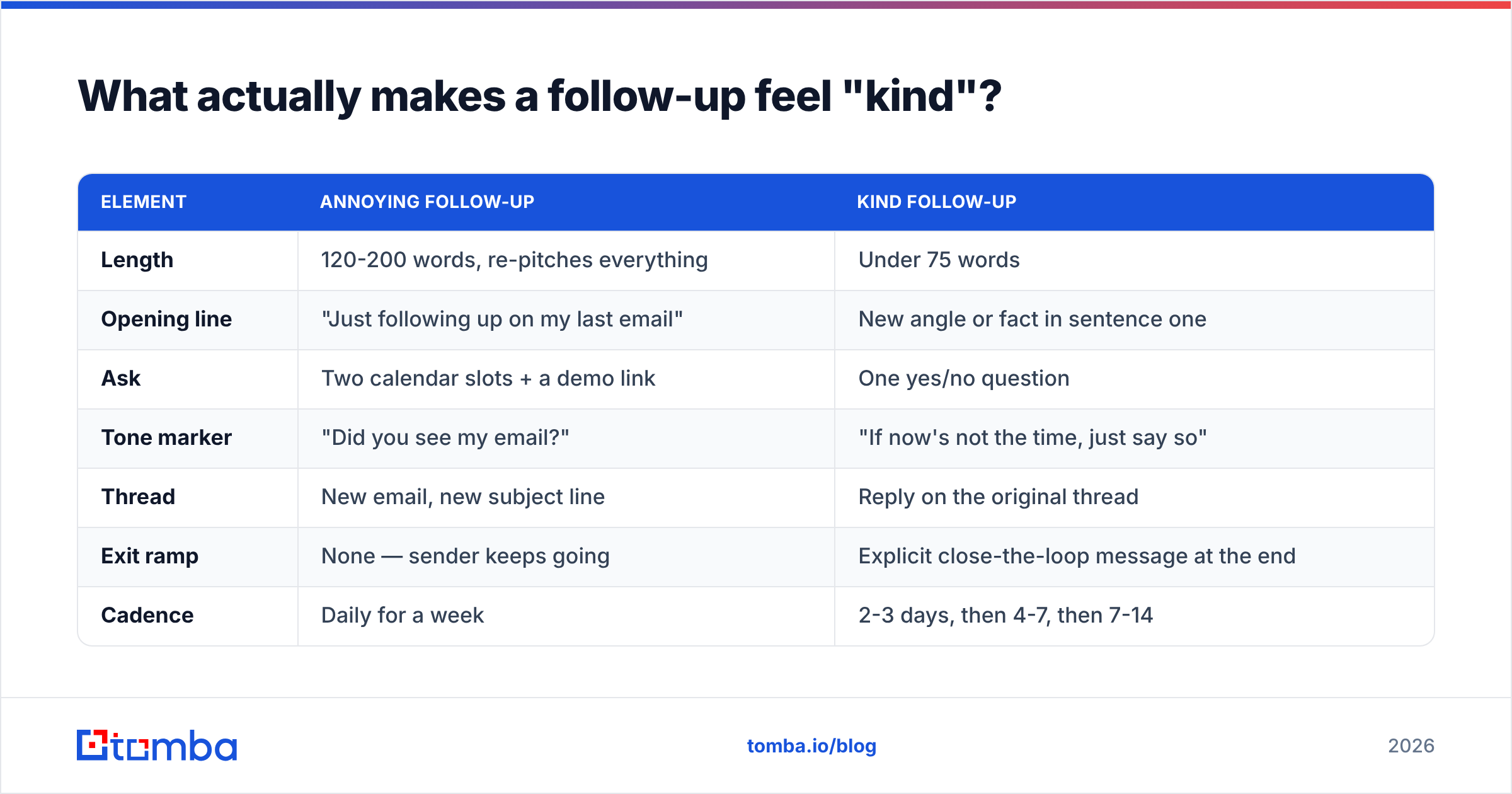
Compare that to what most reps actually send:
| Element | Annoying follow-up | Kind follow-up |
|---|---|---|
| Length | 120-200 words, re-pitches everything | Under 75 words |
| Opening line | "Just following up on my last email" | New angle or fact in sentence one |
| Ask | Two calendar slots + a demo link | One yes/no question |
| Tone marker | "Did you see my email?" | "If now's not the time, just say so" |
| Thread | New email, new subject line | Reply on the original thread |
| Exit ramp | None — sender keeps going | Explicit close-the-loop message at the end |
| Cadence | Daily for a week | 2-3 days, then 4-7, then 7-14 |
The middle column is not rude because the sender is rude. It is rude because it makes the reader do work: reconstruct context, choose between options, and find a polite way to decline.
How long should you wait before following up?#
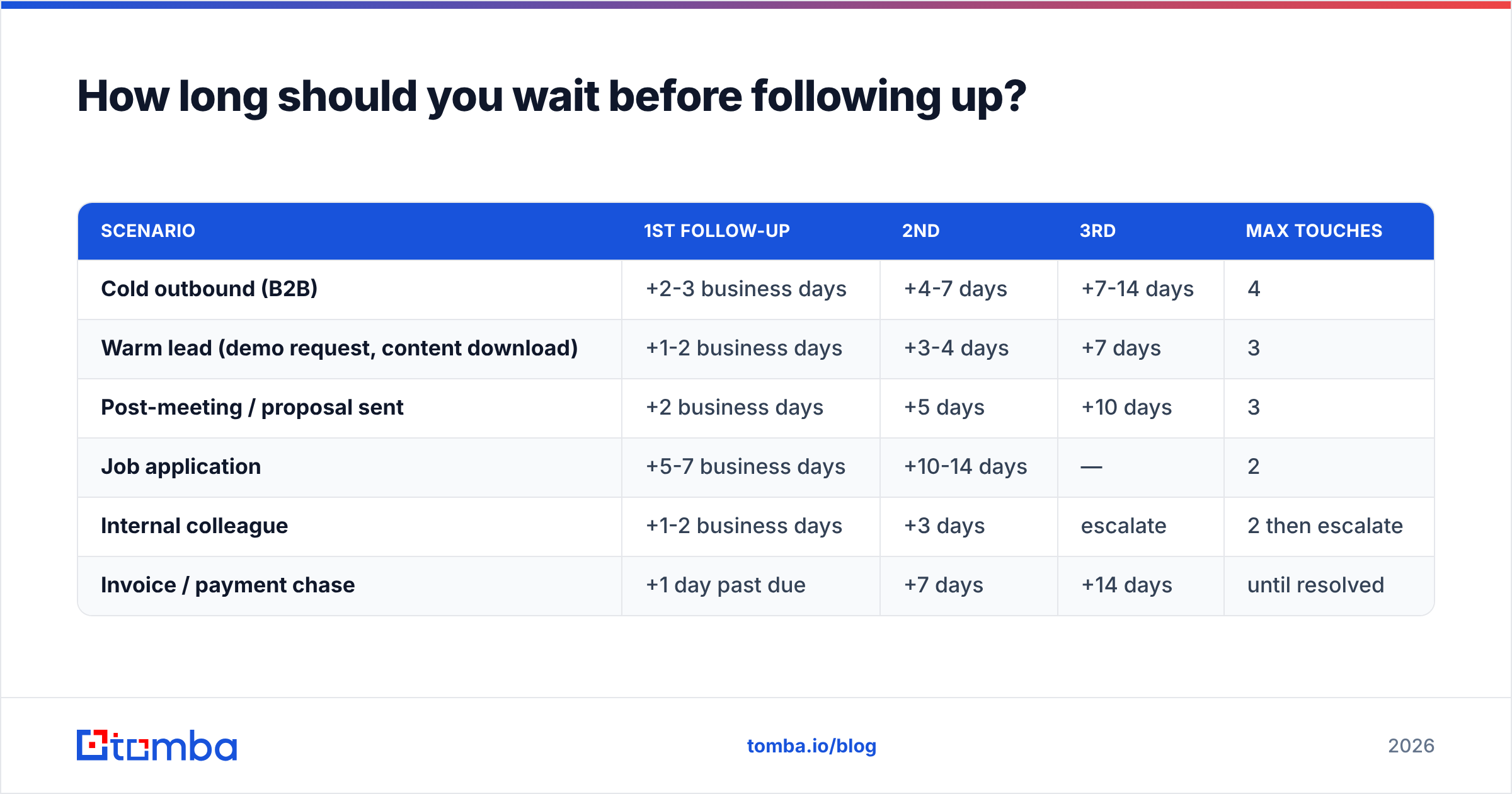
Depends on the relationship. Here's the cadence that holds up across cold outbound, warm inbound, and internal requests:
| Scenario | 1st follow-up | 2nd | 3rd | Max touches |
|---|---|---|---|---|
| Cold outbound (B2B) | +2-3 business days | +4-7 days | +7-14 days | 4 |
| Warm lead (demo request, content download) | +1-2 business days | +3-4 days | +7 days | 3 |
| Post-meeting / proposal sent | +2 business days | +5 days | +10 days | 3 |
| Job application | +5-7 business days | +10-14 days | — | 2 |
| Internal colleague | +1-2 business days | +3 days | escalate | 2 then escalate |
| Invoice / payment chase | +1 day past due | +7 days | +14 days | until resolved |
Two rules override the table. First, respect a stated timeline. If they said "circle back in Q4," calendar it and leave them alone until then. Second, send within business hours in their timezone, not yours. A 6:04am follow-up in the recipient's local time reads as automated. Automated reads as impersonal, no matter how warm the words are.
Avoid Monday morning (inbox triage) and Friday afternoon (mentally checked out). Tuesday through Thursday, mid-morning local, is the boring answer that keeps working.
What are the best polite follow-up templates?#
Seven you can lift directly. Each one shows how to kindly follow up on an email without padding. Adapt the specifics — a template that isn't customized is just spam with better grammar.
1. The value-add bump (cold, follow-up #1)
Subject: (reply on original thread)
Hi [Name] — one thing I should have included: [Similar Company] cut [specific metric] by [number] using the same approach. Two-line summary here: [link].
Still worth 15 minutes, or is this off the table for now?
2. The single-question reset (cold, follow-up #2)
Hi [Name], quick one so you don't have to write much: is [problem] something your team is actively working on this quarter — yes or no?
If no, I'll stop here and won't clutter your inbox.
3. The permission-to-close (cold, final)
Hi [Name] — I haven't heard back, which usually means one of three things: wrong timing, wrong person, or wrong problem.
Any of those is a fine answer. If it's the second, who should I be talking to instead? Otherwise I'll close this out and leave you alone.
4. The post-meeting nudge
Hi [Name], thanks again for Tuesday. You mentioned wanting to run the numbers past [Colleague] — did anything come back?
Happy to send a one-pager if that makes the internal conversation easier.
5. The proposal chase
Hi [Name] — checking whether the proposal cleared your side. If there's a blocker in there (pricing, scope, timeline), tell me which one and I'll rework it rather than guess.
6. The job-application follow-up
Hi [Name], I applied for the [Role] position on [date] and wanted to reiterate my interest — particularly the [specific detail from the job post] part of the role.
If the timeline has shifted or the search is on hold, I completely understand. Just useful to know either way.
7. The gentle invoice reminder
Hi [Name], invoice #[number] for [$amount] came due on [date]. It may well be sitting in an approval queue — if you can point me to the right person in AP, I'll chase it there instead of your inbox.
Notice what none of them do: apologize for existing ("Sorry to bother you"), express disappointment, or use the word "kindly" as a stand-in for actual courtesy. Over-apologizing lowers your status in the reader's eyes. It also makes the message feel more intrusive, because you have drawn attention to the intrusion.
If you want more starting points, Tomba's cold email templates library covers first-touch and follow-up variants by use case. The subject line generator helps when you genuinely need to break the thread and restart with a fresh angle.
Should you change the subject line when you follow up?#
Usually no. Replying in-thread keeps the context and signals continuity. The recipient sees the original message underneath and doesn't have to guess.
Break the thread only in two cases: the original subject line was clearly the failure point, or enough time has passed (30+ days) that the old thread is stale. In that case, write a subject that references something new, not something old. "Re: our conversation" on a thread they never replied to is mildly dishonest, and readers notice.
One more thing: "Following up" as a subject line has been used so heavily that it now works as a filter trigger for many people. So does "Quick question." Neither is banned, but neither buys you attention.
Does deliverability affect whether your follow-up looks polite?#
Yes — and this is the part most tone-focused articles skip. A perfect follow-up that lands in spam is the same as no follow-up at all. One that bounces just makes you look careless.
Three technical things shape how "kind" your sequence feels in practice:
- Bounces. Sending three polite messages to an address that died eight months ago is not persistence, it's noise. It also damages your sender reputation, which cuts inbox placement for the contacts who are real. Run your list through an email verifier before the first send, not after the third bounce.
- Volume per thread. Some filters weight repeated sends to a non-responsive address. Capping at 3-4 touches protects both your tone and your email deliverability.
- Authentication. If SPF, DKIM, and DMARC aren't configured, follow-ups are more likely to be quarantined than first sends. The pattern looks like unsolicited repetition. Google's sender guidelines spell out the current rules for bulk senders.
How do you follow up at scale without sounding like a robot?#
You standardize the structure and personalize the first line. That's the whole trick.
The structure — short, new value, one ask, explicit out — is identical across every prospect. The variable is one sentence of real specificity: their recent funding round, a hiring pattern on their careers page, a product change, something the account executive noticed. If you can't write that sentence for a given prospect, they probably shouldn't be in the sequence.
Practical workflow:
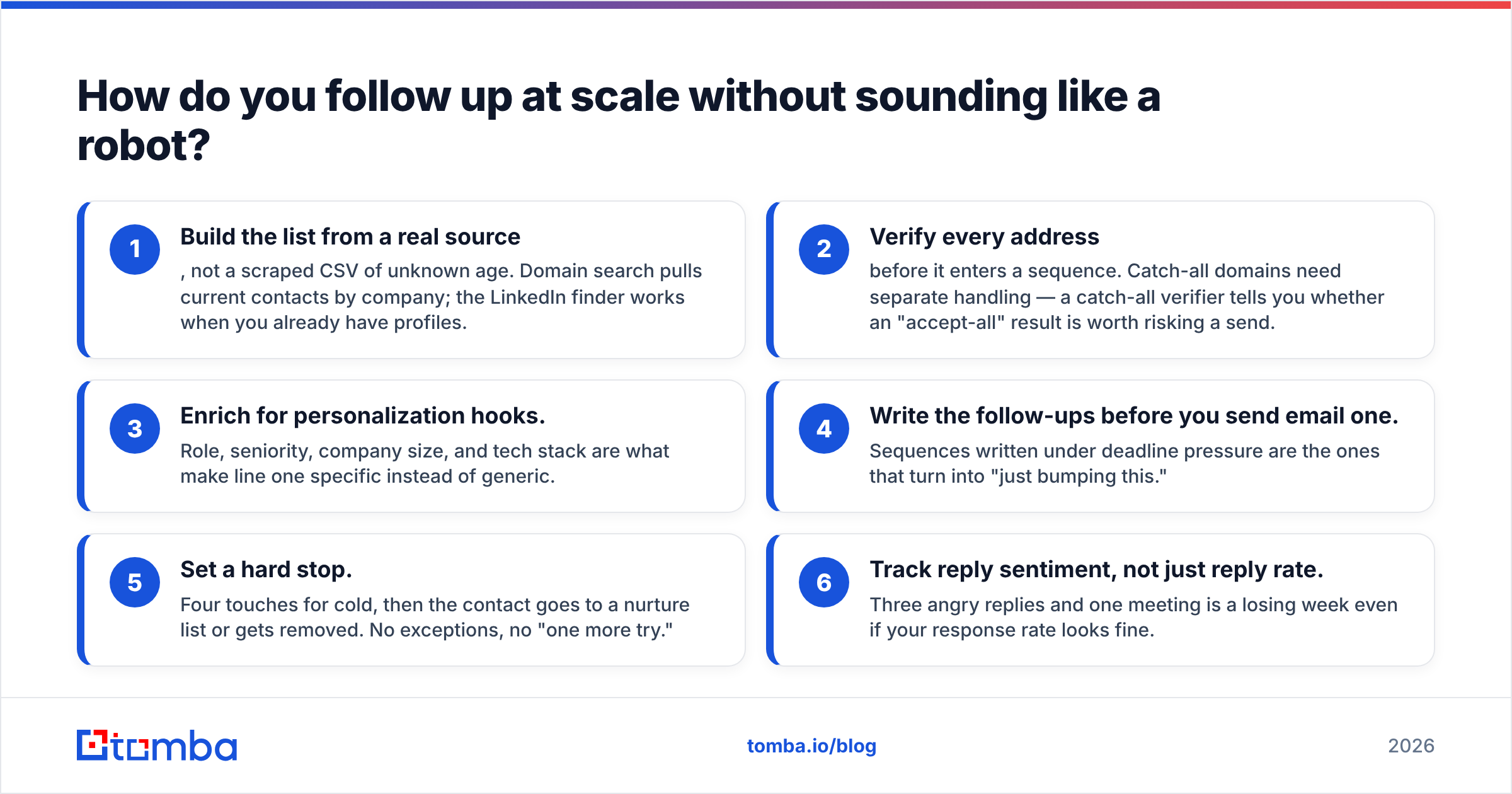
- Build the list from a real source, not a scraped CSV of unknown age. Domain search pulls current contacts by company; the LinkedIn finder works when you already have profiles.
- Verify every address before it enters a sequence. Catch-all domains need separate handling — a catch-all verifier tells you whether an "accept-all" result is worth risking a send.
- Enrich for personalization hooks. Role, seniority, company size, and tech stack are what make line one specific instead of generic.
- Write the follow-ups before you send email one. Sequences written under deadline pressure are the ones that turn into "just bumping this."
- Set a hard stop. Four touches for cold, then the contact goes to a nurture list or gets removed. No exceptions, no "one more try."
- Track reply sentiment, not just reply rate. Three angry replies and one meeting is a losing week, even if your response rate looks fine.
For the tooling layer, HubSpot's sales research publishes ongoing benchmarks on sequence length and reply behavior. G2's sales engagement category is a reasonable place to compare sending platforms on real user reviews rather than vendor claims.
When should you stop following up entirely?#
Immediately, on any of these:
- They reply "no," "not interested," or anything similar. One gracious closing message is fine. A second is harassment.
- They unsubscribe or ask to be removed. This is a legal obligation under CAN-SPAM and GDPR, not a preference.
- The address hard-bounces twice.
- You've hit your cadence cap with zero engagement — no opens, no clicks, no replies.
- Someone else at the same company already told you the timing is wrong.
The graceful exit is a real technique, not a formality. A message that says "closing this out, here's my contact if things change" converts better than any of the middle touches. It removes the pressure entirely. Some reps report it as their highest-reply message in the whole sequence, precisely because it asks for nothing.
What tools help you follow up more effectively?#
Follow-up quality has three inputs: data accuracy, timing discipline, and copy. Tools help with the first two; the third is on you.
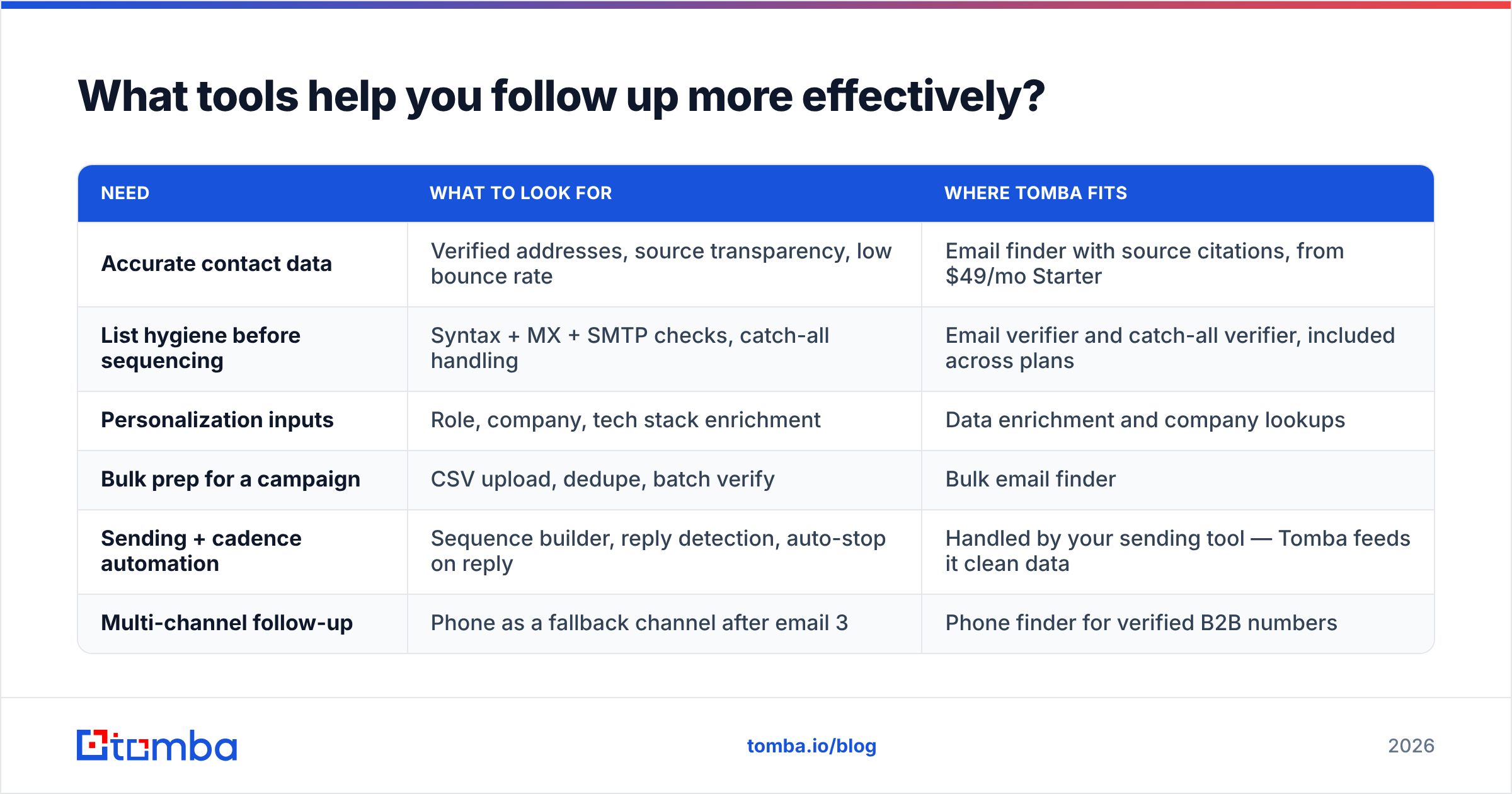
| Need | What to look for | Where Tomba fits |
|---|---|---|
| Accurate contact data | Verified addresses, source transparency, low bounce rate | Email finder with source citations, from $49/mo Starter |
| List hygiene before sequencing | Syntax + MX + SMTP checks, catch-all handling | Email verifier and catch-all verifier, included across plans |
| Personalization inputs | Role, company, tech stack enrichment | Data enrichment and company lookups |
| Bulk prep for a campaign | CSV upload, dedupe, batch verify | Bulk email finder |
| Sending + cadence automation | Sequence builder, reply detection, auto-stop on reply | Handled by your sending tool — Tomba feeds it clean data |
| Multi-channel follow-up | Phone as a fallback channel after email 3 | Phone finder for verified B2B numbers |
Tomba's plans run Free (25 searches/month), Starter at $49/mo, Growth at $99/mo, and Pro at $249/mo, with Enterprise on request. Full Tomba pricing breaks down credits per tier. Peers like BookYourData come at the same problem from a prebuilt-database angle, which suits teams that want to buy a list outright. Both approaches end in the same place: a verified address in a sequence.
The honest framing: no tool makes a bad follow-up polite. What a tool does is make sure the polite follow-up you wrote reaches a real human, at a company that still employs them, in an inbox that isn't filtering you on reputation grounds.
The one-page summary#
Kind follow-ups are short, specific, singular in their ask, and generous with the exit. They arrive 2-3 days apart at first, then stretch. They live in the original thread. They cap at three or four. They stop the moment someone says no. And they land in the inbox because the address was verified before the first send, not diagnosed after the third bounce.
That is the last part of how to kindly follow up on an email: the words only work if the address is real. If your follow-ups are polite but your reply rate is still flat, check the data before you rewrite the copy. Start with the Tomba Email Finder to build a verified list — the free tier gives you 25 searches a month to test whether your bounce problem is really a copy problem. Clean data first, kind words second. In that order, follow-ups work.
Related guides#
// get started
Find, verify and enrich your first contacts today
Start on the free plan with 25 searches a month, then scale when your team is ready.
Free plan · No credit card required · GDPR & CCPA
// about the author