How to Make a Customer Profile: A 7-Step Framework
Most customer profiles are wishful thinking dressed up as research. Here is a 7-step framework for building one from real account data, plus the fields that actually predict revenue.
Learning how to make a customer profile starts with one rule. Use your own data, not a workshop. Pull the accounts that already buy, stay, and grow. Write down what they share. The seven steps below turn that list into filter criteria your team can run this week.
TL;DR
- A customer profile is a data-backed description of the accounts and people who buy, expand, and stay. It is not a fictional "Marketing Mary" with a stock photo.
- Build it from your own closed-won data first. Ten real accounts beat a hundred survey answers.
- The seven steps: pull your best accounts, find the shared firmographics, layer tech signals, map the buying committee, score the trigger events, write the disqualifiers, then enrich and ship it.
- The most-skipped step is writing down who is not a fit. Negative rules save more pipeline hours than positive ones.
- A profile that lives in a slide deck is dead. It has to become filter criteria in your data tooling, or it changes nothing.
What is a customer profile, exactly?#
A customer profile is a short written record of the accounts and people most likely to buy, get value, and stay. It rests on evidence, not hope. Think of it as a fishing map, not a portrait of a fish. The portrait is pretty. The map tells you where to drop the line.
In B2B the term covers four things, and people mix them up all the time:
- Ideal Customer Profile (ICP) — this one describes the account. Industry, headcount, revenue band, tech stack, region, funding stage, org shape. Your list filters run on it.
- Buyer persona — this one describes the person inside that account. Job title, KPIs, reporting line, budget power, what they read, what they fear.
- Customer profile (the umbrella) — the full doc. It ties the account rules to the humans who sign. It also holds the proof that splits good accounts from bad ones.
- Negative profile — the plain "do not chase" list. These firms look like a fit on paper. They churn, or they never close.
Tomba keeps a B2B glossary for the terms next door. It defines things like marketing qualified lead and the rest of the pipeline vocabulary. Keep it open while you write.
The split matters in practice. Your ICP sets which domains you pull contacts from. Your persona sets which titles you search for inside them. Build only one and you get one of two bad lists. A huge list of the wrong firms. Or a tight list of the wrong people.
Why do most customer profiles fail?#
Because they are written backwards. Someone books a workshop. The team lists who they wish would buy. A designer adds a headshot named "Ops Olivia." The deck lands in a Drive folder nobody opens again.
Most teams who ask how to make a customer profile start with that workshop. Start with the data instead.
Four failure modes, in rough order of how often they show up:
- Wishful, not measured. The profile names the big logos leadership wants. It skips the mid-market accounts that close in 34 days.
- Too broad to filter on. "Growing SaaS companies in North America" is not criteria. It is a mood. If you cannot turn it into a query with real numbers, it is not a profile.
- No "no" list. Reps waste weeks on accounts that only look right. Nobody wrote down that firms under 20 staff never renew.
- Never wired into tooling. The profile sits in a doc. The list build still runs on filters someone set up 18 months ago.
Gartner finds that most B2B deals involve six to ten decision-makers. Each one shows up with their own research. Name one persona and stop, and you have described maybe 15% of the room. Their journey research covers how buying groups behave once the deal opens.
How to make a customer profile in 7 steps#
Here is the order. Follow it. Each step feeds the next.
Step 1: Pull your 10-20 best existing customers#
Not your biggest. Your best. Score "best" with three numbers you already have: deal size, how long they stay, and how much support they burn. Use gross margin if you track it. Sort high to low. Take the top 10%.
No revenue yet? Use the next best thing. Design partners. Waitlist signups who wrote back. Or a rival's customers, whose reviews you can read on G2.
Step 2: Extract the firmographic overlap#
For each account, log six fields. Staff count. Revenue band. Industry, by NAICS or SIC code, not by vibes. HQ country. Funding stage. Years in business. Then look for tight clusters.
Hunt for ranges, not averages. "Average headcount 340" hides a lot. You may have 12 firms at 50-80 staff and 4 at 2,000. That is two profiles, not one.
Step 3: Layer in technographics#
What software do your best customers run? Tech signals are the sharpest filter in B2B. They hint at budget, maturity, and a workflow your product can plug into. A firm on Salesforce plus Marketo has different problems than one on a spreadsheet and Gmail.
Much of this shows from the outside. Check a prospect's website tech stack before you spend a credit on contact discovery.
Step 4: Map the buying committee#
For each won deal, list every person who touched it. The champion. The buyer with the budget. The tech reviewer. The blocker. The end user. Copy their titles word for word from the CRM. Do not tidy them up. "Head of Revenue Operations", "VP RevOps", and "Director, Sales Ops" are one role but three search strings.
That title list feeds contact discovery later. Get it right and your hit rate climbs when you go find emails.
Step 5: Quantify the trigger events#
What happened at the account 30-90 days before the deal opened? Strong triggers repeat. A new hire in the buying role. A funding round. A tech-stack move. A compliance deadline. Layoffs in a nearby team. A second office.
Score each trigger by how often it came before a win. Under 20% of wins? That is not a trigger. That is luck.
Step 6: Write the disqualifiers explicitly#
Teams skip this step and regret it. Write five to eight hard "no" rules. The real ones show up again and again. Fewer than X staff. No owner for the job you serve. Buying cycles over 120 days. Industries with rules you cannot clear. Regions you cannot serve.
Give reps permission to disqualify fast. A profile without a "no" list is a permission slip to chase everything.
Step 7: Turn it into filters and enrich#
The profile turns real when it becomes a query. Turn each rule into a filter in your data tool. Run it. Count what comes back. If you get 40, the profile is too narrow. If you get 400,000, it is too broad. A healthy list for one sales motion sits in the low thousands.
Then enrich. For each domain that passes, find the people who match your committee map. A domain search tool earns its keep here. You feed it a company domain. You get back the people at it, sorted by team and seniority. No stale list that went bad six months ago.
What fields actually belong in the profile?#
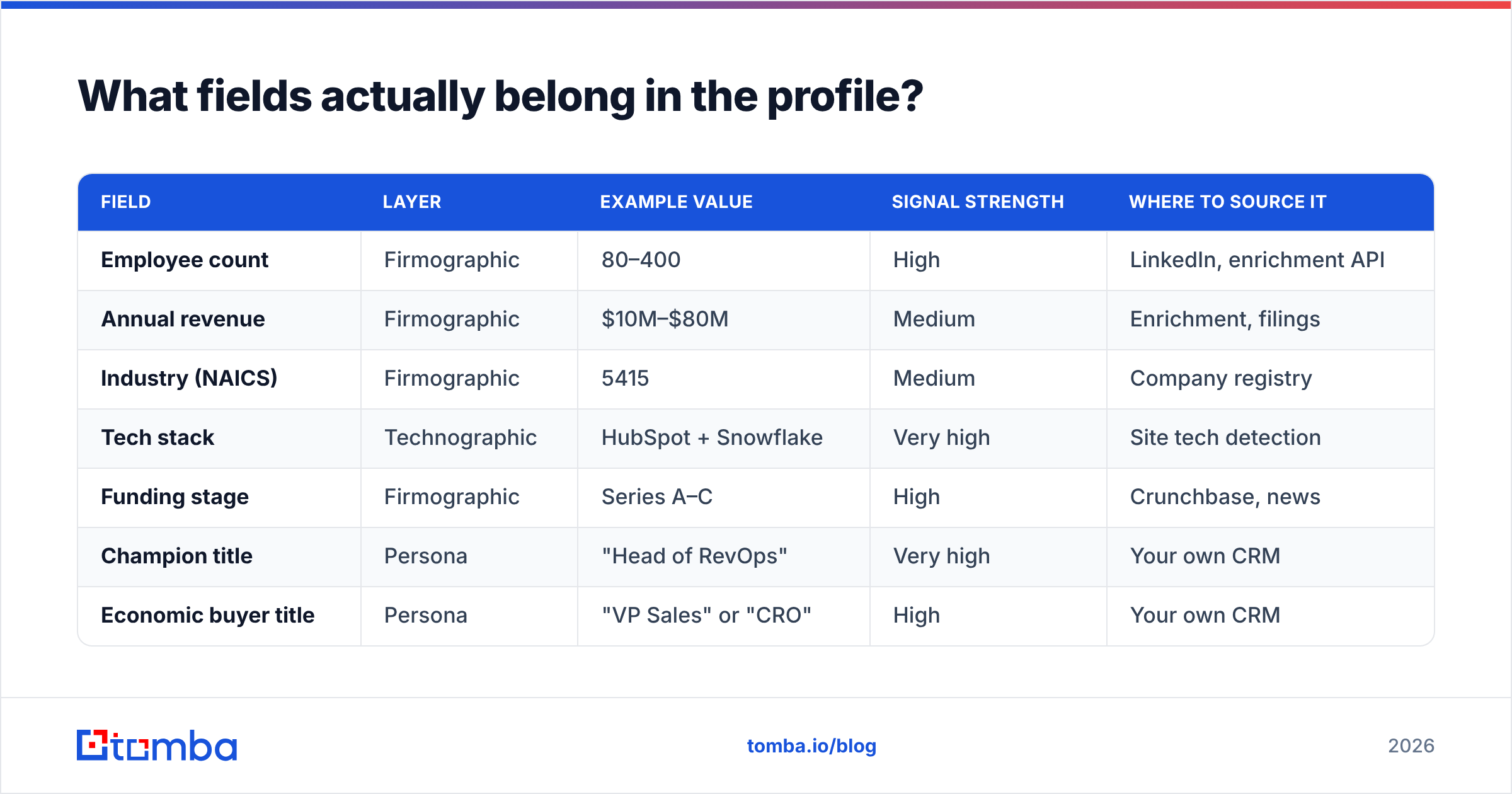
Here is a working template. Most templates skip the "signal strength" column. That column tells you whether a field earns its place.
| Field | Layer | Example value | Signal strength | Where to source it |
|---|---|---|---|---|
| Employee count | Firmographic | 80–400 | High | LinkedIn, enrichment API |
| Annual revenue | Firmographic | $10M–$80M | Medium | Enrichment, filings |
| Industry (NAICS) | Firmographic | 5415 | Medium | Company registry |
| Tech stack | Technographic | HubSpot + Snowflake | Very high | Site tech detection |
| Funding stage | Firmographic | Series A–C | High | Crunchbase, news |
| Champion title | Persona | "Head of RevOps" | Very high | Your own CRM |
| Economic buyer title | Persona | "VP Sales" or "CRO" | High | Your own CRM |
| Committee size | Behavioral | 4–7 people | Medium | Deal history |
| Trigger event | Behavioral | New RevOps hire <90d | Very high | Job boards, alerts |
| Sales cycle length | Behavioral | 21–45 days | Medium | CRM reporting |
| Disqualifier: headcount | Negative | <25 employees | High | Enrichment |
| Disqualifier: geography | Negative | No EU data residency | High | Company HQ |
Look at the top three signals: tech stack, champion title, trigger event. You cannot pull them from a generic company database. They come from your own won deals, plus a few outside checks.
ICP vs buyer persona vs customer profile: which do you need?#
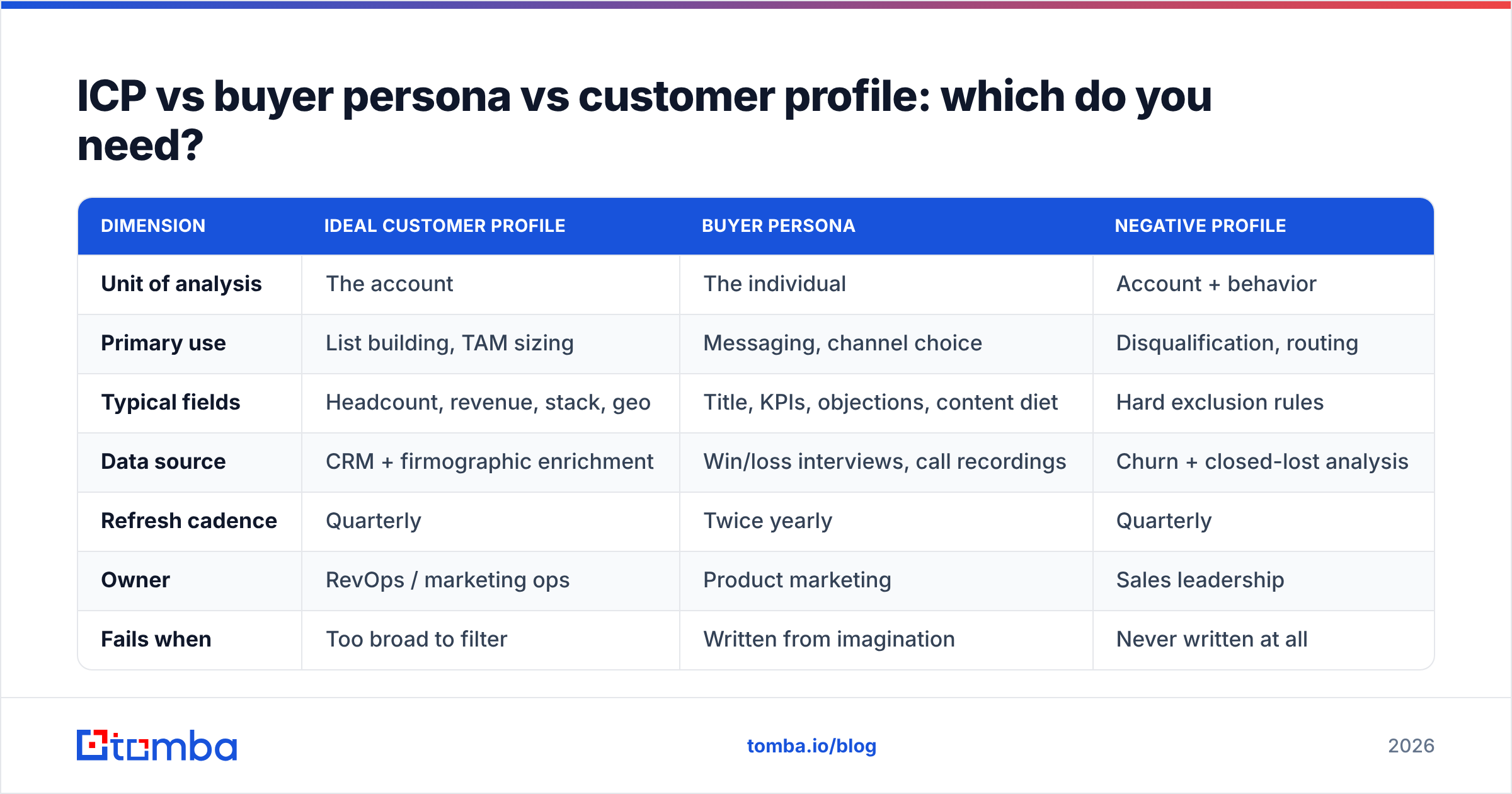
All three. In this order, for different jobs. Building the persona first is the classic mistake. You end up with a rich portrait of a person at a company you cannot sell to.
| Dimension | Ideal Customer Profile | Buyer Persona | Negative Profile |
|---|---|---|---|
| Unit of analysis | The account | The individual | Account + behavior |
| Primary use | List building, TAM sizing | Messaging, channel choice | Disqualification, routing |
| Typical fields | Headcount, revenue, stack, geo | Title, KPIs, objections, content diet | Hard exclusion rules |
| Data source | CRM + firmographic enrichment | Win/loss interviews, call recordings | Churn + closed-lost analysis |
| Refresh cadence | Quarterly | Twice yearly | Quarterly |
| Owner | RevOps / marketing ops | Product marketing | Sales leadership |
| Fails when | Too broad to filter | Written from imagination | Never written at all |
| Feeds into | Prospecting lists | Email copy, sequences | CRM validation rules |
The rule of thumb is short. ICP answers "which 2,000 domains do I load?" Persona answers "what do I say when I get there?" The negative profile answers "which 600 of those do I cut first?"
How do you validate the profile with real data?#
A profile is a guess. Treat it like one.
Run a size check. Turn the rules into filters. Count what matches. Then do the math: revenue target, divided by average deal size, divided by your real win rate. Fewer accounts than that? The profile is too tight.
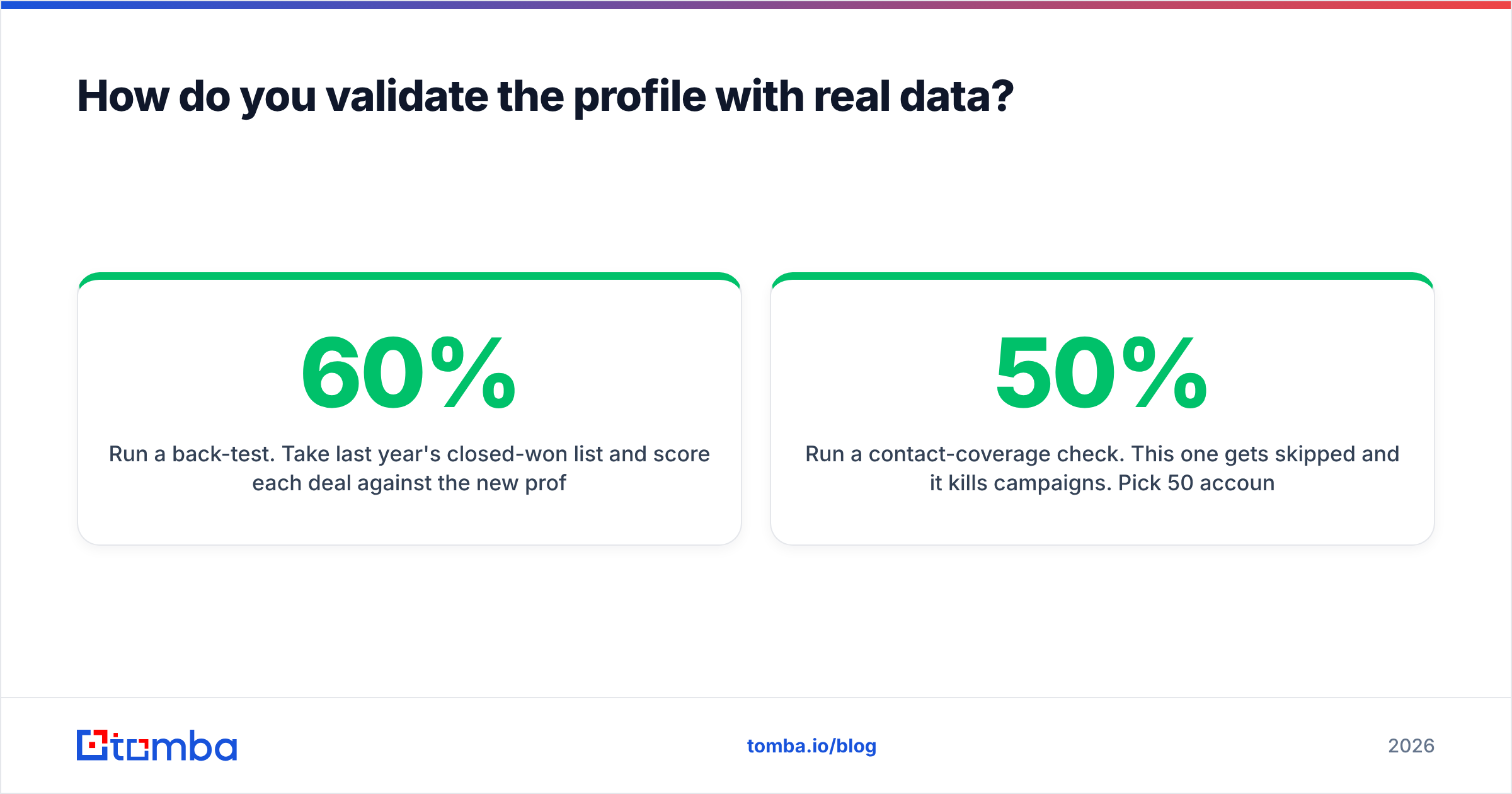
Run a back-test. Take last year's won deals. Score each one against the new profile. How many would have passed? Under 60% means the rules miss your real business. Exactly 100% means you fit the rules to the sample.
Run a contact-coverage check. Teams skip this one, and it kills campaigns. Pick 50 accounts from the list. Check how many have real, verified contacts for your target titles. Under 50% coverage? The profile reads well but cannot work. You will never reach the people.
Coverage is where profile work meets data quality. Verified contacts beat raw volume. Run an email verifier before you send. It guards the sender name you need for every campaign after this one. HubSpot's data on email marketing performance shows how fast bounces drag down a whole domain, not just one send.
Run a message test. Take the pain your persona claims to feel. Write three subject lines for it. Send to a 200-contact slice. If your "ideal" group does not beat the control, the pain is wrong. The firm-level rules can still be right.
How often should you refresh the customer profile?#
Quarterly for the ICP and the negative profile. Twice a year for personas. Set a calendar reminder, not an intention. Once you know how to make a customer profile, the work shifts to keeping it true.
Three events force an off-cycle refresh:
- A pricing change. New prices move which company sizes can afford you. Your headcount band shifts, sometimes by a lot.
- A big product release. Ship SOC 2, single sign-on, or a new integration. A segment you once ruled out can open up.
- A win-rate swing. One segment moves more than 15 points in a quarter? Something changed in the market or in your pitch. Dig in before the next plan bakes in the old view.
Between refreshes, log every lost deal with a fit tag. When "not a fit" losses cluster on a rule you thought was safe, you have found the next edit.
What tools do you need to operationalize it?#
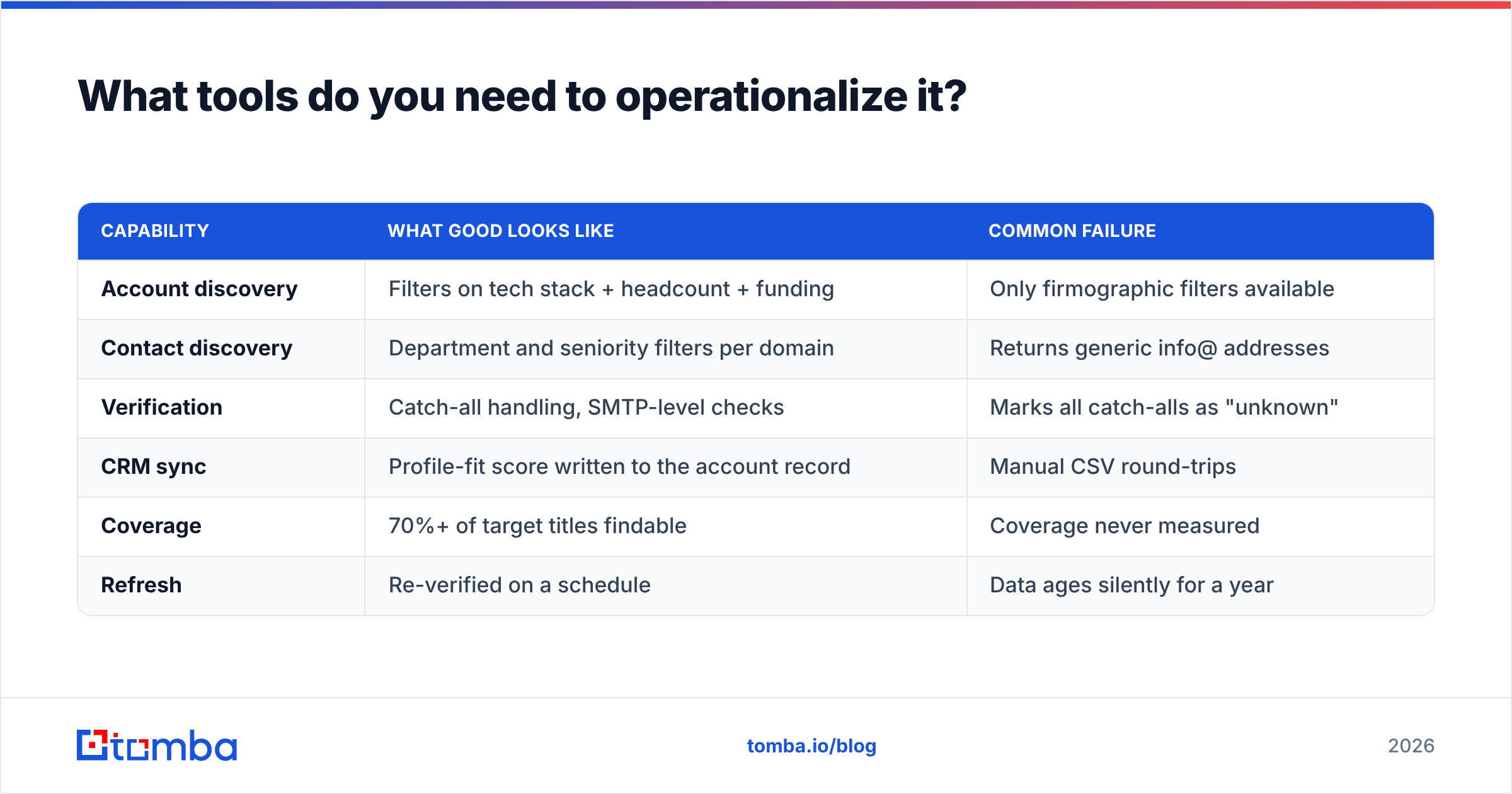
You need four things. They do not have to come from four vendors:
- Account discovery — turn ICP rules into a list of matching domains. Sales databases do this.
- Contact discovery — turn a domain plus a title pattern into named people with real addresses.
- Verification — confirm those addresses land, so bounce rates stay under 2%.
- Enrichment and sync — push the records into your CRM with the profile fields attached. Then reporting can tie revenue back to each segment.
| Capability | What good looks like | Common failure |
|---|---|---|
| Account discovery | Filters on tech stack + headcount + funding | Only firmographic filters available |
| Contact discovery | Department and seniority filters per domain | Returns generic info@ addresses |
| Verification | Catch-all handling, SMTP-level checks | Marks all catch-alls as "unknown" |
| CRM sync | Profile-fit score written to the account record | Manual CSV round-trips |
| Coverage | 70%+ of target titles findable | Coverage never measured |
| Refresh | Re-verified on a schedule | Data ages silently for a year |
One note on checks. Catch-all domains quietly wreck B2B list quality. Many large domains accept every address at the SMTP layer. Simple tools then return "unknown". Reps either skip real people or mail fake ones. A catch-all verifier clears a good share of those.
Want the profile to run on its own? The Tomba API scripts the whole loop. Pass a domain that cleared your rules. Pull contacts that match your title list. Verify them. Write them back to the CRM. Now the doc is a pipeline job, not a slide.
Tomba pricing starts free with 25 searches a month. That is enough to run the coverage check on a 25-account sample. Paid plans start at $49/mo (Starter), then $99/mo (Growth) and $249/mo (Pro).
What does a finished customer profile look like?#
Short. One page, maybe two. Longer than that and you wrote a research report, not a working doc.
A good structure:
- Account criteria — six to ten filterable fields with real number ranges
- Disqualifiers — five to eight hard rules
- Buying committee — three to five roles with word-for-word title variants
- Trigger events — three to five, ranked by how often they show up in wins
- Proof points — the customer names and numbers this profile came from
- Owner and refresh date — a person and a date, not a team and "ongoing"
Print it. Put it in the prospecting doc. Make it slide one of every pipeline review. The real test is not how deep the research goes. It is whether a rep who joined last week can look at an account and say "no" in 30 seconds.
Ready to turn your profile into a real contact list?#
A customer profile pays off only when it hands you people you can reach. You now know how to make a customer profile that filters, so take the next step. Feed the domains that cleared your rules into the Tomba Email Finder. Pull verified contacts for the exact roles you named, sorted by team. Start free with 25 searches a month, no card needed. Build the profile once. Let the data layer do the repeat work.
Related guides#
// get started
Find, verify and enrich your first contacts today
Start on the free plan with 25 searches a month, then scale when your team is ready.
Free plan · No credit card required · GDPR & CCPA
// about the author