How To Make A Sales Report: A Step-by-Step 2026 Guide
Most sales reports get skimmed and forgotten. Here is a repeatable process for building one that actually changes what your team does next week, plus the metrics, tools, and templates worth copying.
TL;DR
- A sales report is not a data dump. It answers three questions: what happened, why it happened, and what we do next.
- Pick your reporting cadence first (daily, weekly, monthly, quarterly), then pick metrics that match that cadence — daily reports should never contain annual targets.
- Clean CRM data is the whole game. A pipeline report built on stale contacts and bounced emails produces confident, wrong decisions.
- Use a fixed template so week-over-week comparisons are honest. Changing the layout every month destroys trendline value.
- Five sections is enough: headline numbers, pipeline movement, activity, win/loss reasons, and a short "what changes next week" list.
What Is a Sales Report, Really?#
A sales report is a scheduled summary of sales performance over a fixed period, built to drive a decision. That last clause is the one most teams skip.
Think of it like a car dashboard. Your dashboard does not display every measurement the engine produces — oil viscosity, individual cylinder temperatures, alternator ripple. It shows speed, fuel, and warning lights, because those are the four or five things you can act on while driving. A sales report should work the same way: a small set of numbers that trigger a specific action, plus the raw detail available underneath if someone wants to dig.
Technically, a sales report pulls from your CRM, your outreach tool, and often a spreadsheet layer in between, then aggregates by period, rep, segment, or stage. But the format matters less than the discipline: same metrics, same period boundaries, same owner, every time.
Reports fall into four common types, and mixing them is the fastest way to make one nobody reads.
- Activity reports — calls made, emails sent, meetings booked. Leading indicators. Daily or weekly.
- Pipeline reports — deals by stage, value, age, and movement since last period. Weekly.
- Performance reports — quota attainment, win rate, average deal size, cycle length. Monthly or quarterly.
- Forecast reports — weighted and committed revenue for the coming period. Monthly, with weekly updates in the final month of a quarter.
- Win/loss reports — reasons deals closed or died, tagged consistently. Quarterly.
- Channel or source reports — which lead sources actually convert to revenue, not just to MQLs. Quarterly.
Why Do Most Sales Reports Get Ignored?#
Because they report on the past without recommending anything about the future.
The pattern is predictable. A RevOps analyst exports the CRM, builds a 14-tab workbook, adds six charts, sends it Monday at 8am, and by 8:20 the only person who opened it is the person who built it. The report was accurate and useless.
Four specific failure modes cause this:
Too many metrics. If your report has more than seven headline numbers, nobody remembers any of them. Salesforce's own sales reporting guidance makes the same point — focus beats completeness.
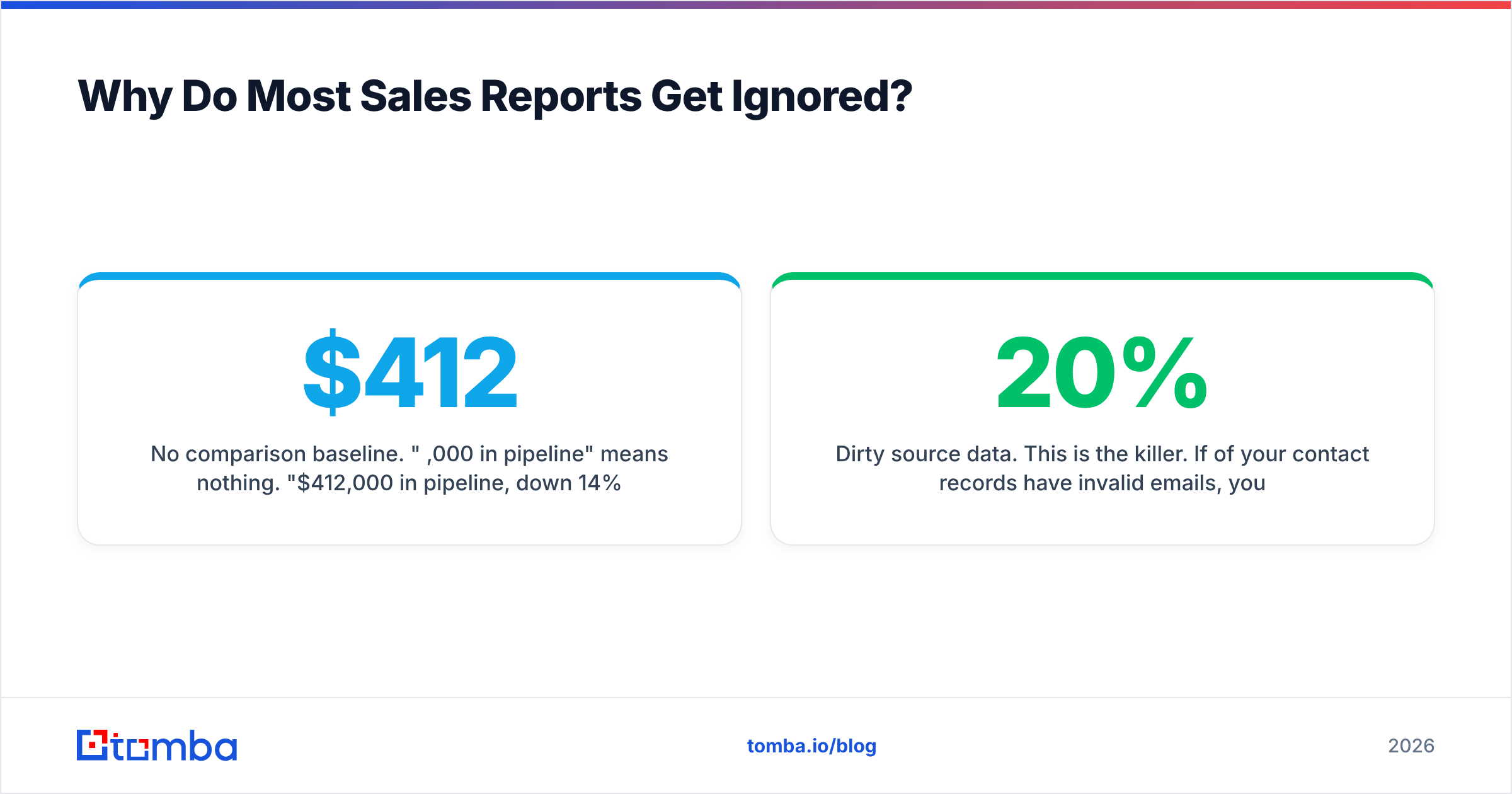
No comparison baseline. "$412,000 in pipeline" means nothing. "$412,000 in pipeline, down 14% from last week, driven entirely by two enterprise deals slipping to Q4" means something.
Dirty source data. This is the killer. If 20% of your contact records have invalid emails, your activity metrics are inflated, your reply rates are deflated, and your source attribution is scrambled. HubSpot's research on CRM data decay puts B2B database decay at roughly 22–30% per year, meaning nearly a third of your contact base rots annually without maintenance.
No owner for the "so what." Somebody has to write two sentences of interpretation. Automated dashboards do not do this and probably never will.
How Do You Make a Sales Report Step by Step?#
Seven steps. The first three take the longest the first time and almost no time afterward.
Step 1: Define the decision the report drives#
Write it down before you touch data. Examples: "Should we reallocate SDR capacity between segments?" or "Which stage is leaking deals?" If you cannot name a decision, you are building a vanity dashboard.
Step 2: Pick the audience and cadence#
A rep-level daily report and a board-level quarterly report share almost no metrics. Match the granularity to how fast the reader can act.
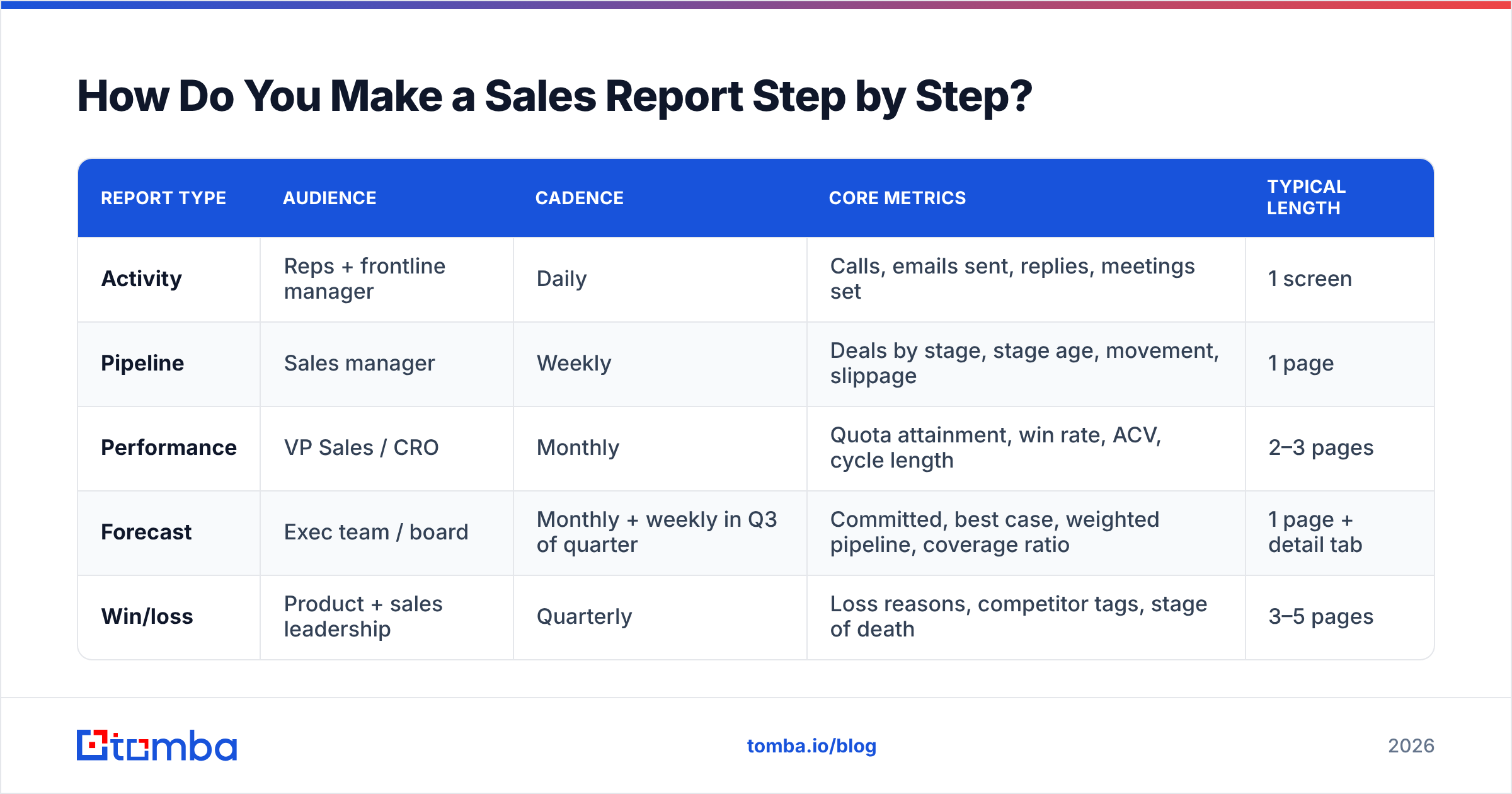
| Report type | Audience | Cadence | Core metrics | Typical length |
|---|---|---|---|---|
| Activity | Reps + frontline manager | Daily | Calls, emails sent, replies, meetings set | 1 screen |
| Pipeline | Sales manager | Weekly | Deals by stage, stage age, movement, slippage | 1 page |
| Performance | VP Sales / CRO | Monthly | Quota attainment, win rate, ACV, cycle length | 2–3 pages |
| Forecast | Exec team / board | Monthly + weekly in Q3 of quarter | Committed, best case, weighted pipeline, coverage ratio | 1 page + detail tab |
| Win/loss | Product + sales leadership | Quarterly | Loss reasons, competitor tags, stage of death | 3–5 pages |
Step 3: Clean the underlying data#
Run this before every reporting cycle, not once a year:
- Deduplicate contacts and accounts. Merge, do not delete.
- Verify email addresses so bounce-driven activity metrics stay honest — an email verifier run across the active list takes minutes and removes a whole class of false signals.
- Enforce closed-lost reason as a required field. Free text is worthless; use a picklist of 6–8 options.
- Flag deals with no activity in 21+ days as stale before they pollute your forecast.
- Fill missing contact records — a data enrichment pass on accounts with fewer than two known contacts usually surfaces the actual decision maker.
Step 4: Choose 5–7 metrics and freeze them#
Freezing matters more than choosing perfectly. A mediocre metric tracked consistently for eight quarters beats a perfect metric introduced last month.
Step 5: Build the template once#
Five sections, in this order:
- Headline numbers — 4–6 figures with period-over-period deltas.
- Pipeline movement — what entered, what advanced, what slipped, what died.
- Activity — leading indicators by rep or segment.
- Win/loss — tagged reasons, with one representative quote if you have it.
- What changes next period — three bullets, maximum, each with an owner and a date.
Step 6: Add narrative, not just numbers#
Two to four sentences at the top. "Pipeline is flat but stage-2 conversion improved 9 points after we tightened the qualification script. The gap is now top-of-funnel volume, not conversion. Recommend shifting one SDR from expansion to net-new for four weeks."
Step 7: Distribute where people already are#
Slack or email beats a BI tool nobody logs into. Attach the detail; put the summary in the message body.
Which Metrics Belong in a Sales Report?#
Depends on cadence, but these are the ones that survive scrutiny.
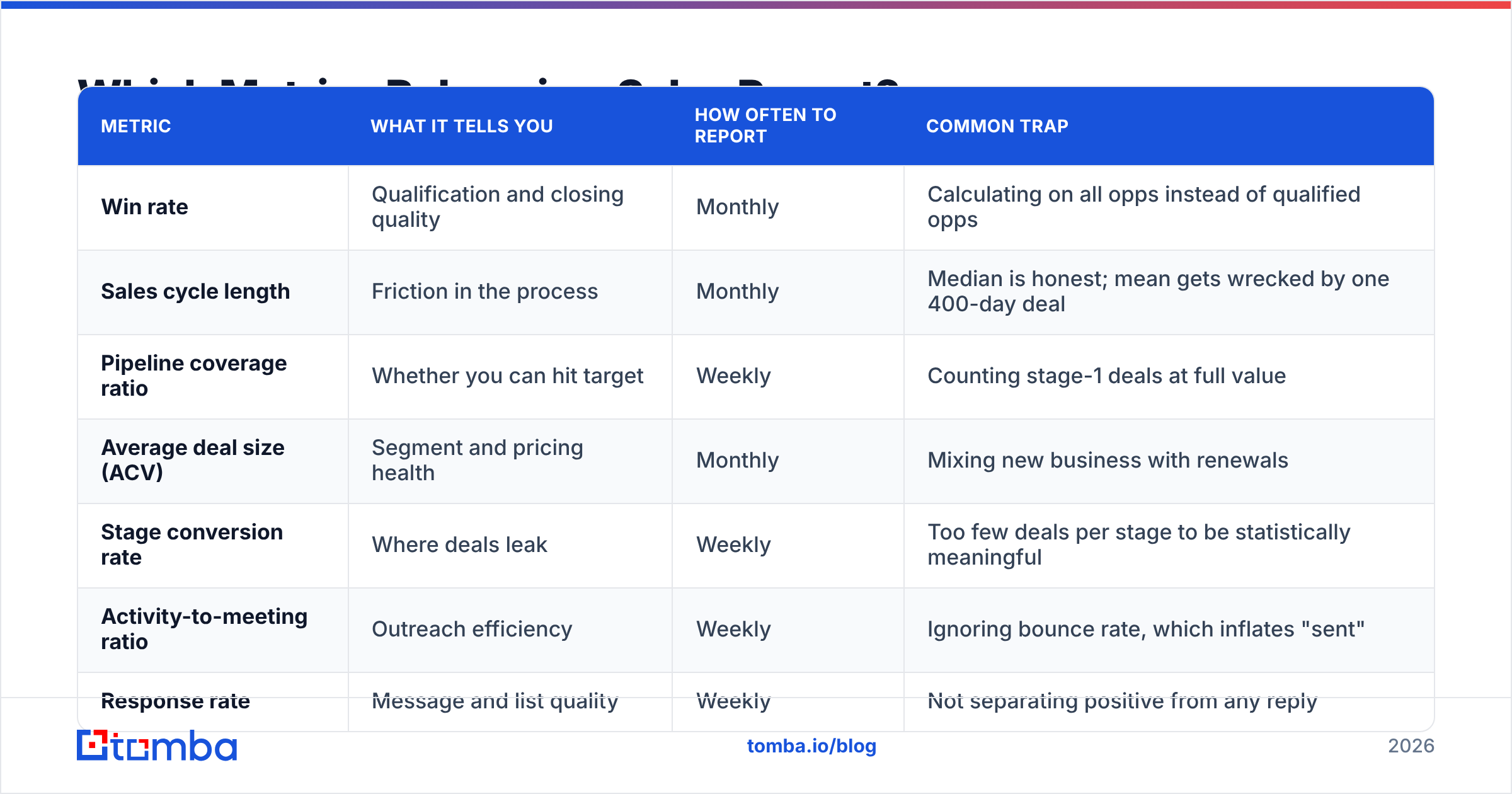
| Metric | What it tells you | How often to report | Common trap |
|---|---|---|---|
| Win rate | Qualification and closing quality | Monthly | Calculating on all opps instead of qualified opps |
| Sales cycle length | Friction in the process | Monthly | Median is honest; mean gets wrecked by one 400-day deal |
| Pipeline coverage ratio | Whether you can hit target | Weekly | Counting stage-1 deals at full value |
| Average deal size (ACV) | Segment and pricing health | Monthly | Mixing new business with renewals |
| Stage conversion rate | Where deals leak | Weekly | Too few deals per stage to be statistically meaningful |
| Activity-to-meeting ratio | Outreach efficiency | Weekly | Ignoring bounce rate, which inflates "sent" |
| Response rate | Message and list quality | Weekly | Not separating positive from any reply |
| Slipped deal value | Forecast reliability | Weekly | Not tracking it at all, which is most teams |
One note on pipeline coverage: the common 3x rule of thumb is a starting point, not a law. If your win rate is 40%, 2.5x coverage is fine. If it is 12%, you need 8x. Compute it from your own win rate rather than copying a benchmark from a blog post — including this one.

What Tools Should You Use to Build Sales Reports?#
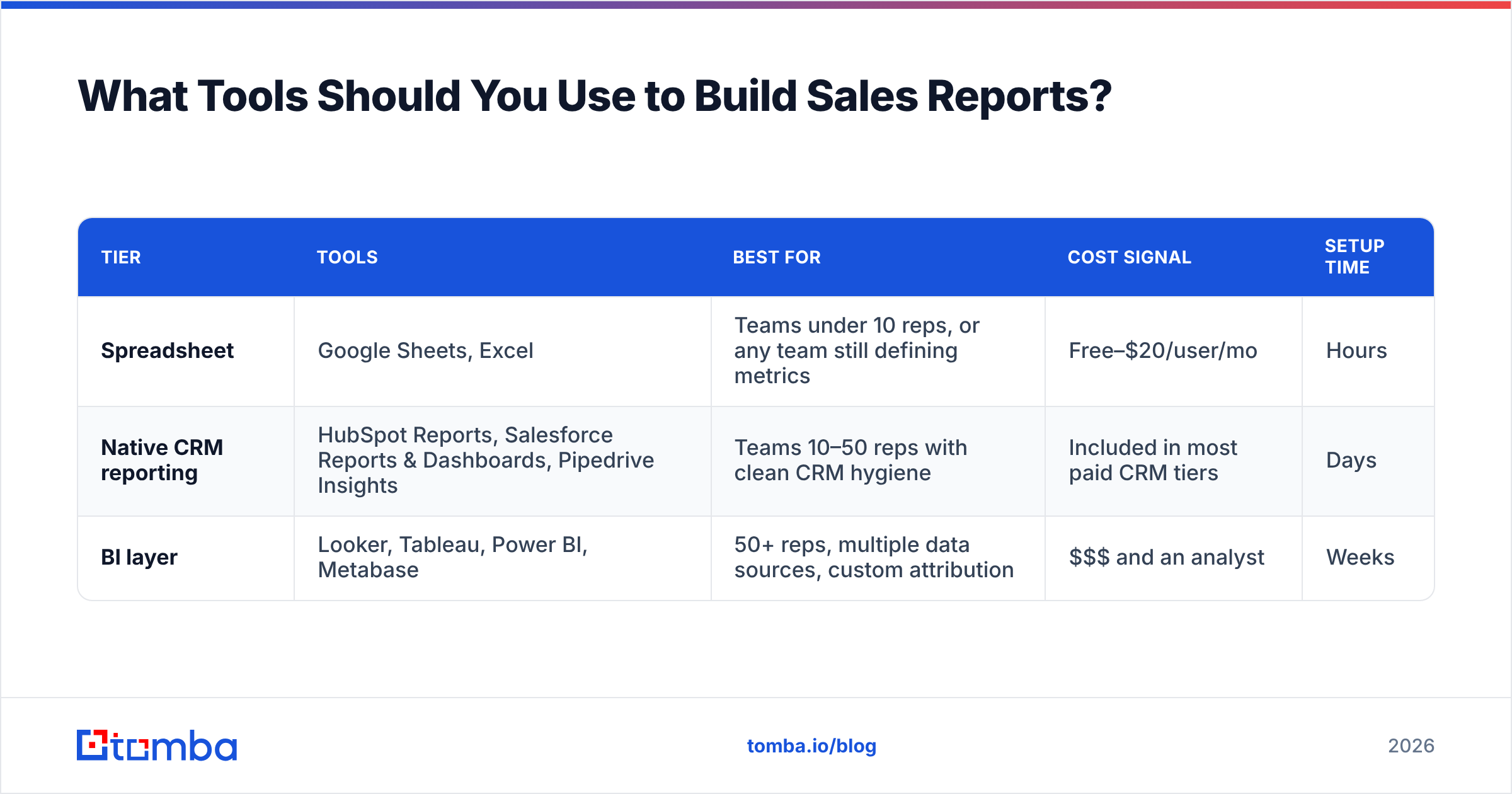
Three tiers, and most teams under 30 reps should stay in tier one or two.
| Tier | Tools | Best for | Cost signal | Setup time |
|---|---|---|---|---|
| Spreadsheet | Google Sheets, Excel | Teams under 10 reps, or any team still defining metrics | Free–$20/user/mo | Hours |
| Native CRM reporting | HubSpot Reports, Salesforce Reports & Dashboards, Pipedrive Insights | Teams 10–50 reps with clean CRM hygiene | Included in most paid CRM tiers | Days |
| BI layer | Looker, Tableau, Power BI, Metabase | 50+ reps, multiple data sources, custom attribution | $$$ and an analyst | Weeks |
The honest advice: do not buy a BI tool to fix a data hygiene problem. A Looker dashboard on dirty CRM data is a faster way to be wrong.
If you build in Sheets, pull contact and company data straight in rather than exporting CSVs by hand — the Sheets email finder add-on and the Tomba API both let you refresh enrichment inline, so your report source stays live. For teams already standardized on HubSpot or Salesforce, wiring enrichment through the HubSpot integration keeps the CRM as the single source of truth, which is the only way stage-level reporting stays trustworthy.
Peer review sites like G2's sales analytics category are useful for shortlisting, but weight the reviews from companies your size. A 400-rep enterprise's Tableau review tells you nothing about your 12-person team.
How Often Should You Send Sales Reports?#
Match cadence to decision speed. If a metric cannot change a decision within the reporting window, report it less often.
- Daily — activity only, and only to reps and frontline managers. Anything else creates noise and encourages metric-gaming.
- Weekly — pipeline movement and forecast deltas. This is the workhorse report.
- Monthly — performance against quota, win rate, cycle length, ACV.
- Quarterly — win/loss analysis, channel attribution, territory and comp review.
One anti-pattern worth naming: sending the weekly pipeline report on Monday morning. Reps update their CRM Monday, so Monday's report reflects Friday's stale data. Send it Tuesday afternoon and it reflects reality.
What Mistakes Kill Sales Report Credibility?#
Changing the definition mid-year. If you redefine "qualified opportunity" in March, every trendline crossing March is fiction. If you must change it, restate history or draw a visible line on the chart.
Reporting averages without distribution. An average deal size of $28,000 could be forty $28k deals or thirty-eight $12k deals and two $340k deals. Those are different companies. Show median alongside mean, or show the histogram.
Hiding bad news in an appendix. Everyone notices. Lead with the miss and the plan.
Counting unverified contacts as reach. If you sent 4,000 emails and 700 hard-bounced, your reply rate denominator is wrong by 18%, and your conclusion about messaging quality is wrong with it. Running the list through a bulk verify step before the campaign — not after the report — is the fix.
No version control. Save each period's report as an immutable file. When someone asks in six months why Q2 forecast was off, you need the original, not the retroactively corrected one.
How Do You Turn a Sales Report Into Action?#
The last section of every report should be the shortest and the only one that is mandatory reading.
Format it as three lines: what we observed, what we are changing, who owns it by when. "Stage-3 to stage-4 conversion dropped from 44% to 29% over six weeks. We are adding a mandatory technical validation call before stage 4. Dana owns the new call script, live by the 19th."
That is it. If your report generates three of those a month and two of them work, the reporting process has paid for itself many times over. If it generates zero, you have an expensive newsletter.
Review the previous period's action items at the top of the next report. Unclosed actions are the most valuable data in the whole document, because they tell you whether the reporting loop is actually closed or just spinning.
Getting the Data Layer Right#
Every sales report is downstream of contact data quality. Stale records inflate activity metrics, invalid emails skew reply rates, and missing decision-maker contacts hide the real reason deals stall in stage 2.
If your pipeline reports keep raising questions your CRM cannot answer, start at the source. The Tomba Email Finder finds verified professional email addresses by domain, name, or company, so the contacts feeding your reports are real people who can actually receive your outreach. The free tier gives you 25 searches a month to test the accuracy against your own list before committing, and Tomba pricing starts at $49/mo on Starter with Growth at $99/mo when you are ready to run it across the whole database. Clean inputs first, better reports follow.
Related guides#
// get started
Find, verify and enrich your first contacts today
Start on the free plan with 25 searches a month, then scale when your team is ready.
Free plan · No credit card required · GDPR & CCPA
// about the author