How to Make an Unsubscribe Link That Keeps You Out of Spam
A working unsubscribe link is now a hard requirement at Gmail and Yahoo, not a nicety. Here is how to build one — HTML, List-Unsubscribe headers, one-click, and the mistakes that get senders blocked.
TL;DR
- An unsubscribe link is two things, not one: a visible HTML link in the body and a
List-Unsubscribeheader in the message. Gmail and Yahoo bulk-sender rules require both for anyone sending over 5,000 messages a day to their users. - One-click unsubscribe (
List-Unsubscribe-Post: List-Unsubscribe=One-Click, RFC 8058) must process the opt-out in under two days, with no login, no survey, no confirmation page. - Cold outbound to individually researched B2B contacts is legally different from bulk marketing — but you still need a plain-text opt-out line, and you still benefit from honoring it instantly.
- The fastest path to a compliant link: use your ESP's merge tag, verify the header renders, then test the flow end-to-end from a real inbox.
- Most "unsubscribe problems" are actually list-quality problems. Bad addresses drive complaints, complaints drive filtering. Verify before you send.
What is an unsubscribe link, technically?#
An unsubscribe link is a personalized URL that identifies one recipient on one list and, when visited, removes them from future sends. Think of it as a hotel key card rather than a master key: it works for exactly one guest, one room, and it can be revoked.
Three components have to line up:
- A unique token per recipient. Never
example.com/unsubscribe?email=jane@acme.comin plain text — that is enumerable and leaks addresses. Use a signed, opaque token (HMAC of subscriber ID + list ID + secret). - A visible HTML link in the footer, in readable contrast, not 6px grey-on-grey.
- Mail headers —
List-Unsubscribeand, for bulk senders,List-Unsubscribe-Post— so the mailbox provider can render its own native "Unsubscribe" button next to your sender name.
That third piece is the one most people skip, and it is the one Gmail actually checks. When Gmail shows its own unsubscribe control, recipients use it instead of hitting "Report spam." That single substitution is worth more to your sender reputation than any copy tweak you will make this quarter.
How do you make an unsubscribe link in HTML?#
Start with the body link, because it is the part every recipient can see and every regulator expects.
<p style="font-size:12px;color:#555;text-align:center;">
You are receiving this because you signed up at example.com.
<a href="https://example.com/u/8f2a1c9e4b" style="color:#555;text-decoration:underline;">
Unsubscribe
</a>
· Example Inc., 100 Market St, San Francisco, CA 94103
</p>Four rules for that block:
- Readable, not hidden. Minimum 12px, contrast ratio above 4.5:1 against the background. Hiding the link is the single most reliable way to convert an unsubscribe into a spam complaint.
- No image-only link. Images get blocked by default in many clients. If your unsubscribe lives inside a PNG, half your audience cannot use it.
- Include the postal address. CAN-SPAM requires a valid physical address; most ESPs will refuse to send without one.
- State why they are getting it. One sentence of provenance ("You downloaded our pricing guide in March") cuts complaint rates measurably.
If your ESP handles the list, replace the raw URL with its merge tag — {{unsubscribe}}, *|UNSUB|*, %unsubscribe_url% — depending on the platform. Do not hand-roll tokens when the platform already signs them.
What is the List-Unsubscribe header and why does it matter more?#
The List-Unsubscribe header is metadata the recipient never sees directly. Gmail, Yahoo, Apple Mail and Outlook read it and render a native unsubscribe affordance in the UI.
Minimum viable header set for a bulk sender:
List-Unsubscribe: <https://example.com/u/8f2a1c9e4b>, <mailto:unsub@example.com?subject=unsubscribe>
List-Unsubscribe-Post: List-Unsubscribe=One-Click
Details that trip people up:
- Order matters in practice. Put the HTTPS URL first; some clients take the first entry they can act on.
List-Unsubscribe-Postturns the URL into a POST target. The mailbox provider sendsPOSTwith bodyList-Unsubscribe=One-Click. Your endpoint must accept POST — a GET-only route silently fails, and the user thinks they unsubscribed when they did not.- No authentication on that endpoint. RFC 8058 explicitly forbids requiring a login or extra confirmation.
- The mailto fallback still helps older clients, but it cannot be your only option under Gmail's bulk sender rules.
- Two-day processing maximum. Gmail's published requirement is that opt-outs be honored within two days. Same-day is the safe target.
Google's official sender guidelines spell out the thresholds; read them directly rather than trusting a summary blog post, because the numbers have changed twice since 2024.
Which unsubscribe method should you use?#
The right implementation depends on volume, sending stack, and whether you are doing marketing broadcast or one-to-one outbound.
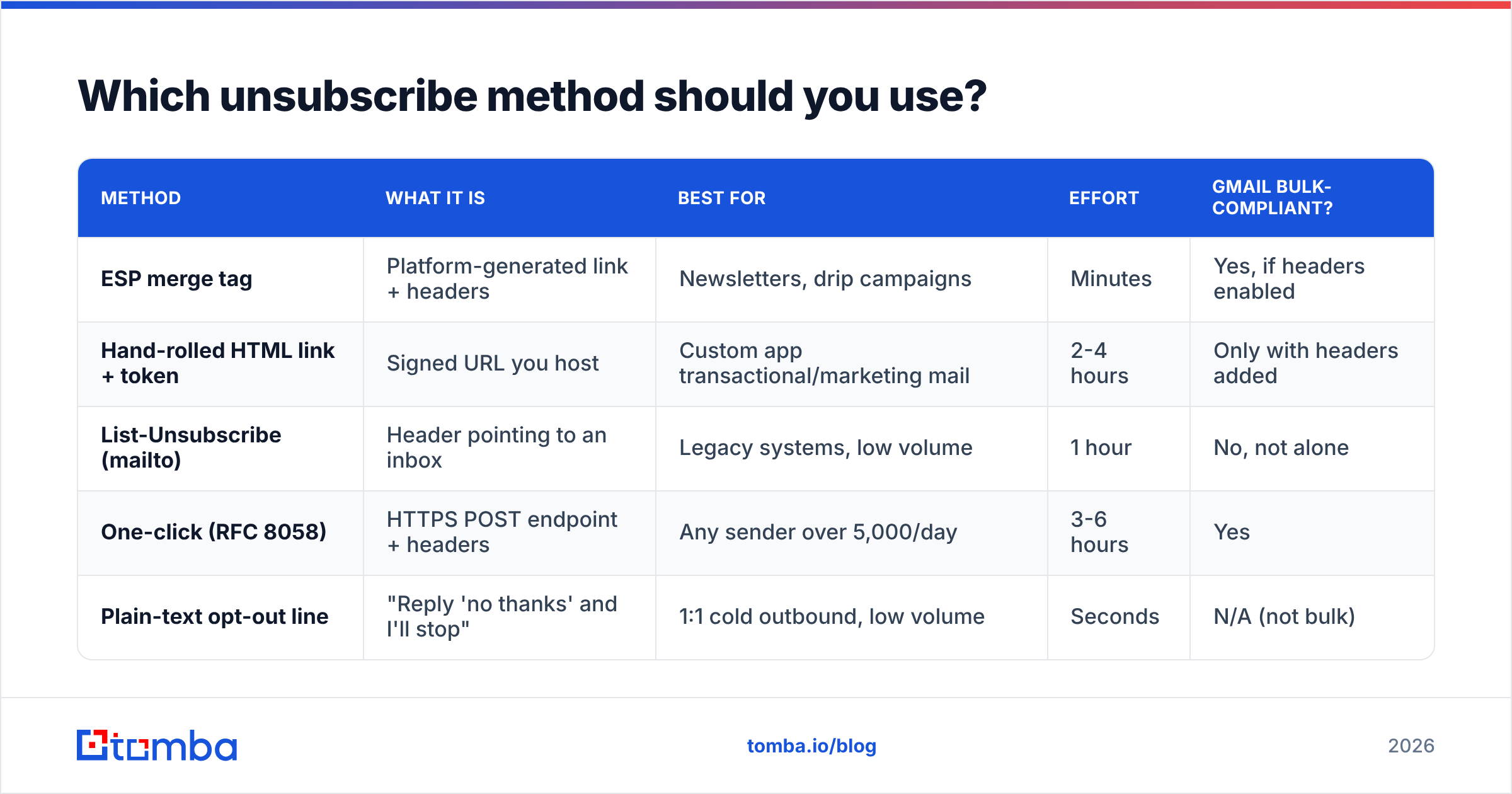
| Method | What it is | Best for | Effort | Gmail bulk-compliant? |
|---|---|---|---|---|
| ESP merge tag | Platform-generated link + headers | Newsletters, drip campaigns | Minutes | Yes, if headers enabled |
| Hand-rolled HTML link + token | Signed URL you host | Custom app transactional/marketing mail | 2-4 hours | Only with headers added |
| List-Unsubscribe (mailto) | Header pointing to an inbox | Legacy systems, low volume | 1 hour | No, not alone |
| One-click (RFC 8058) | HTTPS POST endpoint + headers | Any sender over 5,000/day | 3-6 hours | Yes |
| Plain-text opt-out line | "Reply 'no thanks' and I'll stop" | 1:1 cold outbound, low volume | Seconds | N/A (not bulk) |
For most teams the honest answer is: use your ESP's tag, then verify the headers actually made it into the sent message. That verification step is where the majority of failures hide.
How do you implement one-click unsubscribe on your own endpoint?#
If you send from your own infrastructure, here is the shape of the work.
1. Generate a signed token. Node example:
import crypto from 'node:crypto'

const signToken = (subscriberId, listId, secret) => {
  const payload = `${subscriberId}.${listId}`
  const sig = crypto.createHmac('sha256', secret).update(payload).digest('base64url')
  return `${Buffer.from(payload).toString('base64url')}.${sig}`
}
2. Expose a route that accepts both GET and POST. GET renders a small confirmation page for humans who clicked the footer link. POST — with body List-Unsubscribe=One-Click — processes silently and returns 200 with no body. Never redirect a one-click POST to a login screen.
3. Make the write idempotent. Providers retry. Suppressing an already-suppressed address must return 200, not 409.
4. Write to a global suppression list, not just the campaign list. A recipient who opts out of "Product Updates" and then receives "Company Newsletter" three days later will report spam.
5. Verify the header lands. Send a test to a Gmail account, open the message, choose "Show original," and search for List-Unsubscribe. If it is absent, your sending library stripped it — a common failure with hand-built MIME messages where headers are added after the message is serialized.
6. Log everything. Timestamp, IP, method (link vs header vs reply). Under GDPR you may need to demonstrate that a withdrawal of consent was honored.
Do cold outbound emails need an unsubscribe link?#
Short answer: they need an opt-out mechanism, and in most cases a plain-text sentence is the better choice than a tracked HTML link.
Here is the tension. CAN-SPAM in the US requires a functioning opt-out on commercial email, including cold B2B. GDPR and ePrivacy in the EU allow B2B outreach under legitimate interest in many member states, but still require an easy objection route. Canada's CASL is stricter, requiring consent for most commercial electronic messages.
But a big styled footer with tracking pixels and an image-heavy unsubscribe block makes a one-to-one email look like a broadcast — which is exactly the signal that pushes it into Promotions or spam. Practical middle ground used by most experienced outbound teams:
- One plain sentence at the bottom: "If this is not relevant, reply 'no' and I will not follow up."
- Honor it within 24 hours, in a global suppression list your whole team shares.
- Add
List-Unsubscribeas a mailto header if your sending tool supports it — invisible to the recipient, useful to the mailbox provider. - Skip the image-based footer entirely.
If you are sending genuine one-to-one volume from real mailboxes, this reads human. If you are sending 8,000 identical messages a day, you are a bulk sender regardless of what you call it, and you need the full header stack. Be honest with yourself about which one you are.
Also worth checking: your authentication. An unsubscribe link cannot rescue a domain with a broken SPF record. Run your domain through a SPF checker before you debug anything downstream, and confirm your footer copy is not tripping filters with a spam checker.

What are the most common unsubscribe mistakes?#
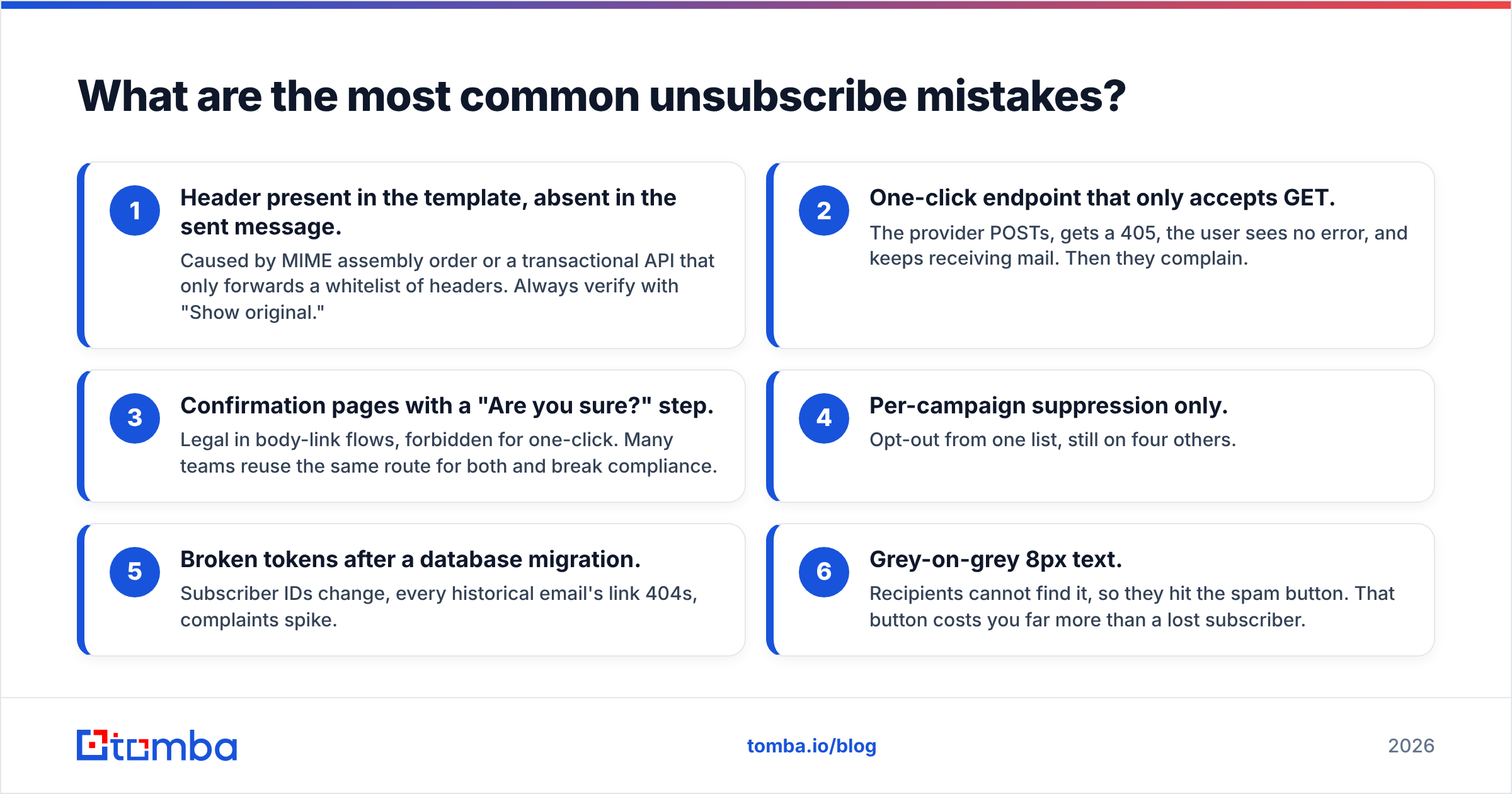
Ranked by how often they show up in real audits:
- Header present in the template, absent in the sent message. Caused by MIME assembly order or a transactional API that only forwards a whitelist of headers. Always verify with "Show original."
- One-click endpoint that only accepts GET. The provider POSTs, gets a 405, the user sees no error, and keeps receiving mail. Then they complain.
- Confirmation pages with a "Are you sure?" step. Legal in body-link flows, forbidden for one-click. Many teams reuse the same route for both and break compliance.
- Per-campaign suppression only. Opt-out from one list, still on four others.
- Broken tokens after a database migration. Subscriber IDs change, every historical email's link 404s, complaints spike.
- Grey-on-grey 8px text. Recipients cannot find it, so they hit the spam button. That button costs you far more than a lost subscriber.
The last one deserves emphasis. An unsubscribe is a clean exit. A spam complaint is a permanent mark against your domain that affects every recipient you will ever mail. Gmail's threshold is a 0.3% complaint rate, and it is not forgiving. Making the unsubscribe easier to find is the cheapest email deliverability fix available.
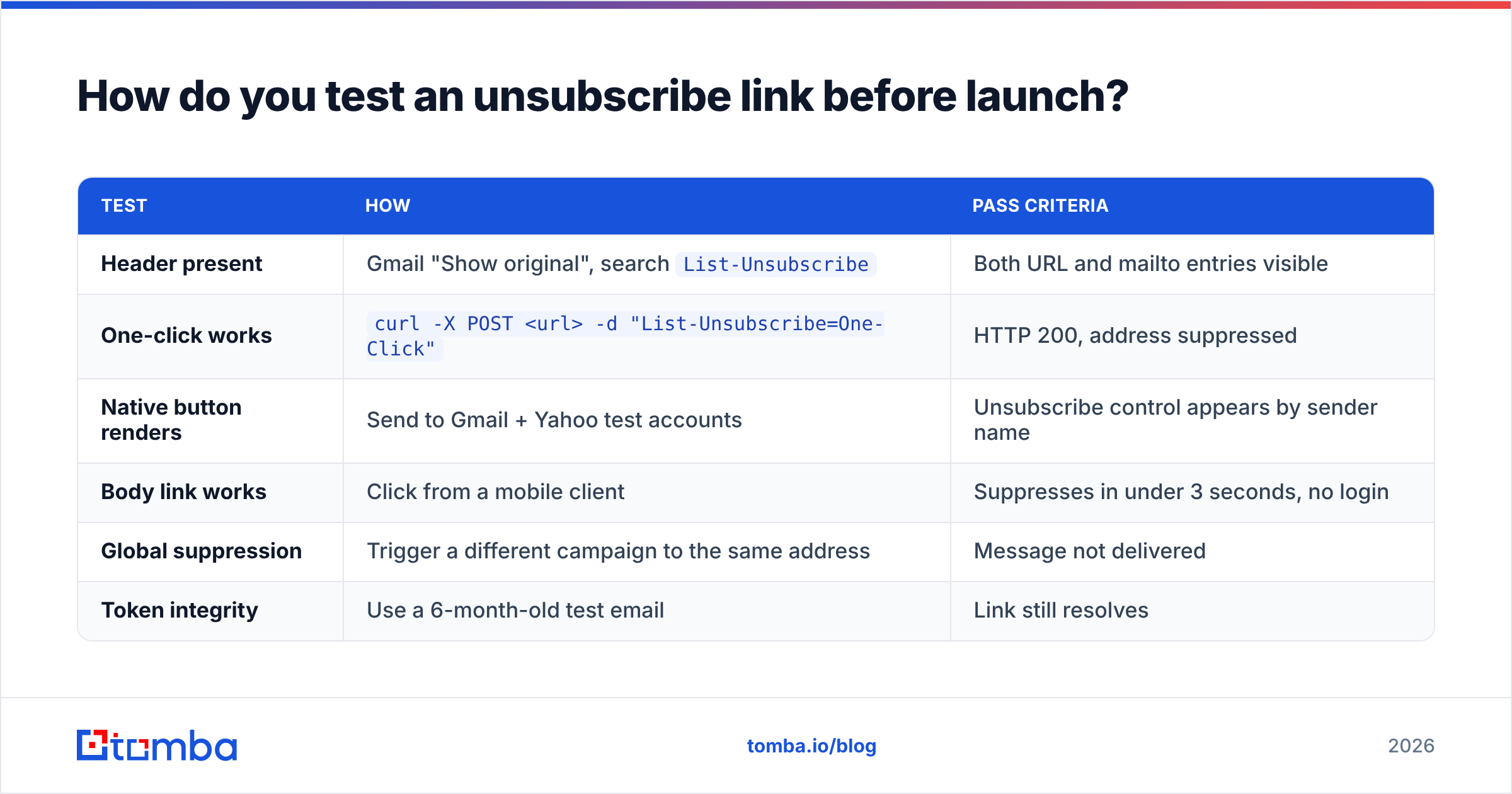
How do you test an unsubscribe link before launch?#
Run this checklist on every template, every quarter:
| Test | How | Pass criteria |
|---|---|---|
| Header present | Gmail "Show original", search List-Unsubscribe |
Both URL and mailto entries visible |
| One-click works | curl -X POST <url> -d "List-Unsubscribe=One-Click" |
HTTP 200, address suppressed |
| Native button renders | Send to Gmail + Yahoo test accounts | Unsubscribe control appears by sender name |
| Body link works | Click from a mobile client | Suppresses in under 3 seconds, no login |
| Global suppression | Trigger a different campaign to the same address | Message not delivered |
| Token integrity | Use a 6-month-old test email | Link still resolves |
Test on mobile specifically. A large share of opens happen on phones, and a footer link that is tappable on desktop can be a 20px target on a phone. If people cannot tap it, they report spam.
Where does list quality fit into this?#
Unsubscribe mechanics are the last mile. Most complaint problems start much earlier — at acquisition.
If a meaningful slice of your list consists of guessed addresses, scraped contacts, or role accounts like info@, you will generate bounces and complaints no matter how elegant your unsubscribe flow is. Mailbox providers weigh bounce rate, complaint rate, and engagement together. A clean 4,000-contact list outperforms a dirty 40,000-contact list on revenue and on reputation.
Two habits fix most of it:
- Verify before you import. Run every new batch through an email verifier to strip invalid, disposable, and role-based addresses. Catch-all domains need their own treatment — a catch-all verifier gives you a confidence score instead of a coin flip.
- Source addresses properly in the first place. Finding a verified work address from a name and domain beats permutating six guesses and mailing all of them. Tools like Tomba, Hunter, and BookYourData each approach this differently — Tomba and Hunter start from a domain or a name, BookYourData sells pre-built verified B2B lists by filter. All three beat guessing.
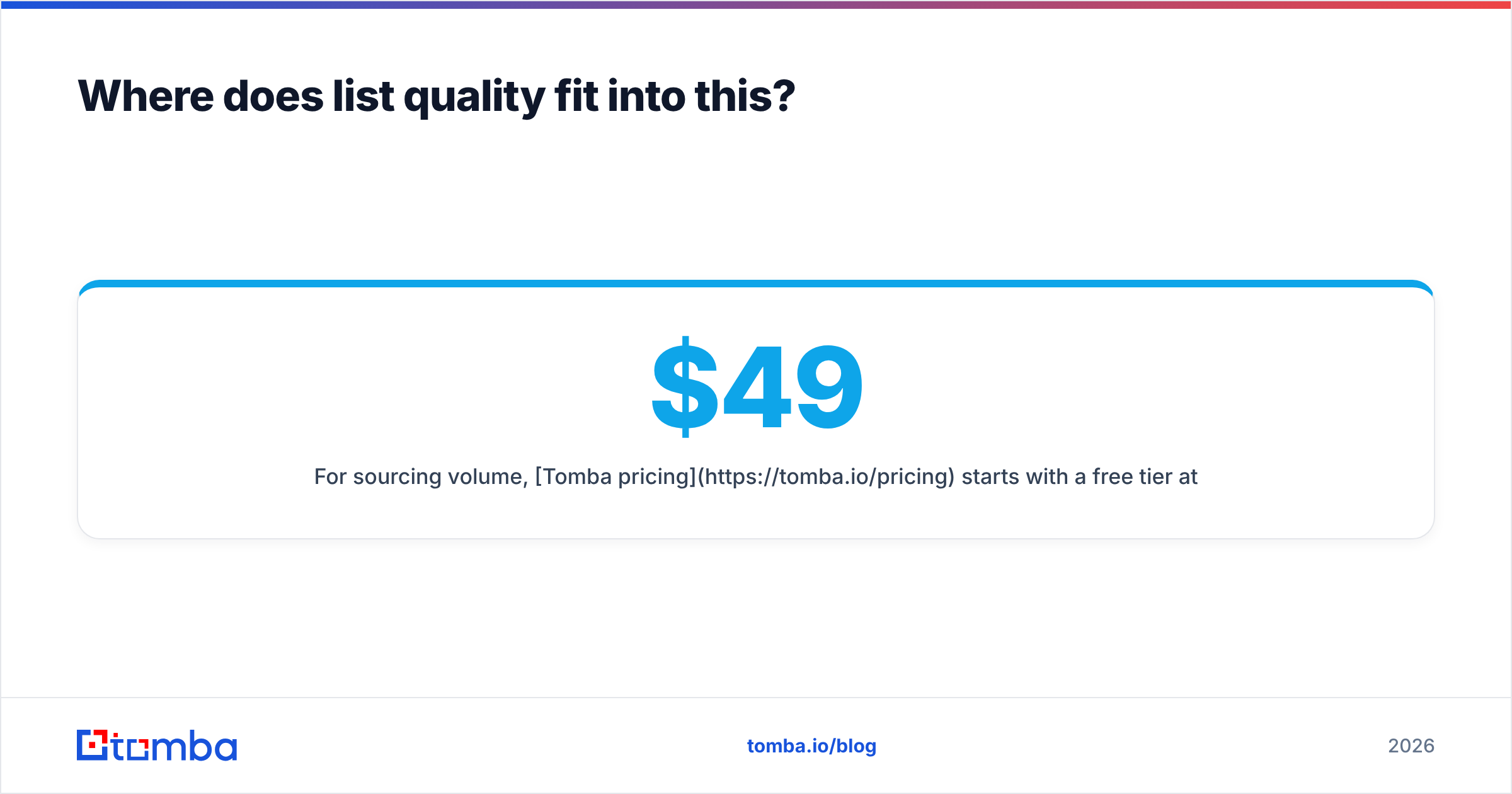
For sourcing volume, Tomba pricing starts with a free tier at 25 searches per month, then Starter at $49/mo, Growth at $99/mo, and Pro at $249/mo. Compare the per-verified-contact cost, not the headline monthly price — a cheaper plan that returns unusable addresses is more expensive once you count the complaint damage. Peer reviews on G2 are a reasonable sanity check before you commit to any of them.
What does a compliant setup look like end to end?#
Putting it together, a sender in good standing has:
- Authentication — SPF, DKIM, and DMARC all passing, aligned to the From domain.
- Headers —
List-Unsubscribewith an HTTPS URL first, mailto second, plusList-Unsubscribe-Postfor one-click. - Body link — visible, readable, text-based, next to a postal address and a provenance sentence.
- Backend — signed tokens, idempotent POST endpoint, global suppression, audit log.
- List hygiene — verification at import, re-verification of anything older than six months, sunset policy for non-openers.
- Monitoring — Google Postmaster Tools for complaint rate and domain reputation, checked weekly.
Miss any one of those and the others compensate only partially. Miss two and you will see delivery drift within a month.
Start with the list, not the footer#
You can build a textbook-perfect one-click unsubscribe endpoint and still land in spam if the addresses behind it were guessed. The order that works: source verified contacts, verify again before send, then make leaving easy for anyone who wants out.
If sourcing is where your list quality breaks down, the Tomba Email Finder finds professional email addresses by domain, name, or company and returns confidence scores with each result — so the contacts entering your list are ones that can actually receive mail. Start on the free tier, verify a batch you already own, and compare the bounce rate against what you are seeing today. The unsubscribe link matters. The list matters more.
Related guides#
// get started
Find, verify and enrich your first contacts today
Start on the free plan with 25 searches a month, then scale when your team is ready.
Free plan · No credit card required · GDPR & CCPA
// about the author